Welcome Guest ( Log In | Register )

Bump Topic Topic Closed RSS Feed

Outline · [ Standard ] · Linear+

 Google NEXUS 7 Official Thread @V2, Officially available in msia! RM999/16GB

views
     
tcmean
post Sep 24 2012, 09:43 AM

On my way
****
Senior Member
561 posts

Joined: Jan 2003
QUOTE(ericlaiys @ Sep 24 2012, 12:11 AM)
It does not work when it listed as "RBC" when you view in google play. I have factory reset several time still cannot. If your wallet is listed as Malaysia, then you can't solve this problem at this moment.
*
I guess everyone missed out the most important step in claiming $25 Google Play Credit.

The most important step would be setting up your Google Wallet account with the country as United States. If your home country is set as Malaysia, you will need to change it before you claim the credit. After you have claim that, you will not be able to change the home country anymore. Your Google Play Credit will be locked to your home country's Play store only.
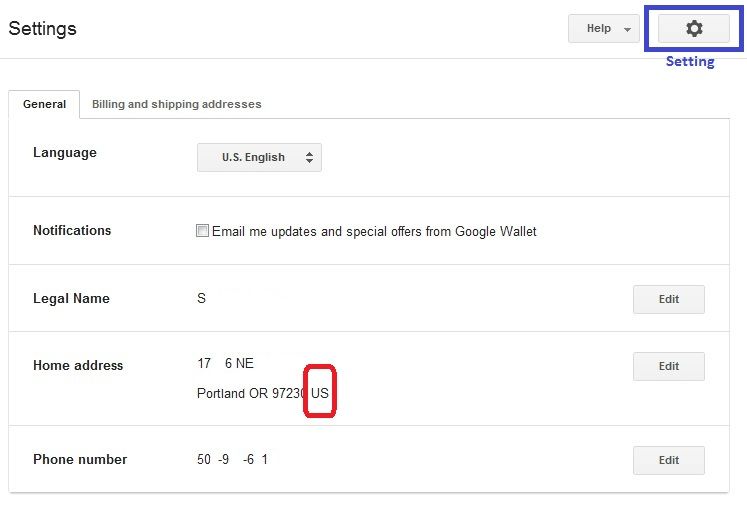
user posted image

For those that are having RBC error, you should have your home country set other than US, UK or any other countries that have Play store available.

If you missed this step, you will still get your $25 credit. But, you will not be able to use it at all.

I would recommend everyone to go to Google Wallet (http://www.google.com/wallet/) first to check if you have your home country set correctly before powering on your Nexus to activate.

This post has been edited by tcmean: Sep 24 2012, 09:48 AM
tcmean
post Sep 24 2012, 09:49 AM

On my way
****
Senior Member
561 posts

Joined: Jan 2003
QUOTE(eugenecctan @ Sep 24 2012, 09:48 AM)
Do I need to master reset again to claim for the $25 credit? Please direct me a method without master reset. Thanks.


Added on September 24, 2012, 9:48 amBtw, my Nexus 7 screen has screen flickering issue, anyone have the same problem?

I've found out from Mr google that weak wifi signal might cause screen flickering on nexus 7. What should I do?
*
I dont think it's needed if you are getting it fresh from the store. But, please 1st check if your Google Wallet account has the home country set as US.

This post has been edited by tcmean: Sep 24 2012, 09:52 AM
tcmean
post Sep 24 2012, 09:57 AM

On my way
****
Senior Member
561 posts

Joined: Jan 2003
QUOTE(eugenecctan @ Sep 24 2012, 09:52 AM)
May I know how to change it? I think mine is currently set to Malaysia.
*
1. Go to http://www.google.com/wallet/
2. Sign in with your Google account (the one that you're gonna use it on your Nexus 7)
3. Click on the Setting button on the top right (right next to the Help button)
4. Click the Edit button at your home address and then change the country


Added on September 24, 2012, 10:01 am
QUOTE(benny888 @ Sep 24 2012, 09:57 AM)
Go to Google wallet - payment methods - and edit your credit card details
*
This is only for the credit card but not the Google Wallet account.

This post has been edited by tcmean: Sep 24 2012, 10:01 AM
tcmean
post Sep 24 2012, 10:04 AM

On my way
****
Senior Member
561 posts

Joined: Jan 2003
QUOTE(eugenecctan @ Sep 24 2012, 10:02 AM)
Why can't I change the country?
Unfortunately, users with a Google Play balance or a Checkout Merchant account are unable to change the country. Any idea why??
*
You won't be able to if you have already activated your Nexus 7 and claimed the $25 credits.

I guess you won't be able to use the credit to purchase in the Play store now.
tcmean
post Sep 24 2012, 10:10 AM

On my way
****
Senior Member
561 posts

Joined: Jan 2003
QUOTE(eugenecctan @ Sep 24 2012, 10:05 AM)
I clicked on the DEVICES, then I received this message -> You haven't activated Google Wallet on any devices.

I'd bought a few apps not long ago....
*
Because you haven't install Google Wallet on your Nexus 7 and activate it. This is Google Wallet on mobile device. It's a different 1.

If you have successfully purchased apps with the $25 credit then what's the problem now?
tcmean
post Sep 24 2012, 10:12 AM

On my way
****
Senior Member
561 posts

Joined: Jan 2003
QUOTE(eugenecctan @ Sep 24 2012, 10:07 AM)
?? I already activated my Nexus 7, but not yet claimed the $25 credits, btw, it has nothing to do with changing my default country right? I am able to change the shipping address. But not the home address..
*
You should get the credit once you activated your Nexus 7 through VPN. You should have receive the credit already.

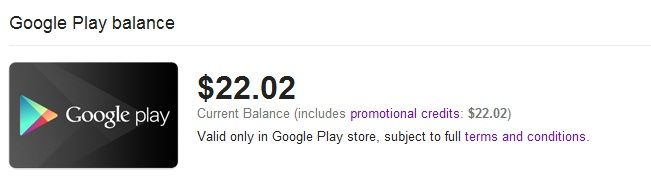
To check, go to http://www.google.com/wallet/ then Payment Method, see if you have Google play balance in the list.

user posted image

If you don't have yet, then follow the steps on the 1st page. Reset it and sign in through VPN

This post has been edited by tcmean: Sep 24 2012, 10:16 AM
tcmean
post Sep 24 2012, 10:24 AM

On my way
****
Senior Member
561 posts

Joined: Jan 2003
QUOTE(eugenecctan @ Sep 24 2012, 10:15 AM)
Btw, activated meant sign up with google account? Previously I have activated the device without trying to claim the $25. Am I still able to claim it now?
*
If you dont have $25 Google play balance listed in your Payment method, then you can start following the guide to get the credit. (Please check this over the website on your computer/mobile device, not the Wallet app in your Nexus 7)

$25 will be credited to your account immediately once you have activated your Nexus 7 on a US VPN. You mentioned that you have activated once. But, I guess it wasn't through a US VPN.

This post has been edited by tcmean: Sep 24 2012, 10:27 AM
tcmean
post Sep 24 2012, 10:54 AM

On my way
****
Senior Member
561 posts

Joined: Jan 2003
I just found out that I'm now able to change home country in my Google Wallet. It wasn't allowed before that because of Google play balance in my account.

Could anyone with RBC error like the following try to change home country to US and try to purchase apps?
QUOTE
This payment method cannot be used for this purchase (RBC)


This post has been edited by tcmean: Sep 24 2012, 10:54 AM
tcmean
post Sep 26 2012, 10:11 PM

On my way
****
Senior Member
561 posts

Joined: Jan 2003
QUOTE(y2k_wmw @ Sep 26 2012, 10:00 PM)
hey I found that we will be charge taxes during checkout. maybe this is why the price hike up. u can click the total there and it will show the breakdown.
*
I just tried. No tax is charged.
tcmean
post Sep 26 2012, 11:45 PM

On my way
****
Senior Member
561 posts

Joined: Jan 2003
QUOTE(y2k_wmw @ Sep 26 2012, 11:31 PM)
Strange, how come mine have?

» Click to show Spoiler - click again to hide... «

*
I don't have the tax too. Did you set your Google Wallet location as somewhere in US that has sales tax?

This post has been edited by tcmean: Sep 26 2012, 11:46 PM
tcmean
post Sep 28 2012, 10:49 AM

On my way
****
Senior Member
561 posts

Joined: Jan 2003
QUOTE(eugenecctan @ Sep 28 2012, 10:20 AM)
Hey guys, any idea why there are 2 FIFA12? Which 1 should i buy?
*
It seems that only that from Electronic Arts Inc is compatible with Nexus 7.
tcmean
post Sep 28 2012, 11:15 AM

On my way
****
Senior Member
561 posts

Joined: Jan 2003
QUOTE(eugenecctan @ Sep 28 2012, 11:02 AM)
Both also with -> Now available for Nexus 7.
*
I tried the other 1 it greyed out for Nexus 7.
tcmean
post Sep 29 2012, 07:32 AM

On my way
****
Senior Member
561 posts

Joined: Jan 2003
QUOTE(samurai1337 @ Sep 29 2012, 07:27 AM)
I got "RBC" error with my USD25 credit
http://forum.xda-developers.com/showthread.php?t=1838710
My default credit card (VISA type) is already set to US as the country. Any idea?
*
I'm sure your Google Wallet account's home country is not. This is different with the address for your credit card
tcmean
post Oct 1 2012, 01:25 PM

On my way
****
Senior Member
561 posts

Joined: Jan 2003
QUOTE(phoenixstudio @ Oct 1 2012, 01:19 PM)
just to claim it right?can use it later right?

my friend used up all because afraid it expired on 30 sept.huhu
*
You can use the credit until end of September 2013.

http://play.google.com/intl/en_us/about/offer-terms.html

This post has been edited by tcmean: Oct 1 2012, 01:27 PM
tcmean
post Oct 5 2012, 11:18 PM

On my way
****
Senior Member
561 posts

Joined: Jan 2003
QUOTE(mikeeeee @ Oct 5 2012, 09:59 PM)
I use aldiko eBook reader to read PDF magazines. Rendering is pretty fast,  didn't try to zoom or unzoom though
*
Try this: Mantano Reader https://play.google.com/store/apps/details?...er.android.lite

Smooth scrolling animation. Repligo or others lag..

This post has been edited by tcmean: Oct 5 2012, 11:19 PM
tcmean
post Oct 6 2012, 03:09 PM

On my way
****
Senior Member
561 posts

Joined: Jan 2003
QUOTE(mikeeeee @ Oct 6 2012, 01:08 AM)
Wow!!!  Thanks for the suggestion! The performance really good!
*
Yes, it's very nice. I've been looking for a good performance 1 for long time. What it lacks it's the small preview of all the pages at the bottom.

Mantano Reader: https://play.google.com/store/apps/details?...er.android.lite

This post has been edited by tcmean: Oct 6 2012, 03:10 PM
tcmean
post Oct 7 2012, 09:55 AM

On my way
****
Senior Member
561 posts

Joined: Jan 2003
QUOTE(benny888 @ Oct 7 2012, 09:35 AM)
Just send in as it is
Toolkit cannot even reflash rom as undetectable
It stays at recovery mode so obvious that warranty is even honoured


Added on October 7, 2012, 9:36 am
No idea. I have flash several other rom
Only this give me problems
*
How did you tell the service center? Did you just tell them you flashed?
tcmean
post Oct 8 2012, 01:50 PM

On my way
****
Senior Member
561 posts

Joined: Jan 2003
QUOTE(chinti @ Oct 8 2012, 06:16 AM)
no idea i read tht even warranty doesnt cover tht screen crack and asus charging 150usd to fixed...while new 1 only cost 199usd... rclxub.gif
*
You are worrying for something that you don't even have to.. rclxub.gif
tcmean
post Oct 10 2012, 08:21 PM

On my way
****
Senior Member
561 posts

Joined: Jan 2003
I have successfuly sideload the update 4.1.2 to my stock and not rooted Nexus 7 following the steps here:

http://www.androidpolice.com/2012/10/09/ho...ustom-recovery/

If you are on stock recovery, you may get in to stock recovery by
1. Turning off your device
2. Boot into fastboot menu by pressing Power + Vol Up + Vol Down together
3. Use Vol Up or Vol Down button to toggle from 'Start' to 'Recovery'. Then press Power button.
4. You will now see android with red exclamation mark. Now, press Power + Vol UP button at the same time and you will be in the recovery menu

This post has been edited by tcmean: Oct 10 2012, 08:47 PM
tcmean
post Oct 13 2012, 10:41 AM

On my way
****
Senior Member
561 posts

Joined: Jan 2003
I got an email from Google Wallet saying my account has suspicious activity and they have suspended my account.

QUOTE
Hello,

This alert is being sent to you as a security precaution. We have suspended your account due to suspicious irregular activity with your Google Wallet. Please contact us immediately at 1-888-682-4630 to resume usage of cards in your Google Wallet.

Sincerely,

The Google Wallet Team
I have tried to buy apps using my Google Play balance and it still works. So, do you guys that have your account that being hold up before receive the same email?

2 Pages  1 2 >Top
Topic ClosedOptions
 

Change to:
| Lo-Fi Version
0.1111sec    0.62    7 queries    GZIP Disabled
Time is now: 12th December 2025 - 01:27 AM