Welcome Guest ( Log In | Register )

Bump Topic Topic Closed RSS Feed
117 Pages « < 30 31 32 33 34 > » Bottom

Outline · [ Standard ] · Linear+

 Google NEXUS 7 Official Thread @V2, Officially available in msia! RM999/16GB

views
     
bulma06
post Sep 24 2012, 01:17 AM

Casual
***
Junior Member
303 posts

Joined: Jan 2006
QUOTE(CyberKewl @ Sep 23 2012, 11:13 PM)
its C70...has minor screen lift issue, no dead pixels, no speaker problem smile.gif
*
Mine also same like you. Just a minor screen lifting on the left hand side. cry.gif c70 also

This post has been edited by bulma06: Sep 24 2012, 01:18 AM
William_Yeo
post Sep 24 2012, 01:27 AM

Regular
******
Senior Member
1,524 posts

Joined: Jan 2003
From: Cheras | Puchong | Seremban | KL | PJ


QUOTE(bulma06 @ Sep 24 2012, 01:17 AM)
Mine also same like you. Just a minor screen lifting on the left hand side.  cry.gif  c70 also
*
bought from garage sales ? US unit ?

bulma06
post Sep 24 2012, 01:33 AM

Casual
***
Junior Member
303 posts

Joined: Jan 2006
QUOTE(William_Yeo @ Sep 24 2012, 01:27 AM)
bought from garage sales ? US unit ?
*
Yup Garage Sale. US unit. C70. Its very minor, if ppl dont complaint, i wouldnt know.
doggydogg
post Sep 24 2012, 03:04 AM

Got some tomatoes to spare?
*****
Senior Member
838 posts

Joined: Jun 2007
using C80 batch, no screen lift issues or any of those common issues many are complaining in xda


Added on September 24, 2012, 3:07 am
QUOTE(benny888 @ Sep 24 2012, 12:21 AM)
I have no issue buying - i used most of it to buy ebooks and rented one movie
*
hmmmm vpn all the time? which address & phone number you use for your c.card ? my account seems to be having issue adding any card at all

This post has been edited by doggydogg: Sep 24 2012, 03:07 AM
im_not_stupid
post Sep 24 2012, 03:19 AM

Regular
******
Senior Member
1,083 posts

Joined: Dec 2007
SenQ selling 16gb @ RM999 with 1+1 year for warranty for member
no accessories order needed
but have to wait around 2 weeks time

IPMart selling 16gb @ RM999 too, warranty forgot d
seems like +-RM1k is the market price for this device in msia
benny888
post Sep 24 2012, 07:17 AM

Gadget Freak
Group Icon
Elite
27,801 posts

Joined: Jun 2007
From: Johor


QUOTE(doggydogg @ Sep 24 2012, 03:04 AM)
using C80 batch, no screen lift issues or any of those common issues many are complaining in xda


Added on September 24, 2012, 3:07 am
hmmmm vpn all the time? which address & phone number you use for your c.card ? my account seems to be having issue adding any card at all
*
I just use a hotel address in LA addresd tell no n zip code
Doesn't matter as long as is valid USA address
Just simply Google for such
I use my existing credit card details except change zip n address n tell no
Apparently MasterCard will have issues
You must be VPN connected to buy book n rent movies
nghj
post Sep 24 2012, 07:23 AM

Regular
******
Senior Member
1,790 posts

Joined: Feb 2006
From: KL
QUOTE(jinaun @ Sep 23 2012, 11:51 PM)
i just noticed the UK price.. isn't uk price has VAT added into it? 20% i think
source : http://www.pcpro.co.uk/reviews/tablets/375886/nexus-7
*
u can also compare N7 retail prices for other countries outside US, eg : hong kong, australia, singapore, etc.
TSmtxx
post Sep 24 2012, 07:35 AM

Look at all my stars!!
*******
Senior Member
5,011 posts

Joined: Aug 2011
QUOTE(ronnie @ Sep 24 2012, 12:13 AM)
Does Nexus 7 has international warranty if purchased from USA ?
*
International. Duh
Yes. Answer is in the first page too.


Added on September 24, 2012, 8:51 am
QUOTE(William_Yeo @ Sep 24 2012, 01:04 AM)
but make sure u not getting c80 and below ..... might be old stock and problematic
http://www.droidhype.com/2012/09/07/possib...-7-screen-lift/
*
Mine is C60.
i read the link your posted.
it asked to remove 2 screws. which i did.
after giving a gentle press at the left side. screen went right back in.
need to observe few days see how.

even if i dont remove the screws. a gentle press will force the screen back in,
but it will bulge out to the usual lifted position automatically after few days.

but then again, this screen lift issue is not that important.
new users please check working mic/speaker, and dead pixel.
screen lift does not affect the usage in any way.

This post has been edited by mtxx: Sep 24 2012, 08:51 AM

tcmean
post Sep 24 2012, 09:43 AM

On my way
****
Senior Member
561 posts

Joined: Jan 2003
QUOTE(ericlaiys @ Sep 24 2012, 12:11 AM)
It does not work when it listed as "RBC" when you view in google play. I have factory reset several time still cannot. If your wallet is listed as Malaysia, then you can't solve this problem at this moment.
*
I guess everyone missed out the most important step in claiming $25 Google Play Credit.

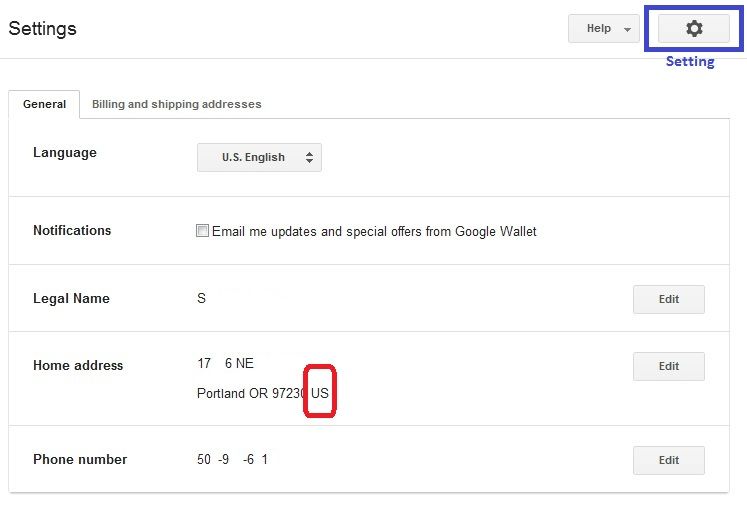
The most important step would be setting up your Google Wallet account with the country as United States. If your home country is set as Malaysia, you will need to change it before you claim the credit. After you have claim that, you will not be able to change the home country anymore. Your Google Play Credit will be locked to your home country's Play store only.

user posted image

For those that are having RBC error, you should have your home country set other than US, UK or any other countries that have Play store available.

If you missed this step, you will still get your $25 credit. But, you will not be able to use it at all.

I would recommend everyone to go to Google Wallet (http://www.google.com/wallet/) first to check if you have your home country set correctly before powering on your Nexus to activate.

This post has been edited by tcmean: Sep 24 2012, 09:48 AM
eugenecctan
post Sep 24 2012, 09:48 AM

Wee Wang Wang
******
Senior Member
1,058 posts

Joined: Nov 2009


Do I need to master reset again to claim for the $25 credit? Please direct me a method without master reset. Thanks.


Added on September 24, 2012, 9:48 amBtw, my Nexus 7 screen has screen flickering issue, anyone have the same problem?

I've found out from Mr google that weak wifi signal might cause screen flickering on nexus 7. What should I do?

This post has been edited by eugenecctan: Sep 24 2012, 09:48 AM
tcmean
post Sep 24 2012, 09:49 AM

On my way
****
Senior Member
561 posts

Joined: Jan 2003
QUOTE(eugenecctan @ Sep 24 2012, 09:48 AM)
Do I need to master reset again to claim for the $25 credit? Please direct me a method without master reset. Thanks.


Added on September 24, 2012, 9:48 amBtw, my Nexus 7 screen has screen flickering issue, anyone have the same problem?

I've found out from Mr google that weak wifi signal might cause screen flickering on nexus 7. What should I do?
*
I dont think it's needed if you are getting it fresh from the store. But, please 1st check if your Google Wallet account has the home country set as US.

This post has been edited by tcmean: Sep 24 2012, 09:52 AM
eugenecctan
post Sep 24 2012, 09:52 AM

Wee Wang Wang
******
Senior Member
1,058 posts

Joined: Nov 2009


QUOTE(tcmean @ Sep 24 2012, 09:49 AM)
Please 1st check if your Google Wallet account has the home country set as US.
*
May I know how to change it? I think mine is currently set to Malaysia.
benny888
post Sep 24 2012, 09:57 AM

Gadget Freak
Group Icon
Elite
27,801 posts

Joined: Jun 2007
From: Johor


QUOTE(eugenecctan @ Sep 24 2012, 09:52 AM)
May I know how to change it? I think mine is currently set to Malaysia.
*
Go to Google wallet - payment methods - and edit your credit card details
tcmean
post Sep 24 2012, 09:57 AM

On my way
****
Senior Member
561 posts

Joined: Jan 2003
QUOTE(eugenecctan @ Sep 24 2012, 09:52 AM)
May I know how to change it? I think mine is currently set to Malaysia.
*
1. Go to http://www.google.com/wallet/
2. Sign in with your Google account (the one that you're gonna use it on your Nexus 7)
3. Click on the Setting button on the top right (right next to the Help button)
4. Click the Edit button at your home address and then change the country


Added on September 24, 2012, 10:01 am
QUOTE(benny888 @ Sep 24 2012, 09:57 AM)
Go to Google wallet - payment methods - and edit your credit card details
*
This is only for the credit card but not the Google Wallet account.

This post has been edited by tcmean: Sep 24 2012, 10:01 AM
eugenecctan
post Sep 24 2012, 10:02 AM

Wee Wang Wang
******
Senior Member
1,058 posts

Joined: Nov 2009


QUOTE(tcmean @ Sep 24 2012, 09:57 AM)
1. Go to http://www.google.com/wallet/
2. Sign in with your Google account (the one that you're gonna use it on your Nexus 7)
3. Click on the Setting button on the top right (right next to the Help button)
4. Click the Edit button at your home address and then change the country


Added on September 24, 2012, 10:01 am

This is only for the credit card but not the Google Wallet account.
*
Why can't I change the country?
Unfortunately, users with a Google Play balance or a Checkout Merchant account are unable to change the country. Any idea why??
tcmean
post Sep 24 2012, 10:04 AM

On my way
****
Senior Member
561 posts

Joined: Jan 2003
QUOTE(eugenecctan @ Sep 24 2012, 10:02 AM)
Why can't I change the country?
Unfortunately, users with a Google Play balance or a Checkout Merchant account are unable to change the country. Any idea why??
*
You won't be able to if you have already activated your Nexus 7 and claimed the $25 credits.

I guess you won't be able to use the credit to purchase in the Play store now.
eugenecctan
post Sep 24 2012, 10:05 AM

Wee Wang Wang
******
Senior Member
1,058 posts

Joined: Nov 2009


I clicked on the DEVICES, then I received this message -> You haven't activated Google Wallet on any devices.

I'd bought a few apps not long ago....
ultra_nyamuk
post Sep 24 2012, 10:07 AM

Regular
******
Senior Member
1,833 posts

Joined: Dec 2008
QUOTE(un_id @ Sep 23 2012, 01:02 AM)
afaik the issues are very random and happened by chance..

my unit have no issue at all so far.

screen coming of due to cheap glue??  sweat.gif  sweat.gif

all the problems you stated above represent a defective device which needed RMA.
*
Hmm..correct, but when i google "nexus 7 issues/problems" all those things pop up. so worried before i go get one.

QUOTE(ericlaiys @ Sep 23 2012, 01:17 AM)
Correct. No charging. I get the same from maybank but no charges except bank called me to verify if i make the transaction.


Added on September 23, 2012, 1:19 am
Mine so far no problem. has been using since 2 weeks+ (Direct from Google Play-USA)


Added on September 23, 2012, 1:20 am
Freesupervpn or cactusvpn will do
*
No problem huh? hmm good smile.gif

QUOTE(doggydogg @ Sep 23 2012, 01:36 AM)
serial number start with what? 1st 3 digit

eg. C90 or C80?
*
what batches are faulty ? do you know ? mostly the ones sold in malaysia ok? smile.gif
eugenecctan
post Sep 24 2012, 10:07 AM

Wee Wang Wang
******
Senior Member
1,058 posts

Joined: Nov 2009


QUOTE(tcmean @ Sep 24 2012, 10:04 AM)
You won't be able to if you have already activated your Nexus 7 and claimed the $25 credits.

I guess you won't be able to use the credit to purchase in the Play store now.
*
?? I already activated my Nexus 7, but not yet claimed the $25 credits, btw, it has nothing to do with changing my default country right? I am able to change the shipping address. But not the home address..
tcmean
post Sep 24 2012, 10:10 AM

On my way
****
Senior Member
561 posts

Joined: Jan 2003
QUOTE(eugenecctan @ Sep 24 2012, 10:05 AM)
I clicked on the DEVICES, then I received this message -> You haven't activated Google Wallet on any devices.

I'd bought a few apps not long ago....
*
Because you haven't install Google Wallet on your Nexus 7 and activate it. This is Google Wallet on mobile device. It's a different 1.

If you have successfully purchased apps with the $25 credit then what's the problem now?

117 Pages « < 30 31 32 33 34 > » Top
Topic ClosedOptions
 

Change to:
| Lo-Fi Version
0.0269sec    0.32    6 queries    GZIP Disabled
Time is now: 16th December 2025 - 02:00 PM