Welcome Guest ( Log In | Register )

Bump Topic Topic Closed RSS Feed
126 Pages « < 39 40 41 42 43 > » Bottom

Outline · [ Standard ] · Linear+

 The SSD Thread V3, The Speed You Need

views
     
everling
post Nov 6 2012, 10:04 AM

Look at all my stars!!
*******
Senior Member
3,591 posts

Joined: Feb 2008
QUOTE(ZeneticX @ Nov 5 2012, 11:43 PM)
i don't think my PSU is that bad, gigabyte odin 800w...
*
This one? Gigabyte's New Odin GT 800W Power Supply

I'm no expert, but I'd be concerned with the voltage outputs after it has aged three or more years.

QUOTE(ZeneticX @ Nov 5 2012, 11:43 PM)
can not partitioning HDD into several partitions be the cause ? i tend to do that for all my 500gb and 1tb hdd until recently i realized what could've probably caused all the trouble

that's why i was asking on previous reply whether i should partition my ssd, to avoid same mistake, or just to be safe
*
I don't think that partitioning is a problem, otherwise someone would have probably noticed something and examined it over the last two decades of computing. I certainly haven't made such a connection myself and I still don't see one.

QUOTE(ZeneticX @ Nov 5 2012, 11:43 PM)
btw i should set the settings to AHCI in my bios for the ssd to unleash its full potential right ?
*
Yes, you should set it to AHCI before installing Windows. It is a bit tricky to change it to AHCI after Windows is installed, but possible.

QUOTE(Eoma @ Nov 5 2012, 11:49 PM)
After playing thorugh a couple of scenarios in my head, if the SSD is just for OS + browser (no i don't use and can't afford Office/Photoshop), then a 60GB would do, and then the programs (Steam/Origin) would remain on the Raptor. But then i won't get the SSD benefits on the loading times. So say I start putting one game, two games, three games, etc, and then i find I run out of space. So i was thinking of biting the bullet and going straight for at least a direct 1:1 SSD replacement in terms of size compared to my Raptor; thus the only 2 options are 512GB or 480GB models.

Saves the hassle of copying in/out the programmes that I use. I have another 2 x 320GB WD drives though, for storage, and 2 x 500GB external drives for backup. Plus with the idea that this SSD purchase last quite a bit, buying the biggest possible drive made for sense (for me).
*
Personally, paying an extra RM600-750 for the convenience of keeping all the games in one drive is too pricey for me. I would much prefer to juggle them and spend the difference on the CPU or GPU. Assuming 20GB per game, that is 10 big games, the OS and some spare space.

But you would still know your needs and wants better than I do, I have no idea what is in your Raptor and I don't know if there are nearby price cuts after the recent release of the 20nm/21nm NAND SSDs.

This post has been edited by everling: Nov 6 2012, 10:04 AM
Eoma
post Nov 6 2012, 10:29 AM

- ,. -
Group Icon
Elite
4,603 posts

Joined: Jan 2003
From: PJ


QUOTE(everling @ Nov 6 2012, 10:04 AM)
But you would still know your needs and wants better than I do, I have no idea what is in your Raptor and I don't know if there are nearby price cuts after the recent release of the 20nm/21nm NAND SSDs.
*
Good point on the price cuts, thus am also reading up if there will be a price drop soon (from Intel).
Also toying with the idea of 2 x 256GB drives or maybe 1 x 60GB + 1 x 256GB combination. Should be cheaper.
Would the lower 4K performance on the SF22xx drives mean much compared to the excellent performance from the Marvel chipsets (i.e. Crucial M4) ?

p/s: My 300GB Raptor is currently 80% utilized, about 240GB. So a 240GB SSD "wouldn't" be enough; i.e. after formatting usable space is around 220+GB ?

This post has been edited by Eoma: Nov 6 2012, 10:32 AM
Boldnut
post Nov 6 2012, 10:34 AM

Look at all my stars!!
*******
Senior Member
2,209 posts

Joined: Nov 2010
Asking this question on behalf of my brother.

He has been using his old 80GB HDD as OS drive (split into 2 partition, 71GB actual size + 3GB as page file)
typically he use up like only left ~7-8GB free space

what size SSD should he get? prefer to spend as low budget as possible as he know SSD will still have a lot of room to drop. Using SATA III

90GB/96GB = what is cheapest in market?
120/128GB = what is cheapest in market?

main concern here is reliability, price, capacity. Speed is not the concern.


1024kbps
post Nov 6 2012, 11:55 AM

李素裳
*******
Senior Member
6,012 posts

Joined: Feb 2007


QUOTE(Boldnut @ Nov 6 2012, 10:34 AM)
Asking this question on behalf of my brother.

He has been using his old 80GB HDD as OS drive (split into 2 partition, 71GB actual size + 3GB as page file)
typically he use up like only left ~7-8GB free space

what size SSD should he get? prefer to spend as low budget as possible as he know SSD will still have a lot of room to drop. Using SATA III

90GB/96GB = what is cheapest in market?
120/128GB = what is cheapest in market?

main concern here is reliability, price, capacity. Speed is not the concern.
*
If want cheapest, go for 64gb SATA2 based ssd loh, old hdd use as data and storage drive.
My XP 32bit dont use more than 7GB, and w8 only utilize 16GB currently. Can use NTFS compression to squeeze out more space, but that will increase write to ssd(shorter life span+performance impact) sweat.gif
Lurker
post Nov 6 2012, 11:55 AM

L U R K I N G
Group Icon
Elite
4,420 posts

Joined: Jan 2003
QUOTE(Eoma @ Nov 6 2012, 10:29 AM)
Good point on the price cuts, thus am also reading up if there will be a price drop soon (from Intel). 
Also toying with the idea of 2 x 256GB drives or maybe 1 x 60GB + 1 x 256GB combination. Should be cheaper.
Would the lower 4K performance on the SF22xx drives mean much compared to the excellent performance from the Marvel chipsets (i.e. Crucial M4) ?

p/s: My 300GB Raptor is currently 80% utilized, about 240GB. So a 240GB SSD "wouldn't" be enough; i.e. after formatting usable space is around 220+GB ?
*
I hv toyed with the idea of using single 120/128gb or 256gb 1st and at a later date if there is a price drop get another to raid 0 it... But alas only the latest z77 chip supports raid trim.

Ended up with a 256gb m4 instead.

128/256 is still the sweet spot price over gb at the moment IMO
ronaldjoe
post Nov 6 2012, 09:28 PM

Look at all my stars!!
*******
Senior Member
3,569 posts

Joined: Apr 2007
QUOTE(AwaN87 @ Nov 5 2012, 11:26 PM)
my crucial m4 got disk error. now attempting to repair.. suddenly crash while installing new nvidia driver.. shall i start repair with win7 disk instead?? sad.gif
Edit :
Done startup repair and it says disk is corrupt. oh why!! no!! sad.gif
*
Suggest you:
1) Format the drive
2) Flash with latest firmware or the earlier 000F
3) Write '0' to the drive

A lot of time, SSD issue is something to do with the controller or interface. Doing the above might save it. Memory itself normally would normally last long.
sniperwolf
post Nov 6 2012, 11:36 PM

Boku Wa Gundam
*******
Senior Member
2,810 posts

Joined: Jan 2003
From: Bangsar
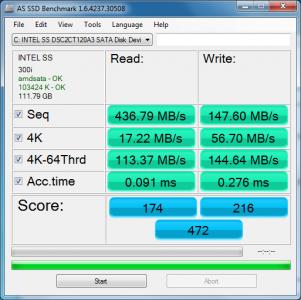
Just bought an intel 330 120gb and run as ssd and the result seems on the lower side. Tried the intel ssd optimizer and got error

Anyone can provide some clues on it?

Attached Image
Attached Image

This post has been edited by sniperwolf: Nov 6 2012, 11:37 PM
everling
post Nov 7 2012, 08:51 AM

Look at all my stars!!
*******
Senior Member
3,591 posts

Joined: Feb 2008
QUOTE(sniperwolf @ Nov 6 2012, 11:36 PM)
Just bought an intel 330 120gb and run as ssd and the result seems on the lower side. Tried the intel ssd optimizer and got error

Anyone can provide some clues on it?
*
Try running an ATTO benchmark test.
sniperwolf
post Nov 7 2012, 11:26 AM

Boku Wa Gundam
*******
Senior Member
2,810 posts

Joined: Jan 2003
From: Bangsar
Result of atto on default settings. Results seems low from 0.5 - 8 range.

Attached Image

This post has been edited by sniperwolf: Nov 7 2012, 11:34 AM
Vorador
post Nov 7 2012, 12:10 PM

Blessed !!!
*******
Senior Member
3,494 posts

Joined: Jan 2003
From: Nosgoth


Hi all,

Me new to SSD here, I just installed my new Intel Series 335, and I notice it still run in IDE mode instead of AHCI. Refer to the optimizing link posted in first page, looks like I can change it in my bios for better performance. My question is:

I'm using a normal harddisk as my secondary storage, but my motherboard only has 1 option for this. My question is, if I change it to AHCI for my SSD, will that affect my secondary harddisk?
sniperwolf
post Nov 7 2012, 12:50 PM

Boku Wa Gundam
*******
Senior Member
2,810 posts

Joined: Jan 2003
From: Bangsar
From what I know changing to AHCI from ide will only affect your booting drive if your os was installed while in ide mode. other storage drive wont had any differences, at least that what I experienced.

This post has been edited by sniperwolf: Nov 7 2012, 12:51 PM
Vorador
post Nov 7 2012, 03:04 PM

Blessed !!!
*******
Senior Member
3,494 posts

Joined: Jan 2003
From: Nosgoth


QUOTE(sniperwolf @ Nov 7 2012, 12:50 PM)
From what I know changing to AHCI from ide will only affect your booting drive if your os was installed while in ide mode. other storage drive wont had any differences, at least that what I experienced.
*
that clear my doubt and relief my worried, thanks!

Btw the way, if it 'affect' your booting drive (in mine, and most of the case in this thread), the SSD, it simply increase the performance, without causing any software problem right? (Sorry for the dumb question, really new to all these settings tongue.gif)

This post has been edited by Vorador: Nov 7 2012, 03:12 PM
everling
post Nov 7 2012, 03:37 PM

Look at all my stars!!
*******
Senior Member
3,591 posts

Joined: Feb 2008
QUOTE(sniperwolf @ Nov 7 2012, 11:26 AM)
Result of atto on default settings. Results seems low from 0.5 - 8 range.
*
The results are normal. The difference in benchmark results of the AS SSD and ATTO is in how the benchmark is conducted.

The Intel 330 specification specifies 500MB/s read and 450MB/s write.

You might be able to increase performance a little more with firmware/driver updates and optimisations, but using as-is is fine.


sniperwolf
post Nov 7 2012, 05:54 PM

Boku Wa Gundam
*******
Senior Member
2,810 posts

Joined: Jan 2003
From: Bangsar
QUOTE(everling @ Nov 7 2012, 03:37 PM)
The results are normal. The difference in benchmark results of the AS SSD and ATTO is in how the benchmark is conducted.

The Intel 330 specification specifies 500MB/s read and 450MB/s write.

You might be able to increase performance a little more with firmware/driver updates and optimisations, but using as-is is fine.
*
Well the intel optimization is a no go for my case since it just wont run without any error as showed in earlier screenshot. Firmware wise it should be the latest as it reported as the latest in the intel ssd toolbox 3.1.1. Any other optimization tools to recommend?
zhiyuan
post Nov 7 2012, 09:01 PM

Casual
***
Junior Member
301 posts

Joined: Apr 2005
From: SS2, PJ


too much choices of SSD .... i am trying to narrow down to 2 type at the moment.... crucial m4 and intel 520

any suggestion?

Vorador
post Nov 7 2012, 09:47 PM

Blessed !!!
*******
Senior Member
3,494 posts

Joined: Jan 2003
From: Nosgoth


LOL what's wrong with mine man... rclxub.gif look at the half-past six score... doh.gif

I already switch to AHCI mode, and run the INTEL optimization... but how come...

Attached Image

Anyone got any idea? (BTW, what does the 'PCiide-BAD' means?)
everling
post Nov 7 2012, 09:51 PM

Look at all my stars!!
*******
Senior Member
3,591 posts

Joined: Feb 2008
QUOTE(sniperwolf @ Nov 7 2012, 05:54 PM)
Well the intel optimization is a no go for my case since it just wont run without any error as showed in earlier screenshot. Firmware wise it should be the latest as it reported as the latest in the intel ssd toolbox 3.1.1. Any other optimization tools to recommend?
*
None comes to mind. If you have already went through the optimisation guide in the first post, there isn't much left to do.

QUOTE(zhiyuan @ Nov 7 2012, 09:01 PM)
too much choices of SSD .... i am trying to narrow down to 2 type at the moment.... crucial m4 and intel 520

any suggestion?
*
The Intel 520 isn't intended for home users, but enterprise usage instead. The Intel 330 is more than sufficient for non-enterprise use, I'd take the 330 over the 520 because you could get more capacity for nearly the same price and I'll also take the 330 over the Crucial M4 because it is cheaper.


Added on November 7, 2012, 9:53 pm
QUOTE(Vorador @ Nov 7 2012, 09:47 PM)
LOL what's wrong with mine man...  rclxub.gif  look at the half-past six score...  doh.gif

I already switch to AHCI mode, and run the INTEL optimization... but how come...

[img]

Anyone got any idea? (BTW, what does the 'PCiide-BAD' means?)
*
Did you confirmed that you have switched to AHCI? Because that indicates you're still on IDE mode.

This post has been edited by everling: Nov 7 2012, 09:53 PM
CyntrixTech
post Nov 7 2012, 09:58 PM

Distributor
*******
Senior Member
2,583 posts

Joined: Sep 2011
From: Kuala Lumpur
QUOTE(everling @ Nov 7 2012, 09:51 PM)
None comes to mind. If you have already went through the optimisation guide in the first post, there isn't much left to do.
The Intel 520 isn't intended for home users, but enterprise usage instead. The Intel 330 is more than sufficient for non-enterprise use, I'd take the 330 over the 520 because you could get more capacity for nearly the same price and I'll also take the 330 over the Crucial M4 because it is cheaper.


Added on November 7, 2012, 9:53 pm
Did you confirmed that you have switched to AHCI? Because that indicates you're still on IDE mode.
*
You forgot to touch base on Local Intel Warranty vs "Local Crucial" Warranty. I on the other hand would take the 520 over the 330 simply because it offers 2 more years warranty, performs faster, and only a wee bit more expensive (120gb). RM 103/yr (Intel SSD 330 120GB) vs RM 80/yr (Intel SSD 520 120GB) Can't go wrong with either.
Vorador
post Nov 7 2012, 10:12 PM

Blessed !!!
*******
Senior Member
3,494 posts

Joined: Jan 2003
From: Nosgoth


QUOTE(everling @ Nov 7 2012, 09:51 PM)


Added on November 7, 2012, 9:53 pm
Did you confirmed that you have switched to AHCI? Because that indicates you're still on IDE mode.
*
I did that in my CMOS... so do I need to do the registry thingy? (base on the optimization guide on first page)

May I know if most of you guys do it in registry or just CMOS enough? sad.gif
ahpaul82
post Nov 7 2012, 11:33 PM

.:保罗:.
*******
Senior Member
3,795 posts

Joined: Jan 2003
From: .: Old Klang Road :.


Which one to be trust? sad.gif

Attached Image

126 Pages « < 39 40 41 42 43 > » Top
Topic ClosedOptions
 

Change to:
| Lo-Fi Version
0.0323sec    0.50    6 queries    GZIP Disabled
Time is now: 4th December 2025 - 12:25 PM