Outline ·
[ Standard ] ·
Linear+
The SSD Thread V3, The Speed You Need
|
ashx
|
 Oct 26 2012, 08:45 PM Oct 26 2012, 08:45 PM
|
Getting Started


|
Here's some screenie for my 2 month old Corsair 240GB GS. I can nvr go back to normal HDD lol. SPECs: Asus P5Q3 mobo C2Q Q9550 @2.8 stock Asus 5870 GC Kingston Value ram 4GB As you can see, my rigg is like 3 year old nothing to shout about plus its a sata 2 mobo. But with the SSD upgrade, i can still push my total rigg rebuild for another year  Everything is silky smooth and BF3 loads so much faster.Nothing beats spawning early while others are still on loading screen My humble benchmark, » Click to show Spoiler - click again to hide... « This post has been edited by ashx: Oct 26 2012, 08:46 PM |
|
|
|
|
|
pds_disi
|
Oct 27 2012, 05:02 AM
|
|
|
Hi guys, please help a noob never use ssd before.
I plan to build a new rig, with SSD + conventional HDD together.
SSD for OS & games, HDD for torrent & storage.
If I set my torrent default download directory on HDD, then DL 24/7 (almost), will the SSD be stressed? (constant read/write?)
|
|
|
|
|
|
skycrawler
|
Oct 27 2012, 06:30 AM
|
|
|
Hi guys , a shocking event happened to me last night . My Crucial M4 dead/kaput last night . BIOS didn't detect it at all , already try it in another PC , same result . Used it for 6 months , didn't expect this to happen  I hope this is a isolated case . Now waiting for Cyntrix to reply to my problem ╮(╯_╰")╭ |
|
|
|
|
|
Lurker
|
Oct 27 2012, 08:50 AM
|
L U R K I N G

|
QUOTE(skycrawler @ Oct 27 2012, 06:30 AM) Hi guys , a shocking event happened to me last night . My Crucial M4 dead/kaput last night . BIOS didn't detect it at all , already try it in another PC , same result . Used it for 6 months , didn't expect this to happen I hope this is a isolated case . Now waiting for Cyntrix to reply to my problem ╮(╯_╰")╭ Died while u using it? |
|
|
|
|
|
owikh84
|
Oct 27 2012, 08:56 AM
|
i7 Clan
|
QUOTE(skycrawler @ Oct 27 2012, 06:30 AM) Hi guys , a shocking event happened to me last night . My Crucial M4 dead/kaput last night . BIOS didn't detect it at all , already try it in another PC , same result . Used it for 6 months , didn't expect this to happen I hope this is a isolated case . Now waiting for Cyntrix to reply to my problem ╮(╯_╰")╭ Sorry to hear that it just served u for 6 months only. Time to grab Vertex4 or Samsung 840s:) |
|
|
|
|
|
primaroti
|
Oct 27 2012, 09:39 AM
|
|
|
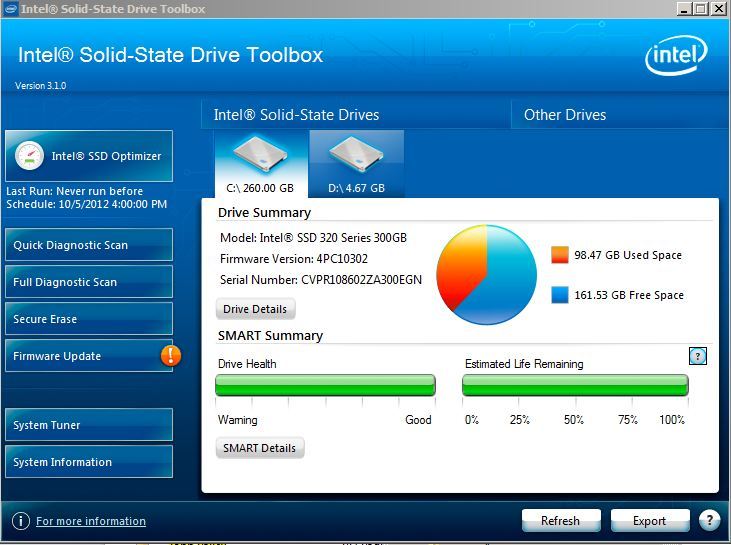
QUOTE Intel Delivers Windows 8-Compatible Solid-State Drive ToolboxIntel announced today a new Intel Solid-State Drive (SSD) Toolbox version 3.1 that is Windows 8-compatible. Offered in 11 languages, the Intel SSD Toolbox helps users keep their Intel SSD in prime condition. Other new features include RAID 0 Trim support with RST 11.x drivers, Plug and Play Support and proactive user notifications. Download the updated toolbox at: http://downloadcenter.intel.com/Detail_Des...Y&DwnldID=18455» Click to show Spoiler - click again to hide... « source : http://www.techpowerup.com/174489/Intel-De...ve-Toolbox.html This post has been edited by primaroti: Oct 27 2012, 09:39 AM |
|
|
|
|
|
skycrawler
|
Oct 27 2012, 10:52 AM
|
|
|
QUOTE(Lurker @ Oct 27 2012, 08:50 AM) Kinda , suddenly the laptop run very slow , cannot open all applications , and then I restart , windows won't load " no bootable drive found " . Restart again , go to bios and shown at primary drive : NONE . Reconnect the SSD , same result 
Added on October 27, 2012, 11:53 amQUOTE(owikh84 @ Oct 27 2012, 08:56 AM) Sorry to hear that it just served u for 6 months only. Time to grab Vertex4 or Samsung 840s:) U think how long cyntrix take time to replace it? Need to RMA? This post has been edited by skycrawler: Oct 27 2012, 11:53 AM |
|
|
|
|
|
clieman
|
Oct 27 2012, 12:43 PM
|
|
|
Hi,
Any good guide to install SSD as Intel Rapid Storage in a system that is already running Win7? Do I need to reinstall Win7 from scratch? I am using the ASUS P8z77-v
|
|
|
|
|
|
skycrawler
|
Oct 27 2012, 02:22 PM
|
|
|
QUOTE(kszg @ Oct 27 2012, 01:06 PM) u was upgrade firmware lates ??? I upgraded it to the latest firmware on the day the latest firmware was release . |
|
|
|
|
|
OC4/3
|
Oct 27 2012, 03:59 PM
|
.
|
QUOTE(pds_disi @ Oct 27 2012, 05:02 AM) Hi guys, please help a noob never use ssd before. I plan to build a new rig, with SSD + conventional HDD together. SSD for OS & games, HDD for torrent & storage. If I set my torrent default download directory on HDD, then DL 24/7 (almost), will the SSD be stressed? (constant read/write?) Nope That is the setup i am using now Intel 320 Series 80GB + Samsung 1.5TB HDD |
|
|
|
|
|
pds_disi
|
Oct 27 2012, 06:46 PM
|
|
|
QUOTE(OC4/3 @ Oct 27 2012, 03:59 PM) Nope That is the setup i am using now Intel 320 Series 80GB + Samsung 1.5TB HDD thats a good news to me thanks for reply  |
|
|
|
|
|
soultaker
|
Oct 27 2012, 10:27 PM
|
|
|
QUOTE(skycrawler @ Oct 27 2012, 02:22 PM) I upgraded it to the latest firmware on the day the latest firmware was release . QUOTE(kszg @ Oct 27 2012, 04:11 PM) daam u upgrade 010G right sigh a lot BUG can't detect BIOS SSD this firmware 000f prefect 010G u need motherboard uefi bios There is bug on the latest firmware. try google around. last time i read about it and he managed to revive back the Crucial SSD. |
|
|
|
|
|
skycrawler
|
Oct 28 2012, 03:04 AM
|
|
|
QUOTE(soultaker @ Oct 27 2012, 10:27 PM) There is bug on the latest firmware. try google around. last time i read about it and he managed to revive back the Crucial SSD. Thanks bro , managed to revive my SSD and revert back to 000F firmware  This post has been edited by skycrawler: Oct 28 2012, 03:05 AM This post has been edited by skycrawler: Oct 28 2012, 03:05 AM |
|
|
|
|
|
Lurker
|
Oct 28 2012, 08:05 AM
|
L U R K I N G
|
QUOTE(skycrawler @ Oct 28 2012, 03:04 AM) Thanks bro , managed to revive my SSD and revert back to 000F firmware Congrats! How did you do it? |
|
|
|
|
|
mfitri77
|
Oct 28 2012, 08:17 AM
|
|
|
I thought Crucial was quite stable already? Was considering the m4 for a Macbook, but decided to take a risk with the Vertex 4.
|
|
|
|
|
|
soultaker
|
Oct 28 2012, 11:26 AM
|
|
|
QUOTE(skycrawler @ Oct 28 2012, 03:04 AM) Thanks bro , managed to revive my SSD and revert back to 000F firmware Glad to hear that your SSD is back to life. QUOTE(mfitri77 @ Oct 28 2012, 08:17 AM) I thought Crucial was quite stable already? Was considering the m4 for a Macbook, but decided to take a risk with the Vertex 4. Crucial was stable but the latest firmware had issue with UEFI mobo. just stay with 2nd latest firmware and you are good to go. i think vertex 4 was a good choice either. other brand you can consider is intel, corsair and samsung. |
|
|
|
|
|
mikd9999
|
Oct 28 2012, 04:13 PM
|
New Member
|
damn 010G firmware, my M4 cannot detected last night after my house suddenly blackout. Recover few minutes later.
I need to revert back to 000F.
|
|
|
|
|
|
owikh84
|
Oct 28 2012, 07:46 PM
|
i7 Clan
|
QUOTE(skycrawler @ Oct 28 2012, 03:04 AM) Thanks bro , managed to revive my SSD and revert back to 000F firmware QUOTE(mikd9999 @ Oct 28 2012, 04:13 PM) damn 010G firmware, my M4 cannot detected last night after my house suddenly blackout. Recover few minutes later. I need to revert back to 000F. Luckily it's not permanently bricked yet. I will revert to older firmware tonight, before any disaster happen.  |
|
|
|
|
|
ZeneticX
|
Oct 28 2012, 07:47 PM
|
|
|
what's the best performance to budget ratio SSD currently ?
looking to get 1 and reformat my pc to win 8
|
|
|
|
|
|
skycrawler
|
Oct 28 2012, 11:37 PM
|
|
|
QUOTE(Lurker @ Oct 28 2012, 08:05 AM) Congrats! How did you do it? I power cycled the ssd Enter bios , left idle for 20 mins , I also changed AHCI to IDE . Shutdown laptop , unplug SSD > On laptop > Enter Bios > change back to AHCI > restart and walah !! u got back ur ssd  |
|
|
|
|



 Quote
Quote







 0.0291sec
 0.21
0.21
 6 queries
 GZIP Disabled