Welcome Guest ( Log In | Register )

Bump Topic Topic Closed RSS Feed

Outline · [ Standard ] · Linear+

 Ivy Bridge Overclocking V1 | 3770K/3570K | Z77, Torture Your CPU, Post It Here!

views
     
kelvin_hata
post Apr 20 2012, 09:12 AM

V.S.O.P
*******
Senior Member
2,696 posts

Joined: Jan 2003
From: Butterworth,Penang Status: Available


Removing the absolute CRAP thermal packaging on the ivy bridge cpu AKA IHS

Item to be ready:-
1. pen knife
2. Screw drivers
3. sponge
4. Scissors
5. Double sided tape (thin)
6 Thermal grease
» Click to show Spoiler - click again to hide... «


Warning... Do it at your own risk, It will caused you bleeding cry.gif , processor die doh.gif , warranty void shakehead.gif and etc etc
We shall NOT respond to any of it. So, if anything happen to you, call 911 and ask for help or cry to your mummy laugh.gif


Step 1.Prepare a pen knife and a box set screws drivers, of cos the processor that u wanted to kill too
» Click to show Spoiler - click again to hide... «


Step 2. Choose the bottom side of the processor cover, gently using the pen knife to force into it. (be careful, your processor is virgin, i not wish to see blood)
» Click to show Spoiler - click again to hide... «


Once successfully cut into the processor cover, use the most thin (1.4mm) flat-bladed screwdriver, and force into it too.
» Click to show Spoiler - click again to hide... «


Once done the step 2, go out take a smoke or maybe can pray to your believed god, wish you all the best
Step 3. Please follow the arrow ya. [cool.gifBLUE----> RED----> Yellow
P/S:
- make sure your hand dun shaking
- make sure the pen knife is very sharp
- make sure dun put too deep into the processor (i means pen knife)
- make sure dun bleeding laugh.gif
» Click to show Spoiler - click again to hide... «


tadaaa... thumbup.gif
» Click to show Spoiler - click again to hide... «
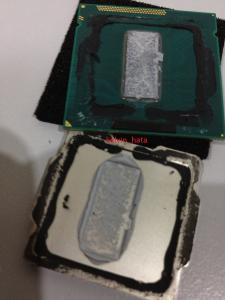

Now, let see what the h3ll intel giving vmad.gif
» Click to show Spoiler - click again to hide... «


Step 4. Clean all left over glue in the IHS and processor surface. Use alcohol cleaner to clear cheeeeeeeepor intel original thermal grease
» Click to show Spoiler - click again to hide... «


Step 5. Prepare Scissors, Double sided tape (thin), Thermal grease
» Click to show Spoiler - click again to hide... «


Step 6. Put some thermal grease on the processor die and put back the IHS (without double sided tape) and open back again to make sure the processor die fully cover with thermal grease.
» Click to show Spoiler - click again to hide... «


Step 7. now only double sided tape turn.
» Click to show Spoiler - click again to hide... «


Step 8. Press hardly on the IHS and make sure the bottom of the processor protect by sponge.
» Click to show Spoiler - click again to hide... «


Done and now.. pray hardly that the processor able to wake up!!!
» Click to show Spoiler - click again to hide... «


This post has been edited by kelvin_hata: May 21 2012, 12:11 AM
TSowikh84
post Apr 20 2012, 09:39 AM

i7 Clan
Group Icon
Elite
8,711 posts

Joined: Nov 2007
From: Butterworth, PG / Machang, Kelantan


QUOTE(kelvin_hata @ Apr 20 2012, 09:12 AM)
owikh84 ... mau try i7 3770k ??

hehehe  drool.gif
*
Whatsapp me bossy biggrin.gif
CyntrixTech
post Apr 20 2012, 11:32 AM

Distributor
*******
Senior Member
2,583 posts

Joined: Sep 2011
From: Kuala Lumpur
4.5ghz @ 1.395 with 17C to TJ Max. 8 hours stable.

Edit #1: Cooler Master 212 Evo + 2 X Scythe Gentle Typhoon cannot handle 1.45V (under load 1.46) @ 21C ambient. At 1.44 there is till over 10C+ before hitting TJ Max. It seems like once you go pass 1.45 it cooks up real quickly.

Edit #2: 4.7ghz not possible no matter what settings with the Asus P8Z77-M (RM300+ mobo) maybe with serious cooling and higher vcore it might work fine but it has hit the wall

Edit #3: 4.6ghz stable for 3 hours now. @ 9C-15C to TJ MAX.

Some thought about the temperature:
http://forum.lowyat.net/index.php?showtopi...post&p=50717372

This post has been edited by CyntrixTech: Apr 20 2012, 04:51 PM
saturn85
post Apr 20 2012, 04:55 PM

Folding@home
*******
Senior Member
8,686 posts

Joined: Mar 2009


QUOTE(owikh84 @ Apr 20 2012, 12:47 AM)
*
the core i5 3570k stock vcore as low as 1.160v?
but full load already reach 75'c? shocking.gif
shepard
post Apr 20 2012, 05:23 PM

We shall overcome
*****
Senior Member
849 posts

Joined: May 2010
From: Penang Island


Aside from the easily hot chip, the 3570k doesn't come with HT as well? even though we can only see the purpose of HT in 3dmark but it feels good to have it imo smile.gif.
CyntrixTech
post Apr 20 2012, 05:26 PM

Distributor
*******
Senior Member
2,583 posts

Joined: Sep 2011
From: Kuala Lumpur
3570k doesn't have HT. It's 2500k's replacement. The cpu cannot possibly be 90-100C under load. While I couldn't place the sensor probe under the CPU now to check it, the temperature is showing as 33C with the sensor under the heatpipe of the 212 Evo.

The air coming out of the cooler also doesn't seem to be anywhere near as hot as the air blown out of a 7970 at 60-70C.

I believe the motherboards need a bios update to reflect the proper CPU temperature, something must be wrong somewhere.

-P
TSowikh84
post Apr 20 2012, 11:59 PM

i7 Clan
Group Icon
Elite
8,711 posts

Joined: Nov 2007
From: Butterworth, PG / Machang, Kelantan


QUOTE(CyntrixTech @ Apr 20 2012, 05:26 PM)
3570k doesn't have HT. It's 2500k's replacement. The cpu cannot possibly be 90-100C under load. While I couldn't place the sensor probe under the CPU now to check it, the temperature is showing as 33C with the sensor under the heatpipe of the 212 Evo.

The air coming out of the cooler also doesn't seem to be anywhere near as hot as the air blown out of a 7970 at 60-70C.

I believe the motherboards need a bios update to reflect the proper CPU temperature, something must be wrong somewhere.

-P
*
Totally agreed with you. It is not hot at all when i touch my rad & TEC block.
TEC controller still showing 33C during LinX. hmm.gif rclxub.gif
Don't know what's happening but i think we will wait for explanation from Intel or mobo manufacturer
Could be false sensor readings, bad IHS contact, etc...

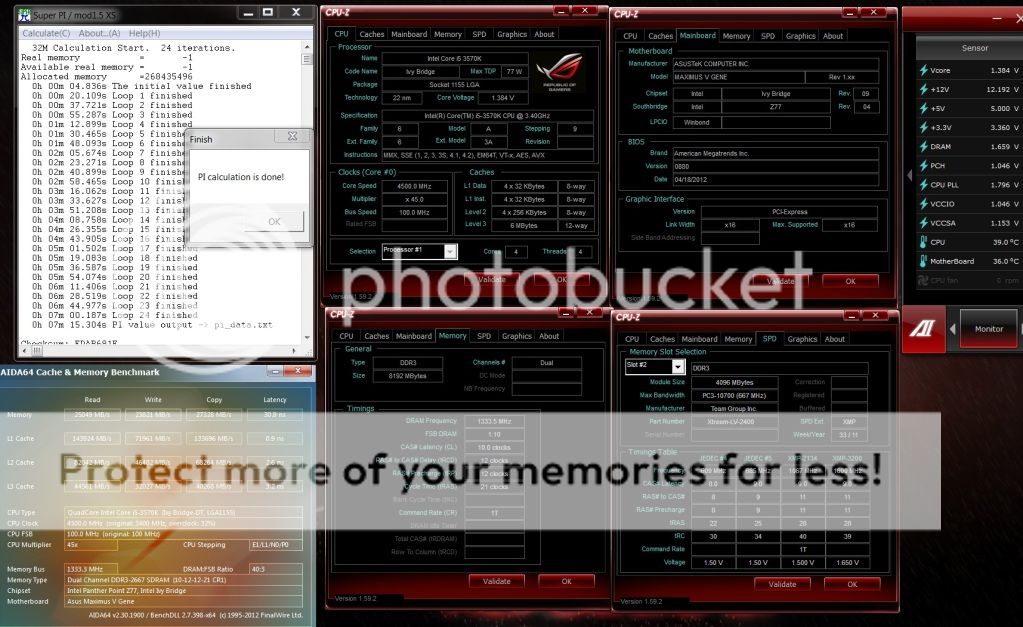
3570K @ 4.5GHz
M5G
Team 2600C10 2x4GB @ 2666
user posted image


XeactorZ
post Apr 21 2012, 12:23 AM

♥ PandaDog ♥
*********
All Stars
31,612 posts

Joined: Aug 2010
sorry noob here
how to know that processor and motherboard is ivy bridge ??
CyntrixTech
post Apr 21 2012, 12:54 AM

Distributor
*******
Senior Member
2,583 posts

Joined: Sep 2011
From: Kuala Lumpur
QUOTE(owikh84 @ Apr 20 2012, 11:59 PM)
Totally agreed with you. It is not hot at all when i touch my rad & TEC block.
TEC controller still showing 33C during LinX.   hmm.gif rclxub.gif 
Don't know what's happening but i think we will wait for explanation from Intel or mobo manufacturer
Could be false sensor readings, bad IHS contact, etc...

3570K @ 4.5GHz
M5G
Team 2600C10 2x4GB @ 2666
user posted image
*
The first rig we built can do 4.6ghz @ 1.44V. Anything more than that is a fail. Since it can't take more vcore, we'd call it a day at this speed.

Next in line:
user posted image

user posted image

This time we used 212's bigger brother. The tower is really thick so we used 2 x GT 1850. The static pressure is required to pierce through the thick walls.

Will be OCing it tomorrow

This post has been edited by CyntrixTech: Apr 21 2012, 12:55 AM
saturn85
post Apr 21 2012, 05:43 AM

Folding@home
*******
Senior Member
8,686 posts

Joined: Mar 2009


QUOTE(XeactorZ @ Apr 21 2012, 12:23 AM)
sorry noob here
how to know that processor and motherboard is ivy bridge ??
*
core i 3000 series, or check with official site? unsure.gif
CyntrixTech
post Apr 21 2012, 09:27 AM

Distributor
*******
Senior Member
2,583 posts

Joined: Sep 2011
From: Kuala Lumpur
i5 3570k @ 4.6GHZ on Air with Asus P8Z77-M (RM3xx mobo)

Prime and CPU-Z
» Click to show Spoiler - click again to hide... «


user posted image

user posted image

user posted image

user posted image

user posted image

WEI
» Click to show Spoiler - click again to hide... «


Added on April 21, 2012, 9:30 amNoticed that CPU-Z shows 1.2V but mobo shows 1.44V? Something is just wrong and a bios update must be coming

This post has been edited by CyntrixTech: Apr 21 2012, 09:30 AM
ALeUNe
post Apr 21 2012, 10:04 AM

I'm the purebred with aristocratic pedigree
Group Icon
VIP
9,692 posts

Joined: Jan 2003
From: Mongrel Isle
QUOTE(CyntrixTech @ Apr 21 2012, 09:27 AM)

Added on April 21, 2012, 9:30 amNoticed that CPU-Z shows 1.2V but mobo shows 1.44V? Something is just wrong and a bios update must be coming
*
About the CPU-Z voltage reading, I think it is the CPU-Z problem instead of the mobo bios.
Newer version CPU-Z might be able to pick up the right voltage.
TSowikh84
post Apr 21 2012, 10:11 AM

i7 Clan
Group Icon
Elite
8,711 posts

Joined: Nov 2007
From: Butterworth, PG / Machang, Kelantan


ok noticed that bios is set to 130c max

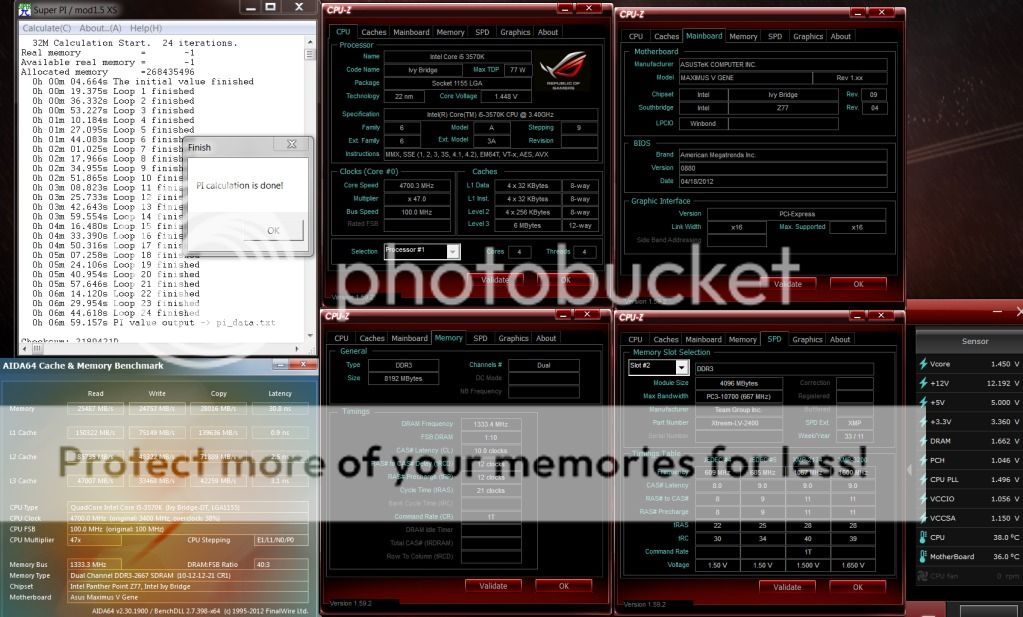
3570K @ 4.7GHz
Team 2600C10 2x4GB @ 2666 10-12-12

user posted image

user posted image

This post has been edited by owikh84: Apr 21 2012, 10:36 AM
CyntrixTech
post Apr 21 2012, 10:47 AM

Distributor
*******
Senior Member
2,583 posts

Joined: Sep 2011
From: Kuala Lumpur
QUOTE(ALeUNe @ Apr 21 2012, 10:04 AM)
About the CPU-Z voltage reading, I think it is the CPU-Z problem instead of the mobo bios.
Newer version CPU-Z might be able to pick up the right voltage.
*
Yup.

@Kevin,
Go cook your CPU @ 120C biggrin.gif Don't dare to try it on customer's PC brows.gif Btw, is this running on the XSPC RS240 or RX240?

XSPC stuck in custom, going for a dual 355 setup with 2 x RX360 just to cool the CPU (extreme overkill, but whatever)

This post has been edited by CyntrixTech: Apr 21 2012, 10:48 AM
TSowikh84
post Apr 21 2012, 11:02 AM

i7 Clan
Group Icon
Elite
8,711 posts

Joined: Nov 2007
From: Butterworth, PG / Machang, Kelantan


QUOTE(CyntrixTech @ Apr 21 2012, 10:47 AM)
Yup.

@Kevin,
Go cook your CPU @ 120C biggrin.gif Don't dare to try it on customer's PC brows.gif Btw, is this running on the XSPC RS240 or RX240?

XSPC stuck in custom, going for a dual 355 setup with 2 x RX360 just to cool the CPU (extreme overkill, but whatever)
*

» Click to show Spoiler - click again to hide... «

rclxm9.gif

It's the RS240 bought from you last year. smile.gif
New EK HF+jetplate6, D5+EK top, 2x RX360, Bits res 250, Primoflex tubing, comp fittings from APES; as well as 10x +2 ScytheGT from you Mr.P biggrin.gif
All reached me safely yesterday. thumbup.gif

Use win7 x64 SP1 + prime95 x64 27.1 w/ AVX for max torture LOL

i've updated the first post, suggestions are welcomed for thread improvement notworthy.gif

This post has been edited by owikh84: Apr 21 2012, 11:03 AM
CyntrixTech
post Apr 21 2012, 11:05 AM

Distributor
*******
Senior Member
2,583 posts

Joined: Sep 2011
From: Kuala Lumpur
So you are gonna use 2 x RX360 + 1 x RX240 on the bench? Thought I was overkill (had to, it'd be a showcase bench table) but surely you are still the king brows.gif

I am going 2 x 355 with XSPC dual top instead of the D5.

This post has been edited by CyntrixTech: Apr 21 2012, 11:06 AM
TSowikh84
post Apr 21 2012, 11:21 AM

i7 Clan
Group Icon
Elite
8,711 posts

Joined: Nov 2007
From: Butterworth, PG / Machang, Kelantan


QUOTE(CyntrixTech @ Apr 21 2012, 11:05 AM)
So you are gonna use 2 x RX360 + 1 x RX240 on the bench? Thought I was overkill (had to, it'd be a showcase bench table) but surely you are still the king brows.gif

I am going 2 x 355 with XSPC dual top instead of the D5.
*

2x RX360 only. It is considered as overkill already for CPU-only loop.
Will grab some good GTX680s + wb & put them in the same loop later, later bro... biggrin.gif
I go with D5 coz i got old EK top already.

2x 355 looks overkill for 2x RX360
my SB-E rig is powered by 2x D5 dual top paired with 2x RX480 can make fountain inside 250 res.

CyntrixTech
post Apr 21 2012, 01:30 PM

Distributor
*******
Senior Member
2,583 posts

Joined: Sep 2011
From: Kuala Lumpur
My v4 bench setup will consist of the following:

-RX 360 x 2, 6 x GT (another alternative is 2 x EX360 x 12X GT...)
-2 x 355
-1 x XSPC Laing Dual Top - Acrylic (hope it doesn't crack and leak, common issue)
-XSPC 5.25" dual bay res
-Lamptron FC9 Fan controller
-Enzotech Silver fittings, 5/8", 3/8" (got sick of 1/2", too difficult to manage)
-XSPC Raystorm / EK Supreme HF (waiting for PPTEK to order in an Acrylic top for me)

When Alphacool comes in, the res will be replaced by this:
user posted image

CyntrixTech
post Apr 21 2012, 03:19 PM

Distributor
*******
Senior Member
2,583 posts

Joined: Sep 2011
From: Kuala Lumpur
This is being tested now:
user posted image

The OC wall on Air is 4.5ghz with the CoolerMaster 212 Evo + F12 x 2. 4.6-4.7ghz with Gentle Typhoons. IB is definitely too hot for most Air cooler to handle now.

EDIT #1: Cannot handle 4.5ghz heatload. Casing traps too much heat

EDIT #2: 13-15C headroom with 4.4ghz @ 1.4V

This post has been edited by CyntrixTech: Apr 21 2012, 05:29 PM
XeactorZ
post Apr 21 2012, 03:27 PM

♥ PandaDog ♥
*********
All Stars
31,612 posts

Joined: Aug 2010
QUOTE(saturn85 @ Apr 21 2012, 05:43 AM)
core i 3000 series, or check with official site? unsure.gif
*
okay thanks for telling
but I can't find in intel website
can provide the link ?
how about laptop ?? any idea ?

This post has been edited by XeactorZ: Apr 21 2012, 03:58 PM

126 Pages < 1 2 3 > » Top
Topic ClosedOptions
 

Change to:
| Lo-Fi Version
0.0336sec    0.77    6 queries    GZIP Disabled
Time is now: 20th December 2025 - 12:51 AM