

 Apr 20 2012, 09:12 AM


Item to be ready:-
1. pen knife
2. Screw drivers
3. sponge
4. Scissors
5. Double sided tape (thin)
6 Thermal grease
» Click to show Spoiler - click again to hide... «

Warning... Do it at your own risk, It will caused you bleeding
 , processor die
  , warranty void
  and etc etc
We shall NOT respond to any of it. So, if anything happen to you, call 911 and ask for help or cry to your mummy

Step 1.Prepare a pen knife and a box set screws drivers, of cos the processor that u wanted to kill too
» Click to show Spoiler - click again to hide... «

Step 2. Choose the bottom side of the processor cover, gently using the pen knife to force into it. (be careful, your processor is virgin, i not wish to see blood)
» Click to show Spoiler - click again to hide... «

Once successfully cut into the processor cover, use the most thin (1.4mm) flat-bladed screwdriver, and force into it too.
» Click to show Spoiler - click again to hide... «

Once done the step 2, go out take a smoke or maybe can pray to your believed god, wish you all the best
Step 3. Please follow the arrow ya. [
 BLUE----> RED----> Yellow
P/S:
- make sure your hand dun shaking
- make sure the pen knife is very sharp
- make sure dun put too deep into the processor (i means pen knife)
- make sure dun bleeding
» Click to show Spoiler - click again to hide... «

tadaaa...

» Click to show Spoiler - click again to hide... «
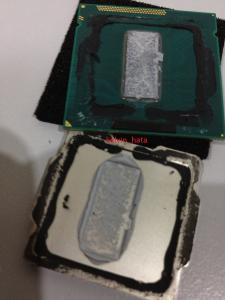
Now, let see what the h3ll intel giving

» Click to show Spoiler - click again to hide... «

Step 4. Clean all left over glue in the IHS and processor surface. Use alcohol cleaner to clear cheeeeeeeepor intel original thermal grease
» Click to show Spoiler - click again to hide... «

Step 5. Prepare Scissors, Double sided tape (thin), Thermal grease
» Click to show Spoiler - click again to hide... «

Step 6. Put some thermal grease on the processor die and put back the IHS (without double sided tape) and open back again to make sure the processor die fully cover with thermal grease.
» Click to show Spoiler - click again to hide... «

Step 7. now only double sided tape turn.
» Click to show Spoiler - click again to hide... «

Step 8. Press hardly on the IHS and make sure the bottom of the processor protect by sponge.
» Click to show Spoiler - click again to hide... «

Done and now.. pray hardly that the processor able to wake up!!!
» Click to show Spoiler - click again to hide... «


This post has been edited by kelvin_hata: May 21 2012, 12:11 AM
 Quote
Quote
 sad
sad 




 0.0563sec
 0.46
0.46
 7 queries
 GZIP Disabled