Outline ·
[ Standard ] ·
Linear+
Streamyx Streamyx SNR Margin, --Read here if you face disconnections--
|
adriankhoo153
|
 May 28 2007, 12:27 AM May 28 2007, 12:27 AM
|

|
They came this morning..Did a stuff like reconnecting my line to other DB, checking with their gear for line problem etc etc and before they left my SNR margin was about 18-20db. That is good enuff but now, my snr margin falls to 1db. I duno how come i can still online here without any disconnection... I think i will give them a call again tomolo morning..Darn, this is already the 2nd time they came here..
This post has been edited by adriankhoo153: May 28 2007, 12:29 AM
|
|
|
|
|
|
leelc99
|
May 28 2007, 05:57 PM
|
Getting Started

|
If you can still online without any connection interruptions, then please stop complaining. I'm still having SNR Margins around 20-25db which isn't 'that' good enough for a stable connection, but my connection just won't disconnect. And if you are having a stable connection already, please don't bother contacting them anymore.
It's just my one piece. Do as you wish. =)
Happy online-ing!
This post has been edited by leelc99: May 28 2007, 06:00 PM
|
|
|
|
|
|
adriankhoo153
|
May 28 2007, 08:24 PM
|
|
|
QUOTE(leelc99 @ May 28 2007, 05:57 PM) If you can still online without any connection interruptions, then please stop complaining. I'm still having SNR Margins around 20-25db which isn't 'that' good enough for a stable connection, but my connection just won't disconnect. And if you are having a stable connection already, please don't bother contacting them anymore. It's just my one piece. Do as you wish. =) Happy online-ing!Dude, how can i not complaint them la.. My speed jump from 512kbps to 100kbps now only. It looks crawling dude..  |
|
|
|
|
|
leelc99
|
May 28 2007, 08:32 PM
|
Getting Started
|
Owh, you didn't mention about your speed so I didn't know about it. I see. Most likely they'd greatly reduced your speed to stabilize your line.
Alright, call them again and force them to solve the case ; )
|
|
|
|
|
|
highwind100
|
May 28 2007, 10:00 PM
|
New Member
|
basically my line was alright until recently ,no d/c yet but just slow suddenly. heres my modem readings: DSL Status: UP DSL Modulation Mode: T1413 DSL Path Mode: FAST Downstream Rate: 832 Kbps Upstream Rate: 512 Kbps Downstream Margin: 6 db Upstream Margin: 9 db Downstream Line Attenuation: 40 Upstream Line Attenuation: 31 Downstream Transmit Power: 0 Upstream Transmit Power: 0 Is the downstream margin too low while line attenuation just ok?? Need to call 100 or not ? thank you  |
|
|
|
|
|
adriankhoo153
|
May 28 2007, 10:10 PM
|
|
|
If Streamyx down, will it effect my SNR margin? Say, school holiday lot ppl using bandwidth thus making internet connection crawling. If check SNR, will it stay the same (maybe 20db) or it will goes down to 5-8db?
|
|
|
|
|
|
leelc99
|
May 29 2007, 02:17 AM
|
Getting Started
|
@highwind100:
Your SNR Margin is too low. Your Line Attenuation is quite okay. But I'll still suggest you to contact 100 and tell them about the problem you're facing now(if only you're facing frequent disconnections).
@adriankhoo153:
Even though it is school holidays now, your download speed should not go down until 100kbps. There must be something wrong either with Streamyx, or your line.
|
|
|
|
|
|
phillys
|
May 30 2007, 12:46 AM
|
New Member
|
Hmm... I can't seem to be able to find the SNR Margin rating for my D-Link DSL-500G router. Any idea how?
Been searching for it on the net but can't find it.
|
|
|
|
|
|
leelc99
|
May 30 2007, 01:18 AM
|
Getting Started
|
This is easy. Step 1:Open a web browser like internet explorer or Netscape. Enter the ip address of your router in the address bar of your browser. In the picture above the address bar has http://www.google.com in it. Just replace all of that with the ip address of your router. By default the ip address should be set to 10.1.1.1. Step 2:You should see a box prompting you for your username and password. Enter your username and password now. By default both the username and password are admin. Click the Ok button to log in to your router. Step 3:Browse inside your modem status and find the word related to 'SNR Margin or Line Attenuation'. You should be able to find them in your modem status. |
|
|
|
|
|
phillys
|
May 30 2007, 10:27 AM
|
New Member
|
Thanks for the reply. I have just tried that but unfortunately I couldn't see anything on the screen related to SNR Margin or Line Attenuation. Below is a screen shot of the system summary page. Attached thumbnail(s)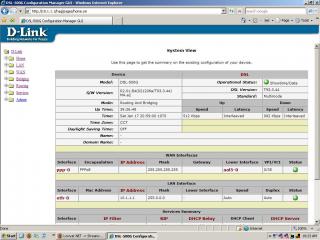
|
|
|
|
|
|
scorps
|
May 30 2007, 10:36 AM
|
|
|
QUOTE(phillys @ May 30 2007, 11:27 AM) Thanks for the reply. I have just tried that but unfortunately I couldn't see anything on the screen related to SNR Margin or Line Attenuation. Below is a screen shot of the system summary page. try find modem status in there, |
|
|
|
|
|
leelc99
|
May 30 2007, 10:48 AM
|
Getting Started
|
Try exploring your 10.1.1.1 web page slowly. You'll find your SNR Margin and Line Attenuation. Those two must be inside there somewhere. Dig 'em out.
|
|
|
|
|
|
adriankhoo153
|
May 31 2007, 11:51 AM
|
|
|
At last Telekom ppl change their cable liau. They say my cable kena lighting strike.. My snr from 2-4db shoot up to 29db. Stll in monitoring. Scared it will drop like last time.. But i am wondering this. If my SNR is outstanding why is my attenuation DS 56/ US 31? Attenuation 56 seems very high. But they change the whole cable. I should be getting a low attenuation and good SNR. But it seems i only get a good SNR but attenuation stay the same.   This post has been edited by adriankhoo153: May 31 2007, 02:44 PM This post has been edited by adriankhoo153: May 31 2007, 02:44 PM |
|
|
|
|
|
leelc99
|
May 31 2007, 02:48 PM
|
Getting Started
|
Just monitor your connection status enough. Don't worry about Line Attenuation. You should now have a stable and fast connection. =)
100 Roxxor!
|
|
|
|
|
|
adriankhoo153
|
May 31 2007, 10:03 PM
|
|
|
Hmm, drop to 18db at night..But still ok..
|
|
|
|
|
|
smwah
|
May 31 2007, 11:30 PM
|
Glad to be Here

|
What if my connection is like every minute the adsl no signal. Meaning like connected but then less than or one minute lost signal. THen back again but lost signal again. It keeps repeat and repeat. Untill u can't have a 5 minutes suft net chances.
ANything do with MTU and MRU?
Added on May 31, 2007, 11:30 pmWhat if my connection is like every minute the adsl no signal. Meaning like connected but then less than or one minute lost signal. THen back again but lost signal again. It keeps repeat and repeat. Untill u can't have a 5 minutes suft net chances.
ANything do with MTU and MRU?
This post has been edited by smwah: May 31 2007, 11:30 PM
|
|
|
|
|
|
Xybirium
|
Jun 1 2007, 12:58 AM
|
|
|
That is Streamyx connection bad. Try to switch to G.Lite modulation and see if it improves your connection.
|
|
|
|
|
|
xenogears86
|
Jun 1 2007, 02:52 AM
|
Getting Started
|
DSL Parameter DSL Parameters and Status Vendor ID: 00B5GSPN Revision Number: Y1.16.3 Serial Number: 123456789abcdx Local Tx Power: 12.13 dB Remote Tx Power: 16.62 dB Local Line Atten.: 54.5 dB Remote Line Atten.: 29.5 dB Local SNR Margin: 9.0 dB Remote SNR Margin: 19.0 dB Self Test: Passed DSL Standard: G.dmt Trellis Coding: Enable Framing Structure: Framing-3 Config Data Up Down Intrlvd Fast Intrlvd Fast AS0(kbps): - - 1024 0 AS1(kbps): - - 0 0 LS0(kbps): 512 0 - - LS1(kbps): 0 0 - - RValue: 16 0 16 0 SValue: 8 4 DValue: 2 4 |
|
|
|
|
|
smwah
|
Jun 1 2007, 07:18 AM
|
Glad to be Here
|
I can't use GLITE, as I won't able to get adsl signal on it. I only use multi and GDMT.
I still don't understand why the connection so bad. The adsl keep blinking every minute. Using phone no problem.
|
|
|
|
|
|
ohthelag
|
Jun 1 2007, 11:19 AM
|
New Member
|
QUOTE(smwah @ May 31 2007, 11:30 PM) What if my connection is like every minute the adsl no signal. Meaning like connected but then less than or one minute lost signal. THen back again but lost signal again. It keeps repeat and repeat. Untill u can't have a 5 minutes suft net chances. ANything do with MTU and MRU?
Added on May 31, 2007, 11:30 pmWhat if my connection is like every minute the adsl no signal. Meaning like connected but then less than or one minute lost signal. THen back again but lost signal again. It keeps repeat and repeat. Untill u can't have a 5 minutes suft net chances. ANything do with MTU and MRU? mine just happens to be like urs suddenly this 2 days. wondering if its tmnet's problem again. or my modem...  |
|
|
|
|



 Quote
Quote


 0.0353sec
 0.36
0.36
 6 queries
 GZIP Disabled