QUOTE(Auwen @ Jul 11 2012, 11:27 AM)
hello, new to here. i had some problems. coz i had realize lately when i wanna to install astro beyond PVR which require two cable and there need to make another hole n conceal the cable. i had prepare only one cable. so i would like to change to ASTRO beyond HD. which is normal. and after i seek some advice, there had a product call ASTRO PVR EASY, which is external hard drive and provide thje recorded services.
so far , if astro dun had this stock, where can i get it? coz i got some info. from contractor which saying tat the product is similar to the Western DIgital product.
anyone know the model???
thx...
Hi !
Either you have some difficulty in explaining to us here or confused, probably caused by too many people giving too many different advice to you. No problem. Maybe I am the only one who did not understand you properly, hehe.
Anyway, eventhough I did explain here before, I have some points or opinions which I wish to let you know.
Astro recording services CAN record from both SD and HD channels. Even without subscribing to Astro "HD Service", we can still record from just SD channels by using either one of the two Byond boxes... Byond box or the Byond PVR box.
A bit of confusion from the acronym "PVR" which can mean either "Personal Video Recorder" which refers to the decoder box OR "Personal Video Recording" which refers to the recording function/ability.
When you say "
wanna to install astro beyond PVR", are you referring to the recording service or the actual Byond PVR box ?
Ok... please correct me if I am wrong so this is what I "think" you have explained...
a) Presently you are using the old Astro DMT decoder box which can only receive SD channels and totally cannot do recording.
b) You planned to upgrade to the Byond PVR box (already with built-in harddisk) but found out that it needs TWO satellite cables to connect to LNB at dish. Because you only have 1 cable that is already laid "in-wall", you don't want to use 2nd cable because of problems hiding it on the walls ! So... you decide NOT to upgrade to Byond PVR box.
c) You have now decided to upgrade to Byond box and you knew that Byond PVR EASi is needed but worry that it may be out-of-stock. Just in case no stock, you want to know what other independent external USB hardddisk brand and model that is compatible.I do not know whether you have upgraded your box or not. So I am guessing that you have NOT upgraded yet and planning to do it later. Therefore, I would like you to be clear about a few things first which may affect your decision.
Below are more info for you which you may have missed...
The Byond PVR boxHave internal 500 GB harddisk so no need to spend extra $$ to buy any external harddisk. Many more hours of recording when compared to the other Byond box. It can record 2 channels at the same time because it have 2 tuners so this is why it need 2 satellite cable connections ! Also have immediate rewind function such as rewind immediately to watch a footbal goal during a Live Telecast of a football match. BUT, don't let me scare you, I have heard from so many cases here, actually happened to many of my friends and from an Astro installer that the Byond PVR don't last long... some got problems after only 1 month !
I may be wrong... I think most of the problems are... (1) the internal harddisk that cannot "tahan" the constant torture of continually recording non-stop for many many hours everyday because of the "fast, immediate rewind" function (Our PC harddisk together with smart "sleep" function have much much less torture because we don't save and read files on the harddisk non-stop continuously for many hours)... (2) its hotter so overheat, the internal fan is not enough and I have actually seen a few of my friends who put the Byond PVR inside beautiful cabinet below the HDTV and with glass door closed ! Not recommended because more ventilation needed (best if outside, open air)... (3) Byond PVR internal board and chip problem.
The Byond boxWell... you already knew that it have no internal harddisk and need Byond PVR EASi or Western Digital My Passport AV external harddisk BUT both are only 320 GB capacity. Aah... recording hours is therefore much less when compared to Byond PVR. It can record from ONLY 1 channel and no immediate rewind function.
Yes, I understood that you want recording BUT you can also record for SD channels eventhough did not subscribe to HD service. Is watching HD channels with great audio/video quality important for you ? If yes, then pay extra RM 20 per month for HD Service for people who did not subscribe to SuperPack.
So... if you think you want recording mostly for SD channels only and don't need to watch HD channels, then do NOT get HD service. You only cannot record from HD channels without HD Service.
Finally, if you have already upgraded and installed the Byond box, then a lot I have mentioned here do not have any useful purpose anymore. What is needed is just to buy the Byond PVR EASi box from Astro (should be RM 80, I think). One guy posted here previously that he searched everywhere, including from PC shops in Low Yat Plaza, and could not find the WD Passport AV for sale which I believe is no longer manufactured. Most nowadays are minimum 500GB ones. I believe you cannot use other capacities such as... 320GB from other brands or... 500GB/1TB capacities although I did not test it because I did not subscribe to Recording Service.
Don't worry about not able to get the Byond PVR EASi box, just tell the Astro Customer Support person and pretend to sound very unhappy that you already cannot find the WD Passport AV after searching everywhere, also complain its unfair to pay extra for Recording Service because its not your fault that the compatible harddisk is NOT available now... ahh... force them to find one PVR EASi for you... maybe only problem is waiting for a much longer time to get it, hehe, maybe 2 weeks or months ! Of course no need to wait if got stocks. I have 2 WD My Passport AV 320GB but its for my PC use and not for sale, hehehe.
» Click to show Spoiler - click again to hide... «
Ooh... you did not ask now but maybe in future you may also ask whether you can copy the recorded files in the harddisk to the computer to play !! Many many people have already asked this question in many places and have already tried BUT my short answer is NO ! A person here did ask here some time ago but I did not answer because I don't know if its okay or not to discuss more about it here (together with sample pics of folders). Hehe... the STR files are encrypted with protection (a special DRM) and special codec encoding is used... various methods have been tried.
 This post has been edited by jamesleetech: Jul 11 2012, 09:23 PM

 Jul 10 2012, 03:05 PM


 Quote
Quote


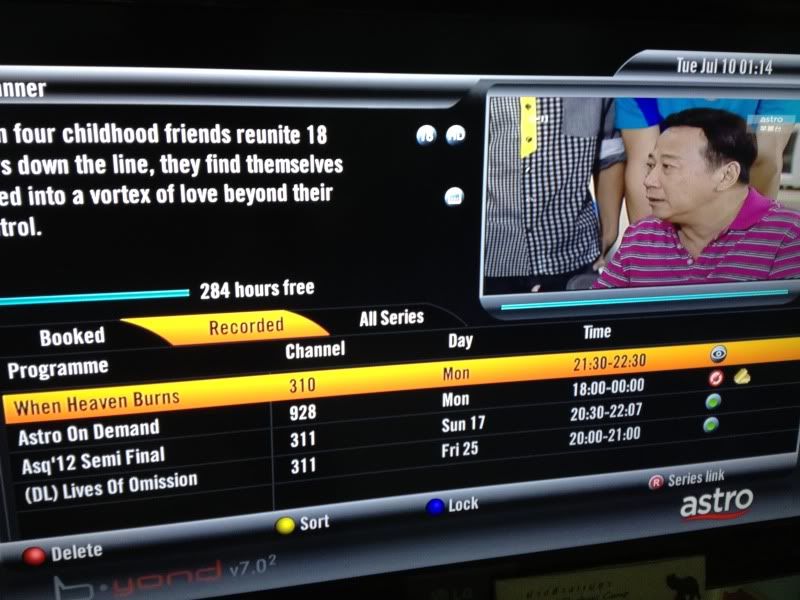

 How come the show recorded is shown as "Astro on Demand" instead of the TV series name?
 Deleted show also still have title?









 yea, I guess so...


 0.0190sec
 0.76
0.76
 6 queries
 GZIP Disabled