Welcome Guest ( Log In | Register )

176 Pages « < 129 130 131 132 133 > » Bottom

Outline · [ Standard ] · Linear+

Enterprise Networking Mikrotik Routers (RouterBoard & RouterOS), User and owner discussion group

views
     
go626201
post Jun 14 2022, 05:14 PM

Regular
******
Senior Member
1,882 posts

Joined: Sep 2017
QUOTE(soonwai @ Jun 14 2022, 04:45 PM)
Still setting up the RB5009 so min config at the moment. Basic firewall, no queues, Fasttrack is off, bridge VLAN filtering is on for 500, 600, 50 (my LAN) and 50+600 trunk to downstairs.

You use waveform to test? I alternate between A or A+.
https://www.waveform.com/tools/bufferbloat?...67-53fcae3768a8

My BTU is Huawei HG8240w but it shouldn't make any difference.
*
Ya waveform,i think yours download speed not running full speed so the latency not affected,mine during test totally eat 800+mbps dl and 200mbps+ up speed,so the latency is affected.
Later I try to limit my speed to see got difference or not.

QUOTE(OlgaC4 @ Jun 14 2022, 05:02 PM)
Replace free mah. So pandai pandai lah
*
Dont know use what reason the force them to replace...Since I cant pretend btu broken without btu off...
So nvm la,just wait for a few more years when they introduce higher plan then at that time btu must be change.

This post has been edited by go626201: Jun 14 2022, 05:16 PM
soonwai
post Jun 14 2022, 05:28 PM


********
All Stars
11,459 posts

Joined: Oct 2007
From: KL


QUOTE(go626201 @ Jun 14 2022, 05:14 PM)
Ya waveform,i think yours download speed not running full speed so the latency not affected,mine during test totally eat 800+mbps dl and 200mbps+ up speed,so the latency is affected.
Later I try to limit my speed to see got difference or not.
Dont know use what reason the force them to replace...Since I cant pretend btu broken without btu off...
So nvm la,just wait for a few more years when they introduce higher plan then at that time btu must be change.
*
This waveform test, can select server? I keep getting 200-300Mbps only.

Tried again got 760Mbps but upload 50Mbps.
https://www.waveform.com/tools/bufferbloat?...f9-d765420083e8

This post has been edited by soonwai: Jun 14 2022, 05:30 PM
go626201
post Jun 14 2022, 05:33 PM

Regular
******
Senior Member
1,882 posts

Joined: Sep 2017
QUOTE(soonwai @ Jun 14 2022, 05:28 PM)
This waveform test, can select server? I keep getting 200-300Mbps only.

Tried again got 760Mbps but upload 50Mbps.
https://www.waveform.com/tools/bufferbloat?...f9-d765420083e8
*
I think nope,seems like your unifi ip range not getting stable routing to the server.

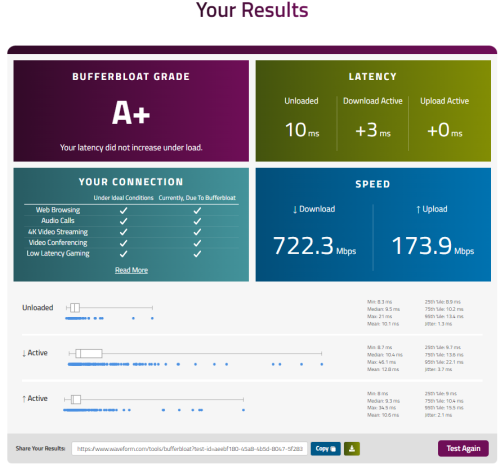
And i just tried simple queue with 90% speed limit - 750M and 180M ,and the result is good.

https://www.waveform.com/tools/bufferbloat?...47-5f2837d2ebe1

user posted image
MC_Amig0
post Jun 26 2022, 11:05 PM

Casual
***
Junior Member
456 posts

Joined: Nov 2005
From: KL-Dungun


hi all sifus,

I finished setup my hAP ac router to connect to TM Unifi by following guide from website.

now, i want to setup multiple VLAN, such as my kids connect to vlan01, my IoT to connect to vlan02, and myself connect to vlan03.

i am afraid to mess around with the router.. any good guide i can follow?
thanks
cwtien
post Jun 29 2022, 04:03 PM

Casual
***
Junior Member
477 posts

Joined: Jan 2003
From: Seri Kembangan


QUOTE(MC_Amig0 @ Jun 26 2022, 11:05 PM)
hi all sifus,

I finished setup my hAP ac router to connect to TM Unifi by following guide from website.

now, i want to setup multiple VLAN, such as my kids connect to vlan01, my IoT to connect to vlan02, and myself connect to vlan03.

i am afraid to mess around with the router.. any good guide i can follow?
thanks
*
If you're planning to setup VLAN, I only have 3 advices to give -
1- export your configuration regularly.
2- make sure you know how to reset your router.
3- Leave yourself a backdoor (designate a network port for emergency use).

I made a mistake earlier changing some VLAN settings and locked myself out of the router, as my PC does not support VLAN tagging. I had to do a hard reset.
PRSXFENG
post Jun 29 2022, 05:00 PM

Look at all my stars!!
*******
Senior Member
2,613 posts

Joined: Nov 2020


QUOTE(cwtien @ Jun 29 2022, 04:03 PM)
If you're planning to setup VLAN, I only have 3 advices to give -
1- export your configuration regularly.
2- make sure you know how to reset your router.
3- Leave yourself a backdoor (designate a network port for emergency use).

I made a mistake earlier changing some VLAN settings and locked myself out of the router, as my PC does not support VLAN tagging.  I had to do a hard reset.
*
PS, both Realtek and Intel NIC's support VLAN Tagging

For Realtek, download Realtek Ethernet Diagnostic Utility, there are VLAN options in there
For Intel, download Intel ANS (Advanced Network Services), the VLAN options will be in device manager tabs

This post has been edited by PRSXFENG: Jun 29 2022, 05:02 PM
soonwai
post Jun 29 2022, 06:17 PM


********
All Stars
11,459 posts

Joined: Oct 2007
From: KL


Finally Mikrotik adds 802.11r (fast transition) to wifiwave2 in latest Routeros 7.4 beta5. Still no sign of k or v.

...and still no Capsman for wifiwave2. Hopefully they can add it before Russia invades Latvia.

Also Docker is back.


This post has been edited by soonwai: Jun 29 2022, 06:19 PM
soonwai
post Jun 30 2022, 10:11 PM


********
All Stars
11,459 posts

Joined: Oct 2007
From: KL


QUOTE(MC_Amig0 @ Jun 26 2022, 11:05 PM)
hi all sifus,

I finished setup my hAP ac router to connect to TM Unifi by following guide from website.

now, i want to setup multiple VLAN, such as my kids connect to vlan01, my IoT to connect to vlan02, and myself connect to vlan03.

i am afraid to mess around with the router.. any good guide i can follow?
thanks
*
Once upon a time I embarked on my vlan adventure with just the docs on wiki.mikrotik.com, a few Youtube tutorials and a post on klseet.com. (can find it here: https://forum.lowyat.net/index.php?showtopi...ost&p=87871705) This one too: https://forum.lowyat.net/topic/1733801/all

In fact that's how I got hooked onto Mikrotik, because I needed something that trunked vlan600(HyppTV) and my LAN from upstairs to downstairs. Shortsightedness resulted in yours truly having just one ethernet cable from the router to the living room TV.

Since you have everything working now, just save a router backup. Worst case, do a reset and restore the backup. As someone has mentioned before this, leave your one of your ethernet ports out of the bridge and vlans so you can always use that to go back in.
BlueWind
post Jun 30 2022, 10:32 PM

Sianzation
*******
Senior Member
2,901 posts

Joined: Jan 2007


I'm thinking to replace my existing router that started to show some age now. And here I am hoping that you guys can shed some opinion here whether Mikrotik suits me or not as I understand it has lots of features with steep learning curve and I am exploring my options.

I don't consider myself as advance user but I only know enough to get myself through any typical consumer grade routers. What I'm looking for is stable network throughout the house with up to 7-8 devices connected including gaming desktop which I am hooking up via ethernet currently.

I don't think I will need any other features as I don't know how to use them most of the time.

What I have in my mind right now is hAP ac2 or ac3 to pair with mesh wifi system. So, would you guys still advice someone like me to still go with Mikrotik? To be honest, I don't mind a little tinkering to get it work though.
blacktubi
post Jun 30 2022, 10:49 PM

-
Group Icon
Elite
8,421 posts

Joined: Jul 2008

QUOTE(BlueWind @ Jun 30 2022, 10:32 PM)
I'm thinking to replace my existing router that started to show some age now.  And here I am hoping that you guys can shed some opinion here whether Mikrotik suits me or not as I understand it has lots of features with steep learning curve and I am exploring my options.

I don't consider myself as advance user but I only know enough to get myself through any typical consumer grade routers. What I'm looking for is stable network throughout the house with up to 7-8 devices connected including gaming desktop which I am hooking up via ethernet currently.

I don't think I will need any other features as I don't know how to use them most of the time.

What I have in my mind right now is hAP ac2 or ac3 to pair with mesh wifi system. So, would you guys still advice someone like me to still go with Mikrotik? To be honest, I don't mind a little tinkering to get it work though.
*
If you care about stability, most modern consumer routers are really good these days.

The hAP ac2 and ac3 are not fast either. Most mid-range WiFi 6 routers have a much faster CPU with much better NAT performance.

Unless you love to tinker around, getting a typical consumer router is more practical.
BlueWind
post Jul 1 2022, 07:47 PM

Sianzation
*******
Senior Member
2,901 posts

Joined: Jan 2007


QUOTE(blacktubi @ Jun 30 2022, 10:49 PM)
If you care about stability, most modern consumer routers are really good these days.

The hAP ac2 and ac3 are not fast either. Most mid-range WiFi 6 routers have a much faster CPU with much better NAT performance.

Unless you love to tinker around, getting a typical consumer router is more practical.
*
Alright thanks for your input. thumbsup.gif
soonwai
post Jul 3 2022, 12:24 PM


********
All Stars
11,459 posts

Joined: Oct 2007
From: KL


QUOTE(BlueWind @ Jun 30 2022, 10:32 PM)
I'm thinking to replace my existing router that started to show some age now.  And here I am hoping that you guys can shed some opinion here whether Mikrotik suits me or not as I understand it has lots of features with steep learning curve and I am exploring my options.

I don't consider myself as advance user but I only know enough to get myself through any typical consumer grade routers. What I'm looking for is stable network throughout the house with up to 7-8 devices connected including gaming desktop which I am hooking up via ethernet currently.

I don't think I will need any other features as I don't know how to use them most of the time.

What I have in my mind right now is hAP ac2 or ac3 to pair with mesh wifi system. So, would you guys still advice someone like me to still go with Mikrotik? To be honest, I don't mind a little tinkering to get it work though.
*
Yeah, go for it. I am like you. Nothing in a consumer level router scares me. Then buy Mikrotik and thought what have I got myself into. Lucky got this thread, plenty of guides here and Google.

But seriously, steep learning curve yes but not for a basic Unifi setup. Basic setup is kacang putih. It's only when you want to start doing more with the router, that's when you need to break-out the search engine and wake up dormant parts of your brain.

btw, what speed is your internet? This will determine how powerful your router needs to be. But for basic setup, RB750Gr3, hAP AC2 or hAP AC3 all can do handle 1Gbps. Since you're using mesh AP, just get non-wifi RB750Gr3 to save a bit of money. hAP AC2 and AC3 are more or less the same routing speed. Both are faster than the RB750Gr3. If need more power, can go for RB4011 or RB5009. I'm using the RB5009 now having just upgraded from hAP ac2 and RB750Gr3 before that. Plus side: the RB5009 can be used as a weapon.

This post has been edited by soonwai: Jul 3 2022, 12:29 PM
BlueWind
post Jul 5 2022, 09:44 PM

Sianzation
*******
Senior Member
2,901 posts

Joined: Jan 2007


QUOTE(soonwai @ Jul 3 2022, 12:24 PM)
Yeah, go for it. I am like you. Nothing in a consumer level router scares me. Then buy Mikrotik and thought what have I got myself into. Lucky got this thread, plenty of guides here and Google.

But seriously, steep learning curve yes but not for a basic Unifi setup. Basic setup is kacang putih. It's only when you want to start doing more with the router, that's when you need to break-out the search engine and wake up dormant parts of your brain.

btw, what speed is your internet? This will determine how powerful your router needs to be. But for basic setup, RB750Gr3, hAP AC2 or hAP AC3 all can do handle 1Gbps. Since you're using mesh AP, just get non-wifi RB750Gr3 to save a bit of money. hAP AC2 and AC3 are more or less the same routing speed. Both are faster than the RB750Gr3. If need more power, can go for RB4011 or RB5009. I'm using the RB5009 now having just upgraded from hAP ac2 and RB750Gr3 before that. Plus side: the RB5009 can be used as a weapon.
*
I'm on 500mbps currently. When you say power, do you mean handling high traffic demand like say torrent?

I narrowed down my choices but I am still mulling between my options LOL. Would love to have more input so that I can decide better. thumbup.gif

asellus
post Jul 7 2022, 05:39 AM

#gompusas
Group Icon
Elite
4,541 posts

Joined: Jan 2003
From: BSRPPG51 Access Concentrator


New PoE switch from Mikrotik:-


hasmidzul_jojo
post Jul 7 2022, 08:54 AM

Getting Started
**
Junior Member
203 posts

Joined: Feb 2008
QUOTE(BlueWind @ Jul 5 2022, 09:44 PM)
Would love to have more input so that I can decide better.  thumbup.gif
*
Im on 300Mbps.Hap Ac2 would not do CAKE @300Mbps (fast track disable,wash 'on',diffserv 4) if you are planning to use it.
Just my 2 cents

BlueWind
post Jul 7 2022, 12:59 PM

Sianzation
*******
Senior Member
2,901 posts

Joined: Jan 2007


QUOTE(hasmidzul_jojo @ Jul 7 2022, 08:54 AM)
Im on 300Mbps.Hap Ac2 would not do CAKE  @300Mbps (fast track disable,wash 'on',diffserv 4) if you are planning to use it.
Just my 2 cents
*
What do you mean?
hasmidzul_jojo
post Jul 7 2022, 01:48 PM

Getting Started
**
Junior Member
203 posts

Joined: Feb 2008
QUOTE(BlueWind @ Jul 7 2022, 12:59 PM)
What do you mean?
*
Its a tool to combat bufferfloat.Just do a test using flent,maybe you dont need CAKE or other type of aqm.
soonwai
post Jul 7 2022, 03:16 PM


********
All Stars
11,459 posts

Joined: Oct 2007
From: KL


QUOTE(BlueWind @ Jul 5 2022, 09:44 PM)
I'm on 500mbps currently. When you say power, do you mean handling high traffic demand like say torrent?

I narrowed down my choices but I am still mulling between my options LOL. Would love to have more input so that I can decide better.  thumbup.gif
*
Normally I would look at routing speed in terms of bandwidth, Mbps and packets per second, pps. Also RAM. Well seeded torrent is a good test to stress a router. You can check the performance specs of MikroTik routers on their respective product page.

For normal user, if using Fasttrack (aka cut through forwarding, hardware NAT, NAT Boost, etc), even old RB750GL can handle 500Mbps.
soonwai
post Jul 7 2022, 05:47 PM


********
All Stars
11,459 posts

Joined: Oct 2007
From: KL


QUOTE(BlueWind @ Jul 7 2022, 12:59 PM)
What do you mean?
*
CAKE is a type of queue in RouterOS7. You can read more about it here. (https://help.mikrotik.com/docs/display/ROS/Queues). But don't worry about this too much. More advanced queues tend to be more CPU intensive. I just use the default only-hardware-queue.

Here's a page on buffer-bloat. https://www.bufferbloat.net/projects/bloat/...or_Bufferbloat/

Bufferbloat is like a traffic jam which results in increased latency when there's heavy sustained network traffic. For home users, chances are you'll only see this during speedtests, the occasional Steam download or a well seeded torrent.
BlueWind
post Jul 7 2022, 07:50 PM

Sianzation
*******
Senior Member
2,901 posts

Joined: Jan 2007


QUOTE(hasmidzul_jojo @ Jul 7 2022, 01:48 PM)
Its a tool to combat bufferfloat.Just do a test using flent,maybe you dont need CAKE or other type of aqm.
*
I see. That's something new for me. I'll check them out.

QUOTE(soonwai @ Jul 7 2022, 03:16 PM)
Normally I would look at routing speed in terms of bandwidth, Mbps and packets per second, pps. Also RAM. Well seeded torrent is a good test to stress a router. You can check the performance specs of MikroTik routers on their respective product page.

For normal user, if using Fasttrack (aka cut through forwarding, hardware NAT, NAT Boost, etc), even old RB750GL can handle 500Mbps.
*
QUOTE(soonwai @ Jul 7 2022, 05:47 PM)
CAKE is a type of queue in RouterOS7. You can read more about it here. (https://help.mikrotik.com/docs/display/ROS/Queues). But don't worry about this too much. More advanced queues tend to be more CPU intensive. I just use the default only-hardware-queue.

Here's a page on buffer-bloat. https://www.bufferbloat.net/projects/bloat/...or_Bufferbloat/

Bufferbloat is like a traffic jam which results in increased latency when there's heavy sustained network traffic. For home users, chances are you'll only see this during speedtests, the occasional Steam download or a well seeded torrent.
*
These are helpful. Thanks. notworthy.gif

176 Pages « < 129 130 131 132 133 > » Top
 

Change to:
| Lo-Fi Version
0.0294sec    1.20    6 queries    GZIP Disabled
Time is now: 18th December 2025 - 04:42 PM