Outline ·
[ Standard ] ·
Linear+
Enterprise Networking Mikrotik Routers (RouterBoard & RouterOS), User and owner discussion group
|
shahie
|
 Nov 9 2020, 09:29 PM Nov 9 2020, 09:29 PM
|

|
Hi
i'm very new to this Mikrotik. Currently using RB750gr3 for my unifi 500mbps with fasttrack enable. Now waiting my RB4011igs+rm probably reach me in this few days. just want to ask, do we still need fasttrack to be enable on this 1.4Ghz Quad core router? so far i have 2 unit Dlink 882 and 1 unit Dlink 3060 as an AP connected to my main wired router via utp CAT5e cable. system workload, user 3 ppl, unifi tv, iptv & my kid using for his online learning too. no torrent as well. thank you.
This post has been edited by shahie: Nov 9 2020, 09:30 PM
|
|
|
|
|
|
shahie
|
Dec 24 2020, 12:42 PM
|
|
|
QUOTE(cwtien @ Dec 24 2020, 11:41 AM) Hi, I am wondering if anyone else has encountered this issue with Unifi. I recently got a Mikrotik Hex S. Using this guide (https://www.mikrotik.com.my/setup-for-unifi/), I connected my Unifi cable to port 1. Unfortunately, I keep getting Unifi drops every 30 mins -> 2 hrs (message says "PPPOE: terminating... - failed to authenticate ourselves to peer"). I subsequently switched to port 4, did some reconfiguration, and this issue never happened again. Thinking I have a faulty port 1, I plugged in my switch LAN port to port 1, but have not been able to detect any CRC or packet drop issues in the history. My question is - has anyone else ever gotten issues with Hex S port 1 connecting to internet, and have resolved it (other than moving to another port)? have you tried 'reset' and 'no default configuration' check? means you begin from the stretch? |
|
|
|
|
|
shahie
|
Jan 13 2021, 03:00 PM
|
|
|
QUOTE(amirsubhi @ Jan 13 2021, 12:33 PM) I just notice that Mikrotik add wireguard in 7.1 beta  Have anyone try it? [attachmentid=10755313] any idea what is that for? |
|
|
|
|
|
shahie
|
Jan 14 2021, 06:14 AM
|
|
|
Hi... suddenly received the notification from my mikrotik at home, someone tried to login on mine. 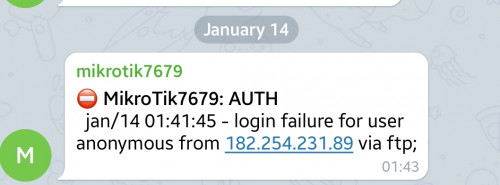 is this normal or risk when enabling remote login features? or just strengthen the password la? |
|
|
|
|
|
shahie
|
Jan 14 2021, 02:07 PM
|
|
|
QUOTE(soonwai @ Jan 14 2021, 01:29 PM) That's normal. There're tons of bots scanning all the time. Can use good username/password, port knocking or totally turn off services or use VPN. Of course last option will still expose one service. Then pray no vulnerabilities discovered. hahaha... tq sir. noted on that. |
|
|
|
|




 Quote
Quote

 0.0212sec
 0.60
0.60
 7 queries
 GZIP Disabled