Welcome Guest ( Log In | Register )

Bump Topic Topic Closed RSS Feed
124 Pages « < 118 119 120 121 122 > » Bottom

Outline · [ Standard ] · Linear+

 SAMSUNG GALAXY S II Official thread V12, NEW Users be SMARTuser - PLS read Page 1

views
     
mydragoon
post Sep 2 2011, 03:38 PM

Look at all my stars!!
*******
Senior Member
7,044 posts

Joined: Nov 2007


QUOTE(Fallenangelz @ Sep 2 2011, 03:33 PM)
Rm5 waive is not for paperless (in fact they charge more RM5 for the paper bill), but is waived for auto billing.
let say u make call n sms around RM20 per month, so its RM68 per month.

get the phone at 1699
68x12= 816
6 percent tax: 48.96
total: 2563.96

wink.gif
*
oh sorry... thought it was paperless... ya, i go for auto-billing... eh, wait... auto-billing means what? credit card payment isit?

oh well... it depends on a person's usage. smile.gif
waveweaver
post Sep 2 2011, 03:39 PM

★★Android & Apple★★
********
All Stars
13,192 posts

Joined: Jul 2011
From: Middle of Avalon
QUOTE(Fallenangelz @ Sep 2 2011, 03:27 PM)
ur phone koma izit   shocking.gif  shocking.gif
*
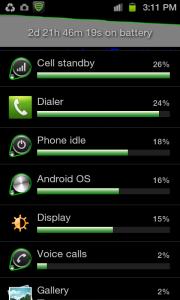
Not koma. Just disable my data network unless i'm updating something. Make calls and sms like usual and even play some Angry birds though only for short while

This post has been edited by waveweaver: Sep 2 2011, 03:46 PM


Attached thumbnail(s)
Attached Image
SUSdestEX
post Sep 2 2011, 03:40 PM

oink oink
*******
Senior Member
3,432 posts

Joined: Apr 2010


QUOTE(waveweaver @ Sep 2 2011, 03:39 PM)
Not koma. Just disable my data network unless i'm updating something. Make calls and sms like usual and even play some Angry birds though only for short while
*
i see you enabled power saving mode, you enable it all the time? auto mode or manual setting?
mydragoon
post Sep 2 2011, 03:40 PM

Look at all my stars!!
*******
Senior Member
7,044 posts

Joined: Nov 2007


QUOTE(Shizuru @ Sep 2 2011, 03:38 PM)
LOL.. confused now rclxub.gif
KH1 or 2 still no use if the stupid KIES keep time out while updating shakehead.gif
*
it's not time out... if i'm not mistaken, you get the same problem like i am...

if you look at kies connection (the part where it shows the phone is connected -- top left), when kies is downloading the software, it will turn from GT-9100 to something like 'no device detected'. means the connection to phone is disconnected.

so, firmware cannot be updated...


Added on September 2, 2011, 3:41 pm
QUOTE(destEX @ Sep 2 2011, 03:40 PM)
i see you enabled power saving mode, you enable it all the time? auto mode or manual setting?
*
i tot power saving mode is meant for low battery only...? like when battery at 30%?

This post has been edited by mydragoon: Sep 2 2011, 03:41 PM
SUSdestEX
post Sep 2 2011, 03:42 PM

oink oink
*******
Senior Member
3,432 posts

Joined: Apr 2010


QUOTE(mydragoon @ Sep 2 2011, 03:40 PM)
it's not time out... if i'm not mistaken, you get the same problem like i am...

if you look at kies connection (the part where it shows the phone is connected -- top left), when kies is downloading the software, it will turn from GT-9100 to something like 'no device detected'. means the connection to phone is disconnected.

so, firmware cannot be updated...


Added on September 2, 2011, 3:41 pm
i tot power saving mode is meant for low battery only...? like when battery at 30%?
*
sry if i'm wrong but did u guys try kies air? icon_idea.gif
80toyshop
post Sep 2 2011, 03:44 PM

New Member
*
Junior Member
44 posts

Joined: Sep 2011
From: Your 80's Toy Shop


i read by disabling auto sync update , can save more battery life too. anyways below are some tips i gather frm another forum to save battery life:

1. Disabled Samsung new app notification. Options>Applications>Samsung Apps> Off)

2. Disabled Back-up and Recovery (Options>Privacy>Back-up off) This made a HUGE difference)

3. Disabled Auto Background Sync -> Under Accounts and Sync Settings

4. Disabled Wake Up Command

5 . Vibrate Off except when Silent

6. WiFi and Bluetooth Off

7. Display Brightness to Lowest

haven't try all yet.
waveweaver
post Sep 2 2011, 03:45 PM

★★Android & Apple★★
********
All Stars
13,192 posts

Joined: Jul 2011
From: Middle of Avalon
QUOTE(destEX @ Sep 2 2011, 03:40 PM)
i see you enabled power saving mode, you enable it all the time? auto mode or manual setting?
*
Enable all the time. Auto mode kick in at 10% battery left
mydragoon
post Sep 2 2011, 03:47 PM

Look at all my stars!!
*******
Senior Member
7,044 posts

Joined: Nov 2007


QUOTE(destEX @ Sep 2 2011, 03:42 PM)
sry if i'm wrong but did u guys try kies air? icon_idea.gif
*
i tot kies air is to connect pc to phone directly? last time i tried... it took me like 5mins to transfer one small file... hmm... not sure if got firmware update or not...

actually... does this mean SGS2 cannot do FOTA? i tot there's a check updates option under settings -- about phone?
Shizuru
post Sep 2 2011, 03:48 PM

Newbie
*******
Senior Member
3,699 posts

Joined: May 2006


QUOTE(mydragoon @ Sep 2 2011, 03:40 PM)
it's not time out... if i'm not mistaken, you get the same problem like i am...

if you look at kies connection (the part where it shows the phone is connected -- top left), when kies is downloading the software, it will turn from GT-9100 to something like 'no device detected'. means the connection to phone is disconnected.

so, firmware cannot be updated...
*
So how to solve the problem.. sigh..


Added on September 2, 2011, 3:49 pm
QUOTE(mydragoon @ Sep 2 2011, 03:47 PM)
i tot kies air is to connect pc to phone directly? last time i tried... it took me like 5mins to transfer one small file... hmm... not sure if got firmware update or not...

actually... does this mean SGS2 cannot do FOTA? i tot there's a check updates option under settings -- about phone?
*
Tried that. its says no update..

This post has been edited by Shizuru: Sep 2 2011, 03:49 PM
mydragoon
post Sep 2 2011, 03:49 PM

Look at all my stars!!
*******
Senior Member
7,044 posts

Joined: Nov 2007


QUOTE(Shizuru @ Sep 2 2011, 03:48 PM)
So how to solve the problem.. sigh..
*
i honestly got no idea... i wanted to try out reinstalling kies... but too lazy... maybe this weekend.

i posted on Samsung MY FB... later see got reply or not.
cadmus
post Sep 2 2011, 03:50 PM

too long...
******
Senior Member
1,132 posts

Joined: Nov 2006
QUOTE(cadmus @ Sep 2 2011, 03:31 PM)
hi,

middle of recalibrating battery.

6.**Root users only** Using a Terminal Emulator, type “su” enter, followed by “rm /data/system/batterystats.bin” ( can also be done more easily through CWM or SGSTools app)
Already got SU.

earlier i put "“rm/data/system/batterystats.bin” and this produce file not found. The spacing right after "rm" was missing.

then when type the “rm /data/system/batterystats.bin”, no response to it. It just goes to the next "#" line. Does that means it was succesfully done?
*
help? thanks biggrin.gif
mydragoon
post Sep 2 2011, 03:53 PM

Look at all my stars!!
*******
Senior Member
7,044 posts

Joined: Nov 2007


QUOTE(destEX @ Sep 2 2011, 03:42 PM)
sry if i'm wrong but did u guys try kies air? icon_idea.gif
*
ok... can't even connect to my phone from kies. last time i tried... copying a small file (less than 1mb took more than 5mins).

*sigh*

seems anything with the word kies is jinxed and bad news...
SUSdestEX
post Sep 2 2011, 03:55 PM

oink oink
*******
Senior Member
3,432 posts

Joined: Apr 2010


QUOTE(cadmus @ Sep 2 2011, 03:50 PM)
help? thanks biggrin.gif
*
go market download app called battery calibration, then use it to delete the battery stats
Shizuru
post Sep 2 2011, 03:57 PM

Newbie
*******
Senior Member
3,699 posts

Joined: May 2006


QUOTE(mydragoon @ Sep 2 2011, 03:49 PM)
i honestly got no idea... i wanted to try out reinstalling kies... but too lazy... maybe this weekend.

i posted on Samsung MY FB... later see got reply or not.
*
I've reinstall KIES. now it cant even detect my phone. Awesome doh.gif
Restarting my PC yawn.gif
cadmus
post Sep 2 2011, 03:59 PM

too long...
******
Senior Member
1,132 posts

Joined: Nov 2006
QUOTE(destEX @ Sep 2 2011, 03:55 PM)
go market download app called battery calibration, then use it to delete the battery stats
*
If i use the app now, would it be inaccurate already this round? Cos it was about 45 minutes when i on back my phone.

the steps i took, may i know what is the output of the statement i keyed in? any responses? or just nothing?
Fallenangelz
post Sep 2 2011, 04:00 PM

24 Hours a day just isn't enough.
*******
Senior Member
3,221 posts

Joined: Sep 2008
From: KL


QUOTE(Shizuru @ Sep 2 2011, 03:57 PM)
I've reinstall KIES. now it cant even detect my phone. Awesome doh.gif
Restarting my PC yawn.gif
*
did u try reinstall the drivers for ur SGSII?
Shizuru
post Sep 2 2011, 04:02 PM

Newbie
*******
Senior Member
3,699 posts

Joined: May 2006


QUOTE(Fallenangelz @ Sep 2 2011, 04:00 PM)
did u try reinstall the drivers for ur SGSII?
*
how to do that? didn't reinstall anything on sgs2.
lol.. didn't thought it will be this complicated sweat.gif
waveweaver
post Sep 2 2011, 04:04 PM

★★Android & Apple★★
********
All Stars
13,192 posts

Joined: Jul 2011
From: Middle of Avalon
QUOTE(80toyshop @ Sep 2 2011, 03:44 PM)
i read by disabling auto sync update , can save more battery life too. anyways below are some tips i gather frm another forum to save battery life:

1. Disabled Samsung new app notification. Options>Applications>Samsung Apps> Off)

2. Disabled Back-up and Recovery (Options>Privacy>Back-up off) This made a HUGE difference)

3. Disabled Auto Background Sync -> Under Accounts and Sync Settings

4. Disabled Wake Up Command

5 . Vibrate Off except when Silent

6. WiFi and Bluetooth Off

7. Display Brightness to Lowest

haven't try all yet.
*
+ 1

And also
1) Disable all auto scroll and auto update on widgets that sits at homescreen. Do it manually or when necessary.
2) Exit apps properly instead of kill/closed it like latitude.

p/s. i haven't disable backup and recovery as i still need it, just in case the phone went balistic.

Fallenangelz
post Sep 2 2011, 04:05 PM

24 Hours a day just isn't enough.
*******
Senior Member
3,221 posts

Joined: Sep 2008
From: KL


QUOTE(Shizuru @ Sep 2 2011, 04:02 PM)
how to do that? didn't reinstall anything on sgs2.
lol.. didn't thought it will be this complicated sweat.gif
*
run kies, then option there got "reinstall driver". forgotten located under which thing d, this shit reli gives me a lot of heart attack doh.gif
mydragoon
post Sep 2 2011, 04:05 PM

Look at all my stars!!
*******
Senior Member
7,044 posts

Joined: Nov 2007


QUOTE(Shizuru @ Sep 2 2011, 04:02 PM)
how to do that? didn't reinstall anything on sgs2.
lol.. didn't thought it will be this complicated sweat.gif
*
i think this is not on the phone side. from your windows PC, basically delete any sgs2 drivers and let the pc detect the phone again... like new.

added:
ooops... wrong advice.


Added on September 2, 2011, 4:07 pm
QUOTE(waveweaver @ Sep 2 2011, 04:04 PM)
+ 1

And also
1) Disable all auto scroll and auto update on widgets that sits at homescreen. Do it manually or when necessary.
2) Exit apps properly instead of kill/closed it like latitude.

p/s. i haven't disable backup and recovery as i still need it, just in case the phone went balistic.
*
doing all that... won't it make the smartphone dumb? smile.gif

This post has been edited by mydragoon: Sep 2 2011, 04:07 PM

124 Pages « < 118 119 120 121 122 > » Top
Topic ClosedOptions
 

Change to:
| Lo-Fi Version
0.0302sec    0.45    6 queries    GZIP Disabled
Time is now: 2nd December 2025 - 07:18 AM