

QUOTE(pikachu01 @ Oct 11 2011, 12:30 AM)
saw it just now.. nice.. gratz! 
Samsung Galaxy S i9000 Official Thread V20, Super AMOLED Screen with Gorilla Glass!
|
|
 Oct 11 2011, 12:33 AM Oct 11 2011, 12:33 AM
|
 
Senior Member
1,852 posts Joined: Jun 2010 From: Alor Setar, Kedah. Live: Kangar, Perlis.  
|
QUOTE(pikachu01 @ Oct 11 2011, 12:30 AM) saw it just now.. nice.. gratz! |
|
|
|
|
|
Oct 11 2011, 12:33 AM
|

Senior Member
666 posts Joined: Oct 2006 From: Klang 
|
QUOTE(ken2291 @ Oct 11 2011, 12:29 AM) dropped my SGS on the floor jz nw. straight on the screen flat... luckily din break it had lots of close call myself for the past year or so too. well.. what can i say  haha |
|
|
Oct 11 2011, 12:55 AM
|
|
Senior Member
1,852 posts Joined: Jun 2010 From: Alor Setar, Kedah. Live: Kangar, Perlis.
|
after a year plus using sgs.. just now i visit the Cynagenmod website.. read the changelog, kinda interesting.. been looking for it screen shot to view the look, found nothing.. can someone point me where?
also.. what's the diff btween "stable" & "nightly"? and referring to thread inside XDA.. mentioned CODE First time flashing CM 7 to your Galaxy S (or coming from another ROM)? 1. Root your device and install ClockworkMod Recovery. 2. Reboot into Recovery using 3-button-combo 3. Do a Nandroid backup! 4. WIPE (wipe data/factory reset + wipe cache partition) 5. Install the ROM from internal sdcard using ClockworkMod Recovery 6. Optionally install the Google Addon and my question is.. 1) nandroid backup is important? if i didnt do any backup? ok? 2) what's google addon? if i don't install it?  |
|
|
Oct 11 2011, 01:00 AM
|

Senior Member
1,510 posts Joined: Dec 2006 From: Penang
|
Nandroid backup is there to make sure that if something goes wrong, you can still recover it by doing a restore.
Google addons are those Google apps like Youtube, Google Search etc. Updated my siggy  |
|
|
Oct 11 2011, 01:06 AM
|
|
Senior Member
1,852 posts Joined: Jun 2010 From: Alor Setar, Kedah. Live: Kangar, Perlis.
|
oic.. now i understand..
so i assume, the CM7 7.1 is the 1st stable released? |
|
|
Oct 11 2011, 01:09 AM
|

Senior Member
695 posts Joined: Jan 2008
|
QUOTE(gajahwhite @ Oct 11 2011, 01:06 AM) oic.. now i understand.. for SGS, yea. but nightlys are stable for everyday use too. CM7 uses ADW launcher, so u can install ADW themes. it looks like stock android.so i assume, the CM7 7.1 is the 1st stable released? |
|
|
|
|
|
Oct 11 2011, 01:19 AM
|
|
Senior Member
1,852 posts Joined: Jun 2010 From: Alor Setar, Kedah. Live: Kangar, Perlis.
|
oic.. i understand that CM7 got "Theme Chooser" inside it also right? i tot the Theme Chooser only work with AOSP?
|
|
|
Oct 11 2011, 01:58 AM
|

Senior Member
2,908 posts Joined: Nov 2008 From: Planet Earth
|
QUOTE(gajahwhite @ Oct 11 2011, 12:55 AM) after a year plus using sgs.. just now i visit the Cynagenmod website.. read the changelog, kinda interesting.. been looking for it screen shot to view the look, found nothing.. can someone point me where? Jz look for CM7 in YouTube and u'll get to see d video.also.. what's the diff btween "stable" & "nightly"? and referring to thread inside XDA.. mentioned CODE First time flashing CM 7 to your Galaxy S (or coming from another ROM)? 1. Root your device and install ClockworkMod Recovery. 2. Reboot into Recovery using 3-button-combo 3. Do a Nandroid backup! 4. WIPE (wipe data/factory reset + wipe cache partition) 5. Install the ROM from internal sdcard using ClockworkMod Recovery 6. Optionally install the Google Addon and my question is.. 1) nandroid backup is important? if i didnt do any backup? ok? 2) what's google addon? if i don't install it? Stable release means stable lah Nightlies are updates released regularly. Like our newspapers - dailies QUOTE(gajahwhite @ Oct 11 2011, 01:19 AM) oic.. i understand that CM7 got "Theme Chooser" inside it also right? i tot the Theme Chooser only work with AOSP? CM7 is AOSP |
|
|
Oct 11 2011, 07:36 AM
|
|
Senior Member
1,852 posts Joined: Jun 2010 From: Alor Setar, Kedah. Live: Kangar, Perlis.
|
oic.. thx2..
wondering if CM7 got "not working" thingy or not? like no 720 video recording? or all fine? |
|
|
Oct 11 2011, 07:55 AM
|

Junior Member
191 posts Joined: Sep 2008 From: gombak.
|
QUOTE Supposedly the Galaxy S III will bring to the table a Exynos 4212 1.8 GHz dual core (sorry not quad core just yet) processor, twinned with 2GBs of RAM. There's also a 4.6 inch Super AMOLED HD display that will provide HD resolution without the PenTile technology found in the current Samsung screens and to finish the list off, the upcoming S will supposedly have a whopping 12MP camera utilizing a W750 BSI CMOS sensor for image control. http://www.gsmarena.com/samsung_galaxy_s_i...e-news-3256.php this is too good to be true. especially the design is more like a Wave phone. 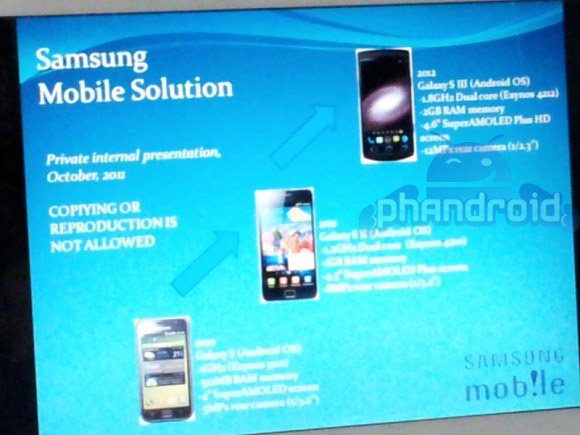 |
|
|
Oct 11 2011, 08:51 AM
|

Junior Member
363 posts Joined: Jan 2010
|
QUOTE a 99% certainty that it will be running the latest Ice Cream Sandwich build of Google's mobile OS.  tempting but don't know the price range..time for S's price to drop again tempting but don't know the price range..time for S's price to drop again  |
|
|
Oct 11 2011, 09:17 AM
|
|
Senior Member
1,852 posts Joined: Jun 2010 From: Alor Setar, Kedah. Live: Kangar, Perlis.
|
wew.. samsung too fast
This post has been edited by gajahwhite: Oct 11 2011, 09:18 AM |
|
|
Oct 11 2011, 09:27 AM
|

Junior Member
107 posts Joined: Jun 2008 From: Batu Caves Selangor 
|
to all sifu here !!!
after flashed to CM7...then i install (google apps) . all success . only YOUTUBE app was missing..!! anyone experience like me.??? i download Youtube.apk to sdcard, then install it.. the apps become Force Close (process com.google.android.youtube) need help from sifu here..!!!  |
|
|
|
|
|
Oct 11 2011, 09:38 AM
|

Junior Member
328 posts Joined: Feb 2010 From: Wonderland
|
QUOTE(gajahwhite @ Oct 11 2011, 12:55 AM) after a year plus using sgs.. just now i visit the Cynagenmod website.. read the changelog, kinda interesting.. been looking for it screen shot to view the look, found nothing.. can someone point me where? 1) yes for some of the people who lazy to wipe data if got any problem. me, never done any. LOLalso.. what's the diff btween "stable" & "nightly"? and referring to thread inside XDA.. mentioned CODE First time flashing CM 7 to your Galaxy S (or coming from another ROM)? 1. Root your device and install ClockworkMod Recovery. 2. Reboot into Recovery using 3-button-combo 3. Do a Nandroid backup! 4. WIPE (wipe data/factory reset + wipe cache partition) 5. Install the ROM from internal sdcard using ClockworkMod Recovery 6. Optionally install the Google Addon and my question is.. 1) nandroid backup is important? if i didnt do any backup? ok? 2) what's google addon? if i don't install it? 2) gapps = google apps. all those google apps like market, google voice..... QUOTE(gajahwhite @ Oct 11 2011, 07:36 AM) oic.. thx2.. 720p not working, no 3g video call so far the biggest problem. ohya and ty-out too.wondering if CM7 got "not working" thingy or not? like no 720 video recording? or all fine? QUOTE(buffallo_soldier @ Oct 11 2011, 09:27 AM) to all sifu here !!! yes this is normal after download the gapps file look inside the zipfile see whether youtube.apk is inside or not if no just install it in market.after flashed to CM7...then i install (google apps) . all success . only YOUTUBE app was missing..!! anyone experience like me.??? i download Youtube.apk to sdcard, then install it.. the apps become Force Close (process com.google.android.youtube) need help from sifu here..!!! |
|
|
Oct 11 2011, 09:52 AM
|

Senior Member
3,158 posts Joined: Dec 2006
|
i have read all the front page...but still dont understand... to many things to ask since im purely new in this flash thingy. well guess im not fortunate to do it by myself.
|
|
|
Oct 11 2011, 09:56 AM
|
|
Junior Member
328 posts Joined: Feb 2010 From: Wonderland
|
QUOTE(normeck @ Oct 11 2011, 09:52 AM) i have read all the front page...but still dont understand... to many things to ask since im purely new in this flash thingy. well guess im not fortunate to do it by myself. what do you want to know? flash a rom? or a custom rom? check my siggy for flashing rom. |
|
|
Oct 11 2011, 10:23 AM
|
|
Senior Member
3,158 posts Joined: Dec 2006
|
QUOTE(ic3joker @ Oct 11 2011, 09:56 AM) what do you want to know? flash a rom? or a custom rom? check my siggy for flashing rom. nvm...i will ask someone else...even i dont know what is ROM you said about. is Gingerbread ROM? what is CyganMOD? same like Gingerbread? need to revert to stock ROM when flash new ROM? ROM and kernel same things?hohohoh...nvm... |
|
|
Oct 11 2011, 10:32 AM
|

Junior Member
85 posts Joined: Apr 2010
|
QUOTE(pikachu01 @ Oct 10 2011, 05:08 PM) Try flashing a modem (i.e. XXJVS/XXJVT) from Perka's stash? Heard it will resolve the problem. Pikachu, I tried to flash JVT modem from Perka, but result still the same, I actually re-flashed to DXJV9 (Malaysia Official Rom) but no luck. Sifus out there, any idea how to get back my IMEI? Thanks |
|
|
Oct 11 2011, 10:32 AM
|
|
Junior Member
328 posts Joined: Feb 2010 From: Wonderland
|
QUOTE(normeck @ Oct 11 2011, 10:23 AM) nvm...i will ask someone else...even i dont know what is ROM you said about. is Gingerbread ROM? what is CyganMOD? same like Gingerbread? need to revert to stock ROM when flash new ROM? ROM and kernel same things? Ok to be simple, all those gingerbread rom 2.3, froyo 2.2 are stock rom which create by samsung using google code, original rom for our phone, cyanogenmod is a custom rom which base on google code, we call them AOSP rom, or in simple, custom rom, made by people, not officially from google or samsung. no need to revert back to stock rom if you wanna flash a rom. rom and kernel are two different thing. try read this, http://forum.xda-developers.com/wiki/index...e=ROM-VS-Kernelhohohoh...nvm... http://www.mydroidworld.com/forums/how-tos...bootloader.html |
|
|
Oct 11 2011, 10:36 AM
|
|
Senior Member
2,908 posts Joined: Nov 2008 From: Planet Earth
|
QUOTE(fuadsyazwan @ Oct 11 2011, 07:55 AM) http://www.gsmarena.com/samsung_galaxy_s_i...e-news-3256.php I doubt it. Will Samsung use non-transparent background for their phones in ads? and Engadget says it's probably a fake coz Samsung uses the term HD Super AMOLED Plus, not Super AMOLED Plus HD this is too good to be true. especially the design is more like a Wave phone.  QUOTE(normeck @ Oct 11 2011, 10:23 AM) nvm...i will ask someone else...even i dont know what is ROM you said about. is Gingerbread ROM? what is CyganMOD? same like Gingerbread? need to revert to stock ROM when flash new ROM? ROM and kernel same things? read 1st page thoroughly. if u come thru some words which u don understand, refer to post #8 Dictionary and Jargons on 1st page. Google if the terms are not there.. Lastly, ask us hohohoh...nvm... |
|
Topic ClosedOptions
|
| Change to: |  0.0268sec 0.0268sec
 0.68 0.68
 6 queries 6 queries
 GZIP Disabled GZIP Disabled
Time is now: 10th December 2025 - 03:30 PM |
 Quote
Quote