Welcome Guest ( Log In | Register )

Bump Topic Topic Closed RSS Feed
132 Pages « < 16 17 18 19 20 > » Bottom

Outline · [ Standard ] · Linear+

 SAMSUNG GALAXY S II Official thread V11, NEW Users be SMARTuser - PLS read Page 1

views
     
waveweaver
post Aug 10 2011, 03:20 PM

★★Android & Apple★★
********
All Stars
13,192 posts

Joined: Jul 2011
From: Middle of Avalon
QUOTE(erymanthus @ Aug 10 2011, 03:10 PM)
Same here, only got View Contact and Delete Thread option.....but don't press the Delete Thread coz it deletes all your previous smses to that person and NOT only the draft sms....be careful...
*
Ohh., ya lor.

Hmm, look like it's still a problem. Anyone with more magic spell know how to solve this? :-(
mydragoon
post Aug 10 2011, 03:22 PM

Look at all my stars!!
*******
Senior Member
7,044 posts

Joined: Nov 2007


QUOTE(Fallenangelz @ Aug 10 2011, 03:19 PM)
try go sms smile.gif
*
aiyoh... dun wanna install any un-necessary apps if possible. i guess this is a feature they can improve on, just like that camera + battery level thingy. i feedback to them on their FB page. hope Samsung will look into the camera thing.

just curious... i wonder if this draft sms thingy applies to all other android phones or just poor design by Samsung.

looks like i have to just delete the text i saved as draft...
Bugeca
post Aug 10 2011, 03:22 PM

Deuces Are Wild
******
Senior Member
1,186 posts

Joined: May 2009
CTRL+A then CTRL+X thumbup.gif
Shizuru
post Aug 10 2011, 03:23 PM

Newbie
*******
Senior Member
3,699 posts

Joined: May 2006


QUOTE(mydragoon @ Aug 10 2011, 03:18 PM)
aiyoh... tipu leh... i tried out just now and all my colleagues look at me like dungu...

*kidding*

seriously... what i mean is:
* i got a conversation for on with say FREN.
* i typed one sms but decided not to send yet. so save as draft. now in the conversation thread, there is a draft sms.

i can't seem to figure if there is a way to just delete the draft sms. at the moment, when viewing the thread, the draft sms will be in the text box and i will have to select ALL text and then delete.

what i was hoping is a way like in the conversation thread, just press and hold the message you want to delete and the option appears...
*
Did you try click on the draft msg. It usually work for me. just choose the msg then you can edit or just delete.
ltwvince
post Aug 10 2011, 03:25 PM

Enthusiast
*****
Senior Member
734 posts

Joined: Jan 2003
From: Earth
QUOTE(waveweaver @ Aug 10 2011, 02:26 PM)
Get the fact right dude. ONLY SGSII use Super Amoled PLUS. All other phone are using either Amoled OR Super Amoled :-P

But you can always bring take your phone back for and exchange if you feel your screen was defect.!!
*
Is typo.. Should be without not with. tongue.gif

mydragoon
post Aug 10 2011, 03:25 PM

Look at all my stars!!
*******
Senior Member
7,044 posts

Joined: Nov 2007


QUOTE(waveweaver @ Aug 10 2011, 03:20 PM)
Ohh., ya lor.

Hmm, look like it's still a problem. Anyone with more magic spell know how to solve this? :-(
*
now colleague looking at me... maybe later i try: nyan nyin sin mata kaji sin
ltwvince
post Aug 10 2011, 03:29 PM

Enthusiast
*****
Senior Member
734 posts

Joined: Jan 2003
From: Earth
QUOTE(Fallenangelz @ Aug 10 2011, 03:03 PM)
and ALL YOUR OTHER PHONES ARE SAMSUNG GALAXY SII??  rolleyes.gif  rolleyes.gif
Is typo.. I should say all my other phone without Super AMOLED Plus without such issue. tongue.gif
waveweaver
post Aug 10 2011, 03:30 PM

★★Android & Apple★★
********
All Stars
13,192 posts

Joined: Jul 2011
From: Middle of Avalon
QUOTE(mydragoon @ Aug 10 2011, 03:22 PM)
aiyoh... dun wanna install any un-necessary apps if possible. i guess this is a feature they can improve on, just like that camera + battery level thingy. i feedback to them on their FB page. hope Samsung will look into the camera thing.

just curious... i wonder if this draft sms thingy applies to all other android phones or just poor design by Samsung.

looks like i have to just delete the text i saved as draft...
*
~~@ Aloo friend, now what camera-thing got anything to do with delete draft. ~~ aiyoo

QUOTE(Bugeca @ Aug 10 2011, 03:22 PM)
CTRL+A then CTRL+X  thumbup.gif
*
~~ lol ~~ now, that's mean :-)

QUOTE(Shizuru @ Aug 10 2011, 03:23 PM)
Did you try click on the draft msg. It usually work for me. just choose the msg then you can edit or just delete.
*
Yess, atlast here come to soccererss (sp.?) with more powerfull magic :-)

megadisc
post Aug 10 2011, 03:31 PM

Look at all my stars!!
*******
Senior Member
4,349 posts

Joined: Mar 2005
From: Johor Bahru, Malaysia

QUOTE(mydragoon @ Aug 10 2011, 04:25 PM)
now colleague looking at me... maybe later i try: nyan nyin sin mata kaji sin
*
they envoius mah
XD
waveweaver
post Aug 10 2011, 03:37 PM

★★Android & Apple★★
********
All Stars
13,192 posts

Joined: Jul 2011
From: Middle of Avalon
QUOTE(ltwvince @ Aug 10 2011, 03:25 PM)
Is typo..  Should be without not with. tongue.gif
*
No problem bro, no hard feeling i hope. :-)
mydragoon
post Aug 10 2011, 03:38 PM

Look at all my stars!!
*******
Senior Member
7,044 posts

Joined: Nov 2007


QUOTE(waveweaver @ Aug 10 2011, 03:30 PM)
~~@ Aloo friend, now what camera-thing got anything to do with delete draft. ~~ aiyoo
~~ lol ~~ now, that's mean :-)
Yess, atlast here come to soccererss (sp.?) with more powerfull magic :-)
*
heh heh... sorry if my train of thought is confusing... i also confuse myself at times...

what i meant was maybe i have to feedback to Samsung FB about this silly draft message thing. previously, i also feedback to them about camera apps not being able to start when battery is at 15%. they said they will forward my feedback to dev team... dunno if they really will or not is another thing...

anyway, to explain the draft message thingy...
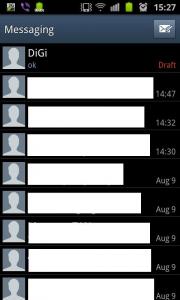
Attached Image
Assuming i have a conversation with Digi like the above. if i press and hold the digi thread, like erymanthus said, only got view contacts and delete thread option.

if i view inside the conversation, this is all i get...
Attached Image

to delete that draft message (its the message with the word 'OK', i need to delete the word OK. if i had typed more... i need to delete everything inside. so far, the fastest way for me is to double tap on that message, select ALL, then press delete button.

i was wondering if there is an easier way to delete the DRAFT message... like press, hold and select 'delete message'.


Added on August 10, 2011, 3:39 pm
QUOTE(Bugeca @ Aug 10 2011, 03:22 PM)
CTRL+A then CTRL+X  thumbup.gif
*
where is the CTRL button ar?!? can't find on my keyboard... my keyboard broken... i wanna exchange new unit! smile.gif

This post has been edited by mydragoon: Aug 10 2011, 03:39 PM

Bugeca
post Aug 10 2011, 03:42 PM

Deuces Are Wild
******
Senior Member
1,186 posts

Joined: May 2009
QUOTE(mydragoon @ Aug 10 2011, 03:38 PM)
where is the CTRL button ar?!? can't find on my keyboard... my keyboard broken... i wanna exchange new unit! smile.gif
*
HAhahahahah biggrin.gif Don't get the one with Pinky lettering.....
supermac
post Aug 10 2011, 03:44 PM

Look at all my stars!!
*******
Senior Member
2,709 posts

Joined: Jun 2008
From: Petaling Jaya


[quote=benny888,Aug 10 2011, 10:56 AM]
YES. If the downloaded file after extract is broken into 3 parts - make sure you select repartition and the PIT file
If it is only a tar file, no need PIT and no need repartition

i tried flashing the rom . but odin show it fail ! sigh y ah !! izzit have to unrooted only can flash firmware or the firmware i dl cant be use ?

btw the firmware i download is only 1 tar file. cry.gif cry.gif cry.gif
mydendenmushi
post Aug 10 2011, 03:44 PM

New Member
*
Junior Member
11 posts

Joined: Jul 2005
1 tar file only put at pda..no need pit, dont tick repartition..click start and you'll be fine..

This post has been edited by mydendenmushi: Aug 10 2011, 03:47 PM
Shizuru
post Aug 10 2011, 03:46 PM

Newbie
*******
Senior Member
3,699 posts

Joined: May 2006


QUOTE(mydragoon @ Aug 10 2011, 03:38 PM)
heh heh... sorry if my train of thought is confusing... i also confuse myself at times...

what i meant was maybe i have to feedback to Samsung FB about this silly draft message thing. previously, i also feedback to them about camera apps not being able to start when battery is at 15%. they said they will forward my feedback to dev team... dunno if they really will or not is another thing...

anyway, to explain the draft message thingy...
Attached Image
Assuming i have a conversation with Digi like the above. if i press and hold the digi thread, like erymanthus said, only got view contacts and delete thread option.

if i view inside the conversation, this is all i get...
Attached Image

to delete that draft message (its the message with the word 'OK', i need to delete the word OK. if i had typed more... i need to delete everything inside. so far, the fastest way for me is to double tap on that message, select ALL, then press delete button.

i was wondering if there is an easier way to delete the DRAFT message... like press, hold and select 'delete message'.


Added on August 10, 2011, 3:39 pm
where is the CTRL button ar?!? can't find on my keyboard... my keyboard broken... i wanna exchange new unit! smile.gif
*
OOOO lookin for faster way is it. Thought you can't delete at all doh.gif
No easier way than that I guess..

This post has been edited by Shizuru: Aug 10 2011, 03:46 PM
erymanthus
post Aug 10 2011, 03:47 PM

Regular
******
Senior Member
1,279 posts

Joined: Dec 2007
QUOTE(mydragoon @ Aug 10 2011, 03:38 PM)
heh heh... sorry if my train of thought is confusing... i also confuse myself at times...

what i meant was maybe i have to feedback to Samsung FB about this silly draft message thing. previously, i also feedback to them about camera apps not being able to start when battery is at 15%. they said they will forward my feedback to dev team... dunno if they really will or not is another thing...

anyway, to explain the draft message thingy...
Attached Image
Assuming i have a conversation with Digi like the above. if i press and hold the digi thread, like erymanthus said, only got view contacts and delete thread option.

if i view inside the conversation, this is all i get...
Attached Image

to delete that draft message (its the message with the word 'OK', i need to delete the word OK. if i had typed more... i need to delete everything inside. so far, the fastest way for me is to double tap on that message, select ALL, then press delete button.

i was wondering if there is an easier way to delete the DRAFT message... like press, hold and select 'delete message'.


Added on August 10, 2011, 3:39 pm
where is the CTRL button ar?!? can't find on my keyboard... my keyboard broken... i wanna exchange new unit! smile.gif
*
At the moment, that is the only way...unless you install other 3rd party SMS app
mydragoon
post Aug 10 2011, 03:48 PM

Look at all my stars!!
*******
Senior Member
7,044 posts

Joined: Nov 2007


i think i just bug samsung FB instead first... heh heh...

luckily these days i seldom save draft messages...

thanks all for the feedback and confirmation. i wonder if IOS suffers from this as well... and i wonder if it is the same for other android devices...
ltwvince
post Aug 10 2011, 03:51 PM

Enthusiast
*****
Senior Member
734 posts

Joined: Jan 2003
From: Earth
QUOTE(waveweaver @ Aug 10 2011, 03:37 PM)
No problem bro, no hard feeling i hope. :-)
*
None taken. Just need to get rid of this blueish issue which causing heart ache to look at.
supermac
post Aug 10 2011, 03:53 PM

Look at all my stars!!
*******
Senior Member
2,709 posts

Joined: Jun 2008
From: Petaling Jaya


QUOTE(mydendenmushi @ Aug 10 2011, 03:44 PM)
1 tar file only put at pda..no need pit, dont tick repartition..click start and you'll be fine..
*
ya i did what u said bro , just failed , and my phone now showing 1 picture , wont boot edi

its like " phone(pic) ... ! ... PC(pic)

how ahhh !!! damn panic here
waveweaver
post Aug 10 2011, 03:54 PM

★★Android & Apple★★
********
All Stars
13,192 posts

Joined: Jul 2011
From: Middle of Avalon
~~@ mydragoon

Ya ya., i get what you mean about the draft one. It's just when you put your sentence - delete draft together with you phone camera is samsung problem - made me cannot tahan laughing until sakit perut. :-P


132 Pages « < 16 17 18 19 20 > » Top
Topic ClosedOptions
 

Change to:
| Lo-Fi Version
0.0301sec    0.56    6 queries    GZIP Disabled
Time is now: 4th December 2025 - 03:16 AM
