

QUOTE(smokymcpot @ Oct 17 2011, 03:00 PM)
Why when I wanna update to gingerbread, they say failed to run firmware upgrade. Unknown error occured. What to do? 

what was the error message?SAMSUNG GALAXY ACE Official Thread V3, Mid Range Phone, Released Date Feb 2011
|
|
 Oct 17 2011, 03:24 PM Oct 17 2011, 03:24 PM
|
 
Junior Member
458 posts Joined: Jun 2008 
|
QUOTE(smokymcpot @ Oct 17 2011, 03:00 PM) Why when I wanna update to gingerbread, they say failed to run firmware upgrade. Unknown error occured. What to do? what was the error message? |
|
|
|
|
|
Oct 17 2011, 07:43 PM
|

Senior Member
760 posts Joined: Apr 2008 
|
QUOTE(n8210 @ Oct 17 2011, 02:15 PM) so far haven't found a rom that takes nothing out but simply replaces them with something better. i guess in the end this is just a galaxy ace, not galaxy s2, meaning less attention/interest from skill people. You could all way try to cook a custom rom yourself...if you willing to.So far having fun with Cm7.1 kang,don't have problem so far. |
|
|
Oct 17 2011, 07:49 PM
|

Senior Member
907 posts Joined: Dec 2008 From: Penang, Malaysia.
|
do i have to backup or remove my memory card if i wan to update to GB via kies?
what to do the the phone screen show the words downloading and it stuck there for like 30 min already? |
|
|
Oct 17 2011, 08:08 PM
|

Senior Member
3,699 posts Joined: May 2006 
|
QUOTE(deShinyDevil @ Oct 17 2011, 07:49 PM) do i have to backup or remove my memory card if i wan to update to GB via kies? When I update I just plug n update. No need backup/remove anything. After update everything still intact. I'd finished my update within 10min but some user report that they have retry up to 5 time or more. It is usual for kies to act up like that.what to do the the phone screen show the words downloading and it stuck there for like 30 min already? This post has been edited by Shizuru: Oct 17 2011, 08:11 PM |
|
|
Oct 17 2011, 09:08 PM
|
|
Senior Member
907 posts Joined: Dec 2008 From: Penang, Malaysia.
|
QUOTE(Shizuru @ Oct 17 2011, 08:08 PM) When I update I just plug n update. No need backup/remove anything. After update everything still intact. I'd finished my update within 10min but some user report that they have retry up to 5 time or more. It is usual for kies to act up like that. okok thnx sucessfully update it =)Added on October 17, 2011, 9:19 pmemm how can i change the setting like the screen saver and stuff like that? This post has been edited by deShinyDevil: Oct 17 2011, 09:19 PM |
|
|
Oct 17 2011, 10:23 PM
|

Senior Member
4,667 posts Joined: Jan 2005 From: UniVeRSiTy Of MaLaYa 
|
QUOTE(bulibulizaimon @ Oct 17 2011, 12:09 PM) possible to connect SGA to a monitor to watch movie/play games? Anyone got experience/info about this? |
|
|
|
|
|
Oct 17 2011, 10:43 PM
|
|
Senior Member
3,699 posts Joined: May 2006
|
QUOTE(deShinyDevil @ Oct 17 2011, 09:08 PM) okok thnx sucessfully update it =) you mean the lock screen? Should be under setting>display>screen displayAdded on October 17, 2011, 9:19 pmemm how can i change the setting like the screen saver and stuff like that? |
|
|
Oct 17 2011, 10:49 PM
|

Junior Member
207 posts Joined: Mar 2008
|
mine using KIES...update running on pc non-stop,keep on DC...WTH ....fell like want to cancel it d...damm tired seeing this....almost 1 hour running like it lol
|
|
|
Oct 17 2011, 11:03 PM
|
|
Senior Member
3,699 posts Joined: May 2006
|
QUOTE(ReidenLing @ Oct 17 2011, 10:49 PM) mine using KIES...update running on pc non-stop,keep on DC...WTH ....fell like want to cancel it d...damm tired seeing this....almost 1 hour running like it lol yeah, the connection is very unstable. always got heartache when updating through kies  |
|
|
Oct 17 2011, 11:20 PM
|
|
Junior Member
207 posts Joined: Mar 2008
|
QUOTE(Shizuru @ Oct 17 2011, 11:03 PM) yeah, the connection is very unstable. always got heartache when updating through kies frustrated seeing so...cancel it d no eye to see it anymore....  |
|
|
Oct 17 2011, 11:46 PM
|
|
Senior Member
3,699 posts Joined: May 2006
|
double post
 This post has been edited by Shizuru: Oct 17 2011, 11:51 PM |
|
|
Oct 17 2011, 11:48 PM
|
|
Senior Member
3,699 posts Joined: May 2006
|
QUOTE(lemontea09 @ Oct 16 2011, 09:21 PM) Thank you so much. Tried and able to send/received MMS. Make sure data packet on.Here's the screen shot setting 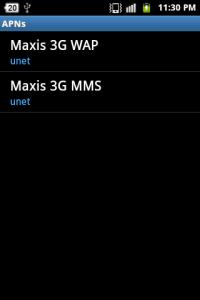
MAXIS 3G WAP 

SERVER - not set APN TYPE - Internet + MMS MAXIS 3G MMS 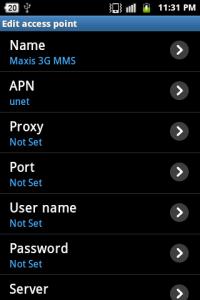

SERVER - not set APN TYPE - MMS This post has been edited by Shizuru: Oct 17 2011, 11:56 PM |
|
|
Oct 18 2011, 01:36 AM
|

Senior Member
1,171 posts Joined: Dec 2006
|
QUOTE(game4life @ Oct 17 2011, 01:33 PM) Thanks. But something weird happened. When I connect to WIFI, the market suddenly appeared! Then logged in as usual and auto-updated to 3.1.5. Wasted my time to download SDK thing. Any good task killer/manager to recommend? Noticed there's no task manager. QUOTE(ninehneh @ Oct 17 2011, 02:58 PM) give Go Launcher EX a try. it's free, easy to use and quite customizable. No lags too. Thanks for the suggestion.  Will try with Go SMS too. Will try with Go SMS too. |
|
|
|
|
|
Oct 18 2011, 02:15 AM
|

Senior Member
1,171 posts Joined: Sep 2010
|
Oh thanks guys. Updated already.
I notice before this update. Sometimes after I off my wifi, when I wanna on it back, cannot. It just on for a while without connecting and off. Need to restart the phone then only can use back. One more thing, when I lock the phone, I have a screen lock. Sometimes when I swipe, it cannot read. Need to lock and unlock the phone back then only can swipe. Any of you experience before? Sorry for the essay.  |
|
|
Oct 18 2011, 09:23 AM
|

Senior Member
1,943 posts Joined: Nov 2008
|
QUOTE(Miracles @ Oct 18 2011, 01:36 AM) Thanks. But something weird happened. When I connect to WIFI, the market suddenly appeared! Then logged in as usual and auto-updated to 3.1.5. Wasted my time to download SDK thing. task killer is not needed. killing task will waste battery life as it will have to launch the background applications again Any good task killer/manager to recommend? Noticed there's no task manager. Thanks for the suggestion. Will try with Go SMS too. |
|
|
Oct 18 2011, 09:31 AM
|
|
Senior Member
1,171 posts Joined: Dec 2006
|
Okay.
Argh.. I cant remove the widget on my homescreen. It's bugged. Tap and hold, hold for long time, also no vibrate and cant be dragged.. I already reboot several times. sigh.. |
|
|
Oct 18 2011, 12:34 PM
|

Junior Member
159 posts Joined: Aug 2007
|
QUOTE(Miracles @ Oct 18 2011, 09:31 AM) Okay. U sure u didnt lock the screen? most launcher got that function so u wont accidentally move widgets.. Argh.. I cant remove the widget on my homescreen. It's bugged. Tap and hold, hold for long time, also no vibrate and cant be dragged.. I already reboot several times. sigh.. |
|
|
Oct 18 2011, 01:33 PM
|
|
Junior Member
458 posts Joined: Jun 2008
|
QUOTE(Miracles @ Oct 18 2011, 01:36 AM) Thanks. But something weird happened. When I connect to WIFI, the market suddenly appeared! Then logged in as usual and auto-updated to 3.1.5. Wasted my time to download SDK thing. i think the phone has a built in one? Press the HOME button for more than 2 seconds and the task killer will appear. Otherwise, Go Launcher EX also has one built in although it can only close all running tasks >.< Any good task killer/manager to recommend? Noticed there's no task manager. Thanks for the suggestion. Will try with Go SMS too. |
|
|
Oct 18 2011, 01:33 PM
|

Senior Member
911 posts Joined: Sep 2006 From: Eboladrome
|
QUOTE(alpha0201 @ Oct 13 2011, 05:10 PM) Guys, i got problem installing/updating large android app (20mb++) from Market. anyone?It always pop up "Installation Error. Insufficient Storage". I have 43mb free space internal & 5gb external free space. My Ace GB is official & unrooted, I cleared cache with App Cache Cleaner but still problem persist. My Galaxy Tab also suffered from the same problem even though I have abundance of free space in both external & internal. But I manage to solve it buy revert the Market factory version. Same cannot be said with Ace. is it the Market 3.x bug caused this? |
|
|
Oct 18 2011, 01:35 PM
|
|
Junior Member
458 posts Joined: Jun 2008
|
QUOTE(Miracles @ Oct 18 2011, 09:31 AM) Okay. if ur using Go Launcher, after you tap and hold, a popup should appear for you to move,delete, uninstall the app. No need to drag. Argh.. I cant remove the widget on my homescreen. It's bugged. Tap and hold, hold for long time, also no vibrate and cant be dragged.. I already reboot several times. sigh.. |
|
Topic ClosedOptions
|
| Change to: |  0.0292sec 0.0292sec
 0.62 0.62
 6 queries 6 queries
 GZIP Disabled GZIP Disabled
Time is now: 14th December 2025 - 01:58 PM |
 Quote
Quote