Outline ·
[ Standard ] ·
Linear+
SAMSUNG GALAXY ACE Official Thread V3, Mid Range Phone, Released Date Feb 2011
|
izzoe
|
 Aug 1 2011, 01:36 AM Aug 1 2011, 01:36 AM
|
Getting Started


|
Plz REMOVE ROM MANAGER in backup apps for it is the source of phone bricking..
Clockworkmod <---- YES! Flash from sd card
ROM manager <---- No support for ace yet, it will flash other recovery for Ace and it will brick..
So plz remove it and simply put clockworkmod(with link to XDA thread) not ROM MANAGER..
This post has been edited by izzoe: Aug 1 2011, 01:38 AM
|
|
|
|
|
|
izzoe
|
Aug 1 2011, 09:53 AM
|
Getting Started
|
QUOTE(gkl83 @ Aug 1 2011, 08:59 AM) guys, let me know any information required to update into V3 topic... Also appreciate some feedback about the restructuring of topic...  I think u better follow the indonesian community format.. They put the latest news for galaxy ace on top of first post.. Include flashing guide or redirect them to each custom ROM on XDA.. Try to follow this format... http://www.kaskus.us/showpost.php?p=447069256&postcount=9and finally, REMOVE ROM MANAGER! Seems like my last post doesnt catch your attention.. The only thing i ask from previous version even if it not updated, just remove the ROM MANAGER as backup apps.. |
|
|
|
|
|
izzoe
|
Aug 1 2011, 10:28 AM
|
Getting Started
|
QUOTE(gkl83 @ Aug 1 2011, 10:17 AM) i unsure your quote attention to whom... hence the information from previous thread and contributed by previous TS... better i retain most of the information if possible... but of cos any updates pls attention to me as not only me reading this forum... about the link from indo, possible just locate link at here instead? since the topic more for "professional" unless rooting required... somemore is indo language, problemsome to translate it...  Sorry bout that, just to make sure nobody come in here crying because of ROM manager which cant be fixed unless sending it Samsung center, then they will start blaming this thread for misleading.. Anyway, in V2 thread i think got 1 post about all the custom rom in XDA from user name huatty.. I try and find it then u can post it the first page.. |
|
|
|
|
|
izzoe
|
Aug 1 2011, 10:59 AM
|
Getting Started
|
QUOTE(coolyl91 @ Aug 1 2011, 10:54 AM)
Added on July 31, 2011, 10:22 pmCWM4 Download CWM4Copy n Paste CWM4 To Ur SD Card Switch off ur hp Hold home button + power on untill go to recovery mode Select Updated ur sd card Select install from zip file Select CWM4 Zip File Press home button After complete select reboot *Pls Dont Extract CWM4 Zip File *At Recovery Mode Volume Button+- = UP DOWN Power On/Off = BACK HOME BUTTON = ENTER *You're doing it at your own risk!  thx for answering me =). Btw does it work on froyo version? hav u tried it ? hehe Not working on froyo.. You will get a boot loop.. To update CWM for froyo u will need to flash this http://forum.xda-developers.com/showthread.php?t=1138436Use Odin.. This post has been edited by izzoe: Aug 1 2011, 11:09 AM |
|
|
|
|
|
izzoe
|
Aug 1 2011, 12:49 PM
|
Getting Started
|
QUOTE(coolyl91 @ Aug 1 2011, 11:31 AM) Thx for updating the front page =). It makes us understand more about rom. Btw after u flashing clockworkmod into your phone. How do u determine whether the clockworkmod is installed or not? Does it appear CWM this apps in our phone? When u flash CWM it will replace your recovery.. Switch off your phone, HOME+POWER button.. And it will boot to CWM.. This post has been edited by izzoe: Aug 1 2011, 12:51 PM |
|
|
|
|
|
izzoe
|
Aug 1 2011, 01:26 PM
|
Getting Started
|
QUOTE(coolyl91 @ Aug 1 2011, 12:55 PM) thx for replying =). Well, i don't really understand. What is ''recovery'' stand for? After i boot to CWM, what will happen? Does it mean i can do a rom backup for my current rom? Sry for being newbie becoz i dun wan to brick my phone  yes you can backup your rom with CWM.. it will backup your phone in that state, alternative u can use Titanium backup.. U just need to root your phone.. |
|
|
|
|
|
izzoe
|
Aug 1 2011, 02:29 PM
|
Getting Started
|
QUOTE(kirokiroshin @ Aug 1 2011, 02:07 PM) if i hv CWM installed in my phone, can i still get the firmware update from Kies? Not sure.. For me when samsung finally release for malaysia, i will flash back to the original firmware DXKC1.. |
|
|
|
|
|
izzoe
|
Aug 1 2011, 05:18 PM
|
Getting Started
|
QUOTE(fuzore @ Aug 1 2011, 05:06 PM) hahahaha.. lucky u which KPH did u use now ive tested romnexus, FirstUA but Coderom-V2 is the best for now for me Same.. CodeROM v2 is the best... Waiting for V2-2b.. But maybe it will be KPN base.. |
|
|
|
|
|
izzoe
|
Aug 2 2011, 08:48 AM
|
Getting Started
|
QUOTE(Lukman Zah @ Aug 2 2011, 08:34 AM) Got GB now? Someone confirm this so i can flash back to stock.. |
|
|
|
|
|
izzoe
|
Aug 2 2011, 11:49 AM
|
Getting Started
|
QUOTE(coolyl91 @ Aug 2 2011, 11:16 AM) ahh ic hehe thx, btw do i need to install rom manager after i hav installed the CWM, or a new rom manager with sga CWM supported will appear in my phone?  Dont use ROM manager.. It will not detect it.. Just access CWM like recovery.. HOME+POWER button.. There's a alternative rom manager but i suggest u try flashing CWM first.. |
|
|
|
|
|
izzoe
|
Aug 2 2011, 01:56 PM
|
Getting Started
|
QUOTE(fuzore @ Aug 2 2011, 01:02 PM) but there is a trick on how to flash back to froyo from gb u cannot go flashing stock KC1 firmware with the one package .tar or u will likely brick ur ace u need to download the stock froyo arab region since its the only one that came with boot,csc,pda and modem file flash it first and after that flash the one package KC1 Can also use the first ROM for Asian Region in samfirmware.. @Fuzore, did u flash yours to CodeROM v2x-2b? |
|
|
|
|
|
izzoe
|
Aug 2 2011, 02:58 PM
|
Getting Started
|
QUOTE(coolyl91 @ Aug 2 2011, 02:51 PM) thx for involving and helping me =), u mean flash stock froyo arab first, after that flash it again with KC1? But the KC1 which i downloaded from samfirmware.com is a image file with ''recovery'' name. Is there any idea on how to use it? in detail pls coz i am newb  Thats a 1package file.. U juz need the .tar.. in Odin, u need to check the box One PAckage.. then juz put the .tar file.. |
|
|
|
|
|
izzoe
|
Aug 2 2011, 03:54 PM
|
Getting Started
|
QUOTE(coolyl91 @ Aug 2 2011, 03:11 PM) izzoe, u mean the ''recovery'' file which i mentioned is 1package file? just place tat ''recovery'' in the 1package section then cooper in OPS and flash it? No, that 1st package file u juz extract that 1 .tar file.. dun extract S5830DXKC1-S5830DXKC1-S5830OLBKC1_HOME.tar.. That is one package.. Juz open odin, put in cooper.ops, then tick the one package box.. put in one package and start.. |
|
|
|
|
|
izzoe
|
Aug 2 2011, 06:25 PM
|
Getting Started
|
QUOTE(Dannyl @ Aug 2 2011, 05:35 PM) But my wallpapers are in the card and I have no problems Maybe he use Live Wallpaper.. Live wallpaper are like widgets.. U cant store it in sc card.. |
|
|
|
|
|
izzoe
|
Aug 3 2011, 12:57 AM
|
Getting Started
|
QUOTE(coolyl91 @ Aug 2 2011, 08:38 PM) btw does it reali matter to convert your sd card to ext4 format? and how to do it ? hehe ... is reformatting required while doing so ?
Added on August 2, 2011, 8:40 pmokok thx i got it  , btw what if i got image type file? how do i use it ? becoz it is not zip file or .tar and whatsoever, so odin method cant be used... For 1st question, if u want to use DarkTremor Apps2SD, u need to convert it to ext4.. U need to format, adn partition ur SD card.. for 2nd, did u download DXKC1 file from Samfirmware? If yes, u should get a .rar file.. Inside there's a folder, and inside that folder got a .tar file.. Check it.. |
|
|
|
|
|
izzoe
|
Aug 3 2011, 05:54 AM
|
Getting Started
|
QUOTE(axxer @ Aug 3 2011, 03:05 AM) lol.  u dont need to format sdcard as ext4 to use darktremore a2sd. ext2 will do just fine. mind u that stock rom only support ext2. u can use ext4 only when u use custom rom/kernel that enables ext4. advising others to use ext4 can results in more problem when they just use rom/kernel that only support ext2. btw Blackthorn, u also need cooper.ops file to flash one package like xwkpn. Lol! Plz read before shooting at ppl.. he's quoting someone using custom rom, CodeROM V2x-2B that converted the system to ext4.. Which obviously using Cf-Root custom kernel that support DTA2SD..  This post has been edited by izzoe: Aug 3 2011, 05:58 AM This post has been edited by izzoe: Aug 3 2011, 05:58 AM |
|
|
|
|
|
izzoe
|
Aug 3 2011, 09:01 AM
|
Getting Started
|
QUOTE(fuzore @ Aug 3 2011, 08:53 AM) V2x-2B lock and loaded ... 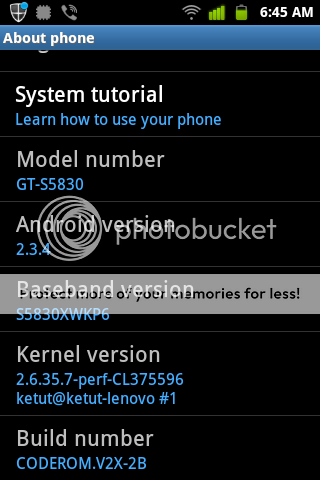 Fuzore, did u flash yours from CodeROM v2x-02? Juz make a wipe and flash it over? |
|
|
|
|
|
izzoe
|
Aug 3 2011, 01:15 PM
|
Getting Started
|
QUOTE(Dannyl @ Aug 3 2011, 12:58 PM) This Samsung so slow in updating firmware... SE X10 firmware for unlocked phones within already covered almost all regions within days... But all those X8, Xperia x10 mini phone no update, stuck with eclair.. Samsung update all Galaxy mini, Fit,GIo, Ace,S, S2.. all also got update.. All my X8 friend RAAAAGGGGGEEE!! Lolz! |
|
|
|
|
|
izzoe
|
Aug 4 2011, 03:29 PM
|
Getting Started
|
QUOTE(coolyl91 @ Aug 4 2011, 03:10 PM) Wifi was being turning on izzit? Becoz mani incident about automatic shut down is caused by opening wifi while let it in sleep mode. Thats a bug...
Added on August 4, 2011, 3:18 pmWell, i hav flashed into code rom nexus ace right now. So can i just flash to code rom v2 with this rom? U can flash almost all version of custom rom in XDA as long as your based is XXKPH or XXKPN.. I go from Froyo>XXKPH>CodeRom Nexus>FirstUA>CodeRom V2x-02>CodeROM v2x-2b.. The dev of CodeROM also confirmed u can flash CodeROM v2x-2b over both KPN and KPH.. This post has been edited by izzoe: Aug 4 2011, 03:45 PM |
|
|
|
|
|
izzoe
|
Aug 4 2011, 08:11 PM
|
Getting Started
|
QUOTE(coolyl91 @ Aug 4 2011, 08:05 PM) bro, that 1 is for coderom nexus izzit ? y my coderom v2 doesnt have such file, i onli got a tar file from its link... Than its the same ler.. One package.. But that's CodeROM v2x-02, u should go and get the v2x-2b.. Got 2 file.. Flash with Odin also.. http://forum.xda-developers.com/showthread.php?t=1198116
Added on August 4, 2011, 8:12 pmQUOTE(amka @ Aug 4 2011, 06:04 PM) Hi there... Would like to ask..i've update my SGA to GB 2.3.4..then i've install ROM MANAGER downloaded from market before i read diz post..therefor after reading diz..i had uninstall the ROM MANAGER and after a few hours i turned off the phone to install CWM..and suddenly my SGA wont turn on even i've remove the battery..is this bcoz of the ROM MANAGER??? What should i do..plzz lend help....TQVM Did u do anything when u install it? Did u try to backup your ROM with it? This post has been edited by izzoe: Aug 4 2011, 08:12 PM |
|
|
|
|



 Quote
Quote

 0.0463sec
 0.65
0.65
 7 queries
 GZIP Disabled