Welcome Guest ( Log In | Register )

Bump Topic Topic Closed RSS Feed

Outline · [ Standard ] · Linear+

Unifi Official TM UniFi High Speed Broadbrand Thread V11, FREE Installation & 1-month subscription

views
     
akash3656
post Jun 22 2011, 08:14 PM

Getting Started
**
Junior Member
288 posts

Joined: Feb 2009
Alamak, guys check all IP ranges, looks like even with Google DNS TM starting to block it (10 sites).............

With screamyx, 115.134 already kena this block....
175 belum kena...........
We're screwed..........
My bad: I though I set Google DNS on my router, but looks like I accidentally turned Google DNS off...........
Ignore this post........

This post has been edited by akash3656: Jun 22 2011, 08:21 PM
shark7
post Jun 22 2011, 08:44 PM

Regular
******
Senior Member
1,378 posts

Joined: Dec 2009
QUOTE(anechoic @ Jun 22 2011, 11:16 AM)
I reset my modem or router once every few days..so far no problem reconnecting back. Almost 1 month using still ok..lucky.
better call unifi center to confirm..else they never turn up then jialat.
*
if u reset,doesnt that mean u have to change the settings again ?or u mean u off on the plug ??

btw my story pulak.

until today no unifi came to my house,i ask my dad to confirm it with TM.
few mins later TM called me and said that the earliest is tmorrow evening .
and i said wtf wtf wtf . i make a report since last week and until now still no one come .
i said every bad words and really angry to them
i said i want it to be fixed by today .dun make me come to TM centre (where ppl pay bills,etc) and bcome hulk there .
then he said today all technician busy.wtf ,is that my prob ?
then i said if he dint call me back by 2,then thats it.
20mins later they called me back, and said techincian will come on 2.30 .(that was fast)

then i went out with my friend.dunno what happen
but my sister was in the house

she tell me that
the technician came around 2. then he nver touch modem,he just walk in my house,he saw the white modem, and he said" that modem is already broken" he din't check the modem yet.
he also said that he just got called by TM to go to my house,he said he dunno whyTM line always busy
he said that he dunno whether this problem will come again or not .

and im very sure he just acting he dunno eyrthing. liar

i think its either the installer dint do his job well or unifi really sucks .

aneip
post Jun 22 2011, 08:51 PM

Look at all my stars!!
*******
Senior Member
2,466 posts

Joined: Nov 2004


My installer so panic when the modem he bring is lucent modem. He said he never configure 1 before. Only huawei & fiberhome. After wasting 1 hour calling he peer finally found ex staff who know about this modem.

Then he friend told him to open the telnet. Guest what, he know nothing about the telnet.

So I have to do it myself. Luckily I know about this. If normal user confirm somebody else have to come to configure.

Btw, now enjoying my 5mbps line. Hopefully iptv will have great show in future with lower fee per channel so I can cut the Astro off
lkoky
post Jun 22 2011, 09:02 PM

Regular
******
Senior Member
1,127 posts

Joined: Jan 2003
I tried to dumped out the router config.bin file to find out what the PpoE password... but unable to read the file as per instruction in http://unifi.athena.my/router_password.html

My TM router comes with the 7.09 firmware. Anyone know how to retrieve the password?

Cant get thru Unifi help line.... so calling the operator seems like a no go.
buyoq
post Jun 22 2011, 09:08 PM

hat ni sebulan...........
******
Senior Member
1,305 posts

Joined: Jan 2010
From: Jitra >> Putrajaya


QUOTE(lkoky @ Jun 22 2011, 09:02 PM)
I tried to dumped out the router config.bin file to find out what the PpoE password... but unable to read the file as per instruction in http://unifi.athena.my/router_password.html

My TM router comes with the 7.09 firmware. Anyone know how to retrieve the password?

Cant get thru Unifi help line.... so calling the operator seems like a no go.
*
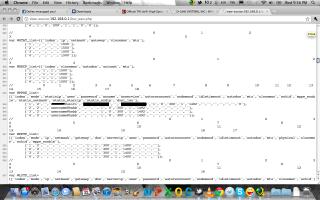
- go to http://192.168.0.1
- login as admin
- go to setup
- select manual internet connection
- view source and find your-username@unifi, ur password is there
myjunk
post Jun 22 2011, 09:22 PM

Look at all my stars!!
*******
Senior Member
3,446 posts

Joined: Jan 2007
ANyone here experienceing slow download etc from international sites? I do speedtest.net to San Fran sites and only get like 300kbps down on my 5mbps line.

of course if choose local KL speedtest, then it's ~5mbps lah


Added on June 22, 2011, 9:22 pmuser posted image

This post has been edited by myjunk: Jun 22 2011, 09:22 PM
lkoky
post Jun 22 2011, 09:27 PM

Regular
******
Senior Member
1,127 posts

Joined: Jan 2003
QUOTE(buyoq @ Jun 22 2011, 09:08 PM)
- go to http://192.168.0.1
- login as admin
- go to setup
- select manual internet connection
- view source and find your-username@unifi, ur password is there
*
But the password is in *****. how to turn it into readable form? Thx
akash3656
post Jun 22 2011, 09:33 PM

Getting Started
**
Junior Member
288 posts

Joined: Feb 2009
QUOTE(lkoky @ Jun 22 2011, 09:27 PM)
But the password is in *****. how to turn it into readable form? Thx
*
In 7.09, the password exploit is fixed, I tried this trick with friend's Unifi, didn't work... Reason: 7.09


Added on June 22, 2011, 9:35 pmTry this: http://unifi.athena.my/router_security.html

I mean that site list the default passwords for Unifi... Try your luck, I had luck with:

Username : operator
Password : h566UniFi

This post has been edited by akash3656: Jun 22 2011, 09:35 PM
buyoq
post Jun 22 2011, 09:35 PM

hat ni sebulan...........
******
Senior Member
1,305 posts

Joined: Jan 2010
From: Jitra >> Putrajaya


QUOTE(akash3656 @ Jun 22 2011, 09:33 PM)
In 7.09, the password exploit is fixed, I tried this trick with friend's Unifi, didn't work... Reason: 7.09
*
mine is on 7.09 and it still work
you have to read the page thru Source / View Source

Attached Image

take note on the censored part.

This post has been edited by buyoq: Jun 22 2011, 09:38 PM
anechoic
post Jun 22 2011, 10:07 PM

TY
*******
Senior Member
2,278 posts

Joined: Jan 2003
From: KL-KL


QUOTE(shark7 @ Jun 22 2011, 08:44 PM)
if u reset,doesnt that mean u have to change the settings again ?or u mean u off on the plug ??

btw my story pulak.

until today no unifi came to my house,i ask my dad to confirm it with TM.
few mins later TM called me and said that the earliest is tmorrow evening .
and i said wtf wtf wtf . i make a report since last week and until now still no one come .
i said every bad words and really angry to them
i said i want it to be fixed by today .dun make me come to TM centre (where ppl pay bills,etc) and bcome hulk there .
then he said today all technician busy.wtf ,is that my prob ?
then i said if he dint call me back by 2,then thats it.
20mins later they called me  back, and said techincian will come on 2.30 .(that was fast)

then i went out with my friend.dunno what happen
but my sister was in the house

she tell me that
the technician came around 2. then he nver touch modem,he just walk in my house,he saw the white modem, and he said" that modem is already broken" he din't check the modem yet.
he also said that he just got called by TM to go to my house,he said he dunno whyTM line always busy
he said that he dunno whether this problem will come again or not .

and im very sure he just acting he dunno eyrthing. liar

i think its either the installer dint do his job well or unifi really sucks .
*
power off and on modem..of coz not the real reset..else all settings gone..

QUOTE(aneip @ Jun 22 2011, 08:51 PM)
My installer so panic when the modem he bring is lucent modem. He said he never configure 1 before. Only huawei & fiberhome. After wasting 1 hour calling he peer finally found ex staff who know about this modem.

Then he friend told him to open the telnet. Guest what, he know nothing about the telnet.

So I have to do it myself. Luckily I know about this. If normal user confirm somebody else have to come to configure.

Btw, now enjoying my 5mbps line. Hopefully iptv will have great show in future with lower fee per channel so I can cut the Astro off
*
wow..i guess the installer didn't go for proper training..
stanleychew
post Jun 22 2011, 11:29 PM

New Member
*
Junior Member
4 posts

Joined: Jun 2011
erm.... just experience something new (i think). I set my DNS using OpenDNS/Google DNS since I got my UNIFI installed... was working fine until an hour ago when I came back from work & turn on the equipments thinking to go online but I can't get connected at all even after 30min... iptv & wifi works (donno bout the phone) so I decided to try using the default DNS from TM... guess what it work immediately... change back to OpenDNS/Google DNS ~ can't get connected... change back to TM DNS ~ connected.

WTFFFFFFFFFFFFFFFFFFFFFFFFFFFFFF!!!!!!!!!!!!!!!!!!!!!!!!!!

Am I alone? pls confirm...
IwanAGP
post Jun 23 2011, 12:38 AM

Nothing is Possible!
*******
Senior Member
9,590 posts

Joined: Jan 2008
From: S'wak||KL||SG


QUOTE(stanleychew @ Jun 22 2011, 11:29 PM)
erm.... just experience something new (i think). I set my DNS using OpenDNS/Google DNS since I got my UNIFI installed... was working fine until an hour ago when I came back from work & turn on the equipments thinking to go online but I can't get connected at all even after 30min... iptv & wifi works (donno bout the phone) so I decided to try using the default DNS from TM... guess what it work immediately... change back to OpenDNS/Google DNS ~ can't get connected... change back to TM DNS ~ connected.

WTFFFFFFFFFFFFFFFFFFFFFFFFFFFFFF!!!!!!!!!!!!!!!!!!!!!!!!!!

Am I alone? pls confirm...
*
Erm... Have you touched other setting when you're setting the DNS? @.@ My Google DNS is set within DIR-615. Nothing wrong so far. Smooth smooth~
shark7
post Jun 23 2011, 12:45 AM

Regular
******
Senior Member
1,378 posts

Joined: Dec 2009
QUOTE(anechoic @ Jun 22 2011, 10:07 PM)
power off and on modem..of coz not the real reset..else all settings gone..
wow..i guess the installer didn't go for proper training..
*
wait3 .
wanna ask
did u guys just leave your modem on for 24hours .???
or u off it on night,and use it when u want to use .???

if im not mistaken that unifi guuy said no need to off modem
so i nver off modem unless its raining heavily,

maybe thats the reason why my modem always rosak ?
stanleychew
post Jun 23 2011, 12:58 AM

New Member
*
Junior Member
4 posts

Joined: Jun 2011
QUOTE(IwanAGP @ Jun 23 2011, 12:38 AM)
Erm... Have you touched other setting when you're setting the DNS? @.@ My Google DNS is set within DIR-615. Nothing wrong so far. Smooth smooth~
*
Nope... but Google DNS is back to normal....lazy to test OpenDNS lio..... sleepy.... just feel weird that DNS can coz those problem.... mayb just...????
ckboon
post Jun 23 2011, 01:03 AM

Casual
***
Junior Member
458 posts

Joined: Nov 2004

QUOTE(lighter @ Jun 22 2011, 01:53 AM)
did you guyz got such IP before?  rclxub.gif
*
??

nothing wrong with the IP what..

what's make u so weird?
IwanAGP
post Jun 23 2011, 01:06 AM

Nothing is Possible!
*******
Senior Member
9,590 posts

Joined: Jan 2008
From: S'wak||KL||SG


QUOTE(shark7 @ Jun 23 2011, 12:45 AM)
wait3 .
wanna ask
did u guys just leave your modem on for 24hours .???
or u off it on night,and use it when u want to use .???

if im not mistaken that unifi guuy said no need to off modem
so i nver off modem unless its raining heavily,

maybe thats the reason why my modem always rosak ?
*
Me here, student house, never off. Only restart as the router keep hang or get to interfere with other wifi, causing some of my housemates cannot connect!
klseet
post Jun 23 2011, 01:29 AM

Getting Started
**
Junior Member
130 posts

Joined: Mar 2008
I never off my HG850a + RB750, torrenting all the way before I go sleep tongue.gif
Attached Image
On Google DNS, 175x IP, still full blast on my VIP5, no throttling yet laugh.gif
stasio
post Jun 23 2011, 12:13 PM

10k Club
********
All Stars
18,504 posts

Joined: Oct 2007
From: P.Jaya
QUOTE(stanleychew @ Jun 22 2011, 11:29 PM)
erm.... just experience something new (i think). I set my DNS using OpenDNS/Google DNS since I got my UNIFI installed... was working fine until an hour ago when I came back from work & turn on the equipments thinking to go online but I can't get connected at all even after 30min... iptv & wifi works (donno bout the phone) so I decided to try using the default DNS from TM... guess what it work immediately... change back to OpenDNS/Google DNS ~ can't get connected... change back to TM DNS ~ connected.

WTFFFFFFFFFFFFFFFFFFFFFFFFFFFFFF!!!!!!!!!!!!!!!!!!!!!!!!!!

Am I alone? pls confirm...
*
I set my OpenDNS/Google DNS in Windows,not in DIR-615.

user posted image

Btw,
PJ central here,
speed very constant all the time,no problem with DIR-615 (7.05B) ,even on 24/7. rclxms.gif

This post has been edited by stasio: Jun 23 2011, 12:18 PM
hazairi
post Jun 23 2011, 12:47 PM

Look at all my stars!!
*******
Senior Member
2,694 posts

Joined: Feb 2007
From: KL


Last time my VDSL ping was 27ms, after I relocated to a different block early this month, the ping is now 35ms. sad.gif
hobbes1001
post Jun 23 2011, 12:56 PM

Getting Started
**
Junior Member
212 posts

Joined: Dec 2008
QUOTE(akash3656 @ Jun 22 2011, 09:33 PM)
In 7.09, the password exploit is fixed, I tried this trick with friend's Unifi, didn't work... Reason: 7.09


Added on June 22, 2011, 9:35 pmTry this: http://unifi.athena.my/router_security.html

I mean that site list the default passwords for Unifi... Try your luck, I had luck with:

Username : operator
Password : h566UniFi
*
Just call unifi center, they will tell you your password. that's how i got my password.

107 Pages « < 20 21 22 23 > » Top
Topic ClosedOptions
 

Change to:
| Lo-Fi Version
0.0639sec    0.32    7 queries    GZIP Disabled
Time is now: 11th December 2025 - 09:38 AM