Welcome Guest ( Log In | Register )

Bump Topic Topic Closed RSS Feed
126 Pages « < 69 70 71 72 73 > » Bottom

Outline · [ Standard ] · Linear+

Streamyx The Official Streamyx 4Mbps Users Club V4, Streamyx 4 Mbps Discussion Thread Q&A

views
     
aHceNt
post Nov 30 2011, 03:22 AM

Getting Started
**
Junior Member
193 posts

Joined: Jun 2006
From: Kuala Lumpur


can i ask you guys something. is this normal for everyone?

let's say I DL a file. The speed is very inconsistent. bounce between ~300-500kBps.

it can't maintain at top speed. anyone know why is it so?

Thanks.
Jer
post Nov 30 2011, 09:05 AM

Getting Started
**
Junior Member
138 posts

Joined: Apr 2007
From: Puchong


Does anyone experience slow download rate for torrents? I have no problems with direct download but the torrent speed is never getting any faster. I'm also using Unifi VIP5 in another place of mine, and it is as fast as ever for ddl and torrents. Comments are appreciated.
RageWeaver
post Nov 30 2011, 12:47 PM

Getting Started
**
Junior Member
131 posts

Joined: Apr 2008


Hello all.

currently I am using streamyx BB 1Mb and I do have good gaming ping,however other family members need more download speed.

So,I might want to upgrade to 4mb but what makes me think twice is that I might get a different IP range that will messed up my latency.

For now I am getting 60.xx.xx.xx ip range(which i am happy with). I want to ask peoples who live in the area Seri Petaling and is using streamyx BB 4mb,what is ut ip range?

There is no need to suggest abt unifi etc,I don't plan to take that at the moment smile.gif .

Thanks guys.
hello10
post Nov 30 2011, 02:40 PM

New Member
*
Newbie
1 posts

Joined: May 2010
From: Kuching (Sarawak)
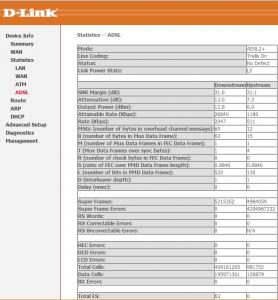
Can somebody tell me why i can't get 4mbps according to the modem statistics?

I just received a call from telecom and he told me i can't get 4mbps so remained as 1mbps, wtf..


Attached thumbnail(s)
Attached Image
poh880
post Nov 30 2011, 03:58 PM

On my way
****
Junior Member
529 posts

Joined: Aug 2006
From: Oil Town (Miri)


QUOTE(hello10 @ Nov 30 2011, 02:40 PM)
Can somebody tell me why i can't get 4mbps according to the modem statistics?

I just received a call from telecom and he told me i can't get 4mbps so remained as 1mbps, wtf..
*
Just ask them to send a technician to your house to prove it. My area also have no 4M BB but I do the same thing and the technician told me "They just follow their system and if you are pro enough in networking, you will know it to be capable to support." tongue.gif
m.shah.f
post Nov 30 2011, 05:17 PM

New Member
*
Junior Member
9 posts

Joined: Jan 2010
From: Cat City


QUOTE(AjkR06 @ Nov 29 2011, 10:50 PM)
"I think the downstream rate shown by the router is the second capping u mentioned done remotely." - No. It's the first or physical capping done at your port on the nearest DSLAM (street cabinet or hosted in exchange)

"So mayb the reason why i'm still getting 1mbps is because the dslam is still capped at 1mbps." - It's not the DSLAM.. But it's the remote capping where TM still not raise your account speed from 1Mbps to 4Mbps...

Btw, have technician come to your house to do other inspection? Usually TM will only raise your account speed after the technician come to your house to do the further testing and he will make sure that your physical line are fully capable and qualified to support 4Mbps. After they confirm that everything is fine, they will call the technical department and ask them to raise your speed. TM will raise your speed between 48 hours from the date and time where the technician come. If you're fortunate, you will get the 4Mbps on-the-spot after the technician leave your house. Make sure you frequently restart your modem in order for the change to take effect...  smile.gif
Thanks for the answers. That clarifies a lot of confusion. Technician just came today. Reason why i couldn't get 4Mbps was just like what u said. TM still haven't raise my speed. Technician said will prob take 2-3 days. Now everything ok.
But sadly from the speed test he ran, it seems max i can get is around 3.5 M. He tried increasing the limit to 5 Mbps but still no difference. Told me the DSLAM which my line is connected to can't support more than 4Mbps coz it's still using copper, not optic. Well, is this true?

Also, i got a new modem. Surprised coz i only upgrade, not applying new. It's the Innacom W3400V. Anyone using this? Any prob? I plan on getting a new Wireless N modem for better wifi coverage coz my house is quite big. Or should i just stick with a wireless G? Will it make any difference from G to N coverage and speed wise?

This post has been edited by m.shah.f: Nov 30 2011, 05:24 PM
AjkR06
post Nov 30 2011, 06:27 PM

that's me
******
Senior Member
1,552 posts

Joined: Oct 2006
From: ugly kingdom


QUOTE(m.shah.f @ Nov 30 2011, 05:17 PM)

But sadly from the speed test he ran, it seems max i can get is around 3.5 M. He tried increasing the limit to 5 Mbps but still no difference. Told me the DSLAM which my line is connected to can't support more than 4Mbps coz it's still using copper, not optic. Well, is this true?

Also, i got a new modem. Surprised coz i only upgrade, not applying new. It's the Innacom W3400V. Anyone using this? Any prob? I plan on getting a new Wireless N modem for better wifi coverage coz my house is quite big. Or should i just stick with a wireless G? Will it make any difference from G to N coverage and speed wise?
*
Probably it is due to the distance from your house to the exchange... You can check whether your line is 50% fiber optic (from the exchange to the remote cabinet DSLAM) or purely 100% copper by accessing TM SAMS WEBSITE. Just enter your streamyx username or phone number and you will know it. For partially fiber line, the green F symbol will appear at the J or Jumper area, meanwhile for the fully copper line, the green TICK symbol will appear instead of F symbol. You can see the attachment below for the example when your line is partially (or 50%) fiber.

It is recommended that you change the modem because you said that your house is big. You're using 4Mbps, and I heard that there are many problems involve around the TM Wifi modem (especially Riger and Innacom one). But you need to spend a bit... Maybe TP-Link TD-W8960N is suitable for you.... smile.gif Depending on the seller, and the most cheap one that I found is RM122 from one reputable seller at Lelong.my... Or perhaps, you can do the survey at the Lowyat itself... laugh.gif

Attached Image


Masrichenko
post Nov 30 2011, 10:01 PM

New Member
*
Newbie
0 posts

Joined: Jan 2011
From: Kuala Terengganu


i achieve 5.76Mbps with 4mbps Streamyx..
heard that 4mbps streamyx record is around 7mbps..is that true?
kaolen
post Nov 30 2011, 10:08 PM

Getting Started
**
Junior Member
164 posts

Joined: Aug 2006


may i know is the meaning of the "S" column there?
AjkR06
post Nov 30 2011, 10:18 PM

that's me
******
Senior Member
1,552 posts

Joined: Oct 2006
From: ugly kingdom


QUOTE(kaolen @ Nov 30 2011, 10:08 PM)
may i know is the meaning of the "S" column there?
*
S - Speed...
Someone here has stated that if the technician did change your port speed, then the green tick will be appear...
But if the technician just leave the port as the default configuration, the red X mark will appear...

Example :
DSLAM original port speed = 2048Kbps

then you request to upgrade to 4Mbps, then the technician will cap it into 4096Kbps or if you're lucky, you will get 5240Kbps...
LcBoy135z
post Nov 30 2011, 10:55 PM

Getting Started
**
Junior Member
224 posts

Joined: Mar 2009


» Click to show Spoiler - click again to hide... «


nice info from u bro...

i had checked up mine...still red color for Jumper...becoz installer who appoinment to come on 29nov stil not come to my house without any news... rclxub.gif doh.gif

very bad guy... vmad.gif mad.gif


m.shah.f
post Dec 1 2011, 02:26 AM

New Member
*
Junior Member
9 posts

Joined: Jan 2010
From: Cat City


Lol, luckily the technician appointed for me is punctual. Nice guy too. Told me to call him if any prob.

Very good info from AjkR06. Sure knows and helps a lot. Thanks dude! The TM SAMS is offline rite now, so can't check.

Yea, i was looking at TP-Link TD-W8960N modem. Will get it soon.
LcBoy135z
post Dec 1 2011, 05:32 AM

Getting Started
**
Junior Member
224 posts

Joined: Mar 2009


QUOTE(m.shah.f @ Dec 1 2011, 02:26 AM)
Lol, luckily the technician appointed for me is punctual. Nice guy too. Told me to call him if any prob.

Very good info from AjkR06. Sure knows and helps a lot. Thanks dude! The TM SAMS is offline rite now, so can't check.

Yea, i was looking at TP-Link TD-W8960N modem. Will get it soon.
*
already make report for that installer man...not punctual on date..sure kene kaw2 with his bos this day..hahaaa..

waiting for his coming today as he promise to do that... icon_idea.gif
m.shah.f
post Dec 1 2011, 09:06 AM

New Member
*
Junior Member
9 posts

Joined: Jan 2010
From: Cat City


i entered my customer login on the TM SANS website. There are multiple results. does that mean some have the same login as me? how do i know which is mine then?
Jigoku
post Dec 1 2011, 09:25 AM

Getting Started
**
Junior Member
288 posts

Joined: Jan 2010

QUOTE(AjkR06 @ Nov 30 2011, 06:27 PM)
Probably it is due to the distance from your house to the exchange... You can check whether your line is 50% fiber optic (from the exchange to the remote cabinet DSLAM) or purely 100% copper by accessing TM SAMS WEBSITE. Just enter your streamyx username or phone number and you will know it. For partially fiber line, the green F symbol will appear at the J or Jumper area, meanwhile for the fully copper line, the green TICK symbol will appear instead of F symbol. You can see the attachment below for the example when your line is partially (or 50%) fiber.

It is recommended that you change the modem because you said that your house is big. You're using 4Mbps, and I heard that there are many problems involve around the TM Wifi modem (especially Riger and Innacom one). But you need to spend a bit... Maybe TP-Link TD-W8960N is suitable for you....  smile.gif  Depending on the seller, and the most cheap one that I found is RM122 from one reputable seller at Lelong.my... Or perhaps, you can do the survey at the Lowyat itself... laugh.gif 

Attached Image
*
Is it me or after i enter my phoner number or streamyx username i get MATCH NOT FOUND?

AjkR06
post Dec 1 2011, 09:31 AM

that's me
******
Senior Member
1,552 posts

Joined: Oct 2006
From: ugly kingdom


QUOTE(m.shah.f @ Dec 1 2011, 09:06 AM)
i entered my customer login on the TM SANS website. There are multiple results. does that mean some have the same login as me? how do i know which is mine then?
*
Multiple result? Can you post the screenshot here?

theberry
post Dec 1 2011, 11:18 AM

OK!
*******
Senior Member
3,514 posts

Joined: Oct 2011
have you guys received cordless phone already? booking for almost 2 months already still no call from tm.
vmad.gif
m.shah.f
post Dec 1 2011, 01:58 PM

New Member
*
Junior Member
9 posts

Joined: Jan 2010
From: Cat City


QUOTE(AjkR06 @ Dec 1 2011, 09:31 AM)
Multiple result? Can you post the screenshot here?
*
Looks something like this.

Attached Image

iipohbee
post Dec 1 2011, 02:55 PM

On my way
****
Senior Member
603 posts

Joined: Dec 2008
Refer to this post:

FTTH "pull" factor on shared IP blocks
https://forum.lowyat.net/topic/1915183/+2080#
SUSRaikkonen
post Dec 1 2011, 02:58 PM

I'll be your ♡ ☁ ☼ ☂
*******
Senior Member
8,635 posts

Joined: Jun 2006
From: Jeonju/Jeollabuk-do


Noon.

Anyone stopped using 4MB package and regret the decision?


biggrin.gif


126 Pages « < 69 70 71 72 73 > » Top
Topic ClosedOptions
 

Change to:
| Lo-Fi Version
0.0291sec    0.53    6 queries    GZIP Disabled
Time is now: 12th December 2025 - 07:48 PM