


There's another question, if a proc's rated FSB is 266, clock is 2.4ghz. If i up the FSB to 400 x 6 as in 2.4ghz with default vcore... so that i can do a 1:1 FSB : DRAM, Will this also degrade/reduce lifespan of the proc?
Thanks.
INTEL OVERCLOCKING THREAD, TIPS,Q n A, Results...Great For NueBis
|
|
 Jan 20 2009, 12:07 PM Jan 20 2009, 12:07 PM
|
 
Senior Member
1,077 posts Joined: Nov 2006 From: Sabah,Sandakan Status:STUNNED  
|
Does overclocking with default vcore will degrade/reduce lifespan of the proc? assume that temp are nice and cool..
There's another question, if a proc's rated FSB is 266, clock is 2.4ghz. If i up the FSB to 400 x 6 as in 2.4ghz with default vcore... so that i can do a 1:1 FSB : DRAM, Will this also degrade/reduce lifespan of the proc? Thanks. |
|
|
|
|
|
Jan 22 2009, 08:10 PM
|

Junior Member
129 posts Joined: Apr 2008
|
paiseh , can i ask ? how to oc ?
im using p4 2.8 how to check my ram timing ? im using 256mb 5500 nvidia graphic card what should i check ? what should i download to check ? and what should i do to oc ? please |
|
|
Jan 23 2009, 01:00 AM
|

Senior Member
2,009 posts Joined: Oct 2006 From: My house
|
|
|
|
Jan 24 2009, 11:40 AM
|

Junior Member
112 posts Joined: May 2008
|
QUOTE(his @ Jan 14 2009, 01:30 AM) this is my new setting and it works perfectly after 8hrs of prime95 and 4 hrs of OCCT did urs ram need that voltage??i'm using same ram and capacity as u but just set it to 2.1v in bios...ram timing 5-5-5-18 1:1 ratio fsb 475..stress with linx 10x passed..look at the ram timing screenshot..hope that will help u..FSB : 380 Timing : 5-5-5-18-3-40-6-3 Vcore : 1.3 Dram volt : 2.2 Vtt : 1.20 now, when i change the fsb to 412 and ram timing to 5-5-5-18-3-20-6-3. It didnt work anymore. The rest of the settings i remained the same. Please advise thx  Attached thumbnail(s) 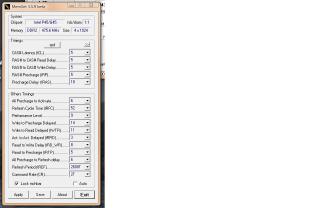
|
|
|
Jan 25 2009, 04:41 PM
|

Senior Member
1,479 posts Joined: Nov 2008
|
Im using Intel C2Q extreme QX6800 and I heard ppl saying OC to high speed hard and things..My CPU stock is 2.93ghz(266x11). I know nothing about OC so I jz changed my fsb from 266 to 270 and multiplier from 11 to 13 with the asus mobo utility and my clock speed became 3.5Ghz and the process cost me like may be 1 minute? And my multiplier can go up to 30 u know. I couldn't believe OC was this easy and i knew that definately something is wrong rite? So all u sifu here enlighten me?
tq |
|
|
Jan 25 2009, 06:40 PM
|

Senior Member
2,547 posts Joined: Oct 2007 
|
QUOTE(B u B u @ Jan 25 2009, 04:41 PM) Im using Intel C2Q extreme QX6800 and I heard ppl saying OC to high speed hard and things..My CPU stock is 2.93ghz(266x11). I know nothing about OC so I jz changed my fsb from 266 to 270 and multiplier from 11 to 13 with the asus mobo utility and my clock speed became 3.5Ghz and the process cost me like may be 1 minute? And my multiplier can go up to 30 u know. I couldn't believe OC was this easy and i knew that definately something is wrong rite? So all u sifu here enlighten me? what is the thing that u dont understand about OC ya? mind to be more specific?tq |
|
|
|
|
|
Jan 25 2009, 08:02 PM
|
|
Senior Member
2,009 posts Joined: Oct 2006 From: My house
|
seriously can go till 30x BuBu?
then let say 200x30 = 6000GHz? wow |
|
|
Jan 25 2009, 11:14 PM
|

Junior Member
372 posts Joined: Jul 2007 From: kuala lumpur
|
can i kno wats de proper ram multiplier i should put??is it ok if i put 2?
|
|
|
Jan 26 2009, 08:04 AM
|

Senior Member
1,689 posts Joined: Jan 2003
|
QUOTE(kennysik88 @ Jan 25 2009, 11:14 PM) can i kno wats de proper ram multiplier i should put??is it ok if i put 2? If u put 2 its consider 1:1 setting for your ram n by the setting of 270 definately no problem for your ram but i am worry for your proc becos it might not go so high with multiplier of 13 |
|
|
Jan 26 2009, 05:53 PM
|
|
Junior Member
372 posts Joined: Jul 2007 From: kuala lumpur
|
QUOTE(Dickong @ Jan 26 2009, 08:04 AM) If u put 2 its consider 1:1 setting for your ram n by the setting of 270 definately no problem for your ram but i am worry for your proc becos it might not go so high with multiplier of 13 i put my proc multiplier at 9 n my fsb at 378 so de ram multiplier still ok? |
|
|
Jan 28 2009, 07:42 AM
|
|
Senior Member
1,689 posts Joined: Jan 2003
|
QUOTE(fesick @ Jan 25 2009, 08:02 PM) seriously can go till 30x BuBu? Your example of calculation is wrong, it should be 6000mhz or just 6 ghz instead of 6000ghz. then let say 200x30 = 6000GHz? wow  |
|
|
Jan 28 2009, 03:28 PM
|

Senior Member
1,937 posts Joined: Jun 2006 From: Petaling Jaya
|
QUOTE(B u B u @ Jan 25 2009, 04:41 PM) Im using Intel C2Q extreme QX6800 and I heard ppl saying OC to high speed hard and things..My CPU stock is 2.93ghz(266x11). I know nothing about OC so I jz changed my fsb from 266 to 270 and multiplier from 11 to 13 with the asus mobo utility and my clock speed became 3.5Ghz and the process cost me like may be 1 minute? And my multiplier can go up to 30 u know. I couldn't believe OC was this easy and i knew that definately something is wrong rite? So all u sifu here enlighten me? Nothing's wrong also.... Good to hear that u can get 3.5GHz easily... Now try to get to 4GHz and above and u will eventually understand why OCing is hard....tq |
|
|
Jan 30 2009, 01:11 AM
|
|
Senior Member
2,009 posts Joined: Oct 2006 From: My house
|
eh,my bad.. should be mhz , yeah u right..
but is it possible? something wrong is it? |
|
|
|
|
|
Feb 16 2009, 08:27 PM
|

Junior Member
282 posts Joined: Jan 2009
|
hye...is this the right place to ask?
i have some problem with my system...u c my proc stock clock for E6300 is 1.86ghz(266mhz x 7) something...then i oc'ed to only 2.1ghz(300mhz x 7).system was stable only for 2 hours..some time its freezes suddenly...after 2 hours oc'ed.then it start to reboot itself more frequently..actually what is my problem? by the way i increase Vdimm to 2.0V because im using high performance ram like in my signature..is that the right thing to do? anyone have any suggestion? now im using proc stock speed.psu powerlogic magnum 5 450w... This post has been edited by deep_hunter: Feb 16 2009, 08:30 PM |
|
|
Feb 16 2009, 10:06 PM
|

Senior Member
3,174 posts Joined: Oct 2008 From: Wonderland 
|
QUOTE(miloXD @ Jan 17 2009, 12:51 AM) E8400 E0 @ 4Ghz w/ thermalright ultra 120 extreme @ def vcore prime stable for 24hr How stable is your 4ghz? 3DMark and Games running well?Team Xtreem PC-8500 @ 1068Mhz @ 1.8 vdimm  |
|
|
Feb 17 2009, 09:36 AM
|

Junior Member
47 posts Joined: Aug 2005
|
guys i need help oc my rams and cpu can anyone help?
i want to clock my system to max without adding power to ram or cpu. cause i runing my pc 24-7 - 360 days. cpu : Intel C2D E8400 ram :G.Skill F2-8000CL5D- 4GBPQ mobo: Gigabyte P35 DS3 RUNNING F14C firmware (latest firmware) cpu cooler: thermalright ultra - 120 with 2000rpm CM fan psu: coolermaster real power pro 650w 80 plus ready thanks to advance guys !!!!!!!!!!!!!!!!!! ------------------------------------------------------------------ These are default settings CPU clock ratio : xx CPU Host clock control: enable/disable CPU host frequency: 266-xxx PCI Express frequency: auto C.I.A 2 :disable performance enchance : Turbo system memory multiplier : auto memory frequency: 667-xxxx high speed DRAM DKK setting: Option 1 system voltage control : auto ddr2 overvoltage control : normal pci-e overvoltage control : normal fsb overvoltage control : normal (G)MCH overvoltage control : normal cpu overvoltage control : normal normal cpu vcore: xx |
|
|
Feb 17 2009, 11:30 AM
|

Senior Member
3,812 posts Joined: Dec 2008 From: Eden
|
QUOTE Im using Intel C2Q extreme QX6800 and I heard ppl saying OC to high speed hard and things..My CPU stock is 2.93ghz(266x11). I know nothing about OC so I jz changed my fsb from 266 to 270 and multiplier from 11 to 13 with the asus mobo utility and my clock speed became 3.5Ghz and the process cost me like may be 1 minute? And my multiplier can go up to 30 u know. I couldn't believe OC was this easy and i knew that definately something is wrong rite? So all u sifu here enlighten me? tq Im using Intel C2Q extreme QX6800 and I heard ppl saying OC to high speed hard and things..My CPU stock is 2.93ghz(266x11). I know nothing about OC so I jz changed my fsb from 266 to 270 and multiplier from 11 to 13 with the asus mobo utility and my clock speed became 3.5Ghz and the process cost me like may be 1 minute? And my multiplier can go up to 30 u know. I couldn't believe OC was this easy and i knew that definately something is wrong rite? So all u sifu here enlighten me? tq why not try 400x8@9? i use it. going to push it to the max later. hehe. someone told me that hisher fsb is better. (that's what i been told, i use higher multiplier than fsb before)  This post has been edited by uzer85: Feb 17 2009, 11:31 AM |
|
|
Feb 17 2009, 08:28 PM
|

Senior Member
1,299 posts Joined: Dec 2007 From: Puchong Utama
|
hyelo guys..hv Q here..
is it safe to set FSB high and lower down processor multiplier??.. now, i am curently running on stock HSF, think wanna find higest FSB first.. This post has been edited by hackcremo: Feb 17 2009, 08:29 PM |
|
|
Feb 17 2009, 11:42 PM
|

Senior Member
1,550 posts Joined: Aug 2008
|
higher fsb strains more on ur mobo than processor... this is a good way of finding ur fsb wall, and yes, high fsb with lower multiplier is better than high multiplier with lower fsb... dats bcos ure making the mobo, and ram run at a higher speed... one of the mobo that has the highest fsb wall is biostar tpower i45.... easily 600fsb, world record is 700fsb
 |
|
|
Feb 18 2009, 12:15 AM
|
|
Senior Member
2,547 posts Joined: Oct 2007
|
QUOTE(iBenQ @ Feb 17 2009, 11:42 PM) higher fsb strains more on ur mobo than processor... this is a good way of finding ur fsb wall, and yes, high fsb with lower multiplier is better than high multiplier with lower fsb... dats bcos ure making the mobo, and ram run at a higher speed... one of the mobo that has the highest fsb wall is biostar tpower i45.... easily 600fsb, world record is 700fsb not really la..... those 600fsb are kinda hard to get actually if u are talking about running on air  and p45 is kinda a tough chipset to play around ... tweak until u sienz |
|
Topic ClosedOptions
|
| Change to: |  0.2593sec 0.2593sec
 0.33 0.33
 6 queries 6 queries
 GZIP Disabled GZIP Disabled
Time is now: 3rd December 2025 - 06:02 PM |
 Quote
Quote