

same as my GMH

but urs at lower frequency WAY lower vdimm

INTEL OVERCLOCKING THREAD, TIPS,Q n A, Results...Great For NueBis
|
|
 Nov 2 2008, 08:18 PM Nov 2 2008, 08:18 PM
|
 
Senior Member
558 posts Joined: Jun 2006 From: KL Sentral - Segamat   
|
GKX oso 2.3V maa?
same as my GMH but urs at lower frequency WAY lower vdimm |
|
|
|
|
|
Nov 6 2008, 08:40 AM
|

Senior Member
2,751 posts Joined: Jan 2003 From: Taiping
|
gkx is vdimm lover unlike gmh
|
|
|
Nov 6 2008, 11:29 AM
|
 
Elite
4,746 posts Joined: Dec 2007 From: Speed rule
|
QUOTE(dro @ Nov 2 2008, 08:18 PM) GKX oso 2.3V maa? CL4-4-4-4 and full stability,test it yourself same as my GMH but urs at lower frequency WAY lower vdimm   That is not the max,just never tested as i run 1:1 only  The point is:Memtest passable |
|
|
Nov 6 2008, 04:47 PM
|

Junior Member
118 posts Joined: Oct 2008 From: Sungai Petani 
|
i just want to start learn about OC..
someone cane help me? my old rig intel P4 3.0HT (N0) 800FSB (s775) eith CM Mars cooler MSI 915P neo-2 platinum 1 x 2GB kvr 667 hd 2600xt |
|
|
Nov 6 2008, 07:08 PM
|

Senior Member
2,547 posts Joined: Oct 2007 
|
QUOTE(OC4/3 @ Nov 6 2008, 11:29 AM) CL4-4-4-4 and full stability,test it yourself 100% ram usage That is not the max,just never tested as i run 1:1 only The point is:Memtest passable n passes over 500% |
|
|
Nov 6 2008, 07:27 PM
|
|
Elite
4,746 posts Joined: Dec 2007 From: Speed rule
|
QUOTE(tkh_1001 @ Nov 6 2008, 07:08 PM) 100% ram usage No lah n passes over 500% 3dmark01 lobby and memtest 100% 500MB passable,lazy to test as i test during benching one mah » Click to show Spoiler - click again to hide... « |
|
|
|
|
|
Nov 8 2008, 05:34 PM
|

Senior Member
1,866 posts Joined: Apr 2006
|
is there anything i can do to push my clock speed higher? i only dare to adjust the bus speed and vCore a bit. no idea with others.
Attached thumbnail(s) 
|
|
|
Nov 8 2008, 06:17 PM
|

Elite
14,576 posts Joined: May 2006 From: Sarawak 
|
QUOTE(LYR @ Nov 8 2008, 05:34 PM) is there anything i can do to push my clock speed higher? i only dare to adjust the bus speed and vCore a bit. no idea with others. Isn't your stock CPU vcore 1.3375v? Why is it set manually to 1.250v?  And you usually don't have to set the vFSB to +0.1v... just put it at default... This post has been edited by kmarc: Nov 8 2008, 06:18 PM |
|
|
Nov 8 2008, 09:09 PM
|
|
Senior Member
1,866 posts Joined: Apr 2006
|
QUOTE(kmarc @ Nov 8 2008, 06:17 PM) Isn't your stock CPU vcore 1.3375v? Why is it set manually to 1.250v? when i set the voltage control to manual, the vcore is at 1.232 first. so, i thought it's the default CPU vcore. however, even if i set the the vcore to 1.35, i will get bluescreen at windows startup with error message of ' memory blah blah blah '(the screen flashed very fast), couldnt see properly.And you usually don't have to set the vFSB to +0.1v... just put it at default... |
|
|
Nov 8 2008, 09:17 PM
|
|
Elite
14,576 posts Joined: May 2006 From: Sarawak
|
QUOTE(LYR @ Nov 8 2008, 09:09 PM) when i set the voltage control to manual, the vcore is at 1.232 first. so, i thought it's the default CPU vcore. however, even if i set the the vcore to 1.35, i will get bluescreen at windows startup with error message of ' memory blah blah blah '(the screen flashed very fast), couldnt see properly. Try setting the ram multiplier to it's lowest value (should be 2.0). That way, you are sure it is not the rams (looks like your rams is running at 2.4x ram multiplier?) when you overclock. |
|
|
Nov 8 2008, 09:28 PM
|
|
Senior Member
1,866 posts Joined: Apr 2006
|
QUOTE(kmarc @ Nov 8 2008, 09:17 PM) Try setting the ram multiplier to it's lowest value (should be 2.0). That way, you are sure it is not the rams (looks like your rams is running at 2.4x ram multiplier?) when you overclock. this is my ram screenshot after i overclocked it to 2.3GHz.Attached thumbnail(s) 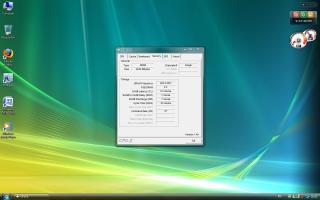
|
|
|
Nov 8 2008, 10:37 PM
|
|
Elite
14,576 posts Joined: May 2006 From: Sarawak
|
QUOTE(LYR @ Nov 8 2008, 09:28 PM) this is my ram screenshot after i overclocked it to 2.3GHz. That could be the reason, that your rams are overclocked too much (unless you increase the vdimm).Try reducing the ram multiplier to it's lowest value... should be 2.0. That way, you either underclock, or mildly overclock the rams..... (it's the "System Memory Multiplier" setting.....) Note : From your previous screen shot, you were running your rams with a 3.0 ram multiplier (275mhz x 3 = 825mhz) This post has been edited by kmarc: Nov 8 2008, 10:39 PM |
|
|
Nov 9 2008, 12:09 AM
|
|
Senior Member
1,866 posts Joined: Apr 2006
|
QUOTE(kmarc @ Nov 8 2008, 10:37 PM) That could be the reason, that your rams are overclocked too much (unless you increase the vdimm). you're right. i managed to get the processor stabled at higher clock speed after i reduced the System Memory Multiplier. thanks for your help.Try reducing the ram multiplier to it's lowest value... should be 2.0. That way, you either underclock, or mildly overclock the rams..... (it's the "System Memory Multiplier" setting.....) Note : From your previous screen shot, you were running your rams with a 3.0 ram multiplier (275mhz x 3 = 825mhz) |
|
|
|
|
|
Nov 18 2008, 09:01 PM
|

Senior Member
1,176 posts Joined: Aug 2008
|
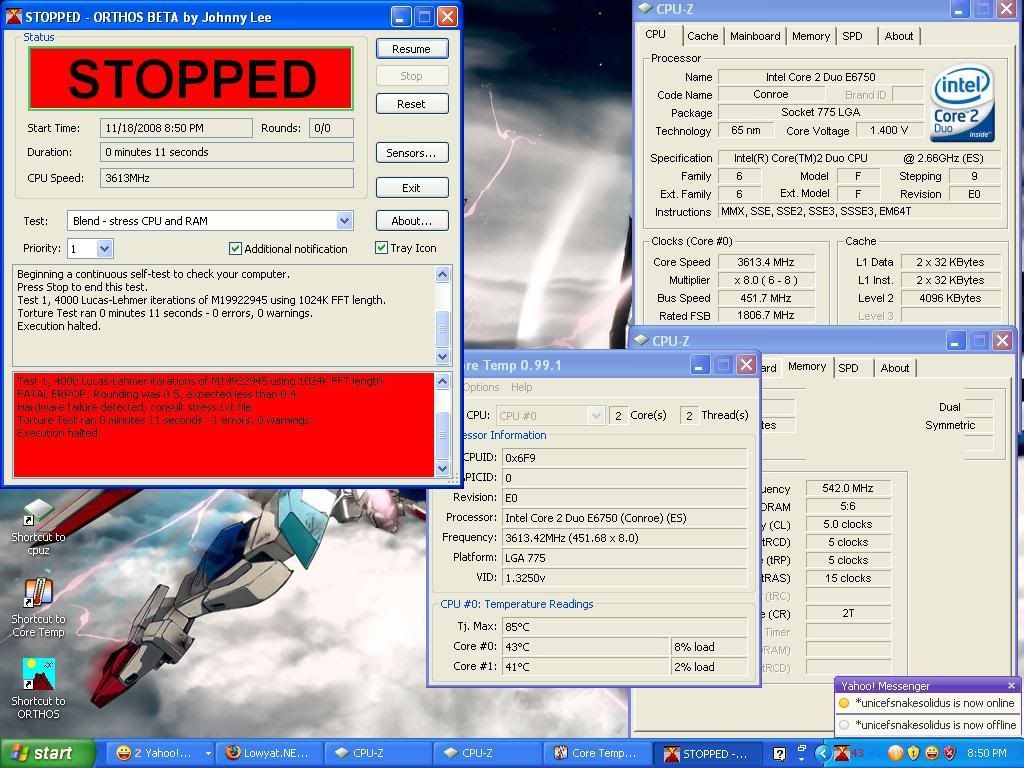 why this happen? any help? |
|
|
Nov 18 2008, 09:22 PM
|

Elite
5,602 posts Joined: Jul 2007 From: The Holiest Of Hole
|
QUOTE(teamloks @ Nov 18 2008, 09:01 PM) » Click to show Spoiler - click again to hide... « why this happen? any help? |
|
|
Nov 19 2008, 08:32 AM
|
|
Senior Member
2,751 posts Joined: Jan 2003 From: Taiping
|
not enough vcore lo i tink
|
|
|
Nov 25 2008, 08:13 PM
|

Senior Member
1,298 posts Joined: Jan 2003 From: utopia
|
still wonder
200FSB x 15 is better or 300 x 10 ? |
|
|
Dec 2 2008, 09:35 PM
|

Junior Member
293 posts Joined: Feb 2006 From: Klang valley
|
Hi guys, need help.. im using a E8400 overclock at 3.825 by to 425.. i left the core voltage at auto... cause im still not sure what is the best.. is 1.25 good for this clock speed?
and im using 2x2GB kingston DDR2 800 value ram.. so the DRAM frequency is now 425 as 1:1 ratio.. does this mean my ram is now OCed? im using a xigmatek HDT963 and the load temp is 55c, im pretty amaze with the temp as the overclock is pretty high.. is the anything wrong with the overclocking?? |
|
|
Dec 2 2008, 09:41 PM
|
|
Senior Member
2,547 posts Joined: Oct 2007
|
QUOTE(livinzo @ Dec 2 2008, 09:35 PM) Hi guys, need help.. im using a E8400 overclock at 3.825 by to 425.. i left the core voltage at auto... cause im still not sure what is the best.. is 1.25 good for this clock speed? suggest u look at mr.kmarc's siggy and read the basic OC guide...and im using 2x2GB kingston DDR2 800 value ram.. so the DRAM frequency is now 425 as 1:1 ratio.. does this mean my ram is now OCed? im using a xigmatek HDT963 and the load temp is 55c, im pretty amaze with the temp as the overclock is pretty high.. is the anything wrong with the overclocking?? btw, i see no problem with ur OC... |
|
|
Dec 29 2008, 02:51 AM
|

Senior Member
1,956 posts Joined: May 2008
|
can i overclock a pentium dual core e5200 2.53 ghz stock clock on
a p4m-900 via mobo or on a g31/945gc intel mobo? i want from 2.53 to 3.0-3.2 ghz OC i dont want to use any cpu cooler or any thing else can i achieve it like this?? i will be using 2gb 667 bus ram or 800 bus ddr2. even if i use 1 gb ram is it possible?? and also suggest a good brand these chipsets plz. I am not in MSIA right now. Is Foxconn, Biostar and ECS good for these chipsets to overclock? anybody used these brands for these chipsets? hows it? bcoz they are available in the place where i am right now. |
|
Topic ClosedOptions
|
| Change to: |  0.0252sec 0.0252sec
 0.69 0.69
 6 queries 6 queries
 GZIP Disabled GZIP Disabled
Time is now: 4th December 2025 - 03:16 AM |
 Quote
Quote