

ok...thank all.
Asus G-Series Notebooks Thread V3, G74's Pics at Post #483 :)
Asus G-Series Notebooks Thread V3, G74's Pics at Post #483 :)
|
|
 Nov 21 2011, 11:13 PM Nov 21 2011, 11:13 PM
|
 
Junior Member
15 posts Joined: Jun 2011 
|
ok...thank all.
|
|
|
|
|
|
Nov 21 2011, 11:41 PM
|

Senior Member
671 posts Joined: Jul 2007
|
yup, its quite easy. You just took the keyboard off and you can already access the empty ram slot. It doesnt involve taking out any screw.
@DoubleU Yup the ATK package is still im my computer but i dont know why i cant use the backlight  The light does come out a few second during boot up so i think its not a hardware problem, more like a driver problem add on: nvm bro, it working now. It turn out my previous ATK file got corrupted. I tried reinstall it again and it work perfectly. lol silly me  This post has been edited by Volt: Nov 22 2011, 12:02 AM |
|
|
Nov 22 2011, 12:43 PM
|

Senior Member
2,708 posts Joined: Oct 2008 From: Johor Bahru 
|
btw volt, why get a laptop if you have gaming PC?
|
|
|
Nov 22 2011, 01:30 PM
|

Senior Member
3,304 posts Joined: Mar 2006 From: Chicago(Port25)
|
QUOTE(Volt @ Nov 21 2011, 11:41 PM) yup, its quite easy. You just took the keyboard off and you can already access the empty ram slot. It doesnt involve taking out any screw. I prefer to open the bottom for the first time(curiousity). Bottom ram slot is accessible. However, I'm following the manual as they've warned.@DoubleU Yup the ATK package is still im my computer but i dont know why i cant use the backlight The light does come out a few second during boot up so i think its not a hardware problem, more like a driver problem add on: nvm bro, it working now. It turn out my previous ATK file got corrupted. I tried reinstall it again and it work perfectly. lol silly me  QUOTE Refering to the following memory population table for a correct memory installation sequence. |
|
|
Nov 22 2011, 02:03 PM
|

Junior Member
75 posts Joined: May 2005
|
Oh you can remove the bottom panel without opening the top first? If I'm not mistaken, only the G74SX can right?
|
|
|
Nov 22 2011, 02:05 PM
|
|
Senior Member
671 posts Joined: Jul 2007
|
@DoubleU
i need a laptop for my work and assignment. that pc is for my home use. @riku2replica im not sure if i place it at the right sequence, i just place at slot that is empty above the stock 4gb ram. which slot did you place bro? |
|
|
|
|
|
Nov 22 2011, 02:23 PM
|

Junior Member
295 posts Joined: Jul 2009 From: Kota Kinabalu
|
QUOTE(Bushido @ Nov 22 2011, 02:03 PM) Oh you can remove the bottom panel without opening the top first? If I'm not mistaken, only the G74SX can right? only 74sx can .... 53sx.. need to open kb then can... really really facepalm ....  |
|
|
Nov 22 2011, 02:28 PM
|
|
Junior Member
75 posts Joined: May 2005
|
Volt,
Don't think it matters which slot you put. Easiest is 1st and 4th slot if im not wrong as it's underneath the keyboard. trustmeiamlegit, Aww knew it. Thanks buddy. |
|
|
Nov 22 2011, 03:27 PM
|
|
Junior Member
16 posts Joined: Aug 2011
|
all the sifus here
i wanna ask something about the asus g53sx the unit that priced at rm3999 does the standard selling unit of it comes with a Full HD resolution(1920x1080)?? |
|
|
Nov 22 2011, 03:28 PM
|
|
Senior Member
3,304 posts Joined: Mar 2006 From: Chicago(Port25)
|
QUOTE(Zair @ Nov 22 2011, 03:27 PM) all the sifus here Current batches are not too sure, however ordering period will kill you.i wanna ask something about the asus g53sx the unit that priced at rm3999 does the standard selling unit of it comes with a Full HD resolution(1920x1080)?? Added on November 22, 2011, 3:29 pm QUOTE(Bushido @ Nov 22 2011, 02:28 PM) Volt, 1st slot is not available. Only 4th is directly below the keyboard.Don't think it matters which slot you put. Easiest is 1st and 4th slot if im not wrong as it's underneath the keyboard. trustmeiamlegit, Aww knew it. Thanks buddy. This post has been edited by riku2replica: Nov 22 2011, 03:30 PM |
|
|
Nov 22 2011, 03:34 PM
|
|
Junior Member
16 posts Joined: Aug 2011
|
how long will it take for ordering it?
and meaning the g53sx doesnt have the 1920x1080 resolution? |
|
|
Nov 22 2011, 03:36 PM
|
|
Senior Member
3,304 posts Joined: Mar 2006 From: Chicago(Port25)
|
QUOTE(Zair @ Nov 22 2011, 03:34 PM) how long will it take for ordering it? There's no guarantee it will be FHD for now unlike early batches..and meaning the g53sx doesnt have the 1920x1080 resolution? Who knows the ordering period. |
|
|
Nov 22 2011, 03:45 PM
|
|
Junior Member
75 posts Joined: May 2005
|
@Riku.
Yep the 1st slot is fitted with the factory RAM. Just to confirm, the given one is running at 1333Mhz right? Don't want to get the wrong frequency. @Zair, We can't guarantee you anything, even Asus can't guarantee on their delivery period. Have fun waiting like the rest of us did. About the fHD, not really sure about that. |
|
|
|
|
|
Nov 22 2011, 04:22 PM
|
|
Junior Member
15 posts Joined: Jun 2011
|
mine is g53sx-s1208v, and i have fhd...but from the catelog, it say 1366 x768 only
Added on November 22, 2011, 4:27 pm QUOTE(Freedom1992 @ Nov 22 2011, 04:22 PM) mine is g53sx-s1208v, and i have fhd...but from the catelog, it say 1366 x768 only i bought it last weekThis post has been edited by Freedom1992: Nov 22 2011, 04:27 PM |
|
|
Nov 22 2011, 04:38 PM
|
|
Senior Member
3,304 posts Joined: Mar 2006 From: Chicago(Port25)
|
QUOTE(Bushido @ Nov 22 2011, 03:45 PM) @Riku. The default samsung RAM from the factory is installed in slot 2 on the back panel. And yes, it is 1333Mhz.Yep the 1st slot is fitted with the factory RAM. Just to confirm, the given one is running at 1333Mhz right? Don't want to get the wrong frequency. @Zair, We can't guarantee you anything, even Asus can't guarantee on their delivery period. Have fun waiting like the rest of us did. About the fHD, not really sure about that. 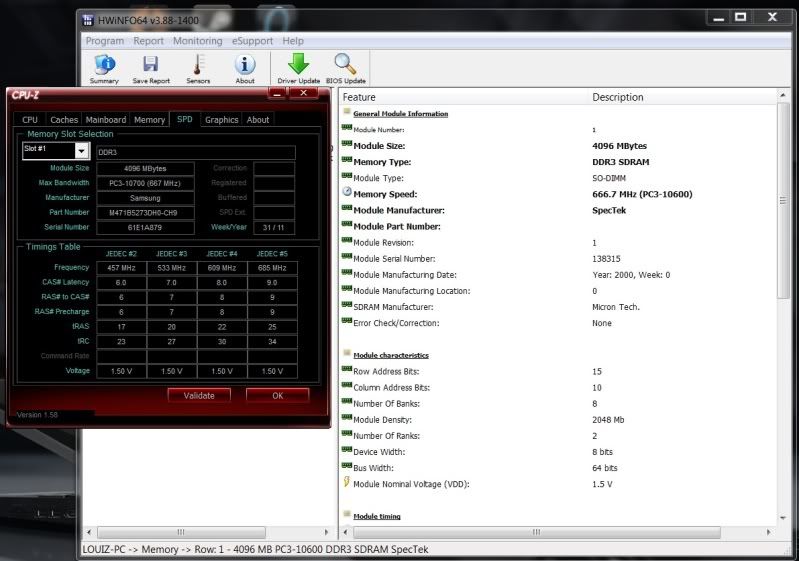 For ur reference, CPU-Z showing Samsung RAM. HWInfo My Mushkin RAM. QUOTE(Freedom1992 @ Nov 22 2011, 04:22 PM) mine is g53sx-s1208v, and i have fhd...but from the catelog, it say 1366 x768 only That would depends on stock availability. Asus MY is pushing 3D tech into mainstream market. So, they prolly have a quota to meet before actually placing order by demand.Added on November 22, 2011, 4:27 pm i bought it last week This post has been edited by riku2replica: Nov 22 2011, 04:42 PM |
|
|
Nov 22 2011, 04:50 PM
|
|
Junior Member
15 posts Joined: Jun 2011
|
QUOTE(riku2replica @ Nov 22 2011, 04:38 PM) The default samsung RAM from the factory is installed in slot 2 on the back panel. And yes, it is 1333Mhz. any nice software that can see all my lappy info and temperature??thank , suggest pleaseFor ur reference, CPU-Z showing Samsung RAM. HWInfo My Mushkin RAM. That would depends on stock availability. Asus MY is pushing 3D tech into mainstream market. So, they prolly have a quota to meet before actually placing order by demand. |
|
|
Nov 22 2011, 04:53 PM
|
|
Junior Member
75 posts Joined: May 2005
|
@Riku
Thanks mate  If it's in slot two, why did they write Slot #1 in CPU-Z? Mine's also Samsung... Maybe Mushkin did it for Samsung as OEM. Haha. Planning to just fill all the RAM slots up since I"m gonna keep this laptop for quite a long time, or until Ivy Bridge comes out. If it's in slot two, why did they write Slot #1 in CPU-Z? Mine's also Samsung... Maybe Mushkin did it for Samsung as OEM. Haha. Planning to just fill all the RAM slots up since I"m gonna keep this laptop for quite a long time, or until Ivy Bridge comes out.  @Freedom: I use GPU-Z and HWMonitor. MSI Afterburner gives good GPU readings as well. |
|
|
Nov 22 2011, 05:01 PM
|
|
Junior Member
15 posts Joined: Jun 2011
|
QUOTE(Bushido @ Nov 22 2011, 04:53 PM) @Riku thank, nice software....Thanks mate If it's in slot two, why did they write Slot #1 in CPU-Z? Mine's also Samsung... Maybe Mushkin did it for Samsung as OEM. Haha. Planning to just fill all the RAM slots up since I"m gonna keep this laptop for quite a long time, or until Ivy Bridge comes out. @Freedom: I use GPU-Z and HWMonitor. MSI Afterburner gives good GPU readings as well. |
|
|
Nov 22 2011, 05:11 PM
|
|
Senior Member
3,304 posts Joined: Mar 2006 From: Chicago(Port25)
|
QUOTE(Bushido @ Nov 22 2011, 04:53 PM) @Riku Not really, That Mushkin ram has ram chips which i haven't seen in ages since the 2007/2008 age lol.Thanks mate If it's in slot two, why did they write Slot #1 in CPU-Z? Mine's also Samsung... Maybe Mushkin did it for Samsung as OEM. Haha. Planning to just fill all the RAM slots up since I"m gonna keep this laptop for quite a long time, or until Ivy Bridge comes out. @Freedom: I use GPU-Z and HWMonitor. MSI Afterburner gives good GPU readings as well. The Samsung RAM remains samsung chips however Mushkin is using Micron D9 chips. Spectek is doing oem for mushkin i suppose. To sum up, we actually got 2 Samsung stuffs in our G53SX, samsung FHD Panel and Samsung RAM. |
|
|
Nov 22 2011, 05:30 PM
|
|
Junior Member
15 posts Joined: Jun 2011
|
QUOTE(riku2replica @ Nov 22 2011, 05:11 PM) Not really, That Mushkin ram has ram chips which i haven't seen in ages since the 2007/2008 age lol. oic...the matte screen is also make by samsung??The Samsung RAM remains samsung chips however Mushkin is using Micron D9 chips. Spectek is doing oem for mushkin i suppose. To sum up, we actually got 2 Samsung stuffs in our G53SX, samsung FHD Panel and Samsung RAM. |
| Change to: |  0.0284sec 0.0284sec
 0.39 0.39
 6 queries 6 queries
 GZIP Disabled GZIP Disabled
Time is now: 5th December 2025 - 01:24 AM |
 Quote
Quote