

can i know is there any Asus G53SX-S1208V stock in low yat plaza...which floor and which shop?? thank you all the sifu here
Asus G-Series Notebooks Thread V3, G74's Pics at Post #483 :)
Asus G-Series Notebooks Thread V3, G74's Pics at Post #483 :)
|
|
 Nov 12 2011, 10:05 PM Nov 12 2011, 10:05 PM
Return to original view | Post
#1
|
 
Junior Member
15 posts Joined: Jun 2011 
|
can i know is there any Asus G53SX-S1208V stock in low yat plaza...which floor and which shop?? thank you all the sifu here
|
|
|
|
|
|
Nov 21 2011, 07:35 PM
Return to original view | Post
#2
|
|
Junior Member
15 posts Joined: Jun 2011
|
may i know if u want to add ram in my g53sx-x1208v.... i need to go to asus center or how can i upgrade my ram?
|
|
|
Nov 21 2011, 11:04 PM
Return to original view | Post
#3
|
|
Junior Member
15 posts Joined: Jun 2011
|
ok....is that posible i buy a ram and take it to the asus service center help me upgrade
|
|
|
Nov 21 2011, 11:13 PM
Return to original view | Post
#4
|
|
Junior Member
15 posts Joined: Jun 2011
|
ok...thank all.
|
|
|
Nov 22 2011, 04:22 PM
Return to original view | Post
#5
|
|
Junior Member
15 posts Joined: Jun 2011
|
mine is g53sx-s1208v, and i have fhd...but from the catelog, it say 1366 x768 only
Added on November 22, 2011, 4:27 pm QUOTE(Freedom1992 @ Nov 22 2011, 04:22 PM) mine is g53sx-s1208v, and i have fhd...but from the catelog, it say 1366 x768 only i bought it last week This post has been edited by Freedom1992: Nov 22 2011, 04:27 PM |
|
|
Nov 22 2011, 04:50 PM
Return to original view | Post
#6
|
|
Junior Member
15 posts Joined: Jun 2011
|
QUOTE(riku2replica @ Nov 22 2011, 04:38 PM) The default samsung RAM from the factory is installed in slot 2 on the back panel. And yes, it is 1333Mhz. any nice software that can see all my lappy info and temperature??thank , suggest please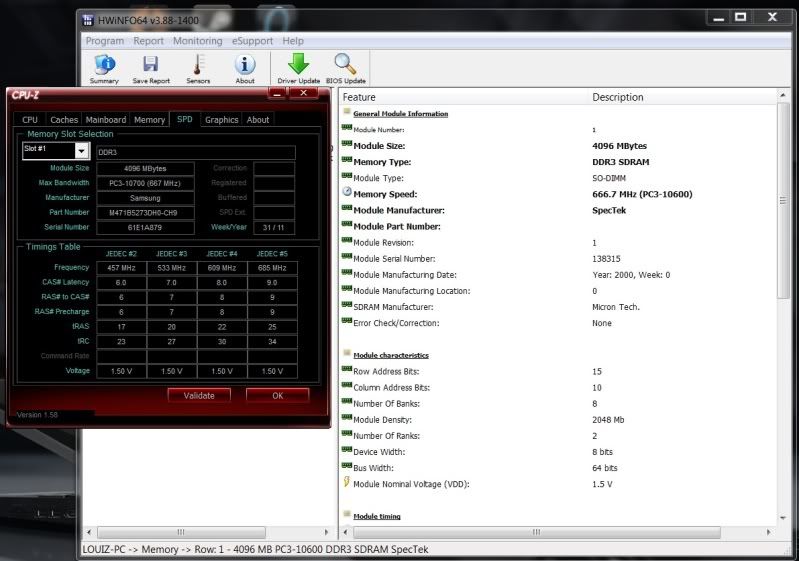 For ur reference, CPU-Z showing Samsung RAM. HWInfo My Mushkin RAM. That would depends on stock availability. Asus MY is pushing 3D tech into mainstream market. So, they prolly have a quota to meet before actually placing order by demand. |
|
|
|
|
|
Nov 22 2011, 05:01 PM
Return to original view | Post
#7
|
|
Junior Member
15 posts Joined: Jun 2011
|
QUOTE(Bushido @ Nov 22 2011, 04:53 PM) @Riku thank, nice software....Thanks mate  If it's in slot two, why did they write Slot #1 in CPU-Z? Mine's also Samsung... Maybe Mushkin did it for Samsung as OEM. Haha. Planning to just fill all the RAM slots up since I"m gonna keep this laptop for quite a long time, or until Ivy Bridge comes out. If it's in slot two, why did they write Slot #1 in CPU-Z? Mine's also Samsung... Maybe Mushkin did it for Samsung as OEM. Haha. Planning to just fill all the RAM slots up since I"m gonna keep this laptop for quite a long time, or until Ivy Bridge comes out.  @Freedom: I use GPU-Z and HWMonitor. MSI Afterburner gives good GPU readings as well. |
|
|
Nov 22 2011, 05:30 PM
Return to original view | Post
#8
|
|
Junior Member
15 posts Joined: Jun 2011
|
QUOTE(riku2replica @ Nov 22 2011, 05:11 PM) Not really, That Mushkin ram has ram chips which i haven't seen in ages since the 2007/2008 age lol. oic...the matte screen is also make by samsung??The Samsung RAM remains samsung chips however Mushkin is using Micron D9 chips. Spectek is doing oem for mushkin i suppose. To sum up, we actually got 2 Samsung stuffs in our G53SX, samsung FHD Panel and Samsung RAM. |
|
|
Nov 22 2011, 06:40 PM
Return to original view | Post
#9
|
|
Junior Member
15 posts Joined: Jun 2011
|
QUOTE(riku2replica @ Nov 22 2011, 05:48 PM) 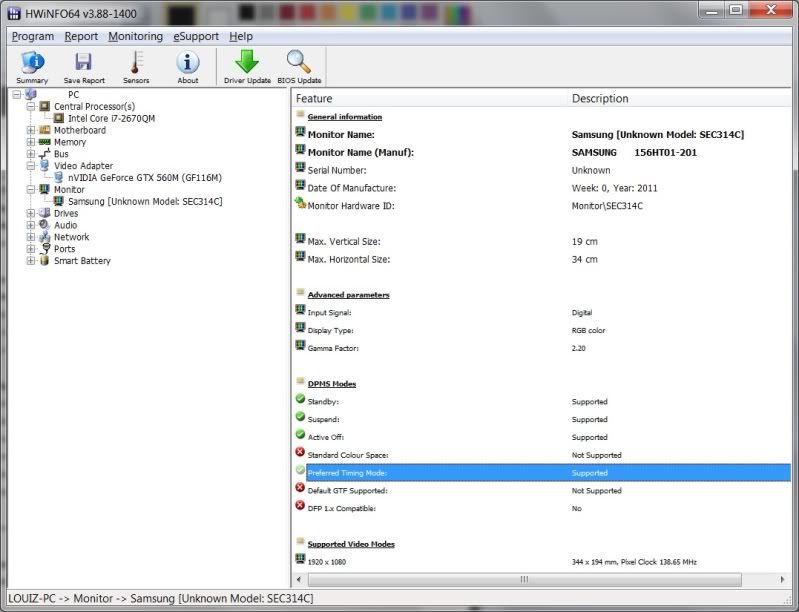 yes, it is. |
|
|
Nov 22 2011, 06:54 PM
Return to original view | Post
#10
|
|
Junior Member
15 posts Joined: Jun 2011
|
QUOTE(trustmeiamlegit @ Nov 22 2011, 06:51 PM) hahahahahahah later i upload the photo of my lappy...so nice the g53sx...LOL u must provide drillz yo!! pics of receipt and laptop !   |
|
|
Nov 22 2011, 09:13 PM
Return to original view | Post
#11
|
|
Junior Member
15 posts Joined: Jun 2011
|
QUOTE(Zair @ Nov 22 2011, 08:24 PM) how much you bought for your laptop? yeapisit the rm3999 or the rm4999? by the mean of FHD..your laptop resolution must be 1920x1080 right? the 3999 without 3d...fhd...1080p.and the laptop graphic is just nice |
|
|
Nov 22 2011, 09:22 PM
Return to original view | Post
#12
|
|
Junior Member
15 posts Joined: Jun 2011
|
call of duty MW3, setting to high
|
|
|
Nov 22 2011, 09:48 PM
Return to original view | Post
#13
|
|
Junior Member
15 posts Joined: Jun 2011
|
QUOTE(riku2replica @ Nov 22 2011, 09:42 PM)  The graphic card can handle black ops well, definitely MW3 is smooth. The graphic card can handle black ops well, definitely MW3 is smooth.@riku.. black ops graphic is higher than MW3 |
|
|
|
|
|
Nov 22 2011, 09:54 PM
Return to original view | Post
#14
|
|
Junior Member
15 posts Joined: Jun 2011
|
QUOTE(riku2replica @ Nov 22 2011, 09:50 PM) Black ops and MW3 is basically sharing same engine. There's no improvement on game engine. Even the safe mode stuff pops-up MW2 wording. overall this laptop is good than other laptop |
|
|
Nov 22 2011, 10:01 PM
Return to original view | Post
#15
|
|
Junior Member
15 posts Joined: Jun 2011
|
QUOTE(trustmeiamlegit @ Nov 22 2011, 09:58 PM) black ops is a poorly coded game imo... uses only abt 50% of the gpu's power but i play MW3 in 1080p all setting high, dun even feel lag or delay, smooth...all mode on...no prob man, fraps show the fps is stable at 60fpsi think u can run it on high @1080p... but off anti aliasing... set ambient occlusion to HBAO.... shadows to low.... off vsync maybe u need to overclock abit |
|
|
Nov 23 2011, 12:32 AM
Return to original view | Post
#16
|
|
Junior Member
15 posts Joined: Jun 2011
|
QUOTE(Bushido @ Nov 22 2011, 11:03 PM) @Freedom, din try the high setting, just try low and medium.so, battlefield can play in high setting?you can only play BF3 in med-low settings? How can that be? I'm playing mine with 95% High and 5% Ultra. No lags, smooth and beautiful as hell. Added on November 23, 2011, 12:35 am QUOTE(trustmeiamlegit @ Nov 22 2011, 10:20 PM) lol i mean for battlefield 3 lol, sorry i forgot to meantion just now haha ... u have it right?? BF3 u can set to fhd resolution, the graphic is detail and clearcan u run it at the settings ive mentioned at 1080p ? and tell me avg fps Added on November 22, 2011, 10:21 pm thats the awesome thing abt 1080p, even if u turn off AA, the jaggies wont be so obvious n pronounced  This post has been edited by Freedom1992: Nov 23 2011, 12:35 AM |
|
|
Nov 23 2011, 01:14 AM
Return to original view | Post
#17
|
|
Junior Member
15 posts Joined: Jun 2011
|


My lappy...Asus ROG G53sx-s1208v FHD GTX560m Added on November 23, 2011, 1:25 am QUOTE(Freedom1992 @ Nov 23 2011, 01:14 AM)
My lappy...Asus ROG G53sx-s1208v FHD GTX560m This post has been edited by Freedom1992: Nov 23 2011, 01:25 AM |
|
|
Nov 23 2011, 11:50 AM
Return to original view | Post
#18
|
|
Junior Member
15 posts Joined: Jun 2011
|
QUOTE(Kalist0 @ Nov 23 2011, 11:48 AM) yikes.. G53 owners.. how do you all manage to keep your lappie clean? -.- mine is full with fingerprints for me any idea how to clean it especially at the hand rest and front area any idea how to clean it especially at the hand rest and front areause 2 eyes glasses cloth and one make it dry and one make it wet...use the wet to wipe once the clean it with the dry cloth |
|
|
Nov 23 2011, 12:51 PM
Return to original view | Post
#19
|
|
Junior Member
15 posts Joined: Jun 2011
|
QUOTE(Bushido @ Nov 23 2011, 12:20 PM) Just get a microfibre cloth, make it damp, wipe it. That will get rid of many things. yeap....look nice and clean every week...  I always clean my laptop once a week. Yes, I have OCD cleanliness problem. Thank god this is matte, else i would have to do what i always do to Glossy laptops. |
|
|
Nov 23 2011, 09:59 PM
Return to original view | Post
#20
|
|
Junior Member
15 posts Joined: Jun 2011
|
QUOTE(DoubleU @ Nov 23 2011, 07:03 PM) the palm rest got finger prints meh? i just use one of those cloth for glasses to wipe. occasionally use those solvents to clean lcd lol.....i think got palm print..but not clear only... |
| Change to: |  0.0651sec 0.0651sec
 0.26 0.26
 7 queries 7 queries
 GZIP Disabled GZIP Disabled
Time is now: 5th December 2025 - 09:41 PM |
 Quote
Quote