Outline ·
[ Standard ] ·
Linear+
Sandy Bridge Overclocking V1, 2500K/2600K/2700K | LGA1155 P67.Z68.Z77
|
monsh
|
 Jan 16 2011, 11:09 PM Jan 16 2011, 11:09 PM
|

|
@kahjye
yeap with this new sandy bridge,it'll be easier since u can only play around with the multiplier instead of the base clock .
basically, all u have to do is raise the multiplier until the desired speed .
about the voltage, im not sure, can ask other sifu here .
|
|
|
|
|
|
kahjye
|
Jan 16 2011, 11:44 PM
|
|
|
i have no idea with the new bios...im using the asus board...the whole bios is different now lol...oh..? so my psu is okay for this spec?
cause alot of my friend told me to get 750w cause 550w true power is not enuf lol..
|
|
|
|
|
|
louislkw
|
Jan 16 2011, 11:55 PM
|
|
|
Yo, BCLK 108.01 :b1: 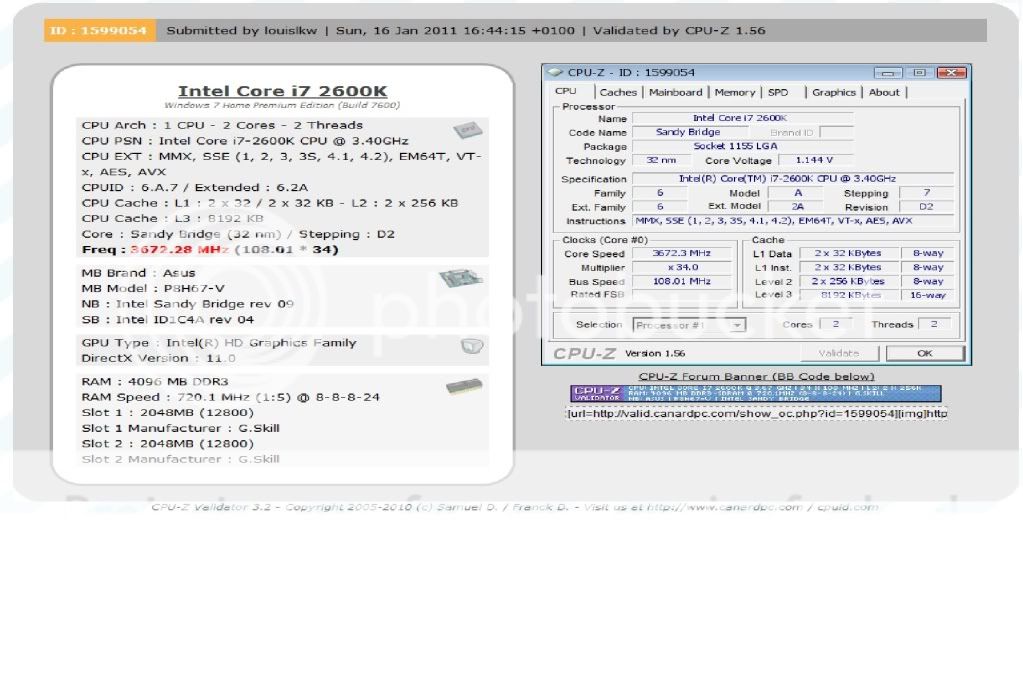 Still far from 109 |
|
|
|
|
|
kahjye
|
Jan 16 2011, 11:58 PM
|
|
|
damn..how to oc? LOl...
|
|
|
|
|
|
stasio
|
Jan 17 2011, 12:43 AM
|
|
|
|
|
|
|
|
|
kahjye
|
Jan 17 2011, 12:54 AM
|
|
|
QUOTE(stasio @ Jan 17 2011, 12:43 AM) can i change mine to that? hahahahahah will void warranty rite?
Added on January 17, 2011, 12:54 amoh ya , + if i oc my i5 2500k to 4.0ghz , do i need to raise up the vcore? This post has been edited by kahjye: Jan 17 2011, 12:54 AM |
|
|
|
|
|
TSowikh84
|
Jan 17 2011, 06:47 AM
|
i7 Clan

|
QUOTE(stasio @ Jan 17 2011, 12:43 AM) thanks stasio, the last 2 bioses didn't allow me to adjust BCLK. Hope this one permit it.  @ kahjye this bios is for M4E board only and u cannot simply flash the wrong bios. This post has been edited by owikh84: Jan 17 2011, 06:49 AM |
|
|
|
|
|
kahjye
|
Jan 17 2011, 09:31 AM
|
|
|
QUOTE(owikh84 @ Jan 17 2011, 06:47 AM) thanks stasio, the last 2 bioses didn't allow me to adjust BCLK. Hope this one permit it. @ kahjye this bios is for M4E board only and u cannot simply flash the wrong bios. anyne? oc`ing just need to adjust the multiplier ? |
|
|
|
|
|
TSowikh84
|
Jan 17 2011, 10:58 AM
|
i7 Clan
|
QUOTE(kahjye @ Jan 17 2011, 09:31 AM) anyne? oc`ing just need to adjust the multiplier ? Start by multi adjistment, increase vcore if couldnt boot or Bsod. |
|
|
|
|
|
kahjye
|
Jan 17 2011, 11:45 AM
|
|
|
QUOTE(owikh84 @ Jan 17 2011, 10:58 AM) Start by multi adjistment, increase vcore if couldnt boot or Bsod. Hello sir do u know how high can i go with stock vcore? |
|
|
|
|
|
louislkw
|
Jan 17 2011, 12:13 PM
|
|
|
QUOTE(kahjye @ Jan 17 2011, 11:45 AM) Hello sir do u know how high can i go with stock vcore? Get a higher capacity PSU. You can try oc with current until pc auto shut down. No one will know how high its can go until you have try it out yourself. It's chip dependence.  Just like eating a mango, you dun know whether it is sour or sweet until you taste it. |
|
|
|
|
|
zzzz52
|
Jan 17 2011, 01:23 PM
|
|
|
I have tried to overclock my i5-2500K using Asus P8P67. I set the Vcore in the bios to auto and offset + mode. I set the BcLK = 100MHz, multiplier = 45x.
So during idle, I'm getting around vcore 0.9v. Running Prime95, I'm getting around 1.34v.
I tried to lower the vcore in the asus AI suite to 1.15v. Using this setting, i was getting Vcore reading from CPU-z and asus probe to be 1.25V. Idle = 0.87v.
If i were to set Vcore in the bios to 1.25V, the Vcore reading with CPU-z and asus probe will be always 1.24v during idle and load.
Just wanted to check with you guys, are you seeing the same thing. Meaning if you set manually the vcore, the vcore will just stay the same regardless of idle or load?
Thanks.
This post has been edited by zzzz52: Jan 17 2011, 01:24 PM
|
|
|
|
|
|
kahjye
|
Jan 17 2011, 01:31 PM
|
|
|
gosh...this is too complex compared to the previous blue~ish bios screen lol...
|
|
|
|
|
|
ne0cz
|
Jan 17 2011, 04:23 PM
|
|
|
QUOTE(zzzz52 @ Jan 17 2011, 01:23 PM) I have tried to overclock my i5-2500K using Asus P8P67. I set the Vcore in the bios to auto and offset + mode. I set the BcLK = 100MHz, multiplier = 45x. So during idle, I'm getting around vcore 0.9v. Running Prime95, I'm getting around 1.34v. I tried to lower the vcore in the asus AI suite to 1.15v. Using this setting, i was getting Vcore reading from CPU-z and asus probe to be 1.25V. Idle = 0.87v. If i were to set Vcore in the bios to 1.25V, the Vcore reading with CPU-z and asus probe will be always 1.24v during idle and load. Just wanted to check with you guys, are you seeing the same thing. Meaning if you set manually the vcore, the vcore will just stay the same regardless of idle or load? Thanks. normally when loaded the vcore drop (vdroop) why it increase?  with LLC it will stay "nearly" the same |
|
|
|
|
|
Sanko
|
Jan 18 2011, 12:29 PM
|
|
|
MSI SOP for Intel ME FirmWare through BIOS Recently Intel has just updated their Intel ME FirmWare from version 1141 to 1164. Therefore, MSI came out with a new BIOS package for its Sandy Bridge Platform linking both BIOS and Intel ME FireWare update. This however needed to be done through DOS Flashing. The easier method through MSI M-Flash function could only update the BIOS while not the Intel ME FirmWare. If updating system BIOS without updating the Intel ME FirmWare, it may cause the system become unstable. Now MSI linked both ME toll + ME FirmWare with BIOS AMI Tool into a .bat file in their Mainpage BIOS Download. Included is the Flashing SOP/Guide for the whole process of updating BIOS and Intel ME FirmWare. List of Mainboards with Intel ME FirmWare Update Included in BIOS Download Page:1. MSI P67A-GD65 2. MSI P67A-GD55 3. MSI P67A-GD53 4. MSI P67A-C45 5. MSI P67A-C43 6. MSI P67S-C43 PS: For MSI Mainboard Users, but i guess any other Manufacturer will release this update as well. Users will be able to play with MSI Control Panel II flawlessly if the Intel ME FirmWare is updated correctly. This post has been edited by Sanko: Jan 18 2011, 06:08 PM |
|
|
|
|
|
Paca
|
Jan 18 2011, 07:53 PM
|
|
|
QUOTE(Sanko @ Jan 18 2011, 12:29 PM) MSI SOP for Intel ME FirmWare through BIOS Recently Intel has just updated their Intel ME FirmWare from version 1141 to 1164. Therefore, MSI came out with a new BIOS package for its Sandy Bridge Platform linking both BIOS and Intel ME FireWare update. This however needed to be done through DOS Flashing. The easier method through MSI M-Flash function could only update the BIOS while not the Intel ME FirmWare. If updating system BIOS without updating the Intel ME FirmWare, it may cause the system become unstable. Now MSI linked both ME toll + ME FirmWare with BIOS AMI Tool into a .bat file in their Mainpage BIOS Download. Included is the Flashing SOP/Guide for the whole process of updating BIOS and Intel ME FirmWare. List of Mainboards with Intel ME FirmWare Update Included in BIOS Download Page:1. MSI P67A-GD65 2. MSI P67A-GD55 3. MSI P67A-GD53 4. MSI P67A-C45 5. MSI P67A-C43 6. MSI P67S-C43 PS: For MSI Mainboard Users, but i guess any other Manufacturer will release this update as well. Users will be able to play with MSI Control Panel II flawlessly if the Intel ME FirmWare is updated correctly. I am using MSI P67A C45.can you give me the direct link?USM internet is a lil bit buggy.  |
|
|
|
|
|
stasio
|
Jan 18 2011, 08:06 PM
|
|
|
QUOTE(Paca @ Jan 18 2011, 07:53 PM) I am using MSI P67A C45.can you give me the direct link?USM internet is a lil bit buggy. Btw,new beta BIOS for Gigabyte P67A,link in my sig.  This post has been edited by stasio: Jan 18 2011, 08:06 PM This post has been edited by stasio: Jan 18 2011, 08:06 PM |
|
|
|
|
|
TSowikh84
|
Jan 18 2011, 09:26 PM
|
i7 Clan
|
QUOTE(stasio @ Jan 18 2011, 08:06 PM) http://hwbot.org/forum/showthread.php?t=15952Btw,new beta BIOS for Gigabyte P67A,link in my sig. Hope Giga fix the laggy bios scrolling |
|
|
|
|
|
kahjye
|
Jan 18 2011, 10:15 PM
|
|
|
lucky i didnt bought the gigabyte lol...
another quest:
why my whole pc lagging when i start winrar-ing big files ? like 10gb files.
|
|
|
|
|
|
coolkwc
|
Jan 18 2011, 10:24 PM
|
|
|
QUOTE(kahjye @ Jan 18 2011, 10:15 PM) lucky i didnt bought the gigabyte lol... another quest: why my whole pc lagging when i start winrar-ing big files ? like 10gb files. Lol, unless u use SSD, else ur kickass HDD will be ur system bottleneck when come to this kind of task, no matter how fast ur proc and ram. |
|
|
|
|



 Quote
Quote






 0.0217sec
 0.24
0.24
 6 queries
 GZIP Disabled