Welcome Guest ( Log In | Register )

Bump Topic Topic Closed RSS Feed
26 Pages  1 2 3 > » Bottom

Outline · [ Standard ] · Linear+

 Sandy Bridge Overclocking V1, 2500K/2600K/2700K | LGA1155 P67.Z68.Z77

views
     
TSowikh84
post Jan 8 2011, 12:42 AM, updated 12y ago

i7 Clan
Group Icon
Elite
8,711 posts

Joined: Nov 2007
From: Butterworth, PG / Machang, Kelantan


Sandy Bridge OC Thread V1

This is Intel LGA1155 aka Sandy Bridge (SB) overclocking thread.
Please share your benchmark, stability, guides etc...
user posted image
» Click to show Spoiler - click again to hide... «

user posted image

Latest BIOS:
LINK

BCLK
measured in MHz
Base Clock Increasing your base clock increases your CPU core clocks, memory speed, QPI frequency, and North Bridge Frequency
-Similar to the older FSB “Front Side Bus”
BCLK x CPU ratio = CPU frequency
Adjust the BCLK frequency to overclock the CPU speed!

Multiplier
-Multiplier is a ratio that determines the clock speed for the CPU based on the multiplication of the BCLK. For example, your CPU multiplier determines what your CPU core clock speed is using this formula: Base clock * multiplier
There are also multipliers for Memory frequency, QPI speed, and North Bridge (UCLK) frequency.

PCIE
measured in MHz
Periferal Connect Interface Express
-Video Graphics communication link
when overclocking, increasing the PCI-E clock can help with stability when above 200MHz BCLK

CPU Voltage
AKA -VCore this is your processor core voltage. Increasing this will supply your CPU cores the power they need to operate at higher frequencies.
Central Processing Unit
-Processor core voltage
DO NOT EXCEED 1.55v

IMC Voltage
"VTT" or "QPI" Increasing this will supply the power needed for the IMC (North Bridge) to operate at higher frequencies.
- L3 shared cache
- memory controller
- processor I/O power rail
Since memory controller frequency is dependent on BCLK, the higher the BCLK, the higher the IMC voltage required. DO NOT Exceed 1.45v

DRAM Voltage
DDR3 Random Access Memory
-Memory Voltage
Since DRAM speed is linked to the BCLK the higher the BCLK the higher the DRAM Voltage is needed

CPU PLL Voltage
PLL: Phase Locked Loop voltage
- Processor/IMC(Integrated Memory Controller)/other internal clock cycles
- Clock multiplying of processor is provided by an internal Phase Locked Loop
Does not have a significant effect on CPU Speed, -DO NOT Exceed 1.90v

PCH Voltage
Platform Controller Hub
- main I/O interface for CPU
- display connectivity
- Integrated Audio
- power management features
- Storage features
The higher the CPU frequency, the harder the I/O (input and output) has to work so there is higher power consumption and more heat is generated, raising the CPU temperature. The PCH voltage needs to be increased in order to stabilize I/O signaling. DO NOT EXCEED 1.25v

vroom vroom SB! thumbup.gif

OC Guides & Tips:
LGA1155 Overclocking Glossary
Asus P67/Z68 OC Guides
Asus P67 OC Guides

Latest Overclocking Programs, System Info, Benchmarking, & Stability Tools
LINK - credit to stasio

Monitoring Tools:
CPU-Z 1.61
RealTemp 3.70
CoreTemp 1.0 RC3
HWiNFO 3.95
Mem TweakIT 1.01.6
CPU-Tweaker 2.0 Beta 15

Stability/Stressing Tools: - Pls install win7 SP1 for max stressing
LinX 0.6.4 - 10.3.11.019
PS: For those having problems with bench not starting, try to set mem manually or set it a bit lower than "ALL" preset
Intel BurnTest 2.52
Prime95 27.7 Build 2 X64
Prime95 27.7 Build 2 X86

» Click to show Spoiler - click again to hide... «


Benchmark Tools:
SuperPI Mod XS 1.5
HyperPI 0.99 Beta
AIDA64 2.30.1900
Cinebench 11.5
wprime 2.09
pifast
maxxmem
AquaMark 3.1

BSOD codes for overclocking
QUOTE
0x101 = increase vcore
0x124 = increase/decrease vcore or QPI/VTT... have to test to see which one it is
0x0A = unstable RAM/IMC, increase QPI first, if that doesn't work increase vcore
0x1E = increase vcore
0x3B = increase vcore
0x3D = increase vcore
0xD1 = QPI/VTT, increase/decrease as necessary, can also be unstable Ram, raise Ram voltage
0x9C = QPI/VTT most likely, but increasing vcore has helped in some instances
0x50 = RAM timings/Frequency or uncore multi unstable, increase RAM voltage or adjust QPI/VTT, or lower uncore if you're higher than 2x
0x109 = Not enough or too Much memory voltage
0x116 = Low IOH (NB) voltage, GPU issue (most common when running multi-GPU/overclocking GPU)
0x7E = Corrupted OS file, possibly from overclocking. Run sfc /scannow and chkdsk /r


This post has been edited by owikh84: Aug 8 2012, 06:41 AM
TSowikh84
post Jan 8 2011, 12:43 AM

i7 Clan
Group Icon
Elite
8,711 posts

Joined: Nov 2007
From: Butterworth, PG / Machang, Kelantan


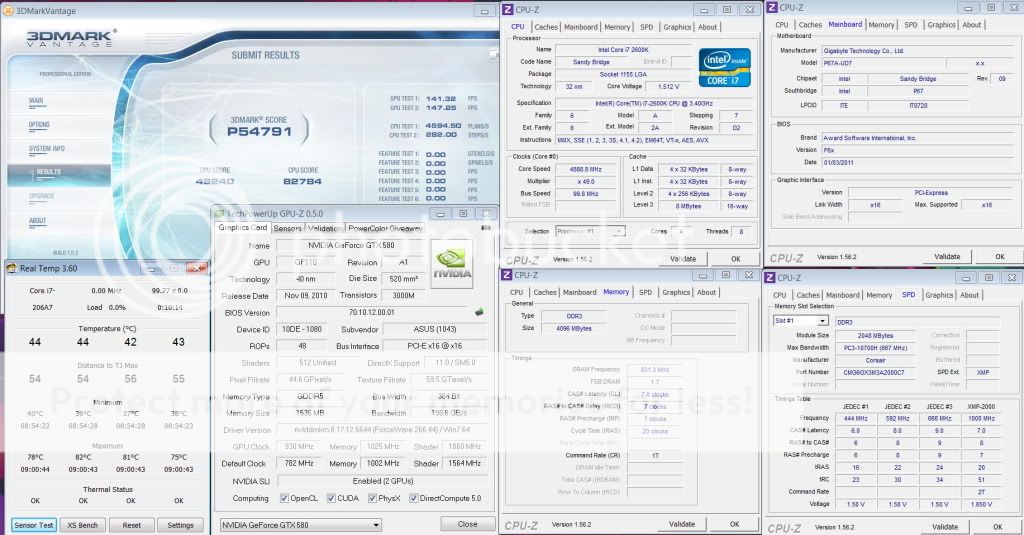
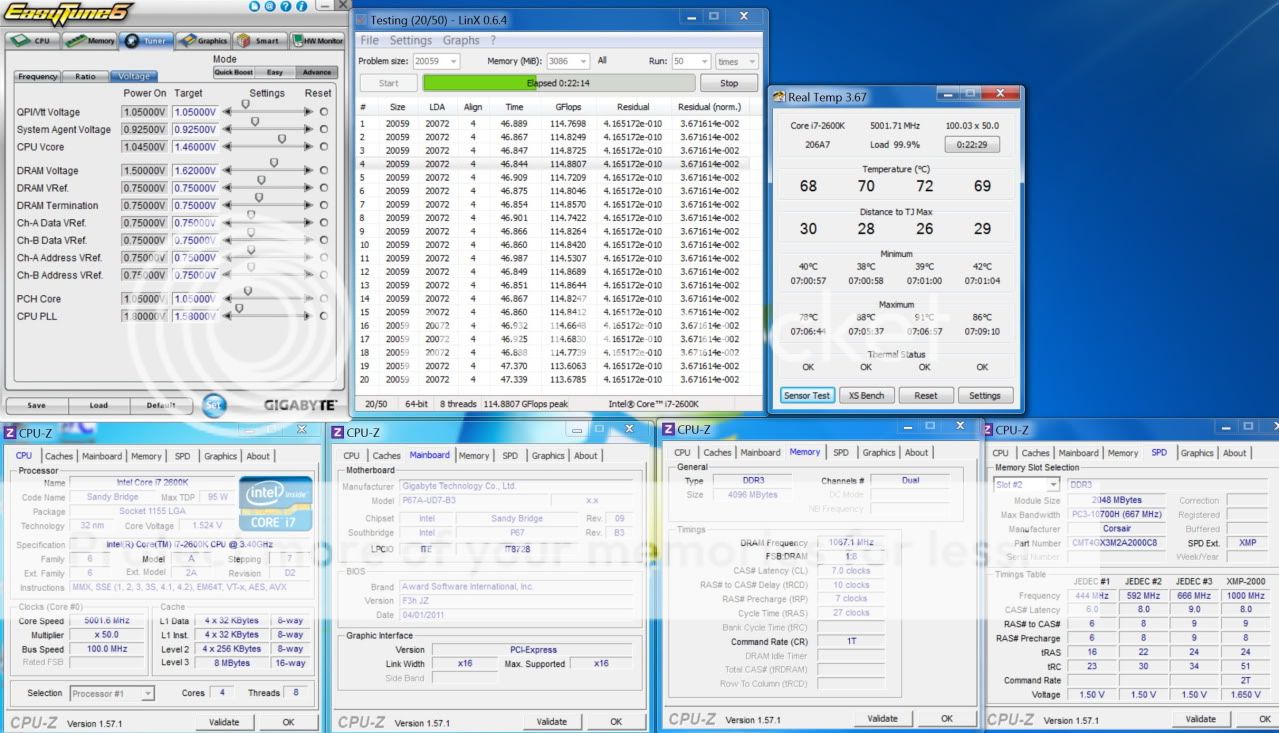
Gigabyte P67A-UD7

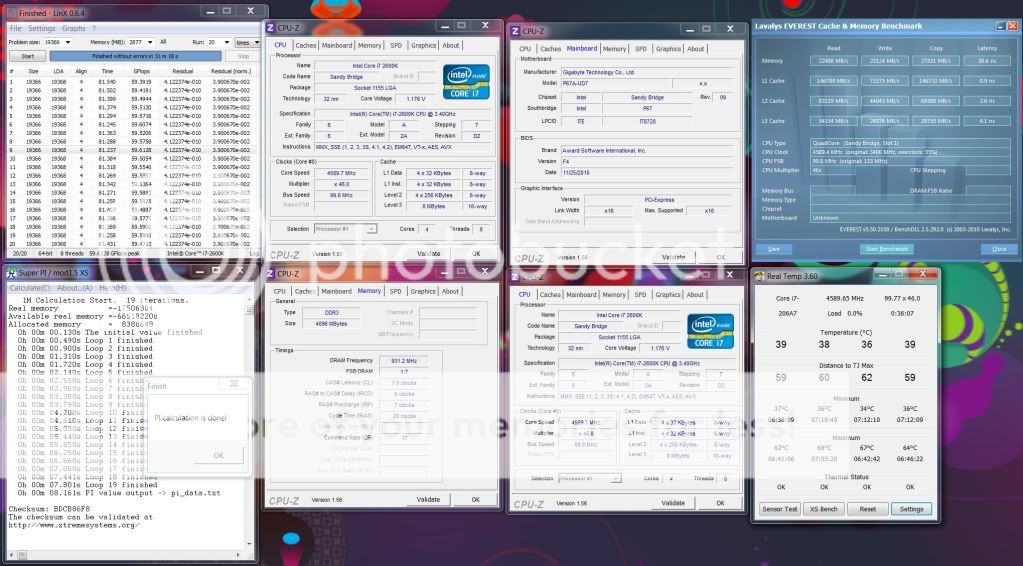
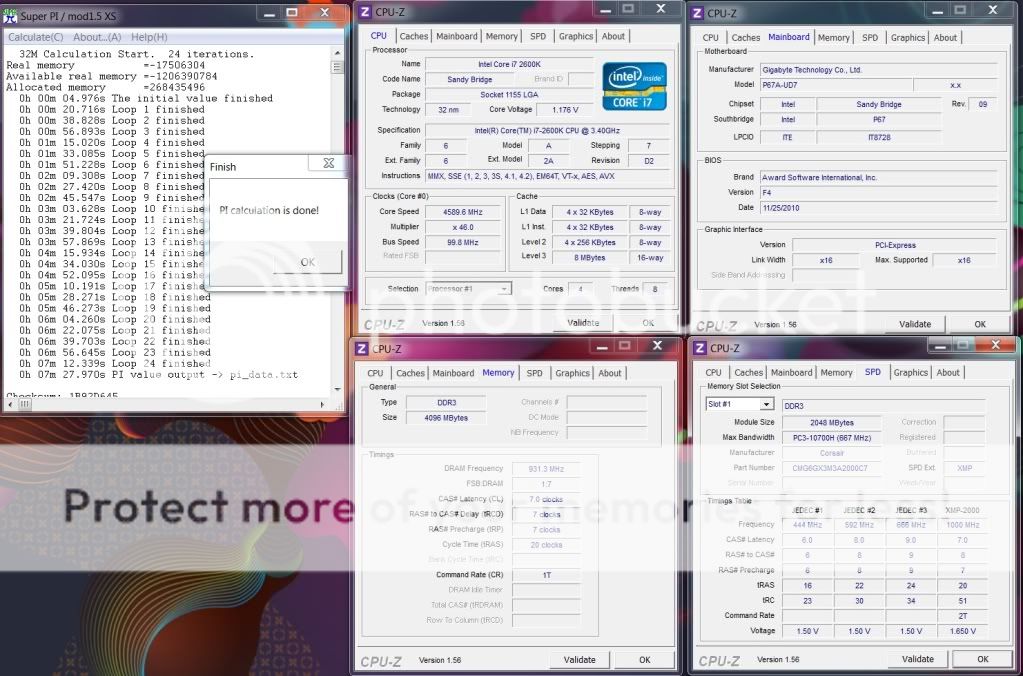
Intel Core i7 2600K 4.6GHz HT ON (4C/8T)
Gigabyte P67A-UD7
2x2GB Corsair DomGT DDR3-2000 CL7
2x MSI GTX580SLI, 930/4100Mhz
Corsair AX1200


LinX (* OLD version GFlops is lower)
» Click to show Spoiler - click again to hide... «

Vantage:
» Click to show Spoiler - click again to hide... «

Super Pi 32M: 7-7-7-20
» Click to show Spoiler - click again to hide... «


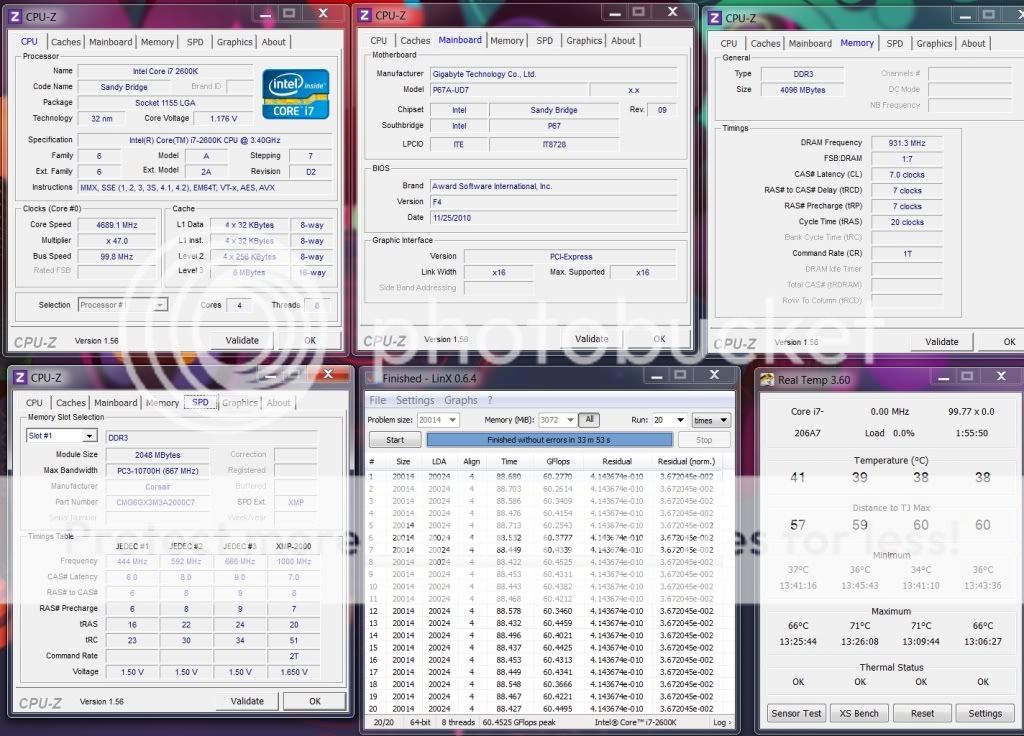
i7 2600K @ 4.7GHz HT ON (4C/8T) LinX (* OLD version GFlops is lower)
» Click to show Spoiler - click again to hide... «


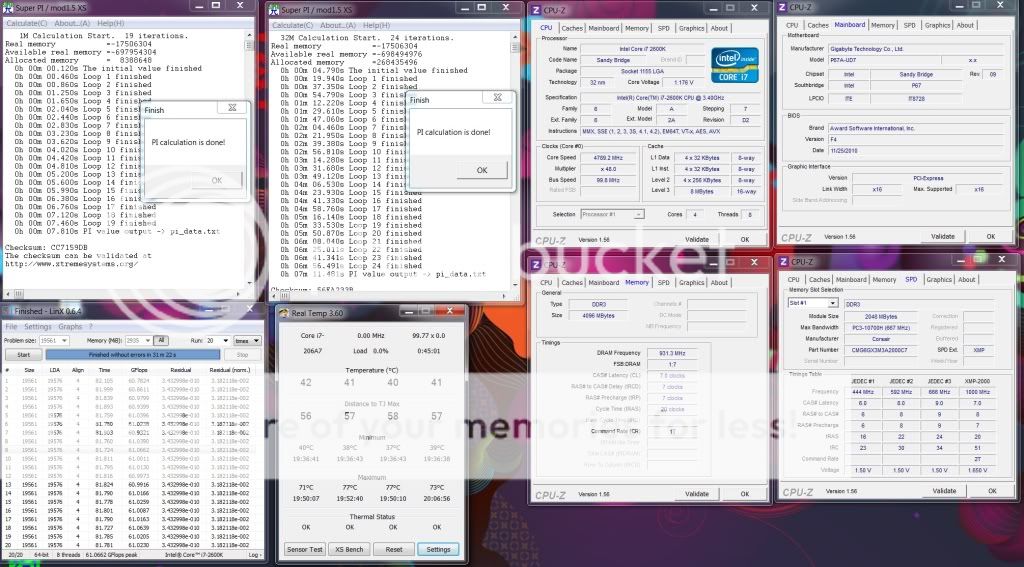
i7 2600K @ 4.8GHz HT ON (4C/8T)
» Click to show Spoiler - click again to hide... «


i7 2600K @ 4.9GHz HT ON (4C/8T)
LinX (* OLD version GFlops is lower), SPI 1M, 32M:
» Click to show Spoiler - click again to hide... «

Cinebench:
» Click to show Spoiler - click again to hide... «

3DMark PhysX:
» Click to show Spoiler - click again to hide... «


Intel Core i7 2600K 5.0GHz HT ON (4C/8T)
LinX - latest with AVX thumbup.gif
» Click to show Spoiler - click again to hide... «

Prime95:
» Click to show Spoiler - click again to hide... «


This post has been edited by owikh84: Aug 30 2011, 08:27 PM
TSowikh84
post Jan 8 2011, 12:43 AM

i7 Clan
Group Icon
Elite
8,711 posts

Joined: Nov 2007
From: Butterworth, PG / Machang, Kelantan


Asus Maximus IV Extreme

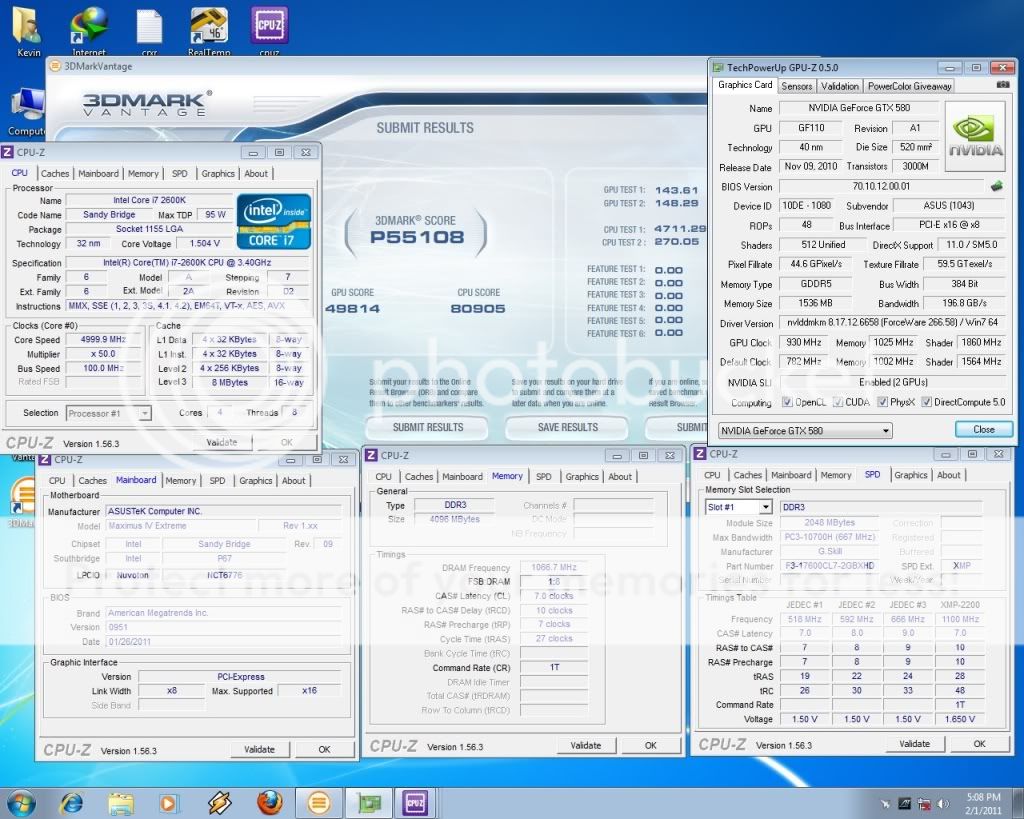
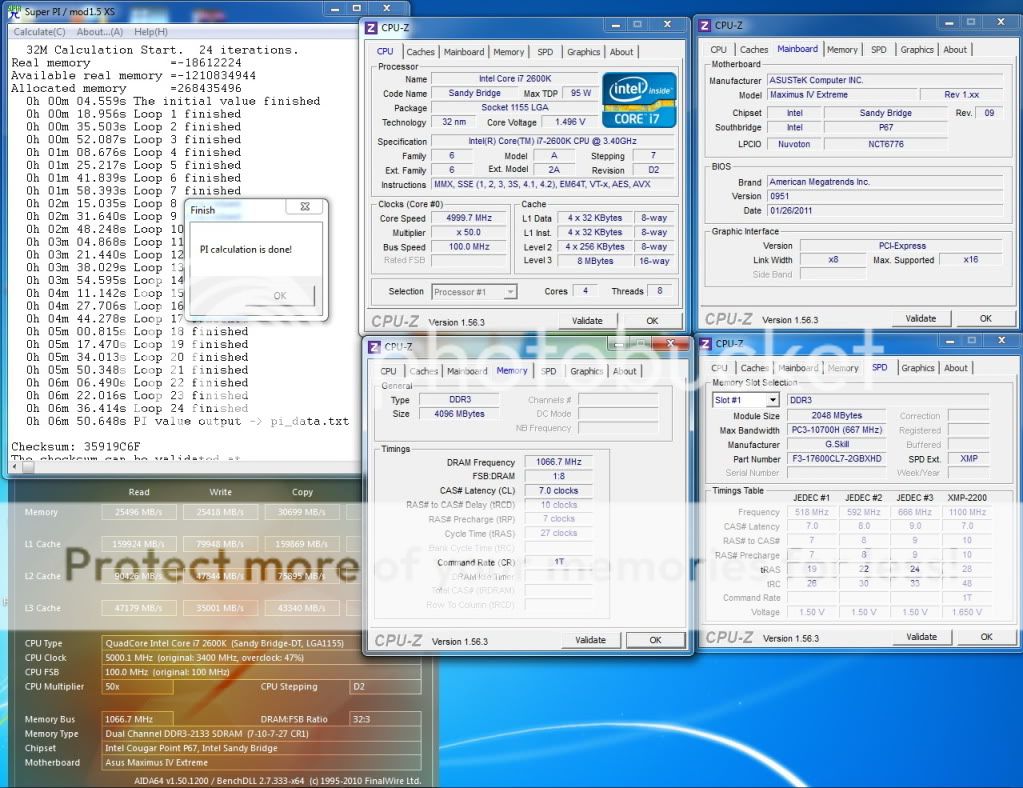
Intel Core i7 2600K @ 5.0GHz HT ON (4C/8T)
Asus Maximus IV Extreme
2x2GB GSkill RipjawsX 2200C7 @ 2133Mhz 7-10-7-27-1T
2x MSI GTX580 SLI, 930/4100Mhz
Corsair AX1200


LinX - Latest with AVX thumbup.gif
» Click to show Spoiler - click again to hide... «

Vantage:
» Click to show Spoiler - click again to hide... «

Pi 32M:
» Click to show Spoiler - click again to hide... «


5.1 GHz HT ON
LinX - Latest with AVX thumbup.gif
» Click to show Spoiler - click again to hide... «

3DMark06:
» Click to show Spoiler - click again to hide... «

Vantage PhysX ON:
» Click to show Spoiler - click again to hide... «

PhysX OFF:
» Click to show Spoiler - click again to hide... «

wPrime:
» Click to show Spoiler - click again to hide... «

Pi 32M:
» Click to show Spoiler - click again to hide... «


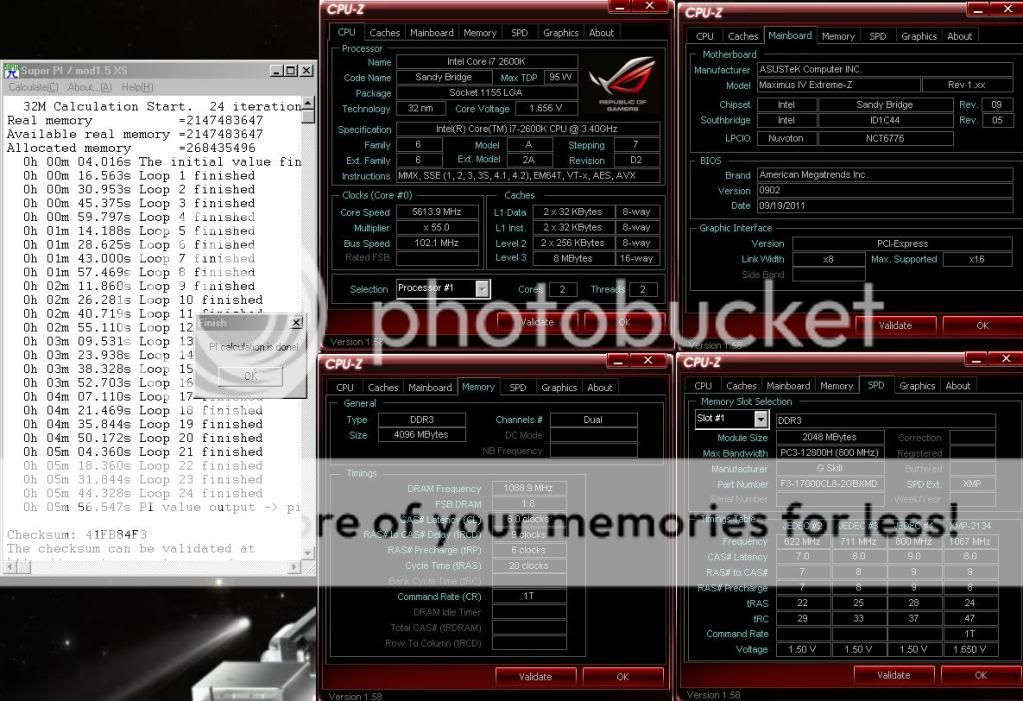
5.614 GHz
» Click to show Spoiler - click again to hide... «


This post has been edited by owikh84: Jan 28 2014, 06:39 AM
TSowikh84
post Jan 8 2011, 12:44 AM

i7 Clan
Group Icon
Elite
8,711 posts

Joined: Nov 2007
From: Butterworth, PG / Machang, Kelantan


Gigabyte P67A-UD7 vs Asus Maximus IV Extreme

user posted image

Asus BIOS Template
» Click to show Spoiler - click again to hide... «


This post has been edited by owikh84: Sep 16 2011, 05:14 PM
TSowikh84
post Jan 8 2011, 01:21 AM

i7 Clan
Group Icon
Elite
8,711 posts

Joined: Nov 2007
From: Butterworth, PG / Machang, Kelantan


QUOTE(metsatsu @ Jan 8 2011, 12:56 AM)
105mhz. isn't that a bit risky? and what cooling are u using atm?
*
No idea bro, for time being getting to know 2600K's behaviour.
Will be using the latest bios F6E for more promising results, hopefully.
WC kit is as siggy for i7 920. Yes, I'm still using the same parts.
I oso got Asus Maximus IV Extreme at the same time.
TSowikh84
post Jan 8 2011, 01:58 AM

i7 Clan
Group Icon
Elite
8,711 posts

Joined: Nov 2007
From: Butterworth, PG / Machang, Kelantan


QUOTE(metsatsu @ Jan 8 2011, 01:37 AM)
so the mounting as rumor says, LGA1156 = LGA1155? would like to see some linx gflops results should get 70+ easily thumbup.gif
*
Correct. nod.gif The 1156 bracket fits nicely w/o modding.
The board:
Attached Image
Foxconn chipset:
Attached Image
Aiya that PCIEx1 hates my D2X. doh.gif
Attached Image


TSowikh84
post Jan 8 2011, 08:14 AM

i7 Clan
Group Icon
Elite
8,711 posts

Joined: Nov 2007
From: Butterworth, PG / Machang, Kelantan


QUOTE(kolong @ Jan 8 2011, 07:59 AM)
Wow.. So nice..
*
lol.. I couldn't upload pics in imageshack and photobucket atm.. anyone encounter the same prob? Using 4MBbs haiz
lol lol...


Added on January 8, 2011, 8:19 am
QUOTE(metsatsu @ Jan 8 2011, 01:37 AM)
so the mounting as rumor says, LGA1156 = LGA1155? would like to see some linx gflops results should get 70+ easily thumbup.gif
*
From my LinX result.
i7 2600K 4.6Ghz HT produce the same GFlops as i7 920 4.5Ghz HT ~ 59ish


Added on January 8, 2011, 8:29 am
QUOTE(selfdz87 @ Jan 8 2011, 12:53 AM)
dang...so fast!!!!
owikh...can u post the temp ss??
thanks...
*
Can't upload pics atm.
LinX 20 runs
i7 2600K @ 4.6Ghz HT, vCore 1.332v on WC
Idle: 36C, Load: 65C
Ambient: 30C.

Hint: Corsair H5O/Venomous-X is 15C weaker than my custom WC so 65+15=80C this speed is still acceptable for air cooling. thumbup.gif

This post has been edited by owikh84: Jan 8 2011, 09:57 AM
TSowikh84
post Jan 8 2011, 03:30 PM

i7 Clan
Group Icon
Elite
8,711 posts

Joined: Nov 2007
From: Butterworth, PG / Machang, Kelantan


QUOTE(kevink82 @ Jan 8 2011, 11:38 AM)
how is gaming performance? any noticeable improvements?
might get into it if there is some gain in gaming, but most sites only report low res gaming.....
*
Hmm not really concern abt gaming when it comes to CPU.
My GTX580SLI already shines all the benchies. brows.gif
QUOTE(hantarkatsini2 @ Jan 8 2011, 12:11 PM)
xpe. can put at other pci-e slot
hehe
*

For some reason the PCIEx1 will make things easier for me. whistling.gif

btw, here's 4.7Ghz stable at 1.375v
» Click to show Spoiler - click again to hide... «

damn UD7 keeps failing to flash bios, invalid image haiz...

Asus Maximus 4 Extreme...
» Click to show Spoiler - click again to hide... «


This post has been edited by owikh84: Jan 16 2011, 08:20 AM
TSowikh84
post Jan 8 2011, 08:59 PM

i7 Clan
Group Icon
Elite
8,711 posts

Joined: Nov 2007
From: Butterworth, PG / Machang, Kelantan


QUOTE(metsatsu @ Jan 8 2011, 03:34 PM)
you seriously need 2400mhz dual channel ram bro.... may i suggest THIS biggrin.gif so u can run 2133mhz mode thumbup.gif
*
No point to get 2400MHz since max mem multi for P67 is 21.33x only.
Although Intel allows 10% increase in BCLK, most proc cant do anything above 104 BCLK hence 21.33x104=2218MHz is the max mem freq for P67.mmI will raise my mem after this. Should hv no prob for me.

QUOTE(Vigilant @ Jan 8 2011, 05:28 PM)
Bro Owikh u got that M4E already? Wow? How much?
*
yes received M4E today for RM1.2k only. Great package as always thumbup.gif

QUOTE(ne0cz @ Jan 8 2011, 06:02 PM)
No matter how much you achieve.. I must say this
You are a rich guy with strong balls... Continue your OCing! Gambateh!
*
Thanks1
QUOTE(monsh @ Jan 8 2011, 08:23 PM)
aiyark !
@metsatsu
what do u mean dangerous when increase to 105 mhz ?
and how to OC this thing actually ?
any reference for BIOS setting ?
i got i5-2400 lying around .
seems like the multiplier locked at 38 .
so boring .
i cant even achieve 4ghz from 3.1ghz .
too darn boring platform
*

yes u can do 4Ghz with 107 BCLK, but I doubt its stability for daily usage. hmm.gif
As for me, dont expect much from 2400 becoz it is not a (K)evin. laugh.gif
TSowikh84
post Jan 8 2011, 09:03 PM

i7 Clan
Group Icon
Elite
8,711 posts

Joined: Nov 2007
From: Butterworth, PG / Machang, Kelantan


4.8Ghz HT ON stable at 1.435v
it is still possible on air. Might get better by reducing the CPU PLL nod.gif
» Click to show Spoiler - click again to hide... «

(I will raise my ram to 2133Mhz later..)

This post has been edited by owikh84: Jan 16 2011, 08:20 AM
TSowikh84
post Jan 8 2011, 09:37 PM

i7 Clan
Group Icon
Elite
8,711 posts

Joined: Nov 2007
From: Butterworth, PG / Machang, Kelantan


QUOTE(selfdz87 @ Jan 8 2011, 09:21 PM)
owikh thanks...
the temp look so nice even on 4.7ghz...HT on summore...drool.gif
eh...why u no try evga mobo 1st instead of gigabyte?? laugh.gif
*
Still no ETA for EVGA, it is in my buying list as well. whistling.gif
Yeah quite happy with the 32nm SB, dun think u can do 4.6Ghz HT ON with Bloomfield
TSowikh84
post Jan 9 2011, 12:45 AM

i7 Clan
Group Icon
Elite
8,711 posts

Joined: Nov 2007
From: Butterworth, PG / Machang, Kelantan


QUOTE(monsh @ Jan 8 2011, 11:45 PM)
ah crap !
this new sandy bridge really suck man !
y intel do this to us ?!!

@owikh84

wat voltage should i bump for 3.8-4.0ghz ?

and what should i alter for 106/107 bclk ?

i tried to simply add up the vCore and the PC wont boot at 38x multiplier .
*
erm... duno wat or who sucks. Could be ur fren sucked by SB tongue.gif
not sure abt ur 2400 but slightly more than 1.25v, dun do anything on VTT let it auto or 1.2v
there's a BCLK settings in BIOS, it is there. Advise to let it be default 100 until u manage to hit 38x multi successfully.

TSowikh84
post Jan 9 2011, 08:31 AM

i7 Clan
Group Icon
Elite
8,711 posts

Joined: Nov 2007
From: Butterworth, PG / Machang, Kelantan


QUOTE(Vigilant @ Jan 9 2011, 04:48 AM)
Bro Owikh, where do u get that M4E? I'm interested also biggrin.gif
*
I thought it has arrived LYP. no?
I got it from CEX said to be last stock.
TSowikh84
post Jan 9 2011, 09:15 AM

i7 Clan
Group Icon
Elite
8,711 posts

Joined: Nov 2007
From: Butterworth, PG / Machang, Kelantan


QUOTE(metsatsu @ Jan 9 2011, 09:05 AM)
Nice article I've included this link to #1 post. TQ!
TSowikh84
post Jan 9 2011, 10:03 AM

i7 Clan
Group Icon
Elite
8,711 posts

Joined: Nov 2007
From: Butterworth, PG / Machang, Kelantan


i7 2600K @ 4.9GHz HT ON (4C/8T), 1.476v load (LLC on)
WC: EK Supreme HF Ac+Ni + MCP655V EK-TOP + EK 250 X2 Adv + TFC480+360 + 2x EK FC480 Ac+Ni + 14x Scythe GTs
Gigabyte GA P67A UD7, F6X
Corsair DomGT 2000C7 @ 1866MHz 7-7-7-20-1T
Intel X25-M 160GB
2x GTX580SLI @ 900/4100MHz
Corsair AX1200


LinX, SPI 1M, 32M:
» Click to show Spoiler - click again to hide... «


Cinebench:
» Click to show Spoiler - click again to hide... «


3DMark PhysX:
» Click to show Spoiler - click again to hide... «


TSowikh84
post Jan 9 2011, 10:21 AM

i7 Clan
Group Icon
Elite
8,711 posts

Joined: Nov 2007
From: Butterworth, PG / Machang, Kelantan


QUOTE(DarkNite @ Jan 9 2011, 10:05 AM)
Very Nice! thumbup.gif
No result for M4E? hmm.gif
*
Unfortunately that would be next week. sad.gif
The LinX test above showed that it is impossible to be done on air cooling (non-aircond)
So 5GHz on air (not water) wont happen in Malaysia. Unless in aircond or highlands.
TSowikh84
post Jan 12 2011, 11:25 AM

i7 Clan
Group Icon
Elite
8,711 posts

Joined: Nov 2007
From: Butterworth, PG / Machang, Kelantan


Having issues booting Win7 x64 with multi x50 and above. It will stuck at win logo most of the times, randomly. Somehow can boot everytime into WinXP x64 til x54. Hmm either buggy bios or Win7 need a patch for 5Ghz+. Another issue is my dram is not natively support for P67 mobos. Cant do 2133Mhz on UD7, but Maximus is doable.
TSowikh84
post Jan 13 2011, 06:28 AM

i7 Clan
Group Icon
Elite
8,711 posts

Joined: Nov 2007
From: Butterworth, PG / Machang, Kelantan


QUOTE(k!nex @ Jan 13 2011, 01:38 AM)
I get 4.4ghz stable only at 1.30V. I dont know how others get theirs above that as i'll get blue screen during windows booting if i ramp the multi to 45X. So far i only raise the Vcore , other voltage i haven't learn yet  cry.gif
*
Flashing bios to the latest beta solved my booting issue at 50x multi.
Download links
M4E
TSowikh84
post Jan 13 2011, 09:18 AM

i7 Clan
Group Icon
Elite
8,711 posts

Joined: Nov 2007
From: Butterworth, PG / Machang, Kelantan


QUOTE(kevink82 @ Jan 13 2011, 07:40 AM)
other voltages dont seems to do much for sandy overclocking......
*
Gv it some time bro Sandy is just out. I believe immature bios stil ruins OCing atm.
I can see from bios to bios it gets improvement in clocks vs voltage. Ram OC is terrible at higher frequencies but as said bios issue is the reason. Btw M4E supports 2400mhz ram in their bios settings but I still couldnt find the best settings to make it booted at 2400 at rated timings. Im using Patriot 2400c9.
TSowikh84
post Jan 14 2011, 11:46 AM

i7 Clan
Group Icon
Elite
8,711 posts

Joined: Nov 2007
From: Butterworth, PG / Machang, Kelantan


QUOTE(louislkw @ Jan 14 2011, 10:57 AM)
Special guest has arrived,
A sneak preview,
Sorry for the poor picture. Will take another set again.
Update over the weekend.
*
Wahh bro is that Gskill 2133? Cant wait for the benchmark. drool.gif

26 Pages  1 2 3 > » Top
Topic ClosedOptions
 

Change to:
| Lo-Fi Version
0.0479sec    1.06    7 queries    GZIP Disabled
Time is now: 1st December 2025 - 03:16 PM