Outline ·
[ Standard ] ·
Linear+
Sandy Bridge Overclocking V1, 2500K/2600K/2700K | LGA1155 P67.Z68.Z77
|
Sanko
|
 Jan 18 2011, 12:29 PM Jan 18 2011, 12:29 PM
|

|
MSI SOP for Intel ME FirmWare through BIOS Recently Intel has just updated their Intel ME FirmWare from version 1141 to 1164. Therefore, MSI came out with a new BIOS package for its Sandy Bridge Platform linking both BIOS and Intel ME FireWare update. This however needed to be done through DOS Flashing. The easier method through MSI M-Flash function could only update the BIOS while not the Intel ME FirmWare. If updating system BIOS without updating the Intel ME FirmWare, it may cause the system become unstable. Now MSI linked both ME toll + ME FirmWare with BIOS AMI Tool into a .bat file in their Mainpage BIOS Download. Included is the Flashing SOP/Guide for the whole process of updating BIOS and Intel ME FirmWare. List of Mainboards with Intel ME FirmWare Update Included in BIOS Download Page:1. MSI P67A-GD65 2. MSI P67A-GD55 3. MSI P67A-GD53 4. MSI P67A-C45 5. MSI P67A-C43 6. MSI P67S-C43 PS: For MSI Mainboard Users, but i guess any other Manufacturer will release this update as well. Users will be able to play with MSI Control Panel II flawlessly if the Intel ME FirmWare is updated correctly. This post has been edited by Sanko: Jan 18 2011, 06:08 PM |
|
|
|
|
|
Sanko
|
Jan 18 2011, 10:29 PM
|
|
|
QUOTE(Paca @ Jan 18 2011, 07:53 PM) I am using MSI P67A C45.can you give me the direct link?USM internet is a lil bit buggy.  Here you go. But you to create a bootable USB and just follow the guide included in the downloaded file. Of course, unzip the file 1st. Guide for creating Bootable USB: http://www.techpowerup.com/articles//overc...ng/vidcard/34/5Download Link (P67A-C45): http://download3.msi.com/files/downloads/bos_exe/7673v17.zip |
|
|
|
|
|
Sanko
|
Jan 26 2011, 02:49 AM
|
|
|
Paca: what BIOS you are using? Like that owi says, it's quite normal to get 99.8 MHz. But from my experience, if 1 disable HT, it's more likely to be 100 MHz. And honestly i have no idea why is that. shot me a PM if you want to try latest BETA bios if you couldn't find in the net. for me, i'm still using .174 rather than .186 and .187 that released today. But do try .186, seems the BIOS is smoother.
Edit: just noticed that you are using the official 1.7 BIOS? seriously do change to .174 Beta. The official one seems buggy. no joke. lol.
This post has been edited by Sanko: Jan 26 2011, 02:51 AM
|
|
|
|
|
|
Sanko
|
Jan 27 2011, 01:27 AM
|
|
|
Just a quick test on Corsair Vengeance 8GB Memory Kit (CMZ8GX3M2A1600C8). Should have run 32M or Hyper Pi at least, haih, really no time. lol. But don't worry, dinos22 (Team.AU OverClocker) managed to stabilized it with 1.68vdimm, 1.25qpi/vtt iirc. Search around xtremesystems.org Testbed: CPU: I7 2600K Sandy Bridge Mainbiard: MSI P67A-GD65 Memory: Corsair Vengeance 4GB x 2 CMZ8GX3M2A1600C8VDIMM: 1.68v, rated 1.5v CPU IO/VTT: 1.23v 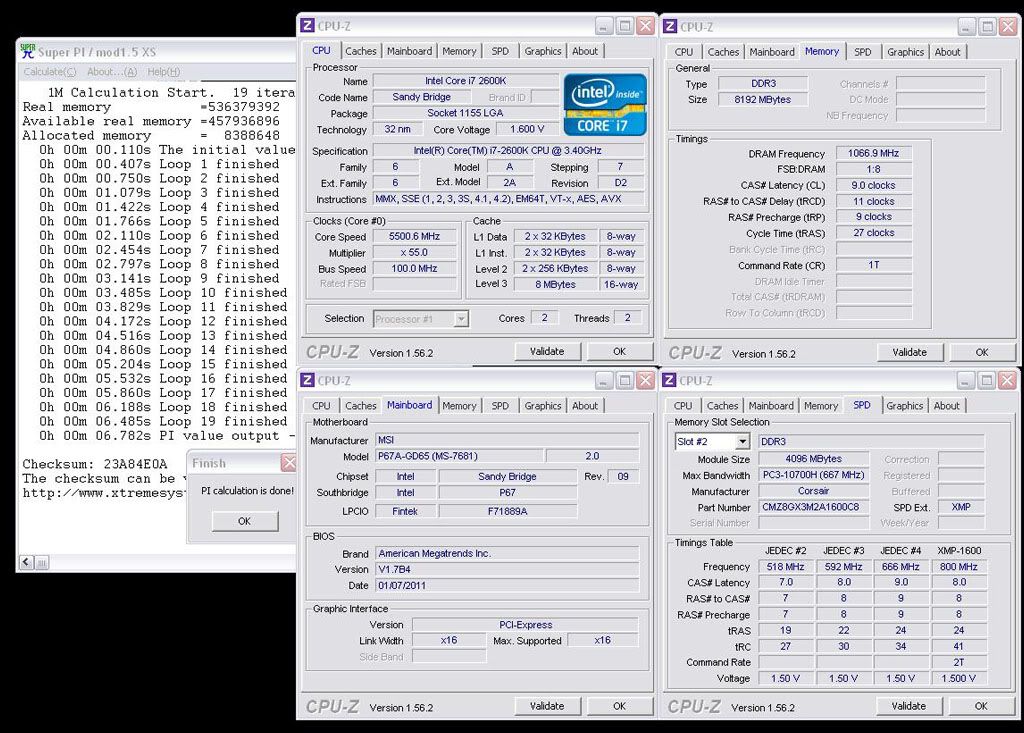 DDR2133 - 9-11-9-27, rated DDR1600 8-8-8-24 Product Link: Click Here!!This post has been edited by Sanko: Jan 27 2011, 01:37 AM |
|
|
|
|
|
Sanko
|
Jan 27 2011, 09:22 AM
|
|
|
Paca: refer to the link below. got it from HWBot.org. BTW, heard that by disabling the Speed Spectrum it will solve the 98MHz problem. I'll give it a try too. P67A-GD55 (1.8b7): http://91.121.148.119/downloads/BIOS/E7681IMS.187P67A-GD55 (1.8b6): http://91.121.148.119/downloads/BIOS/E7681IMS.186P67A-GD55 (1.7b4): http://91.121.148.119/downloads/BIOS/E7681IMS.174This post has been edited by Sanko: Jan 27 2011, 10:38 AM |
|
|
|
|
|
Sanko
|
Jan 27 2011, 10:46 AM
|
|
|
Played with the Corsair Dominator GT 4GB Kit (CMT4GX3M2A2133C9), not too shabby. This time round not 1M anymore. At least a 3DMark Loop. But still far from Prim95/LinX. Ignore the vcore please, it's 5.0GHz setting actually. Testbed: CPU: i7 2600K Sandy Bridge Mainboard: P67A-GD65 Memory: Corsair Dominator GT 2GB x 2 CMT4GX3M2A2133C9VDIMM: 1.695v, rated 1.6v CPU IO/VTT: 1.23v 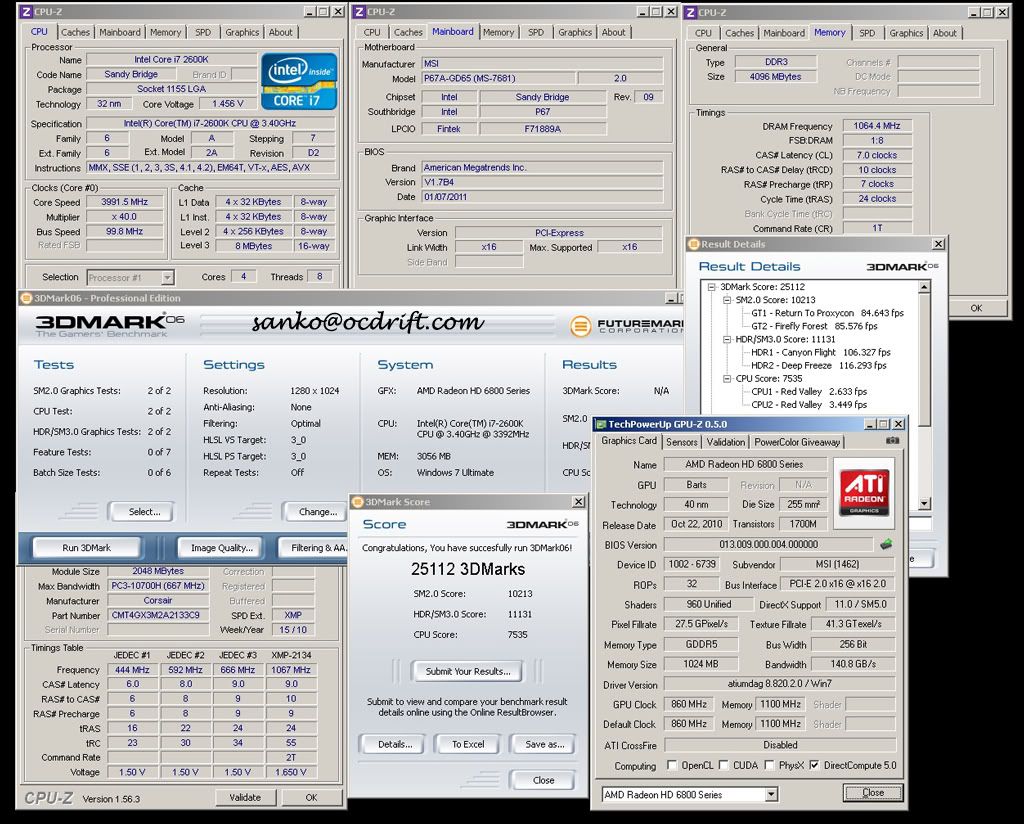 DDR2133 7-10-7-24, rated DDR2133 9-10-9-24 Product Link: Click Here!!This post has been edited by Sanko: Jan 27 2011, 11:09 AM |
|
|
|
|
|
Sanko
|
Jan 27 2011, 11:41 AM
|
|
|
stasio: ahh, sorry to spoil the party here. there's 2 kind of oc-er, one stability, one benchmark. i'm the benchmark type. so it's not my 24/7. for stability our sifu is always here, bro owi.
owikh84: VTT BIOS = 1.23v, real should be around 1.21v, SA = 1.205v BIOS, real should be 1.208v. Actually the VTT BIOS = 1.21v can run for Super Pi, while 1.23v easier to pass 3dmark.
This post has been edited by Sanko: Jan 27 2011, 11:44 AM
|
|
|
|
|





 Quote
Quote

 0.0693sec
 0.33
0.33
 7 queries
 GZIP Disabled