Welcome Guest ( Log In | Register )

Bump Topic Topic Closed RSS Feed
133 Pages « < 18 19 20 21 22 > » Bottom

Outline · [ Standard ] · Linear+

 Sandy Bridge Overclocking V1, 2500K/2600K/2700K | LGA1155 P67.Z68.Z77

views
     
archonixm
post Feb 8 2011, 07:26 AM

Enthusiast
*****
Senior Member
774 posts

Joined: Jan 2003
From: Prontera's Inn


Yup, suddenly i got disk parity error this morning, i was like waffak?

I never ever encounter this error before when i'm still using my c2d system, now with sandy. my god, i can't wait this april for a replacement mobo.
lichyetan
post Feb 8 2011, 10:42 AM

*****
*******
Senior Member
2,295 posts

Joined: Jan 2005
From: Penang


QUOTE(archonixm @ Feb 8 2011, 07:26 AM)
Yup, suddenly i got disk parity error this morning, i was like waffak?

I never ever encounter this error before when i'm still using my c2d system, now with sandy. my god, i can't wait this april for a replacement mobo.
*
just use the port 0/1 ( the sata3 or sata 6gbps port ) or the 3rd party 6gbps port from marvell, which most asus board got.

I currently running on the marvell port on my p8p67 pro mobo. and wait for the right time to rma laugh.gif

read some information on other website, dunno if its already posted here:
QUOTE
Miscellaneous Information.

Below are some snippets of information that I suspect will become frequently asked questions, and will be updated regularly:

Sandy Bridge has only been around for a short time, but sadly, there is an incredible amount of confusion regarding certain aspects of voltage adjustment. The information below, comes directly from Asus, Gigabyte, Corsair and Intel PMO (Platform Memory Operations), and to the best of my knowledge is 100% correct at the time of writing this. Of course, if any new information comes to light, I will update this section.

Sandy Bridge does not demand only 1.5v modules, it will be perfectly happy with 1.65v modules too. If someone tries to tell you that you must have 1.5v modules, then they are either trying to sell them to you, or they have been reading misinformation, or both! Another point to consider here, is that in your BIOS, if you head to the memory voltage setting, and enter 1.5v, the text will remain white/grey, if you enter 1.65v, it will turn yellow, and it isn't until 1.73v that it turns red, so at the moment, I'd rest assured that 1.65v modules are OK to use, and I have had this confirmed by Asus, Gigabyte and Corsair so far, as soon as I hear from anyone else, I will update this again.

Sandy Bridge does not require there to be a maximum of 0.5v between the VDIMM value and the VCCIO and VCCSA values when 1.65v voltage modules are used.

BCLK Overclocking will not murder your CPU or motherboard. There is absolutely no evidence to support the rumours that adjusting the BCLK upwards on a locked or unlocked CPU will kill/damage it. What will happen, is that the system will become unstable, and you will lose control of things like your hard drive or graphics card, resulting in instability, corruption or the inability to start up properly. As with any overclocking induced instability, simply reduce the overclock and you will find that normality resumes - If you have suffered a SATA problem, then you may have to run your Windows repair console to get the boot loader back.

SOURCE

Noob question from myself, so would I safe if I run my memory at 1.68-1.70v to reach 2133mhz DRAM ?

This post has been edited by lichyetan: Feb 8 2011, 11:25 AM

dblooi
post Feb 8 2011, 03:58 PM

......
******
Senior Member
1,404 posts

Joined: Apr 2006
From: ......


*edited*

This post has been edited by dblooi: Feb 8 2011, 04:54 PM
yuanbao
post Feb 8 2011, 06:55 PM

Getting Started
**
Junior Member
108 posts

Joined: Dec 2008
L041 and L042 available at my side.. =)
pm me if any1 intersted ty..

and good luck for those who oc go to 5.0ghz
TSowikh84
post Feb 9 2011, 06:49 AM

i7 Clan
Group Icon
Elite
8,711 posts

Joined: Nov 2007
From: Butterworth, PG / Machang, Kelantan


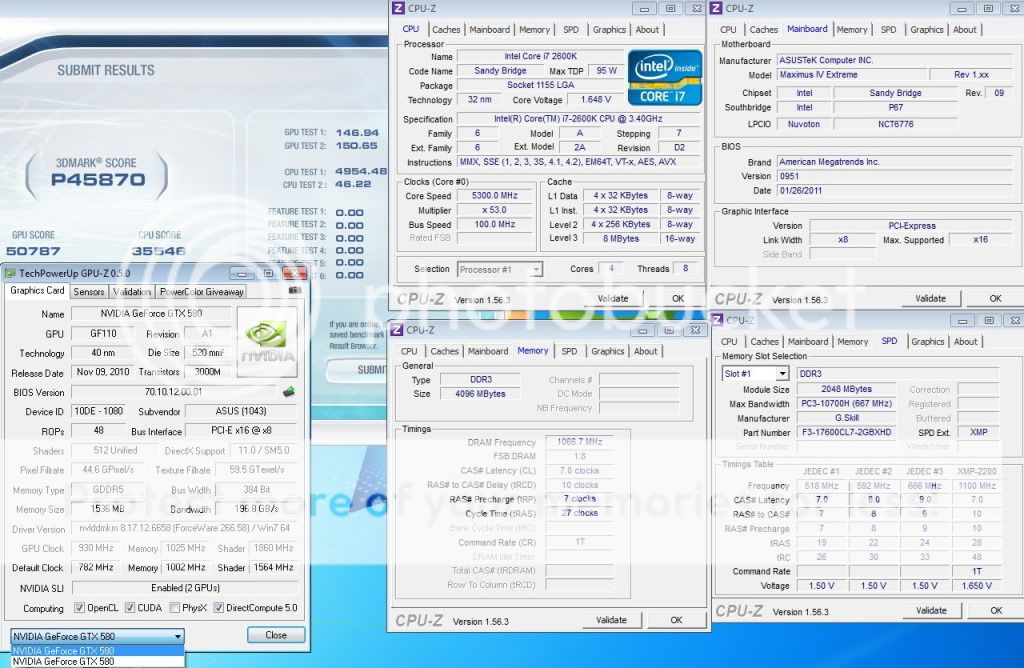
user posted image
user posted image
stasio
post Feb 9 2011, 03:45 PM

10k Club
********
All Stars
18,503 posts

Joined: Oct 2007
From: P.Jaya
GA-P67A-UD3P - F7a:

http://www.fileden.com/files/2009/12/20/26...p67aud3p.7a.zip

GA-P67A-UD7 - F8x (up to 59x multi):

http://www.fileden.com/files/2009/12/20/26.../p67aud7.8x.zip
metsatsu
post Feb 9 2011, 09:46 PM

Chocolate Starfish
Group Icon
VIP
2,510 posts

Joined: Dec 2004
From: Penang Island and Bidor


http://techpowerup.com/140110/Roger-splman...rld-Record.html

This post has been edited by metsatsu: Feb 9 2011, 09:49 PM
Dandy
post Feb 9 2011, 10:23 PM

Getting Started
**
Junior Member
193 posts

Joined: Sep 2008


only manage to 4.8ghz.need to try harder for 5.Xghz...
Walaoeh!
post Feb 10 2011, 05:52 PM

Casual
***
Junior Member
304 posts

Joined: Jan 2009
QUOTE(Dandy @ Feb 9 2011, 10:23 PM)
only manage to 4.8ghz.need to try harder for 5.Xghz...
*
hi, just wondering, for stock volt, how much your 2500k can overclock to?
ameenskywalker
post Feb 11 2011, 01:09 AM

Casual
***
Junior Member
343 posts

Joined: Mar 2005
From: This means more !


Attached Image

Hi, need feedback from sifus here...

1. I'm aiming the highest and most stable i can get out of my 2500k. I've managed 4700MHz @ 1.39v and successfully run IBT at Very High setting.

2. I notice lower temp when I lowered CPU PLL to 1.75v. Is this ok ?

3. Do you guys think that my temp is too high ? I've hit 79c maximum while doing LinX. Is it safe for 24/7 use ?

4. I have not tried Prime95 blend with this setting yet, but my last setting (4500@1.32v) it BSOD after 6hr. Is it considered unstable ? Does this mean it'll BSOD during 6hr of gaming or what do Prime95 test represent actually.

It's a lot of asking, and thanks in advance.
kahjye
post Feb 11 2011, 02:10 AM

Look at all my stars!!
*******
Senior Member
4,494 posts

Joined: Feb 2009

Guys should i get

P67 UD3P

or

MSI P67 GD55?
stasio
post Feb 11 2011, 12:20 PM

10k Club
********
All Stars
18,503 posts

Joined: Oct 2007
From: P.Jaya
GA-P67A-UD4 - F8b-(with pll override)
http://www.mediafire.com/?xuh694688srw1yb

-up to x59 multi
-11.Feb 11

GA-P67A-UD3P - F7b -(with pll override)

http://www.fileden.com/files/2009/12/20/26...p67aud3p.7b.zip

-11.Feb 11

This post has been edited by stasio: Feb 11 2011, 04:30 PM
TSowikh84
post Feb 11 2011, 12:27 PM

i7 Clan
Group Icon
Elite
8,711 posts

Joined: Nov 2007
From: Butterworth, PG / Machang, Kelantan


Nice one.. Asus hasnt release any new bios this month..
BSOD error codes added in post #1.
Iylia
post Feb 11 2011, 12:29 PM

Getting Started
**
Junior Member
263 posts

Joined: Oct 2004
From: Kuala Lumpur


» Click to show Spoiler - click again to hide... «


Is my voltage alittle high for 4.5GHz overclock?

i5-2500K
Asus P8P67-Pro
8GB Corsair 1333MHz RAM
1000W Antec TP Quattro
WinFast GTX570
Coolermaster V6GT cooler
kahjye
post Feb 11 2011, 04:05 PM

Look at all my stars!!
*******
Senior Member
4,494 posts

Joined: Feb 2009

mind to guide me how to update bios anyone? smile.gif
stasio
post Feb 11 2011, 04:44 PM

10k Club
********
All Stars
18,503 posts

Joined: Oct 2007
From: P.Jaya
QUOTE(kahjye @ Feb 11 2011, 04:05 PM)
mind to guide me how to update bios anyone? smile.gif
*
http://forums.tweaktown.com/gigabyte/27576...lash-guide.html

CPU-Z 1.56.4 Beta
http://www.fileden.com/files/2009/12/20/26...7/cpuz_1564.zip
ron4
post Feb 11 2011, 04:57 PM

Regular
******
Senior Member
1,123 posts

Joined: Jun 2006
From: KL


Hi im using i5 2400 and Asus P8P67 mobo. For this chipset design flaw, am i have to return back this processor and mobo to whom actually?, please guide me..

So far my rig works fine.

This post has been edited by ron4: Feb 11 2011, 04:57 PM
kahjye
post Feb 11 2011, 04:57 PM

Look at all my stars!!
*******
Senior Member
4,494 posts

Joined: Feb 2009

QUOTE(stasio @ Feb 11 2011, 04:44 PM)
Wauuuu....its so completed lol..
cstkl1
post Feb 11 2011, 05:55 PM

Look at all my stars!!
Group Icon
Elite
6,799 posts

Joined: Jan 2003

QUOTE(ron4 @ Feb 11 2011, 04:57 PM)
Hi im using i5 2400 and Asus P8P67 mobo. For this chipset design flaw, am i have to return back this processor and mobo to whom actually?, please guide me..

So far my rig works fine.
*
proc has no flaw

mobo distro already said u can do 1:1 in april when new chipset comes out
talk to ure retailer
if u bought from online reseller then LOL!!!
stasio
post Feb 11 2011, 07:42 PM

10k Club
********
All Stars
18,503 posts

Joined: Oct 2007
From: P.Jaya
QUOTE(owikh84 @ Feb 11 2011, 12:27 PM)
Nice one.. Asus hasnt release any new bios this month..
BSOD error codes added in post #1.
*
brows.gif

Maximus IV Extreme (1052):
http://91.121.148.119/downloads/BIOS/Maxim...e-ASUS-1052.ROM

Fixed if select By number of active cores mode,
CPU ratio & BCLK all changed , after reset it will jump back to all cores mode

Another one:

GA-P67A-UD3 - F7a -(with pll override)

http://www.fileden.com/files/2009/12/20/26.../p67aud3.7a.zip

This post has been edited by stasio: Feb 11 2011, 08:00 PM

133 Pages « < 18 19 20 21 22 > » Top
Topic ClosedOptions
 

Change to:
| Lo-Fi Version
0.0306sec    0.37    6 queries    GZIP Disabled
Time is now: 5th December 2025 - 01:56 AM