Welcome Guest ( Log In | Register )

Bump Topic Topic Closed RSS Feed
3 Pages  1 2 3 >Bottom

Outline · [ Standard ] · Linear+

 Sandy Bridge Overclocking V1, 2500K/2600K/2700K | LGA1155 P67.Z68.Z77

views
     
lichyetan
post Jan 24 2011, 07:21 PM

*****
*******
Senior Member
2,295 posts

Joined: Jan 2005
From: Penang


hi guys,

plan to play with some mid end sandy bridge, any good mobo to recommend ?

since no longer playing bclk, do mobo quality still counts ? or i can OC high on CPU with any midrange board rm600-800 board.

about ram, do old ddr3 such as psc chips still playable in P67 ?

sry noob questions, been away from OC for some times. laugh.gif
lichyetan
post Jan 25 2011, 01:34 PM

*****
*******
Senior Member
2,295 posts

Joined: Jan 2005
From: Penang


Hi guys,

Now considering this 2 board, Asus P8P67 Pro and Gigabyte P67-UD4. Which one better ? any user comments ?

If don't go for extreme multi GPU setup, do M4E any special than a regular P67 ? icon_rolleyes.gif
lichyetan
post Jan 25 2011, 09:01 PM

*****
*******
Senior Member
2,295 posts

Joined: Jan 2005
From: Penang


QUOTE(owikh84 @ Jan 25 2011, 07:43 PM)
nolah.. just another batch of 2600K.  whistling.gif
*
where u get ur source ? PM me... Penang Island lot of place sold out.

which batch of i7 2600k good or 2500k good ? what is ur limitation of ur current proc ?

laugh.gif

lichyetan
post Jan 25 2011, 09:08 PM

*****
*******
Senior Member
2,295 posts

Joined: Jan 2005
From: Penang


QUOTE(owikh84 @ Jan 25 2011, 09:04 PM)
same here bro. I asked my GF to buy for me at LYP
The whole Penang is out of stock since 2 weeks ago.
But I heard new stock will reach on 27th, so by Friday u can grab one.
*
ya. some shops here also told me 27th. Hopefully can get them. Maybe will go for i5 2500k first.
lichyetan
post Feb 3 2011, 05:43 PM

*****
*******
Senior Member
2,295 posts

Joined: Jan 2005
From: Penang


QUOTE(owikh84 @ Feb 3 2011, 05:26 PM)
Im not worried coz when the new replacement board arrives then only swap one to one with them. Stil got another one for spare.
Hit 85glops when i bump vcore from 1.5v to 1.51v, but fail LinX at 19.
*
i think i will just wait and only rma after new batch out. For now, actually can stick to the 6gbps port or the marvel port...

if anyone here successfully rma, post here ya laugh.gif
lichyetan
post Feb 5 2011, 12:50 AM

*****
*******
Senior Member
2,295 posts

Joined: Jan 2005
From: Penang


QUOTE(ameenskywalker @ Feb 5 2011, 12:26 AM)
This might sound stupid, but what is the problem with P67 board anyway, my noob brain could not understand what's going on here. I'm using Asus P67 pro.. should i be worry ?
*
please use google. It something related to the chipset bug. Only SATA 3gbps port involved.
lichyetan
post Feb 5 2011, 09:19 PM

*****
*******
Senior Member
2,295 posts

Joined: Jan 2005
From: Penang


QUOTE(selfdz87 @ Feb 5 2011, 08:28 PM)
erm guys...
wanna ask 1 question...
is asus m4e+i5 2500k is OC able like asus m4e+i7 2600k??
different only on HT right?? hmm.gif  hmm.gif
my budget is kinda tight now...just can afford i5 2500k...mybe....
beside i like asus M4E design.... wub.gif
*
just get 2500k.... the only difference is HT. Not sure about the OC ability though.
lichyetan
post Feb 6 2011, 12:43 AM

*****
*******
Senior Member
2,295 posts

Joined: Jan 2005
From: Penang


QUOTE(cstkl1 @ Feb 5 2011, 09:24 PM)
not just ht dude..

l3 cache..thats a biggie difference.
*
lol..jz realise after comparing screenshots...

thanks for the info...


This post has been edited by lichyetan: Feb 6 2011, 02:11 AM
lichyetan
post Feb 6 2011, 02:11 AM

*****
*******
Senior Member
2,295 posts

Joined: Jan 2005
From: Penang


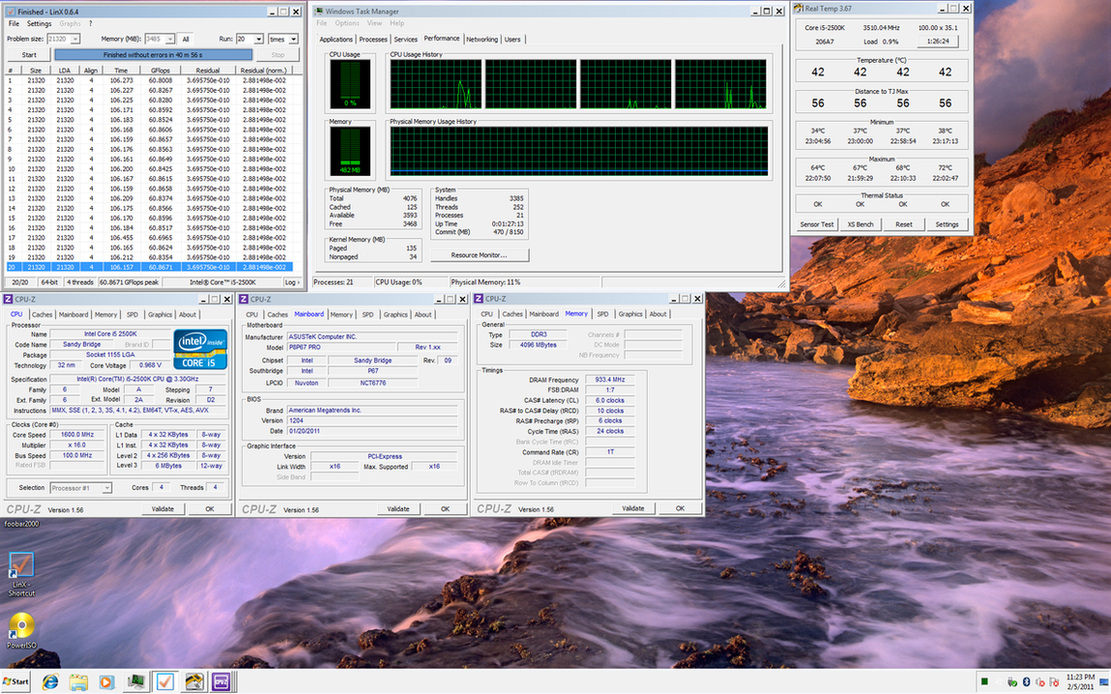
Core i5 2500k @ 4.2ghz @ DDR3 1866 @ 6-10-6-24
» Click to show Spoiler - click again to hide... «

CPU-Z clock speed different due to intel speedstep laugh.gif

This post has been edited by lichyetan: Feb 6 2011, 02:12 AM
lichyetan
post Feb 7 2011, 07:53 AM

*****
*******
Senior Member
2,295 posts

Joined: Jan 2005
From: Penang


QUOTE(metsatsu @ Feb 6 2011, 07:54 AM)
what ram ur using?
*
mushkin ridgeback 1600 cl6 for x58. used the 2/3 sticks.
lichyetan
post Feb 8 2011, 10:42 AM

*****
*******
Senior Member
2,295 posts

Joined: Jan 2005
From: Penang


QUOTE(archonixm @ Feb 8 2011, 07:26 AM)
Yup, suddenly i got disk parity error this morning, i was like waffak?

I never ever encounter this error before when i'm still using my c2d system, now with sandy. my god, i can't wait this april for a replacement mobo.
*
just use the port 0/1 ( the sata3 or sata 6gbps port ) or the 3rd party 6gbps port from marvell, which most asus board got.

I currently running on the marvell port on my p8p67 pro mobo. and wait for the right time to rma laugh.gif

read some information on other website, dunno if its already posted here:
QUOTE
Miscellaneous Information.

Below are some snippets of information that I suspect will become frequently asked questions, and will be updated regularly:

Sandy Bridge has only been around for a short time, but sadly, there is an incredible amount of confusion regarding certain aspects of voltage adjustment. The information below, comes directly from Asus, Gigabyte, Corsair and Intel PMO (Platform Memory Operations), and to the best of my knowledge is 100% correct at the time of writing this. Of course, if any new information comes to light, I will update this section.

Sandy Bridge does not demand only 1.5v modules, it will be perfectly happy with 1.65v modules too. If someone tries to tell you that you must have 1.5v modules, then they are either trying to sell them to you, or they have been reading misinformation, or both! Another point to consider here, is that in your BIOS, if you head to the memory voltage setting, and enter 1.5v, the text will remain white/grey, if you enter 1.65v, it will turn yellow, and it isn't until 1.73v that it turns red, so at the moment, I'd rest assured that 1.65v modules are OK to use, and I have had this confirmed by Asus, Gigabyte and Corsair so far, as soon as I hear from anyone else, I will update this again.

Sandy Bridge does not require there to be a maximum of 0.5v between the VDIMM value and the VCCIO and VCCSA values when 1.65v voltage modules are used.

BCLK Overclocking will not murder your CPU or motherboard. There is absolutely no evidence to support the rumours that adjusting the BCLK upwards on a locked or unlocked CPU will kill/damage it. What will happen, is that the system will become unstable, and you will lose control of things like your hard drive or graphics card, resulting in instability, corruption or the inability to start up properly. As with any overclocking induced instability, simply reduce the overclock and you will find that normality resumes - If you have suffered a SATA problem, then you may have to run your Windows repair console to get the boot loader back.

SOURCE

Noob question from myself, so would I safe if I run my memory at 1.68-1.70v to reach 2133mhz DRAM ?

This post has been edited by lichyetan: Feb 8 2011, 11:25 AM

lichyetan
post Feb 16 2011, 02:11 PM

*****
*******
Senior Member
2,295 posts

Joined: Jan 2005
From: Penang


QUOTE(monsh @ Feb 16 2011, 08:31 AM)
Ok great . Thanks owikh . Looking for i7 2600K now . Hopefully can get 2nd hand . Heh .
*
abang owikh now selling lot of i7 2600k. laugh.gif


lichyetan
post Feb 25 2011, 12:47 AM

*****
*******
Senior Member
2,295 posts

Joined: Jan 2005
From: Penang


user posted image

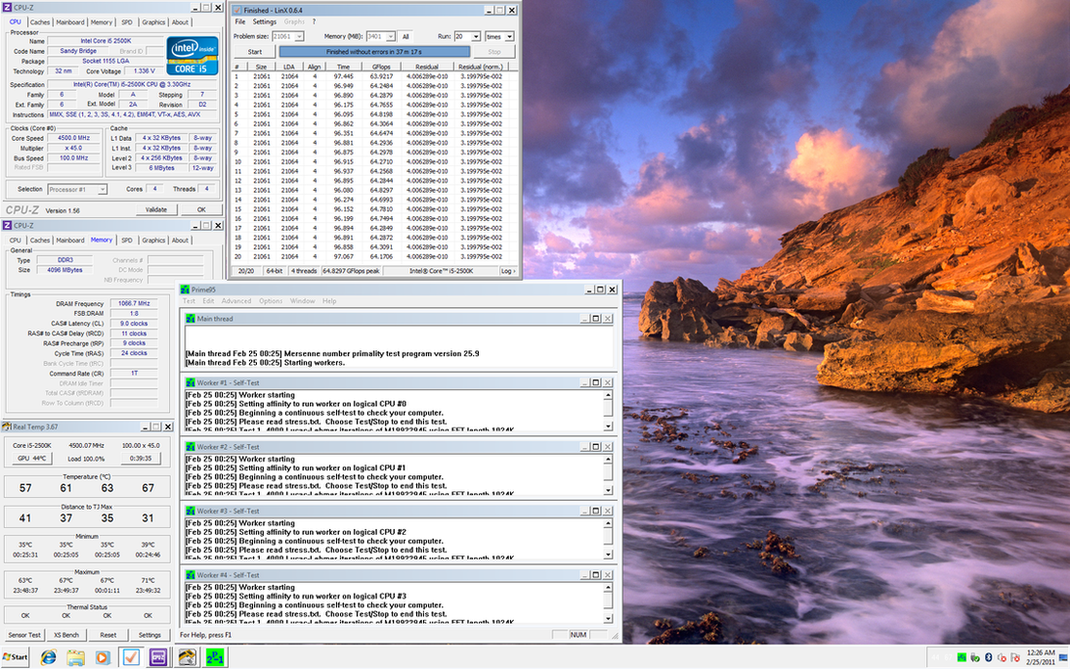
i5 2500k 4.5ghz, DDR3 2133 9-11-9-24

lichyetan
post Feb 25 2011, 09:12 AM

*****
*******
Senior Member
2,295 posts

Joined: Jan 2005
From: Penang


QUOTE(owikh84 @ Feb 25 2011, 08:35 AM)
Most prolly 2000 9-10-9 yes but theres always a trick to do 9-9-9 hehe..
Arghh btw i cant simply mix up between one 2GB stick from a kit with another kit it's unstable think one of the reason why couldnt do fine on 4 sticks.
*
mind to share the trick ? any special settings ? brows.gif
lichyetan
post Mar 28 2011, 05:46 PM

*****
*******
Senior Member
2,295 posts

Joined: Jan 2005
From: Penang


QUOTE(clawhammer @ Mar 28 2011, 05:25 PM)
I told myself to stop catching up with technology but I guess this PC crap is in my blood. Now I'm thinking of getting the i5 2500K and Asrock Extreme 4. Any thoughts? smile.gif I suppose all i5 2500K would easily do 4.6Ghz or more but the concern is with the mobo. It's cheap though biggrin.gif
*
haha... i also plan to quit... but end up with a i5 2500k + P8P67 pro. u juz cant resist when u browse through forum and reviews. so stop the poisons by quitting lyn and stop entering those review websites laugh.gif

sandy bridge juz pawn i7 x58 easily. lower power with a 4.5ghz OC...
lichyetan
post Mar 28 2011, 05:57 PM

*****
*******
Senior Member
2,295 posts

Joined: Jan 2005
From: Penang


QUOTE(clawhammer @ Mar 28 2011, 05:53 PM)
I believe that is the case. I thought of living with my beloved i3 and now I end up spending $$$ yet again biggrin.gif metsatsu is the culprit! He kept on asking me if I wanted to upgrade so I started reading about Sand beaches and I'm poorer now.
*
lol... sand beaches are very poisonous to OC, it eat the x58 i7 easily on proc speed. all can do 4.5-4.6 easily.... if not all, most of them laugh.gif

but cooling gear can cut down liao... no need those big radiator to cool this chip, but if go xtreme like cstkl or owikh dai gor... 5ghz club, do need a good cooling...
lichyetan
post Mar 29 2011, 03:19 PM

*****
*******
Senior Member
2,295 posts

Joined: Jan 2005
From: Penang


QUOTE(clawhammer @ Mar 29 2011, 02:49 PM)
I manage to quickly and easily get 4.6Ghz out of the box smile.gif The heat which is produced is also unbelievably low. I am using a Hyper 212+ with 2 x F12 (push/pull) and temps never exceed 65C LinX or Prime. However my chip is a dud, it needs more voltage to be stable at that clock speed sad.gif

Question: What is core current limit and what does it do?
*
lol.. may i knw ur chip core temp for each core.. my i5 got 1 core always 6-7c higher thn the rest. make my temp not nice sweat.gif

remount liao also same. when load, one of the core always higher 7c thn others... laugh.gif
lichyetan
post Apr 2 2011, 11:43 PM

*****
*******
Senior Member
2,295 posts

Joined: Jan 2005
From: Penang


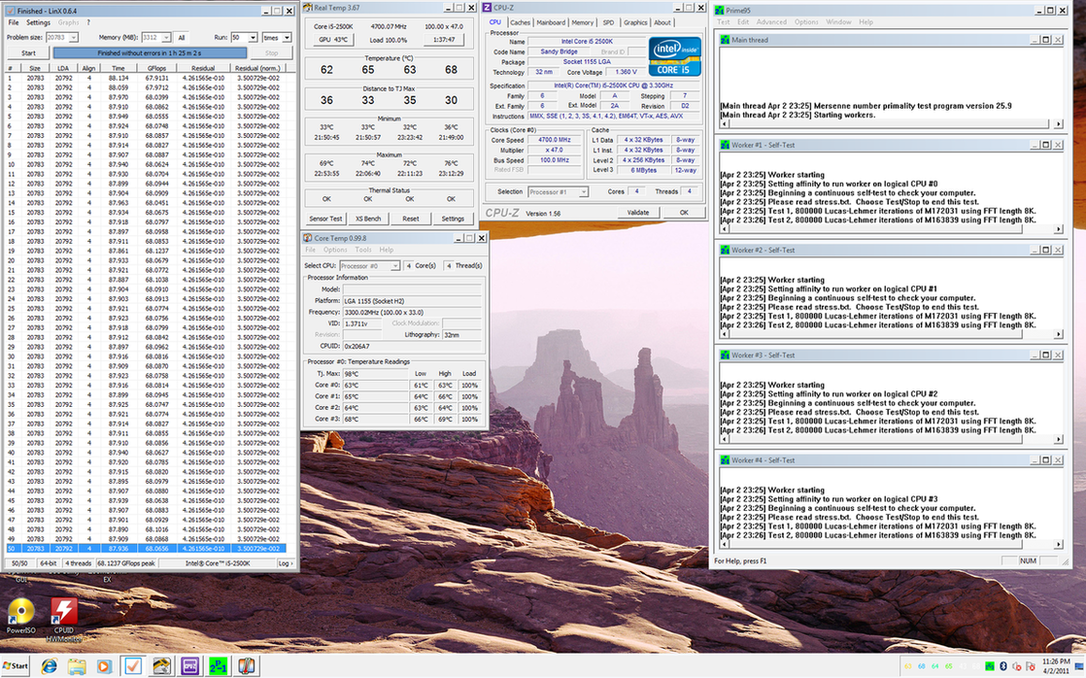
Intel Core i5 2500k @ 4.7Ghz, Ram at 9-11-9-27 @ DDR3 2133
user posted image

Its been a while since I OC and run tests laugh.gif
lichyetan
post Apr 4 2011, 09:17 AM

*****
*******
Senior Member
2,295 posts

Joined: Jan 2005
From: Penang


QUOTE(clawhammer @ Apr 4 2011, 04:23 AM)
Your chip seems to be a lot better than mine biggrin.gif For 4.7Ghz, I need 1.4XX Vcore to make it stable. Anyway, I'll just stress it to hell and if it dies, I'll make it as a key chain laugh.gif So long for a crap piece of chip!
*
need sommore vcore to totally stable ones. Cause BSOD half way gaming with COD:BO zombies. added 1 more notch vcore. no more laugh.gif
lichyetan
post Apr 4 2011, 04:18 PM

*****
*******
Senior Member
2,295 posts

Joined: Jan 2005
From: Penang


QUOTE(clawhammer @ Apr 4 2011, 01:45 PM)
I've read that Prime95 is the best tool to stress Sandy Bridge CPU's. In my case, Prime could pass for hours but still it is unstable sometimes, lol. I'm not sure what's happening. Any ideas?


Added on April 4, 2011, 1:46 pm

My chip is a voltage sucker biggrin.gif Although it could do 4.7Ghz but it needs massive Vcore. Sad!
*
dunno bro, I usually after stress test, will try to game with the system, if no BSOD, then its stable enough for me. Usually if its not stable, when playing COD:zombies online, when lot of zombie, it will go bsod. laugh.gif and I become a leaver sad.gif

Havent try cstkl1 method though, which is playing dota on a pendrive. Will try it out soon...

3 Pages  1 2 3 >Top
Topic ClosedOptions
 

Change to:
| Lo-Fi Version
0.0420sec    1.08    7 queries    GZIP Disabled
Time is now: 9th December 2025 - 11:48 AM