QUOTE(lyl_bgr @ Apr 4 2012, 07:05 PM)
lol that means cant overclock?
but my fren can de a (
(

ur fren is a magician?but my fren can de a
(Sandy Bridge Overclocking V1, 2500K/2600K/2700K | LGA1155 P67.Z68.Z77
|
|
 Apr 4 2012, 07:56 PM Apr 4 2012, 07:56 PM
|
 
Senior Member
2,736 posts Joined: Dec 2006   
|
QUOTE(lyl_bgr @ Apr 4 2012, 07:05 PM) lol that means cant overclock? ur fren is a magician?but my fren can de a ( |
|
|
|
|
|
Apr 5 2012, 09:39 PM
|

Junior Member
112 posts Joined: Dec 2010
|
Vcore 1.151V
 Vcore 1.312  just wanna ask, how to get max multi like owink X57  |
|
|
Apr 5 2012, 10:05 PM
|
 
Elite
8,711 posts Joined: Nov 2007 From: Butterworth, PG / Machang, Kelantan 
|
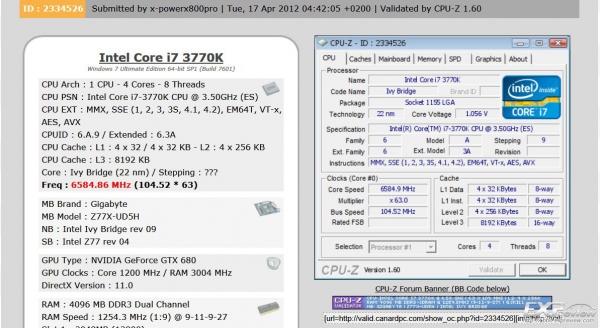
QUOTE(Mrkroit @ Apr 5 2012, 09:39 PM) Vcore 1.151V 57X is a very2 rare chip. The same CPU max out at 56X under water, 2 cores only. 57X is only achievable on subzero. I bought it used for RM2.3k shipped from UK lol. I believe later Ivy Bridge can do better than this & this thread will be dead.Vcore 1.312 just wanna ask, how to get max multi like owink X57 |
|
|
Apr 9 2012, 10:52 AM
|

Junior Member
223 posts Joined: Aug 2010 From: MALAYSIA!!
|
QUOTE(Mrkroit @ Apr 5 2012, 09:39 PM) Vcore 1.151V I am so jelly Vcore 1.312 just wanna ask, how to get max multi like owink X57 QUOTE(owikh84 @ Apr 5 2012, 10:05 PM) 57X is a very2 rare chip. The same CPU max out at 56X under water, 2 cores only. 57X is only achievable on subzero. I bought it used for RM2.3k shipped from UK lol. I believe later Ivy Bridge can do better than this & this thread will be dead. So soon will be dead??  Should i change to ivy bridge once it comes out?? |
|
|
Apr 9 2012, 03:34 PM
|
|
Elite
8,711 posts Joined: Nov 2007 From: Butterworth, PG / Machang, Kelantan
|
QUOTE(MrFay @ Apr 9 2012, 10:52 AM) I am so jelly it's really up to you. If you already satisfied with your current setup then don't change. If you want more speed & features from IB & Z77 board then upgrade. But for sure IB has more OC playability since it has higher unlocked multiplier & higher memory limit than SB. Well we'll wait and see soon. Good luck! So soon will be dead?? Should i change to ivy bridge once it comes out?? |
|
|
Apr 10 2012, 11:58 AM
|

All Stars
18,503 posts Joined: Oct 2007 From: P.Jaya
|
QUOTE(owikh84 @ Apr 9 2012, 03:34 PM) it's really up to you. If you already satisfied with your current setup then don't change. If you want more speed & features from IB & Z77 board then upgrade. But for sure IB has more OC playability since it has higher unlocked multiplier & higher memory limit than SB. Well we'll wait and see soon. Good luck! I heard that ASUS will include 1 or 2 BIOS chip free....ha,ha  This post has been edited by stasio: Apr 10 2012, 11:58 AM |
|
|
|
|
|
Apr 10 2012, 02:46 PM
|
|
Elite
8,711 posts Joined: Nov 2007 From: Butterworth, PG / Machang, Kelantan
|
QUOTE(stasio @ Apr 10 2012, 11:58 AM) I heard that ASUS will include 1 or 2 BIOS chip free....ha,ha Sounds legit as what happened to my last MIVE P67. IME part of bios chip went faulty causing BCLK stuck at 100. But there is no such issue with MIVE-Z (Z68) & RIVE (X79). I hope their Z77 wont be affected too. |
|
|
Apr 10 2012, 11:15 PM
|
|
All Stars
18,503 posts Joined: Oct 2007 From: P.Jaya
|
QUOTE(owikh84 @ Apr 10 2012, 02:46 PM) Sounds legit as what happened to my last MIVE P67. IME part of bios chip went faulty causing BCLK stuck at 100. But there is no such issue with MIVE-Z (Z68) & RIVE (X79). I hope their Z77 wont be affected too. Yeah I know about you and few another from this forum.But now is getting worse, RIVE (X79) getting code 00 : http://rog.asus.com/forum/showthread.php?3...ssible-solution http://www.kingpincooling.com/forum/showth...?t=1497&page=17 http://hardforum.com/showthread.php?t=1671468 etc,etc..... CyntrixTech must read this as ask me for facts. This post has been edited by stasio: Apr 11 2012, 12:17 AM |
|
|
Apr 17 2012, 11:21 AM
|

Junior Member
225 posts Joined: Sep 2009 From: Sabah / Melaka / JB / KL
|
Hye guys,
I oc-ed to 4.7ghz. When i see at cpuz, my core speed is always at 4.7ghz eventho im not stressing it. Last time i think it supposed to be 4.7 when only i stress out, otherwise it will stay below than that. Which in bios i should enable or disable? |
|
|
Apr 17 2012, 11:56 AM
|
|
Elite
8,711 posts Joined: Nov 2007 From: Butterworth, PG / Machang, Kelantan
|
QUOTE(rulmufc @ Apr 17 2012, 11:21 AM) Hye guys, That's because speedstep isnt set to off yetI oc-ed to 4.7ghz. When i see at cpuz, my core speed is always at 4.7ghz eventho im not stressing it. Last time i think it supposed to be 4.7 when only i stress out, otherwise it will stay below than that. Which in bios i should enable or disable? In bios enable EIST (speedstep), C1E, C3/6 In windows, change power management to balanced or power saver. |
|
|
Apr 17 2012, 04:51 PM
|
|
Junior Member
225 posts Joined: Sep 2009 From: Sabah / Melaka / JB / KL
|
QUOTE(owikh84 @ Apr 17 2012, 11:56 AM) That's because speedstep isnt set to off yet Hey bro,In bios enable EIST (speedstep), C1E, C3/6 In windows, change power management to balanced or power saver. I enabled EIST, C1E, C3/6 all of it and power management to balanced. CPUZ still show my core speed is at 4.7ghz. Is there any effect if it just keep at 4.7ghz instead of automatic? Last time its automatic, it only up when i playing games or run some stress. Is there any way i can fix this? Thanks in advance |
|
|
Apr 17 2012, 06:00 PM
|
|
Elite
8,711 posts Joined: Nov 2007 From: Butterworth, PG / Machang, Kelantan
|
QUOTE(rulmufc @ Apr 17 2012, 04:51 PM) Hey bro, I always disabled EIST on all of my Intel CPUs. As long as your not putting crazy volts through it then you need not worry about the lifespan, also with regards to power consumption it will use more when disabled but your CPU will probably not be running at 100% load constantly anyway so the power consumption won't be that dramatic. My OC is 24/7 no power saving features, though a lot of the time I am just browsing and listening to music so its not like it's using up tons of electricity as it is. I enabled EIST, C1E, C3/6 all of it and power management to balanced. CPUZ still show my core speed is at 4.7ghz. Is there any effect if it just keep at 4.7ghz instead of automatic? Last time its automatic, it only up when i playing games or run some stress. Is there any way i can fix this? Thanks in advance EIST can be offset by adjusting C1E in RealTemp. Check/tick the C1E box to enable EIST so that your CPU speed wil relax to 1.6GHz or whatever lower during idle. But i dont think you would do this on every reboot.  |
|
|
Apr 18 2012, 03:08 PM
|

Senior Member
1,000 posts Joined: Jan 2003 From: 10465 South Park,Colorado
|
Joining the club b4 its too late :
i5 2500k@4.7Ghz , 1.365v Bios reading, EVGA Superclock Air cooler. How come multiplier decrease, vcore wrong read  » Click to show Spoiler - click again to hide... « |
|
|
|
|
|
Apr 18 2012, 03:45 PM
|
|
Elite
8,711 posts Joined: Nov 2007 From: Butterworth, PG / Machang, Kelantan
|
QUOTE(beetle_larvae @ Apr 18 2012, 03:08 PM) Joining the club b4 its too late : vCore is reflect to Load Line Calibration (LLC) causing vdroop.i5 2500k@4.7Ghz , 1.365v Bios reading, EVGA Superclock Air cooler. How come multiplier decrease, vcore wrong read 4.3GHz all the time or fluctuating between 4.3-4.7GHz? maybe you accidentally set the max core temp to 75C in BIOS, so the multi is throttled when it hit 75C. pls share BIOS settings |
|
|
Apr 18 2012, 04:07 PM
|

Senior Member
8,686 posts Joined: Mar 2009
|
QUOTE(beetle_larvae @ Apr 18 2012, 03:08 PM) i5 2500k@4.7Ghz , 1.365v Bios reading, EVGA Superclock Air cooler. may i know where can get this cooler? |
|
|
Apr 18 2012, 04:13 PM
|
|
Senior Member
1,000 posts Joined: Jan 2003 From: 10465 South Park,Colorado
|
QUOTE(owikh84 @ Apr 18 2012, 03:45 PM) vCore is reflect to Load Line Calibration (LLC) causing vdroop. ok i check back the setting later at home..it hit 4.5-4.7 sometimes during the test 4.3GHz all the time or fluctuating between 4.3-4.7GHz? maybe you accidentally set the max core temp to 75C in BIOS, so the multi is throttled when it hit 75C. pls share BIOS settings  . .Added on April 18, 2012, 4:15 pm QUOTE(saturn85 @ Apr 18 2012, 04:07 PM) may i know where can get this cooler? gray market import..  This post has been edited by beetle_larvae: Apr 18 2012, 04:15 PM |
|
|
Apr 18 2012, 04:19 PM
|
|
Senior Member
8,686 posts Joined: Mar 2009
|
QUOTE(beetle_larvae @ Apr 18 2012, 04:13 PM) gray market import.. oh, any lubang?how much is it? |
|
|
Apr 19 2012, 05:44 AM
|
|
Senior Member
8,686 posts Joined: Mar 2009
|
|
|
|
Apr 19 2012, 10:19 AM
|

Senior Member
978 posts Joined: Jul 2010 From: Sitiawan, Perak
|
QUOTE(owikh84 @ Apr 17 2012, 06:00 PM) I always disabled EIST on all of my Intel CPUs. As long as your not putting crazy volts through it then you need not worry about the lifespan, also with regards to power consumption it will use more when disabled but your CPU will probably not be running at 100% load constantly anyway so the power consumption won't be that dramatic. My OC is 24/7 no power saving features, though a lot of the time I am just browsing and listening to music so its not like it's using up tons of electricity as it is. dude.. im having the same problem as well...i already set my cpu back to factory setting..(3.7GHz in Turbo)..but it always show 3.50Ghz without any drop...what should i do?EIST can be offset by adjusting C1E in RealTemp. Check/tick the C1E box to enable EIST so that your CPU speed wil relax to 1.6GHz or whatever lower during idle. But i dont think you would do this on every reboot. im quite confused with your statement before...which one do i need to disabled?EIST? This post has been edited by torino: Apr 19 2012, 10:48 AM |
|
|
Apr 19 2012, 11:05 AM
|
|
Elite
8,711 posts Joined: Nov 2007 From: Butterworth, PG / Machang, Kelantan
|
QUOTE(torino @ Apr 19 2012, 10:19 AM) dude.. im having the same problem as well...i already set my cpu back to factory setting..(3.7GHz in Turbo)..but it always show 3.50Ghz without any drop...what should i do? weird, since you have set back to default settings, EIST, C1E, C3/C6 is supposed to be enabled/auto. Just make sure that:im quite confused with your statement before...which one do i need to disabled?EIST? In bios enable EIST (speedstep), C1E, C3/6 In windows, change power management to balanced or power saver. Other than that I really have no idea already. Maybe other forumers got idea  |
|
Topic ClosedOptions
|
| Change to: |  0.0404sec 0.0404sec
 1.26 1.26
 6 queries 6 queries
 GZIP Disabled GZIP Disabled
Time is now: 1st December 2025 - 02:45 PM |
 Quote
Quote