Outline ·
[ Standard ] ·
Linear+
Sandy Bridge Overclocking V1, 2500K/2600K/2700K | LGA1155 P67.Z68.Z77
|
rulmufc
|
 Dec 10 2011, 03:36 PM Dec 10 2011, 03:36 PM
|
Getting Started


|
Hi guys,
Im really new in OC, so i really need help from all of u guys here.
What i want with my system is to load faster in game such as BF3, i can gaming while my browser or wmp or messenger is running and i can easily tab to it.
So heres my question about OC-ing to clear my doubt before starting.
1. Does OC helping such things.
2. Do i need performance ram for OC or what i want.
* Im planning to get aftermarket cpu cooler soon, what u guys recommended if i want to OC 4.5GHz and above?
|
|
|
|
|
|
rulmufc
|
Dec 10 2011, 05:37 PM
|
Getting Started
|
QUOTE(flexus90 @ Dec 10 2011, 03:42 PM) OC does help fasten few process. But you need Solid State Drive. I suggest put Corsair Force GT 240GB in RAID 0. This will help for faster loading. Oh I thought SSD will load faster for OS only not in games, but if i have SSD i must install the game in SSD right to load faster? Theres no point having SSD for OS only if the games in HDD? Does 8GB RAM makes a diff in loading game? Which one is important for choosing RAM, the Mhz or Latency? |
|
|
|
|
|
rulmufc
|
Dec 17 2011, 01:01 PM
|
Getting Started
|
Hi guys,
I just updated my bios to 2103, and then tried auto tuning and it cannot pass 4.5GHz. When auto tuning, do i have to change anything before start? My temp around 62 with prime95 stress test. While my fren with same mobo and bios 1303 & i5 2500K can easily reach 5.0GHz with Cooler V6GT. How do i pass 4.5GHz with auto tuning?
|
|
|
|
|
|
rulmufc
|
Dec 17 2011, 02:10 PM
|
Getting Started
|
QUOTE(CyntrixTech @ Dec 17 2011, 01:48 PM) Your friend didn't hit 5ghz with auto tuning  Auto tuning usually gets stuck at 4.6-4.7 Nope, he really hit 5.0GHz with auto tuning. Actually he is my roomate, when he auto tuning, i was infront of him. |
|
|
|
|
|
rulmufc
|
Dec 17 2011, 10:45 PM
|
Getting Started
|
Hi guys, i think my temp is quite high for 4.8GHz with Vcore 1.4 Can tell me whats wrong? 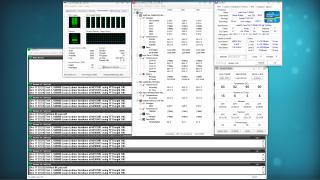
|
|
|
|
|
|
rulmufc
|
Dec 17 2011, 11:11 PM
|
Getting Started
|
QUOTE(owikh84 @ Dec 17 2011, 10:54 PM) It is normal for air cooling.  turn on air cond if u want lower temp  Oh, its normal. Is it safe for everyday use? Im not gonna stretch my cpu up to 100% 24/7. The highest maybe while playing game such as bf3. |
|
|
|
|
|
rulmufc
|
Dec 17 2011, 11:15 PM
|
Getting Started
|
QUOTE(DzX @ Dec 17 2011, 11:13 PM) anybody got the download link for realtemp 3.67? tq At front page this thread got link for real temp. Here » Click to show Spoiler - click again to hide... « http://benchmarks.gr/wp-content/plugins/download-monitor/download.php?id=18 This post has been edited by rulmufc: Dec 17 2011, 11:24 PM |
|
|
|
|
|
rulmufc
|
Apr 17 2012, 11:21 AM
|
Getting Started
|
Hye guys,
I oc-ed to 4.7ghz. When i see at cpuz, my core speed is always at 4.7ghz eventho im not stressing it. Last time i think it supposed to be 4.7 when only i stress out, otherwise it will stay below than that. Which in bios i should enable or disable?
|
|
|
|
|
|
rulmufc
|
Apr 17 2012, 04:51 PM
|
Getting Started
|
QUOTE(owikh84 @ Apr 17 2012, 11:56 AM) That's because speedstep isnt set to off yet In bios enable EIST (speedstep), C1E, C3/6 In windows, change power management to balanced or power saver. Hey bro, I enabled EIST, C1E, C3/6 all of it and power management to balanced. CPUZ still show my core speed is at 4.7ghz. Is there any effect if it just keep at 4.7ghz instead of automatic? Last time its automatic, it only up when i playing games or run some stress. Is there any way i can fix this? Thanks in advance |
|
|
|
|



 Quote
Quote

 0.0446sec
 0.42
0.42
 7 queries
 GZIP Disabled