

QUOTE(scorps @ Aug 15 2008, 12:05 PM)
yess, already installed
what next??

After install you have to edit samba.conf file. Put the workgroup name and other setting that you want.what next??
[Help!] Ubuntu Problems, everything related to ubuntu goes here
|
|
 Aug 15 2008, 01:17 PM Aug 15 2008, 01:17 PM
|
 
Senior Member
631 posts Joined: Feb 2006  
|
QUOTE(scorps @ Aug 15 2008, 12:05 PM) yess, already installed After install you have to edit samba.conf file. Put the workgroup name and other setting that you want.what next?? |
|
|
|
|
|
Aug 15 2008, 08:32 PM
|

Senior Member
785 posts Joined: Dec 2007 From: Perth
|
QUOTE(sjr @ Aug 15 2008, 11:38 AM) actually most of the drivers are ready once u successfully installed ubuntu as ubuntu recognises most hardwares...except for some hardware such as 3d card, u need to install... QUOTE(WebWalker @ Aug 15 2008, 12:23 PM) Ubuntu usually has most of drivers for today devices. alright, thanks.If it doesn't has it, you need to go to the devices maker homepage to download the necessary drivers. |
|
|
Aug 19 2008, 11:12 AM
|

Senior Member
9,572 posts Joined: Jun 2005 From: Terengganu Darul Iman 
|
hi,
i have some problem here, i use streamyx, and every time i need to change the dns server value to 202.188.1.5. to get connected, so how can i permanent do it ?? for now, every time i want to connect, i need to adjust that dns first, if not change it, i failed to surf.. how can i do it?? oh yeah i'm using router mode, so how aa?? This post has been edited by scorps: Aug 19 2008, 11:20 AM |
|
|
Aug 19 2008, 04:40 PM
|

Senior Member
876 posts Joined: Nov 2005 From: /root/Melbourne
|
QUOTE(scorps @ Aug 19 2008, 11:12 AM) hi, Does your /etc/resolv.conf contain nameserver 202.188.1.5? If not, append it to your resolv.conf file.i have some problem here, i use streamyx, and every time i need to change the dns server value to 202.188.1.5. to get connected, so how can i permanent do it ?? for now, every time i want to connect, i need to adjust that dns first, if not change it, i failed to surf.. how can i do it?? oh yeah i'm using router mode, so how aa?? If you are using a router/modem with DNS-relay enabled, you have to add nameserver <your router's/modem's LAN IP> instead. |
|
|
Aug 19 2008, 05:19 PM
|
|
Senior Member
9,572 posts Joined: Jun 2005 From: Terengganu Darul Iman
|
QUOTE(mystical zero @ Aug 19 2008, 05:40 PM) Does your /etc/resolv.conf contain nameserver 202.188.1.5? If not, append it to your resolv.conf file. If you are using a router/modem with DNS-relay enabled, you have to add nameserver <your router's/modem's LAN IP> instead. QUOTE ### BEGIN INFO # # Modified_by: NetworkManager # Process: /usr/bin/NetworkManager # Process_id: 5261 # ### END INFO nameserver 10.0.0.2 nameserver 202.188.1.5 this is what in my resolv.conf file so what i can do?? |
|
|
Aug 19 2008, 08:51 PM
|

Senior Member
751 posts Joined: Nov 2004
|
dpkg --purge resolvconf
edit /etc/resolv.conf again. If that doesn't work...try purge avahi especially avahi-dnsconfd This post has been edited by oshiri: Aug 19 2008, 08:54 PM |
|
|
|
|
|
Aug 19 2008, 09:39 PM
|
|
Senior Member
9,572 posts Joined: Jun 2005 From: Terengganu Darul Iman
|
ok my problem solved,
i create new resolv.conf file, and replace it with the exciting file but that only for wired connection, my wifi connection still problem,  |
|
|
Aug 19 2008, 10:18 PM
|
|
Senior Member
751 posts Joined: Nov 2004
|
Are you using network-manager?
If that the case, it is similar to resolvconf which detect dhcp broadcast and replace nameserver automatically. Some routers does not send dns ip properly or even don't have place to set those ip. That's the origin of the problem. You could try let your dhcpclient takeover the dns ip from your router. Edit your dhcp client. Not sure which version you are using. if dhcp3-client, then edit /etc/dhcp3/dhclient.conf anda prepend tmnet dns ip: CODE prepend domain-name-servers 202.188.0.133, 202.188.1.5; request subnet-mask, broadcast-address, time-offset, routers, domain-name, domain-name-servers, host-name, netbios-name-servers, netbios-scope, interface-mtu; My advise is...remove all those automatic tools, do the old fashion, set everything manually. Only 2 file necessary if you do it manually: /etc/resolv.conf and /etc/network/interfaces |
|
|
Aug 19 2008, 10:34 PM
|
|
Senior Member
9,572 posts Joined: Jun 2005 From: Terengganu Darul Iman
|
QUOTE(oshiri @ Aug 19 2008, 11:18 PM) Are you using network-manager? thanks for advice,anyway, my wired connection is ok right now after replace that fileIf that the case, it is similar to resolvconf which detect dhcp broadcast and replace nameserver automatically. Some routers does not send dns ip properly or even don't have place to set those ip. That's the origin of the problem. You could try let your dhcpclient takeover the dns ip from your router. Edit your dhcp client. Not sure which version you are using. if dhcp3-client, then edit /etc/dhcp3/dhclient.conf anda prepend tmnet dns ip: CODE prepend domain-name-servers 202.188.0.133, 202.188.1.5; request subnet-mask, broadcast-address, time-offset, routers, domain-name, domain-name-servers, host-name, netbios-name-servers, netbios-scope, interface-mtu; My advise is...remove all those automatic tools, do the old fashion, set everything manually. Only 2 file necessary if you do it manually: /etc/resolv.conf and /etc/network/interfaces but do u know what is the problem with wifi connection?? i refer here for wifi problem, http://ubuntuforums.org/showthread.php?t=880218 do u think it will work?? my situation now,wifi driver is ok, all connected,the signal is strength (good), there is no security for my wifi like wep or wpa so what the problem??  |
|
|
Aug 19 2008, 11:04 PM
|
|
Senior Member
751 posts Joined: Nov 2004
|
QUOTE(scorps @ Aug 19 2008, 10:34 PM) thanks for advice,anyway, my wired connection is ok right now after replace that file I'm not so sure what you mean.but do u know what is the problem with wifi connection?? i refer here for wifi problem, http://ubuntuforums.org/showthread.php?t=880218 do u think it will work?? my situation now,wifi driver is ok, all connected,the signal is strength (good), there is no security for my wifi like wep or wpa so what the problem?? Are you having problem or cannot authenticate to your wpa/wep router? Read my note on how to use wpa supplicant or wlassistant: http://mambang.org.my/modules/news/article...78&keywords=wpa http://mambang.org.my/modules/news/article...77&keywords=wpa Get latest kernel if available because kernel 2.6.26 has more support for wireless devices. Or you could try my kernel: http://mambang.org.my/modules/news/article.php?storyid=205 |
|
|
Aug 19 2008, 11:25 PM
|

Senior Member
6,249 posts Joined: Jul 2006
|
some of the current linux reminds me of the win98 days.
still quite lean still quite fast still have to do alot of things manually to get it working right and there is an order to install things so they work. though with ubuntu it gives me the mac feeling....it just works. though i am unable to fix my keys getting sticky at random times  |
|
|
Aug 19 2008, 11:54 PM
|
|
Senior Member
9,572 posts Joined: Jun 2005 From: Terengganu Darul Iman
|
QUOTE(oshiri @ Aug 20 2008, 12:04 AM) I'm not so sure what you mean. no, not about wpa and wpe at allAre you having problem or cannot authenticate to your wpa/wep router? Read my note on how to use wpa supplicant or wlassistant: http://mambang.org.my/modules/news/article...78&keywords=wpa http://mambang.org.my/modules/news/article...77&keywords=wpa Get latest kernel if available because kernel 2.6.26 has more support for wireless devices. Or you could try my kernel: http://mambang.org.my/modules/news/article.php?storyid=205 i'm not enabling it, my problem is i still can't get to surf even my wifi is working, it's working,signal strength is good, but can't connected, this is when i connect using wired connection... QUOTE scorps@scorps-laptop:~$ ifconfig this is when i try connect using wifieth0 Link encap:Ethernet HWaddr 00:16:d3:fc:0d:5e inet addr:10.0.0.9 Bcast:255.255.255.255 Mask:255.0.0.0 inet6 addr: fe80::216:d3ff:fefc:d5e/64 Scope:Link UP BROADCAST RUNNING MULTICAST MTU:1500 Metric:1 RX packets:108316 errors:0 dropped:0 overruns:0 frame:0 TX packets:101701 errors:0 dropped:0 overruns:0 carrier:0 collisions:0 txqueuelen:1000 RX bytes:123687395 (117.9 MB) TX bytes:12484421 (11.9 MB) Interrupt:220 Base address:0x4000 wlan0 Link encap:Ethernet HWaddr 00:00:00:1a:73:9f UP BROADCAST MULTICAST MTU:1500 Metric:1 RX packets:1333 errors:0 dropped:0 overruns:0 frame:0 TX packets:909 errors:0 dropped:0 overruns:0 carrier:0 collisions:0 txqueuelen:1000 RX bytes:238766 (233.1 KB) TX bytes:119293 (116.4 KB) wmaster0 Link encap:UNSPEC HWaddr 00-00-00-1A-73-9F-00-00-00-00-00-00-00-00-00-00 UP BROADCAST RUNNING MULTICAST MTU:1500 Metric:1 RX packets:0 errors:0 dropped:0 overruns:0 frame:0 TX packets:0 errors:0 dropped:0 overruns:0 carrier:0 collisions:0 txqueuelen:1000 RX bytes:0 (0.0 B) TX bytes:0 (0.0 B) QUOTE wlan0 Link encap:Ethernet HWaddr 00:00:00:1a:73:9f inet addr:10.0.0.3 Bcast:255.255.255.255 Mask:255.255.255.0 inet6 addr: fe80::200:ff:fe1a:739f/64 Scope:Link UP BROADCAST RUNNING MULTICAST MTU:1500 Metric:1 RX packets:1352 errors:0 dropped:0 overruns:0 frame:0 TX packets:932 errors:0 dropped:0 overruns:0 carrier:0 collisions:0 txqueuelen:1000 RX bytes:242243 (236.5 KB) TX bytes:124593 (121.6 KB) |
|
|
Aug 20 2008, 02:22 AM
|

Junior Member
200 posts Joined: Jan 2003 From: Kuching
|
i've problem with the brightness configuration.
it works ok when i bootup ubuntu. and i've set it to be dim when its in idle for 10 min but whenver i back from the idle. the brightness still at dim. how can i configure it? |
|
|
|
|
|
Aug 20 2008, 09:06 AM
|
|
Senior Member
751 posts Joined: Nov 2004
|
QUOTE(scorps @ Aug 19 2008, 11:54 PM) no, not about wpa and wpe at all 1. Have you install firmware for your wifi card?i'm not enabling it, my problem is i still can't get to surf even my wifi is working, it's working,signal strength is good, but can't connected, this is when i connect using wired connection... this is when i try connect using wifi For broadcom, you need fw_cutter. 2. Happen to me once. I mess up with kernel. Try use different kernel. QUOTE some of the current linux reminds me of the win98 days. still quite lean still quite fast still have to do alot of things manually to get it working right and there is an order to install things so they work. though with ubuntu it gives me the mac feeling....it just works. though i am unable to fix my keys getting sticky at random times Don't know about "it just work". I never use Ubuntu because their versioning system really confusing. I can't figure out which is stable, which is unstable, experimental...so on. Looks like they "cocktail" everything up. Still stick to "pure" Debian for ages. I prefer doing things manually. About your key problem...you could try disable acpi but at the cost of having power mangement and others depends on acpi to not working. QUOTE i've problem with the brightness configuration. it works ok when i bootup ubuntu. and i've set it to be dim when its in idle for 10 min but whenver i back from the idle. the brightness still at dim. how can i configure it? This is probably acpi problem. Try get newer kernel. Dont know what brand your notebook is. Usually notebook has function (Fn) key to control various aspect of their system. Try use it. Or you could try command line. Check in this : cat /proc/acpi/video/lcd/brightness *video could have different name You could just change the brightness using command such as: echo 100 > /proc/acpi/video/lcd/brightness Change the numerical value to your liking, 0 -100 This post has been edited by oshiri: Aug 20 2008, 09:10 AM |
|
|
Aug 20 2008, 09:15 AM
|
|
Senior Member
9,572 posts Joined: Jun 2005 From: Terengganu Darul Iman
|
QUOTE(oshiri @ Aug 20 2008, 10:06 AM) 1. Have you install firmware for your wifi card? i'm now try to install new firmware..For broadcom, you need fw_cutter. 2. Happen to me once. I mess up with kernel. Try use different kernel. need to try it first  |
|
|
Aug 20 2008, 09:30 AM
|
|
Junior Member
200 posts Joined: Jan 2003 From: Kuching
|
QUOTE(oshiri @ Aug 20 2008, 09:06 AM) This is probably acpi problem. Try get newer kernel. Dont know what brand your notebook is. Already using up-to-date kernel from ubuntu. unless i install myself. lolUsually notebook has function (Fn) key to control various aspect of their system. Try use it. Or you could try command line. Check in this : cat /proc/acpi/video/lcd/brightness *video could have different name You could just change the brightness using command such as: echo 100 > /proc/acpi/video/lcd/brightness Change the numerical value to your liking, 0 -100 i using dell xps m1210 last time i think no problem 1. but after i configured the dim during idle. d brightness become less when back from dim. odd |
|
|
Aug 20 2008, 10:18 AM
|
|
Senior Member
751 posts Joined: Nov 2004
|
QUOTE(CONANDOR @ Aug 20 2008, 09:30 AM) Already using up-to-date kernel from ubuntu. unless i install myself. lol Try use Fn up or Fn downi using dell xps m1210 last time i think no problem 1. but after i configured the dim during idle. d brightness become less when back from dim. odd For user using laptop, better install laptop-mode-tools. |
|
|
Aug 20 2008, 12:22 PM
|
|
Senior Member
9,572 posts Joined: Jun 2005 From: Terengganu Darul Iman
|
look at this..
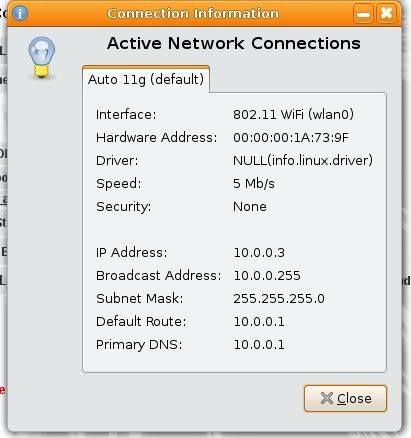 what should i do?? |
|
|
Aug 20 2008, 12:30 PM
|
|
Senior Member
751 posts Joined: Nov 2004
|
QUOTE(scorps @ Aug 20 2008, 12:22 PM) look at this.. Why primary DNS still using 10.0.0.1?what should i do?? check /etc/resolv.conf again. No matter you using wired or wireless.... both will refer to that file. |
|
|
Aug 20 2008, 12:53 PM
|

Junior Member
357 posts Joined: May 2006
|
QUOTE(scorps @ Aug 20 2008, 12:22 PM) look at this.. i assume u're using dhpc..what should i do?? the dns might came from dhcp lease from your router/modem... check your router DNS setting to change this permanently.. after that no need to change /etc/resolv.conf everytime d... This post has been edited by ozs: Aug 20 2008, 12:53 PM |
| Change to: |  0.0335sec 0.0335sec
 0.50 0.50
 6 queries 6 queries
 GZIP Disabled GZIP Disabled
Time is now: 10th December 2025 - 05:22 PM |
 Quote
Quote