Welcome Guest ( Log In | Register )

95 Pages « < 53 54 55 56 57 > » Bottom

Outline · [ Standard ] · Linear+

 [Help!] Ubuntu Problems, everything related to ubuntu goes here

views
     
ozs
post Aug 21 2008, 05:33 PM

Casual
***
Junior Member
357 posts

Joined: May 2006


QUOTE(scorps @ Aug 21 2008, 02:44 PM)
good news,
my wifi connected (working good now)
notworthy.gif

but it happen after i reconfigure my network setup

set the adsl modem as brigde mode,
and set the wifi router as pppoe mode,

so that my fault,

before this i just use modem as pppoe mode, and the wifi router as dhcp
and laptop with winxp can connect wifi very good
but thanks all

and how about to do network sharing between winxp and ubuntu?
using samba??
any link to me??
thanks oshiri..  thumbup.gif
*
http://ubuntuforums.org/showthread.php?t=202605
arafat
post Aug 21 2008, 10:53 PM

ROCK ON!
******
Senior Member
1,747 posts

Joined: Nov 2004
From: serdang selangor

hi..
how to remove the password window everytime i want to mount a hdd drive?
using ntfs.
scorps
post Aug 21 2008, 11:51 PM

Something you call love, but I call sex
*******
Senior Member
9,572 posts

Joined: Jun 2005
From: Terengganu Darul Iman


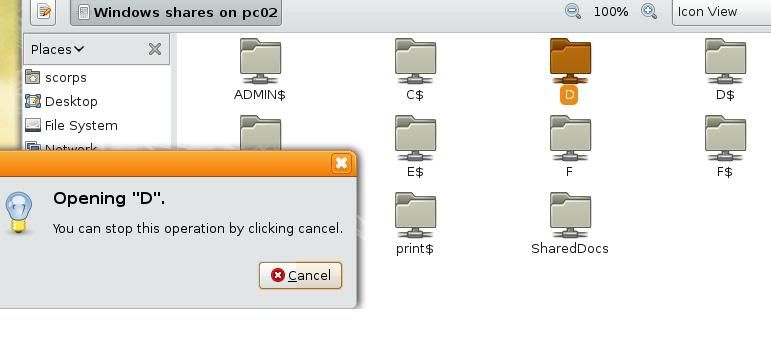
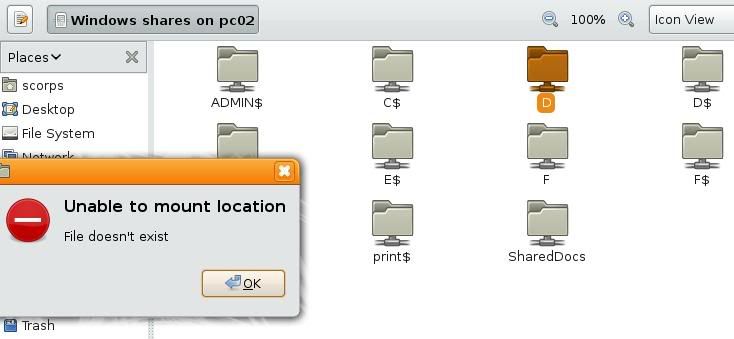
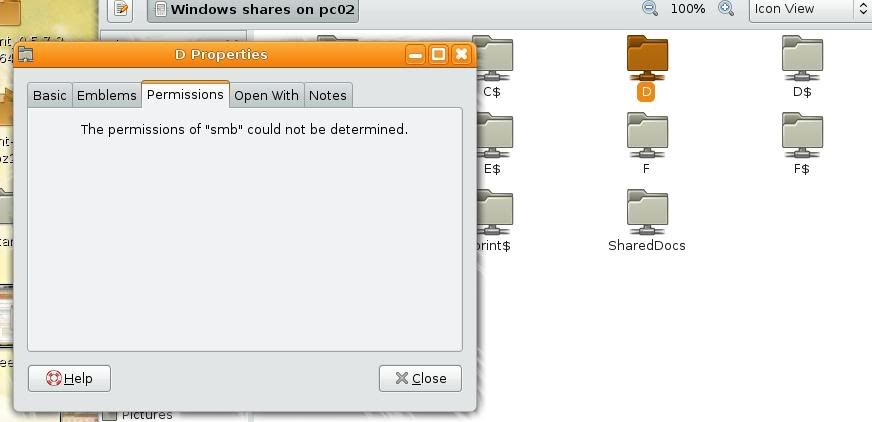
i have a new problem here,
my network shared can't access,

ozs
post Aug 21 2008, 11:58 PM

Casual
***
Junior Member
357 posts

Joined: May 2006


QUOTE(arafat @ Aug 21 2008, 10:53 PM)
hi..
how to remove the password window everytime i want to mount a hdd drive?
using ntfs.
*
administrative privilleges is require to mount/unmount drive..

btw if you want to mount it permanently use /etc/fstab

QUOTE(scorps @ Aug 21 2008, 11:51 PM)
i have a new problem here,
my network shared can't access,
*
more details?...
error?..

This post has been edited by ozs: Aug 21 2008, 11:59 PM
scorps
post Aug 22 2008, 12:07 AM

Something you call love, but I call sex
*******
Senior Member
9,572 posts

Joined: Jun 2005
From: Terengganu Darul Iman


QUOTE(ozs @ Aug 22 2008, 12:58 AM)
more details?...
error?..
*
owh sorry..
user posted image

user posted image

user posted image

so what??? rclxub.gif icon_question.gif
arafat
post Aug 22 2008, 12:26 AM

ROCK ON!
******
Senior Member
1,747 posts

Joined: Nov 2004
From: serdang selangor

QUOTE(ozs @ Aug 21 2008, 11:58 PM)
administrative privilleges is require to mount/unmount drive..

btw if you want to mount it permanently use /etc/fstab

*
sorry,newbie..
what to do with the /etc/fstab? type in terminal?
scorps
post Aug 22 2008, 12:32 AM

Something you call love, but I call sex
*******
Senior Member
9,572 posts

Joined: Jun 2005
From: Terengganu Darul Iman


QUOTE(arafat @ Aug 22 2008, 01:26 AM)
sorry,newbie..
what to do with the /etc/fstab? type in terminal?
*
sudo /etc/fstab
in terminal
prasys
post Aug 22 2008, 01:00 AM

Heros Never Die
Group Icon
VIP
12,925 posts

Joined: Mar 2005
From: Kuala Lumpur
QUOTE(arafat @ Aug 22 2008, 12:26 AM)
sorry,newbie..
what to do with the /etc/fstab? type in terminal?
*
type

sudo gedit /etc/fstab

enter your password and it will load gedit (I would prefer vi) , but then you might not be familiar with CLI text editor. From there you can edit and include it so that the system auto-mounts !


http://www.tuxfiles.org/linuxhelp/fstab.html , read that guide for more information

jordan86
post Aug 22 2008, 07:58 AM

On my way
****
Senior Member
631 posts

Joined: Feb 2006


QUOTE(scorps @ Aug 22 2008, 12:07 AM)
owh sorry..
user posted image

user posted image

user posted image

so what??? rclxub.gif  icon_question.gif
*
You got try edit the samba configuration file?
Until now im still not very sure how to setup the samba. lol... May be you can refer to some websites.
Lastime i done edi, but sometime window can see the my share folder, sometime cannot.
Then now i also lazy to setup edi.
scorps
post Aug 22 2008, 09:10 AM

Something you call love, but I call sex
*******
Senior Member
9,572 posts

Joined: Jun 2005
From: Terengganu Darul Iman


QUOTE(jordan86 @ Aug 22 2008, 08:58 AM)
You got try edit the samba configuration file?
Until now im still not very sure how to setup the samba. lol... May be you can refer to some websites.
Lastime i done edi, but sometime window can see the my share folder, sometime cannot.
Then now i also lazy to setup edi.
*
i have edit it already,
i follow these step http://ubuntuforums.org/showthread.php?t=202605
but still can't rclxub.gif
ozs
post Aug 22 2008, 10:14 AM

Casual
***
Junior Member
357 posts

Joined: May 2006


create share folder using samba(windows alike)
only these will be needed..

CODE
[share]
  comment = This is a share folder
  path = /Software (example)
  browseable = yes
  public = yes
  writable = no


and under Global Setting, change:
CODE
Security = share


to access it from windows, type \\<yourlinuxIP> in address bar or run..
oshiri
post Aug 22 2008, 11:54 AM

Enthusiast
*****
Senior Member
751 posts

Joined: Nov 2004
Let's do manually:

For testing only:
Edit /etc/samba.smb.conf (sudo gedit /etc/samba/smb.conf)

CODE
[global]
workgroup = MSHOME   #This workgroup must be the same as what you set in windows pc ans all other samba pc
server string = Scorps Samba Server # put whatever you like
map to guest = Bad User
restrict anonymous = no
guest ok = yes
domain master = no
preferred master = no
max protocol = NT
acl compatibility = winnt
ldap ssl = No
server signing = Auto
security = user  
log level = 2
log file = /var/log/samba.log


[My_Home_Folder]
path = /home/scorps  # change this to the path/folder you want to share
comment = home files
read only = No
guest ok = Yes  # to allow anonymous access, in Debian/Ubuntu, user nobody will be used as guest.


Testing:
1. local
List share folder:
Just enter when asked for password because we allow anonymous access.
CODE
$ smbclient -L localhost
Password:
Anonymous login successful
Domain=[MSHOME] OS=[Unix] Server=[Samba 3.0.24]

       Sharename       Type      Comment
       ---------       ----      -------
       My_Home_Folder  Disk      home files
       IPC$            IPC       IPC Service (Scorps Samba Server)
Anonymous login successful
Domain=[MSHOME] OS=[Unix] Server=[Samba 3.0.24]

       Server               Comment
       ---------            -------
       OSHIRIX              Scorps Samba Server

       Workgroup            Master
       ---------            -------
       MSHOME


Login to shared folder:
CODE
$ smbclient //localhost/My_Home_Folder
Password:
Anonymous login successful
Domain=[MSHOME] OS=[Unix] Server=[Samba 3.0.24]
smb: \> pwd
Current directory is \\localhost\My_Home_Folder\
smb: \> quit


2. Test remote
Do the same but change localhost to ip of remote pc.
If failed, try access windows shared using user/password of the windows login.
smbclient -L "ip" -U "username windows"
smbclient "ip"/"shared folder" -U "username"

and enter the password.

Other test can be done using Nautilus (gnome) or Koqueror (kde).
Just put on the url bar:
smb://"ip"
or
smb://username:password@"ip"

* On XP Pro, you need a login account. Some user use XP Pro without login account. This will not work with Samba.

scorps
post Aug 22 2008, 01:18 PM

Something you call love, but I call sex
*******
Senior Member
9,572 posts

Joined: Jun 2005
From: Terengganu Darul Iman


CODE
scorps@scorps-laptop:~$  smbclient -L localhost
Connection to localhost failed (Error NT_STATUS_BAD_NETWORK_NAME)
scorps@scorps-laptop:~$


this what i got... hmm.gif
oshiri
post Aug 22 2008, 01:38 PM

Enthusiast
*****
Senior Member
751 posts

Joined: Nov 2004
1. Pleae paste your /etc/samba/smb.conf
2. Pelase paste output of : tail /var/log/samba.log
3. Please paste output of: testparm


scorps
post Aug 22 2008, 02:24 PM

Something you call love, but I call sex
*******
Senior Member
9,572 posts

Joined: Jun 2005
From: Terengganu Darul Iman


CODE
[global]
  ; General server settings
   netbios name = scorps
   server string =
   workgroup = WORKGROUP
   announce version = 5.0
   socket options = TCP_NODELAY IPTOS_LOWDELAY SO_KEEPALIVE SO_RCVBUF=8192 SO_SNDBUF=8192

   passdb backend = tdbsam
   security = user
   null passwords = true
   username map = /etc/samba/smbusers
   name resolve order = hosts wins bcast

   wins support = yes

   printing = CUPS
   printcap name = CUPS

   syslog = 1
   syslog only = yes

; NOTE: If you need access to the user home directories uncomment the
; lines below and adjust the settings to your hearts content.
;[homes]
  ;valid users = %S
  ;create mode = 0600
  ;directory mode = 0755
  ;browseable = no
  ;read only = no
  ;veto files = /*.{*}/.*/mail/bin/

; NOTE: Only needed if you run samba as a primary domain controller.
; Not needed as this config doesn't cover that matter.
;[netlogon]
  ;path = /var/lib/samba/netlogon
  ;admin users = Administrator
  ;valid users = %U
  ;read only = no

; NOTE: Again - only needed if you're running a primary domain controller.
;[Profiles]
  ;path = /var/lib/samba/profiles
  ;valid users = %U
  ;create mode = 0600
  ;directory mode = 0700
  ;writeable = yes
  ;browseable = no

; NOTE: Inside this place you may build a printer driver repository for
; Windows - I'll cover this topic in another HOWTO.
[print$]
   path = /var/lib/samba/printers
   browseable = yes
   guest ok = yes
   read only = yes
   write list = root
   create mask = 0664
   directory mask = 0775

[printers]
   path = /tmp
   printable = yes
   guest ok = yes
   browseable = no

; Uncomment if you need to share your CD-/DVD-ROM Drive
;[DVD-ROM Drive]
  ;path = /media/cdrom
  ;browseable = yes
  ;read only = yes
  ;guest ok = yes

[MyFiles]
   path = /home/samba/
   browseable = yes
   read only = no
   guest ok = no
   create mask = 0644
   directory mask = 0755
   force user = scorps
   force group = scorps

oshiri
post Aug 22 2008, 02:41 PM

Enthusiast
*****
Senior Member
751 posts

Joined: Nov 2004
Try with my basic smb.conf. Adjust a bit.

Once you got it working then it is up to you to do the advance config.
For the time being...just make it simple.

Don't forget to restart samba once you finish editing.
/etc/init.d/samba restart

scorps
post Aug 22 2008, 04:09 PM

Something you call love, but I call sex
*******
Senior Member
9,572 posts

Joined: Jun 2005
From: Terengganu Darul Iman


CODE
[global]
workgroup = WORKGROUP
server string = Scorps
map to guest = Bad User
restrict anonymous = no
guest ok = yes
domain master = no
preferred master = no
max protocol = NT
acl compatibility = winnt
ldap ssl = No
server signing = Auto
security = user  
log level = 2
log file = /var/log/samba.log


[My_Home_Folder]
path = /home/scorps
comment = home files
read only = No
guest ok = Yes  


well i got this error message

CODE
scorps@scorps-laptop:~$ sudo gedit /etc/samba/smb.conf
[sudo] password for scorps:
scorps@scorps-laptop:~$ sudo /etc/init.d/samba restart
* Stopping Samba daemons                                                [ OK ]
* Starting Samba daemons                                                [ OK ]
scorps@scorps-laptop:~$ smbclient -L localhost
timeout connecting to 203.106.203.238:445
timeout connecting to 203.106.203.238:139
Connection to localhost failed (Error NT_STATUS_ACCESS_DENIED)
scorps@scorps-laptop:~$


This post has been edited by scorps: Aug 22 2008, 04:11 PM
oshiri
post Aug 22 2008, 04:16 PM

Enthusiast
*****
Senior Member
751 posts

Joined: Nov 2004
Ip it trying to connect is suspicious. Probably you didn't declare localhost in /etc/hosts.

Try : smbclient -L 127.0.0.1

scorps
post Aug 22 2008, 04:21 PM

Something you call love, but I call sex
*******
Senior Member
9,572 posts

Joined: Jun 2005
From: Terengganu Darul Iman


QUOTE(oshiri @ Aug 22 2008, 05:16 PM)
Ip it trying to connect is suspicious. Probably you didn't declare localhost in /etc/hosts.

Try : smbclient -L 127.0.0.1
*
ok got it ..

CODE
scorps@scorps-laptop:~$ smbclient -L 127.0.0.1
Enter scorps's password:
Domain=[SCORPS-LAPTOP] OS=[Unix] Server=[Samba 3.2.1]

Sharename       Type      Comment
---------       ----      -------
My_Home_Folder  Disk      home files
IPC$            IPC       IPC Service (Scorps)
folder to shared Disk      
Domain=[SCORPS-LAPTOP] OS=[Unix] Server=[Samba 3.2.1]

Server               Comment
---------            -------

Workgroup            Master
---------            -------
WORKGROUP            PC02
scorps@scorps-laptop:~$


next what?? hmm.gif
scorps
post Aug 22 2008, 04:24 PM

Something you call love, but I call sex
*******
Senior Member
9,572 posts

Joined: Jun 2005
From: Terengganu Darul Iman


CODE
scorps@scorps-laptop:~$ smbclient //localhost/My_Home_Folder
timeout connecting to 203.106.203.238:445

scorps@scorps-laptop:~$ smbclient //127.0.0.1/My_Home_Folder
Enter scorps's password:
Domain=[SCORPS-LAPTOP] OS=[Unix] Server=[Samba 3.2.1]
smb: \> pwd
Current directory is \\127.0.0.1\My_Home_Folder\
smb: \>


ok then??

95 Pages « < 53 54 55 56 57 > » Top
 

Change to:
| Lo-Fi Version
0.0278sec    0.74    6 queries    GZIP Disabled
Time is now: 10th December 2025 - 09:02 PM