QUOTE(scorps @ Aug 19 2008, 11:54 PM)
no, not about wpa and wpe at all
i'm not enabling it,
my problem is i still can't get to surf even my wifi is working,
it's working,signal strength is good,
but can't connected,
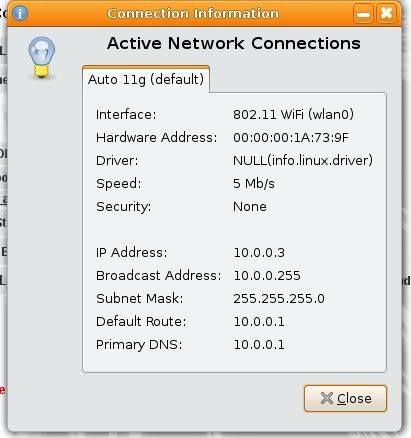
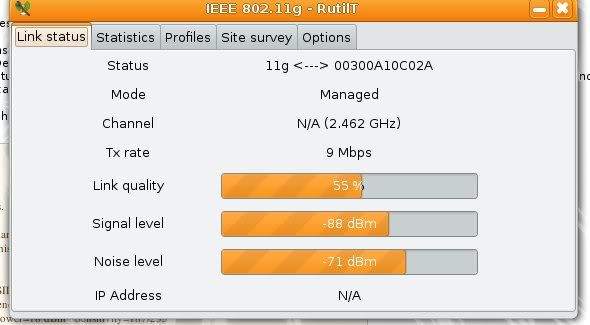
this is when i connect using wired connection...
this is when i try connect using wifi

Â

1. Have you install firmware for your wifi card?
For broadcom, you need fw_cutter.
2. Happen to me once. I mess up with kernel. Try use different kernel.
QUOTE
some of the current linux reminds me of the win98 days.
still quite lean still quite fast still have to do alot of things manually to get it working right and there is an order to install things so they work.
though with ubuntu it gives me the mac feeling....it just works.
though i am unable to fix my keys getting sticky at random times
Don't know about "it just work". I never use Ubuntu because their versioning system really confusing. I can't figure out which is stable, which is unstable, experimental...so on. Looks like they "cocktail" everything up. Still stick to "pure" Debian for ages. I prefer doing things manually.
About your key problem...you could try disable acpi but at the cost of having power mangement and others depends on acpi to not working.
QUOTE
i've problem with the brightness configuration.
it works ok when i bootup ubuntu.
and i've set it to be dim when its in idle for 10 min
but whenver i back from the idle. the brightness still at dim.
how can i configure it?
This is probably acpi problem. Try get newer kernel. Dont know what brand your notebook is.
Usually notebook has function (Fn) key to control various aspect of their system. Try use it.
Or you could try command line.
Check in this : cat /proc/acpi/video/lcd/brightness
*video could have different name
You could just change the brightness using command such as: echo 100 > /proc/acpi/video/lcd/brightness
Change the numerical value to your liking, 0 -100
This post has been edited by oshiri: Aug 20 2008, 09:10 AM 

 Aug 31 2006, 10:53 AM


 Quote
Quote
 ) + some sort of kernel bug.


 0.0455sec
 0.54
0.54
 7 queries
 GZIP Disabled