


Unifi Official TM UniFi High Speed Broadbrand Thread V7, News: VIP20, free instalation till 31/12
Unifi Official TM UniFi High Speed Broadbrand Thread V7, News: VIP20, free instalation till 31/12
|
|
 Sep 29 2010, 08:23 PM Sep 29 2010, 08:23 PM
|
 
Senior Member
2,785 posts Joined: Jan 2003   
|
Guyz,do u know how much the installer charge if i need merely around 20m-30m of lan cable in order to connect the iptv to my tv at 2nd floor??That day when the installer came and install unifi,i told them that i don't need iptv at that moment,but after a while why not give it a try..Plus already paid for the monthly package somemore..huhu..No homeplug for me as i think i'll get bad signal due to old plug point connection
|
|
|
|
|
|
Sep 29 2010, 08:52 PM
|

Junior Member
17 posts Joined: Jul 2010
|
QUOTE(aliftaufiq @ Sep 29 2010, 08:23 PM) Guyz,do u know how much the installer charge if i need merely around 20m-30m of lan cable in order to connect the iptv to my tv at 2nd floor??That day when the installer came and install unifi,i told them that i don't need iptv at that moment,but after a while why not give it a try..Plus already paid for the monthly package somemore..huhu..No homeplug for me as i think i'll get bad signal due to old plug point connection You never know., homeplug may work perfectly well for you. You only need 8 Mbps for IPTV, a 200 Mbps will give you a lot of spare bandwidth already. |
|
|
Sep 29 2010, 09:06 PM
|
|
Senior Member
2,785 posts Joined: Jan 2003
|
QUOTE(akerue @ Sep 29 2010, 08:52 PM) You never know., homeplug may work perfectly well for you. You only need 8 Mbps for IPTV, a 200 Mbps will give you a lot of spare bandwidth already. It's more expensive n i do doubt it will run perfectly in the house..huhu..If i got the cable,the installation for the iptv is not that hard right??Anyone care to give me some guidance..Thanks  |
|
|
Sep 29 2010, 09:13 PM
|
|
Junior Member
17 posts Joined: Jul 2010
|
QUOTE(aliftaufiq @ Sep 29 2010, 09:06 PM) It's more expensive n i do doubt it will run perfectly in the house..huhu..If i got the cable,the installation for the iptv is not that hard right??Anyone care to give me some guidance..Thanks If you don't mind cable running around then it is better. For me, I hate to see exposed cable  |
|
|
Sep 29 2010, 09:17 PM
|
|
Senior Member
2,785 posts Joined: Jan 2003
|
QUOTE(akerue @ Sep 29 2010, 09:13 PM) If you don't mind cable running around then it is better. For me, I hate to see exposed cable It won't running around..Will hide it that's for sure Just need some guide on setting up the iptv then i'm good to go |
|
|
Sep 29 2010, 09:37 PM
|

Senior Member
1,346 posts Joined: Sep 2007
|
QUOTE(aliftaufiq @ Sep 29 2010, 09:17 PM) It won't running around..Will hide it that's for sure 20 - 30m Cat. 5E cable should not be any problem (as long as not exceed 95m). I am using homeplug as Akerue mentioned as I can't really hide the Cat 5e aka ethernet aka LAN cable Just need some guide on setting up the iptv then i'm good to go |
|
|
|
|
|
Sep 29 2010, 11:23 PM
|

Senior Member
1,925 posts Joined: Feb 2006 From: Petaling Jaya
|
Guys, how troublesome it is to setup this unifi?
I'm planning for the VIP5 but looking as how complicated it is, I plan to go for the 4MB package instead though its RM9 difference. Any advice? |
|
|
Sep 29 2010, 11:26 PM
|

Senior Member
5,221 posts Joined: Aug 2007 From: Deneb star
|
QUOTE(auronthas @ Sep 29 2010, 09:37 PM) 20 - 30m Cat. 5E cable should not be any problem (as long as not exceed 95m). I am using homeplug as Akerue mentioned as I can't really hide the Cat 5e aka ethernet aka LAN cable How many homeplug you buy?Because my family nag me already pulling wires from PC(Bottom floor) to Router(Top Floor)  Plus my homes use alot PC..so nid use alot Lan Cable.. |
|
|
Sep 30 2010, 12:59 AM
|

Senior Member
690 posts Joined: Jul 2008 From: Taman Equine. Seri Kembangan 
|
Just registered Unifi This afternoon at Cyberjaya TMpoint... i thought i'm insane to arrange Installation date on 30th october 2010, but a person beside me arrange installation on his VIP10 on 4th January 2011... it's a uncle... that says his house still under renovation.. only can "Siap" at that time... i was Sooo Shocked.. that he really do that.. >.<
now i have 1043ND... so any configurations needed to be done on the router on Unifi Settings? tq~ |
|
|
Sep 30 2010, 01:42 AM
|

Junior Member
314 posts Joined: May 2007
|
QUOTE(boonykun @ Sep 30 2010, 12:59 AM) Just registered Unifi This afternoon at Cyberjaya TMpoint... i thought i'm insane to arrange Installation date on 30th october 2010, but a person beside me arrange installation on his VIP10 on 4th January 2011... it's a uncle... that says his house still under renovation.. only can "Siap" at that time... i was Sooo Shocked.. that he really do that.. >.< lol all wana avoid the rm200. now i have 1043ND... so any configurations needed to be done on the router on Unifi Settings? tq~ i just installed my Unifi in my apartment today. Need some wiring and roughly 1m = RM4. Roughly need rm60 then i ask for wired casing as well as is so ugly see-ing blue wire hanging on all side wall. Don't really got time to play with the router yet as going out-station 2mro. |
|
|
Sep 30 2010, 05:16 AM
|

Junior Member
149 posts Joined: Jan 2003 From: D.U
|
Anyone having problem with the Live TV? mine don't have picture only can see a broken satellite icon at screen. i can access the net, VOD, telephone no problem just not Live Tv. I'm at Damansara Utama. I called tech support last nite, they said the have reset my connections but until now its still down.
|
|
|
Sep 30 2010, 08:18 AM
|

Senior Member
4,522 posts Joined: Jan 2003 From: Mordor, Middle Earth.
|
QUOTE(AMDAthlon @ Sep 29 2010, 11:26 PM) How many homeplug you buy?Because my family nag me already pulling wires from PC(Bottom floor) to Router(Top Floor) Just use a strong wireless router such as netgear WNDR3700. Other than IPTV. PCs are doing fine with a strong wireless router.Plus my homes use alot PC..so nid use alot Lan Cable.. |
|
|
Sep 30 2010, 10:26 AM
|
|
Senior Member
1,346 posts Joined: Sep 2007
|
QUOTE(AMDAthlon @ Sep 29 2010, 11:26 PM) How many homeplug you buy?Because my family nag me already pulling wires from PC(Bottom floor) to Router(Top Floor) I only used a pair of Homeplug for IPTV, all my PC/MAC, network media server (Squeezebox) are connected wirelessly.Plus my homes use alot PC..so nid use alot Lan Cable.. |
|
|
|
|
|
Sep 30 2010, 11:19 AM
|

Senior Member
1,488 posts Joined: Oct 2004
|
QUOTE(kuekss @ Sep 29 2010, 07:30 PM) i think next 2 days will launch..  My kids going to like it! My kids going to like it! |
|
|
Sep 30 2010, 11:37 AM
|
|
Senior Member
878 posts Joined: Jun 2009
|
QUOTE(billytong @ Sep 29 2010, 06:23 PM) Hi guys, for those who want to take a peek/feel of how RouterOS look like. Here is the demo/emulator Web UI link You can safely ignore the webbox. Web interface administration for RouterOS is quite minimal and you can't really do much. WInbox is the way to go. Check out their terminal window from winbox. One of the better command line tool around that does real time check (with color code) as you type.Instructions : 1. Go to http://www.mikrotik.com/software.html 2. Click Demo Tab @ below the webpage 3. Click http://demo.mt.lv ( http://demo2.mt.lv is beta version) first link is the one you will get if u get RB750,RB750G 4. When you bought a router there are a couple of User interface for you to config your RouterOS. Since this is a emulator, it shows you a couple of ways to play with it. 5. Webbox is web UI. I have not figure out how to login Webbox, but Winbox is GUI also interface, Download winbox and type "demo" as username, make sure the IP you connect is 159.148.147.211 (beta version is diff IP tho) 6. Enjoy the hehehe7. Much of the function is disabled, you cant really do anything. mikrotik has not complete this emulator yet, but login in this winbox emulator should give u an idea whether you want to handle this kind of router or not. |
|
|
Sep 30 2010, 12:17 PM
|
|
Senior Member
974 posts Joined: Jan 2009
|
QUOTE(akerue @ Sep 29 2010, 08:52 PM) You never know., homeplug may work perfectly well for you. You only need 8 Mbps for IPTV, a 200 Mbps will give you a lot of spare bandwidth already. I see there is also an 85Mbps home plug. Has anyone tried that? Will it work with the IPTV? |
|
|
Sep 30 2010, 12:33 PM
|

Senior Member
623 posts Joined: Jan 2003 From: Kuala Lumpur
|
QUOTE(scaygoo @ Sep 30 2010, 05:16 AM) Anyone having problem with the Live TV? mine don't have picture only can see a broken satellite icon at screen. i can access the net, VOD, telephone no problem just not Live Tv. I'm at Damansara Utama. I called tech support last nite, they said the have reset my connections but until now its still down. I cannot watch Live TV since two days ago...I have been experiencing ping timeout ( 20-30 ping OK, then another 30-40 ping timeout ) the whole day... I've been graphing ping response time for sites like TM nameserver, Gmail & Bing, I usually get like 15ms but for the last 2 days since 28th Sept, the ping times have been doubled.. Is it just ME or everyone else also encounter the same issue of ping timeout on and off ? I'm located in Mont Kiara with a VDSL2 ( multi tenant unit ) unifi VIP5 connection, got my unifi on the 20th Sept.. 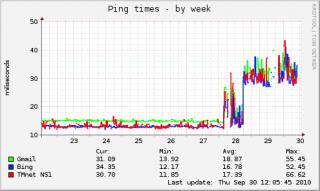
Added on September 30, 2010, 12:39 pm QUOTE(mylinear @ Sep 30 2010, 12:17 PM) I see there is also an 85Mbps home plug. Has anyone tried that? Will it work with the IPTV? Should work fine.. BUT...85Mbps is like the marketing "speed" like the 45Mbps for wireless G and 150Mbps for wireless N.. The more power extension chords or 3 point adapters you use or the further away the two homeplug is located.. the lower the speed.. I m using a pair of HomePlug 85Mbps for my HTPC at the living room BUT pulling Cat5 cables for the IPTV... This post has been edited by stan001: Sep 30 2010, 12:39 PM |
|
|
Sep 30 2010, 12:56 PM
|
|
Senior Member
2,785 posts Joined: Jan 2003
|
Most probably going to get my lan cable today..can anyone guide me how to setup the iptv..Thanks in advance
|
|
|
Sep 30 2010, 02:20 PM
|

Senior Member
952 posts Joined: Jun 2005 From: Cyberjaya
|
Anyone using UNIFI in USJ area??
|
|
|
Sep 30 2010, 02:43 PM
|

Senior Member
893 posts Joined: Nov 2004
|
register now and install later noneed to pay installation fees?
|
|
Topic ClosedOptions
|
| Change to: |  0.0601sec 0.0601sec
 0.34 0.34
 7 queries 7 queries
 GZIP Disabled GZIP Disabled
Time is now: 3rd December 2025 - 10:58 PM |
 Quote
Quote