


Unifi Official TM UniFi High Speed Broadbrand Thread V7, News: VIP20, free instalation till 31/12
Unifi Official TM UniFi High Speed Broadbrand Thread V7, News: VIP20, free instalation till 31/12
|
|
 Sep 30 2010, 09:39 PM Sep 30 2010, 09:39 PM
|
 
Junior Member
25 posts Joined: Oct 2006  
|
my wireless N mode for dir 615 is screwed up. latency suddenly increase. used 2 be 10ms ping for kl server on speedtest.net, but now 30-50 ms.. using b/g mode now.. but signal is low
|
|
|
|
|
|
Sep 30 2010, 10:07 PM
|

Senior Member
3,345 posts Joined: Jan 2003
|
hmm.. i received my 2nd bill on the next month of first bill. I though first month covered 2 months payment?
Anyone can confirmed? |
|
|
Sep 30 2010, 10:14 PM
|
|
Junior Member
500 posts Joined: May 2007 From: Kuala Lumpur
|
QUOTE(ruffstuff @ Sep 30 2010, 10:07 PM) hmm.. i received my 2nd bill on the next month of first bill. I though first month covered 2 months payment? Streamyx and Unifi is always paid a month in advance.Anyone can confirmed?  |
|
|
Sep 30 2010, 10:23 PM
|

Senior Member
1,495 posts Joined: Sep 2005 From: Damansara Perdana - KL
|
i'm thinking of unsubscribing my astro and using the money to upgrade to the vip 10 package from vip5 currently.
to my understanding i will still get the basic iptv channels right? i'll just need to shell out for vod or additional channels (like universal which i'm loving right now). |
|
|
Sep 30 2010, 10:30 PM
|

Senior Member
837 posts Joined: Mar 2005
|
QUOTE(boonykun @ Sep 30 2010, 12:59 AM) Just registered Unifi This afternoon at Cyberjaya TMpoint... i thought i'm insane to arrange Installation date on 30th october 2010, but a person beside me arrange installation on his VIP10 on 4th January 2011... it's a uncle... that says his house still under renovation.. only can "Siap" at that time... i was Sooo Shocked.. that he really do that.. >.< Hmm, unifi is available in taman equine already? now i have 1043ND... so any configurations needed to be done on the router on Unifi Settings? tq~  Was planning to get wired broadband (since I hate wireless BB), but not really sure whether I should get streamyx or unifi. This post has been edited by gaeria84: Sep 30 2010, 10:31 PM |
|
|
Sep 30 2010, 10:46 PM
|
|
Senior Member
3,345 posts Joined: Jan 2003
|
QUOTE(charymsylyn @ Sep 30 2010, 10:14 PM) Streamyx and Unifi is always paid a month in advance. paid month in advanced as in the next month you don't have to pay right? so if you paid 2 months bill, then you shouldn't be billed on the next month right?My first bill is 2 months bill. |
|
|
|
|
|
Sep 30 2010, 10:48 PM
|

Senior Member
5,221 posts Joined: Aug 2007 From: Deneb star
|
QUOTE(Lord_Ashe @ Sep 30 2010, 10:23 PM) i'm thinking of unsubscribing my astro and using the money to upgrade to the vip 10 package from vip5 currently. well i think you should keep Astro for now becoz there still not many interesting channel in IPTV..not even football/sports channel..to my understanding i will still get the basic iptv channels right? i'll just need to shell out for vod or additional channels (like universal which i'm loving right now). |
|
|
Sep 30 2010, 10:54 PM
|
|
Senior Member
1,495 posts Joined: Sep 2005 From: Damansara Perdana - KL
|
QUOTE(AMDAthlon @ Sep 30 2010, 10:48 PM) well i think you should keep Astro for now becoz there still not many interesting channel in IPTV..not even football/sports channel.. i pay RM 55 for Astro which i don't really have time to watch. I don't have HBO or sports (not really a sports fan). I come home around 7 every day, and by the time me and the family finish dinner and relax it's 8pm, so we watch the news and then most likely something i downloaded LOL.I'm happy with Universal and SyFy, and if it's just 5 points for a month of each for now...it's likely i'll wave goodbye to astro really soon. |
|
|
Sep 30 2010, 11:30 PM
|
|
Junior Member
500 posts Joined: May 2007 From: Kuala Lumpur
|
QUOTE(ruffstuff @ Sep 30 2010, 10:46 PM) paid month in advanced as in the next month you don't have to pay right? so if you paid 2 months bill, then you shouldn't be billed on the next month right? No, you always pay first two months in first month's bill and then for the following month on subsequent monthly bills. Please refer to T&C when signing up or on the website.My first bill is 2 months bill. |
|
|
Oct 1 2010, 01:09 AM
|

Junior Member
130 posts Joined: Mar 2008
|
QUOTE(oreomambo @ Sep 25 2010, 02:14 PM) Joeaggas, I am using Mikrotik RB750G with successful connection. You'll need to do this: 1) remove any bridge you have right now (so it won't interfere with what you are going to start with). Bridge will be needed later for IPTV setup, but get on with your PPPoE first. 2) Setup vlan with ID 500 (under interface->vlan) and attach it to Ethernet1 (assuming you are using Ethernet1 to connect to the BTU). So under winbox you'll see Ether1 +-- vlan1.500 3) Create a PPPoE interface and have it attached to the vlan ID 500 that you've created above. Ensure that the Enable service tag is unchecked. 4) Immediately, you'll see it get connected. 5) ensure you create a NAT to masq the srcnat. i am working out a longer set of instructions to get the pppoe + iptv setup for RB750G. Juggling between work and this...stay tuned. QUOTE(oreomambo @ Sep 25 2010, 02:55 PM) For IPTV, Hi Oreomambo,1) use ether5 (my choice) 2) setup ether5 to be neither master nor slave. That means bound to "none". So this will not enable the switching function under this physical port (cos we want to bridge it) 3) setup vlan ID 600 under ether1 (yes, that wan port to btu). You probably have a vlan ID 500 under this ehter1 as well for PPPoE. 4) Create a bridge, call it bridge.iptv. 5) Put the vlan ID 600 interface created above and ether5 under this bridge->port . That mean you are bridging vlan 600 (under ether1) + ether5 physical port itself. Traffic going out via port1 will have vlan ID 600 tagged. 6) still in the bridge window, you'll see a button "bridge setup" (i think), uncheck Bridge for firwall, vlan and pppoe (yes, all 3 unchecked) 7) hook up the STB to ether5 port and power up the box. Have fun. * as for your DHCP bit, i don't think it is the dhcp server. Disconnection here could be other stuff, check if you have mis configure any other interface with bridge. Your management port (probably ether2) should only hold dhcp and an IP address. nothing else. Follow your guides, I managed to setup the RB750 & RB750G with both internet & IPTV working, thank you bro !!  Luckily MikroTik has the WinBox GUI, lots of features & information, otherwise I don't think I'm capable to configure it at command lines ...  The setup is rather straight forward, just few setup screen out of the box: Interface – create vlan 500 & 600 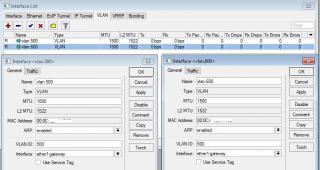
Interface – set LAN5 neither master nor slave [to use for IPTV STB direct connection] 
Bridge – create a bridge for IPTV 
Bridge – Ports for IPTV bridge 
PPP – Create PPPoE client for UniFi 
Firewall – setup NAT 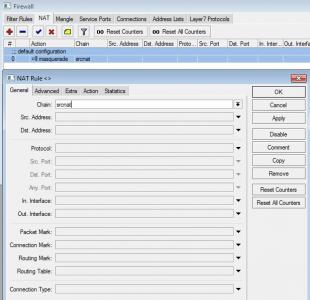
IP – DHCP server 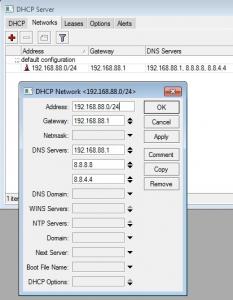
That's all, internet & IPTV up & running!  Now have to figure out how to tighten the firewall ... |
|
|
Oct 1 2010, 02:35 AM
|

Senior Member
3,008 posts Joined: Sep 2005 From: T.T.D.I, Bukit Damansara
|
More channels available on iptv now..
131 - BabyFirst 146 - iConcerts HD 162 - Warner TV (The OC, Smallville, Gossip Girl, Privileged, Gilmore Girls...) 180 - Screen Red Would love to have Comedy Central HD though. |
|
|
Oct 1 2010, 04:02 AM
|

Senior Member
657 posts Joined: Jan 2003
|
QUOTE(cannavaro @ Oct 1 2010, 02:35 AM) More channels available on iptv now.. I take it that only iConcerts is the only new HD channel yeah?131 - BabyFirst 146 - iConcerts HD 162 - Warner TV (The OC, Smallville, Gossip Girl, Privileged, Gilmore Girls...) 180 - Screen Red Would love to have Comedy Central HD though. |
|
|
Oct 1 2010, 06:33 AM
|

Junior Member
408 posts Joined: Feb 2008 From: puchong 
|
QUOTE(cannavaro @ Oct 1 2010, 02:35 AM) More channels available on iptv now.. hmmmm.. not yet MUTV ?131 - BabyFirst 146 - iConcerts HD 162 - Warner TV (The OC, Smallville, Gossip Girl, Privileged, Gilmore Girls...) 180 - Screen Red Would love to have Comedy Central HD though. but why am i still need to subscribe though ? i VIP20. those new channel consider premium right ? This post has been edited by tommyfai: Oct 1 2010, 06:40 AM |
|
|
|
|
|
Oct 1 2010, 08:22 AM
|

Senior Member
1,488 posts Joined: Oct 2004
|
QUOTE(Lord_Ashe @ Sep 30 2010, 10:54 PM) i pay RM 55 for Astro which i don't really have time to watch. I don't have HBO or sports (not really a sports fan). I come home around 7 every day, and by the time me and the family finish dinner and relax it's 8pm, so we watch the news and then most likely something i downloaded LOL. Just bear in mind that we do not know how much (in RM) that 5 points will be in the future. Maybe you should wait till the pricing has been confirmed, who knows VIP20 may be better....I'm happy with Universal and SyFy, and if it's just 5 points for a month of each for now...it's likely i'll wave goodbye to astro really soon. |
|
|
Oct 1 2010, 08:59 AM
|

Senior Member
4,522 posts Joined: Jan 2003 From: Mordor, Middle Earth.
|
inexpensive/free channel is what keeping me from DLing from torrent. Low bandwidth usage. Compared to Astro, Unifi TV is far inferior, if they start charging right now, it is confirm I will hop back to torrent.
They need to think carefully b4 start charging, a lot of user can hop back to torrent which will increase international backbone bandwidth usage = end up more costly to them. Added on October 1, 2010, 9:18 amBtw, someone need to bulk order again. I need 750G   This post has been edited by billytong: Oct 1 2010, 09:18 AM |
|
|
Oct 1 2010, 09:31 AM
|
 
VIP
3,055 posts Joined: Jan 2003
|
Well for now we're just speculating. Gotta wait till pricing details come out at the end of Oct.
For now, I'm just gonna enjoy myself on MUTV.  |
|
|
Oct 1 2010, 09:37 AM
|
|
Junior Member
130 posts Joined: Mar 2008
|
QUOTE(billytong @ Oct 1 2010, 08:59 AM) ... The RB750, which is the same price with RB250GS, is really tempting ! Added on October 1, 2010, 9:18 amBtw, someone need to bulk order again. I need 750G  I think it's another item to consider for ppl who want full features router+vlan tagging and also those advance functions. For me it means another less equipment and also neat since RB750/750G is the same size with RB250GS!  |
|
|
Oct 1 2010, 09:37 AM
|
|
Junior Member
17 posts Joined: Jul 2010
|
QUOTE(billytong @ Oct 1 2010, 08:59 AM) inexpensive/free channel is what keeping me from DLing from torrent. Low bandwidth usage. Compared to Astro, Unifi TV is far inferior, if they start charging right now, it is confirm I will hop back to torrent. I thought you can get RB750G from Landasan in Kelana Jaya?They need to think carefully b4 start charging, a lot of user can hop back to torrent which will increase international backbone bandwidth usage = end up more costly to them. Added on October 1, 2010, 9:18 amBtw, someone need to bulk order again. I need 750G |
|
|
Oct 1 2010, 09:41 AM
|
|
Senior Member
1,754 posts Joined: Jan 2003 From: Puchong
|
QUOTE(akerue @ Oct 1 2010, 09:37 AM) I thought you can get RB750G from Landasan in Kelana Jaya? Landasan is selling RM310/unit... if bulk from sg.. the cost is +-RM200 only..... |
|
|
Oct 1 2010, 09:47 AM
|
|
Senior Member
878 posts Joined: Jun 2009
|
QUOTE(joeaggas @ Sep 30 2010, 05:18 PM) Mr. Oreomambo, Sorry for the late reply. Talking about beefing  up the router firewall rules; I used some of these; up the router firewall rules; I used some of these;http://wiki.mikrotik.com/wiki/Protecting_your_customers After applying these rules, the downloading of torrent files from famous sites were a little harder, only magnet linking works fine. Anything u might want recommend to filter? regards J Reach out fo this URL below and scroll down. There is a sample firewall rule which is more generic. http://wiki.mikrotik.com/wiki/Manual:IP/Firewall/Filter No point putting virus firewall by port. You'll never be able to chase everything. Let the AV software do the job instead. I've not been doing torrent for a very long time, so kinda lost touch. You could assign a fix port in your torrent software and configure port forwarding on Mikrotic via that port forwarding. Try this one.. http://wiki.mikrotik.com/wiki/Forwarding_a..._an_internal_IP |
|
Topic ClosedOptions
|
| Change to: |  0.0589sec 0.0589sec
 0.60 0.60
 7 queries 7 queries
 GZIP Disabled GZIP Disabled
Time is now: 3rd December 2025 - 06:24 AM |
 Quote
Quote