Welcome Guest ( Log In | Register )

3 Pages  1 2 3 >Bottom

Outline · [ Standard ] · Linear+

 Intel Core i7 LGA1366 & X58 Overclocking V2, Discussion, Benchmarks, Stabilty, Guides

views
     
TSowikh84
post Aug 31 2010, 01:52 PM, updated 12y ago

i7 Clan
Group Icon
Elite
8,711 posts

Joined: Nov 2007
From: Butterworth, PG / Machang, Kelantan


Intel Core i7 LGA1366 & X58 OC Thread V2

This thread is to discuss about Intel Core i7 LGA1366 & X58 overclocking.
Please share your benchmark, stability test, guides etc...

» Click to show Spoiler - click again to hide... «
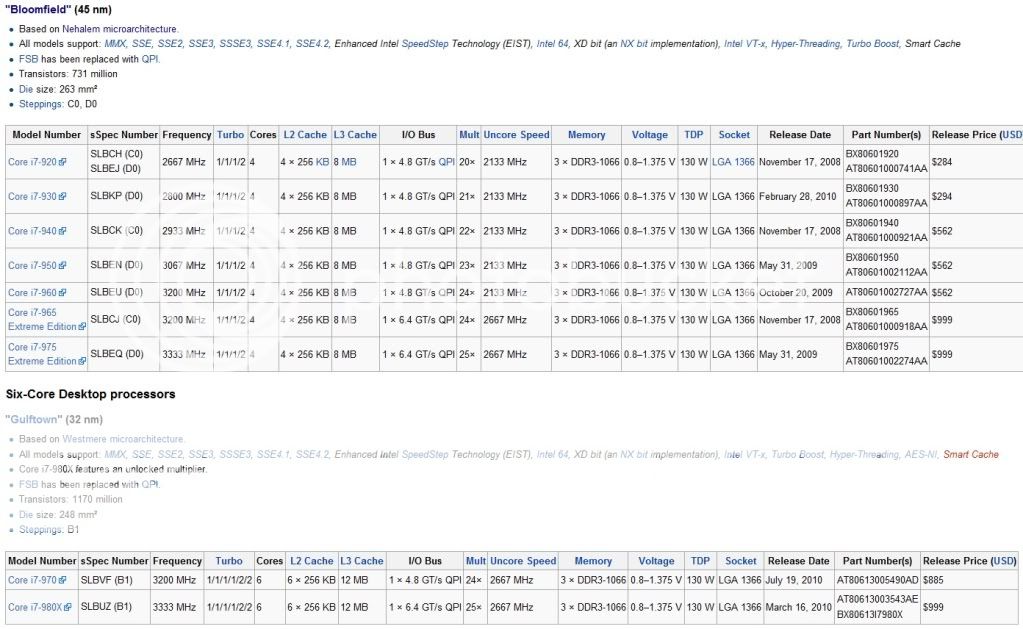

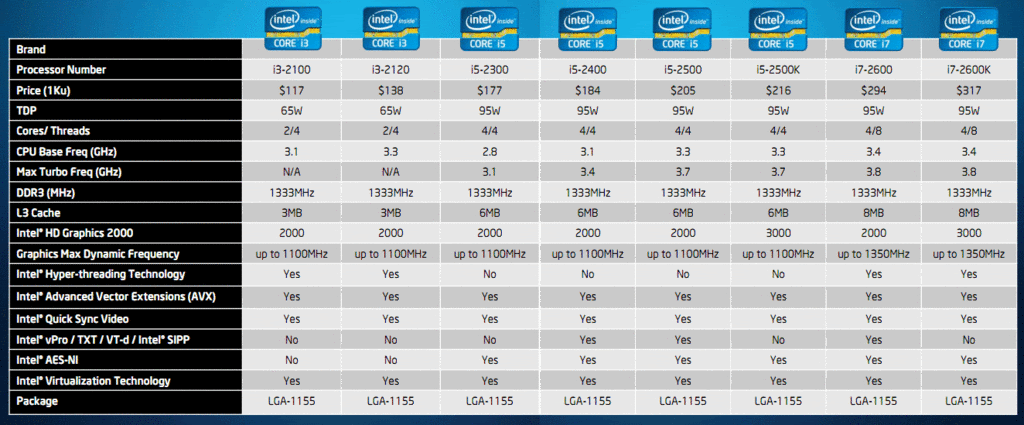
LGA1156/P55/H55/H57 vs LGA1366/X58
user posted image

BCLK (Base Clock) - To keep things as simple as possible, this is the setting that we will be increasing to achieve our desired overclock. The default value for our 920 processor is 133.
QPI (Quick Path Interconnect) - The QPI connects the processor to the In Out Hub (IOH) - In other words, it is the way that your processor talks to the rest of your system.
Multipliers (Multis) and Dividers - As with previous platforms, i7 uses multipliers and dividers, but the way that i7 differs is that there are several of them for various things. For example, your CPU has a default multiplier (Multi) of 21x and there is a multiplier for the memory and the UnCore
UnCore - This is simply any part of the processor that is not the core, such as the memory controller or cache
Turbo Mode - is quite a complex feature, but to sum it up, if enabled, it will give you an extra multi, so on our 920, we get 21x instead of 20x
Vcore - This is just another term for the main CPU Voltage.

Software:
CPU-Z 1.59
LinX 0.6.4 - 10.3.9.015
Intel BurnTest 2.52
RealTemp 3.66 - works for 6 cores
CoreTemp 1.0 RC2
HWiNFO32 3.70
Prime95 32-Bit 27.1
Prime95 64-Bit 27.1
SuperPI Mod XS 1.5
HyperPI 0.99 Beta
AIDA64 2.00.1700
Cinebench 11.5

Here are some links you may find useful:

- Intel Core i7 Specifications
- Ultimate Core i7 Overclocking Guide
- from X-bit labs
- Guide to Overclocking the Core I7 920 to 4.0Ghz
- Intel I7 & X58 oc and discussion thread V1

DDR3 IC
Attached Image

BSOD codes for overclocking:
QUOTE
0x101 = increase vcore
0x124 = increase vcore
0x0A = unstable RAM/IMC, increase QPI first, if that doesn't work increase vcore
0x1E = increase vcore
0x3B = increase vcore
0x3D = increase vcore
0xD1 = QPI/VTT, increase/decrease as necessary, can also be unstable Ram, raise Ram voltage
0x9C = QPI/VTT most likely, but increasing vcore has helped in some instances
0x50 = RAM timings/Frequency or uncore multi unstable, increase RAM voltage or adjust QPI/VTT, or lower uncore if you're higher than 2x
0x109 = Not enough or too Much memory voltage
0x116 = Low IOH (NB) voltage, GPU issue (most common when running multi-GPU/overclocking GPU)
0x7E = Corrupted OS file, possibly from overclocking. Run sfc /scannow and chkdsk /r


This post has been edited by owikh84: Feb 25 2012, 10:08 PM
TSowikh84
post Aug 31 2010, 01:52 PM

i7 Clan
Group Icon
Elite
8,711 posts

Joined: Nov 2007
From: Butterworth, PG / Machang, Kelantan


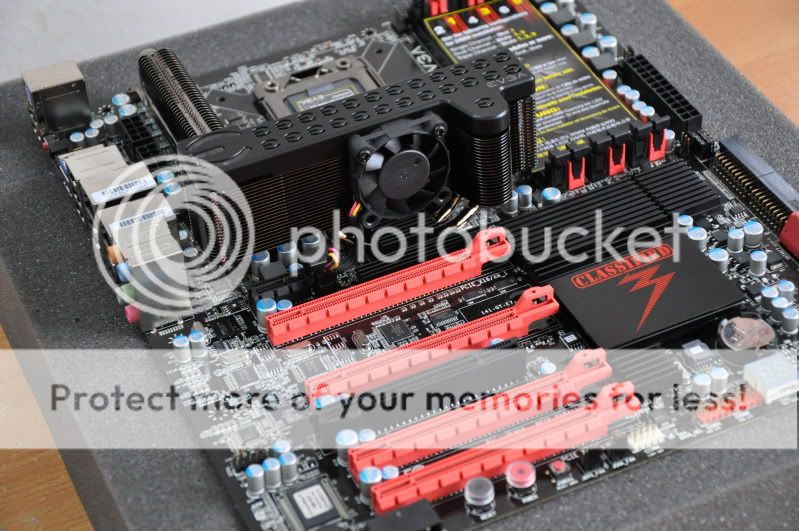
EVGA X58 3XSLI Classified E760

Latest BIOS: 75
- Adds IOH Clock Skew, tWL and tREF options to BIOS

BIOS Template:
» Click to show Spoiler - click again to hide... «


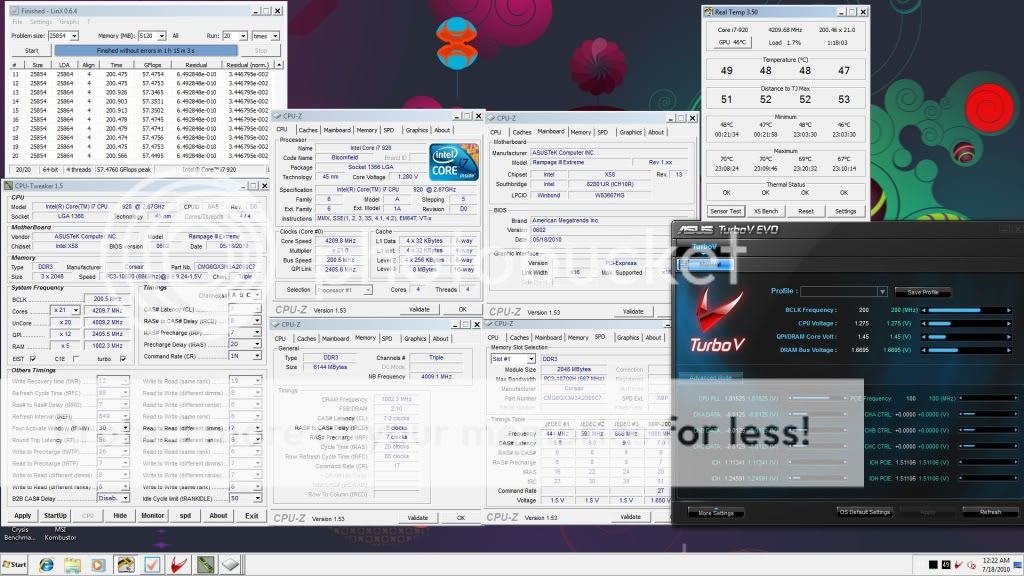
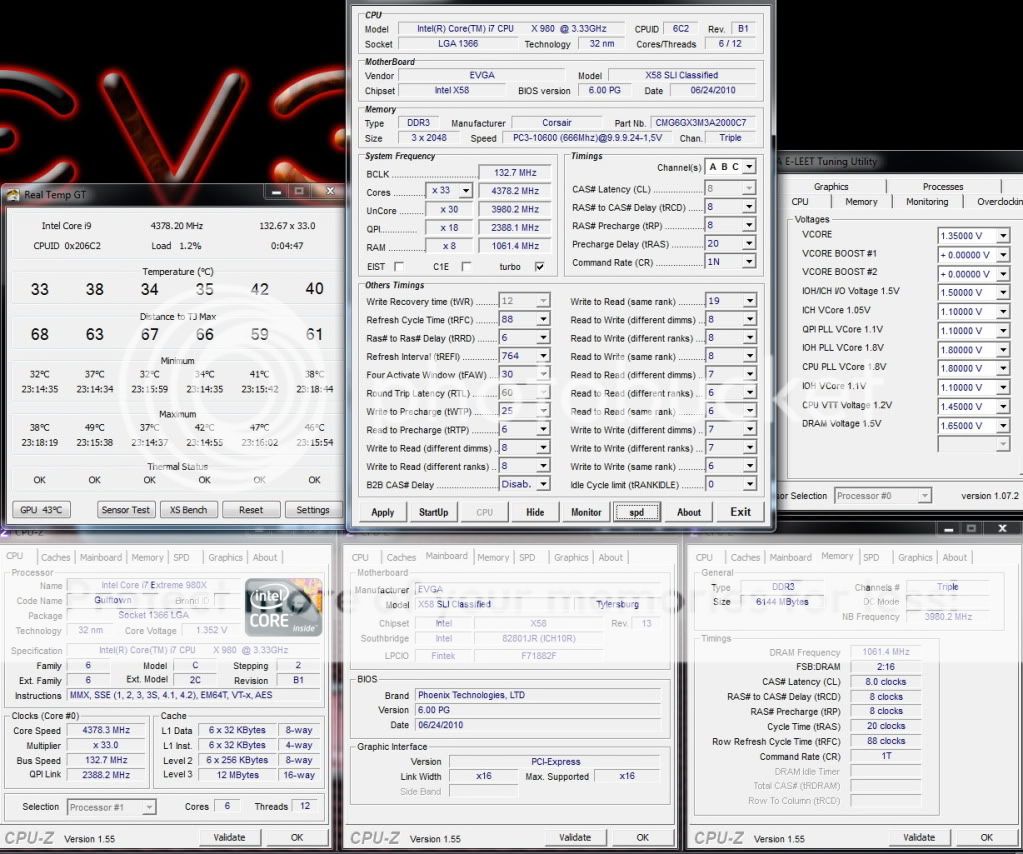
4.2Ghz HT ON, dram 2000Mhz 7-7-7-20
» Click to show Spoiler - click again to hide... «


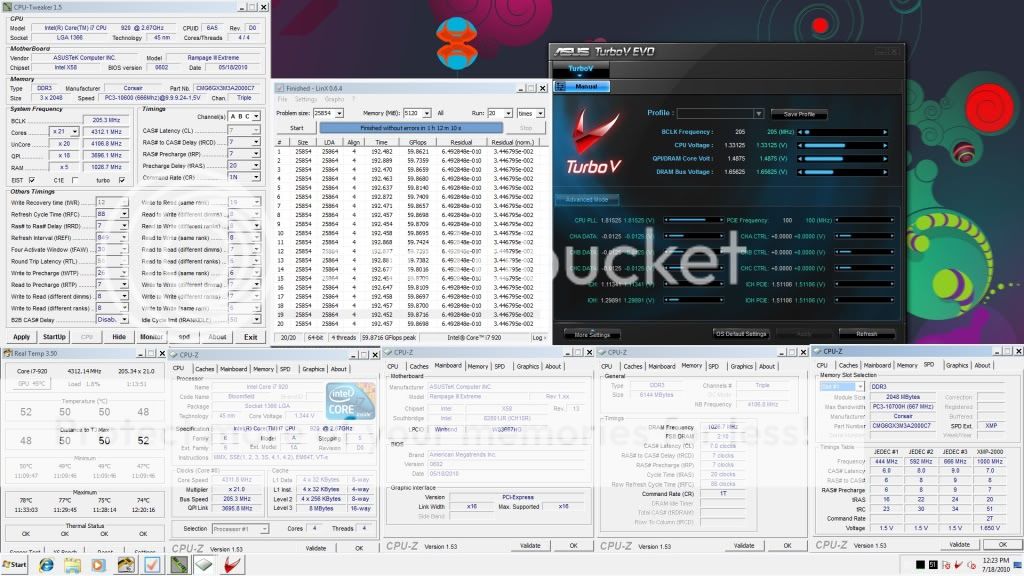
4.2Ghz HT OFF, dram 2000Mhz 7-7-7-20
» Click to show Spoiler - click again to hide... «


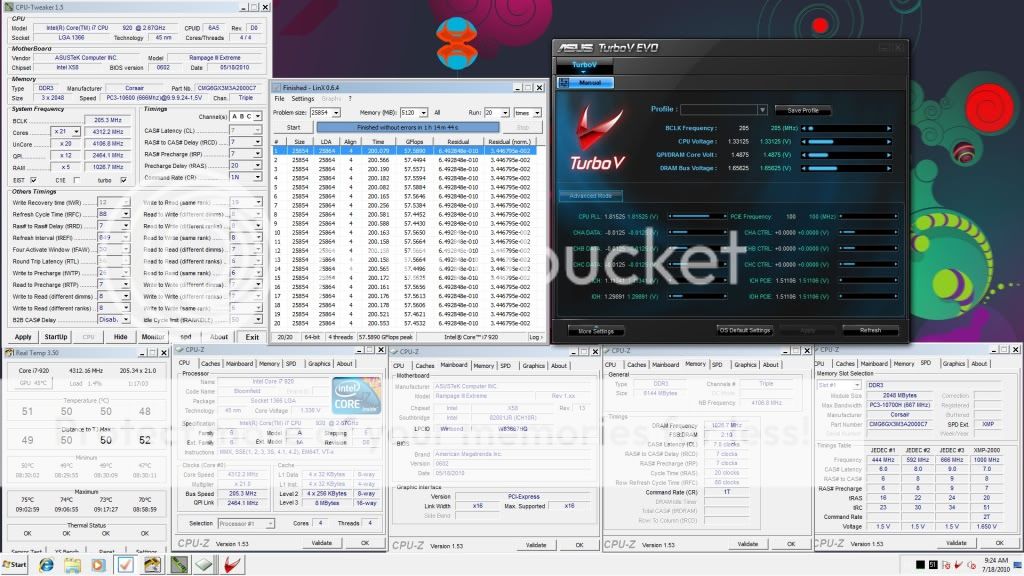
4.3Ghz, dram 2050Mhz 7-7-7-20
» Click to show Spoiler - click again to hide... «


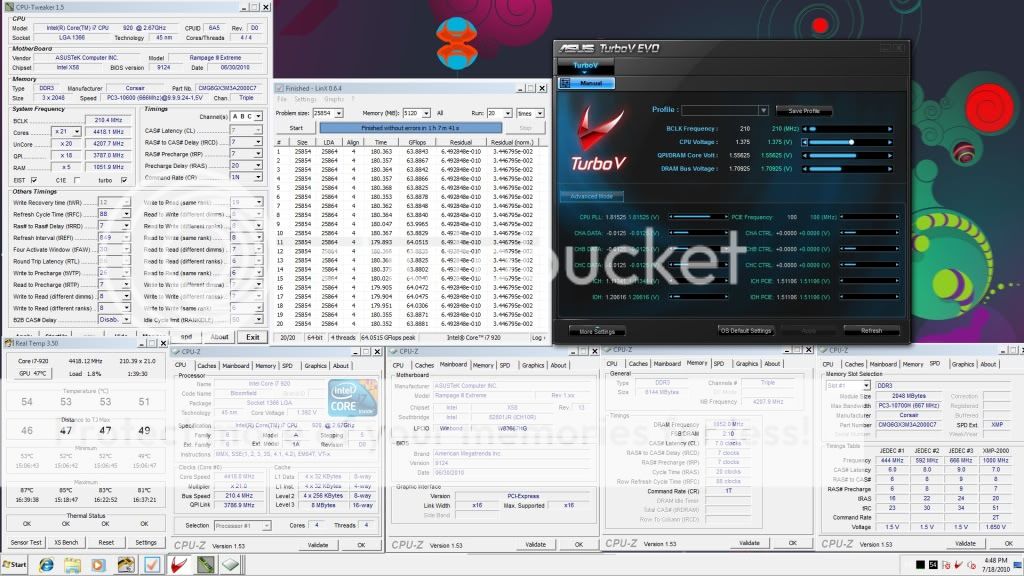
4.4Ghz, dram 2100Mhz 7-7-7-20
» Click to show Spoiler - click again to hide... «


4.5Ghz, dram 2150Mhz 8-8-8-24
» Click to show Spoiler - click again to hide... «


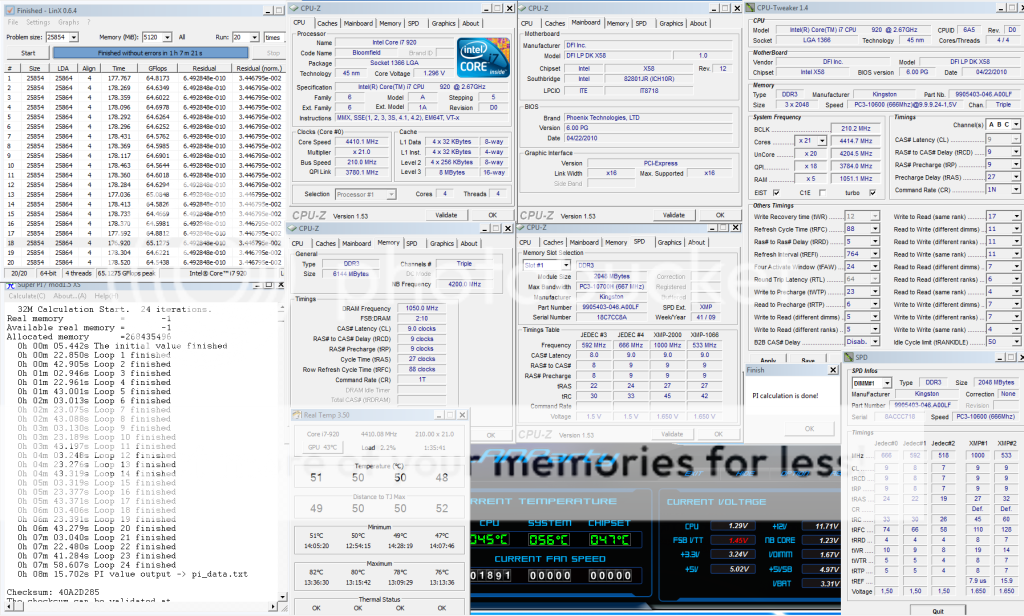
4.557Ghz (217x21), dram 2170Mhz 8-8-8-24
» Click to show Spoiler - click again to hide... «

» Click to show Spoiler - click again to hide... «


4.6Ghz, dram 1760Mhz 6-6-6-18
» Click to show Spoiler - click again to hide... «


This post has been edited by owikh84: Mar 30 2011, 07:07 AM
TSowikh84
post Aug 31 2010, 01:53 PM

i7 Clan
Group Icon
Elite
8,711 posts

Joined: Nov 2007
From: Butterworth, PG / Machang, Kelantan


4.2Ghz, dram 1600Mhz 6-6-6-18

uncore 3.2Ghz
» Click to show Spoiler - click again to hide... «


uncore 3.6Ghz
» Click to show Spoiler - click again to hide... «


uncore 4.0Ghz
» Click to show Spoiler - click again to hide... «


uncore 4.2Ghz
» Click to show Spoiler - click again to hide... «


This post has been edited by owikh84: Sep 2 2010, 07:32 PM
TSowikh84
post Aug 31 2010, 01:53 PM

i7 Clan
Group Icon
Elite
8,711 posts

Joined: Nov 2007
From: Butterworth, PG / Machang, Kelantan


Asus Rampage III Extreme

Latest BIOS: 1102
1. Support new CPUs

BIOS Template:
» Click to show Spoiler - click again to hide... «


4.2Ghz, dram 2000Mhz 7-8-7-20, QPI slow mode
» Click to show Spoiler - click again to hide... «


4.3Ghz, dram 2050Mhz 7-8-7-20, QPI slow mode
» Click to show Spoiler - click again to hide... «


4.3Ghz, dram 2050Mhz 7-7-7-20, QPI slow mode
» Click to show Spoiler - click again to hide... «


4.3Ghz, dram 2050Mhz 7-7-7-20, QPI normal
» Click to show Spoiler - click again to hide... «


4.4Ghz, dram 2100Mhz 7-7-7-20
» Click to show Spoiler - click again to hide... «


4.5Ghz, dram 2150Mhz 8-8-8-24
» Click to show Spoiler - click again to hide... «


=============================================

How this CPU config affects PI score

Hardware Prefetcher: OFF ----> 8.39.876mm
» Click to show Spoiler - click again to hide... «


Hardware Prefetcher: ON ----> 8.12.695m
» Click to show Spoiler - click again to hide... «


This post has been edited by owikh84: Dec 22 2010, 06:40 AM
TSowikh84
post Aug 31 2010, 02:23 PM

i7 Clan
Group Icon
Elite
8,711 posts

Joined: Nov 2007
From: Butterworth, PG / Machang, Kelantan


EVGA X58 3XSLI Classified E760
Kingston KHX2000C9T1 6GB

4.3GHz, dram 2050Mhz 9-9-9-27-1T
» Click to show Spoiler - click again to hide... «


4.4GHz, dram 2100Mhz 8-9-8-21-1T
» Click to show Spoiler - click again to hide... «


DFI DK x58 T3eH6
4.4GHz, dram 2100Mhz 9-9-9-21-1T
» Click to show Spoiler - click again to hide... «


This post has been edited by owikh84: Feb 20 2011, 11:01 PM
lichyetan
post Aug 31 2010, 03:05 PM

*****
*******
Senior Member
2,295 posts

Joined: Jan 2005
From: Penang


Intel Core i7 + Rampage III Extreme + Patriot Value Ram

3.916Ghz @ DDR3 1865 @ 9-9-9-27
» Click to show Spoiler - click again to hide... «


4Ghz @ DDR3 1900 @ 9-9-9-27
» Click to show Spoiler - click again to hide... «


3.8Ghz @ DDR3 2000 @ 9-9-9-27
» Click to show Spoiler - click again to hide... «


i7 950 + Patriot Value Series DDR3 1333@ DDR3 1874 Prime95 Custom Test 5 hours
» Click to show Spoiler - click again to hide... «


i7 950 + Patriot Value Series DDR3 1333@ DDR3 1900 Prime95 Custom Test 5 hours
» Click to show Spoiler - click again to hide... «


This post has been edited by lichyetan: Sep 13 2010, 12:11 AM
antonio
post Aug 31 2010, 03:10 PM

AMD Phenom II & Intel i7 Overclocker
Group Icon
VIP
4,032 posts

Joined: Jan 2003
From: MSR Headquaters
Lol owikh suke bukak thread tongue.gif

Btw nice result there lichyetan... D9 is it??

This post has been edited by metsatsu: Aug 31 2010, 06:45 PM
lichyetan
post Aug 31 2010, 03:10 PM

*****
*******
Senior Member
2,295 posts

Joined: Jan 2005
From: Penang


QUOTE(antonio @ Aug 31 2010, 03:10 PM)
Lol owikh suke bukak thread tongue.gif

Btw nice result there lichyetan... D9 is it??


Added on August 31, 2010, 3:10 pmLol owikh suke bukak thread tongue.gif

Btw nice result there lichyetan... D9 is it??
*
special ram dari bro antonio... thumbup.gif
metsatsu
post Aug 31 2010, 04:25 PM

Chocolate Starfish
Group Icon
VIP
2,510 posts

Joined: Dec 2004
From: Penang Island and Bidor


V1 thread closed smile.gif

I'm gonna be posting up some results too. but nothing surprising though...


Added on August 31, 2010, 6:38 pmCore i7 975 4.2Ghz HT on, dram 1600Mhz 6-6-6-18

uncore 4.0Ghz
» Click to show Spoiler - click again to hide... «


But I still failed at 2000mhz DRAM C7. other than just bumping up the vdimm to 1.65V and changing dram frequency/latency to 2000mhz 7-7-7-20 T1. The rest i left it at auto. should i be bumping up the VTT too? or could it the RAM all the while??

This post has been edited by metsatsu: Aug 31 2010, 07:14 PM
TSowikh84
post Aug 31 2010, 07:28 PM

i7 Clan
Group Icon
Elite
8,711 posts

Joined: Nov 2007
From: Butterworth, PG / Machang, Kelantan


for 2100 7-7-7-20-1T (lower tRCD rather than 7-8-7-20-1T)
change read to read and write to write (same ranks) from 4 to 6.
metsatsu
post Aug 31 2010, 08:37 PM

Chocolate Starfish
Group Icon
VIP
2,510 posts

Joined: Dec 2004
From: Penang Island and Bidor


tried setting to 1.66Vdimm. then after booting into windows, 6gb turned to 4gb. but after i set it back to 1.51V, all 6gb shows.....

I don't like the look of it....
selfdz87
post Aug 31 2010, 09:22 PM

~5Ghz+ Club~
*****
Senior Member
932 posts

Joined: Dec 2008
From: Paris With Love


wooot....v2 oledi....congrats2...rclxms.gif rclxms.gif
go2 i7 wish.gif
TSowikh84
post Aug 31 2010, 09:52 PM

i7 Clan
Group Icon
Elite
8,711 posts

Joined: Nov 2007
From: Butterworth, PG / Machang, Kelantan


QUOTE(metsatsu @ Aug 31 2010, 08:37 PM)
tried setting to 1.66Vdimm. then after booting into windows, 6gb turned to 4gb. but after i set it back to 1.51V, all 6gb shows.....

I don't like the look of it....
*
Rtl let it auto 1st. Wromg rtl will result in ram disappearing.
kaka_89
post Aug 31 2010, 09:58 PM

Casual
***
Junior Member
470 posts

Joined: Jan 2009
From: JB @ PJ

@mets..

gflops x stabil.. tongue.gif ..bahaye tuh.. brows.gif
metsatsu
post Aug 31 2010, 10:20 PM

Chocolate Starfish
Group Icon
VIP
2,510 posts

Joined: Dec 2004
From: Penang Island and Bidor


QUOTE(owikh84 @ Aug 31 2010, 09:52 PM)
Rtl let it auto 1st. Wromg rtl will result in ram disappearing.
*
ok, thanks. I will give it a try

QUOTE(kaka_89 @ Aug 31 2010, 09:58 PM)
@mets..

gflops x stabil.. tongue.gif ..bahaye tuh.. brows.gif
*
oh, that. actually I was surfing net and running java games when linx was running. hence the inconsistent gflops. tongue.gif

This post has been edited by metsatsu: Sep 1 2010, 07:24 AM
kaka_89
post Aug 31 2010, 11:50 PM

Casual
***
Junior Member
470 posts

Joined: Jan 2009
From: JB @ PJ

@lichyetan

woooo.. drool.gif ..patriot VR par with my dom.. tongue.gif ..

running that for 24/7 ar bro..?..
cstkl1
post Sep 1 2010, 11:25 AM

Look at all my stars!!
Group Icon
Elite
6,799 posts

Joined: Jan 2003

QUOTE(metsatsu @ Aug 31 2010, 08:37 PM)
tried setting to 1.66Vdimm. then after booting into windows, 6gb turned to 4gb. but after i set it back to 1.51V, all 6gb shows.....

I don't like the look of it....
*
for 1600 C6.. for Pheonix bios at bclk 200 is arond 46,49,50/51 for uncore 3.2
and for 4.2 u can do 58,60,61/62

2k c7 try 7-8-7-20 first at 1.6-1.61v bios set rtl 53/54,55/56/57,58 combi.. hmm with a weak imc actually advice to do 55,57,58

the new bios is more fussy about rtl channel C.


This post has been edited by cstkl1: Sep 1 2010, 11:31 AM
lichyetan
post Sep 1 2010, 03:12 PM

*****
*******
Senior Member
2,295 posts

Joined: Jan 2005
From: Penang


QUOTE(kaka_89 @ Aug 31 2010, 11:50 PM)
@lichyetan

woooo.. drool.gif ..patriot VR par with my dom.. tongue.gif ..

running that for 24/7 ar bro..?..
*
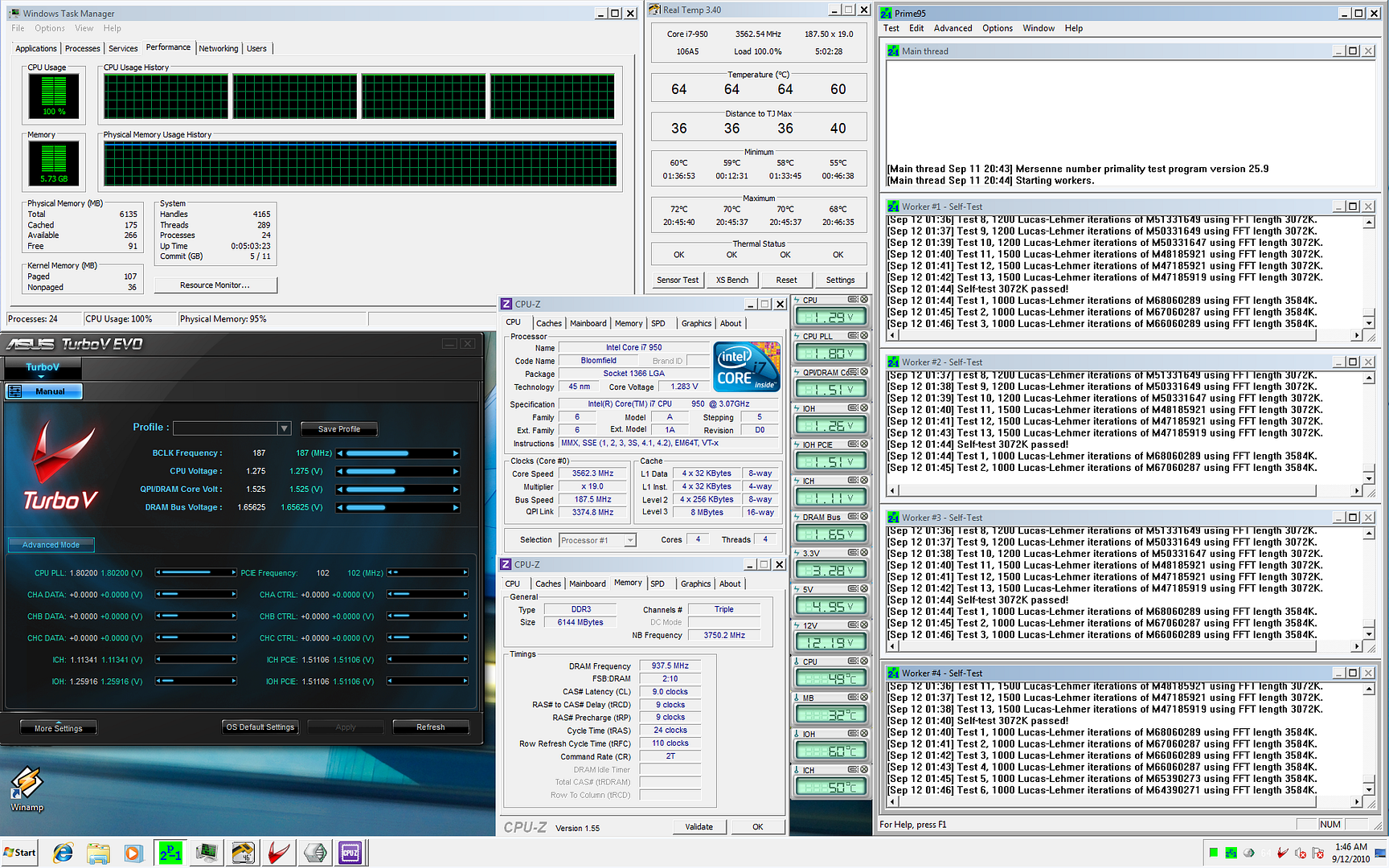
not 24/7 settings, for ddr3 1900, could not pass prime95 25.9 (64 bit), custom test with 5500mb memory (128-4096 FFT) in diag mode. Keep getting freezing problem after 2-3 hours run. But it pass LinX 20 loops easily. Still fine tuning it. Might try to prime 1866mhz later if cant get 1900 fully prime stable.

QUOTE(cstkl1 @ Sep 1 2010, 11:25 AM)
for 1600 C6.. for Pheonix bios at bclk 200 is arond 46,49,50/51 for uncore 3.2
and for 4.2 u can do 58,60,61/62

2k c7 try 7-8-7-20 first at 1.6-1.61v bios set rtl 53/54,55/56/57,58 combi.. hmm with a weak imc actually advice to do 55,57,58

the new bios is more fussy about rtl channel C.
*
cstkl1, how do u calculate the RTL... I using the excel spreadsheet from anandtech now to set the RTL. Any information to share on getting correct RTL ?

This post has been edited by lichyetan: Sep 1 2010, 03:12 PM
TSowikh84
post Sep 1 2010, 07:59 PM

i7 Clan
Group Icon
Elite
8,711 posts

Joined: Nov 2007
From: Butterworth, PG / Machang, Kelantan


QUOTE(lichyetan @ Sep 1 2010, 03:12 PM)
not 24/7 settings, for ddr3 1900, could not pass prime95 25.9 (64 bit), custom test with 5500mb memory (128-4096 FFT) in diag mode. Keep getting freezing problem after 2-3 hours run. But it pass LinX 20 loops easily. Still fine tuning it. Might try to prime 1866mhz later if cant get 1900 fully prime stable.
cstkl1, how do u calculate the RTL... I using the excel spreadsheet from anandtech now to set the RTL. Any information to share on getting correct RTL ?
*
3) No typical values per se, although most of the time the memory controller prefers channel B and C to be offset by a few clocks past A. So channel B is generally +2~3 clocks and Channel C +3~5 clocks over the Channel A value. Assuming trace lengths are well matched between slots the need for such offset lies within the memory controller (although capacitance of serpentine traces may come into play at higher frequency).

Source
lichyetan
post Sep 1 2010, 09:01 PM

*****
*******
Senior Member
2,295 posts

Joined: Jan 2005
From: Penang


QUOTE(owikh84 @ Sep 1 2010, 07:59 PM)
3) No typical values per se, although most of the time the memory controller prefers channel B and C to be offset by a few clocks past A. So channel B is generally +2~3 clocks and Channel C +3~5 clocks over the Channel A value. Assuming trace lengths are well matched between slots the need for such offset lies within the memory controller (although capacitance of serpentine traces may come into play at higher frequency).

Source
*
wow.. nice link there... think more forumers should read them if wanna clock ram.

now running 1866mhz with prime95 128-4096fft 5500mb custom test, hopefully can pass 4 hours stability test at least, then I will use it as my 24/7 settings. Damn R3E for no cooling on vtt pwm on stock cooling. Will try fusion block later to test if it does bring the board temp down, maybe by bringing down cpu pwm and chipset temp down, it will reduce the vtt pwm as well because the PCB has less hotspot.

Temporarily outta budget to get FB. laugh.gif

Or is it worth to invest a FB for R3E ? Or i am good to go with Fusion block... ??? unsure.gif

Add on : anyone knw which settings mostly causing the system to BSOD after 2-3 hours of prime95 ? all my settings pass LinX well... now trying with 1866mhz in diag mode.

This post has been edited by lichyetan: Sep 1 2010, 09:03 PM
TSowikh84
post Sep 1 2010, 09:42 PM

i7 Clan
Group Icon
Elite
8,711 posts

Joined: Nov 2007
From: Butterworth, PG / Machang, Kelantan


QUOTE(lichyetan @ Sep 1 2010, 09:01 PM)
Add on : anyone knw which settings mostly causing the system to BSOD after 2-3 hours of prime95 ? all my settings pass LinX well... now trying with 1866mhz in diag mode.
*
tFAW=30
monsh
post Sep 2 2010, 04:22 AM

Let's Change The World !
*******
Senior Member
4,196 posts

Joined: Oct 2007


if ur playing below 4k uncore no problem i guess .
max i think the board could handle with no FB is around 1.5v VTT ?
above that is considered too hot already for me .
now running 1.41v for 4k uncore .
still no time to test . gotta play around with CUDA cause its my FYP >.<"
lichyetan
post Sep 2 2010, 08:50 AM

*****
*******
Senior Member
2,295 posts

Joined: Jan 2005
From: Penang


QUOTE(monsh @ Sep 2 2010, 04:22 AM)
if ur playing below 4k uncore no problem i guess .
max i think the board could handle with no FB is around 1.5v VTT ?
above that is considered too hot already for me .
now running 1.41v for 4k uncore .
still no time to test . gotta play around with CUDA cause its my FYP >.<"
*
ic... burnt SLI micro at 1.55 vtt last round sweat.gif

now the limitation to go 2k dram is my ram chip, if want get fully stable need to run cl10 i guess... voltage requirement for 2k cl9 is too high for this chip, around 1.8 +/-. Too high for x58.

CL10 2k dram 4k uncore seems a bit slow... now still priming on 1866@cl9. cant pass the 3-4 hours mark.. keep getting freezing problem. Will try adjust TFAW as owikh suggest after work laugh.gif
metsatsu
post Sep 2 2010, 09:42 PM

Chocolate Starfish
Group Icon
VIP
2,510 posts

Joined: Dec 2004
From: Penang Island and Bidor


Just an update of the RTL combi stated by cstkl1 for try out

DRAM 2000mhz 7-8-7-20 T1 @ 1.61Vdimm and 1.425VTT

54-56-58 = 1 worker error after 45 minutes. Ran this RTL twice, and failure timing were consistent

54-57-58 = 1 worker error in 1 minute

54-55-58 = Only 2Gb memory detected

53-56-58 = 1 worker error in 1 minute

53-55-58 = 1 worker error in 1 minute

53-57-58 = 1 worker error in 1 minute

54-56-59 = 1 worker error in 1 minute

55-57-58 = 1 worker error in 1 minute


so it seems like RTL 54-56-58 is the one that could bring me the furthest. Gonna try 55-56-58 later.


Attached thumbnail(s)
Attached Image
cstkl1
post Sep 3 2010, 12:49 AM

Look at all my stars!!
Group Icon
Elite
6,799 posts

Joined: Jan 2003

QUOTE(metsatsu @ Sep 2 2010, 09:42 PM)
Just an update of the RTL combi stated by cstkl1 for try out

DRAM 2000mhz 7-8-7-20 T1 @ 1.61Vdimm and 1.425VTT

54-56-58 = 1 worker error after 45 minutes. Ran this RTL twice, and failure timing were consistent

54-57-58 = 1 worker error in 1 minute

54-55-58 = Only 2Gb memory detected

53-56-58 = 1 worker error in 1 minute

53-55-58 = 1 worker error in 1 minute

53-57-58 = 1 worker error in 1 minute

54-56-59 = 1 worker error in 1 minute

55-57-58 = 1 worker error in 1 minute
so it seems like RTL 54-56-58 is the one that could bring me the furthest. Gonna try 55-56-58 later.
*
its a insufficient vdimm.

no use that same rtl 54,56,58 first.. ( later tweak it to 54,56,57 (bios 74).. ( then try again to 53,55,56)
but change ure vdimm to 1.62v set

u guys seriously need to understand fft's of prime.

do this
prime 95
set custom
set small fft to 128 and large fft to 4096
test atleast 5400mb


eh now for 2150 i am running 60,62,63 C8
and 2000 C7 at 53,55,56

also all hypers that i have tested always are in even number vdimm's.. for 2k's
only those that i have seen on classy's that are not is on the e759.. the first batch classy with nf200 triple sli

btw to me ure first 45 prime.. is a 15 mins fail prime..
try to understand fft's 8,10 is not what u want now
blend custom's are to get overall switches in phases, voltages, stressing different components

u want uncore and ram with cpu
so do that custom i posted above
u just need around 4 hours of that

This post has been edited by cstkl1: Sep 3 2010, 01:00 AM
mozact89
post Sep 6 2010, 03:18 AM

~KAWASAKI NINJA~
******
Senior Member
1,137 posts

Joined: Oct 2007
From: ~Somewhere only we know~


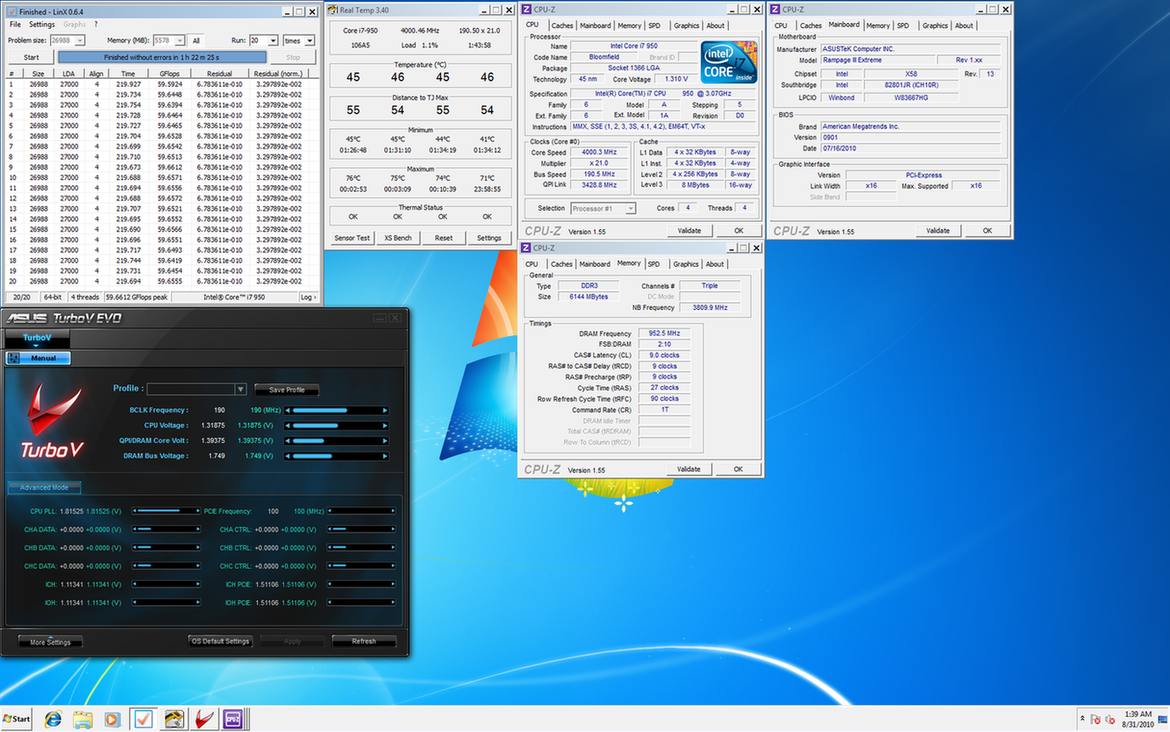
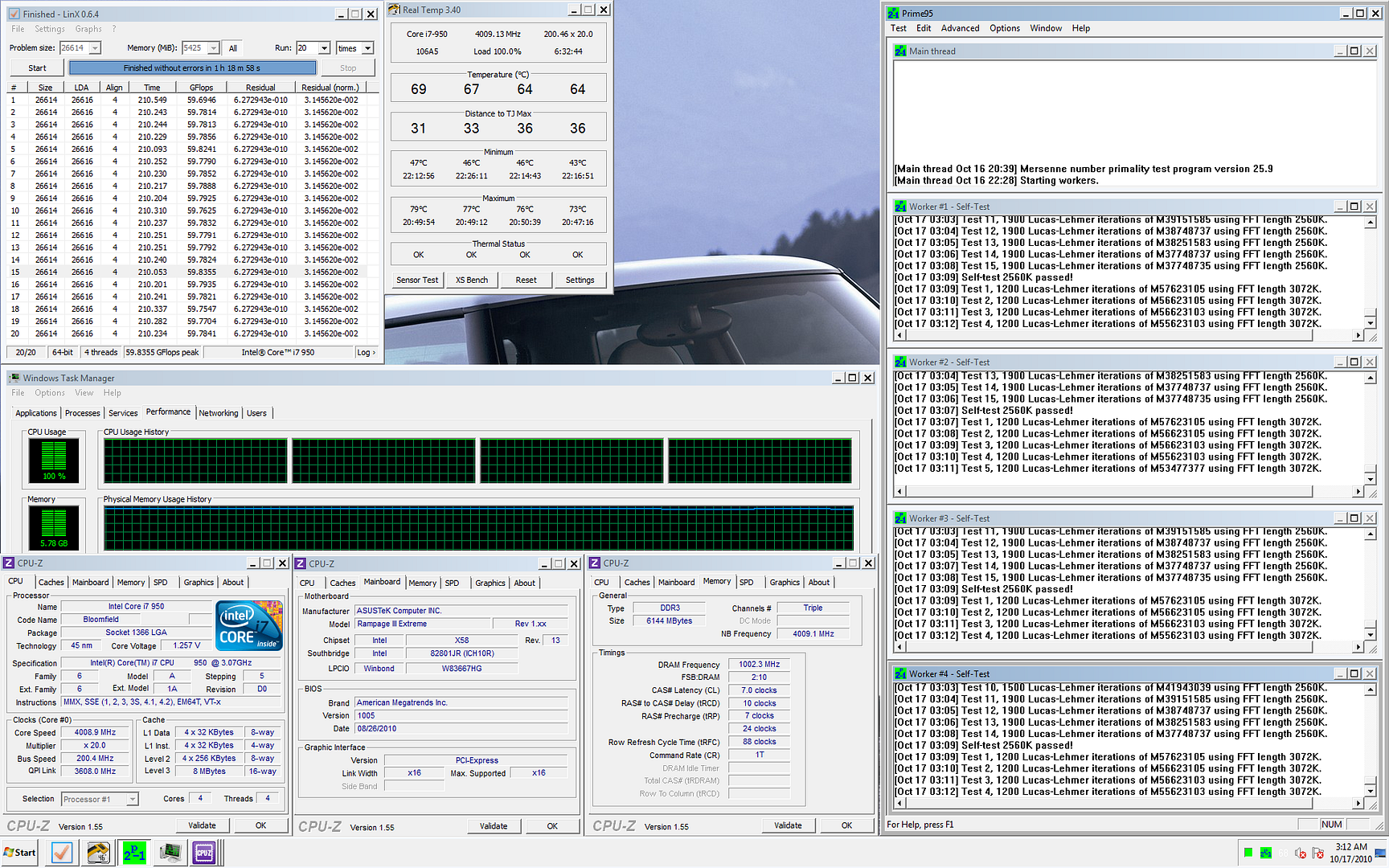
just playing with my 950..

stable on 4.0ghz 200x20 on 1.235vcore(set in bios)..


Attached thumbnail(s)
Attached Image
TSowikh84
post Sep 6 2010, 06:49 AM

i7 Clan
Group Icon
Elite
8,711 posts

Joined: Nov 2007
From: Butterworth, PG / Machang, Kelantan


QUOTE(mozact89 @ Sep 6 2010, 03:18 AM)
just playing with my 950..
stable on 4.0ghz 200x20 on 1.235vcore(set in bios)..
wow, this 950 is not bad.
but pls show us the other CPU-Z tabs ie. mobo & dram tabs.
or use CPU Tweaker.
lichyetan
post Sep 6 2010, 09:12 AM

*****
*******
Senior Member
2,295 posts

Joined: Jan 2005
From: Penang


QUOTE(mozact89 @ Sep 6 2010, 03:18 AM)
just playing with my 950..

stable on 4.0ghz 200x20 on 1.235vcore(set in bios)..
*
good proc, time to test the IMC with uncore stress...
mozact89
post Sep 6 2010, 11:28 AM

~KAWASAKI NINJA~
******
Senior Member
1,137 posts

Joined: Oct 2007
From: ~Somewhere only we know~


QUOTE(owikh84 @ Sep 6 2010, 06:49 AM)
wow, this 950 is not bad.
but pls show us the other CPU-Z tabs ie. mobo & dram tabs.
or use CPU Tweaker.
*
Ok bro.. Later i will post some other pic..

~dah lame x oc, byk sudah lupe.. Lol..
gto87
post Sep 8 2010, 03:52 AM

Casual
***
Junior Member
492 posts

Joined: Jun 2008
From: KEDAH (Raja Bolasepak Malaysia)


I got a problem. I tried to fix my sound card in the 3rd PCIe slot and my GC in the 1st PCIe slot but then my display went wrong. I can't set it to High resolution anymore. (I think the bandwidth become 8x)

I remove my sound card from the 3rd PCIe slot - Display became normal.

This mean I can't fix 2 cards in different PCIe slot if I'm not doing CF.

Is there any way, I can use both PCIe for different purpose?

By the way, my mobo is DFI DK, Thanks~
TSowikh84
post Sep 8 2010, 06:30 AM

i7 Clan
Group Icon
Elite
8,711 posts

Joined: Nov 2007
From: Butterworth, PG / Machang, Kelantan


QUOTE(gto87 @ Sep 8 2010, 03:52 AM)
I got a problem. I tried to fix my sound card in the 3rd PCIe slot and my GC in the 1st PCIe slot but then my display went wrong. I can't set it to High resolution anymore. (I think the bandwidth become 8x)

I remove my sound card from the 3rd PCIe slot - Display became normal.

This mean I can't fix 2 cards in different PCIe slot if I'm not doing CF.

Is there any way, I can use both PCIe for different purpose?

By the way, my mobo is DFI DK, Thanks~
*
What about another PCIe slot? Try swapping between all those 3 slots.
Reinstall gc driver after installing sound card?
The board should be able to run gc+sc at any slot w/o issues.
cstkl1
post Sep 8 2010, 10:57 AM

Look at all my stars!!
Group Icon
Elite
6,799 posts

Joined: Jan 2003

ok just to make sure the correct slots are numbered as follows

PCIE 1 (16x)
PCIE (4x)
PCIE 3 (8x/16x)
PCI
PCIE 2 (8x/16x)
PCI


plug in either the 4x or PCIE 3.
and not pcie 2.

This post has been edited by cstkl1: Sep 8 2010, 12:11 PM
clawhammer
post Sep 8 2010, 01:21 PM

///M
Group Icon
VIP
8,788 posts

Joined: Jan 2003
From: Kuala Lumpur


QUOTE(gto87 @ Sep 8 2010, 03:52 AM)
I got a problem. I tried to fix my sound card in the 3rd PCIe slot and my GC in the 1st PCIe slot but then my display went wrong. I can't set it to High resolution anymore. (I think the bandwidth become 8x)

I remove my sound card from the 3rd PCIe slot - Display became normal.

This mean I can't fix 2 cards in different PCIe slot if I'm not doing CF.

Is there any way, I can use both PCIe for different purpose?

By the way, my mobo is DFI DK, Thanks~
*
1. You can check the bandwidth using softwares like GPU-Z
2. This looks to be a motherboard specific problems. PCI-E 1x, 4x, 9x, 11x or whatever "x" will work on PCI-E slots as they are using the same interface
3. I have my 5870 on the 3rd PCI- E slot and sound card on 2nd PCI-E slot and it works fine, no problems. Even my R2E didn't gave me problems moving the PCI-E sound cards to different slots
lichyetan
post Sep 10 2010, 05:31 PM

*****
*******
Senior Member
2,295 posts

Joined: Jan 2005
From: Penang


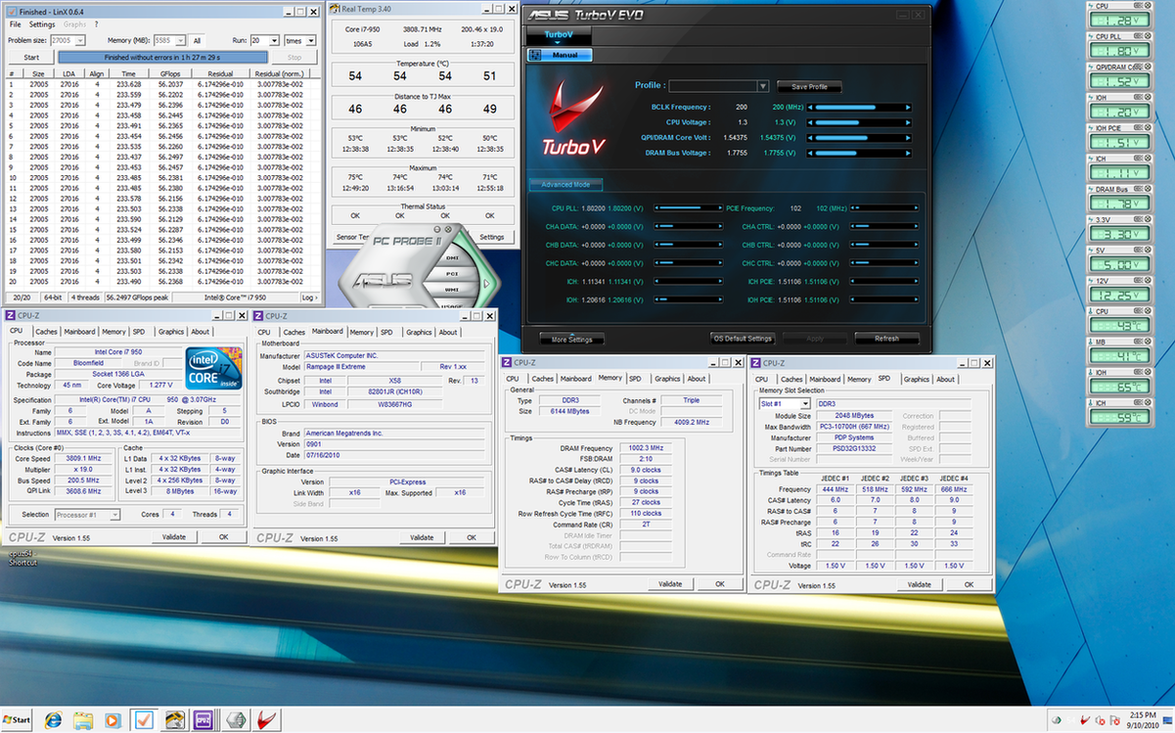
i7 950 + Patriot Value Ram DDR3 1333

3.8Ghz @ DDR3 2000 @ 9-9-9-27
» Click to show Spoiler - click again to hide... «


Not so efficient IMC, but maybe its also depends on ram chipset ???

the rams were using micron D9KPV, which based on old tech ddr3. Not as good as new ddr3 chips.

But not bad for a value ram to deliver this speed thumbup.gif
gto87
post Sep 12 2010, 04:50 AM

Casual
***
Junior Member
492 posts

Joined: Jun 2008
From: KEDAH (Raja Bolasepak Malaysia)


QUOTE(owikh84 @ Sep 8 2010, 06:30 AM)
What about another PCIe slot? Try swapping between all those 3 slots.
Reinstall gc driver after installing sound card?
The board should be able to run gc+sc at any slot w/o issues.
*
QUOTE(cstkl1 @ Sep 8 2010, 10:57 AM)
ok just to make sure the correct slots are numbered as follows

PCIE 1 (16x)
PCIE (4x)
PCIE 3 (8x/16x)
PCI
PCIE 2 (8x/16x)
PCI
plug in either the 4x or PCIE 3.
and not pcie 2.
*
@Owikh, I tried every slot with every possible combination but hardly found a working one except for the one Cstkl suggested. Iinm, this is a default PCIe bandwidth setting for DFI mobos.

Anyway, the pickle is, I'm planning on fixing a T-Rad2 for my HD5870, it's a tri slot cooler and this board just made it hard for me to fix the GC and the SC in the order I desired.

My initial plan is to fix in the GC+T-Rad2 in 1st slot and my SC will go into the 2nd slot (slot numbers are followed as referred by bro Cstkl).

But the only configuration left for me is fixing my SC in PCIe (4x) and my GC in the 3rd slot. Since I'm using CM690, fixing my GC in the 2nd slot is quite impossible since the space is not enough for my T-Rad2.

Is there any chance for me to Mod the Bandwidth settings?
Anybody, have any solution for this.. Thanks~

QUOTE(clawhammer @ Sep 8 2010, 01:21 PM)
1. You can check the bandwidth using softwares like GPU-Z
2. This looks to be a motherboard specific problems. PCI-E 1x, 4x, 9x, 11x or whatever "x" will work on PCI-E slots as they are using the same interface
3. I have my 5870 on the 3rd PCI- E slot and sound card on 2nd PCI-E slot and it works fine, no problems. Even my R2E didn't gave me problems moving the PCI-E sound cards to different slots
*
I think this is a common bandwidth setting for DFI mobos, iinm, DFI UT have the same configuration of bandwidth between it's PCIe slot.

lichyetan
post Sep 13 2010, 12:10 AM

*****
*******
Senior Member
2,295 posts

Joined: Jan 2005
From: Penang


i7 950 + Patriot Value Series DDR3 1333@ DDR3 1874 Prime95 Custom Test 5 hours
» Click to show Spoiler - click again to hide... «


i7 950 + Patriot Value Series DDR3 1333@ DDR3 1900 Prime95 Custom Test 5 hours
» Click to show Spoiler - click again to hide... «

cstkl1
post Sep 15 2010, 03:24 PM

Look at all my stars!!
Group Icon
Elite
6,799 posts

Joined: Jan 2003

Spend some time with R3e Last two days

hmm ok this is the big difference on bandwidth r3e vs classy

basic..
classy main bandwidth on reduction of Cl on equal ram speed is the RTL's
rather than the subtimings of Read to Write
r3e gains bandwidth from lower Read to write than classy

uncore 4k dram 2000

R3e - RTL for any CL on R3e is best at 58,60,61
Classy - CL7 is at 53,56,58,CL8 is 58,60,61 CL9 is 61,63,64 etc


on CL8's the R3e is faster.. but when it comes to CL7 classy bandwidth is higher with lower latency


uncore 4k dram 1600
this is where the classy starts kicking r3e butt on latency
R3e - RTL 64,60,61.. on any CL's is optimum
EVGA - CL7= 2k C9 rtl's, CL6 = 2k C8 rtl's , CL5 = 2k C7's RTL's,

Vdimm Scaling
I am assuming this is the reason for r3e.. its because of the Read to Writes

r3e = 2k C8 = 1.52v , 2k C7 1.6v
classy = 2k C8 1.5v , 2k C7 1.6v
r3e = 1600 C6 1.5v.. and overclocking on this fixed preset is the same classy on vdimm
classy = 1600 C6 = 1.5v
ok this where i cheesed of with r3e
normally in any other mobo ure 2k C8 = 1866 C7 = 1600 C6 same vdimm.

Conclusion
And here is actually the cool part about r3e
Pro's of R3e
Its easier to clock 2000 compared to classy as the rtl's are more or less the same all out. So just the vdimm and ure qpi voltage for ure 2k rams.
Cons of R3e
Above CL8.. on 2k .. not going to make much of a difference.

and owikh is king of bantai voltage

This post has been edited by cstkl1: Sep 17 2010, 05:20 PM
TSowikh84
post Sep 17 2010, 10:10 PM

i7 Clan
Group Icon
Elite
8,711 posts

Joined: Nov 2007
From: Butterworth, PG / Machang, Kelantan


QUOTE(cstkl1 @ Sep 15 2010, 03:24 PM)
and owikh is king of bantai voltage
*
cough cough.. tongue.gif
i love to feed my sticks (more than) sufficiently hehe..
easier and quicker for me lahh.
Now studying on Channel Interleave & Rank Interleave Settings brows.gif

gengstapo
post Sep 18 2010, 01:04 PM

Retired enthusiast
********
All Stars
10,688 posts

Joined: Jan 2005
How come my clocked i7 920@ 3.6Ghz have lower score compare to i7 930@ 2.9Ghz (Turbo boost) in Vantage score? Both same running Win 7 x64 bit.. sweat.gif

This post has been edited by gengstapo: Sep 18 2010, 01:05 PM
cstkl1
post Sep 18 2010, 02:48 PM

Look at all my stars!!
Group Icon
Elite
6,799 posts

Joined: Jan 2003

QUOTE(gengstapo @ Sep 18 2010, 01:04 PM)
How come my clocked i7 920@ 3.6Ghz have lower score compare to i7 930@ 2.9Ghz (Turbo boost) in Vantage score? Both same running Win 7 x64 bit.. sweat.gif
*
vantage first benefit of scoring from overclocking comes in i7 920

1. GPU
2. Mem bandwidth ( take note i didnt say mem speed.. but bandwidth)
3. CPU uncore
4. Cpu speed.

i still havent found a way to measure the benefit of high qpi
TSowikh84
post Sep 18 2010, 09:09 PM

i7 Clan
Group Icon
Elite
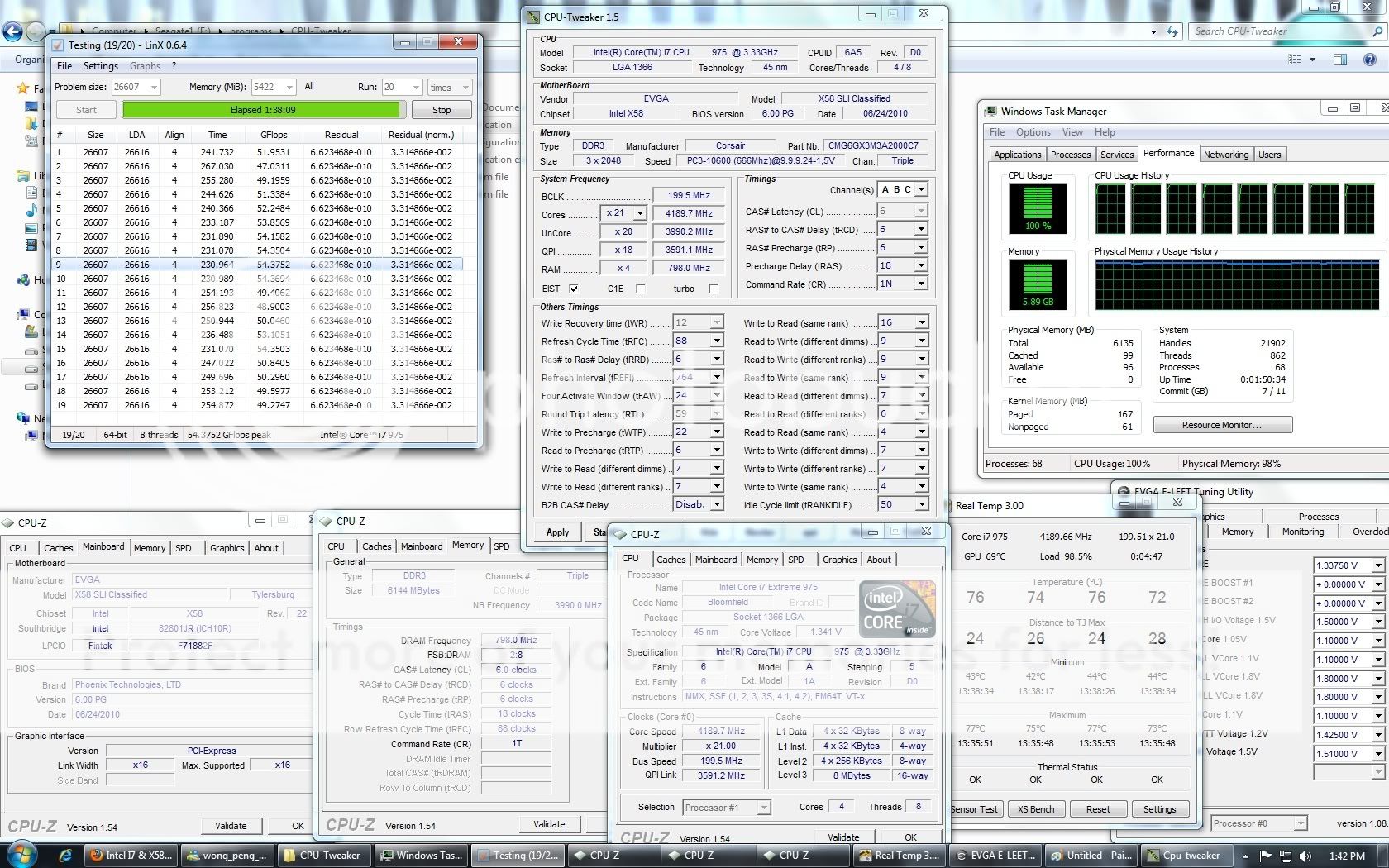
8,711 posts

Joined: Nov 2007
From: Butterworth, PG / Machang, Kelantan


QUOTE(gengstapo @ Sep 18 2010, 01:04 PM)
How come my clocked i7 920@ 3.6Ghz have lower score compare to i7 930@ 2.9Ghz (Turbo boost) in Vantage score? Both same running Win 7 x64 bit.. sweat.gif

*
Pls at least show us more details ie. system specs, settings and screenshots etc.
My GTX480 @ 910Mhz scores lower than 900Mhz, when HT is turned OFF. yawn.gif
Most likely ur OC is unstable, not enough juice.

This post has been edited by owikh84: Sep 18 2010, 09:11 PM
gengstapo
post Sep 18 2010, 09:45 PM

Retired enthusiast
********
All Stars
10,688 posts

Joined: Jan 2005
Lolzzz, my question might get you all confuse tongue.gif

I mean the CPU score for both comparison. I dont know if GPU affecting the CPU score..

i7 920@ 3.8Ghz vs i7 930@ 2.9Ghz

Does the RAM divider thinggy really affect such huge performance?? hmm.gif

This post has been edited by gengstapo: Sep 18 2010, 09:47 PM
TSowikh84
post Sep 18 2010, 10:07 PM

i7 Clan
Group Icon
Elite
8,711 posts

Joined: Nov 2007
From: Butterworth, PG / Machang, Kelantan


QUOTE(gengstapo @ Sep 18 2010, 09:45 PM)
Lolzzz, my question might get you all confuse tongue.gif

I mean the CPU score for both comparison. I dont know if GPU affecting the CPU score..

i7 920@ 3.8Ghz vs i7 930@ 2.9Ghz

Does the RAM divider thinggy really affect such huge performance??  hmm.gif
*
Yes, GPU affecting CPU score,
on the same GC but different clocks and different GCs it will give different CPU score
Both ur 920 & 930 setups are quite different to each other.
core, HT, uncore, dram, GPU, voltage are all different etc...

Effect of GPU on Vantage CPU Score:
biggrin.gif
Stock GTX480:
» Click to show Spoiler - click again to hide... «


OCed GTX480:
» Click to show Spoiler - click again to hide... «


This post has been edited by owikh84: Sep 19 2010, 07:56 AM
gengstapo
post Sep 19 2010, 09:12 AM

Retired enthusiast
********
All Stars
10,688 posts

Joined: Jan 2005
^ Hmm Im just comparing the CPU score tongue.gif But since GPU also affecting CPU score, then just leave it. Darn, time to upgrade GPU?? laugh.gif laugh.gif

Btw, I do increase my clock from 3.22Ghz@ 1.18V till 3.8Ghz@ 1.18V seems to be stable(passed LinX atleast) but at 4Ghz, the voltage 1.18V appear BSOD. Do I need to raise the CPU voltage alone or the others voltage also need increment, such QPI, DRAM, IOH etc?

Current setup(BIOS):-

CPU Clock: 201x19
CPU Voltage: 1.18V
QPI Link: 1.28V
IOH: 1.18V
DRAM Voltage: 1.60V
UCLK: 3.4Ghz
RAM Divider: 2:8, 1T

This post has been edited by gengstapo: Sep 19 2010, 09:21 AM
TSowikh84
post Sep 19 2010, 10:20 AM

i7 Clan
Group Icon
Elite
8,711 posts

Joined: Nov 2007
From: Butterworth, PG / Machang, Kelantan


QUOTE(gengstapo @ Sep 19 2010, 09:12 AM)
^ Hmm Im just comparing the CPU score tongue.gif But since GPU also affecting CPU score, then just leave it. Darn, time to upgrade GPU??  laugh.gif  laugh.gif

Btw, I do increase my clock from 3.22Ghz@ 1.18V till 3.8Ghz@ 1.18V seems to be stable(passed LinX atleast) but at 4Ghz, the voltage 1.18V appear BSOD. Do I need to raise the CPU voltage alone or the others voltage also need increment, such QPI, DRAM, IOH etc?

Current setup(BIOS):-

CPU Clock: 201x19
CPU Voltage: 1.18V
QPI Link: 1.28V
IOH: 1.18V
DRAM Voltage: 1.60V
UCLK: 3.4Ghz
RAM Divider: 2:8, 1T
*
Increase vCore 1st, followed by vQPI (VTT) and vDIMM.
Google for BIOS settings
gengstapo
post Sep 19 2010, 10:34 AM

Retired enthusiast
********
All Stars
10,688 posts

Joined: Jan 2005
QUOTE(owikh84 @ Sep 19 2010, 10:20 AM)
Increase vCore 1st, followed by vQPI (VTT) and vDIMM.
Google for BIOS settings
*
Alright boss, gonna try soon.

Thanks for the advice~
gengstapo
post Sep 21 2010, 08:54 PM

Retired enthusiast
********
All Stars
10,688 posts

Joined: Jan 2005
I tried but i cant get pass LinX at least..

Setting:
CPU: i7 920@ 201 x20
VCore: 1.18v till 1.25v, no luck
QPI Voltage: 1.31v
IOH Voltage: 1.22v
DRAM Voltage: 1.62v, Default timming, 1:8
UCLK: 3.22Ghz

The rest are all AUTO.. Any suggestion?
lichyetan
post Sep 22 2010, 09:49 AM

*****
*******
Senior Member
2,295 posts

Joined: Jan 2005
From: Penang


QUOTE(gengstapo @ Sep 21 2010, 08:54 PM)
I tried but i cant get pass LinX at least..

Setting:
CPU: i7 920@ 201 x20
VCore: 1.18v till 1.25v, no luck
QPI Voltage: 1.31v
IOH Voltage: 1.22v
DRAM Voltage: 1.62v, Default timming, 1:8
UCLK: 3.22Ghz

The rest are all AUTO.. Any suggestion?
*
for i7, you need higher vcore for 20x multiplier. you can try 21x multiplier to get lower stable voltage.
gengstapo
post Sep 22 2010, 10:42 AM

Retired enthusiast
********
All Stars
10,688 posts

Joined: Jan 2005
QUOTE(lichyetan @ Sep 22 2010, 09:49 AM)
for i7, you need higher vcore for 20x multiplier. you can try 21x multiplier to get lower stable voltage.
*
Hmm the 20x not really suit for i7 right?
I found few forum said that 20x just crap for i7.. they prefer 19 or 21.. laugh.gif laugh.gif
mengsuan
post Sep 22 2010, 03:32 PM

9W2NNS
Group Icon
Staff
10,459 posts

Joined: Sep 2005
From: Puchong

I am seeing 3 year 1-to-1 warranty label on my i7 920 box. I wonder who is the distributor in case I needed the warranty. It could be time to push my i7 to the brink biggrin.gif
TSowikh84
post Sep 22 2010, 07:24 PM

i7 Clan
Group Icon
Elite
8,711 posts

Joined: Nov 2007
From: Butterworth, PG / Machang, Kelantan


QUOTE(gengstapo @ Sep 22 2010, 10:42 AM)
Hmm the 20x not really suit for i7 right?
I found few forum said that 20x just crap for i7.. they prefer 19 or 21..  laugh.gif  laugh.gif
*
yes, Bloomfields prefer odd multiplier.
See 930 altho max 22x but ppl still using 21x (same as 920) nod.gif
lichyetan
post Sep 23 2010, 09:41 AM

*****
*******
Senior Member
2,295 posts

Joined: Jan 2005
From: Penang


QUOTE(owikh84 @ Sep 22 2010, 07:24 PM)
yes, Bloomfields prefer odd multiplier.
See 930 altho max 22x but ppl still using 21x (same as 920)  nod.gif
*
yeah... 950 got 24x, but I using 23x if want to go high clock, but now also using 21x... since going 190*23 require too much vcore. Not really a good batch... but still consider ok for me, atleast it can do 4.2 - 4.3, can 4k uncore capable with my D9KPV value rams. icon_rolleyes.gif
metsatsu
post Sep 23 2010, 10:36 AM

Chocolate Starfish
Group Icon
VIP
2,510 posts

Joined: Dec 2004
From: Penang Island and Bidor


QUOTE(mengsuan @ Sep 22 2010, 03:32 PM)
I am seeing 3 year 1-to-1 warranty label on my i7 920 box. I wonder who is the distributor in case I needed the warranty. It could be time to push my i7 to the brink biggrin.gif
*
I think u can directly contact intel for the warranty claim. where did u get it from? just send it back to the shop smile.gif
gengstapo
post Sep 23 2010, 09:11 PM

Retired enthusiast
********
All Stars
10,688 posts

Joined: Jan 2005
QUOTE(metsatsu @ Sep 23 2010, 10:36 AM)
I think u can directly contact intel for the warranty claim. where did u get it from? just send it back to the shop smile.gif
*
Yep, that should the way with little tips as service charges brows.gif laugh.gif
mengsuan
post Sep 23 2010, 09:50 PM

9W2NNS
Group Icon
Staff
10,459 posts

Joined: Sep 2005
From: Puchong

Haha, my i7 is still fine. Haven't killed it by attempting 4GHz on stock cooler yet, although it reached 90C.

Since i7 930 has superseded i7 920, I could have done something for an upgrade. tongue.gif Oh well.. it's just feels too bad to do so.
TSowikh84
post Sep 23 2010, 10:50 PM

i7 Clan
Group Icon
Elite
8,711 posts

Joined: Nov 2007
From: Butterworth, PG / Machang, Kelantan


QUOTE(mengsuan @ Sep 23 2010, 09:50 PM)
Haha, my i7 is still fine. Haven't killed it by attempting 4GHz on stock cooler yet, although it reached 90C.

Since i7 930 has superseded i7 920, I could have done something for an upgrade. tongue.gif Oh well.. it's just feels too bad to do so.
*
turn off temp protection on cpu.
burn mark.
clear.
good luck. brows.gif
gengstapo
post Sep 23 2010, 10:57 PM

Retired enthusiast
********
All Stars
10,688 posts

Joined: Jan 2005
This what I do for pass few days~

Still trying to pass LinX.. cry.gif laugh.gif laugh.gif Goshh..

user posted image
gengstapo
post Sep 23 2010, 11:01 PM

Retired enthusiast
********
All Stars
10,688 posts

Joined: Jan 2005
Yayy, mission completed~ Darn.. laugh.gif icon_idea.gif icon_idea.gif

user posted image
gto87
post Sep 24 2010, 09:05 PM

Casual
***
Junior Member
492 posts

Joined: Jun 2008
From: KEDAH (Raja Bolasepak Malaysia)


OK guys, I have a problem in using bclk 200MHz.

I can get my 197MHz x 20, Vcore 1.27 Bios (1.31 CPU-z), 1.31 VTT and 1.65Vdimm pass Linx 20 runs no problem.

But yesterday I tried 200MHz x20,x19 and x18 but couldn't get it to past limx for more than 50 seconds.
I pumped the Vcore until 1.32v but got nothing, then I push the VTT to 1.37 (Vdimm 1.68 constant) but no improvement whatsoever.

The thing is, no matter what settings I use, if it involves 200MHz bclk then my screen will freeze after running Linx for 30-50 seconds.

I tried one of the bro Cstkl settings but it improves nothing.


QUOTE
First Test
Vcore
Program : linx 0.5.8

Config :
bclk 200 ,multi 20 ,uncore 2400, dram 1200 ,HT off first.
vdimm at stock, qpi at stock,EIST/TM/C1 etc etc all disabled
also since ure running gtx295 make sure u set 512mb more than ure 1792mb so i guess 2304mb.
6 channel interleave, 4 channel interleave, leave dram at 2n 8-8-8-24 tRFC 88

test ure cpu vcore with this always at 1.25,1.2625,1.275,1.28750,1.3,1.31250,1.3250 etc
the inbetween causes more instability.Proven in many mobos.

pass linx 10 rounds. reboot and try again. atleast twice

Second test
VTT
Program : Prime95 25.8-25.9 64xbit


Config :
set dram to 1600mhz qpi to 3200mhz dram at 1.65v-1.68v , vtt at 1.26-1.36v
set prime95 to large fft and then custom change from run fft to atleast 5.4gb
for ioh/ich voltage, ioh analogue, ich voltage
try this combi either 1.11,1.10,1.05 / 1.21,1.2,1.15

U need to pass atleast the full 1024mb and 896mb full 15 of each.

Notice the errors u get for more vdimm and vtt. Later find the exact ratio aka difference between vdimm and vtt. This will help u in later overclocking for higher ram speeds.

Once u pass reboot and retry again. atleast 3 times.

then try with better ram timing

Test 3
reconfirm ure ioh/ich, ioh analogue, ich 1.05 voltage
Run hyperpi 32m 4 threads, 8 threads, and then 16 threads

Make sure u can pass it atleast twice one after the other
and then pass again upon reboot twice again.

This is how i clocked

the others err ram timing a bit more complicated. more to feel.


Again, the screen freezed on my initial run for the first test. It's the same all over again~

Everything done on my DK in diagnostic mode.
i7 920 D0 with megashadow Push/pull, 6GB Dominator 1600MHz cl7 ver2.2, DFI DK, HD5870, Acbel M8 750w.
lichyetan
post Sep 24 2010, 09:28 PM

*****
*******
Senior Member
2,295 posts

Joined: Jan 2005
From: Penang


check ur QPI multiplier 1st maybe ??? icon_rolleyes.gif
gto87
post Sep 24 2010, 09:39 PM

Casual
***
Junior Member
492 posts

Joined: Jun 2008
From: KEDAH (Raja Bolasepak Malaysia)


QUOTE(lichyetan @ Sep 24 2010, 09:28 PM)
check ur QPI multiplier 1st maybe ???  icon_rolleyes.gif
*
Err. I'm kinda confused here. What do you mean by that. Enlighten me please~ smile.gif
gengstapo
post Sep 24 2010, 09:41 PM

Retired enthusiast
********
All Stars
10,688 posts

Joined: Jan 2005
QUOTE(gto87 @ Sep 24 2010, 09:05 PM)
OK guys, I have a problem in using bclk 200MHz.

I can get my 197MHz x 20, Vcore 1.27 Bios (1.31 CPU-z), 1.31 VTT and 1.65Vdimm pass Linx 20 runs no problem.

But yesterday I tried 200MHz x20,x19 and x18 but couldn't get it to past limx for more than 50 seconds.
I pumped the Vcore until 1.32v but got nothing, then I push the VTT to 1.37 (Vdimm 1.68 constant) but no improvement whatsoever.

The thing is, no matter what settings I use, if it involves 200MHz bclk then my screen will freeze after running Linx for 30-50 seconds.

I tried one of the bro Cstkl settings but it improves nothing.
Again, the screen freezed on my initial run for the first test. It's the same all over again~

Everything done on my DK in diagnostic mode.
i7 920 D0 with megashadow Push/pull, 6GB Dominator 1600MHz cl7 ver2.2, DFI DK, HD5870, Acbel M8 750w.
*
Try this:-

Enable "Load-line Calibration" thingy IF avail. in BIOS
Set IOH & ICH to 1.2V for both
QPI Voltage to 1.32V raise again IF fail by 1 stage, or just shoot for 1.35V.. laugh.gif laugh.gif
VDimm just need around 1.64V
lichyetan
post Sep 24 2010, 09:49 PM

*****
*******
Senior Member
2,295 posts

Joined: Jan 2005
From: Penang


QUOTE(gto87 @ Sep 24 2010, 09:39 PM)
Err. I'm kinda confused here. What do you mean by that. Enlighten me please~ smile.gif
*
can u show us ur CPU-Z ? just capture the memory and cpu portions. icon_rolleyes.gif
cstkl1
post Sep 24 2010, 09:53 PM

Look at all my stars!!
Group Icon
Elite
6,799 posts

Joined: Jan 2003

geng use more ram

trust me..
if u run in diagnostic mode with nothing on .. u can linx around 5518

this is like freaking hard..
i can pass like 5400 etc for 100 runs
but will hang on this sometimes on 3 run lol..

and normally tweaking minor and ram settings etc..


gengstapo
post Sep 24 2010, 09:57 PM

Retired enthusiast
********
All Stars
10,688 posts

Joined: Jan 2005
QUOTE(cstkl1 @ Sep 24 2010, 09:53 PM)
geng use more ram

trust me..
if u run in diagnostic mode with nothing on .. u can linx around 5518

this is like freaking hard..
i can pass like 5400 etc for 100 runs
but will hang on this sometimes on 3 run lol..

and normally tweaking minor and ram settings etc..
*
I tried previously but I cant wait.. Too long & I need to play BF2 also~ laugh.gif laugh.gif
gto87
post Sep 25 2010, 08:24 AM

Casual
***
Junior Member
492 posts

Joined: Jun 2008
From: KEDAH (Raja Bolasepak Malaysia)


QUOTE(gengstapo @ Sep 24 2010, 09:41 PM)
Try this:-

Enable "Load-line Calibration" thingy IF avail. in BIOS
Set IOH & ICH to 1.2V for both
QPI Voltage to 1.32V raise again IF fail by 1 stage, or just shoot for 1.35V..  laugh.gif  laugh.gif
VDimm just need around 1.64V
*
I don't think there's LLC for DFI mobos. But I did search for it and didn't find it.
I'm sorry but can you explain to me the logic of pushing the IOH and ICH voltage? Thanks~


QUOTE(lichyetan @ Sep 24 2010, 09:49 PM)
can u show us ur CPU-Z ? just capture the memory and cpu portions.  icon_rolleyes.gif
*
user posted image
gengstapo
post Sep 25 2010, 08:52 AM

Retired enthusiast
********
All Stars
10,688 posts

Joined: Jan 2005
QUOTE(gto87 @ Sep 25 2010, 08:24 AM)
I'm sorry but can you explain to me the logic of pushing the IOH and ICH voltage? Thanks~
*
It helps with overclocking the QPI frequency, that what I know from surfing OC forums rclxms.gif
cstkl1
post Sep 25 2010, 10:29 AM

Look at all my stars!!
Group Icon
Elite
6,799 posts

Joined: Jan 2003

until now on 4 different boards
i never hard to raise ioh voltage until 215
even on sli, crossfire etc
gengstapo
post Sep 25 2010, 10:50 AM

Retired enthusiast
********
All Stars
10,688 posts

Joined: Jan 2005
QUOTE(cstkl1 @ Sep 25 2010, 10:29 AM)
until now on 4 different boards
i never hard to raise ioh voltage until 215
even on sli, crossfire etc
*
laugh.gif laugh.gif laugh.gif 215??

That must be extreme ones~ doh.gif
chenhui87
post Sep 25 2010, 07:19 PM

♥Jigeumeun So Nyuh Shi Dae♥
*******
Senior Member
2,150 posts

Joined: Apr 2009
From: 首尔


wow, long time din online, x58 got V2 oredi~~go go i7~~
gengstapo
post Sep 26 2010, 04:28 AM

Retired enthusiast
********
All Stars
10,688 posts

Joined: Jan 2005
Test drive in diagnostic mode~ laugh.gif laugh.gif

user posted image

mengsuan
post Sep 26 2010, 11:56 PM

9W2NNS
Group Icon
Staff
10,459 posts

Joined: Sep 2005
From: Puchong

QUOTE(owikh84 @ Sep 23 2010, 10:50 PM)
turn off temp protection on cpu.
burn mark.
clear.
good luck.  brows.gif
*
If it overheats to be dead, probably there would be irremovable marks that can invalidate warranty right? Not a good idea laugh.gif

Bah, bad idea. I'll just live with the faithful i7 920. It is so tough that it can take any abuse.
gengstapo
post Sep 27 2010, 12:48 AM

Retired enthusiast
********
All Stars
10,688 posts

Joined: Jan 2005
QUOTE(mengsuan @ Sep 26 2010, 11:56 PM)
If it overheats to be dead, probably there would be irremovable marks that can invalidate warranty right? Not a good idea  laugh.gif

Bah, bad idea. I'll just live with the faithful i7 920. It is so tough that it can take any abuse.
*
Then, OC it with default voltage lorr, sure no burn mark~ laugh.gif laugh.gif
kaka_89
post Sep 27 2010, 01:07 AM

Casual
***
Junior Member
470 posts

Joined: Jan 2009
From: JB @ PJ

@gengstapo

nice clock there,what rams are you using..?

try and push your rams too..

are you on wc..?
monsh
post Sep 27 2010, 02:08 AM

Let's Change The World !
*******
Senior Member
4,196 posts

Joined: Oct 2007


@gto87

possible BCLK hole ?
it wont be stable not even at any setting u try put .
try 201 instead ?
gengstapo
post Sep 27 2010, 04:04 AM

Retired enthusiast
********
All Stars
10,688 posts

Joined: Jan 2005
QUOTE(kaka_89 @ Sep 27 2010, 01:07 AM)
@gengstapo

nice clock there,what rams are you using..?

try and push your rams too..

are you on wc..?
*
Thanks~

Me using only chapo OEM RAM, maker was Samsung. Didnt check what chipset..

Me run on TRUE only~ laugh.gif
BigSaver
post Sep 27 2010, 09:07 PM

v(^_^)V
******
Senior Member
1,029 posts

Joined: Apr 2008
From: Earth


muahaha..
just joining i7 club after 1 year waiting.
i7 950 reporting biggrin.gif

now just dunt hv proper time to study OC this i7.
~exam mode sad.gif
???
post Sep 30 2010, 02:50 AM

New Member
*
Junior Member
14 posts

Joined: Nov 2004
Hi all,
I'm new to OC here. Had read few forum about OC'ing i7 and thinking of doing it this weekend. Below are my desktop's components

i7 930 (CPU cooler - VX w/ a 12cm cm fan)
P6X58D-E (BIOS ver 0303)
Corsair (3X2) - CMX6GX3M3C 1600 C7
Casing - CM II 690 Adv

first of all, I would like to know are my cpu's cores temp normal. Everything on stock and not inside AC room.

realtemp reading (w/ HT)
low high
44 45
39 40
43 44
41 42

I did tried to disable the HT but I just can see the difference of 1c for all the cores compare to w/ HT. rclxub.gif rclxub.gif is that normal ???
Need some advise here icon_question.gif


TSowikh84
post Sep 30 2010, 06:31 AM

i7 Clan
Group Icon
Elite
8,711 posts

Joined: Nov 2007
From: Butterworth, PG / Machang, Kelantan


QUOTE(??? @ Sep 30 2010, 02:50 AM)
Hi all,
I'm new to OC here. Had read few forum about OC'ing i7 and thinking of doing it this weekend. Below are my desktop's components

i7 930 (CPU cooler - VX w/ a 12cm cm fan)
P6X58D-E (BIOS ver 0303)
Corsair (3X2) - CMX6GX3M3C 1600 C7
Casing - CM II 690 Adv

first of all, I would like to know are my cpu's cores temp normal. Everything on stock and not inside AC room.

realtemp reading (w/ HT)
low              high
44                45
39                40
43                44
41                42

I did tried to disable the HT but I just can see the difference of 1c for all the cores compare to w/ HT.  rclxub.gif  rclxub.gif  is that normal ???
Need some advise here  icon_question.gif
*
The core temps look quite normal at idle state.
They're relaxing when idle ~0% proc usage be it w/ or w/o HT
Once load u will see a huge difference.
???
post Oct 1 2010, 12:01 AM

New Member
*
Junior Member
14 posts

Joined: Nov 2004
QUOTE(owikh84 @ Sep 30 2010, 06:31 AM)
The core temps look quite normal at idle state.
They're relaxing when idle ~0% proc usage be it w/ or w/o HT
Once load u will see a huge difference.
*
Thanks for the input.
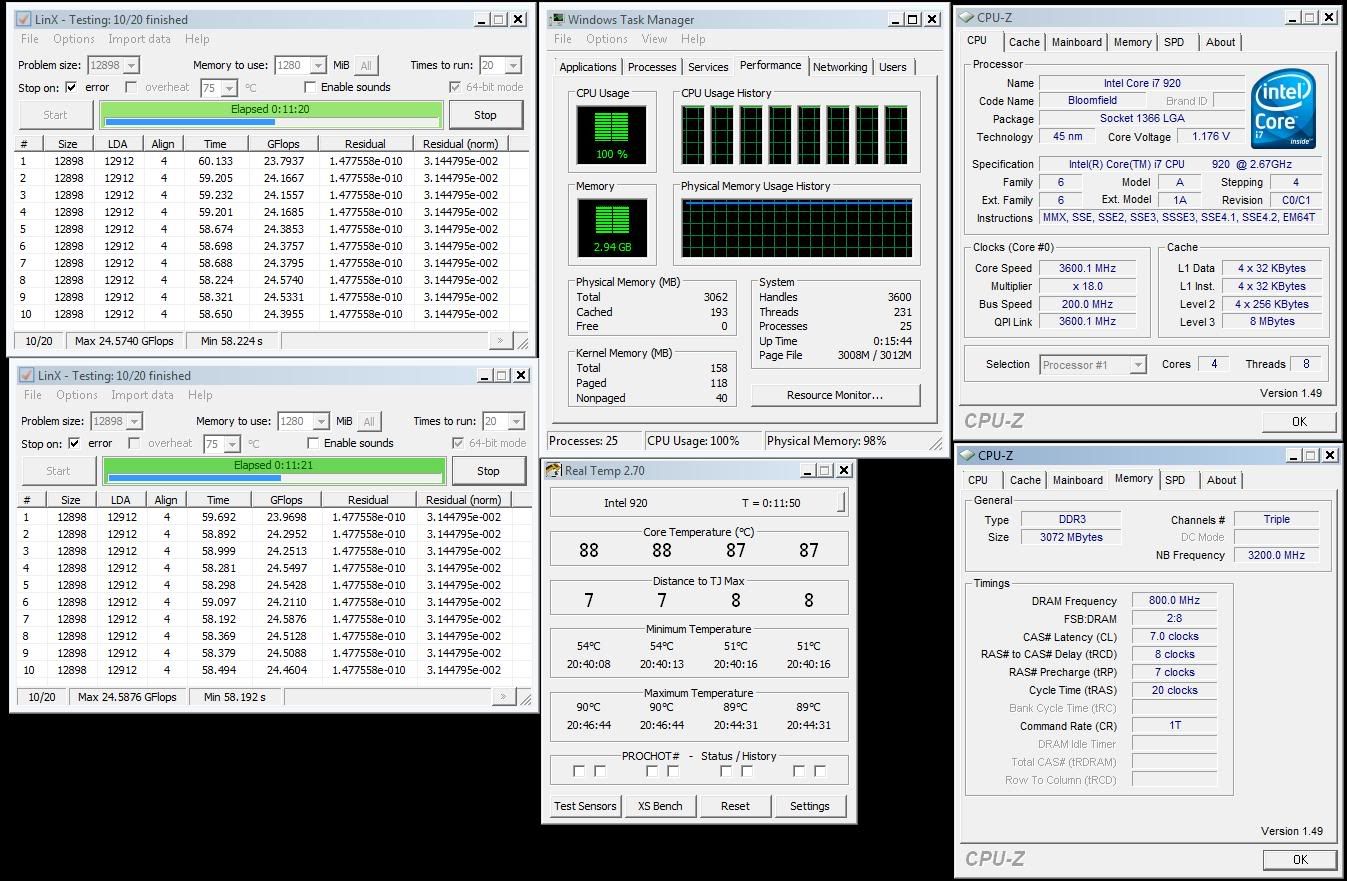
So those temp are normal. I have ran prime95 blend test for 10 minutes and the temp were WOW shocking.gif

realtemp w/ HT (full load)

72
70
70
69

I think 75C is the CPU threshold right? sweat.gif


Just want to know is it save for me to OC to 3.2 first on this weekend ? due to the heat sweat.gif
TSowikh84
post Oct 1 2010, 06:39 AM

i7 Clan
Group Icon
Elite
8,711 posts

Joined: Nov 2007
From: Butterworth, PG / Machang, Kelantan


QUOTE(??? @ Oct 1 2010, 12:01 AM)
Thanks for the input.
So those temp are normal. I have ran prime95 blend test for 10 minutes and the temp were WOW  shocking.gif

realtemp w/ HT (full load)

72
70
70
69

I think 75C is the CPU threshold right?  sweat.gif
Just want to know is it save for me to OC to 3.2 first on this weekend ? due to the heat  sweat.gif
*
Max is 100C and don't worry ur PC will auto shutdown at 100C (overtemp protection set by bios)
U're safe with 3.2Ghz HT on @ vcore < 1.2X v depending on ur chip strength.
I can do 4.4Ghz HT off @ 1.3v on air cooling when max temp hit 82C nod.gif

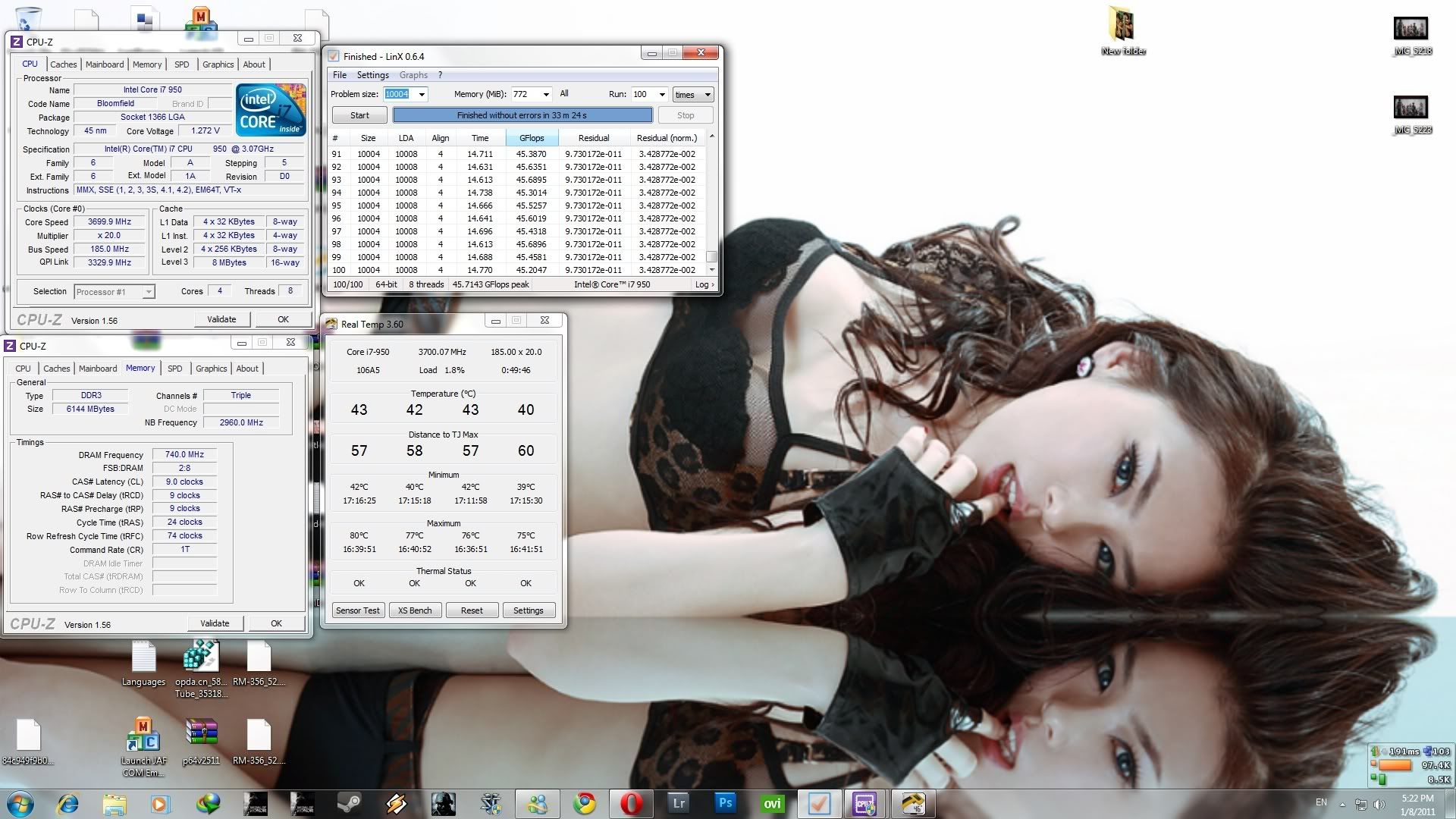
LinX
» Click to show Spoiler - click again to hide... «


Pime95
» Click to show Spoiler - click again to hide... «


http://hardforum.com/showthread.php?t=1502931

This post has been edited by owikh84: Oct 1 2010, 06:46 AM
gengstapo
post Oct 1 2010, 08:21 AM

Retired enthusiast
********
All Stars
10,688 posts

Joined: Jan 2005
QUOTE(??? @ Oct 1 2010, 12:01 AM)
Thanks for the input.
So those temp are normal. I have ran prime95 blend test for 10 minutes and the temp were WOW  shocking.gif

realtemp w/ HT (full load)

72
70
70
69

I think 75C is the CPU threshold right?  sweat.gif
Just want to know is it save for me to OC to 3.2 first on this weekend ? due to the heat  sweat.gif
*
If my temp. as such, it would be very very nice. I would be grateful, too bad my setup cannot hold such temperature.. Zzz

You can check my temp. during priming Here. It shows by RealTemp under the Maximum box laugh.gif laugh.gif

This post has been edited by gengstapo: Oct 1 2010, 08:22 AM
???
post Oct 2 2010, 03:53 PM

New Member
*
Junior Member
14 posts

Joined: Nov 2004
QUOTE(gengstapo @ Oct 1 2010, 08:21 AM)
If my temp. as such, it would be very very nice. I would be grateful, too bad my setup cannot hold such temperature.. Zzz

You can check my temp. during priming Here. It shows by RealTemp under the Maximum box  laugh.gif   laugh.gif
*
shocking.gif so I guess we cannot use the temp provided by those people inside Overclocker.net as reference.

I am on 3.2Ghz w/o HT while typing this rclxms.gif rclxms.gif finally I've done it.

realtemp (prime95 blend test -- 10 mins)

Min Max
41 57
36 55
40 56
38 55

I wonder why the temp dropped so much? Below are my setting in BIOS

My BIOS setting:
CPU ratio 21x
BCLK 153
PCIE 100
DRAM DDR3-920MHz
UCLK 1841
CPU Voltage 1.15
PLL Voltage 1.80
QPI/DRAM 1.21250


Thanks for owikh84 and gengstapo for the input thumbup.gif thumbup.gif

This post has been edited by ???: Oct 2 2010, 03:57 PM
TSowikh84
post Oct 2 2010, 07:43 PM

i7 Clan
Group Icon
Elite
8,711 posts

Joined: Nov 2007
From: Butterworth, PG / Machang, Kelantan


Temps lower bcos HT is turned off now
ur temp is still quite good for higher OC
i7 is built to clock at least 4Ghz to show its full potential
???
post Oct 2 2010, 09:37 PM

New Member
*
Junior Member
14 posts

Joined: Nov 2004
I have done an hour of prime95 (small fft) on 3.2Ghz and no error found, so I have decide to OC it to 3.8Ghz brows.gif
Currently on 3.8Ghz w/o HT and doing the prime95 now. The temp is actually almost same as 3.2Ghz. Hope it is stable on 3.8Ghz smile.gif
Will update once it past at least an hour of prime95.
TSowikh84
post Oct 2 2010, 09:55 PM

i7 Clan
Group Icon
Elite
8,711 posts

Joined: Nov 2007
From: Butterworth, PG / Machang, Kelantan


QUOTE(??? @ Oct 2 2010, 09:37 PM)
I have done an hour of prime95 (small fft) on 3.2Ghz and no error found, so I have decide to OC it to 3.8Ghz  brows.gif
Currently on 3.8Ghz w/o HT and doing the prime95 now. The temp is actually almost same as 3.2Ghz. Hope it is stable on 3.8Ghz  smile.gif
Will update once it past at least an hour of prime95.
*
Well done. Don't forget to post up some screenshots too. thumbup.gif
p_cock01
post Oct 2 2010, 10:42 PM

Getting Started
**
Junior Member
118 posts

Joined: Mar 2009
From: kepong,KL


tailo kevin i wanna ask somethin.
why my 930 idle temperature are about 56c?
im just use stock cooler and using tx2.
edi turn off ht
fyi when i assemble my rig i ter drop my proc about 15 cm high and back of the proc kene lantai
is that cause this prob?
using giga x58aud3r mobo and pls recommend me bios setting for this mobo for 4.0ghz speed.

gengstapo
post Oct 2 2010, 11:58 PM

Retired enthusiast
********
All Stars
10,688 posts

Joined: Jan 2005
QUOTE(p_cock01 @ Oct 2 2010, 10:42 PM)
tailo kevin i wanna ask somethin.
why my 930 idle temperature are about 56c?
im just use stock cooler and using tx2.
edi turn off ht
fyi when i assemble my rig i ter drop my proc about 15 cm high and back of the proc kene lantai
is that cause this prob?
using giga x58aud3r mobo and pls recommend me bios setting for this mobo for 4.0ghz speed.
*
I believe its normal..
TSowikh84
post Oct 3 2010, 09:57 AM

i7 Clan
Group Icon
Elite
8,711 posts

Joined: Nov 2007
From: Butterworth, PG / Machang, Kelantan


QUOTE(p_cock01 @ Oct 2 2010, 10:42 PM)
tailo kevin i wanna ask somethin.
why my 930 idle temperature are about 56c?
im just use stock cooler and using tx2.
edi turn off ht
fyi when i assemble my rig i ter drop my proc about 15 cm high and back of the proc kene lantai
is that cause this prob?
using giga x58aud3r mobo and pls recommend me bios setting for this mobo for 4.0ghz speed.
*
Ur temp is normal. Ambient & casing airflow affects the temp too.
Hmm don't think u can do 4.0Ghz with stock cooler unless in non air cond room.
U might google for "x58aud3r 4ghz bios", just make sure that HT is turned off 1st.
anyway to OC I highly recommend grabbing a good 3rd party cooler ie. Corsair H7O/H5O, Thermalright Venomous-X, etc..
with these coolers, OC is easier & more fun biggrin.gif
???
post Oct 3 2010, 12:24 PM

New Member
*
Junior Member
14 posts

Joined: Nov 2004
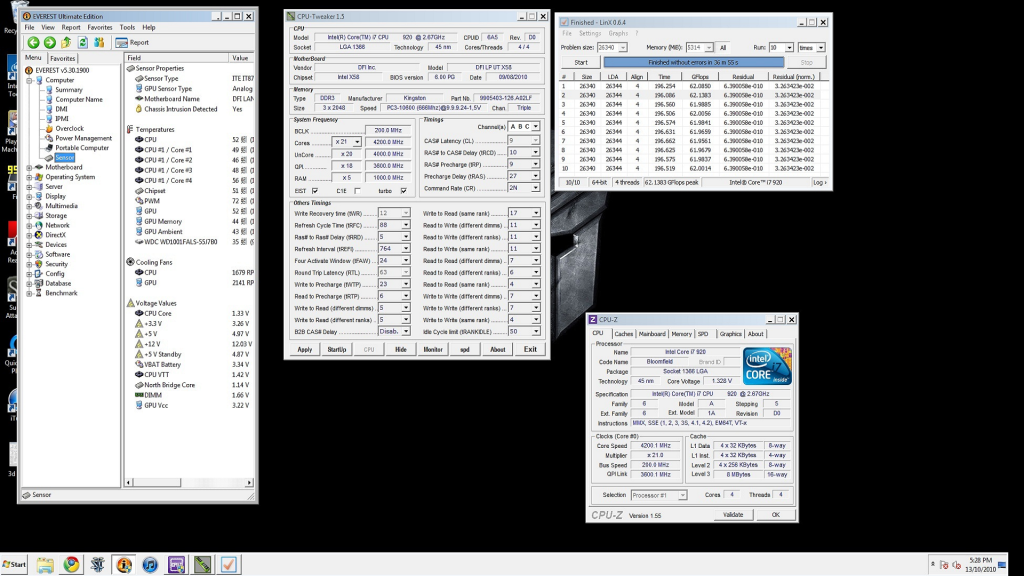
I did prime95 w/o Aircond for 3.8Ghz. Below are the pic

Attached Image

BIOS setting

CPU ratio 19x
BCLK 200
PCIE 100
DRAM 1603
UCLK 3208
CPU Voltage 1.2v
PLL Voltage 1.8v
QPI/DRAM Voltage 1.21250

I wonder can I lower down the cpu voltage hmm.gif is it fine to lower it down? try to get the optimum voltage/heat for 3.8 first before I move to 4.0 wub.gif
Need some advise here.

Another details screenshot

Attached Image


This post has been edited by ???: Oct 3 2010, 04:17 PM
TSowikh84
post Oct 4 2010, 07:08 AM

i7 Clan
Group Icon
Elite
8,711 posts

Joined: Nov 2007
From: Butterworth, PG / Machang, Kelantan


Suggest to go straight to 4Ghz.
Prime at least 4 hours or LinX for 20 runs.
p_cock01
post Oct 4 2010, 07:50 PM

Getting Started
**
Junior Member
118 posts

Joined: Mar 2009
From: kepong,KL


new user reporting.
Attached Image
thanks kevin for ur help

This post has been edited by p_cock01: Oct 4 2010, 07:51 PM
TSowikh84
post Oct 4 2010, 08:52 PM

i7 Clan
Group Icon
Elite
8,711 posts

Joined: Nov 2007
From: Butterworth, PG / Machang, Kelantan


QUOTE(p_cock01 @ Oct 4 2010, 07:50 PM)
new user reporting.
thanks kevin for ur help
*
ur dram timing should be 9-9-9-24-88-1T
and run LinX to the max memory in normal mode or full amount in diagnostic mode
max memory settings, click "All" button or pick the last memory size option from the drop down menu, the "All" option is highly recommended
20 runs should last about 1 hour
for diagnostic mode, go to START menu > Run (or hotkey win logo + R) > type msconfig > diagnostic startup
gengstapo
post Oct 5 2010, 05:31 PM

Retired enthusiast
********
All Stars
10,688 posts

Joined: Jan 2005
QUOTE(owikh84 @ Oct 4 2010, 08:52 PM)
ur dram timing should be 9-9-9-24-88-1T
and run LinX to the max memory in normal mode or full amount in diagnostic mode
max memory settings, click "All" button or pick the last memory size option from the drop down menu, the "All" option is highly recommended
20 runs should last about 1 hour
for diagnostic mode, go to START menu > Run (or hotkey win logo + R) > type msconfig > diagnostic startup
*
Ehh, I wonder bout QPI Link thingy
Is there any different between higher & lower value in performance?
In stability, which is recommended?

Thanks~
TSowikh84
post Oct 5 2010, 07:03 PM

i7 Clan
Group Icon
Elite
8,711 posts

Joined: Nov 2007
From: Butterworth, PG / Machang, Kelantan


QUOTE(gengstapo @ Oct 5 2010, 05:31 PM)
Ehh, I wonder bout QPI Link thingy
Is there any different between higher & lower value in performance?
In stability, which is recommended?

Thanks~
*
There are no performance effects of a higher QPI speed on any single socket system I've ever heard of.

QPI has nothing to do with memory performance, CPU performance, or any thing else besides connecting the CPU to the chipset, or to another CPU (in the case of high-end Xeons).

It is possible to take advantage of DDR3-2000+, but you need an extremely high uncore clock. Again, QPI doesn't matter for this.

Slower QPI mode could help in achieving higher BCLK, easier.
gengstapo
post Oct 5 2010, 08:24 PM

Retired enthusiast
********
All Stars
10,688 posts

Joined: Jan 2005
QUOTE(owikh84 @ Oct 5 2010, 07:03 PM)
Slower QPI mode could help in achieving higher BCLK, easier.
*
What the recommended speed? I dont find any menus in BIOS which allow me to lowered my QPI..
TSowikh84
post Oct 5 2010, 09:20 PM

i7 Clan
Group Icon
Elite
8,711 posts

Joined: Nov 2007
From: Butterworth, PG / Machang, Kelantan


QUOTE(gengstapo @ Oct 5 2010, 08:24 PM)
What the recommended speed? I dont find any menus in BIOS which allow me to lowered my QPI..
*
Some high end mobos only. FYI ur cheapo P6T doesn't hv this option.
???
post Oct 5 2010, 10:14 PM

New Member
*
Junior Member
14 posts

Joined: Nov 2004
I tried 4.0Ghz but haven't found the correct BIOS setting yet. Ran prime95(small fft) for 20mins before BSOD and prime95(large fft) for 6mins and 1 worker failed.
BSOD code : 3b --- from what I have found some said it is Uncore/DRAM issue and some said is QPI/DRAM voltage.

My 4.0 BIOS setting:
CPU ratio 21x
BCLK 191
PCIE 100
DRAM 1531
UCLK 3063
CPU voltage 1.2250v
PLL voltage 1.8v
QPI/DRAM voltage 1.2125v

Currently reverted back to 3.8Ghz. Need help here icon_question.gif icon_question.gif
TSowikh84
post Oct 5 2010, 10:35 PM

i7 Clan
Group Icon
Elite
8,711 posts

Joined: Nov 2007
From: Butterworth, PG / Machang, Kelantan


Ur vcore also might be insufficient.
gengstapo
post Oct 5 2010, 10:43 PM

Retired enthusiast
********
All Stars
10,688 posts

Joined: Jan 2005
QUOTE(owikh84 @ Oct 5 2010, 09:20 PM)
Some high end mobos only. FYI ur cheapo P6T doesn't hv this option.
*
Ahhaaa, no wonder la I cant find em'.. doh.gif doh.gif sweat.gif
chinkor
post Oct 8 2010, 06:04 PM

Getting Started
**
Junior Member
75 posts

Joined: Sep 2008
Guys first time overclocker here,

My hardware:
Core i7 930
Asus Rampage II Extreme
Corsair Dominator GT 1600 2x2gb

Stable after running prime for 5 hours.
With Hyper Threading ON ( If turn off I know can get cooler temperature, but any disavantages for gaming?)

Below are my screenshot,
One thing I dont understand is the ram timing, what timing should I use?

Attached Image Attached Image Attached Image


TSowikh84
post Oct 8 2010, 08:24 PM

i7 Clan
Group Icon
Elite
8,711 posts

Joined: Nov 2007
From: Butterworth, PG / Machang, Kelantan


QUOTE(chinkor @ Oct 8 2010, 06:04 PM)
Guys first time overclocker here,

My hardware:
Core i7 930
Asus Rampage II Extreme
Corsair Dominator GT 1600 2x2gb

Stable after running prime for 5 hours.
With Hyper Threading ON ( If turn off I know can get cooler temperature, but any disavantages for gaming?)

Below are my screenshot,
One thing I dont understand is the ram timing, what timing should I use?
*
HT advantage/disadvantage depends on games, but the difference is pretty much negligible ~1% favorably HT off.
For me, I'd turn off HT and OC core clock higher since turning off HT will reduce core temps by huge margin.
But when it comes to 8-thread intensive apps, this HT feature will show its advantage.
From ur 3rd pic, it shows that ur dram is rated at 8-8-8-24 ~1.65v
But where's the 5 hours stability screenshot? hmm.gif
Btw, u can combine all the CPU-Z tabs into one screen by multi launching the app a few times at the same time.
selfdz87
post Oct 9 2010, 02:16 PM

~5Ghz+ Club~
*****
Senior Member
932 posts

Joined: Dec 2008
From: Paris With Love


who has this i7 920 batch# 3931A627
Can do high uncore or not? hmm.gif
TSowikh84
post Oct 9 2010, 02:22 PM

i7 Clan
Group Icon
Elite
8,711 posts

Joined: Nov 2007
From: Butterworth, PG / Machang, Kelantan


QUOTE(selfdz87 @ Oct 9 2010, 02:16 PM)
who has this i7 920 batch# 3931A627
Can do high uncore or not? hmm.gif
*
Played with this batch b4.. core 4.2Ghz HT off, uncore 4.2Ghz @ 1.275v.
For me it performs like any other 920 D0's
selfdz87
post Oct 9 2010, 02:53 PM

~5Ghz+ Club~
*****
Senior Member
932 posts

Joined: Dec 2008
From: Paris With Love


QUOTE(owikh84 @ Oct 9 2010, 02:22 PM)
Played with this batch b4.. core 4.2Ghz HT off, uncore 4.2Ghz @ 1.275v.
For me it performs like any other 920 D0's
*
Ok bro,thanks a lot...im hunting for new 920 that can do 4k uncore w/ low vtt...hehe laugh.gif


Added on October 9, 2010, 2:59 pm
QUOTE(owikh84 @ Oct 9 2010, 02:22 PM)
Played with this batch b4.. core 4.2Ghz HT off, uncore 4.2Ghz @ 1.275v.
For me it performs like any other 920 D0's
*
Ok bro,thanks a lot...im hunting for new 920 that can do 4k uncore w/ low vtt...hehe laugh.gif

This post has been edited by selfdz87: Oct 9 2010, 02:59 PM
TSowikh84
post Oct 9 2010, 04:21 PM

i7 Clan
Group Icon
Elite
8,711 posts

Joined: Nov 2007
From: Butterworth, PG / Machang, Kelantan


QUOTE(selfdz87 @ Oct 9 2010, 02:53 PM)
Ok bro,thanks a lot...im hunting for new 920 that can do 4k uncore w/ low vtt...hehe laugh.gif
*
anyway depends on ur dram and mobo as well bro.. in my case I'm using DomGT 2kc7 and Classy
vcore @ 1.275v, vtt @ 1.425v, altho not as low as my current 920 which requires 1.25vcore and 1.4vtt only.
???
post Oct 10 2010, 12:02 AM

New Member
*
Junior Member
14 posts

Joined: Nov 2004
QUOTE(owikh84 @ Oct 5 2010, 10:35 PM)
Ur vcore also might be insufficient.
*
Had ran 5 hours of prime95 large fft and it was stable so far biggrin.gif
I have to raised the CPU voltage to 1.23125v as suggested by you rclxms.gif rclxms.gif

Attach pic when I started the prime95 test yesterday
Attached Image

forget to screenshot it after I woke up doh.gif
Do I need to run more hours for prime95 to find stability ?


Edit : BSOD after 2 hours of gaming rclxub.gif rclxub.gif
BCcode : a
It seems like it is the same issue with BCcode : 3b I guess.
Should I just adding more Vcore to run next test or keep the Vcore and add some QPI/DRAM voltage to test it out?


This post has been edited by ???: Oct 10 2010, 02:57 AM
TSowikh84
post Oct 10 2010, 07:58 AM

i7 Clan
Group Icon
Elite
8,711 posts

Joined: Nov 2007
From: Butterworth, PG / Machang, Kelantan


Let the 5-hour priming screenshot prove stability,
BSOD means ur OC is not stable yet.. try upping more voltages ie. vCore, vQPI/RAM (vtt) etc.. try and error.
Large FFT is meant to determine ur max heat, power consumption, stress some ram only. Use custom blend on 5400MBs of ram to stress core, uncore & dram entirely. U will fail in 5mins, 30mins, 1 hour, 2, 3 etc...
???
post Oct 10 2010, 11:02 PM

New Member
*
Junior Member
14 posts

Joined: Nov 2004
QUOTE(owikh84 @ Oct 10 2010, 07:58 AM)
Let the 5-hour priming screenshot prove stability,
BSOD means ur OC is not stable yet.. try upping more voltages ie. vCore, vQPI/RAM (vtt) etc.. try and error.
Large FFT is meant to determine ur max heat, power consumption, stress some ram only. Use custom blend on 5400MBs of ram to stress core, uncore & dram entirely. U will fail in 5mins, 30mins, 1 hour, 2, 3 etc...
*
Just finished ran 5 hours of prime95
Attached Image Attached Image

I have added my Vcore up to 1.23750v and lower down the QPI/DRAM Voltage to 1.20625v

CPU ratio 21x
BCLK 191
PCIE 100
DRAM 1531
UCLK 3063
CPU voltage 1.23750v
PLL voltage 1.80v
QPI/DRAM voltage 1.20625v
TSowikh84
post Oct 10 2010, 11:59 PM

i7 Clan
Group Icon
Elite
8,711 posts

Joined: Nov 2007
From: Butterworth, PG / Machang, Kelantan


Good job! so how's the game still crash on u with these latest settings?
Ur temp still allow higher OC good luck

This post has been edited by owikh84: Oct 11 2010, 12:01 AM
???
post Oct 11 2010, 09:27 PM

New Member
*
Junior Member
14 posts

Joined: Nov 2004
QUOTE(owikh84 @ Oct 10 2010, 11:59 PM)
Good job! so how's the game still crash on u with these latest settings?
Ur temp still allow higher OC good luck
*
Haven't try any game yet, but those temp I have posted yesterday were under air-cond room (26C) laugh.gif
I just on AC when I stress test because I scare it burn some how doh.gif

Below are idle temp for 4.0 without AC
Attached Image

I'll try some games today or tomorrow to see is it stable or not. Will update nod.gif
GaryCCW
post Oct 13 2010, 06:29 PM

Getting Started
**
Junior Member
50 posts

Joined: Mar 2007
From: kap thung


user posted image
This is my overclock settings, sorry about that SS, it was a bad pic, I just passed 10times linx twice with these settings

4.2ghz i7 920 @ 1.3125v(at bios) 4k uncore Cpu Vtt:1.37v(bios)
Kingston HyperX t1 cl9 2000mhz 2gbx3 @ 2000mhz 9-10-9-27 cr2
Dfi Ut-t3eh8 with latest bios
Cooling - H20
Psu-Corsair tx650
GPU- Palit Gtx 260+

Please comment my overclock settings and pls give me some guide to improve my memory clocking. tq

This post has been edited by GaryCCW: Oct 13 2010, 06:43 PM
kaka_89
post Oct 14 2010, 06:26 PM

Casual
***
Junior Member
470 posts

Joined: Jan 2009
From: JB @ PJ

QUOTE(GaryCCW @ Oct 13 2010, 06:29 PM)
user posted image
This is my overclock settings, sorry about that SS, it was a bad pic, I just passed 10times linx twice with these settings

4.2ghz i7 920 @ 1.3125v(at bios) 4k uncore Cpu Vtt:1.37v(bios)
Kingston HyperX t1 cl9 2000mhz 2gbx3 @ 2000mhz 9-10-9-27 cr2
Dfi Ut-t3eh8 with latest bios
Cooling - H20
Psu-Corsair tx650
GPU- Palit Gtx 260+

Please comment my overclock settings and pls give me some guide to  improve my memory clocking. tq
*
try and increase you cpu/vtt notch by notch..

and for your rams, try 9-9-9-24/88 1T or 2T..do some linx test 20 times..the size of memory should be ALL
cheesycake
post Oct 15 2010, 07:19 AM

Casual
***
Junior Member
302 posts

Joined: Oct 2004
Going to overclock my 930 soon. Thinking of the following combination for watercooling:

EK Supreme HF
XSPC RX 240 (my current case is CM690)
Laing D5

Don't think I'm buying reservoir. Budget kinda tight. Is the reservoir needed? Won't be cooling gpu yet, so this will just be the loop.

What you guys think?
supernothing
post Oct 15 2010, 12:13 PM

super ☆
******
Senior Member
1,343 posts

Joined: Jun 2006
From: Wangsa Maju/TTDI/Ampang


QUOTE(cheesycake @ Oct 15 2010, 07:19 AM)
Going to overclock my 930 soon. Thinking of the following combination for watercooling:

EK Supreme HF
XSPC RX 240 (my current case is CM690)
Laing D5

Don't think I'm buying reservoir. Budget kinda tight. Is the reservoir needed? Won't be cooling gpu yet, so this will just be the loop.

What you guys think?
*
yeah, you can build a setup without reservoir. just use the tube to fill your loop.
clawhammer
post Oct 15 2010, 02:38 PM

///M
Group Icon
VIP
8,788 posts

Joined: Jan 2003
From: Kuala Lumpur


QUOTE(cheesycake @ Oct 15 2010, 07:19 AM)
Going to overclock my 930 soon. Thinking of the following combination for watercooling:

EK Supreme HF
XSPC RX 240 (my current case is CM690)
Laing D5

Don't think I'm buying reservoir. Budget kinda tight. Is the reservoir needed? Won't be cooling gpu yet, so this will just be the loop.

What you guys think?
*
It's best to have a reservoir but of course there are always smart people that tries to do wonders smile.gif Humans can live with one kidney as well but I'm sure you know it's not optimal.
lichyetan
post Oct 15 2010, 03:18 PM

*****
*******
Senior Member
2,295 posts

Joined: Jan 2005
From: Penang


QUOTE(cheesycake @ Oct 15 2010, 07:19 AM)
Going to overclock my 930 soon. Thinking of the following combination for watercooling:

EK Supreme HF
XSPC RX 240 (my current case is CM690)
Laing D5

Don't think I'm buying reservoir. Budget kinda tight. Is the reservoir needed? Won't be cooling gpu yet, so this will just be the loop.

What you guys think?
*
you can build ur loop without reservoir, but good luck on bleeding the thing...
cheesycake
post Oct 15 2010, 04:51 PM

Casual
***
Junior Member
302 posts

Joined: Oct 2004
Or maybe to keep things in budget I should get a cheaper pump and a reservoir? But getting a cheaper pump will mean compromising quite a lot in cooling performance I think.

Is the D5 too strong for a single loop for cpu only?
???
post Oct 16 2010, 01:25 PM

New Member
*
Junior Member
14 posts

Joined: Nov 2004
QUOTE(??? @ Oct 11 2010, 09:27 PM)
Haven't try any game yet, but those temp I have posted yesterday were under air-cond room (26C)  laugh.gif
I just on AC when I stress test because I scare it burn some how  doh.gif

Below are idle temp for 4.0 without AC
Attached Image

I'll try some games today or tomorrow to see is it stable or not. Will update  nod.gif
*
Just have time to test some game yesterday but I got BSOD after 15mins of SC2 vmad.gif vmad.gif
Did some changes and ran another 5 hours of prime95 test.
Attached Image Attached Image

Hope this time wont BSOD again.

Below are the setting: (CPU : i7 930 #Batch 3949B120 | MB : ASUS P6X58D-E)

Ai Overclock Tuner.....................[Manual]
CPU Ratio Setting......................[21.0]
Intel® SpeedStep™ Tech............[Disabled]
Xtreme Phase Full Power Mode...........[Enabled]
BCLK Frequency.........................[191]
PCIE Frequency.........................[100]
DRAM Frequency.........................[DDR3-1531MHz]
UCLK Frequency.........................[3063MHz]
QPI Link Data Rate.....................[Auto]

CPU Voltage Control....................[Manual]
CPU Voltage............................[1.24375]
CPU PLL Voltage........................[1.80]
QPI/DRAM Core Voltage..................[1.21875]
IOH Voltage............................[1.12]
IOH PCIE Voltage.......................[1.50]
ICH Voltage............................[1.20]
ICH PCIE Voltage.......................[1.50]
DRAM Bus Voltage.......................[1.64]
DRAM DATA REF Voltage on CHA...........[Auto]
DRAM CTRL REF Voltage on CHA...........[Auto]
DRAM DATA REF Voltage on CHB...........[Auto]
DRAM CTRL REF Voltage on CHB...........[Auto]
DRAM DATA REF Voltage on CHC...........[Auto]
DRAM CTRL REF Voltage on CHC...........[Auto]

Load-Line Calibration..................[Enabled]
CPU Differential Amplitude.............[800mV]
CPU Clock Skew.........................[Delay 300ps]
CPU Spread Spectrum....................[Disabled]
IOH Clock Skew.........................[Auto]
PCIE Spread Spectrum...................[Disabled]

C1E Support............................[Disabled]
Hardware Prefetcher....................[Enabled]
Adjacent Cache Line Prefetch...........[Enabled]
Intel® Virtualization Tech...........[Disabled]
CPU TM Function........................[Enabled]
Execute Disable Bit....................[Enabled]
Intel® HT Technology.................[Disabled]
Active Processor Cores.................[All]
A20M...................................[Disabled]
Intel® SpeedStep™ Tech............[Disabled]
Intel® C-STATE Tech..................[Disabled]

TSowikh84
post Oct 16 2010, 06:37 PM

i7 Clan
Group Icon
Elite
8,711 posts

Joined: Nov 2007
From: Butterworth, PG / Machang, Kelantan


Passed prime95 but crashed during gaming.
btw what about other games?
From what I heard SC2 will crash on some custom map
Bad GPU driver also can cause BSOD.

CPU Clock Skew.........................[Delay 300ps] <-- 100ps is enuf
Boomeraangkid
post Oct 17 2010, 04:21 AM

Behind You
*******
Senior Member
2,696 posts

Joined: Nov 2007
From: forum.lowyat.net


this is the results

QUOTE
[Sun Oct 17 00:23:10 2010]
Self-test 1024K passed!
[Sun Oct 17 00:38:29 2010]
Self-test 8K passed!
[Sun Oct 17 03:50:22 2010]
Compare your results to other computers at http://www.mersenne.org/report_benchmarks
Intel® Core™ i7 CPU        950  @ 3.07GHz
CPU speed: 3640.85 MHz, 8 cores
CPU features: RDTSC, CMOV, Prefetch, MMX, SSE, SSE2, SSE4
L1 cache size: 32 KB
L2 cache size: 256 KB, L3 cache size: 8 MB
L1 cache line size: 64 bytes
L2 cache line size: 64 bytes
TLBS: 64
Prime95 64-bit version 25.11, RdtscTiming=1
Best time for 768K FFT length: 10.145 ms.
Best time for 896K FFT length: 12.270 ms.
Best time for 1024K FFT length: 13.826 ms.
Best time for 1280K FFT length: 17.420 ms.
Best time for 1536K FFT length: 21.045 ms.
i woke up at 3.45am to see my pc off. rupa rupanya bsod.
» Click to show Spoiler - click again to hide... «

could it be because my computer went to sleep after 30 minutes?
lichyetan
post Oct 17 2010, 08:58 AM

*****
*******
Senior Member
2,295 posts

Joined: Jan 2005
From: Penang


Core i7 @ 4ghz HT Off, DDR3 2k CL7 with Mushkin Ridgeback. icon_rolleyes.gif

» Click to show Spoiler - click again to hide... «


This post has been edited by lichyetan: Oct 17 2010, 08:58 AM
selfdz87
post Oct 17 2010, 11:31 AM

~5Ghz+ Club~
*****
Senior Member
932 posts

Joined: Dec 2008
From: Paris With Love


@lichyetan
nice bro...
kenot tighten the ram timing anymore?? hmm.gif
how much u buy this ridgeback??
really interesting ram...
???
post Oct 17 2010, 01:49 PM

New Member
*
Junior Member
14 posts

Joined: Nov 2004
QUOTE(Boomeraangkid @ Oct 17 2010, 04:21 AM)
this is the results
i woke up at 3.45am to see my pc off. rupa rupanya bsod.
» Click to show Spoiler - click again to hide... «

could it be because my computer went to sleep after 30 minutes?
*
From what i've experienced when win7 goes to sleep mode it wont cause BSOD. It will stop prime test until you awake your pc. Anyway I always make win7 never sleep when I do prime test.

This post has been edited by ???: Oct 17 2010, 01:50 PM
gengstapo
post Oct 17 2010, 01:51 PM

Retired enthusiast
********
All Stars
10,688 posts

Joined: Jan 2005
Another thing guys, does your all overclocked i7 machine able to resume after it went sleep? Mine cannot nia~
Boomeraangkid
post Oct 17 2010, 04:01 PM

Behind You
*******
Senior Member
2,696 posts

Joined: Nov 2007
From: forum.lowyat.net


i went out at 12pm today. left the pc on without air con. came back it hung. could it be my psu? my top fan was quite hot
lichyetan
post Oct 17 2010, 11:27 PM

*****
*******
Senior Member
2,295 posts

Joined: Jan 2005
From: Penang


QUOTE(selfdz87 @ Oct 17 2010, 11:31 AM)
@lichyetan
nice bro...
kenot tighten the ram timing anymore?? hmm.gif
how much u buy this ridgeback??
really interesting ram...
*
havent try tighter timing... will try 7-9-7 later on...

i bought this kit @ rm699. icon_rolleyes.gif
mengsuan
post Oct 18 2010, 03:18 PM

9W2NNS
Group Icon
Staff
10,459 posts

Joined: Sep 2005
From: Puchong

Last time you guys have told me that turning on HT will decrease Linx Gflops. Last time I'm just using low core clock and HT does give higher Gflops. Now I clocked to 3.4GHz, using HT reduces the Gflops by 10. Lol...
TSowikh84
post Oct 18 2010, 06:49 PM

i7 Clan
Group Icon
Elite
8,711 posts

Joined: Nov 2007
From: Butterworth, PG / Machang, Kelantan


QUOTE(mengsuan @ Oct 18 2010, 03:18 PM)
Last time you guys have told me that turning on HT will decrease Linx Gflops. Last time I'm just using low core clock and HT does give higher Gflops. Now I clocked to 3.4GHz, using HT reduces the Gflops by 10. Lol...
*
Voltages do affect GFlops as well bro.
Increase vCore without HT and compare.


Added on October 18, 2010, 6:52 pm
QUOTE(gengstapo @ Oct 17 2010, 01:51 PM)
Another thing guys, does your all overclocked i7 machine able to resume after it went sleep? Mine cannot nia~
*
Resume mode related in bios.
Enable wake up by usb kb/ mouse.
Other than that press pwr button on ur case.

This post has been edited by owikh84: Oct 18 2010, 06:52 PM
mengsuan
post Oct 19 2010, 10:53 AM

9W2NNS
Group Icon
Staff
10,459 posts

Joined: Sep 2005
From: Puchong

If voltage would affect Gflops, does it mean that an undervoltage, can cause more errors but just that the error is self-recoverable within the processor?

We need semicon engineer to explain about this though. tongue.gif

This post has been edited by mengsuan: Oct 19 2010, 02:56 PM
gengstapo
post Oct 19 2010, 04:27 PM

Retired enthusiast
********
All Stars
10,688 posts

Joined: Jan 2005
QUOTE(owikh84 @ Oct 18 2010, 06:49 PM)
Resume mode related in bios.
Enable wake up by usb kb/ mouse.
Other than that press pwr button on ur case.
*
Err I dont know hoe to reply this sweat.gif
As far as I remember, when I run my i7 at stock setting, I could resume my machine from sleep(at this point the BIOS option working), but after I overclock, seems it just likely "hang" on resuming windows(I didnt change any setting on BIOS, only configuration for overclocking)..
TSowikh84
post Oct 19 2010, 07:54 PM

i7 Clan
Group Icon
Elite
8,711 posts

Joined: Nov 2007
From: Butterworth, PG / Machang, Kelantan


QUOTE(mengsuan @ Oct 19 2010, 10:53 AM)
If voltage would affect Gflops, does it mean that an undervoltage, can cause more errors but just that the error is self-recoverable within the processor?

We need semicon engineer to explain about this though. tongue.gif
*
I wouldn't call it as an calculation error. It is about the correlation between GFlops and voltage efficiency.
The most efficient voltage will yield the most optimal performance.
LinX is used more for figuring out if u're close to optimal, efficient vCore.
mengsuan
post Oct 19 2010, 10:31 PM

9W2NNS
Group Icon
Staff
10,459 posts

Joined: Sep 2005
From: Puchong

I assume optimal Vcore is varying according to core speed?

If lets say 1.15V is optimal but 1.10V is already enough for stability; would 1.15V produce lesser heat since it should be efficient?
TSowikh84
post Oct 19 2010, 10:44 PM

i7 Clan
Group Icon
Elite
8,711 posts

Joined: Nov 2007
From: Butterworth, PG / Machang, Kelantan


QUOTE(mengsuan @ Oct 19 2010, 10:31 PM)
I assume optimal Vcore is varying according to core speed?

If lets say 1.15V is optimal but 1.10V is already enough for stability; would 1.15V produce lesser heat since it should be efficient?
*
No and No
mengsuan
post Oct 20 2010, 12:44 PM

9W2NNS
Group Icon
Staff
10,459 posts

Joined: Sep 2005
From: Puchong

Ok, good. I'll search for optimal Vcore.
Sanity
post Oct 20 2010, 08:23 PM

Getting Started
**
Junior Member
289 posts

Joined: Jun 2005
From: Hairy World

i7 guru . . me go lower my cpu speed from 4.2 ghz to 4.0 ghz by setting 200 x 20 at bios . . load into windows . . it still shows 4.2 ghz at 200 x 21 . . got bug ka?
TSowikh84
post Oct 20 2010, 09:39 PM

i7 Clan
Group Icon
Elite
8,711 posts

Joined: Nov 2007
From: Butterworth, PG / Machang, Kelantan


QUOTE(Sanity @ Oct 20 2010, 08:23 PM)
i7 guru . . me go lower my cpu speed from 4.2 ghz to 4.0 ghz by setting 200 x 20 at bios . . load into windows . . it still shows 4.2 ghz at 200 x 21 . . got bug ka?
*
It's not a bug but it's called the Intel SpeedStep Technology (EIST)
To do 200x20=4.0Ghz u hv to turn off this CPU feature in BIOS.
EIST will bump ur multi from 20x to 21x that's why u got 200x21= 4.2Ghz
acther
post Oct 21 2010, 12:51 AM

Casual
***
Junior Member
317 posts

Joined: Jan 2009
Can anyone teach me how to set my ram to 2200mhz? Totally forgot liao =(
mengsuan
post Oct 21 2010, 12:42 PM

9W2NNS
Group Icon
Staff
10,459 posts

Joined: Sep 2005
From: Puchong

AT 3.36GHz@1.05V, the core temperatures are already at 86C. Lolz. I think I can't go much further with stock cooler.
cstkl1
post Oct 21 2010, 01:11 PM

Look at all my stars!!
Group Icon
Elite
6,799 posts

Joined: Jan 2003

QUOTE(mengsuan @ Oct 21 2010, 12:42 PM)
AT 3.36GHz@1.05V, the core temperatures are already at 86C. Lolz. I think I can't go much further with stock cooler.
*
user posted image
mengsuan
post Oct 21 2010, 01:21 PM

9W2NNS
Group Icon
Staff
10,459 posts

Joined: Sep 2005
From: Puchong

Eek. 3.6GHz is just 2C higher. Stock cooler or ...?

C0, HT on, 3.6GHz, 1.176V:

Your screenshot makes me think that my heatsink is running abnormally. Mine is D0, HT off, 3.36GHz, 1.05V.

This post has been edited by mengsuan: Oct 21 2010, 01:24 PM
cheesycake
post Oct 22 2010, 09:07 AM

Casual
***
Junior Member
302 posts

Joined: Oct 2004
I'm currently using Kingston HyperX 6Gb 2000mhz but not overclocking my pc till I get my watercooling.

Feel like tightening the ram timings but dont know which values I should adjust and what values I should adjust them to.
mengsuan
post Oct 22 2010, 01:30 PM

9W2NNS
Group Icon
Staff
10,459 posts

Joined: Sep 2005
From: Puchong

user posted image

Goes up to 89C at 3.6GHz@1.10V (BIOS) without HT. sad.gif

The core temperatures look quite imbalanced. First I thought was bad mounting but I already pushed it very well in.


Added on October 22, 2010, 1:49 pmTried 3.6GHz HT on. Very disappointed with the temperature when compared to cstkl1's rig. My uncore speed is already lower than his but yet so much hotter.

user posted image

This post has been edited by mengsuan: Oct 22 2010, 06:32 PM
gengstapo
post Oct 22 2010, 05:58 PM

Retired enthusiast
********
All Stars
10,688 posts

Joined: Jan 2005
QUOTE(mengsuan @ Oct 22 2010, 01:30 PM)
user posted image

Goes up to 89C at 3.6V@1.10V (BIOS) without HT. sad.gif

The core temperatures look quite imbalanced. First I thought was bad mounting but I already pushed it very well in.

already lower than his but yet so much hotter.

*
Are you on stock HSF??
mengsuan
post Oct 22 2010, 06:31 PM

9W2NNS
Group Icon
Staff
10,459 posts

Joined: Sep 2005
From: Puchong

Yes. Stock HSF
TSowikh84
post Oct 22 2010, 07:08 PM

i7 Clan
Group Icon
Elite
8,711 posts

Joined: Nov 2007
From: Butterworth, PG / Machang, Kelantan


Some of the reasons why u got different temps:
Diff proc diff exothermic
Environment (aircond/none)
Casing airflow
Extra active cooling (table fan)
Thermal compd (TIM)
voltages, VTT, etc...

Solution:
Get an aftermarket cooler and clock at least 4Ghz
gengstapo
post Oct 22 2010, 10:12 PM

Retired enthusiast
********
All Stars
10,688 posts

Joined: Jan 2005
QUOTE(mengsuan @ Oct 22 2010, 06:31 PM)
Yes. Stock HSF
*
Hahaa, no wonder laa. But your temp. & mine are about the same tongue.gif
But me on higher clock & voltage with 3rd party air cooling.. laugh.gif laugh.gif
mengsuan
post Oct 22 2010, 10:43 PM

9W2NNS
Group Icon
Staff
10,459 posts

Joined: Sep 2005
From: Puchong

I'll reseat the heatsink and clean the fans tomorrow. The noise is echoing my house.
TSowikh84
post Oct 23 2010, 03:26 PM

i7 Clan
Group Icon
Elite
8,711 posts

Joined: Nov 2007
From: Butterworth, PG / Machang, Kelantan


slightly bumping up the QPI PLL & IOH/ICH I/O volts

i7 920 D0 @ 4.5Ghz HT OFF
EVGA Classfied E760 Bios 73
Corsair DomGT 2kC7 @ 2150Mhz 8-8-8-20-1T, RTL 60/62/64, vdimm 1.61v


» Click to show Spoiler - click again to hide... «


This post has been edited by owikh84: Oct 23 2010, 03:48 PM
TSowikh84
post Oct 23 2010, 06:14 PM

i7 Clan
Group Icon
Elite
8,711 posts

Joined: Nov 2007
From: Butterworth, PG / Machang, Kelantan


Understanding EVGA X58 Classified Voltages

CPU VTT: Stock VTT voltage defaults to 1.17V or so. The scale runs in 10mv steps, allowing you to add or subtract from the base value. VTT voltage drives the integrated memory controller and the QPI link bus. This voltage will need to be increased as you increase memory frequency and increase BCLK (QPI frequency). Remember to keep this voltage within 0.5V of VDIMM to prevent damage to the integrated memory controller.

CPU PLL VCore: 1.8V base; we found no benefits to increasing this voltage for overclocking. Clean power to PLL circuits is essential for ensuring that external influences over the accuracy of clock signals is minimized. It seems EVGA have done a good job with regards to all PLL voltage rails on the Classified. In terms of overclocking headroom and PLL's, clean power always trumps more voltage, thus there's no need to tinker with these voltages to any great extent on this board, apart from perhaps QPI PLL. Even then, you'll probaby find the level of voltage required for maximum BCLK potential is far below what some other boards need to get the same clocks...

IOH PLL VCore: Input/Output Hub Phase Locked Loop voltage. The default voltage is 1.8V. For the most part this voltage can be left at stock unless chasing maximum QPI frequencies for benchmarking. For 24/7 use we recommend you stick with a maximum of 1.89V. Processors/IOHs needing more than 1.89V to remain stable are best run at a lower BCLK and higher CPU multiplier to bring them back into their comfort zone.

QPI PLL VCore: Quick Path Interconnect Phase Locked Loop voltage. For 24/7 overclocking this voltage can be left at stock in most instances. Again, if you need to use more it's probably wise to pull back a little on QPI frequency to a speed that requires no more than 1.2V. For benchmarking, we used 1.45V to reach 239 BCLK for a CPU-Z shot.

IOH VCore: Input/Output Hub voltage uses a 1.10V base. Stock values usually suffice for 24/7 overclocking even when using multiple graphics cards; we had no problems in reaching a stable 200 BCLK X20 for 4GHz CPU speed. For more extreme QPI frequencies this voltage will need to be increased. For 3D benchmarking past 220 BCLK we used 1.45V. We needed 1.50V to reach 239 BCLK. Values over 1.50V failed to POST or locked up in the OS; use only as much voltage as you need.

IOH/ICH I/O Voltage: IOH to Intel Southbridge termination voltage. We left this voltage at stock and did not see any overclocking improvements from increasing it on this board. Base value is 1.50V.

ICH VCore: 1.05V base voltage; again this voltage can be left at default.

NF200 Voltage: 1.2V stock. We left this voltage at stock for all overclocking.

VTT PWM Frequency: Changes the switching frequency of the VTT voltage line. Higher switching frequencies can help facilitate lower output ripple, and reduce overshoot while providing a higher frequency power bandwidth to the CPU. Setting a higher frequency with this BIOS option may improve overclocking headroom somewhat depending on the current drawn. For overclocking past 220 BCLK we generally used 490KHz; for speeds below this a 250KHz switching frequency worked fine for us and also reduces the heat output from the PWM FETs.

CPU PWM Frequency: CPU PWM (VCore supply) switching frequency. Stock is 800KHz, which is more than sufficient for 99% of overclocking. For subzero benchmarking you may wish to increase the switching frequency to see if it helps stability during heavy 8-thread CPU loads. The side effect in doing so is increased heat from the power FETs, although the temperature increase is quite small due to the use of a 10-phase power delivery circuit, especially as the FETs are indirectly cooled via the CPU power plane when the processor temperature is well into the negative region.

CPU Impedance: Sets the level of signal compensation for the QPI bus to the CPU. Higher QPI frequencies often demand a higher signal current, which means that compensation levels have to be changed in order to counter any signal line reflections caused by PCB traces and input impedance mismatches. The options available for this function are AUTO and Less. On the Classified, we found that QPI frequencies approaching 4GHz can benefit from a reduction in setting Less, even more so if the CPU frequency is well above 4.5GHz. Leave at AUTO for most 24/7 overclocking at BCLKs under 200MHz. For subzero cooling at high system speeds, set this value to Less to see if it helps with overclocking headroom.

QPI Compensation: Sets the level of signal compensation for the QPI bus to the IOH. There are three options for this function, those being AUTO, Less, and More. We found that IOH compensation is far more sensitive to changes in compensation values than the CPU. A setting of Less for high BCLKs and QPI frequencies almost always brings about additional system stability during benchmarking (at least in our experience). For all other purposes, this value can be left to AUTO.
mengsuan
post Oct 24 2010, 03:54 PM

9W2NNS
Group Icon
Staff
10,459 posts

Joined: Sep 2005
From: Puchong

My computer had total freeze without BSOD. Returning to stock voltage and clock will still give random freeze. I deteriorated the processor/motherboard? It can still pass Linx and Folding@home as long as possible until random freeze occur again.

No BSOD=No logs. No idea what caused instability.

This post has been edited by mengsuan: Oct 24 2010, 03:55 PM
TSowikh84
post Oct 24 2010, 04:05 PM

i7 Clan
Group Icon
Elite
8,711 posts

Joined: Nov 2007
From: Butterworth, PG / Machang, Kelantan


One of my HDDs in drive D kong, frozen the windows. No BSOD.
Check ur CPU socket for bulu.
kripkorn
post Oct 26 2010, 02:17 AM

On my way
****
Senior Member
512 posts

Joined: Nov 2006


what i should do when intel burn test passed succesfully but when run linX. it show error calculation.

Increase vCore or QPI
cstkl1
post Oct 26 2010, 03:26 PM

Look at all my stars!!
Group Icon
Elite
6,799 posts

Joined: Jan 2003

QUOTE(mengsuan @ Oct 24 2010, 03:54 PM)
My computer had total freeze without BSOD. Returning to stock voltage and clock will still give random freeze. I deteriorated the processor/motherboard? It can still pass Linx and Folding@home as long as possible until random freeze occur again.

No BSOD=No logs. No idea what caused instability.
*
theres a issue with one of the updates on windows 7 with HPEt timing
i am also looking into these

also troubleshoot by replacing the Linx linpack files from intel.

QUOTE(kripkorn @ Oct 26 2010, 02:17 AM)
what i should do when intel burn test passed succesfully but when run linX. it show error calculation.

Increase vCore or QPI
*
ibt has the latest linkpack while Linx hasnt been updated quite sometime
also read the above reply post to mengsuan
huzzLEE_82
post Oct 26 2010, 09:48 PM

MHaF
******
Senior Member
1,301 posts

Joined: Feb 2010
From: FSN9 CenTToll


sorry all sifu here me as noob in OC..
my northbridge/IOH temp is 78c with 5870CF..is it acceptable?

cheesycake
post Oct 26 2010, 10:07 PM

Casual
***
Junior Member
302 posts

Joined: Oct 2004
What do you guys think about my water cooling set up?
http://forum.lowyat.net/topic/1615410
TSowikh84
post Oct 26 2010, 11:16 PM

i7 Clan
Group Icon
Elite
8,711 posts

Joined: Nov 2007
From: Butterworth, PG / Machang, Kelantan


QUOTE(huzzLEE_82 @ Oct 26 2010, 09:48 PM)
sorry all sifu here me as noob in OC..
my northbridge/IOH temp is 78c with 5870CF..is it acceptable?
*
ur IOH=1.35v is too high for 200x19. Only play with IOH if BCLK > 200.
Most of the time just let it auto.

QUOTE(cheesycake @ Oct 26 2010, 10:07 PM)
What do you guys think about my water cooling set up?
http://forum.lowyat.net/topic/1615410
*
Pls use the existing WC thread laugh.gif
huzzLEE_82
post Oct 27 2010, 12:16 AM

MHaF
******
Senior Member
1,301 posts

Joined: Feb 2010
From: FSN9 CenTToll


@owikh..thanx now put IOH to auto...
my temp goes down to 65c now..
isk still not within 50s...or just put ais ketul dalam sana...


TSowikh84
post Oct 27 2010, 06:05 AM

i7 Clan
Group Icon
Elite
8,711 posts

Joined: Nov 2007
From: Butterworth, PG / Machang, Kelantan


QUOTE(huzzLEE_82 @ Oct 27 2010, 12:16 AM)
@owikh..thanx now put IOH to auto...
my temp goes down to 65c now..
isk still not within 50s...or just put ais ketul dalam sana...
*
use the provided active NB fan block or reapply TIM+reseat the block. nod.gif
lichyetan
post Oct 27 2010, 10:33 AM

*****
*******
Senior Member
2,295 posts

Joined: Jan 2005
From: Penang


QUOTE(huzzLEE_82 @ Oct 26 2010, 09:48 PM)
sorry all sifu here me as noob in OC..
my northbridge/IOH temp is 78c with 5870CF..is it acceptable?
*
For R3E, if you take out the stock heatsink, you will see yellow piece of lousy thermal paste, which are causing high temps, you can try to reapply the thermal paste on the stock heatsink, you will see improvements for sure.
mengsuan
post Oct 28 2010, 12:19 AM

9W2NNS
Group Icon
Staff
10,459 posts

Joined: Sep 2005
From: Puchong

Updated Linx with latest linpack. Lets see if I can squeeze out errors that were never detected.
kripkorn
post Oct 28 2010, 03:51 AM

On my way
****
Senior Member
512 posts

Joined: Nov 2006


i dont really see much different between stock speed and OC..

i running 3d mark vantage, at stock it give 21000 mark for cpu

when oc to 4ghz it give 3000 extra more. more heat, more power jz for 3000 mark.
TSowikh84
post Oct 28 2010, 06:40 AM

i7 Clan
Group Icon
Elite
8,711 posts

Joined: Nov 2007
From: Butterworth, PG / Machang, Kelantan


QUOTE(kripkorn @ Oct 28 2010, 03:51 AM)
i dont really see much different between stock speed and OC..

i running 3d mark vantage, at stock it give 21000 mark for cpu

when oc to 4ghz it give 3000 extra more. more heat, more power jz for 3000 mark.
*
3000 points are huge gain bro. What digits do u expect in this synthetic benchmark? sweat.gif
This increase in speed can make ur day to day tasks run quicker and any number crunching such as compression, folding or video encoding or even Photoshop processing should be more fluid and less time consuming.
There are many benchmark reviews out there pls go read up HERE
kthxbyte
lichyetan
post Oct 28 2010, 01:36 PM

*****
*******
Senior Member
2,295 posts

Joined: Jan 2005
From: Penang


QUOTE(kripkorn @ Oct 28 2010, 03:51 AM)
i dont really see much different between stock speed and OC..

i running 3d mark vantage, at stock it give 21000 mark for cpu

when oc to 4ghz it give 3000 extra more. more heat, more power jz for 3000 mark.
*
you can always settle for lower end pc as well.. why buy i7 ? its only juz for few k mark with extra ringgits laugh.gif

This post has been edited by lichyetan: Oct 28 2010, 01:36 PM
clawhammer
post Oct 28 2010, 02:28 PM

///M
Group Icon
VIP
8,788 posts

Joined: Jan 2003
From: Kuala Lumpur


QUOTE(kripkorn @ Oct 28 2010, 03:51 AM)
i dont really see much different between stock speed and OC..

i running 3d mark vantage, at stock it give 21000 mark for cpu

when oc to 4ghz it give 3000 extra more. more heat, more power jz for 3000 mark.
*
One easy real life test you can do is by installing Windows smile.gif You can try installing Windows with your stock i7 CPU speed versus an overclocked speed. I'm pretty sure you can then tell the difference.
kripkorn
post Oct 29 2010, 10:29 AM

On my way
****
Senior Member
512 posts

Joined: Nov 2006


the only reason why i buy i7 is to play Civ 5, when i play using 965BE is take 5-10 sec to load turn. i thought i7 would be faster but i guess it juz the same. or i mistaken something.
D.Sync
post Oct 29 2010, 03:31 PM

Enthusiast
*****
Senior Member
777 posts

Joined: Mar 2007
From: 6th Stratum: Forbidden Room


For me,

Buy a new PC just for playing a certain game = BIG NO NO

Buy a new PC because the current PC is too old = YES

In my case, purchasing i7 gives me a huge satisfaction as I'm upgrading from P4 3.0 GHz with Nvidia TNT Riva 2 32 MB (LOL) to i7 950 HD 5870. So I can see a definite result there.
TSowikh84
post Oct 30 2010, 12:42 AM

i7 Clan
Group Icon
Elite
8,711 posts

Joined: Nov 2007
From: Butterworth, PG / Machang, Kelantan


QUOTE(kripkorn @ Oct 29 2010, 10:29 AM)
the only reason why i buy i7 is to play Civ 5, when i play using 965BE is take 5-10 sec to load turn. i thought i7 would be faster but i guess it juz the same. or i mistaken something.
*
it is too subjective to convince me without a single benchmark
An i7 920 already pwned Phenom2 SOS
I'd say something wrong with ur settings, voltages, etc..

Group: Junior Member
cheesycake
post Oct 30 2010, 01:06 AM

Casual
***
Junior Member
302 posts

Joined: Oct 2004
Just installed my water cooling loop and I'm beginning my overclocking! Wish me luck! biggrin.gif


Added on October 30, 2010, 2:13 amI followed settings from http://www.overclock.net/intel-motherboard...tml#post8435147

And am currently Priming at 4Ghz. So far temps are (60,56,56,54) highest after 1 hour.

Think I want to try pushing to more. I still have room for temp right?

This post has been edited by cheesycake: Oct 30 2010, 02:13 AM
p_cock01
post Oct 30 2010, 06:21 PM

Getting Started
**
Junior Member
118 posts

Joined: Mar 2009
From: kepong,KL


i have question
why my vantage score is 18k?
is it coz i use windows 7 32 bit?
my gpu score is 15k plus and cpu is 18k plus.
using i7 930 4.01ghz and 5850 stock clock.
already test my stability system using occt at 8 hours no bluescreen.
TSowikh84
post Oct 30 2010, 11:26 PM

i7 Clan
Group Icon
Elite
8,711 posts

Joined: Nov 2007
From: Butterworth, PG / Machang, Kelantan


user posted image
selfdz87
post Oct 31 2010, 10:49 AM

~5Ghz+ Club~
*****
Senior Member
932 posts

Joined: Dec 2008
From: Paris With Love


woooot.....owikh already migrate to 980x drool.gif
nice temp...so much headroom for OC....
does real temp detect it correctly bro?? hmm.gif

i see intel core i9 there... laugh.gif
TSowikh84
post Oct 31 2010, 12:06 PM

i7 Clan
Group Icon
Elite
8,711 posts

Joined: Nov 2007
From: Butterworth, PG / Machang, Kelantan


QUOTE(selfdz87 @ Oct 31 2010, 10:49 AM)
woooot.....owikh already migrate to 980x drool.gif
nice temp...so much headroom for OC....
does real temp detect it correctly bro?? hmm.gif

i see intel core i9 there... laugh.gif
*
yaya managed to grab one unit for myself hehe.
I'm using older version of RealTemp. Latest one should fix the name correctly. laugh.gif
And this clock is not LinX stable yet. Still looking for a sweet clock.
The temps are that low due to 32nm. thumbup.gif 4.3Ghz HT off on 920 D0 was 50C idle.
Stay tuned for more updates.
» Click to show Spoiler - click again to hide... «

atomik
post Oct 31 2010, 12:57 PM

Enthusiast
*****
Senior Member
760 posts

Joined: Dec 2008


QUOTE(owikh84 @ Oct 31 2010, 12:06 PM)
yaya managed to grab one unit for myself hehe.
I'm using older version of RealTemp. Latest one should fix the name correctly.  laugh.gif
And this clock is not LinX stable yet. Still looking for a sweet clock.
The temps are that low due to 32nm. thumbup.gif  4.3Ghz HT off on 920 D0 was 50C idle.
Stay tuned for more updates.
» Click to show Spoiler - click again to hide... «

*
some interesting stuff catch ma ais...D90 and ax1200... whistling.gif
TSowikh84
post Oct 31 2010, 05:51 PM

i7 Clan
Group Icon
Elite
8,711 posts

Joined: Nov 2007
From: Butterworth, PG / Machang, Kelantan


i7 980X @ 4.5Ghz HT OFF
EVGA Classfied E760 Bios 73
Corsair DomGT 2kC7 @ 1800Mhz 7-7-7-20-1T, RTL 53/55/56


initial test...
» Click to show Spoiler - click again to hide... «


sorry photobucket doesnt hv 19" mode

This post has been edited by owikh84: Nov 4 2010, 06:35 AM
metsatsu
post Oct 31 2010, 09:10 PM

Chocolate Starfish
Group Icon
VIP
2,510 posts

Joined: Dec 2004
From: Penang Island and Bidor


@owikh84

finally some1 worthy that owns a 980X. good on u bro. wanna ask. u made the jump for it, bcoz u just wanted to? or bcoz of this batch u got? if it was bcoz of this particular batch, anything good about it?
acther
post Oct 31 2010, 09:17 PM

Casual
***
Junior Member
317 posts

Joined: Jan 2009
wakakka owikh84, u tukar also! nice! but i dont oc mine, can afford the com to hand while using it, anyway overall experience is much better than my old i5, no more lagness haha
TSowikh84
post Oct 31 2010, 09:39 PM

i7 Clan
Group Icon
Elite
8,711 posts

Joined: Nov 2007
From: Butterworth, PG / Machang, Kelantan


QUOTE(metsatsu @ Oct 31 2010, 09:10 PM)
@owikh84

finally some1 worthy that owns a 980X. good on u bro. wanna ask. u made the jump for it, bcoz u just wanted to? or bcoz of this batch u got? if it was bcoz of this particular batch, anything good about it?
*

It's a sudden jump w/o planning at all haha.. I hv no idea which batch is good.
I'm happy to own it coz my room is a lot cooler than before thumbup.gif

QUOTE(acther @ Oct 31 2010, 09:17 PM)
wakakka owikh84, u tukar also! nice! but i dont oc mine, can afford the com to hand while using it, anyway overall experience is much better than my old i5, no more lagness haha
*
yo bro, pls OC it! brows.gif
TSowikh84
post Oct 31 2010, 11:40 PM

i7 Clan
Group Icon
Elite
8,711 posts

Joined: Nov 2007
From: Butterworth, PG / Machang, Kelantan


i7 980X @ 4.5Ghz HT OFF
EVGA Classfied E760 Bios 73
Corsair DomGT 2kC7 @ 1800Mhz 7-7-7-20-1T, RTL 53/55/56


» Click to show Spoiler - click again to hide... «

selfdz87
post Nov 1 2010, 11:27 AM

~5Ghz+ Club~
*****
Senior Member
932 posts

Joined: Dec 2008
From: Paris With Love


QUOTE(owikh84 @ Oct 31 2010, 11:40 PM)
i7 980X @ 4.5Ghz HT OFF
EVGA Classfied E760 Bios 73
Corsair DomGT 2kC7 @ 1800Mhz 7-7-7-20-1T, RTL 53/55/56


» Click to show Spoiler - click again to hide... «

*
nice clock bro...
5Ghz attempt after this?? brows.gif
are this baby need that much vcore to stable @ 4.5Ghz??
now it become AMD lol... laugh.gif
i heard this 980x no need to double the uncore for high dram clock right bro? hmm.gif

btw u already sold ur "Golden Batch"?? brows.gif

This post has been edited by selfdz87: Nov 1 2010, 11:30 AM
huzzLEE_82
post Nov 1 2010, 05:03 PM

MHaF
******
Senior Member
1,301 posts

Joined: Feb 2010
From: FSN9 CenTToll


QUOTE(lichyetan @ Oct 27 2010, 10:33 AM)
For R3E, if you take out the stock heatsink, you will see yellow piece of lousy thermal paste, which are causing high temps, you can try to reapply the thermal paste on the stock heatsink, you will see improvements for sure.
*
thanx lich&owikh
yeah tat yellow TIM hardened aredi...when i took it off it aredi granulated...
i reapply the TIM (TX-2),resit heatsink (as recommended)..then my temp goes to 56c..thanx...
if still high i'll use my TX-3... sweat.gif
*can't believe R3E use tat rubbish TIM.. sweat.gif
cstkl1
post Nov 2 2010, 12:10 PM

Look at all my stars!!
Group Icon
Elite
6,799 posts

Joined: Jan 2003

yippy

finally evga listen to me after campaigning for 4 months for this 3 settings lol

tref,ioh skew and the most special setting tWL..

so from now on screw the preset straps.
t
the ioh skew part is just a testing phase as manage to do 253 bclk on R3e when its slighly slowed down to cpu skew


yeah yeah i know sham been preaching that the both pll's must be insynced etc
now back to benching since got interesting settings now

this makes the evga board back on top

This post has been edited by cstkl1: Nov 2 2010, 12:15 PM
cheesycake
post Nov 2 2010, 03:13 PM

Casual
***
Junior Member
302 posts

Joined: Oct 2004
Currently just finished Priming 4.6Ghz. One of the cores had an error after 3 hours,60 tests. The others worked fine for 12 hours total. I have already increased cpu voltage 2 notches since the last similar error. Currently cpu voltage is at 1.41v and qpi is at 1.25v. Any ideas on what should I do?
p_cock01
post Nov 2 2010, 06:18 PM

Getting Started
**
Junior Member
118 posts

Joined: Mar 2009
From: kepong,KL


hi.wanna ask something.
why my cpu score like this ya?
hope all sifu help me.
Attached Image
kripkorn
post Nov 2 2010, 07:00 PM

On my way
****
Senior Member
512 posts

Joined: Nov 2006


set the control panel > power management > Use the maximum power usage.

i think so so la.
trepidationmutt
post Nov 3 2010, 11:39 AM

New Member
*
Junior Member
49 posts

Joined: Jun 2010


QUOTE(lichyetan @ Oct 27 2010, 10:33 AM)
For R3E, if you take out the stock heatsink, you will see yellow piece of lousy thermal paste, which are causing high temps, you can try to reapply the thermal paste on the stock heatsink, you will see improvements for sure.
*
is it other asus board using that thermal paste?..coz myb p6t northbridge so high temperature
lichyetan
post Nov 3 2010, 11:48 AM

*****
*******
Senior Member
2,295 posts

Joined: Jan 2005
From: Penang


QUOTE(trepidationmutt @ Nov 3 2010, 11:39 AM)
is it other asus board using that thermal paste?..coz myb p6t northbridge so high temperature
*
not sure, never open other asus x58 heatsink. I owned P6T before, you can cable tie a fan onto the heatsink on NB, it cools down quite a lot. icon_rolleyes.gif

else you can just take out the heatsink and check ..
selfdz87
post Nov 3 2010, 01:02 PM

~5Ghz+ Club~
*****
Senior Member
932 posts

Joined: Dec 2008
From: Paris With Love


yeah nb & sb for asus board quite high...
mine b4 put fan is around 55c
after put fan the temp goes down to 45-47c...LOL to Asus...
gengstapo
post Nov 4 2010, 12:43 AM

Retired enthusiast
********
All Stars
10,688 posts

Joined: Jan 2005
QUOTE(trepidationmutt @ Nov 3 2010, 11:39 AM)
is it other asus board using that thermal paste?..coz myb p6t northbridge so high temperature
*
Hmm I never check those NB temp.
Im using P6T also~
cstkl1
post Nov 5 2010, 10:36 PM

Look at all my stars!!
Group Icon
Elite
6,799 posts

Joined: Jan 2003

got a tip from a friend who has the 1155

clock to clock the i7 2600 kicks the old i7 's butt
selfdz87
post Nov 6 2010, 10:16 AM

~5Ghz+ Club~
*****
Senior Member
932 posts

Joined: Dec 2008
From: Paris With Love


QUOTE(cstkl1 @ Nov 5 2010, 10:36 PM)
got a tip from a friend who has the 1155

clock to clock the i7 2600 kicks the old i7 's butt
*
which i7 butt??1366 or 1156?? laugh.gif
metsatsu
post Nov 6 2010, 10:42 AM

Chocolate Starfish
Group Icon
VIP
2,510 posts

Joined: Dec 2004
From: Penang Island and Bidor


QUOTE(selfdz87 @ Nov 6 2010, 10:16 AM)
which i7 butt??1366 or 1156?? laugh.gif
*
most likely 1366 la, why would anyone wanna compare it with a 2nd grade architecture sweat.gif
selfdz87
post Nov 6 2010, 10:56 AM

~5Ghz+ Club~
*****
Senior Member
932 posts

Joined: Dec 2008
From: Paris With Love


heh..that's why i asked...lol...
if that the case...sandy bridge really fast lol...
but mainstream pwns 1366 that's something...
and lock and unlocked multi...WTH?? yawn.gif

must wait for LGA 2011.... drool.gif
metsatsu
post Nov 6 2010, 11:10 AM

Chocolate Starfish
Group Icon
VIP
2,510 posts

Joined: Dec 2004
From: Penang Island and Bidor


QUOTE(selfdz87 @ Nov 6 2010, 10:56 AM)
heh..that's why i asked...lol...
if that the case...sandy bridge really fast lol...
but mainstream pwns 1366 that's something...
and lock and unlocked multi...WTH?? yawn.gif

must wait for LGA 2011.... drool.gif
*
we still haven't got much insight on how fast the LGA1155, but I personally believe that it's gonna be faster than LGA1366 eventhough it's not in the same stream. thumbup.gif
don^don
post Nov 6 2010, 07:31 PM

(#‵′)凸
******
Senior Member
1,930 posts

Joined: Aug 2005
From: o( *゚ー゚)┘miao^miao Status: Perm Banana

hi guys, first time oc my i7, and the temp somehow scares me sweat.gif

getting 3.7Ghz for 186bclk x 20 at 1.312v. idling at 50+ temp. is this ok? the temp isn't very sweet for me. sweat.gif

i tried running prime95 but the temp reaches 100degree occasionally sweat.gif wth!
gengstapo
post Nov 6 2010, 07:35 PM

Retired enthusiast
********
All Stars
10,688 posts

Joined: Jan 2005
QUOTE(don^don @ Nov 6 2010, 07:31 PM)
hi guys, first time oc my i7, and the temp somehow scares me sweat.gif

getting 3.7Ghz for 186bclk x 20 at 1.312v. idling at 50+ temp. is this ok? the temp isn't very sweet for me. sweat.gif

i tried running prime95 but the temp reaches 100degree occasionally sweat.gif wth!
*
Err your CM V8 cant handle the temp.?? What the voltage applied?

Mine at 4Ghz temp. around 80c++ while running prime95.. laugh.gif laugh.gif

This post has been edited by gengstapo: Nov 6 2010, 07:36 PM
don^don
post Nov 6 2010, 07:42 PM

(#‵′)凸
******
Senior Member
1,930 posts

Joined: Aug 2005
From: o( *゚ー゚)┘miao^miao Status: Perm Banana

1.312v, sometimes went up to 1.32. sweat.gif noob v8! laugh.gif
selfdz87
post Nov 6 2010, 08:40 PM

~5Ghz+ Club~
*****
Senior Member
932 posts

Joined: Dec 2008
From: Paris With Love


@don^don

try play with multi x19 and x21...
usually x20 for multi need more vcore...
n try re-apply thermal paste again bro b4 prime...
don^don
post Nov 7 2010, 12:55 AM

(#‵′)凸
******
Senior Member
1,930 posts

Joined: Aug 2005
From: o( *゚ー゚)┘miao^miao Status: Perm Banana

thanx. ^^ my casing kinda dusty, does that affect alot?


Added on November 7, 2010, 1:15 am1.30v for 3.4GHz, x19 multiplier with bclk 180. i guess that's the limit. sweat.gif wtf!

max of 85 degree for prime95. let's see if this will go well the whole nite...

This post has been edited by don^don: Nov 7 2010, 01:15 AM
mengsuan
post Nov 7 2010, 01:34 AM

9W2NNS
Group Icon
Staff
10,459 posts

Joined: Sep 2005
From: Puchong

1.3V for 3.4GHz is high. I only used 1.00V for 3.3GHz.
trepidationmutt
post Nov 7 2010, 04:28 AM

New Member
*
Junior Member
49 posts

Joined: Jun 2010


QUOTE(lichyetan @ Nov 3 2010, 11:48 AM)
not sure, never open other asus x58 heatsink. I owned P6T before, you can cable tie a fan onto the heatsink on NB, it cools down quite a lot.  icon_rolleyes.gif

else you can just take out the heatsink and check ..
*
done check with nb heatsink..got that yellow termal paste...
OC cpu temp load 55c and idle 38c for 3.4Ghz...at 1.26v..

is it ok with that?
don^don
post Nov 7 2010, 08:56 AM

(#‵′)凸
******
Senior Member
1,930 posts

Joined: Aug 2005
From: o( *゚ー゚)┘miao^miao Status: Perm Banana

last nite fiddled around again, and i got this... 1.224v for 3.9GHz. tried 1.215v but prime95 shows error, and system restart shortly after that.

bclk 188 with 21 multiplier, running on 1.224v. prime max temp reaches 91 last nite. sweat.gif but the temp was quite ok i think, average 85.
gengstapo
post Nov 7 2010, 11:03 AM

Retired enthusiast
********
All Stars
10,688 posts

Joined: Jan 2005
QUOTE(mengsuan @ Nov 7 2010, 01:34 AM)
1.3V for 3.4GHz is high. I only used 1.00V for 3.3GHz.
*
Lol, my 1.3V already for 4Ghz smile.gif
trepidationmutt
post Nov 7 2010, 12:05 PM

New Member
*
Junior Member
49 posts

Joined: Jun 2010


ic ..coz my stock Vcore 1.22v..
i just change my bclk 170 with 20 multiplier..
me still new in OC...
don^don
post Nov 8 2010, 02:30 PM

(#‵′)凸
******
Senior Member
1,930 posts

Joined: Aug 2005
From: o( *゚ー゚)┘miao^miao Status: Perm Banana

hmm... should i upgrade my cooler? the new super mega looks extremely delicious if fitted with a pair of silverstone fans. drool.gif

hope can bring down the load temp to around 60+ brows.gif
gengstapo
post Nov 8 2010, 03:54 PM

Retired enthusiast
********
All Stars
10,688 posts

Joined: Jan 2005
QUOTE(don^don @ Nov 8 2010, 02:30 PM)
hope can bring down the load temp to around 60+ brows.gif
*
Nahh, unless you applied low voltage & also in AC room. Else, it just bring minor difference..
don^don
post Nov 8 2010, 04:11 PM

(#‵′)凸
******
Senior Member
1,930 posts

Joined: Aug 2005
From: o( *゚ー゚)┘miao^miao Status: Perm Banana

do you think max load with 80 degree achievable? my v8 max getting 95 degree, but average at 85~90. sweat.gif
lichyetan
post Nov 8 2010, 04:13 PM

*****
*******
Senior Member
2,295 posts

Joined: Jan 2005
From: Penang


QUOTE(don^don @ Nov 8 2010, 02:30 PM)
hmm... should i upgrade my cooler? the new super mega looks extremely delicious if fitted with a pair of silverstone fans. drool.gif

hope can bring down the load temp to around 60+ brows.gif
*
to bring it to 60+, go for water cooling laugh.gif

you can reduce 3-5c if you switch to megahalems.. ( my guess only )
don^don
post Nov 8 2010, 04:37 PM

(#‵′)凸
******
Senior Member
1,930 posts

Joined: Aug 2005
From: o( *゚ー゚)┘miao^miao Status: Perm Banana

hmm... 5c... doesn't sound like a good investment for rm300+. maybe i'll just get my lazy ass up and clean my dusty rig. laugh.gif
gengstapo
post Nov 8 2010, 05:34 PM

Retired enthusiast
********
All Stars
10,688 posts

Joined: Jan 2005
QUOTE(don^don @ Nov 8 2010, 04:37 PM)
hmm... 5c... doesn't sound like a good investment for rm300+. maybe i'll just get my lazy ass up and clean my dusty rig. laugh.gif
*
Get WC laa, can OC to the max!! laugh.gif laugh.gif
kripkorn
post Nov 8 2010, 05:36 PM

On my way
****
Senior Member
512 posts

Joined: Nov 2006


did WC really good meh?
don^don
post Nov 8 2010, 06:10 PM

(#‵′)凸
******
Senior Member
1,930 posts

Joined: Aug 2005
From: o( *゚ー゚)┘miao^miao Status: Perm Banana

QUOTE(gengstapo @ Nov 8 2010, 05:34 PM)
Get WC laa, can OC to the max!!  laugh.gif  laugh.gif
*
don wan lar... water cooling very mafan... sweat.gif need to constantly monitor the reservoir, and scare of water leaking. and if upgrade, wan drain water again... sweat.gif
selfdz87
post Nov 8 2010, 07:03 PM

~5Ghz+ Club~
*****
Senior Member
932 posts

Joined: Dec 2008
From: Paris With Love


QUOTE(kripkorn @ Nov 8 2010, 05:36 PM)
did WC really good meh?
*
you will fall in love with it....trust me.... laugh.gif

This post has been edited by selfdz87: Nov 8 2010, 07:04 PM
kolong
post Nov 8 2010, 11:57 PM

Getting Started
**
Junior Member
78 posts

Joined: Nov 2007
From: Borneo HeadHunterz


i do fast OC n i get this want >>

» Click to show Spoiler - click again to hide... «


want to ask, is my qpi/dram is safe voltage? i try from 1.25 ~ 1.47. this 1.47(set in bios) is stable and can boot.
my timing,any advice guys?

google told me dat as long as u keep da voltage less than .5V between qpi n dram.

Attached Image

This post has been edited by kolong: Nov 9 2010, 01:25 AM
TSowikh84
post Nov 9 2010, 06:59 AM

i7 Clan
Group Icon
Elite
8,711 posts

Joined: Nov 2007
From: Butterworth, PG / Machang, Kelantan


QUOTE(kolong @ Nov 8 2010, 11:57 PM)
i do fast OC n i get this want >>

want to ask, is my qpi/dram is safe voltage? i try from 1.25 ~ 1.47. this 1.47(set in bios) is stable and can boot.
my timing,any advice guys?

google told me dat as long as u keep da voltage less than .5V between qpi n dram.
Good job on the clocks.
That high QPI/dram aka vtt is normal for R3E. Just make sure that all OCP settings are enabled in bios to avoid explosion brows.gif
On stock cooling it's best to keep it below 1.55v. Get a table fan blowing towards ur casing while stressing.
The vtt that actually killed me R3E was 1.6Xv OCP off, on stock cooling.
On EVGA Classified my 920 @ 4.2Ghz HT ON, uncore 4Ghz, dram 2000Mhz, can go as low as 1.425v vtt
uncore 3600Mhz, dram 1600Mhz, 1.3Xv vtt

P/S: ordering Classified3 E770 from karom
kolong
post Nov 9 2010, 08:10 AM

Getting Started
**
Junior Member
78 posts

Joined: Nov 2007
From: Borneo HeadHunterz


Haa? OCP?? Wut is dat? Duhh..I still don't know a lot of thingbro owikh... rclxub.gif rclxub.gif rclxub.gif


EDIT: ok..i got it ody. its enable dy. hehehe.. rclxms.gif

This post has been edited by kolong: Nov 9 2010, 11:11 AM
lichyetan
post Nov 9 2010, 11:41 AM

*****
*******
Senior Member
2,295 posts

Joined: Jan 2005
From: Penang


R3E stock cooling does not cover the vtt mosfet chips, if over volt heavily, it will burnt easily... I experienced it when using EVGA SLI micro, stressing at high vtt without cooling on vtt mosfet chip. If wanna run high vtt voltage, cooling on the mosfets are required.
kolong
post Nov 9 2010, 12:06 PM

Getting Started
**
Junior Member
78 posts

Joined: Nov 2007
From: Borneo HeadHunterz


ermm..thinking want to get full mobo waterblock. izit the block will cover the mosfet as well?
mengsuan
post Nov 10 2010, 06:22 PM

9W2NNS
Group Icon
Staff
10,459 posts

Joined: Sep 2005
From: Puchong

I replaced stock cooler with Hyper 212+.
user posted image

This is before replacement. Exact same settings.
user posted image
trepidationmutt
post Nov 12 2010, 03:06 AM

New Member
*
Junior Member
49 posts

Joined: Jun 2010


mine i7 920 3.6gHz on 1.2v ..temp load +-60c.idle +-40c...
is it ok??
mengsuan
post Nov 12 2010, 01:17 PM

9W2NNS
Group Icon
Staff
10,459 posts

Joined: Sep 2005
From: Puchong

That's very cool. What cooler are you using? Is your i7 HT on or off?
gengstapo
post Nov 12 2010, 02:19 PM

Retired enthusiast
********
All Stars
10,688 posts

Joined: Jan 2005
QUOTE(trepidationmutt @ Nov 12 2010, 03:06 AM)
mine i7 920 3.6gHz  on 1.2v ..temp load +-60c.idle  +-40c...
is it ok??
*
I dont know, but I feel it quite impossible. Even with WC also could hit 60c++ unless you place the machine in very cool room tongue.gif
mengsuan
post Nov 12 2010, 02:38 PM

9W2NNS
Group Icon
Staff
10,459 posts

Joined: Sep 2005
From: Puchong

I'd to agree. I'm using the same 3.6GHz @ 1.1V instead of 1.2V. Yet he has 10c lower.
trepidationmutt
post Nov 12 2010, 03:30 PM

New Member
*
Junior Member
49 posts

Joined: Jun 2010


QUOTE(gengstapo @ Nov 12 2010, 02:19 PM)
I dont know, but I feel it quite impossible. Even with WC also could hit 60c++ unless you place the machine in very cool room tongue.gif
*

i'm using WC..but in fan room..not aircond..with cyberjaya temperature mega_shok.gif
max temp core load 62c..

btw still in process learning OC ...just try set the vcore to 1.2v..
not sure about HT..myb on.. rclxub.gif
coz not change anything yet other than bclk and vcore ...
still newbie.. sweat.gif
mengsuan
post Nov 12 2010, 03:43 PM

9W2NNS
Group Icon
Staff
10,459 posts

Joined: Sep 2005
From: Puchong

If default then HT on. You have good temperature. No worries, clock them up!
selfdz87
post Nov 12 2010, 03:48 PM

~5Ghz+ Club~
*****
Senior Member
932 posts

Joined: Dec 2008
From: Paris With Love


QUOTE(trepidationmutt @ Nov 12 2010, 03:30 PM)
i'm using WC..but in fan room..not aircond..with cyberjaya temperature mega_shok.gif
max temp core load 62c..

btw still in process learning OC ...just try set the vcore to 1.2v..
not sure about HT..myb on.. rclxub.gif
coz not change anything yet other than bclk and vcore ...
still newbie.. sweat.gif
*
if based on ur cpu-z validation at ur siggy...ur HT is on...
straight go to 4ghz bro...ur temp is nice+on WC also...

trepidationmutt
post Nov 12 2010, 05:50 PM

New Member
*
Junior Member
49 posts

Joined: Jun 2010


today done test with prime95 3.8gHz 1.25v ...temp load 66+- ..
idle 44c+-..HT on..

gengstapo
post Nov 12 2010, 06:50 PM

Retired enthusiast
********
All Stars
10,688 posts

Joined: Jan 2005
QUOTE(trepidationmutt @ Nov 12 2010, 03:30 PM)
i'm using WC..but in fan room..not aircond..with cyberjaya temperature mega_shok.gif
max temp core load 62c..

btw still in process learning OC ...just try set the vcore to 1.2v..
not sure about HT..myb on.. rclxub.gif
coz not change anything yet other than bclk and vcore ...
still newbie.. sweat.gif
*
QUOTE(trepidationmutt @ Nov 12 2010, 05:50 PM)
today done test with prime95 3.8gHz 1.25v ...temp load 66+- ..
idle 44c+-..HT on..
*
Hmm thats great. There more room for higher clock tongue.gif
Clock it to the max~
selfdz87
post Nov 12 2010, 08:13 PM

~5Ghz+ Club~
*****
Senior Member
932 posts

Joined: Dec 2008
From: Paris With Love


linx 25 run in diagnostic mode with kingston kvr 1333 C9(half size)

» Click to show Spoiler - click again to hide... «


still trying to get this ram stable at 2k mem...
vtt already raise to 1.55v... rclxub.gif

currently vtt @ 1.47(bios)
vtt 1.45(windows)
vdimm 1.63v

This post has been edited by selfdz87: Nov 12 2010, 08:15 PM
trepidationmutt
post Nov 13 2010, 12:14 PM

New Member
*
Junior Member
49 posts

Joined: Jun 2010


hit 4Ghz ...change the multiplier to x21 and vcore to 1.28...
trying vcore 1.5v...but get BSOD... sweat.gif
temp idle +-40c..load 70c
» Click to show Spoiler - click again to hide... «

selfdz87
post Nov 14 2010, 01:57 PM

~5Ghz+ Club~
*****
Senior Member
932 posts

Joined: Dec 2008
From: Paris With Love


QUOTE(trepidationmutt @ Nov 13 2010, 12:14 PM)
hit 4Ghz ...change the multiplier to x21 and vcore to 1.28...
trying vcore 1.5v...but get BSOD... sweat.gif
temp idle +-40c..load 70c
» Click to show Spoiler - click again to hide... «

*
1.5v vcore is too high dude even for WC...
u want to kill ur proc??
gengstapo
post Nov 14 2010, 02:04 PM

Retired enthusiast
********
All Stars
10,688 posts

Joined: Jan 2005
QUOTE(trepidationmutt @ Nov 13 2010, 12:14 PM)
hit 4Ghz ...change the multiplier to x21 and vcore to 1.28...
trying vcore 1.5v...but get BSOD... sweat.gif
temp idle +-40c..load 70c
*
Uhh, 1.5V?? Your want to try what speed?? blush.gif blink.gif ohmy.gif
mengsuan
post Nov 14 2010, 02:45 PM

9W2NNS
Group Icon
Staff
10,459 posts

Joined: Sep 2005
From: Puchong

LN2 cooling will go very well with 1.5V settings.
trepidationmutt
post Nov 14 2010, 03:50 PM

New Member
*
Junior Member
49 posts

Joined: Jun 2010


haha..typo..1.25v..sory..
want try 4.0Ghz with 1.25v..but get bsod..

This post has been edited by trepidationmutt: Nov 14 2010, 03:51 PM
gengstapo
post Nov 14 2010, 05:59 PM

Retired enthusiast
********
All Stars
10,688 posts

Joined: Jan 2005
i just update BIOS which is 1408, seems nothing gained. Voltages are all the same with last setup. Hoping to decrease volt a bit~

Haihzzz...
chenhui87
post Nov 15 2010, 06:23 PM

♥Jigeumeun So Nyuh Shi Dae♥
*******
Senior Member
2,150 posts

Joined: Apr 2009
From: 首尔


QUOTE(gengstapo @ Nov 14 2010, 05:59 PM)
i just update BIOS which is 1408, seems nothing gained. Voltages are all the same with last setup. Hoping to decrease volt a bit~

Haihzzz...
*
i gained alot from this bios version, finally i can boot into windows with 4000 uncore and 2000mhz ram~finding way to make it stable now, last bios 1303 cannot boot into windows with 4000 uncore~
kripkorn
post Nov 15 2010, 06:26 PM

On my way
****
Senior Member
512 posts

Joined: Nov 2006


everybody sooosososo rich..

i want WC also.....
selfdz87
post Nov 15 2010, 07:37 PM

~5Ghz+ Club~
*****
Senior Member
932 posts

Joined: Dec 2008
From: Paris With Love


QUOTE(chenhui87 @ Nov 15 2010, 06:23 PM)
i gained alot from this bios version, finally i can boot into windows with 4000 uncore and 2000mhz ram~finding way to make it stable now, last bios 1303 cannot boot into windows with 4000 uncore~
*
what ram u use bro??
same like ur siggy?? hmm.gif
how much vtt is needed to achive 2000Mhz ram speed w/ 4k uncore??
chenhui87
post Nov 15 2010, 10:03 PM

♥Jigeumeun So Nyuh Shi Dae♥
*******
Senior Member
2,150 posts

Joined: Apr 2009
From: 首尔


QUOTE(selfdz87 @ Nov 15 2010, 07:37 PM)
what ram u use bro??
same like ur siggy?? hmm.gif
how much vtt is needed to achive 2000Mhz ram speed w/ 4k uncore??
*
ya, same like my siggy, still testing now~~but using 1.525V now for VTT~not yet stable~windows reboot after 1 round of linX


Added on November 15, 2010, 10:32 pmis it safe to set my vdimm to 1.7V??


Added on November 15, 2010, 10:32 pmis it safe to set my vdimm to 1.7V??

This post has been edited by chenhui87: Nov 15 2010, 10:32 PM
mengsuan
post Nov 15 2010, 10:33 PM

9W2NNS
Group Icon
Staff
10,459 posts

Joined: Sep 2005
From: Puchong

No problem. I tried 1.74V on cheap Kingston KVR1333. It isn't even hot when touched.

You just have to ensure Vtt difference is not more than 0.5V. Usually motherboard BIOS will take care of this for you.
chenhui87
post Nov 16 2010, 01:00 AM

♥Jigeumeun So Nyuh Shi Dae♥
*******
Senior Member
2,150 posts

Joined: Apr 2009
From: 首尔


QUOTE(mengsuan @ Nov 15 2010, 10:33 PM)
No problem. I tried 1.74V on cheap Kingston KVR1333. It isn't even hot when touched.

You just have to ensure Vtt difference is not more than 0.5V. Usually motherboard BIOS will take care of this for you.
*
wow!!1.74v how dare u? whistling.gif i m testing 9-9-9-27 2000mhz~at 1.68v oredi 4000 uncore~add summore to vdim will help in this?
huzzLEE_82
post Nov 16 2010, 10:04 AM

MHaF
******
Senior Member
1,301 posts

Joined: Feb 2010
From: FSN9 CenTToll


i've read some articles on Intel Socket 2011/X68 will b in Q3 2011
4 single channel ram..and might b PCIE x16 3.0
so i wonder is it worth it 4 upgrade? or our X58 still gud enuf?
if really gud then i'll follow..u jump i jump...
selfdz87
post Nov 16 2010, 10:19 AM

~5Ghz+ Club~
*****
Senior Member
932 posts

Joined: Dec 2008
From: Paris With Love


QUOTE(huzzLEE_82 @ Nov 16 2010, 10:04 AM)
i've read some articles on Intel Socket 2011/X68 will b in Q3 2011
4 single channel ram..and might b PCIE x16 3.0
so i wonder is it worth it 4 upgrade? or our X58 still gud enuf?
if really gud then i'll follow..u jump i jump...
*
not much we know about this LGA 2011 socket... hmm.gif
need to wait for more info lol...
but sure it will be faster than sandy bridge...
i think... laugh.gif

This post has been edited by selfdz87: Nov 16 2010, 10:20 AM
mengsuan
post Nov 16 2010, 04:05 PM

9W2NNS
Group Icon
Staff
10,459 posts

Joined: Sep 2005
From: Puchong

QUOTE(chenhui87 @ Nov 16 2010, 01:00 AM)
wow!!1.74v how dare u? whistling.gif  i m testing 9-9-9-27 2000mhz~at 1.68v oredi 4000 uncore~add summore to vdim will help in this?
*
Cheap value RAM only. Moreover it comes with warranty. I wish I can burn it off but it just wouldn't. laugh.gif

How much VTT you using for 4000 uncore?
TSowikh84
post Nov 16 2010, 07:31 PM

i7 Clan
Group Icon
Elite
8,711 posts

Joined: Nov 2007
From: Butterworth, PG / Machang, Kelantan


QUOTE(mengsuan @ Nov 16 2010, 04:05 PM)
Cheap value RAM only. Moreover it comes with warranty. I wish I can burn it off but it just wouldn't. laugh.gif
How much VTT you using for 4000 uncore?
*

QUOTE(chenhui87 @ Nov 15 2010, 10:03 PM)
ya, same like my siggy, still testing now~~but using 1.525V now for VTT~not yet stable~windows reboot after 1 round of linX
*

For uncore 4000Mhz u just need VTT around 1.4-1.5v. Watch out for PWM temp windows will reboot once this evil temp hit ~ 100C
chenhui87
post Nov 16 2010, 09:30 PM

♥Jigeumeun So Nyuh Shi Dae♥
*******
Senior Member
2,150 posts

Joined: Apr 2009
From: 首尔


QUOTE(owikh84 @ Nov 16 2010, 07:31 PM)
For uncore 4000Mhz u just need VTT around 1.4-1.5v. Watch out for PWM temp windows will reboot once this evil temp hit ~ 100C
*
kevin, how to check with the PWM temp??wad software i should use?
mengsuan
post Nov 16 2010, 09:38 PM

9W2NNS
Group Icon
Staff
10,459 posts

Joined: Sep 2005
From: Puchong

QUOTE(owikh84 @ Nov 16 2010, 07:31 PM)
For uncore 4000Mhz u just need VTT around 1.4-1.5v. Watch out for PWM temp windows will reboot once this evil temp hit ~ 100C
*
How much can the PWM withstand? DFI monitoring software already show red @ 60C. laugh.gif
TSowikh84
post Nov 16 2010, 10:53 PM

i7 Clan
Group Icon
Elite
8,711 posts

Joined: Nov 2007
From: Butterworth, PG / Machang, Kelantan


QUOTE(chenhui87 @ Nov 16 2010, 09:30 PM)
kevin, how to check with the PWM temp??wad software i should use?
*
P6T doesnt hv PWM aka VRM sensor this cant check its temp sweat.gif
Even R3E also u hv to plug sensor cable on this area but is not quite accurate.

QUOTE(mengsuan @ Nov 16 2010, 09:38 PM)
How much can the PWM withstand? DFI monitoring software already show red @ 60C. laugh.gif
*

DFI will throttle once PWM temp exceeds 85C. Ur hybrid digital PWM can withstand temp up to 105C.
But according to Jimmy the DFI engineer, overheat PWM won't cause shutdown hmm.gif
Somehow this guy keeps mum when I questioned uptil now DFI still didn't managed to overcome the high PWM issues in their boards.
Most DFIs died due to evil code 88 error, this stupid guy replaces the burned CPU PWM IC,w/o knowing that actually it's caused by electric-attribute changed of some components on CPU VCore circuit and damage PWM IC again. Pity those DFI buyers RMA few times again and again. There are many DFI boards still waiting RMA turn at local distro atm.. Good luck.
But now I'm glad that this MF mobo maker has stopped producing LP boards.
chenhui87
post Nov 16 2010, 11:18 PM

♥Jigeumeun So Nyuh Shi Dae♥
*******
Senior Member
2,150 posts

Joined: Apr 2009
From: 首尔


QUOTE(owikh84 @ Nov 16 2010, 10:53 PM)
P6T doesnt hv PWM aka VRM sensor this cant check its temp  sweat.gif
Even R3E also u hv to plug sensor cable on this area but is not quite accurate.
DFI will throttle once PWM temp exceeds 85C. Ur hybrid digital PWM can withstand temp up to 105C.
But according to Jimmy the DFI engineer, overheat PWM won't cause shutdown  hmm.gif
Somehow this guy keeps mum when I questioned uptil now DFI still didn't managed to overcome the high PWM issues in their boards.
Most DFIs died due to evil code 88 error, this stupid guy replaces the burned CPU PWM IC,w/o knowing that actually it's caused by electric-attribute changed of some components on CPU VCore circuit and damage PWM IC again. Pity those DFI buyers RMA few times again and again. There are many DFI boards still waiting RMA turn at local distro atm.. Good luck.
But now I'm glad that this MF mobo maker has stopped producing LP boards.
*
too bad~~cannot check the temperature~P6T sux~haha
k3et
post Nov 17 2010, 02:22 AM

Getting Started
**
Junior Member
192 posts

Joined: Jan 2003
From: Subang Jaya and Off Jln Puchong (near OUG)


QUOTE(huzzLEE_82 @ Nov 16 2010, 10:04 AM)
i've read some articles on Intel Socket 2011/X68 will b in Q3 2011
4 single channel ram..and might b PCIE x16 3.0
so i wonder is it worth it 4 upgrade? or our X58 still gud enuf?
if really gud then i'll follow..u jump i jump...
*
u jump i jump too...hahahaha
mengsuan
post Nov 17 2010, 10:16 PM

9W2NNS
Group Icon
Staff
10,459 posts

Joined: Sep 2005
From: Puchong

The 21th multiplier is being throttled down @ 4GHz settings. Temperatures are fine except for PWM that is over 70C. Is it over-current protection?
TSowikh84
post Nov 17 2010, 10:29 PM

i7 Clan
Group Icon
Elite
8,711 posts

Joined: Nov 2007
From: Butterworth, PG / Machang, Kelantan


QUOTE(mengsuan @ Nov 17 2010, 10:16 PM)
The 21th multiplier is being throttled down @ 4GHz settings. Temperatures are fine except for PWM that is over 70C. Is it over-current protection?
*
Once ur PWM temp reaches certain limit (85C in my case), Turbo mode will be closed, min multi executed and throttled.
In bios settings, to remove throttling, do the following protection functions
Set VR Current Limit Max: Enabled
TDC Function: Enabled
mengsuan
post Nov 17 2010, 11:35 PM

9W2NNS
Group Icon
Staff
10,459 posts

Joined: Sep 2005
From: Puchong

I did Set VR Current Limit Max: Enabled and it no longer throttle down. Thanks

I manage to hit 4GHz, but the system couldn't sustain. While Linx never gave error and neither Windows BSOD or acted weirdly, DFI monitoring software alarms me for a great dip in voltage for
Vdimm: ~1V
+5V: 0.somethingV
Vcore: 0.9V

Then few seconds later whole system will shutdown (not restart/BSOD) and stay off until I manually start the system. I also noticed that the PWM temperature are 75-76C when this happened.

PWM overheating? PSU can't cope?

PWM OCP set to 140A. PSU is Silverstone ST-56F

This post has been edited by mengsuan: Nov 17 2010, 11:47 PM
TSowikh84
post Nov 17 2010, 11:55 PM

i7 Clan
Group Icon
Elite
8,711 posts

Joined: Nov 2007
From: Butterworth, PG / Machang, Kelantan


QUOTE(mengsuan @ Nov 17 2010, 11:35 PM)
I did Set VR Current Limit Max: Enabled and it no longer throttle down. Thanks

I manage to hit 4GHz, but the system couldn't sustain. While Linx never gave error and neither Windows BSOD or acted weirdly, DFI monitoring software alarms me for a great dip in voltage for
Vdimm: ~1V
+5V: 0.somethingV
Vcore: 0.9V

Then few seconds later whole system will shutdown (not restart/BSOD) and stay off until I manually start the system. I also noticed that the PWM temperature are 75-76C when this happened.

PWM overheating? PSU can't cope?

PWM OCP set to 140A. PSU is Silverstone ST-56F
*
The blinking red voltages show that ur system is being throttled due to PWM overheating.
U will see voltages shoot up and down and cause shutdown etc... Nothing wrong with the OCP just let it be.
The solution is try to reduce the PWM temp by active cooling ie small fan + table fan blowing directly towards PWM & NB
TIM needs a replacement too, argh this DFI puts red glue on the NB screws doh.gif
mengsuan
post Nov 18 2010, 12:00 AM

9W2NNS
Group Icon
Staff
10,459 posts

Joined: Sep 2005
From: Puchong

Okay, I'll get a fan to blow and try again. If I remove the PWM heatsink, warranty would be void. Moreover I heard it's difficult to align the heatsink for perfect contact again.

user posted image

Sidenote: Why -12V rail has a ridiculous reading?

This post has been edited by mengsuan: Nov 18 2010, 12:01 AM
TSowikh84
post Nov 18 2010, 12:16 AM

i7 Clan
Group Icon
Elite
8,711 posts

Joined: Nov 2007
From: Butterworth, PG / Machang, Kelantan


QUOTE(mengsuan @ Nov 18 2010, 12:00 AM)
Okay, I'll get a fan to blow and try again. If I remove the PWM heatsink, warranty would be void. Moreover I heard it's difficult to align the heatsink for perfect contact again.
Sidenote: Why -12V rail has a ridiculous reading?
*

That's fine with the negative railing. Not the issue.
gengstapo
post Nov 18 2010, 08:32 AM

Retired enthusiast
********
All Stars
10,688 posts

Joined: Jan 2005
QUOTE(chenhui87 @ Nov 16 2010, 11:18 PM)
too bad~~cannot check the temperature~P6T sux~haha
*
Cheap board with decent features nia~
Why need complaint more?? laugh.gif laugh.gif

If its ruin & just get better one wink.gif
kolong
post Nov 19 2010, 08:34 PM

Getting Started
**
Junior Member
78 posts

Joined: Nov 2007
From: Borneo HeadHunterz


my bclk dowan move further 205 and above.. even if i set my pcie to 118-126,still da same. it boot but no display. wall of my board or proc? but my faith said my cpu sux... hahaha
mengsuan
post Nov 19 2010, 08:40 PM

9W2NNS
Group Icon
Staff
10,459 posts

Joined: Sep 2005
From: Puchong

You sure your HDD can survive 126MHz PCI-E clock?
kolong
post Nov 19 2010, 08:52 PM

Getting Started
**
Junior Member
78 posts

Joined: Nov 2007
From: Borneo HeadHunterz


i really no idea bout dat.. wut will happen to hdd?
mengsuan
post Nov 19 2010, 09:39 PM

9W2NNS
Group Icon
Staff
10,459 posts

Joined: Sep 2005
From: Puchong

Could be data corruption or premature HDD failure.

PCI-E clock will affect the stability HDD, sound card, ethernet controllers, graphics card and possibly other devices also.

Minor tweaking can improve stability but 126MHz is usually too high for a stable set up.

This post has been edited by mengsuan: Nov 19 2010, 09:39 PM
metsatsu
post Nov 20 2010, 09:58 AM

Chocolate Starfish
Group Icon
VIP
2,510 posts

Joined: Dec 2004
From: Penang Island and Bidor


QUOTE(kolong @ Nov 19 2010, 08:34 PM)
my bclk dowan move further 205 and above.. even if i set my pcie to 118-126,still da same. it boot but no display. wall of my board or proc? but my faith said my cpu sux... hahaha
*
bro..... even 118hz is an insane PCIE freq. if u have been playing with that pcie freq for a long time. most likely u have already corrupted part of your HDD data without noticing it
gengstapo
post Nov 20 2010, 11:45 AM

Retired enthusiast
********
All Stars
10,688 posts

Joined: Jan 2005
QUOTE(kolong @ Nov 19 2010, 08:34 PM)
my bclk dowan move further 205 and above.. even if i set my pcie to 118-126,still da same. it boot but no display. wall of my board or proc? but my faith said my cpu sux... hahaha
*
I didnt know by increasing PCI-E clock could boost BCLK overclocking?..
But really last time, I been experience increasing PCI-E clock but it just bring into BSOD/ worst result..
kolong
post Nov 20 2010, 01:17 PM

Getting Started
**
Junior Member
78 posts

Joined: Nov 2007
From: Borneo HeadHunterz


read it sumwhere at XS forum.. hmm.. not sure oso.. any idea wut i shud do if my bclk lock at 205 only?
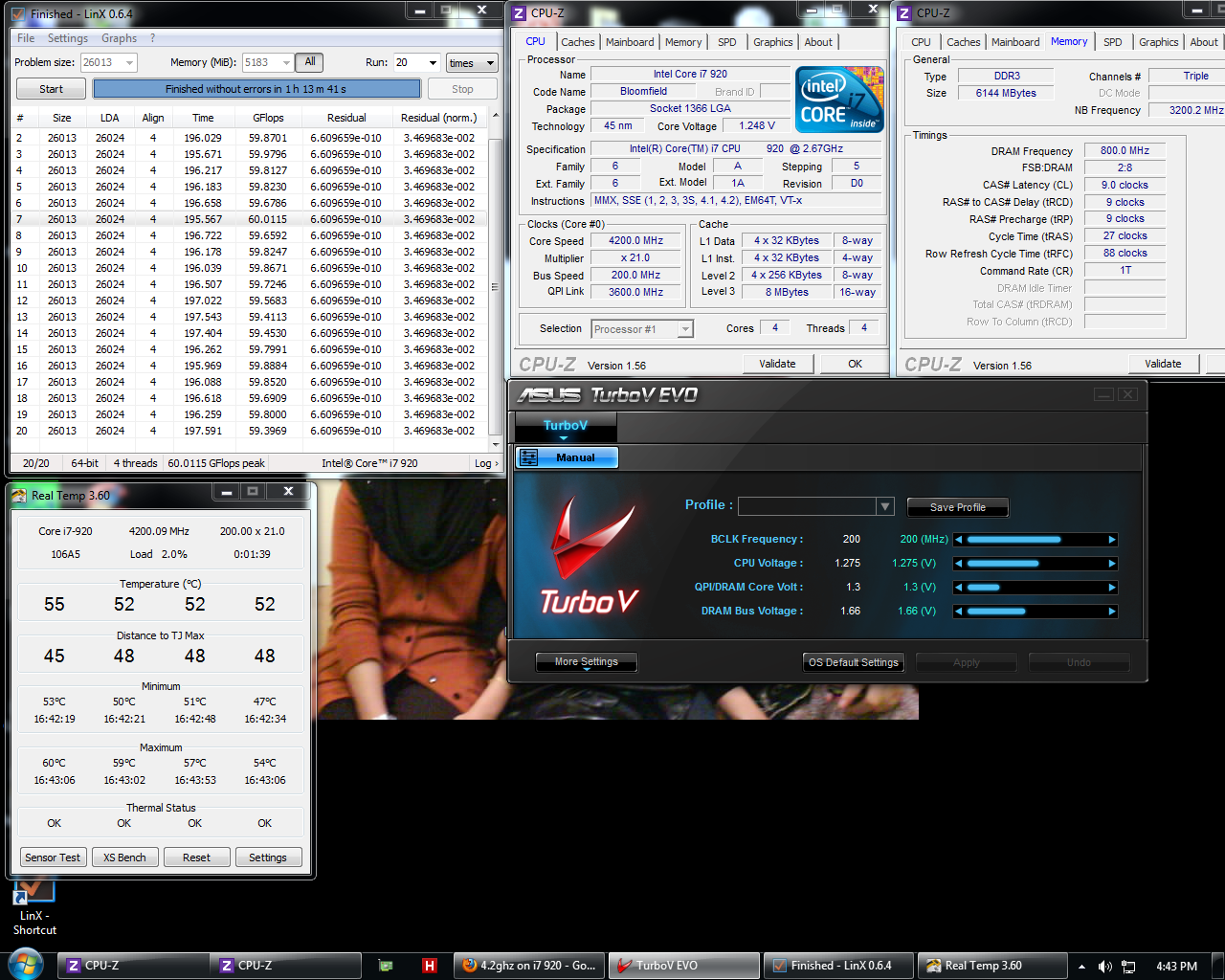
This post has been edited by kolong: Nov 20 2010, 01:17 PM
metsatsu
post Nov 20 2010, 10:52 PM

Chocolate Starfish
Group Icon
VIP
2,510 posts

Joined: Dec 2004
From: Penang Island and Bidor


QUOTE(kolong @ Nov 20 2010, 01:17 PM)
read it sumwhere at XS forum.. hmm.. not sure oso.. any idea wut i shud do if my bclk lock at 205 only?
*
the simplest way for a start would be to further increase your QPI/DRAM core volt. try 1.5V, and see if it works.
kolong
post Nov 21 2010, 07:41 AM

Getting Started
**
Junior Member
78 posts

Joined: Nov 2007
From: Borneo HeadHunterz


orait.. will try dat bro..

p/s: the boring part is burning test.. lazy want to wait.. sweat.gif
TSowikh84
post Nov 21 2010, 09:56 AM

i7 Clan
Group Icon
Elite
8,711 posts

Joined: Nov 2007
From: Butterworth, PG / Machang, Kelantan


QUOTE(kolong @ Nov 20 2010, 01:17 PM)
read it sumwhere at XS forum.. hmm.. not sure oso.. any idea wut i shud do if my bclk lock at 205 only?
*

If not mistaken u're playing with 8X dram and 16X uncore only.
vtt for uncore < 4000mhz should be lower than 1.4v. above this might get BSOD etc..
R3E sucks more vcore for 4.4Ghz core HT off u will need something like 1.4vcore to get it stabled.

kolong
post Nov 21 2010, 09:19 PM

Getting Started
**
Junior Member
78 posts

Joined: Nov 2007
From: Borneo HeadHunterz


QUOTE(owikh84 @ Nov 21 2010, 09:56 AM)
If not mistaken u're playing with 8X dram and 16X uncore only.
vtt for uncore < 4000mhz should be lower than 1.4v. above this might get BSOD etc..
R3E sucks more vcore for 4.4Ghz core HT off u will need something like 1.4vcore to get it stabled.
*
yes... 4.4Ghz sucks more bloody vcore. i noticed dat.

btw guys,here sum tweak a bit..

Attached Image
trepidationmutt
post Nov 26 2010, 06:49 PM

New Member
*
Junior Member
49 posts

Joined: Jun 2010


what maximum safe Vcore for i7 with WC setup?
gn9746203
post Nov 27 2010, 01:45 PM

Casual
***
Junior Member
302 posts

Joined: May 2009
can someone suggest me a pure CPU ONLY benchmark tools or something that show me how much the CPU performance boosted.... I got 3DMarkVantage but I cant stand to wait it run... so long
dblooi
post Dec 1 2010, 10:34 AM

......
******
Senior Member
1,404 posts

Joined: Apr 2006
From: ......


Hey guys,

Sabertooth X58 review up,

http://forum.lowyat.net/topic/1659657

Feel free to comment laugh.gif
kaka_89
post Dec 2 2010, 07:04 PM

Casual
***
Junior Member
470 posts

Joined: Jan 2009
From: JB @ PJ

@mets..

post me you bios set for 4.2g's on 975 EE.. tongue.gif ..

just get my r3e from rma.. sweat.gif ..they replace me a new board.. tongue.gif

This post has been edited by kaka_89: Dec 2 2010, 07:04 PM
metsatsu
post Dec 3 2010, 07:30 AM

Chocolate Starfish
Group Icon
VIP
2,510 posts

Joined: Dec 2004
From: Penang Island and Bidor


QUOTE(kaka_89 @ Dec 2 2010, 07:04 PM)
@mets..

post me you bios set for 4.2g's on 975 EE.. tongue.gif ..

just get my r3e from rma.. sweat.gif ..they replace me a new board.. tongue.gif
*
i have never owned an R3E la sweat.gif
lichyetan
post Dec 3 2010, 09:00 AM

*****
*******
Senior Member
2,295 posts

Joined: Jan 2005
From: Penang


QUOTE(kaka_89 @ Dec 2 2010, 07:04 PM)
@mets..

post me you bios set for 4.2g's on 975 EE.. tongue.gif ..

just get my r3e from rma.. sweat.gif ..they replace me a new board.. tongue.gif
*
what happened to ur r3E ?
kolong
post Dec 3 2010, 01:15 PM

Getting Started
**
Junior Member
78 posts

Joined: Nov 2007
From: Borneo HeadHunterz


mine odw RMA... sad... play zuma use my mum's quaddy pc..
kaka_89
post Dec 4 2010, 02:12 AM

Casual
***
Junior Member
470 posts

Joined: Jan 2009
From: JB @ PJ

QUOTE(lichyetan @ Dec 3 2010, 09:00 AM)
what happened to ur r3E ?
*
rams socket got prob, didn't detect my rams properly, i've slot 3 GB but identify 1gb instead.. sweat.gif .

LAN socket also prob, LED doesn't stop blinking.. hmm.gif

@mets..

i would like to know your CPUV and CPUTvtt on this EE.. wink.gif ..
TSowikh84
post Dec 4 2010, 12:06 PM

i7 Clan
Group Icon
Elite
8,711 posts

Joined: Nov 2007
From: Butterworth, PG / Machang, Kelantan


user posted image
It's not too late before the upcoming Sandy Bridge... laugh.gif
chenhui87
post Dec 8 2010, 09:15 PM

♥Jigeumeun So Nyuh Shi Dae♥
*******
Senior Member
2,150 posts

Joined: Apr 2009
From: 首尔


QUOTE(owikh84 @ Dec 4 2010, 12:06 PM)
user posted image
It's not too late before the upcoming Sandy Bridge...  laugh.gif
*
nice mobo bro, fail to get the EVGA mobo from u for rm500,haizz~~
Sanity
post Dec 8 2010, 10:22 PM

Getting Started
**
Junior Member
289 posts

Joined: Jun 2005
From: Hairy World

» Click to show Spoiler - click again to hide... «


Just curious to know how come my gigaflops is a bit higher than kolong's one when my system spec and OC config is inferior than his?

Attached Image

This post has been edited by Sanity: Dec 8 2010, 10:27 PM
TSowikh84
post Dec 8 2010, 11:38 PM

i7 Clan
Group Icon
Elite
8,711 posts

Joined: Nov 2007
From: Butterworth, PG / Machang, Kelantan


QUOTE(Sanity @ Dec 8 2010, 10:22 PM)
» Click to show Spoiler - click again to hide... «

Just curious to know how come my gigaflops is a bit higher than kolong's one when my system spec and OC config is inferior than his?
*
His HT is turned on - 4cores/8threads.
Explaination
More

This post has been edited by owikh84: Dec 8 2010, 11:40 PM
Sanity
post Dec 8 2010, 11:43 PM

Getting Started
**
Junior Member
289 posts

Joined: Jun 2005
From: Hairy World

QUOTE(owikh84 @ Dec 8 2010, 11:38 PM)
His HT is turned on - 4cores/8threads.
Explaination
More
*
O.o . .thx for da info
TSowikh84
post Dec 12 2010, 06:36 PM

i7 Clan
Group Icon
Elite
8,711 posts

Joined: Nov 2007
From: Butterworth, PG / Machang, Kelantan


higher GFlops. biggrin.gif

i7 920 @ 4.6Ghz, HT off
EVGA Classified3 E770
Corsair DomGT 2000C7 @ 1760Mhz 6-6-6-18-1T
Corsair AX1200W

» Click to show Spoiler - click again to hide... «


This post has been edited by owikh84: Dec 12 2010, 06:37 PM
jerrywan
post Dec 12 2010, 08:55 PM

Casual
***
Junior Member
423 posts

Joined: Jan 2009
From: KL and SeREmban area


guys..i overcloked my i7 930 to 4Gz on asus rampage 3 extreme..
by default,the option for c1e will automatically disable when i go to cpu configuration tab in da bios..
wat happen if i turn on c1e manually?
nothing bad happen?

i noticed that in HWmonitor,my cpu only takes 40.52W if i turn on da c1e option.and it will keep changing between 40.52W to 115.02W if i do some works.

while da CPUz maintainly show 4Ghz at da core speed tab.. unsure.gif
kaka_89
post Dec 12 2010, 10:18 PM

Casual
***
Junior Member
470 posts

Joined: Jan 2009
From: JB @ PJ

@jerrywan

nothing bad will happend if you disable or enable the feature bro..c1e function is quite similar with EIST..it actually protects your cpu from overvoltage..

if you disable the c1e function, it means that the voltage that was supplied to your proc will be maintain...disable c1e function usually does help in oc..that why most people who oc, they disable that function in order to get their desired voltage..
jerrywan
post Dec 12 2010, 11:48 PM

Casual
***
Junior Member
423 posts

Joined: Jan 2009
From: KL and SeREmban area


QUOTE(kaka_89 @ Dec 12 2010, 10:18 PM)
@jerrywan

nothing bad will happend if you disable or enable the feature bro..c1e function is quite similar with EIST..it actually protects your cpu from overvoltage..

if you disable the c1e function, it means that the voltage that was supplied to your proc will be maintain...disable c1e function usually does help in oc..that why most people who oc, they disable that function in order to get their desired voltage..
*
i see..
wat feature do i hv to enable in order when my cpu is idle,then da core speed decrease..
when i play games,da core speed increase..
i dono la wat its name.. rclxub.gif
wat u said is i can just turn all da functions?

TSowikh84
post Dec 13 2010, 06:35 AM

i7 Clan
Group Icon
Elite
8,711 posts

Joined: Nov 2007
From: Butterworth, PG / Machang, Kelantan


QUOTE(jerrywan @ Dec 12 2010, 11:48 PM)
i see..
wat feature do i hv to enable in order when my cpu is idle,then da core speed decrease..
when i play games,da core speed increase..
i dono la wat its name.. rclxub.gif
wat u said is i can just turn all da functions?
*
The feature is Intel SpeedStep Technology (EIST), a power saving feature for lntel processors
it lowers the clockspeed of your CPU when ur system is idle
metsatsu
post Dec 13 2010, 08:28 AM

Chocolate Starfish
Group Icon
VIP
2,510 posts

Joined: Dec 2004
From: Penang Island and Bidor


QUOTE(owikh84 @ Dec 12 2010, 06:36 PM)
higher GFlops.  biggrin.gif

i7 920 @ 4.6Ghz, HT off
EVGA Classified3 E770
Corsair DomGT 2000C7 @ 1760Mhz 6-6-6-18-1T
Corsair AX1200W

» Click to show Spoiler - click again to hide... «

*
unbelivable. is this 920 the same 920 that u have been using before 980x? and where's your 980x?
TSowikh84
post Dec 13 2010, 09:29 AM

i7 Clan
Group Icon
Elite
8,711 posts

Joined: Nov 2007
From: Butterworth, PG / Machang, Kelantan


QUOTE(metsatsu @ Dec 13 2010, 08:28 AM)
unbelivable. is this 920 the same 920 that u have been using before 980x? and where's your 980x?
*
Yes the same 920, but stil couldnt exceed BCLK 220 with this new mobo. I think ive hit its max BCLK at this x21 multi. Can boot 225 but not stable = useless. Might try lower multi. For me, Classified3 = Classified E760 + USB3 + SATA3. My 980X has been sold to someone long2 time ago due to urgent demand. tongue.gif
Waiting for Sandbridge by X-mas as it looked promising...
kolong
post Dec 13 2010, 12:58 PM

Getting Started
**
Junior Member
78 posts

Joined: Nov 2007
From: Borneo HeadHunterz


is sandy bridge available for 1366 socket?
metsatsu
post Dec 13 2010, 01:39 PM

Chocolate Starfish
Group Icon
VIP
2,510 posts

Joined: Dec 2004
From: Penang Island and Bidor


QUOTE(kolong @ Dec 13 2010, 12:58 PM)
is sandy bridge available for 1366 socket?
*
Sandy Bridge is LGA1155. it's a totally different platform

https://forum.lowyat.net/topic/1398704
mengsuan
post Dec 13 2010, 01:58 PM

9W2NNS
Group Icon
Staff
10,459 posts

Joined: Sep 2005
From: Puchong

QUOTE(owikh84 @ Dec 12 2010, 06:36 PM)
higher GFlops.  biggrin.gif

i7 920 @ 4.6Ghz, HT off
EVGA Classified3 E770
Corsair DomGT 2000C7 @ 1760Mhz 6-6-6-18-1T
Corsair AX1200W

» Click to show Spoiler - click again to hide... «

*
Can I bring my i7 920 over to your house and let you clock to things like 4.6GHz? Lol.. Even with CM212+, anything above 4GHz is too hot to handle.
clawhammer
post Dec 13 2010, 02:23 PM

///M
Group Icon
VIP
8,788 posts

Joined: Jan 2003
From: Kuala Lumpur


QUOTE(mengsuan @ Dec 13 2010, 01:58 PM)
Can I bring my i7 920 over to your house and let you clock to things like 4.6GHz? Lol.. Even with CM212+, anything above 4GHz is too hot to handle.
*
Maybe you can get a better HSF from Thermalright or Prolimatech? That should work a bit better but it'll still be around the 80C I believe biggrin.gif
TSowikh84
post Dec 13 2010, 03:00 PM

i7 Clan
Group Icon
Elite
8,711 posts

Joined: Nov 2007
From: Butterworth, PG / Machang, Kelantan


QUOTE(mengsuan @ Dec 13 2010, 01:58 PM)
Can I bring my i7 920 over to your house and let you clock to things like 4.6GHz? Lol.. Even with CM212+, anything above 4GHz is too hot to handle.
*
4.6ghz is imposible for aircooling. The best coud go is 4.3Ghz HT off @ 1.31v touching 88c, with table fab blowing towards pwm

QUOTE(clawhammer @ Dec 13 2010, 02:23 PM)
Maybe you can get a better HSF from Thermalright or Prolimatech? That should work a bit better but it'll still be around the 80C I believe biggrin.gif
*
yes indeed get a better air cooler ie Vernomous-X, Megashadow etc... Or H7O. Above 4.4ghz pls get a custom wc hehe.
clawhammer
post Dec 13 2010, 08:28 PM

///M
Group Icon
VIP
8,788 posts

Joined: Jan 2003
From: Kuala Lumpur


Perhaps we can also explore the good old phase change cooling biggrin.gif If I can get something working, I'd like to have it for my PC laugh.gif That would squeeze another few hundred Mhz more I think?

user posted image
TSowikh84
post Dec 13 2010, 09:56 PM

i7 Clan
Group Icon
Elite
8,711 posts

Joined: Nov 2007
From: Butterworth, PG / Machang, Kelantan


i7 920 @ 4.5Ghz, HT off
EVGA Classified3 E770
Corsair DomGT 2000C7 @ 2150Mhz 8-8-8-24-1T
Corsair AX1200W

» Click to show Spoiler - click again to hide... «


Old E760 board I have to play more with vIOH, but not necessary for this new E770 - pretty much lesser tweaking thumbup.gif


Added on December 14, 2010, 6:26 ami7 920 @ 4.5Ghz, HT off
EVGA Classified3 E770
Corsair DomGT 2000C7 @ 2150Mhz 8-8-8-24-1T
Corsair AX1200W

» Click to show Spoiler - click again to hide... «

optimized abit... biggrin.gif

This post has been edited by owikh84: Dec 14 2010, 06:26 AM
jerrywan
post Dec 15 2010, 08:33 AM

Casual
***
Junior Member
423 posts

Joined: Jan 2009
From: KL and SeREmban area


@owikh

can u show me wat is da bes stting for r3e to get 4Ghz stable with i7 930?
BigSaver
post Dec 15 2010, 04:56 PM

v(^_^)V
******
Senior Member
1,029 posts

Joined: Apr 2008
From: Earth


i7 920 4.2Ghz(21x200) HT off
» Click to show Spoiler - click again to hide... «

Max temp 78c and idle 55c
The RT is the new temp as the temp when linx test was finish TERclose sad.gif
Thanks bro owikh for guiding me.

i7 920 4ghz(20x200) HT off
» Click to show Spoiler - click again to hide... «


smile.gif

TSowikh84
post Dec 15 2010, 07:23 PM

i7 Clan
Group Icon
Elite
8,711 posts

Joined: Nov 2007
From: Butterworth, PG / Machang, Kelantan


QUOTE(jerrywan @ Dec 15 2010, 08:33 AM)
@owikh

can u show me wat is da bes stting for r3e to get 4Ghz stable with i7 930?
*
U might try to ask BigSaver below

QUOTE(BigSaver @ Dec 15 2010, 04:56 PM)
i7 920 4.2Ghz(21x200) HT off
Max temp 78c and idle 55c
The RT is the new temp as the temp when linx test was finish TERclose sad.gif
Thanks bro owikh for guiding me.
i7 920 4ghz(20x200) HT off smile.gif
*

Well done mate, finally. woot Golden batch spotted 3849B056 thumbup.gif
The temps still allow u to clock higher.
jerrywan
post Dec 15 2010, 08:14 PM

Casual
***
Junior Member
423 posts

Joined: Jan 2009
From: KL and SeREmban area


wahh..he actualy can do 1.20v for vcore??
metsatsu
post Dec 15 2010, 11:33 PM

Chocolate Starfish
Group Icon
VIP
2,510 posts

Joined: Dec 2004
From: Penang Island and Bidor


QUOTE(jerrywan @ Dec 15 2010, 08:14 PM)
wahh..he actualy can do 1.20v for vcore??
*
for that batch, it's a piece of cake for 4ghz. but still not sure if the IMC is good. Coz I owned one before

@Bigsaver
what ram ur using? if it's capable of doing 2000mhz, please try to run it with 4ghz uncore and see if u can pass prime95 5.4gb
jerrywan
post Dec 15 2010, 11:52 PM

Casual
***
Junior Member
423 posts

Joined: Jan 2009
From: KL and SeREmban area


da more uncore frequency,more score for benchmarking?
BigSaver
post Dec 16 2010, 01:26 AM

v(^_^)V
******
Senior Member
1,029 posts

Joined: Apr 2008
From: Earth


QUOTE(metsatsu @ Dec 15 2010, 11:33 PM)
for that batch, it's a piece of cake for 4ghz. but still not sure if the IMC is good. Coz I owned one before

@Bigsaver
what ram ur using? if it's capable of doing 2000mhz, please try to run it with 4ghz uncore and see if u can pass prime95 5.4gb
*
Right only using kvr sad.gif still no fund to grab 2k ram and play uncore.
btw this proc was belong to u.. tongue.gif
TSowikh84
post Dec 16 2010, 07:00 AM

i7 Clan
Group Icon
Elite
8,711 posts

Joined: Nov 2007
From: Butterworth, PG / Machang, Kelantan


QUOTE(jerrywan @ Dec 15 2010, 11:52 PM)
da more uncore frequency,more score for benchmarking?
*
Some memory intensive applications will benefit more from a faster uncore, roughly 3% I'd say but may vary from app to app.
3DMark is one of them.

QUOTE(BigSaver @ Dec 16 2010, 01:26 AM)
Right only using kvr sad.gif still no fund to grab 2k ram and play uncore.
btw this proc was belong to u.. tongue.gif
*

Get a Corsair DomGT 2C8-9-8 for RM8XX only right now
On the other hand, my Elpida kit is still doing great and kicking in my rig

Just to share for those Elpida collectors..
List of some Elpida kits from Super Talent
Note that their 2000C7 is better than my DomGT 2000C7 in timing specifically tRCD
7-7-7-21 vs mine 7-8-7-20.. Anyway it's been reported (confirmed) that Elpida chips will die (degrading) after some time, likely a time bomb. It is disappearing from the market.


Added on December 16, 2010, 7:58 am
QUOTE(jerrywan @ Dec 15 2010, 08:33 AM)
@owikh

can u show me wat is da bes stting for r3e to get 4Ghz stable with i7 930?
*
Perhaps u might wanna give it a try.
Rampage3 Formula

This post has been edited by owikh84: Dec 16 2010, 07:58 AM
jerrywan
post Dec 16 2010, 08:34 AM

Casual
***
Junior Member
423 posts

Joined: Jan 2009
From: KL and SeREmban area


surely ill give it try..^^
thnx btw~
TSowikh84
post Dec 18 2010, 07:50 AM

i7 Clan
Group Icon
Elite
8,711 posts

Joined: Nov 2007
From: Butterworth, PG / Machang, Kelantan


i7 920 @ 4.5Ghz, HT ON (4C/8T)
EVGA Classified3 E770
Corsair DomGT 2000C7 @ 2150Mhz 8-8-8-24-1T
Corsair AX1200W
» Click to show Spoiler - click again to hide... «

metsatsu
post Dec 18 2010, 09:21 PM

Chocolate Starfish
Group Icon
VIP
2,510 posts

Joined: Dec 2004
From: Penang Island and Bidor


QUOTE(owikh84 @ Dec 16 2010, 07:00 AM)
Some memory intensive applications will benefit more from a faster uncore, roughly 3% I'd say but may vary from app to app.
3DMark is one of them.
Get a Corsair DomGT 2C8-9-8 for RM8XX only right now
On the other hand, my Elpida kit is still doing great and kicking in my rig

Just to share for those Elpida collectors..
List of some Elpida kits from Super Talent
Note that their 2000C7 is better than my DomGT 2000C7 in timing specifically tRCD
7-7-7-21 vs mine 7-8-7-20.. Anyway it's been reported (confirmed) that Elpida chips will die (degrading) after some time, likely a time bomb. It is disappearing from the market.


Added on December 16, 2010, 7:58 am
Perhaps u might wanna give it a try.
Rampage3 Formula
*
yeah speaking of that my DOM GT 2000C7 has finally succumbed to the elpida fate of death. Have no choice but to get myself a new set of 2000C8 now instead sad.gif
monsh
post Dec 19 2010, 12:15 AM

Let's Change The World !
*******
Senior Member
4,196 posts

Joined: Oct 2007


guys, is it ok to run d dom gt without the fan ?
im using d new rev7.1 dom gt 2k 8-9-8-24-1n 1.65v
cstkl1 reported able to run XMP profile at 1.5v
might try for 2k cl7 at 1.6v .

d question is it ok not to have active cooling cause my tubing right now is blocking d fan .
cannot attach them .
jerrywan
post Dec 19 2010, 08:04 PM

Casual
***
Junior Member
423 posts

Joined: Jan 2009
From: KL and SeREmban area


mosh..later taech me how to oc da RAMs..since we r in da same university..^^
kaka_89
post Dec 19 2010, 09:09 PM

Casual
***
Junior Member
470 posts

Joined: Jan 2009
From: JB @ PJ

QUOTE(monsh @ Dec 19 2010, 12:15 AM)
guys, is it ok to run d dom gt without the fan ?
im using d new rev7.1 dom gt 2k 8-9-8-24-1n 1.65v
cstkl1 reported able to run XMP profile at 1.5v
might try for 2k cl7 at 1.6v .

d question is it ok not to have active cooling cause my tubing right now is blocking d fan .
cannot attach them .
*
i think is okay la bro..my ordinary 1600cl8 dom runs at 1866 without fan.. tongue.gif ..vdimm at 1.66v.. nod.gif ..
monsh
post Dec 20 2010, 01:21 AM

Let's Change The World !
*******
Senior Member
4,196 posts

Joined: Oct 2007


@jerrywan

Im suck at it .

Btw, thx 4 d info guys .
TSowikh84
post Dec 20 2010, 06:56 AM

i7 Clan
Group Icon
Elite
8,711 posts

Joined: Nov 2007
From: Butterworth, PG / Machang, Kelantan


QUOTE(monsh @ Dec 19 2010, 12:15 AM)
guys, is it ok to run d dom gt without the fan ?
im using d new rev7.1 dom gt 2k 8-9-8-24-1n 1.65v
cstkl1 reported able to run XMP profile at 1.5v
might try for 2k cl7 at 1.6v .

d question is it ok not to have active cooling cause my tubing right now is blocking d fan .
cannot attach them .
*
U might wanna try tighten timings:
7-9-7-24-72-1T, 1.56v
6-9-6-24-72-1T, 1.66v
No need active cooling unless u go insane vdimm ie over 1.8v
1.7v+ is still safe and cool, avoid noise pollution
monsh
post Dec 20 2010, 12:25 PM

Let's Change The World !
*******
Senior Member
4,196 posts

Joined: Oct 2007


what's d pattern of this PSC chipset actually ?
does it favor x-x+2-x timing ?

well my PC is not gonna boot up for at least another 2 weeks .
going for full mod and bitspower block coming in for my r3e ^^,
guestx
post Dec 20 2010, 07:53 PM

On my way
****
Senior Member
526 posts

Joined: Jan 2003
From: 私の孤独な家


is't normal to get full load temperature at around 96c ?
trepidationmutt
post Dec 20 2010, 08:39 PM

New Member
*
Junior Member
49 posts

Joined: Jun 2010


Vcore 1.39v for 4.4Ghz is it normal?..wat max Vcore for wc setup?
BigSaver
post Dec 20 2010, 08:45 PM

v(^_^)V
******
Senior Member
1,029 posts

Joined: Apr 2008
From: Earth


QUOTE(guestx @ Dec 20 2010, 07:53 PM)
is't normal to get full load temperature at around 96c ?
*
Ur PnP on VenoX still can get 96c?its not normal..
What ur proc speed anyway?and vcore?

QUOTE(trepidationmutt @ Dec 20 2010, 08:39 PM)
Vcore 1.39v for 4.4Ghz is it normal?..wat max Vcore for wc setup?
*
Bro owikh84 can achieve 4.5ghz using 1.388..i guess its normal for that speed.
guestx
post Dec 20 2010, 10:24 PM

On my way
****
Senior Member
526 posts

Joined: Jan 2003
From: 私の孤独な家


QUOTE(BigSaver @ Dec 20 2010, 08:45 PM)
Ur PnP on VenoX still can get 96c?its not normal..
What ur proc speed anyway?and vcore?
Bro owikh84 can achieve 4.5ghz using 1.388..i guess its normal for that speed.
*
Vcore 1.48v ..Speed only 4Ghz
TSowikh84
post Dec 20 2010, 10:30 PM

i7 Clan
Group Icon
Elite
8,711 posts

Joined: Nov 2007
From: Butterworth, PG / Machang, Kelantan


QUOTE(guestx @ Dec 20 2010, 10:24 PM)
Vcore 1.48v ..Speed only 4Ghz
*
OMG ur D0 doesnt really need that much
For 4Ghz HT the best juice is 1.25v only. HT off is even lower.
guestx
post Dec 20 2010, 10:33 PM

On my way
****
Senior Member
526 posts

Joined: Jan 2003
From: 私の孤独な家


QUOTE(owikh84 @ Dec 20 2010, 10:30 PM)
OMG ur D0 doesnt really need that much
For 4Ghz HT the best juice is 1.25v only. HT off is even lower.
*
ok will try.beginner here biggrin.gif
monsh
post Dec 21 2010, 11:47 PM

Let's Change The World !
*******
Senior Member
4,196 posts

Joined: Oct 2007


slow2 la bro .
dont push ur vCore too much .
96 is almost at its limit .
TSowikh84
post Dec 21 2010, 11:47 PM

i7 Clan
Group Icon
Elite
8,711 posts

Joined: Nov 2007
From: Butterworth, PG / Machang, Kelantan


i7 920 @ 4.6Ghz, HT OFF (4C/4T)
EVGA Classified3 E770, uncore 4400Mhz
Corsair DomGT 2000C7 @ 2200Mhz 8-8-8-24-1T
Corsair AX1200W

» Click to show Spoiler - click again to hide... «


» Click to show Spoiler - click again to hide... «


Added on December 23, 2010, 6:26 ami7 920 @ 4.662Ghz (222x21), HT OFF (4C/4T)
EVGA Classified3 E770, uncore 4440Mhz
Corsair DomGT 2000C7 @ 2220Mhz 8-8-8-24-1T
Corsair AX1200W

» Click to show Spoiler - click again to hide... «


This post has been edited by owikh84: Dec 23 2010, 06:27 AM
mick10
post Dec 23 2010, 12:27 PM

New Member
*
Junior Member
11 posts

Joined: Mar 2010


Need Help!having problem with my OC. stable for dekstop use but BSOD during gaming.bsod like 1 minute into gaming.usually BSOD 124 or 101 i think

here is bios setting
» Click to show Spoiler - click again to hide... «
TSowikh84
post Dec 23 2010, 01:50 PM

i7 Clan
Group Icon
Elite
8,711 posts

Joined: Nov 2007
From: Butterworth, PG / Machang, Kelantan


Do u rilly need tat much voltage for 4GHz? With that insane vcore for sure will overheat. Try this.

» Click to show Spoiler - click again to hide... «


This post has been edited by owikh84: Dec 24 2010, 06:29 AM
mick10
post Dec 23 2010, 06:10 PM

New Member
*
Junior Member
11 posts

Joined: Mar 2010


will try..

thx
metsatsu
post Dec 24 2010, 12:22 AM

Chocolate Starfish
Group Icon
VIP
2,510 posts

Joined: Dec 2004
From: Penang Island and Bidor


hey kevin, what's the min size for prime95 custom blend again? i remember cstkl1 mentioned it's not 8k
TSowikh84
post Dec 24 2010, 06:26 AM

i7 Clan
Group Icon
Elite
8,711 posts

Joined: Nov 2007
From: Butterworth, PG / Machang, Kelantan


QUOTE(metsatsu @ Dec 24 2010, 12:22 AM)
hey kevin, what's the min size for prime95 custom blend again? i remember cstkl1 mentioned it's not 8k
*
min fft 128k max fft 4096k
got new ram kit liao?
metsatsu
post Dec 24 2010, 07:54 AM

Chocolate Starfish
Group Icon
VIP
2,510 posts

Joined: Dec 2004
From: Penang Island and Bidor


QUOTE(owikh84 @ Dec 24 2010, 06:26 AM)
min fft 128k max fft 4096k
got new ram kit liao?
*
oh 128k eh, i went ahead with 8k and lol wtf. the guru can even sense when ppl got a new kit. yes you're right, got myself a new Corsair CMT6GX3M3A2000C8 kit and guess what.....?

i7 975 @ 4.2Ghz, HT ON
EVGA Classified3 E760, uncore 4000Mhz
Corsair Dominator GT 2000mhz 8-9-8-24-1T @ 2000Mhz 8-9-8-24-1T
Corsair HX1000W

» Click to show Spoiler - click again to hide... «


Never for once I can achieve such stability. The GT 2000C7 that I had was FAULTY ALL THE WHILE! shocking.gif
Now my rig feels like it's ALIVE AGAIN!! gonna try to play with more timings in the next few days biggrin.gif

This post has been edited by metsatsu: Dec 24 2010, 07:55 AM
TSowikh84
post Dec 24 2010, 09:18 AM

i7 Clan
Group Icon
Elite
8,711 posts

Joined: Nov 2007
From: Butterworth, PG / Machang, Kelantan


Good job mets. u shouldnt sell ur goldy last time. Goodbye to ur Elpida lol.
My 2kC7 can smell the graveyard yet, hopefully at least until next year huhu.
Meanwhile I managed to pump more vtt with E770. My last E760 was capped at 1.525v only, hence now can do uncore more than 4.4Ghz @ dram 2200cl8. But gtx580 SLI doesnt seem to allow me to play with PCIE clock more than 100mhz, one of the gc will disappear at PCIE 110. While i need this to do stabilty at 4.6GHz core. Hmm mem low gap is set to 2GB.
metsatsu
post Dec 24 2010, 09:30 AM

Chocolate Starfish
Group Icon
VIP
2,510 posts

Joined: Dec 2004
From: Penang Island and Bidor


Hhmm.... I thought about that too.... apparently yuanbao still has it... do u seriously think the IMC and the core correlate similarly when it comes to the voltages. last time when I still had my 1600c7 GT, it just couldn't do uncore 4k, so I thought it could be a crappy ram. then I changed to that faulty 2000c7 and same thing happened. So i'm not sure whether if it's procs fault or the ram's fault at that time. but now i know for sure that the 2000c7 was faulty. but how would we explain on 1600c7? maybe it just simply can't do 2000mhz dimm?

Alvin currently owns the 1600c7 ram i mentioned, not sure whether if he has actually tested it extensively. hopefully he can come in and clear things up a bit.

I saw cstkl1's posts on this CMT6GX3M3A2000C8 in extremesys. what it's capable of doing is pretty good. btw, I noticed that my 975 can do 4k uncore @ VTT 1.375v. tried 1.35v it will BSOD in 20 minutes. for that VTT i would say it's pretty good yeah?


Added on December 24, 2010, 9:44 amcorrection. that 920 was sold to bigsaver


Added on December 24, 2010, 9:47 am
QUOTE(BigSaver @ Dec 16 2010, 01:26 AM)
Right only using kvr sad.gif still no fund to grab 2k ram and play uncore.
btw this proc was belong to u.. tongue.gif
*
lol now i know i owned this before! shocking.gif

This post has been edited by metsatsu: Dec 24 2010, 09:47 AM
TSowikh84
post Dec 24 2010, 10:46 AM

i7 Clan
Group Icon
Elite
8,711 posts

Joined: Nov 2007
From: Butterworth, PG / Machang, Kelantan


QUOTE(metsatsu @ Dec 24 2010, 09:30 AM)
Hhmm.... I thought about that too.... apparently yuanbao still has it... do u seriously think the IMC and the core correlate similarly when it comes to the voltages. last time when I still had my 1600c7 GT, it just couldn't do uncore 4k, so I thought it could be a crappy ram. then I changed to that faulty 2000c7 and same thing happened. So i'm not sure whether if it's procs fault or the ram's fault at that time. but now i know for sure that the 2000c7 was faulty. but how would we explain on 1600c7? maybe it just simply can't do 2000mhz dimm?

Alvin currently owns the 1600c7 ram i mentioned, not sure whether if he has actually tested it extensively. hopefully he can come in and clear things up a bit.

I saw cstkl1's posts on this CMT6GX3M3A2000C8 in extremesys. what it's capable of doing is pretty good. btw, I noticed that my 975 can do 4k uncore @ VTT 1.375v. tried 1.35v it will BSOD in 20 minutes. for that VTT i would say it's pretty good yeah?


Added on December 24, 2010, 9:44 amcorrection. that 920 was sold to bigsaver


Added on December 24, 2010, 9:47 am

lol now i know i owned this before! shocking.gif
*
Core, uncore, dram all related to voltages bro
Core is linear to voltage whilst Uncore reacts exponentially to vtt.
For me all D0 could do uncore 4ghz easily due to better IMC vs C0/1. Just that u hv to choose the correct vtt.
Ur 1600C7 should be able to do 2000C9 with higher vdimm and loosen timings.


mick10
post Dec 24 2010, 08:29 PM

New Member
*
Junior Member
11 posts

Joined: Mar 2010


QUOTE(owikh84 @ Dec 23 2010, 01:50 PM)
Do u rilly need tat much voltage for 4GHz? With that insane vcore for sure will overheat.  Try this.

» Click to show Spoiler - click again to hide... «

*
I cant boot up.any to tweak?
TSowikh84
post Dec 25 2010, 12:27 AM

i7 Clan
Group Icon
Elite
8,711 posts

Joined: Nov 2007
From: Butterworth, PG / Machang, Kelantan


QUOTE(mick10 @ Dec 24 2010, 08:29 PM)
I cant boot up.any to tweak?
*
did u try XMP1 profile in mem settings? Try disable HT 1st
metsatsu
post Dec 25 2010, 11:45 AM

Chocolate Starfish
Group Icon
VIP
2,510 posts

Joined: Dec 2004
From: Penang Island and Bidor


i7 975 @ 4.2Ghz, HT ON
EVGA Classified3 E760, uncore 4000Mhz
Corsair Dominator GT 2000mhz 8-9-8-24-1T @ 2000Mhz 7-9-7-27-1T
Corsair HX1000W
Prime95 Custom 5.4Gb blend (min fft 128k max fft 4096k)

» Click to show Spoiler - click again to hide... «


This kit doesn't seem to like 8-8-8-20 or 7-8-7-20, it won't even boot. Tried 7-9-7-24, surprisingly it ran prime95 for a while, but BSOD in within couple of hours. hopefully by loosening the tRAS will allow me to pass 8hrs. off to RMA my elpida now sad.gif

Updated after 7 hrs:

» Click to show Spoiler - click again to hide... «


This post has been edited by metsatsu: Dec 25 2010, 05:11 PM
TSowikh84
post Dec 25 2010, 06:44 PM

i7 Clan
Group Icon
Elite
8,711 posts

Joined: Nov 2007
From: Butterworth, PG / Machang, Kelantan


Holy great PSC kit u got there.. I believe it also shows better bandwidth over Hypers. Ur current setup looked fine for BLCK 215 hhaa...
zhafri_abdullah
post Dec 27 2010, 11:13 AM

Getting Started
**
Junior Member
75 posts

Joined: Sep 2009
From: Shah Alam, Selangor


Guys if u dont mind me asking..
Whats your take on the Sabertooth X58..?
I mean compared with the Rampage and Classified and stuff..
In terms of CPU overclocking and memory support..?

Almost bought a Rampage the other day.. But i thought i 'd do
some research first.. smile.gif
TSowikh84
post Dec 27 2010, 12:55 PM

i7 Clan
Group Icon
Elite
8,711 posts

Joined: Nov 2007
From: Butterworth, PG / Machang, Kelantan


QUOTE(zhafri_abdullah @ Dec 27 2010, 11:13 AM)
Guys if u dont mind me asking..
Whats your take on the Sabertooth X58..?
I mean compared with the Rampage and Classified and stuff..
In terms of CPU overclocking and memory support..?

Almost bought a Rampage the other day.. But i thought i 'd do
some research first.. smile.gif
*
For sure R3E is better than Saberbooth. TUF designed Saber is built for extreme heat n cooling. U might also consider r3formula which is as good as R3E. I like its TurboV, looked quite informative than the R3E.
Asus wont b that stupid enuf in pricing.
Classy wins in Mem oc amongst these boards. On top of that, Gulftown seems to prefer R3E than Classy. But i had hard time playing R3E bios than Classy. maybe im more familiar with Awards bios like what Classy n DFI are using lol.
kolong
post Dec 27 2010, 07:54 PM

Getting Started
**
Junior Member
78 posts

Joined: Nov 2007
From: Borneo HeadHunterz


hi guys.. y my linx finished before 20 loops? is there any error or my linx getting lazy? rclxub.gif rclxub.gif

Attached Image

plz help.. unsure.gif
TSowikh84
post Dec 27 2010, 10:11 PM

i7 Clan
Group Icon
Elite
8,711 posts

Joined: Nov 2007
From: Butterworth, PG / Machang, Kelantan


means ur OC failed with bad bios settings
need to see CPU tweaker for mem timings and voltage in TurboV
kolong
post Dec 27 2010, 10:46 PM

Getting Started
**
Junior Member
78 posts

Joined: Nov 2007
From: Borneo HeadHunterz


yerp.. running p95 n BSOD. up my Vqpi n stable linx 20 loops.. rclxms.gif

Attached Image


Boomeraangkid
post Dec 27 2010, 11:03 PM

Behind You
*******
Senior Member
2,696 posts

Joined: Nov 2007
From: forum.lowyat.net


QUOTE(kolong @ Dec 27 2010, 10:46 PM)
yerp.. running p95 n BSOD. up my Vqpi n stable linx 20 loops..  rclxms.gif

Attached Image
*
safer to do it this way or thru the BIOS?
kolong
post Dec 27 2010, 11:04 PM

Getting Started
**
Junior Member
78 posts

Joined: Nov 2007
From: Borneo HeadHunterz


erm..i set it on bios. turbov jz to show the voltage dat i used..
Boomeraangkid
post Dec 27 2010, 11:05 PM

Behind You
*******
Senior Member
2,696 posts

Joined: Nov 2007
From: forum.lowyat.net


but wait, turboV is just for your mobo? or my x58 can use also? i've been wanting to increase my cpu speed to 3.6ghz, but im scared i'll bust my cpu.
kolong
post Dec 27 2010, 11:11 PM

Getting Started
**
Junior Member
78 posts

Joined: Nov 2007
From: Borneo HeadHunterz


QUOTE(Boomeraangkid @ Dec 27 2010, 11:05 PM)
but wait, turboV is just for your mobo? or my x58 can use also? i've been wanting to increase my cpu speed to 3.6ghz, but im scared i'll bust my cpu.
*
turboV come with mobo driver cd if im not mistaken.. not sure bout urs.. icon_rolleyes.gif
Boomeraangkid
post Dec 27 2010, 11:13 PM

Behind You
*******
Senior Member
2,696 posts

Joined: Nov 2007
From: forum.lowyat.net


QUOTE(kolong @ Dec 27 2010, 11:11 PM)
turboV come with mobo driver cd if im not mistaken..  not sure bout urs.. icon_rolleyes.gif
*
btw if i oc my i7 950 till 3.6ghz, will it like take extra juice from my PSU? i only have a CM Silent M Pro700W. and i have 2x1GB NGTX460. what settings do you change in the BIOS?
kolong
post Dec 27 2010, 11:19 PM

Getting Started
**
Junior Member
78 posts

Joined: Nov 2007
From: Borneo HeadHunterz


post ur setting.. let the sifu ere c wut u hv done n dey will give u idea to work out 3.6 or even 4Ghz.. cool2.gif

u juz copy bios template from page 1: post #4..
gn9746203
post Dec 27 2010, 11:44 PM

Casual
***
Junior Member
302 posts

Joined: May 2009
QUOTE(Boomeraangkid @ Dec 27 2010, 11:05 PM)
but wait, turboV is just for your mobo? or my x58 can use also? i've been wanting to increase my cpu speed to 3.6ghz, but im scared i'll bust my cpu.
*
i7 950 to 3.6 is easy .... i am using cm gx 750w and currently running at 3.7 with nice temp .... still working to across 3.8 cause I am at newbie overclocker also ~ 3.8 is a gap for me need to config a lot of thing which i am not good enough to do it
Boomeraangkid
post Dec 28 2010, 11:17 AM

Behind You
*******
Senior Member
2,696 posts

Joined: Nov 2007
From: forum.lowyat.net


what bios template can i refer to for my Sabertooth?
TSowikh84
post Dec 29 2010, 06:33 AM

i7 Clan
Group Icon
Elite
8,711 posts

Joined: Nov 2007
From: Butterworth, PG / Machang, Kelantan


QUOTE(Boomeraangkid @ Dec 28 2010, 11:17 AM)
what bios template can i refer to for my Sabertooth?
*
dug out from google for reference only.
» Click to show Spoiler - click again to hide... «

kolong
post Dec 30 2010, 06:59 AM

Getting Started
**
Junior Member
78 posts

Joined: Nov 2007
From: Borneo HeadHunterz


my Dom cant go stable with 2k @ C8 n 9.. sad.gif like old days,we know D9XXX is the best.. do we have Geil distributer or seller or retailer here? Are Geil ram good?
metsatsu
post Dec 30 2010, 07:34 AM

Chocolate Starfish
Group Icon
VIP
2,510 posts

Joined: Dec 2004
From: Penang Island and Bidor


QUOTE(kolong @ Dec 30 2010, 06:59 AM)
my Dom cant go stable with 2k @ C8 n 9..  sad.gif like old days,we know D9XXX is the best.. do we have Geil distributer or seller or retailer here? Are Geil ram good?
*
There's a high chance that it could be due to your ram. mind to list our bios setting?
BigSaver
post Dec 30 2010, 09:40 AM

v(^_^)V
******
Senior Member
1,029 posts

Joined: Apr 2008
From: Earth


QUOTE(metsatsu @ Dec 24 2010, 09:30 AM)

lol now i know i owned this before! shocking.gif
*
Doing fine with 4.2ghz now thumbup.gif
Just now my IOH temp go crazy ,so not very dare to push more unless find suitable cooling solution for it.

QUOTE(kolong @ Dec 30 2010, 06:59 AM)
my Dom cant go stable with 2k @ C8 n 9..  sad.gif like old days,we know D9XXX is the best.. do we have Geil distributer or seller or retailer here? Are Geil ram good?
*
Google up and find most of review mention this kit can go stable at 1900mhz only.
time to change thumbup.gif
kolong
post Dec 30 2010, 01:47 PM

Getting Started
**
Junior Member
78 posts

Joined: Nov 2007
From: Borneo HeadHunterz


QUOTE(BigSaver @ Dec 30 2010, 09:40 AM)
Doing fine with 4.2ghz now thumbup.gif
Just now my IOH temp go crazy ,so not very dare to push more unless find suitable cooling solution for it.
Google up and find most of review mention this kit can go stable at 1900mhz only.
time to change thumbup.gif
*
u got nice chip bos from nice sifu.. 1900mhz? hmm.gif will try again later..
trepidationmutt
post Dec 30 2010, 08:38 PM

New Member
*
Junior Member
49 posts

Joined: Jun 2010


why p6t se manual OC Vcore cant 1.4+?..it is need to change jumper??..
but auto setting can get 1.45v...
even disable HT and uncore same also cant..
monsh
post Jan 1 2011, 05:10 AM

Let's Change The World !
*******
Senior Member
4,196 posts

Joined: Oct 2007


i gotta finish up my project ASAP and start clocking back .
d r3e been sleeping for quite some time already .
hopefully no leak on my new block .
will definitely try out for 4.2k uncore this time ^^,
no more worry for crazy temp on mosfet .
TSowikh84
post Jan 1 2011, 08:53 AM

i7 Clan
Group Icon
Elite
8,711 posts

Joined: Nov 2007
From: Butterworth, PG / Machang, Kelantan


QUOTE(trepidationmutt @ Dec 30 2010, 08:38 PM)
why p6t se manual OC Vcore cant 1.4+?..it is need to change jumper??..
but auto setting can get 1.45v...
even disable HT and uncore same also cant..
*
That means u need a better board tongue.gif

QUOTE(monsh @ Jan 1 2011, 05:10 AM)
i gotta finish up my project ASAP and start clocking back .
d r3e been sleeping for quite some time already .
hopefully no leak on my new block .
will definitely try out for 4.2k uncore this time ^^,
no more worry for crazy temp on mosfet .
*
Com'on let's finish it asap and break it to the limit.
Make sure that all the fittings sit tightly and conduct a leak test before running this RMA prone mobo.

Just to share something which Classy3 and DomGT could boot:D
» Click to show Spoiler - click again to hide... «


This post has been edited by owikh84: Jan 1 2011, 09:07 AM
metsatsu
post Jan 1 2011, 10:20 AM

Chocolate Starfish
Group Icon
VIP
2,510 posts

Joined: Dec 2004
From: Penang Island and Bidor


not too much of diff between 1760 C6 and 2200 C7 in terms of super Pi 1M score eh....
TSowikh84
post Jan 1 2011, 10:51 AM

i7 Clan
Group Icon
Elite
8,711 posts

Joined: Nov 2007
From: Butterworth, PG / Machang, Kelantan


QUOTE(metsatsu @ Jan 1 2011, 10:20 AM)
not too much of diff between 1760 C6 and 2200 C7 in terms of super Pi 1M score eh....
*
Gotta do with the latency, although higher bandwidth doesn't really boost the score.
Actually the 0.09s improvement is great for Pi 1M. I believe can do better with some tweaks and tricks tongue.gif
Well I'm quite happy with how Classy3 can do what my old Classy was unable to do due to capped VTT @ 1.525v
Another thing is Classy3 has the latest X58 chipset rev. 22.
kolong
post Jan 1 2011, 02:23 PM

Getting Started
**
Junior Member
78 posts

Joined: Nov 2007
From: Borneo HeadHunterz


nice clock bro owikh.. u hv nice ram kit.. i need to change my turbo kit.. im still tame my beast to play wif 4.4 @ 1.381v.. cant wait for my full r3e block come next week..
monsh
post Jan 1 2011, 10:26 PM

Let's Change The World !
*******
Senior Member
4,196 posts

Joined: Oct 2007


@owikh84

chill dude, im waiting for ronmodz to finish up my casing then its definitely clocking time.

btw have u tried d new PSC chipset dom gt 2k c8 ?
wanna know its performance .
cstkl1 reported its comparable to 2k c7 with a lil bit looser timing .

This post has been edited by monsh: Jan 1 2011, 10:31 PM
TSowikh84
post Jan 1 2011, 10:49 PM

i7 Clan
Group Icon
Elite
8,711 posts

Joined: Nov 2007
From: Butterworth, PG / Machang, Kelantan


QUOTE(monsh @ Jan 1 2011, 10:26 PM)
@owikh84

chill dude, im waiting for ronmodz to finish up my casing then its definitely clocking time.

btw have u tried d new PSC chipset dom gt 2k c8 ?
wanna know its performance .
cstkl1 reported its comparable to 2k c7 with a lil bit looser timing .
*
Comparable but still not better than Elpida, Lower tRCD = win.
Haven't got a chance to try out DomGT 2k 8-9-8
I'm looking for Elpida-based SuperTalent 2200C8 hehehe...
metsatsu
post Jan 1 2011, 11:40 PM

Chocolate Starfish
Group Icon
VIP
2,510 posts

Joined: Dec 2004
From: Penang Island and Bidor


QUOTE(owikh84 @ Jan 1 2011, 10:49 PM)
Comparable but still not better than Elpida, Lower tRCD = win.
Haven't got a chance to try out DomGT 2k 8-9-8
I'm looking for Elpida-based SuperTalent 2200C8 hehehe...
*
hey wanna swap? lol. try try for a few weeks brows.gif
TSowikh84
post Jan 2 2011, 08:41 AM

i7 Clan
Group Icon
Elite
8,711 posts

Joined: Nov 2007
From: Butterworth, PG / Machang, Kelantan


QUOTE(metsatsu @ Jan 1 2011, 11:40 PM)
hey wanna swap? lol. try try for a few weeks brows.gif
*
lol. Thanks for the offer but I just don't want anything happen to ur ram later. haha tongue.gif
monsh
post Jan 2 2011, 10:59 AM

Let's Change The World !
*******
Senior Member
4,196 posts

Joined: Oct 2007


is it possible to do 1600 c5 on that dom gt 2k c7 ?
TSowikh84
post Jan 2 2011, 11:14 AM

i7 Clan
Group Icon
Elite
8,711 posts

Joined: Nov 2007
From: Butterworth, PG / Machang, Kelantan


QUOTE(monsh @ Jan 2 2011, 10:59 AM)
is it possible to do 1600 c5 on that dom gt 2k c7 ?
*
on my 1st attempt it failed to boot, then didn't go for another try already. tongue.gif

This post has been edited by owikh84: Jan 2 2011, 11:15 AM
monsh
post Jan 2 2011, 11:25 AM

Let's Change The World !
*******
Senior Member
4,196 posts

Joined: Oct 2007


at what voltage u failed ?
did u try 1.7v ?
TSowikh84
post Jan 2 2011, 01:01 PM

i7 Clan
Group Icon
Elite
8,711 posts

Joined: Nov 2007
From: Butterworth, PG / Machang, Kelantan


QUOTE(monsh @ Jan 2 2011, 11:25 AM)
at what voltage u failed ?
did u try 1.7v ?
*
1600 5-6-5 is bootable at 1.7v
but 1600 5-5-5 wont post even at 1.8v
anyway 1600 6-6-6 still performs the best in Pi nod.gif
metsatsu
post Jan 2 2011, 01:43 PM

Chocolate Starfish
Group Icon
VIP
2,510 posts

Joined: Dec 2004
From: Penang Island and Bidor


maybe if u raise the trcd to 7, it might work?

This post has been edited by metsatsu: Jan 2 2011, 01:45 PM
monsh
post Jan 2 2011, 01:48 PM

Let's Change The World !
*******
Senior Member
4,196 posts

Joined: Oct 2007


erm, dat's possible .
but raise trcd to 7, wont it affect much ?
honestly i havent really try those tight timing .
gotta gain some knowledge 1st .
TSowikh84
post Jan 2 2011, 08:02 PM

i7 Clan
Group Icon
Elite
8,711 posts

Joined: Nov 2007
From: Butterworth, PG / Machang, Kelantan


QUOTE(metsatsu @ Jan 2 2011, 01:43 PM)
maybe if u raise the trcd to 7, it might work?
*
QUOTE(monsh @ Jan 2 2011, 01:48 PM)
erm, dat's possible .
but raise trcd to 7, wont it affect much ?
honestly i havent really try those tight timing .
gotta gain some knowledge 1st .
*
no way. raising TRCD will just worsen the performance. nod.gif
anyway my 4.6Ghz settings are 1760mhz 6-6-6 which is pretty much faster than 1600Mhz 5-6-5.
monsh
post Jan 2 2011, 08:21 PM

Let's Change The World !
*******
Senior Member
4,196 posts

Joined: Oct 2007


in what sense u guys compare the performance ?
using aida64 bandwidth test or simply using superPI ?
TSowikh84
post Jan 3 2011, 09:23 AM

i7 Clan
Group Icon
Elite
8,711 posts

Joined: Nov 2007
From: Butterworth, PG / Machang, Kelantan


QUOTE(monsh @ Jan 2 2011, 08:21 PM)
in what sense u guys compare the performance ?
using aida64 bandwidth test or simply using superPI ?
*
I'm more interested with Pi so latency at tight timing is my concern. Anyway will leave this Bloomie for a while for i7 2600K paired with M4E n Giga UD7 this week.
Happy working days guys!
monsh
post Jan 3 2011, 11:43 AM

Let's Change The World !
*******
Senior Member
4,196 posts

Joined: Oct 2007


how good shud the 2600K scale ?
capable of goin 4.9ghz ? >.<"
and the new lga1155 can still use the old ram ?
ddr3 at 1.5v ?

btw, owikh84, if u happen to sell 2400 cheap tell me . im getting them by this week .
sooner better

This post has been edited by monsh: Jan 3 2011, 11:54 AM
TSowikh84
post Jan 3 2011, 12:57 PM

i7 Clan
Group Icon
Elite
8,711 posts

Joined: Nov 2007
From: Butterworth, PG / Machang, Kelantan


Sandy Bridge, heard 5GHz on air is easy at winter countries.
2600K vs 950, clock to clock 2600K wins for sure. 950 n other Bloomies are real dead now. 6 cores Gulftown is the only which can survive in 1366 platform, but still pricey.
My price for Sandy would be abt RM50 cheaper than shops only.
1155 is using the exactly the same ram as previous platforms, rated at 1.5-1.65v, dual channel.

monsh
post Jan 3 2011, 01:15 PM

Let's Change The World !
*******
Senior Member
4,196 posts

Joined: Oct 2007


well then, PM me best price for i5-2400 ok .
is it ready stock ?
selfdz87
post Jan 3 2011, 01:20 PM

~5Ghz+ Club~
*****
Senior Member
932 posts

Joined: Dec 2008
From: Paris With Love


QUOTE(monsh @ Jan 3 2011, 01:15 PM)
well then, PM me best price for i5-2400 ok .
is it ready stock ?
*
building new rig monsh?? drool.gif
monsh
post Jan 3 2011, 03:20 PM

Let's Change The World !
*******
Senior Member
4,196 posts

Joined: Oct 2007


Fren rig but im gonna see how well d sandy b**** oc . Ops i mean bridge
TSowikh84
post Jan 3 2011, 05:12 PM

i7 Clan
Group Icon
Elite
8,711 posts

Joined: Nov 2007
From: Butterworth, PG / Machang, Kelantan


QUOTE(monsh @ Jan 3 2011, 01:15 PM)
well then, PM me best price for i5-2400 ok .
is it ready stock ?
*
I bought my 2600K from a shop nearby
metsatsu
post Jan 3 2011, 06:27 PM

Chocolate Starfish
Group Icon
VIP
2,510 posts

Joined: Dec 2004
From: Penang Island and Bidor


QUOTE(owikh84 @ Jan 3 2011, 05:12 PM)
I bought my 2600K from a shop nearby
*
butterworth got stock already? or did u buy it off from pg island?
monsh
post Jan 3 2011, 07:59 PM

Let's Change The World !
*******
Senior Member
4,196 posts

Joined: Oct 2007


I just bought 2400 n p67a-ud3p for my fren . Tonight will test out
TSowikh84
post Jan 3 2011, 08:21 PM

i7 Clan
Group Icon
Elite
8,711 posts

Joined: Nov 2007
From: Butterworth, PG / Machang, Kelantan


QUOTE(metsatsu @ Jan 3 2011, 06:27 PM)
butterworth got stock already? or did u buy it off from pg island?
*
BW got stock at main branch of PCD
monsh
post Jan 4 2011, 02:59 AM

Let's Change The World !
*******
Senior Member
4,196 posts

Joined: Oct 2007


Just tested d bios on ud3p . Really weird looking bios . Nothing similar to p55 n x58 . Gotta find review quick on how to oc sandy bridge
BigSaver
post Jan 5 2011, 09:46 AM

v(^_^)V
******
Senior Member
1,029 posts

Joined: Apr 2008
From: Earth


QUOTE(owikh84 @ Jan 3 2011, 12:57 PM)
Sandy Bridge, heard 5GHz on air is easy at winter countries.
2600K vs 950, clock to clock 2600K wins for sure. 950 n other Bloomies are real dead now. 6 cores Gulftown is the only which can survive in 1366 platform, but still pricey.
My price for Sandy would be abt RM50 cheaper than shops only.
1155 is using the exactly the same ram as previous platforms, rated at 1.5-1.65v, dual channel.
*
Bro,if say an OC-ed i7 950 4ghz vs i7 2600k 4ghz,is it sandy still shining in term of performance?cant find any review regarding this matter.
monsh
post Jan 5 2011, 10:19 AM

Let's Change The World !
*******
Senior Member
4,196 posts

Joined: Oct 2007


from benchmark seems like its better but game performance wise from what i can see it seems like the difference is negligible cause only around 5 FPS increment .
gotta wait for more review .
but it seems like the sandy bridge is not really OC frenly based on the reviews .
can only play with the multiplier and the BCLK increment might not even exceed 10%
and review said only P67 chipset can play around in BIOS .
the H67 doesnt allow it .

dont flame me but this is what i read from review >.<"

lichyetan
post Jan 5 2011, 10:22 AM

*****
*******
Senior Member
2,295 posts

Joined: Jan 2005
From: Penang


QUOTE(monsh @ Jan 5 2011, 10:19 AM)
from benchmark seems like its better but game performance wise from what i can see it seems like the difference is negligible cause only around 5 FPS increment .
gotta wait for more review .
but it seems like the sandy bridge is not really OC frenly based on the reviews .
can only play with the multiplier and the BCLK increment might not even exceed 10%
and review said only P67 chipset can play around in BIOS .
the H67 doesnt allow it .

dont flame me but this is what i read from review >.<"
*
the architecture is completely different, but its a bit dull if only can play with multiplier. Still waiting for more reviews and user comments though laugh.gif
monsh
post Jan 5 2011, 10:27 AM

Let's Change The World !
*******
Senior Member
4,196 posts

Joined: Oct 2007


yeap its too dull that it doesn't make it interesting to play with new playform although it has better performance .

aih, any news on when will LGA2011 will be released ?
that enthusiast platform should let OCer play around with the BIOS settings man .

else, it wont be nice .
metsatsu
post Jan 5 2011, 11:46 AM

Chocolate Starfish
Group Icon
VIP
2,510 posts

Joined: Dec 2004
From: Penang Island and Bidor


QUOTE(monsh @ Jan 5 2011, 10:19 AM)
from benchmark seems like its better but game performance wise from what i can see it seems like the difference is negligible cause only around 5 FPS increment .
gotta wait for more review .
but it seems like the sandy bridge is not really OC frenly based on the reviews .
can only play with the multiplier and the BCLK increment might not even exceed 10%
and review said only P67 chipset can play around in BIOS .
the H67 doesnt allow it .

dont flame me but this is what i read from review >.<"
*
if it's a heavily gpu dependable game, even a few fps is considered a good gain already.

now the sandy bridge bclk feels like pcie frequency. very rigid
kolong
post Jan 5 2011, 11:58 AM

Getting Started
**
Junior Member
78 posts

Joined: Nov 2007
From: Borneo HeadHunterz


hi guys..

everybody busy for lga1155.. i read the reviews n seems tempting..

my oc till 4.3Ghz.. hard to make it stable at 210 bclk.. any idea?

below my setting for 209 only..

Attached Image
sup3rfly
post Jan 5 2011, 12:58 PM

Techno Slave
******
Senior Member
1,561 posts

Joined: Jan 2003
From: 秋葉原電気街


sandy should be quite boring for now... for the meantime i will keep my gulfy and wait for z68 and x68 lol...
TSowikh84
post Jan 5 2011, 03:42 PM

i7 Clan
Group Icon
Elite
8,711 posts

Joined: Nov 2007
From: Butterworth, PG / Machang, Kelantan


QUOTE(metsatsu @ Jan 5 2011, 11:46 AM)
if it's a heavily gpu dependable game, even a few fps is considered a good gain already.
now the sandy bridge bclk feels like pcie frequency. very rigid
*
QUOTE(sup3rfly @ Jan 5 2011, 12:58 PM)
sandy should be quite boring for now... for the meantime i will keep my gulfy and wait for z68 and x68 lol...
*
Agree with u guys. Without BCLK tweaking Sandy overclocking is such a bore. Less playability no fun.
metsatsu
post Jan 5 2011, 04:13 PM

Chocolate Starfish
Group Icon
VIP
2,510 posts

Joined: Dec 2004
From: Penang Island and Bidor


QUOTE(kolong @ Jan 5 2011, 11:58 AM)
hi guys..

everybody busy for lga1155.. i read the reviews n seems tempting..

my oc till 4.3Ghz.. hard to make it stable at 210 bclk.. any idea?

below my setting for 209 only..

Attached Image
*
your screenshot provides too little info about your oc setting, don't even know what's the problem. do post in with cpu tweaker and cpuz (ram, mobo info etc)
kolong
post Jan 5 2011, 05:18 PM

Getting Started
**
Junior Member
78 posts

Joined: Nov 2007
From: Borneo HeadHunterz


i read sandy's oc guide from XS n found dat they recommended to keep C1E and EIST option enabled for the best overclock capability.. btw,i read sumwhere said dat sandy's K processor can do 4.9Ghz on air.. huiiyoo.. n sweet spot for Vcore will be 1.45~1.55.. but no review up yet so we cant say anything bout sandy atm..

p/s: bro mets,i will try post some info 2nite..

This post has been edited by kolong: Jan 5 2011, 05:19 PM
selfdz87
post Jan 5 2011, 05:42 PM

~5Ghz+ Club~
*****
Senior Member
932 posts

Joined: Dec 2008
From: Paris With Love


QUOTE(sup3rfly @ Jan 5 2011, 12:58 PM)
sandy should be quite boring for now... for the meantime i will keep my gulfy and wait for z68 and x68 lol...
*
yeah i also think like that....wait for x68...then i jump...
this so called "integrated graphics" is pain in the a** only... laugh.gif sleep.gif
i heard it will be release in mid year??izit true? hmm.gif

This post has been edited by selfdz87: Jan 5 2011, 05:43 PM
kolong
post Jan 5 2011, 06:25 PM

Getting Started
**
Junior Member
78 posts

Joined: Nov 2007
From: Borneo HeadHunterz


x68 = lga2011?

btw, bro mets n gurus,here setting for 4.4Ghz but cant make it stable..

ody vcore to 1.4++ still da same..

symptom = linx freezing n (some tweak i did laz nite but forgot) after 15loops bsod..

Attached Image
gn9746203
post Jan 5 2011, 06:30 PM

Casual
***
Junior Member
302 posts

Joined: May 2009
hey guys i am really new in overclock ~ it is such a waste i hav this rig but i stio oc it due to study ~ now i wanna do it again
so far i only able to oc my i7-950 to 3.7 ~ i need some guide to get over to 3.8 ~ when i try oc to 3.8 it sometimes can boot sometimes no ~
pls give me some guide which setting i need to play with especially those voltage thing thx ~

mobo: RE3 Rampage
CPU: i7-950
RAM : 2x 2G Corsair Gaming Ram 1333
GC : Sapphire HD 5850
user posted image
user posted image

This post has been edited by gn9746203: Jan 5 2011, 06:32 PM
metsatsu
post Jan 5 2011, 07:43 PM

Chocolate Starfish
Group Icon
VIP
2,510 posts

Joined: Dec 2004
From: Penang Island and Bidor


QUOTE(kolong @ Jan 5 2011, 06:25 PM)
x68 = lga2011?

btw, bro mets n gurus,here setting for 4.4Ghz but cant make it stable..

ody vcore to 1.4++ still da same..

symptom = linx freezing n (some tweak i did laz nite but forgot) after 15loops bsod..

Attached Image
*
try setting your tRCD to 9 and tRFC to 88. and most of all, I seriously don't think u need that much of QPI/DRAM volt (VTT) sometimes for certain procs, too much vtt can lead to instability. set it to 1.30v or 1.35v
TSowikh84
post Jan 5 2011, 11:40 PM

i7 Clan
Group Icon
Elite
8,711 posts

Joined: Nov 2007
From: Butterworth, PG / Machang, Kelantan


QUOTE(kolong @ Jan 5 2011, 11:58 AM)
hi guys..
everybody busy for lga1155.. i read the reviews n seems tempting..
my oc till 4.3Ghz.. hard to make it stable at 210 bclk.. any idea?
below my setting for 209 only..
*
Depends on what BSOD u got.
A bump on vcore, vdimm or lower VTT might help. 1.3x VTT is sufficient for that uncore.
Might try to play with PCIE 105Mhz, IOH 1.175v etc... ahh LinX failure could be many reasons.
Run memtest to check dram error, but for R3E I just let it auto except for the 9-9-9-x


Added on January 6, 2011, 12:01 am
QUOTE(gn9746203 @ Jan 5 2011, 06:30 PM)
hey guys i am really new in overclock ~ it is such a waste i hav this rig but i stio oc it due to study ~ now i wanna do it again
so far i only able to oc my i7-950 to 3.7 ~ i need some guide to get over to 3.8 ~ when i try oc to 3.8 it sometimes can boot sometimes no ~
pls give me some guide which setting i need to play with especially those voltage thing thx ~
mobo: RE3 Rampage
CPU: i7-950
RAM : 2x 2G Corsair Gaming Ram 1333
GC : Sapphire HD 5850
*
Nice try bro. U need to manually adjust vcore more than the current 1.15v, say 1.3v should be sweet for 3.8Ghz
vdimm set to 1.65v 1st, after this u might adjust lower for the most optimized one, say 1.6v.
QPI/RAM aka VTT set to 1.3x, for that uncore should be enough.

This post has been edited by owikh84: Jan 6 2011, 12:01 AM
gn9746203
post Jan 6 2011, 12:07 AM

Casual
***
Junior Member
302 posts

Joined: May 2009
QUOTE(owikh84 @ Jan 5 2011, 11:40 PM)
Depends on what BSOD u got.
A bump on vcore, vdimm or lower VTT might help. 1.3x VTT is sufficient for that uncore.
Might try to play with PCIE 105Mhz, IOH 1.175v etc... ahh LinX failure could be many reasons.
Run memtest to check dram error, but for R3E I just let it auto except for the 9-9-9-x


Added on January 6, 2011, 12:01 am
Nice try bro. U need to manually adjust vcore more than the current 1.15v, say 1.3v should be sweet for 3.8Ghz
vdimm set to 1.65v 1st, after this u might adjust lower for the most optimized one, say 1.6v.
QPI/RAM aka VTT set to 1.3x, for that uncore should be enough.
*
thx bro ~ try it now


Added on January 6, 2011, 12:26 amlol bootmgr corrupted ~ looks like i need some time

This post has been edited by gn9746203: Jan 6 2011, 12:26 AM
sup3rfly
post Jan 6 2011, 12:56 AM

Techno Slave
******
Senior Member
1,561 posts

Joined: Jan 2003
From: 秋葉原電気街


QUOTE(selfdz87 @ Jan 5 2011, 05:42 PM)
yeah i also think like that....wait for x68...then i jump...
this so called "integrated graphics" is pain in the a** only... laugh.gif  sleep.gif
i heard it will be release in mid year??izit true? hmm.gif
*
from what i heard, z68 shd be mid yr then x68 might be end of this yr or beginning of next year
gn9746203
post Jan 6 2011, 01:05 PM

Casual
***
Junior Member
302 posts

Joined: May 2009
erm ~ how to count the memory divider ? to get the desire dram frequency
TSowikh84
post Jan 6 2011, 03:13 PM

i7 Clan
Group Icon
Elite
8,711 posts

Joined: Nov 2007
From: Butterworth, PG / Machang, Kelantan


QUOTE(gn9746203 @ Jan 6 2011, 01:05 PM)
erm ~ how to count the memory divider ? to get the desire dram frequency
*
Either 2:8 or 2:10 for BCLK:Ram

Let's say for 2:8 (or 1:4) default BCLK of 950 is 133Mhz
So 133:133mhzx4 is 133:533mhz effective dram freq for DDR3 is 533x2=1066mhz
U may say 133x8 ~1066mhz for 2:8
For 2:10, effective dram speed is 133x10 = 1333mhz
Hope this helps. biggrin.gif
gn9746203
post Jan 6 2011, 03:45 PM

Casual
***
Junior Member
302 posts

Joined: May 2009
QUOTE(owikh84 @ Jan 6 2011, 03:13 PM)
Either 2:8 or 2:10 for BCLK:Ram

Let's say for 2:8 (or 1:4) default BCLK of 950 is 133Mhz
So 133:133mhzx4 is 133:533mhz effective dram freq for DDR3 is 533x2=1066mhz
U may say 133x8 ~1066mhz for 2:8
For 2:10, effective dram speed is 133x10 = 1333mhz
Hope this helps.  biggrin.gif
*
this info is damn clear ! i read through alot and cant understand but what u tell is very ez to understand

made it to 3.8 ~ any comment
user posted image

This post has been edited by gn9746203: Jan 6 2011, 04:24 PM
Shirogawa
post Jan 6 2011, 04:38 PM

Getting Started
**
Junior Member
165 posts

Joined: Aug 2008
Guys izzit ok if i oced i7 950 to run 4.2 24 hours with CM 212+ only?
gn9746203
post Jan 6 2011, 04:43 PM

Casual
***
Junior Member
302 posts

Joined: May 2009
QUOTE(Shirogawa @ Jan 6 2011, 04:38 PM)
Guys izzit ok if i oced i7 950 to run 4.2 24 hours with CM 212+ only?
*
i think if ur temp is ok then ok
monsh
post Jan 6 2011, 04:49 PM

Let's Change The World !
*******
Senior Member
4,196 posts

Joined: Oct 2007


I dont think the 212 can handle d load .
Shirogawa
post Jan 6 2011, 04:49 PM

Getting Started
**
Junior Member
165 posts

Joined: Aug 2008
So what temp is consider ok/safe?

This post has been edited by Shirogawa: Jan 6 2011, 04:50 PM
gn9746203
post Jan 6 2011, 04:55 PM

Casual
***
Junior Member
302 posts

Joined: May 2009
QUOTE(Shirogawa @ Jan 6 2011, 04:49 PM)
So what temp is consider ok/safe?
*
try stress test b4 and after load
Shirogawa
post Jan 6 2011, 06:35 PM

Getting Started
**
Junior Member
165 posts

Joined: Aug 2008
ic..thanks monsh & gn9746203 smile.gif
monsh
post Jan 6 2011, 08:21 PM

Let's Change The World !
*******
Senior Member
4,196 posts

Joined: Oct 2007


there's a threshold for the temperature .
the limit for this platform im not sure .
but keep it below 100 to be safe
Shirogawa
post Jan 6 2011, 09:36 PM

Getting Started
**
Junior Member
165 posts

Joined: Aug 2008
QUOTE(monsh @ Jan 6 2011, 08:21 PM)
there's a threshold for the temperature .
the limit for this platform im not sure .
but keep it below 100 to be safe
*
Ic..noted smile.gif
kolong
post Jan 7 2011, 05:10 AM

Getting Started
**
Junior Member
78 posts

Joined: Nov 2007
From: Borneo HeadHunterz


4418Mhz Uncore 4K
Pass LinX smile.gif

Attached Image


This post has been edited by kolong: Jan 7 2011, 05:11 AM
monsh
post Jan 7 2011, 05:13 AM

Let's Change The World !
*******
Senior Member
4,196 posts

Joined: Oct 2007


do u really need that high QPI voltage for 4k uncore ?
try lower .
it should do somewhere arnd 1.4v

and what cooling u use ?
70C is impressively low for 4.4ghz imho
kolong
post Jan 7 2011, 05:18 AM

Getting Started
**
Junior Member
78 posts

Joined: Nov 2007
From: Borneo HeadHunterz


mrng bro monsh..

i tried bro monsh.. from 1.3xx,notch by notch (i juz pressed the "+" to add voltage). my ram not so good bro... now try to tweak some timings..
my chip oso... might try to grab 980X

want play IOH,ICH etc voltage..hope it can lower my VTT.. smile.gif

edit:WC rclxms.gif

This post has been edited by kolong: Jan 7 2011, 05:21 AM
monsh
post Jan 7 2011, 05:22 AM

Let's Change The World !
*******
Senior Member
4,196 posts

Joined: Oct 2007


try the similar setting for 100 loop of linx at 5.4gb ram
or prime95 blend for 12 hours .

see if its stable or not smile.gif
TSowikh84
post Jan 7 2011, 06:33 AM

i7 Clan
Group Icon
Elite
8,711 posts

Joined: Nov 2007
From: Butterworth, PG / Machang, Kelantan


QUOTE(kolong @ Jan 7 2011, 05:10 AM)
4418Mhz Uncore 4K
Pass LinX  smile.gif
*
Well done bro. Good GFlops. I like ur never give up spirit.
Note that lowering CPU PLL might slightly improve ur vCore.
Now try 4.5Ghz.
gn9746203
post Jan 7 2011, 10:12 AM

Casual
***
Junior Member
302 posts

Joined: May 2009
my linx test stop at 15th loop and error occur ... possible reason ?
monsh
post Jan 7 2011, 02:59 PM

Let's Change The World !
*******
Senior Member
4,196 posts

Joined: Oct 2007


@gn9746203

post screenshot of ur bios setting .
we can't help u unless we see the setting .

@owikh84

bro, at 4.6 what's ur temp reading on vrm and cpu ?
selfdz87
post Jan 7 2011, 03:12 PM

~5Ghz+ Club~
*****
Senior Member
932 posts

Joined: Dec 2008
From: Paris With Love


mine 4.4ghz @ 1.37v[bios] HT off still not stable

any idea guys??

vtt 1.35 @ 1682mhz

3364mhz uncore

hmm.gif hmm.gif

gn9746203
post Jan 7 2011, 05:33 PM

Casual
***
Junior Member
302 posts

Joined: May 2009
QUOTE(monsh @ Jan 7 2011, 02:59 PM)
@gn9746203

post screenshot of ur bios setting .
we can't help u unless we see the setting .

@owikh84

bro, at 4.6 what's ur temp reading on vrm and cpu ?
*
actually i posted but no buddy respond but nevermind i post again biggrin.gif
the first time i run LinX error on 15th loop but 2nd time passed all .... prime95 run for 1 hour no problem and memtest also
but when i gaming will bsod


Attached thumbnail(s)
Attached Image
nicks
post Jan 7 2011, 05:51 PM

TC
*******
Senior Member
2,070 posts

Joined: Sep 2005
From: Sungai Buloh


The turbo boost, C3,C1 state all disabled already?
gn9746203
post Jan 7 2011, 05:55 PM

Casual
***
Junior Member
302 posts

Joined: May 2009
QUOTE(nicks @ Jan 7 2011, 05:51 PM)
The turbo boost, C3,C1 state all disabled already?
*
yea it is disable


This post has been edited by gn9746203: Jan 7 2011, 05:57 PM
monsh
post Jan 7 2011, 06:33 PM

Let's Change The World !
*******
Senior Member
4,196 posts

Joined: Oct 2007


possible its ur ram unstable .

btw, y ur running ur ram too low but with high voltage ?
try lower the ram voltage .

and try exactly double frequency for ur uncore .

gn9746203
post Jan 7 2011, 07:20 PM

Casual
***
Junior Member
302 posts

Joined: May 2009
QUOTE(monsh @ Jan 7 2011, 06:33 PM)
possible its ur ram unstable .

btw, y ur running ur ram too low but with high voltage ?
try lower the ram voltage .

and try exactly double frequency for ur uncore .
*
QUOTE
We had to run 1.66 volts for stable performance even at low RAM clock speeds. QPI also needed to be nudged up to 1.3 volts.


i tot intel said maintain vdimm and qpi at 1.6 and 1.3 to get stable performance ?
actually i dont really know how to oc ram and that is the only setting i can get it boot and stable (for uncore and ram oc)~


This post has been edited by gn9746203: Jan 7 2011, 07:21 PM
monsh
post Jan 7 2011, 08:20 PM

Let's Change The World !
*******
Senior Member
4,196 posts

Joined: Oct 2007


u can get it boot doesnt mean its stable .
intel said a lot of thing .
i think u better refer to 1st page and see how's d setting on owikh84 rig .
dat shud give u basic idea on the scaling of x58 platform
gn9746203
post Jan 7 2011, 08:48 PM

Casual
***
Junior Member
302 posts

Joined: May 2009
QUOTE(monsh @ Jan 7 2011, 08:20 PM)
u can get it boot doesnt mean its stable .
intel said a lot of thing .
i think u better refer to 1st page and see how's d setting on owikh84 rig .
dat shud give u basic idea on the scaling of x58 platform
*
i know it is not stable ~ and the article about the voltage thing also refer to 1st page's info
i am just a newbie and will follow what the review said ~ if follow template i dont really will get the idea and that's y i keep fail n fail and ask ~
that is better learning tongue.gif

This post has been edited by gn9746203: Jan 7 2011, 08:58 PM
selfdz87
post Jan 8 2011, 12:19 AM

~5Ghz+ Club~
*****
Senior Member
932 posts

Joined: Dec 2008
From: Paris With Love


call me slowpoke

but i found this

sandy bridge benchmark :

http://www.maxit-online.net/articles.php?t...&article_id=700

http://www.maxit-online.net/articles.php?t...&article_id=700

looks cool.... cool2.gif
gn9746203
post Jan 8 2011, 02:04 AM

Casual
***
Junior Member
302 posts

Joined: May 2009
just realise most of people using triple channel and 6gb in oc ..... why ?
monsh
post Jan 8 2011, 09:04 AM

Let's Change The World !
*******
Senior Member
4,196 posts

Joined: Oct 2007


triple channel gives u boost in benchmark iinm .
but OCing a single ram stick should be easier compared to triple channel .
gn9746203
post Jan 8 2011, 01:15 PM

Casual
***
Junior Member
302 posts

Joined: May 2009
arhhh still cant make my 3.8 stable ~ refer to many template but still cant make the ram stable even i pump a lot on it .... grrrr
below is the only stable setting but the benchmark is low comparing with my 3.7 setting ~ keep failing when i try to increase the dram freq and uncore mad.gif

This post has been edited by gn9746203: Jan 8 2011, 01:22 PM


Attached thumbnail(s)
Attached Image
TSowikh84
post Jan 8 2011, 03:42 PM

i7 Clan
Group Icon
Elite
8,711 posts

Joined: Nov 2007
From: Butterworth, PG / Machang, Kelantan


QUOTE(gn9746203 @ Jan 8 2011, 01:15 PM)
arhhh still cant make my 3.8 stable ~ refer to many template but still cant make the ram stable even i pump a lot on it .... grrrr
below is the only stable setting but the benchmark is low comparing with my 3.7 setting ~ keep failing when i try to increase the dram freq and uncore mad.gif
*
Something wrong with ur ram settings I can it's running single channel. Curious how do u put ur ram on ram slots?
from CPU socket slot A-B-C-D-E-F, dual channel is B+D for ur case.
btw, what a waste 1366 running dual channel when the most interesting part of this platform is its triple.

Boomeraangkid
post Jan 8 2011, 04:25 PM

Behind You
*******
Senior Member
2,696 posts

Joined: Nov 2007
From: forum.lowyat.net


QUOTE(owikh84 @ Dec 29 2010, 06:33 AM)
dug out from google for reference only.
» Click to show Spoiler - click again to hide... «

*
bro, i followed this settings to OC and i will try linx now. i changed the CPU Ratio settings to 20.0
monsh
post Jan 8 2011, 04:39 PM

Let's Change The World !
*******
Senior Member
4,196 posts

Joined: Oct 2007


try 21 or 19 instead .
x58 platform prone to have better result for OCing in odd multiplier iinm .
gn9746203
post Jan 8 2011, 05:24 PM

Casual
***
Junior Member
302 posts

Joined: May 2009
QUOTE(owikh84 @ Jan 8 2011, 03:42 PM)
Something wrong with ur ram settings I can it's running single channel. Curious how do u put ur ram on ram slots?
from CPU socket slot A-B-C-D-E-F, dual channel is B+D for ur case.
btw, what a waste 1366 running dual channel when the most interesting part of this platform is its triple.
*
yea i insert it in single channel (E,F)~ because the time i bought this rig no more money for ram so only 2 stick~
actually i am also thinking to add more or just make it double channel so my oc can go on?
if it is causing the gap
Boomeraangkid
post Jan 8 2011, 05:28 PM

Behind You
*******
Senior Member
2,696 posts

Joined: Nov 2007
From: forum.lowyat.net


Added on January 8, 2011, 5:34 pmi tested linx 100 loops. idle at 40-43 for 4 cores. heres a screenshot
» Click to show Spoiler - click again to hide... «

settings all follow that template except CPU Ratio change to 20.0

This post has been edited by Boomeraangkid: Jan 8 2011, 05:35 PM
monsh
post Jan 8 2011, 05:44 PM

Let's Change The World !
*******
Senior Member
4,196 posts

Joined: Oct 2007


great !
now try push more .
try for 4ghz at least .
any of the x58 proc could go at least 4ghz iinm .

and dont forget to PM me the number of the chix on ur avatar tongue.gif
Boomeraangkid
post Jan 8 2011, 06:58 PM

Behind You
*******
Senior Member
2,696 posts

Joined: Nov 2007
From: forum.lowyat.net


QUOTE(monsh @ Jan 8 2011, 05:44 PM)
great !
now try push more .
try for 4ghz at least .
any of the x58 proc could go at least 4ghz iinm .

and dont forget to PM me the number of the chix on ur avatar tongue.gif
*
bro i sked lah 4ghz cry.gif sked my Prolimatech Armageddon takleh tahan
selfdz87
post Jan 8 2011, 07:32 PM

~5Ghz+ Club~
*****
Senior Member
932 posts

Joined: Dec 2008
From: Paris With Love


QUOTE(Boomeraangkid @ Jan 8 2011, 06:58 PM)
bro i sked lah 4ghz  cry.gif sked my Prolimatech Armageddon takleh tahan
*
try pair ur Armageddon with 2x scythe GT...u will get a better result... brows.gif
that chick no...i also want...PM me....muahaha
monsh
post Jan 8 2011, 07:39 PM

Let's Change The World !
*******
Senior Member
4,196 posts

Joined: Oct 2007


oi i book 1st !
dont cut line !

btw ur armageddon should do fine with 4ghz .
dont overshoot temp .
dont go over 90 should be good edi
Boomeraangkid
post Jan 8 2011, 07:42 PM

Behind You
*******
Senior Member
2,696 posts

Joined: Nov 2007
From: forum.lowyat.net


but my armageddon using 2X orang Xigmatek XLF 14cm fans wor, tak cukup lagi?
monsh
post Jan 8 2011, 07:45 PM

Let's Change The World !
*******
Senior Member
4,196 posts

Joined: Oct 2007


should be no problem dude .
even now max is only 80 .
should do fine for 4ghz .
i say u better try for more pleasure of OCing .
and also WHERE'S D NUMBER ! ASKED FOR SO LONG EDI !
Boomeraangkid
post Jan 8 2011, 07:47 PM

Behind You
*******
Senior Member
2,696 posts

Joined: Nov 2007
From: forum.lowyat.net


QUOTE(monsh @ Jan 8 2011, 07:45 PM)
should be no problem dude .
even now max is only 80 .
should do fine for 4ghz .
i say u better try for more pleasure of OCing .
and also WHERE'S D NUMBER ! ASKED FOR SO LONG EDI !
*
no number la bro laugh.gif OC can feel the diff? i belum try playing my games yet
monsh
post Jan 8 2011, 07:56 PM

Let's Change The World !
*******
Senior Member
4,196 posts

Joined: Oct 2007


OC should feel difference .
but if the game ur playing is already above 60FPS then u wont feel anything different la .

btw, the girl name is camila davalos ? got her prawn ar ?
Boomeraangkid
post Jan 8 2011, 09:08 PM

Behind You
*******
Senior Member
2,696 posts

Joined: Nov 2007
From: forum.lowyat.net


QUOTE(monsh @ Jan 8 2011, 07:56 PM)
OC should feel difference .
but if the game ur playing is already above 60FPS then u wont feel anything different la .

btw, the girl name is camila davalos ? got her prawn ar ?
*
she and her twin sister are models. no prawn lah.
selfdz87
post Jan 8 2011, 09:08 PM

~5Ghz+ Club~
*****
Senior Member
932 posts

Joined: Dec 2008
From: Paris With Love


edit~

This post has been edited by selfdz87: Jan 8 2011, 09:09 PM
TSowikh84
post Jan 9 2011, 01:14 AM

i7 Clan
Group Icon
Elite
8,711 posts

Joined: Nov 2007
From: Butterworth, PG / Machang, Kelantan


QUOTE(gn9746203 @ Jan 8 2011, 05:24 PM)
yea i insert it in single channel (E,F)~ because the time i bought this rig no more money for ram so only 2 stick~
actually i am also thinking to add more or just make it double channel so my oc can go on?
if it is causing the gap
*
Advise to do dual channel at slot B+D. Hmm what a waste running single channel on x58, it's even worse than old 775s.
gn9746203
post Jan 9 2011, 01:58 AM

Casual
***
Junior Member
302 posts

Joined: May 2009
QUOTE(owikh84 @ Jan 9 2011, 01:14 AM)
Advise to do dual channel at slot B+D. Hmm what a waste running single channel on x58, it's even worse than old 775s.
*
ouch u hurt me so bad cry.gif
i will correct it tongue.gif
kolong
post Jan 10 2011, 09:30 AM

Getting Started
**
Junior Member
78 posts

Joined: Nov 2007
From: Borneo HeadHunterz


Hi guys n gurus,

Want to ask,wut do u tink dat holding back high bclk? I play IOH 1.16~1.3, vtt from 1.35~1.5, vcore 1.3~ 1.45 n low timing to eliminate my Ram n still no luck. Target was 4.5Ghz. CPU pll from from 1.8~ 1.86 no luck oso. Do u ppl play wif skew oso? I haven't try skew yet.

Symptom is freezing when Linx. Sumtimes bsod 9c.

This post has been edited by kolong: Jan 10 2011, 09:31 AM
TSowikh84
post Jan 10 2011, 10:49 AM

i7 Clan
Group Icon
Elite
8,711 posts

Joined: Nov 2007
From: Butterworth, PG / Machang, Kelantan


QUOTE(kolong @ Jan 10 2011, 09:30 AM)
Hi guys n gurus,

Want to ask,wut do u tink dat holding back high bclk? I play IOH 1.16~1.3, vtt from 1.35~1.5, vcore 1.3~ 1.45 n low timing to eliminate my Ram n still no luck. Target was 4.5Ghz. CPU pll from from 1.8~ 1.86 no luck oso. Do u ppl play wif skew oso? I haven't try skew yet.

Symptom is freezing when Linx. Sumtimes bsod 9c.
*
BSOD 9C most likely refering to vtt. But increasing vcore might help.
selfdz87
post Jan 10 2011, 01:42 PM

~5Ghz+ Club~
*****
Senior Member
932 posts

Joined: Dec 2008
From: Paris With Love


owikh...
wanna ask abt asus sabretooth x58 good or not in dram tweaking??
better than asus R2E?? hmm.gif
thanks bro...

This post has been edited by selfdz87: Jan 10 2011, 01:49 PM
Sanity
post Jan 10 2011, 08:02 PM

Getting Started
**
Junior Member
289 posts

Joined: Jun 2005
From: Hairy World

Intel LGA2011 Socket, X68 Express Chipset Pictured

http://www.techpowerup.com/138087/Intel-LG...t-Pictured.html

This post has been edited by Sanity: Jan 10 2011, 08:03 PM
selfdz87
post Jan 24 2011, 01:25 PM

~5Ghz+ Club~
*****
Senior Member
932 posts

Joined: Dec 2008
From: Paris With Love


haih....so sad....everybody move to sandy bridge edy....
ne0cz
post Jan 24 2011, 08:54 PM

Zoom Zoom
*******
Senior Member
5,372 posts

Joined: May 2008
From: Nokia HQ


QUOTE(selfdz87 @ Jan 24 2011, 01:25 PM)
haih....so sad....everybody move to sandy bridge edy....
*
you can too icon_rolleyes.gif
TSowikh84
post Jan 24 2011, 11:01 PM

i7 Clan
Group Icon
Elite
8,711 posts

Joined: Nov 2007
From: Butterworth, PG / Machang, Kelantan


QUOTE(selfdz87 @ Jan 24 2011, 01:25 PM)
haih....so sad....everybody move to sandy bridge edy....
*
No worries the 990X is still the King of the Hill atm.. 6 cores 12 threads FTW!
When u still didnt manage to clock ur proc to 4.5Ghz, u're still in the game. ur mission is not accomplished yet!
monsh
post Jan 25 2011, 12:36 AM

Let's Change The World !
*******
Senior Member
4,196 posts

Joined: Oct 2007


Soon x68 will support 6 cores 12 threads n 8 cores 16 threads right ? And also quad channel ddr3 . Gotta stop playing hardware man . Its creating holes in my pocket !
kolong
post Jan 25 2011, 06:48 AM

Getting Started
**
Junior Member
78 posts

Joined: Nov 2007
From: Borneo HeadHunterz


gulfy will cut the price?
TSowikh84
post Jan 25 2011, 06:58 AM

i7 Clan
Group Icon
Elite
8,711 posts

Joined: Nov 2007
From: Butterworth, PG / Machang, Kelantan


QUOTE(kolong @ Jan 25 2011, 06:48 AM)
gulfy will cut the price?
*
Cut to as low as RM2.4k since long time ago tongue.gif
lichyetan
post Jan 25 2011, 01:48 PM

*****
*******
Senior Member
2,295 posts

Joined: Jan 2005
From: Penang


QUOTE(owikh84 @ Jan 24 2011, 11:01 PM)
No worries the 990X is still the King of the Hill atm.. 6 cores 12 threads FTW!
When u still didnt manage to clock ur proc to 4.5Ghz, u're still in the game. ur mission is not accomplished yet!
*
4.5ghz damn hard to get. Maybe my cooling not powah enough... Managed to get 4.2ghz + DDR3 2k C7 already a good point for my proc. Now maybe moving to Sandy Bridge. Maybe play I5, no budget yet for i7 2600k. Any diff between i5 and i7 other than the HT tech on new Sandy Bridge platform ? laugh.gif
monsh
post Jan 25 2011, 03:35 PM

Let's Change The World !
*******
Senior Member
4,196 posts

Joined: Oct 2007


Not sure bout difference . But ppl clock up to 5.25ghz with HT on .

BTw, wat is d limit for i7-930 ? I could get 4.4 with 200 bclk .

Really bored cant clock for d past 3 months . Casing still not finished . Aih .
kolong
post Jan 25 2011, 07:56 PM

Getting Started
**
Junior Member
78 posts

Joined: Nov 2007
From: Borneo HeadHunterz


bro monsh,

try bclk 205..shud be ok..
u got nice domGT there..
TSowikh84
post Jan 25 2011, 07:56 PM

i7 Clan
Group Icon
Elite
8,711 posts

Joined: Nov 2007
From: Butterworth, PG / Machang, Kelantan


QUOTE(lichyetan @ Jan 25 2011, 01:48 PM)
4.5ghz damn hard to get. Maybe my cooling not powah enough... Managed to get 4.2ghz + DDR3 2k C7 already a good point for my proc. Now maybe moving to Sandy Bridge. Maybe play I5, no budget yet for i7 2600k. Any diff between i5 and i7 other than the HT tech on new Sandy Bridge platform ?  laugh.gif
*
U may refer to the table below for comparison. I think no other difference hidden behind already.
» Click to show Spoiler - click again to hide... «


QUOTE(monsh @ Jan 25 2011, 03:35 PM)
Not sure bout difference . But ppl clock up to 5.25ghz with HT on .

BTw, wat is d limit for i7-930 ? I could get 4.4 with 200 bclk .

Really bored cant clock for d past 3 months . Casing still not finished . Aih .
*
Batch, IMC strength, cooling, mobo chipset, dram etc.. to name a few are the limits.
u can find 4.7Ghz is the best LinX stable clock for 930 in XS. LN2 is another thing.
monsh
post Jan 26 2011, 02:09 PM

Let's Change The World !
*******
Senior Member
4,196 posts

Joined: Oct 2007


i've eliminated a few .
so the only concern is IMC strength and good batch or not .
well, will try soon once i get everything up and running .
now still waiting news from RonModz .
fella been gone for 3 weeks .
now only can get in touch but even so, hardly get to call him or something .
really kinda pain for me not to finish my project ASAP .

btw, owikh, how long does it take for MDPC-X sleeves to arrive malaysia ?
cause i've ordered last few days .
hoping to get within 2 weeks sad.gif
TSowikh84
post Jan 26 2011, 02:27 PM

i7 Clan
Group Icon
Elite
8,711 posts

Joined: Nov 2007
From: Butterworth, PG / Machang, Kelantan


QUOTE(monsh @ Jan 26 2011, 02:09 PM)
i've eliminated a few .
so the only concern is IMC strength and good batch or not .
well, will try soon once i get everything up and running .
now still waiting news from RonModz .
fella been gone for 3 weeks .
now only can get in touch but even so, hardly get to call him or something .
really kinda pain for me not to finish my project ASAP .

btw, owikh, how long does it take for MDPC-X sleeves to arrive malaysia ?
cause i've ordered last few days .
hoping to get within 2 weeks sad.gif
*
MDPC-x took 1 month to arrive as they're using snail global mail DHL. Sad to hear ur casing. Dont wanna add heat here. There is no nice modder in Msia. Some of them are taking materials from the conman bombman. Sorry to say that but i'm still observing these guys activities. The best modder is our own hands. Anyway Good luck to u guys.
monsh
post Jan 26 2011, 03:27 PM

Let's Change The World !
*******
Senior Member
4,196 posts

Joined: Oct 2007


Bombman a conman ? Well never heard of that before . Im kinda disappointed cause it should be simple and quick . End up like this . Really quite a depression .
1 month is a darn long time man . Aih i had to order directly since no one else taking them in .

lichyetan
post Jan 26 2011, 09:42 PM

*****
*******
Senior Member
2,295 posts

Joined: Jan 2005
From: Penang


QUOTE(owikh84 @ Jan 26 2011, 02:27 PM)
MDPC-x took 1 month to arrive as they're using snail global mail DHL. Sad to hear ur casing. Dont wanna add heat here. There is no nice modder in Msia. Some of them are taking materials from the conman bombman. Sorry to say that but i'm still observing these guys activities. The best modder is our own hands. Anyway Good luck to u guys.
*
ya, kinda agree. Last time got ianho and allngap, retired. and nowadays seems lack of nice modder.

Actually for powder coat or laser cut, we can always disassemble the casing ourself and send it to furniture shop or advertisement shop for powder coat and laser cut.

Or buy a dremel, read guides online and cut outself. In malaysia, we got nice modder, but mostly not applying their skills on PC. laugh.gif You go furniture shop, their cutting is damn cunning, just that it applied on furniture. ( some cutting very nice alu shape ) laugh.gif
monsh
post Jan 29 2011, 09:41 PM

Let's Change The World !
*******
Senior Member
4,196 posts

Joined: Oct 2007


got back my stuffs from RonModz .
now waiting for casing powdercoat and also mdpc-x to arrive T_T
dang so long no touch my PC >.<"
antonio
post Feb 20 2011, 02:15 PM

AMD Phenom II & Intel i7 Overclocker
Group Icon
VIP
4,032 posts

Joined: Jan 2003
From: MSR Headquaters
QUOTE(selfdz87 @ Jan 24 2011, 01:25 PM)
haih....so sad....everybody move to sandy bridge edy....
*
yaa lor...dis thread I look just now at pg 2 sad.gif


QUOTE(owikh84 @ Jan 24 2011, 11:01 PM)
No worries the 990X is still the King of the Hill atm.. 6 cores 12 threads FTW!
When u still didnt manage to clock ur proc to 4.5Ghz, u're still in the game. ur mission is not accomplished yet!
*
me top out at

user posted image

But daily is 4.1 on air only...cant stand the heat (on TRUE + Delta 120/38 push pull...)

This post has been edited by antonio: Feb 20 2011, 02:15 PM
monsh
post Feb 20 2011, 03:37 PM

Let's Change The World !
*******
Senior Member
4,196 posts

Joined: Oct 2007


ehehe tongue.gif
this thread been dead for almost a month already .
im going to assemble my bloomsfield rig soon .
hopefully can finish by next week
metsatsu
post Feb 20 2011, 10:19 PM

Chocolate Starfish
Group Icon
VIP
2,510 posts

Joined: Dec 2004
From: Penang Island and Bidor


@antonio

is that overclock stable?
TSowikh84
post Feb 20 2011, 10:54 PM

i7 Clan
Group Icon
Elite
8,711 posts

Joined: Nov 2007
From: Butterworth, PG / Machang, Kelantan


dont think 4.4 HT is possible on air
HT off also hardly doable.

This post has been edited by owikh84: Feb 20 2011, 11:33 PM
monsh
post Feb 21 2011, 05:15 AM

Let's Change The World !
*******
Senior Member
4,196 posts

Joined: Oct 2007


ergh leak test got 1 leak at rotary .
haih !
TSowikh84
post Feb 21 2011, 08:20 PM

i7 Clan
Group Icon
Elite
8,711 posts

Joined: Nov 2007
From: Butterworth, PG / Machang, Kelantan


GIGABYTE GA-X58A-OC

user posted image

Read more: LINK
monsh
post Feb 21 2011, 08:39 PM

Let's Change The World !
*******
Senior Member
4,196 posts

Joined: Oct 2007


Wah ! Damn cun d color man . Haha
hantarkatsini2
post Feb 22 2011, 11:30 AM

Tech Creator
****
Senior Member
689 posts

Joined: Jun 2008
From: Sri Gombak


Wow. That board looks great.
monsh
post Feb 22 2011, 06:14 PM

Let's Change The World !
*******
Senior Member
4,196 posts

Joined: Oct 2007


y is it the manufacturer still make x58 platform ?
aren't it phasing out anytime soon ?
TSowikh84
post Feb 22 2011, 09:31 PM

i7 Clan
Group Icon
Elite
8,711 posts

Joined: Nov 2007
From: Butterworth, PG / Machang, Kelantan


Different class.
1155 mainstream, to replace 1156
1366 enthusiast, will be superseded by LGA2011 soon
monsh
post Feb 23 2011, 12:56 AM

Let's Change The World !
*******
Senior Member
4,196 posts

Joined: Oct 2007


any news on official release and spec of lga2011 platform ?
acther
post Feb 24 2011, 04:18 PM

Casual
***
Junior Member
317 posts

Joined: Jan 2009
when is that ga-x58a-oc launching.. tired of waiting,..
coolice
post Feb 24 2011, 04:27 PM

Team OCD!
******
Senior Member
1,857 posts

Joined: Sep 2004
From: ocdrift.com


QUOTE(acther @ Feb 24 2011, 04:18 PM)
when is that ga-x58a-oc launching.. tired of waiting,..
*
after cebit smile.gif
stasio
post Feb 25 2011, 04:47 AM

10k Club
********
All Stars
18,503 posts

Joined: Oct 2007
From: P.Jaya
Official Gigabyte beta BIOS is out:

GA-X58A-UD9 - F5l
GA-X58A-UD7 - F8k
GA-X58A-UD7 (2.0) - FD5
GA-X58A-UD5 - F7h
GA-X58A-UD5 (2.0) - FE2
GA-X58A-UD3R - F7j
GA-X58A-UD3R (2.0) - FF8
GA-X58-USB3 - F3j
GA-EX58-UD3R (1.6) - FJ16

-3TB+ HDD support
-18.Feb 11

* Please use the latest @BIOS or FLASHSPI.EXE to reflash BIOS- (size are now 2MB)

This post has been edited by stasio: Feb 25 2011, 10:31 AM
monsh
post Feb 25 2011, 12:55 PM

Let's Change The World !
*******
Senior Member
4,196 posts

Joined: Oct 2007


eh, does the new linpack used for SB stressing gives any difference on this x58 platform ?
maybe more gFlops or something .
might as well do a bit of comparison
metsatsu
post Feb 26 2011, 10:15 AM

Chocolate Starfish
Group Icon
VIP
2,510 posts

Joined: Dec 2004
From: Penang Island and Bidor


sorry noob question again. I managed to get 2100mhz DRAM 5 hrs prime95 custom stable. however when i run linx I cant seem to get the gflops higher than 35. i heard that it is due to instability. tried up'ing the vtt and vcore but didn't seem to help. or maybe i should post up a screenshot?
TSowikh84
post Feb 26 2011, 01:29 PM

i7 Clan
Group Icon
Elite
8,711 posts

Joined: Nov 2007
From: Butterworth, PG / Machang, Kelantan


First check whether linx running all cores or half.
Let's try this mets, priority either in linx or windows set to Above Normal etc..

This post has been edited by owikh84: Feb 26 2011, 01:46 PM
monsh
post Feb 26 2011, 01:52 PM

Let's Change The World !
*******
Senior Member
4,196 posts

Joined: Oct 2007


memory to OS = 0MB .
priorty = above normal

run in diag mode .

metsatsu
post Feb 26 2011, 04:13 PM

Chocolate Starfish
Group Icon
VIP
2,510 posts

Joined: Dec 2004
From: Penang Island and Bidor


Thanks guys, will give it another shot with what you guys mentioned

btw, owikh. I'm pretty sure all my cores were loading when running linx. we check that in task manager right?

This post has been edited by metsatsu: Feb 26 2011, 04:20 PM
monsh
post Feb 26 2011, 06:32 PM

Let's Change The World !
*******
Senior Member
4,196 posts

Joined: Oct 2007


should be all core running 100% during linX .
can try check affinity status in task manager as well .
metsatsu
post Feb 26 2011, 06:45 PM

Chocolate Starfish
Group Icon
VIP
2,510 posts

Joined: Dec 2004
From: Penang Island and Bidor


Ok Seems like selecting priority above normal solves the problem. will try to achieve 2150mhz next. thanks all biggrin.gif
» Click to show Spoiler - click again to hide... «


This post has been edited by metsatsu: Feb 26 2011, 06:47 PM
monsh
post Feb 26 2011, 07:06 PM

Let's Change The World !
*******
Senior Member
4,196 posts

Joined: Oct 2007


what ram r u using man ?
and iinm scale of 4.4ghz with 2k+ ram should be around 67gFlops .
not really sure .

metsatsu
post Feb 26 2011, 07:43 PM

Chocolate Starfish
Group Icon
VIP
2,510 posts

Joined: Dec 2004
From: Penang Island and Bidor


if you look at the cpuz, it says cmgtx3. that's what i'm using smile.gif

67gflops? owikh84 didn't reach that high at 4.4ghz 2100mhz dram also. where did u see 67gflops?
TSowikh84
post Feb 26 2011, 08:19 PM

i7 Clan
Group Icon
Elite
8,711 posts

Joined: Nov 2007
From: Butterworth, PG / Machang, Kelantan


67GFlops for 4.6GHz bclk 220
65 for 210-215, depends on settings
1 mhz bclk equals to point something GFLops

monsh
post Feb 27 2011, 02:00 AM

Let's Change The World !
*******
Senior Member
4,196 posts

Joined: Oct 2007


oh sorry i didnt scroll further .
anyawy, thx 4 d info owikh .
cause wanna try for 4.4ghz .
finally boot up my system .
sadly no internet, cable not long enough to route to my PC .
will post pictures n stuffs on WC .
maybe by next week since i'll be busy tomorrow >.<"
and going back to kajang
irienaoki
post Feb 28 2011, 09:51 PM

Janitor
*******
Senior Member
3,428 posts

Joined: May 2008
From: Toilet


thanks to owihk, monsh n ezzydamp + hilmi
run prime95 for 4hours only
my first try on R3E ...quite noob in this

user posted image

This post has been edited by irienaoki: Feb 28 2011, 10:03 PM
TSowikh84
post Feb 28 2011, 10:15 PM

i7 Clan
Group Icon
Elite
8,711 posts

Joined: Nov 2007
From: Butterworth, PG / Machang, Kelantan


odd multi eg. x21 works better on bloomfield. Turn ON the turbo to make it 200x21=4.2GHz hehe.. but no harm for x20 if it given u a successful run. Temp is ur enemy.
irienaoki
post Feb 28 2011, 10:43 PM

Janitor
*******
Senior Member
3,428 posts

Joined: May 2008
From: Toilet


35 idle and 65 max load when running prime95
thinking of pushing it higher but for now ram is my concern....
will give it a try 200x21 with same vcore
possible is it?

This post has been edited by irienaoki: Feb 28 2011, 10:44 PM
TSowikh84
post Feb 28 2011, 10:53 PM

i7 Clan
Group Icon
Elite
8,711 posts

Joined: Nov 2007
From: Butterworth, PG / Machang, Kelantan


QUOTE(irienaoki @ Feb 28 2011, 10:43 PM)
35 idle and 65 max load when running prime95
thinking of pushing it higher but for now ram is my concern....
will give it  a try 200x21 with same vcore
possible is it?
*
golden batch yes. nod.gif
should go for LinX as well haha..

monsh
post Feb 28 2011, 10:55 PM

Let's Change The World !
*******
Senior Member
4,196 posts

Joined: Oct 2007


could try first .
vCore vary depends on chip bro .
yeap even i use 930 oso i use 21x instead of 22 on turbo mode .


Added on February 28, 2011, 10:57 pmwhat does prime really push and what does linX really push actually ?
i've forgotten .
seems like sometimes could get solid 12 hours on prime and fail linx instantly or vice versa >.<"

This post has been edited by monsh: Feb 28 2011, 10:57 PM
irienaoki
post Feb 28 2011, 11:00 PM

Janitor
*******
Senior Member
3,428 posts

Joined: May 2008
From: Toilet


owh ok
about ram
currently run CM3X2G1600C8D
possible to push it 2000mhz?
how about the timing?
run on 1600mhz 7-7-7-21 but BSOD
then change to 8-8-8-24
superPi 1m took me 10.xxx seconds

monsh
post Feb 28 2011, 11:23 PM

Let's Change The World !
*******
Senior Member
4,196 posts

Joined: Oct 2007


try 1600 7-8-7-21/24
tfaw 30
trfc raise a bit
must work around it
not really good at ram timing
try ask owikh .
he's ram lover tongue.gif
try raise voltage as well .
should be able to do 1600 cl7 at 1.61v something like that .
2000 is possible .
try cl9 1st .
irienaoki
post Feb 28 2011, 11:24 PM

Janitor
*******
Senior Member
3,428 posts

Joined: May 2008
From: Toilet


hahaha tried on 2000mhz c8 cant boot up


Added on February 28, 2011, 11:26 pmcurrent trfc is 72 1600c8
if wanna push to 2000c9 how much to raise?88?


Added on February 28, 2011, 11:28 pmwill try linX on 200*21

This post has been edited by irienaoki: Feb 28 2011, 11:28 PM
selfdz87
post Feb 28 2011, 11:35 PM

~5Ghz+ Club~
*****
Senior Member
932 posts

Joined: Dec 2008
From: Paris With Love


glad to see this thread alive again... rclxms.gif

btw last saturday i manage to grab this new el cheapo ram in pair, Elixir = Rm6x per piece...
yeah,im poor...dont have money to buy GT's like u guys... cry.gif

but this ram can do 1600 C7,im quite impress wub.gif

» Click to show Spoiler - click again to hide... «


try push to 2000 C9 but no luck...mybe im too noob in clocking ram or my IMC is too weak.... sweat.gif sweat.gif

now running 1600 7-7-7-20 wub.gif

This post has been edited by selfdz87: Feb 28 2011, 11:36 PM
monsh
post Feb 28 2011, 11:35 PM

Let's Change The World !
*******
Senior Member
4,196 posts

Joined: Oct 2007


yea try 88 and play around with the RTL .
2k cl9 not sure .
try 61-63-65 .
ergh left the clocking on this board for so long .
forgot already the scaling .


Added on February 28, 2011, 11:37 pm1600 cl7 should have similar result to 2k cl9 iinm .
yea well imma go back to home this weekend and clock my PC ^^,
1600 cl7 is possible .
i used team elite and tried around 1200 cl6 is bootable and stable ^^,
what chipset not sure .
simply try and successful.
team elite ram used on my AMD rig .

This post has been edited by monsh: Feb 28 2011, 11:37 PM
irienaoki
post Mar 1 2011, 12:10 AM

Janitor
*******
Senior Member
3,428 posts

Joined: May 2008
From: Toilet


bad news
2000cl9 but after 10minutes bsod
not yet run on prime95
only few test using superPi

user posted image


Added on March 1, 2011, 12:15 amusing 1.65v
owikh ask me to push @1.7v

This post has been edited by irienaoki: Mar 1 2011, 12:15 AM
monsh
post Mar 1 2011, 12:25 AM

Let's Change The World !
*******
Senior Member
4,196 posts

Joined: Oct 2007


if ur willing to try 1.7v go ahead ^^,
what's d vtt u running for 2k ram ?
and try push a bit on the vCore .
maybe low on vCore .

3 Pages  1 2 3 >Top
 

Change to:
| Lo-Fi Version
0.2708sec    0.47    6 queries    GZIP Disabled
Time is now: 2nd December 2025 - 02:32 AM