Welcome Guest ( Log In | Register )

9 Pages  1 2 3 > » Bottom

Outline · [ Standard ] · Linear+

 Intel Core i7 LGA1366 & X58 Overclocking V2, Discussion, Benchmarks, Stabilty, Guides

views
     
TSowikh84
post Aug 31 2010, 01:52 PM, updated 12y ago

i7 Clan
Group Icon
Elite
8,711 posts

Joined: Nov 2007
From: Butterworth, PG / Machang, Kelantan


Intel Core i7 LGA1366 & X58 OC Thread V2

This thread is to discuss about Intel Core i7 LGA1366 & X58 overclocking.
Please share your benchmark, stability test, guides etc...

» Click to show Spoiler - click again to hide... «

LGA1156/P55/H55/H57 vs LGA1366/X58
user posted image

BCLK (Base Clock) - To keep things as simple as possible, this is the setting that we will be increasing to achieve our desired overclock. The default value for our 920 processor is 133.
QPI (Quick Path Interconnect) - The QPI connects the processor to the In Out Hub (IOH) - In other words, it is the way that your processor talks to the rest of your system.
Multipliers (Multis) and Dividers - As with previous platforms, i7 uses multipliers and dividers, but the way that i7 differs is that there are several of them for various things. For example, your CPU has a default multiplier (Multi) of 21x and there is a multiplier for the memory and the UnCore
UnCore - This is simply any part of the processor that is not the core, such as the memory controller or cache
Turbo Mode - is quite a complex feature, but to sum it up, if enabled, it will give you an extra multi, so on our 920, we get 21x instead of 20x
Vcore - This is just another term for the main CPU Voltage.

Software:
CPU-Z 1.59
LinX 0.6.4 - 10.3.9.015
Intel BurnTest 2.52
RealTemp 3.66 - works for 6 cores
CoreTemp 1.0 RC2
HWiNFO32 3.70
Prime95 32-Bit 27.1
Prime95 64-Bit 27.1
SuperPI Mod XS 1.5
HyperPI 0.99 Beta
AIDA64 2.00.1700
Cinebench 11.5

Here are some links you may find useful:

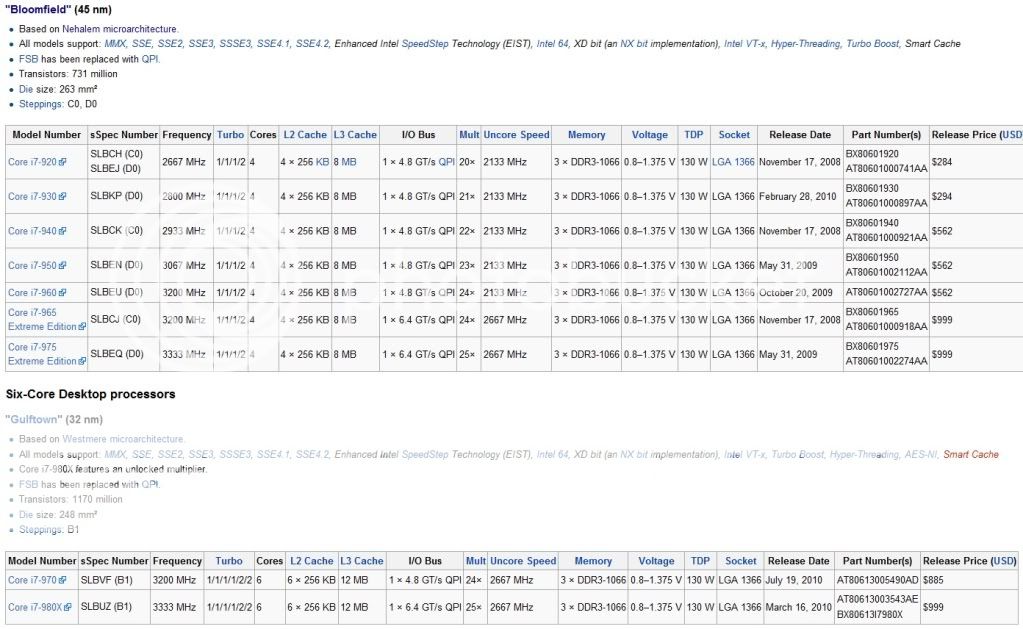
- Intel Core i7 Specifications
- Ultimate Core i7 Overclocking Guide
- from X-bit labs
- Guide to Overclocking the Core I7 920 to 4.0Ghz
- Intel I7 & X58 oc and discussion thread V1

DDR3 IC
Attached Image

BSOD codes for overclocking:
QUOTE
0x101 = increase vcore
0x124 = increase vcore
0x0A = unstable RAM/IMC, increase QPI first, if that doesn't work increase vcore
0x1E = increase vcore
0x3B = increase vcore
0x3D = increase vcore
0xD1 = QPI/VTT, increase/decrease as necessary, can also be unstable Ram, raise Ram voltage
0x9C = QPI/VTT most likely, but increasing vcore has helped in some instances
0x50 = RAM timings/Frequency or uncore multi unstable, increase RAM voltage or adjust QPI/VTT, or lower uncore if you're higher than 2x
0x109 = Not enough or too Much memory voltage
0x116 = Low IOH (NB) voltage, GPU issue (most common when running multi-GPU/overclocking GPU)
0x7E = Corrupted OS file, possibly from overclocking. Run sfc /scannow and chkdsk /r


This post has been edited by owikh84: Feb 25 2012, 10:08 PM
TSowikh84
post Aug 31 2010, 01:52 PM

i7 Clan
Group Icon
Elite
8,711 posts

Joined: Nov 2007
From: Butterworth, PG / Machang, Kelantan


EVGA X58 3XSLI Classified E760

Latest BIOS: 75
- Adds IOH Clock Skew, tWL and tREF options to BIOS

BIOS Template:
» Click to show Spoiler - click again to hide... «


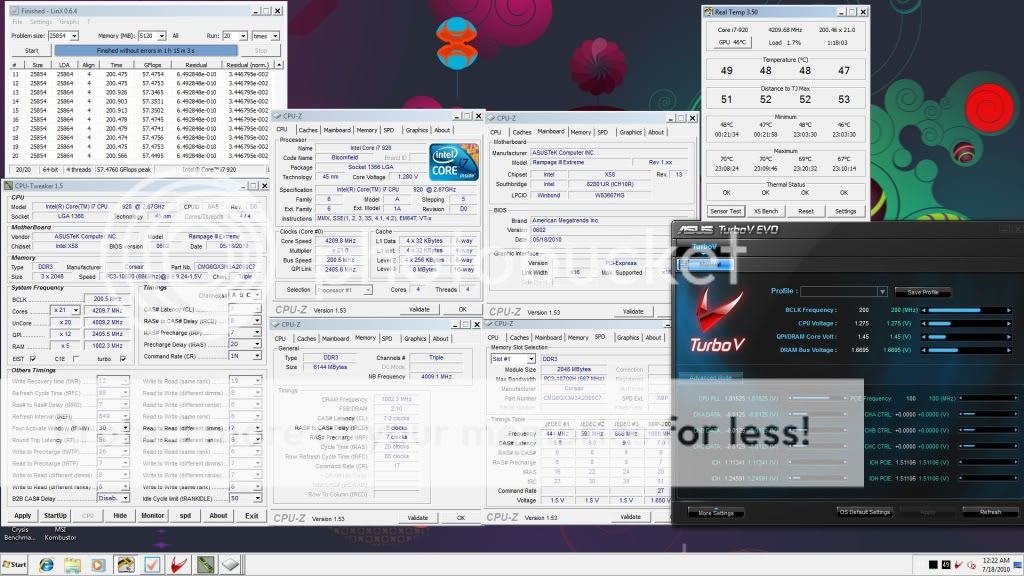
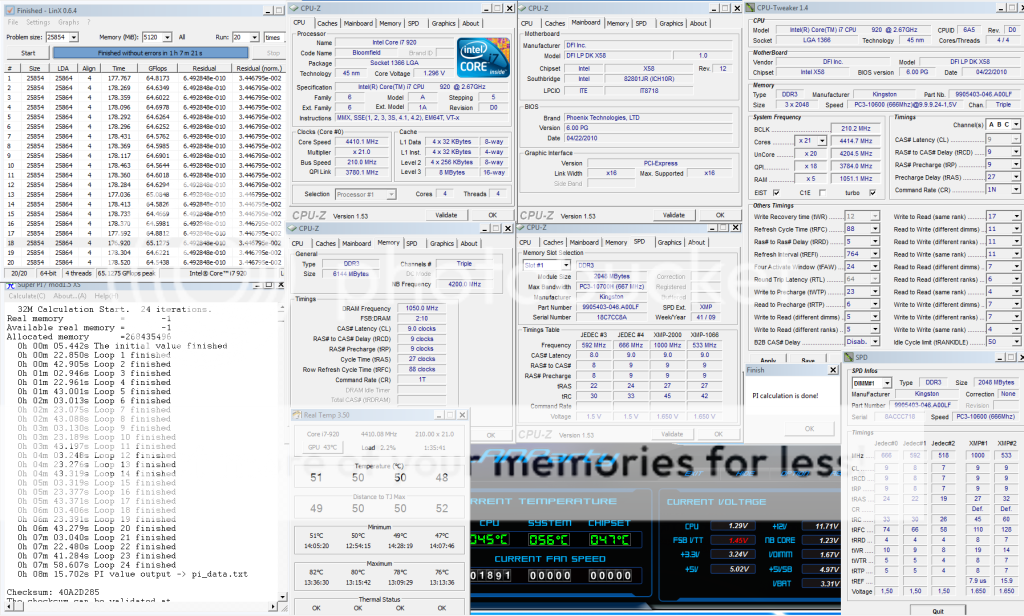
4.2Ghz HT ON, dram 2000Mhz 7-7-7-20
» Click to show Spoiler - click again to hide... «


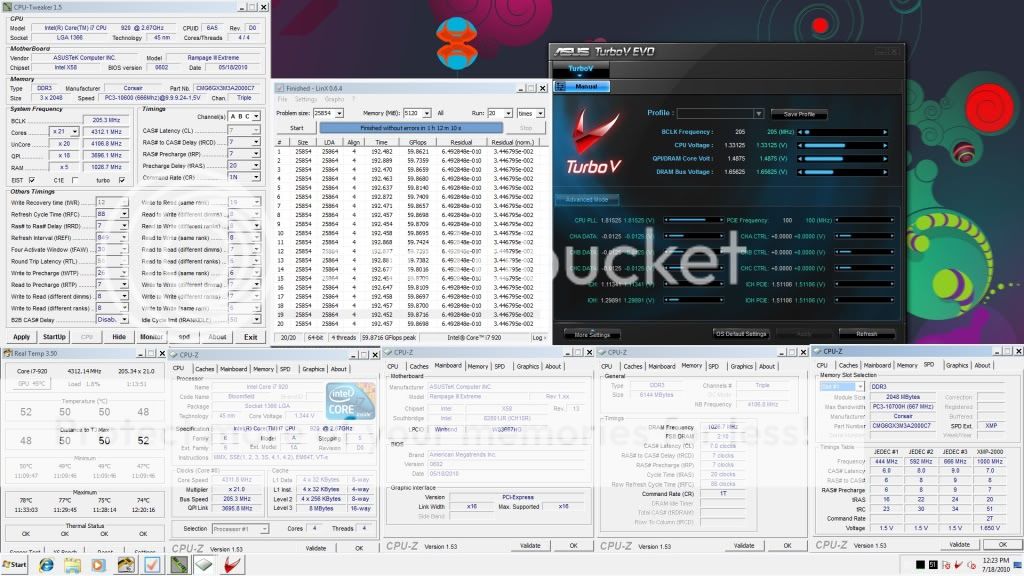
4.2Ghz HT OFF, dram 2000Mhz 7-7-7-20
» Click to show Spoiler - click again to hide... «


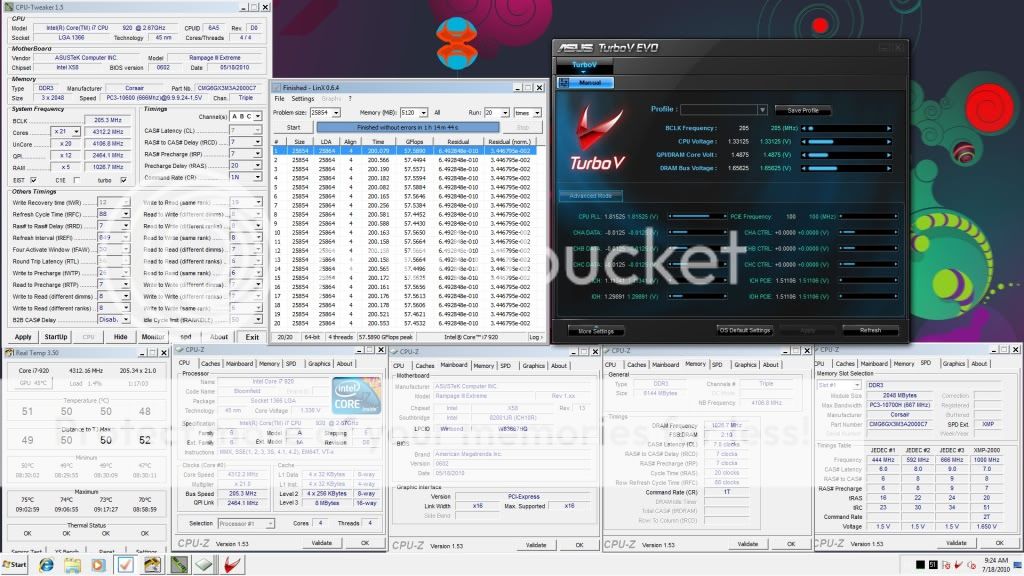
4.3Ghz, dram 2050Mhz 7-7-7-20
» Click to show Spoiler - click again to hide... «


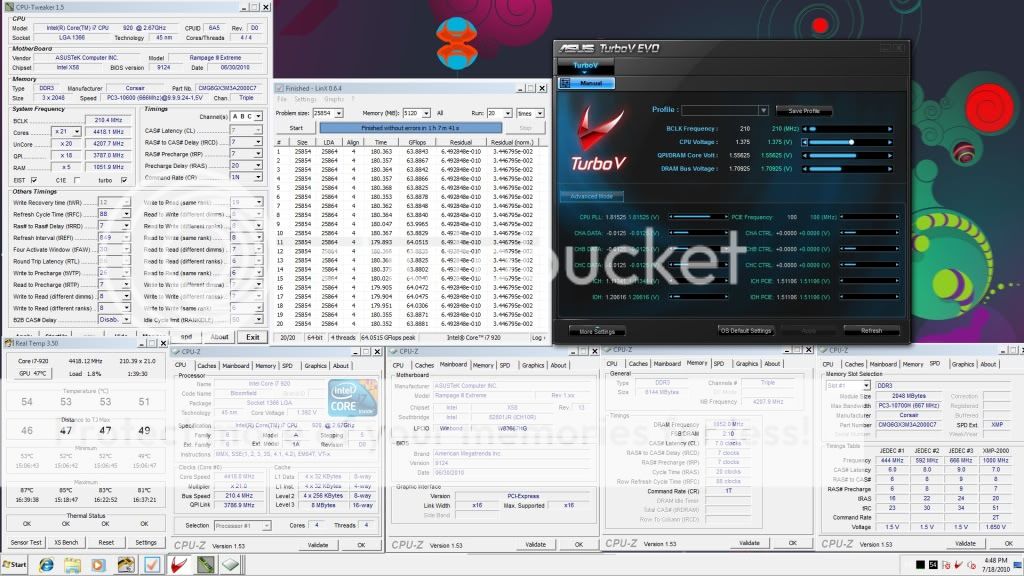
4.4Ghz, dram 2100Mhz 7-7-7-20
» Click to show Spoiler - click again to hide... «


4.5Ghz, dram 2150Mhz 8-8-8-24
» Click to show Spoiler - click again to hide... «


4.557Ghz (217x21), dram 2170Mhz 8-8-8-24
» Click to show Spoiler - click again to hide... «

» Click to show Spoiler - click again to hide... «


4.6Ghz, dram 1760Mhz 6-6-6-18
» Click to show Spoiler - click again to hide... «


This post has been edited by owikh84: Mar 30 2011, 07:07 AM
TSowikh84
post Aug 31 2010, 01:53 PM

i7 Clan
Group Icon
Elite
8,711 posts

Joined: Nov 2007
From: Butterworth, PG / Machang, Kelantan


4.2Ghz, dram 1600Mhz 6-6-6-18

uncore 3.2Ghz
» Click to show Spoiler - click again to hide... «


uncore 3.6Ghz
» Click to show Spoiler - click again to hide... «


uncore 4.0Ghz
» Click to show Spoiler - click again to hide... «


uncore 4.2Ghz
» Click to show Spoiler - click again to hide... «


This post has been edited by owikh84: Sep 2 2010, 07:32 PM
TSowikh84
post Aug 31 2010, 01:53 PM

i7 Clan
Group Icon
Elite
8,711 posts

Joined: Nov 2007
From: Butterworth, PG / Machang, Kelantan


Asus Rampage III Extreme

Latest BIOS: 1102
1. Support new CPUs

BIOS Template:
» Click to show Spoiler - click again to hide... «


4.2Ghz, dram 2000Mhz 7-8-7-20, QPI slow mode
» Click to show Spoiler - click again to hide... «


4.3Ghz, dram 2050Mhz 7-8-7-20, QPI slow mode
» Click to show Spoiler - click again to hide... «


4.3Ghz, dram 2050Mhz 7-7-7-20, QPI slow mode
» Click to show Spoiler - click again to hide... «


4.3Ghz, dram 2050Mhz 7-7-7-20, QPI normal
» Click to show Spoiler - click again to hide... «


4.4Ghz, dram 2100Mhz 7-7-7-20
» Click to show Spoiler - click again to hide... «


4.5Ghz, dram 2150Mhz 8-8-8-24
» Click to show Spoiler - click again to hide... «


=============================================

How this CPU config affects PI score

Hardware Prefetcher: OFF ----> 8.39.876mm
» Click to show Spoiler - click again to hide... «


Hardware Prefetcher: ON ----> 8.12.695m
» Click to show Spoiler - click again to hide... «


This post has been edited by owikh84: Dec 22 2010, 06:40 AM
TSowikh84
post Aug 31 2010, 02:23 PM

i7 Clan
Group Icon
Elite
8,711 posts

Joined: Nov 2007
From: Butterworth, PG / Machang, Kelantan


EVGA X58 3XSLI Classified E760
Kingston KHX2000C9T1 6GB

4.3GHz, dram 2050Mhz 9-9-9-27-1T
» Click to show Spoiler - click again to hide... «


4.4GHz, dram 2100Mhz 8-9-8-21-1T
» Click to show Spoiler - click again to hide... «


DFI DK x58 T3eH6
4.4GHz, dram 2100Mhz 9-9-9-21-1T
» Click to show Spoiler - click again to hide... «


This post has been edited by owikh84: Feb 20 2011, 11:01 PM
TSowikh84
post Aug 31 2010, 07:28 PM

i7 Clan
Group Icon
Elite
8,711 posts

Joined: Nov 2007
From: Butterworth, PG / Machang, Kelantan


for 2100 7-7-7-20-1T (lower tRCD rather than 7-8-7-20-1T)
change read to read and write to write (same ranks) from 4 to 6.
TSowikh84
post Aug 31 2010, 09:52 PM

i7 Clan
Group Icon
Elite
8,711 posts

Joined: Nov 2007
From: Butterworth, PG / Machang, Kelantan


QUOTE(metsatsu @ Aug 31 2010, 08:37 PM)
tried setting to 1.66Vdimm. then after booting into windows, 6gb turned to 4gb. but after i set it back to 1.51V, all 6gb shows.....

I don't like the look of it....
*
Rtl let it auto 1st. Wromg rtl will result in ram disappearing.
TSowikh84
post Sep 1 2010, 07:59 PM

i7 Clan
Group Icon
Elite
8,711 posts

Joined: Nov 2007
From: Butterworth, PG / Machang, Kelantan


QUOTE(lichyetan @ Sep 1 2010, 03:12 PM)
not 24/7 settings, for ddr3 1900, could not pass prime95 25.9 (64 bit), custom test with 5500mb memory (128-4096 FFT) in diag mode. Keep getting freezing problem after 2-3 hours run. But it pass LinX 20 loops easily. Still fine tuning it. Might try to prime 1866mhz later if cant get 1900 fully prime stable.
cstkl1, how do u calculate the RTL... I using the excel spreadsheet from anandtech now to set the RTL. Any information to share on getting correct RTL ?
*
3) No typical values per se, although most of the time the memory controller prefers channel B and C to be offset by a few clocks past A. So channel B is generally +2~3 clocks and Channel C +3~5 clocks over the Channel A value. Assuming trace lengths are well matched between slots the need for such offset lies within the memory controller (although capacitance of serpentine traces may come into play at higher frequency).

Source
TSowikh84
post Sep 1 2010, 09:42 PM

i7 Clan
Group Icon
Elite
8,711 posts

Joined: Nov 2007
From: Butterworth, PG / Machang, Kelantan


QUOTE(lichyetan @ Sep 1 2010, 09:01 PM)
Add on : anyone knw which settings mostly causing the system to BSOD after 2-3 hours of prime95 ? all my settings pass LinX well... now trying with 1866mhz in diag mode.
*
tFAW=30
TSowikh84
post Sep 6 2010, 06:49 AM

i7 Clan
Group Icon
Elite
8,711 posts

Joined: Nov 2007
From: Butterworth, PG / Machang, Kelantan


QUOTE(mozact89 @ Sep 6 2010, 03:18 AM)
just playing with my 950..
stable on 4.0ghz 200x20 on 1.235vcore(set in bios)..
wow, this 950 is not bad.
but pls show us the other CPU-Z tabs ie. mobo & dram tabs.
or use CPU Tweaker.
TSowikh84
post Sep 8 2010, 06:30 AM

i7 Clan
Group Icon
Elite
8,711 posts

Joined: Nov 2007
From: Butterworth, PG / Machang, Kelantan


QUOTE(gto87 @ Sep 8 2010, 03:52 AM)
I got a problem. I tried to fix my sound card in the 3rd PCIe slot and my GC in the 1st PCIe slot but then my display went wrong. I can't set it to High resolution anymore. (I think the bandwidth become 8x)

I remove my sound card from the 3rd PCIe slot - Display became normal.

This mean I can't fix 2 cards in different PCIe slot if I'm not doing CF.

Is there any way, I can use both PCIe for different purpose?

By the way, my mobo is DFI DK, Thanks~
*
What about another PCIe slot? Try swapping between all those 3 slots.
Reinstall gc driver after installing sound card?
The board should be able to run gc+sc at any slot w/o issues.
TSowikh84
post Sep 17 2010, 10:10 PM

i7 Clan
Group Icon
Elite
8,711 posts

Joined: Nov 2007
From: Butterworth, PG / Machang, Kelantan


QUOTE(cstkl1 @ Sep 15 2010, 03:24 PM)
and owikh is king of bantai voltage
*
cough cough.. tongue.gif
i love to feed my sticks (more than) sufficiently hehe..
easier and quicker for me lahh.
Now studying on Channel Interleave & Rank Interleave Settings brows.gif

TSowikh84
post Sep 18 2010, 09:09 PM

i7 Clan
Group Icon
Elite
8,711 posts

Joined: Nov 2007
From: Butterworth, PG / Machang, Kelantan


QUOTE(gengstapo @ Sep 18 2010, 01:04 PM)
How come my clocked i7 920@ 3.6Ghz have lower score compare to i7 930@ 2.9Ghz (Turbo boost) in Vantage score? Both same running Win 7 x64 bit.. sweat.gif
*
Pls at least show us more details ie. system specs, settings and screenshots etc.
My GTX480 @ 910Mhz scores lower than 900Mhz, when HT is turned OFF. yawn.gif
Most likely ur OC is unstable, not enough juice.

This post has been edited by owikh84: Sep 18 2010, 09:11 PM
TSowikh84
post Sep 18 2010, 10:07 PM

i7 Clan
Group Icon
Elite
8,711 posts

Joined: Nov 2007
From: Butterworth, PG / Machang, Kelantan


QUOTE(gengstapo @ Sep 18 2010, 09:45 PM)
Lolzzz, my question might get you all confuse tongue.gif

I mean the CPU score for both comparison. I dont know if GPU affecting the CPU score..

i7 920@ 3.8Ghz vs i7 930@ 2.9Ghz

Does the RAM divider thinggy really affect such huge performance??  hmm.gif
*
Yes, GPU affecting CPU score,
on the same GC but different clocks and different GCs it will give different CPU score
Both ur 920 & 930 setups are quite different to each other.
core, HT, uncore, dram, GPU, voltage are all different etc...

Effect of GPU on Vantage CPU Score:
biggrin.gif
Stock GTX480:
» Click to show Spoiler - click again to hide... «


OCed GTX480:
» Click to show Spoiler - click again to hide... «


This post has been edited by owikh84: Sep 19 2010, 07:56 AM
TSowikh84
post Sep 19 2010, 10:20 AM

i7 Clan
Group Icon
Elite
8,711 posts

Joined: Nov 2007
From: Butterworth, PG / Machang, Kelantan


QUOTE(gengstapo @ Sep 19 2010, 09:12 AM)
^ Hmm Im just comparing the CPU score tongue.gif But since GPU also affecting CPU score, then just leave it. Darn, time to upgrade GPU??  laugh.gif  laugh.gif

Btw, I do increase my clock from 3.22Ghz@ 1.18V till 3.8Ghz@ 1.18V seems to be stable(passed LinX atleast) but at 4Ghz, the voltage 1.18V appear BSOD. Do I need to raise the CPU voltage alone or the others voltage also need increment, such QPI, DRAM, IOH etc?

Current setup(BIOS):-

CPU Clock: 201x19
CPU Voltage: 1.18V
QPI Link: 1.28V
IOH: 1.18V
DRAM Voltage: 1.60V
UCLK: 3.4Ghz
RAM Divider: 2:8, 1T
*
Increase vCore 1st, followed by vQPI (VTT) and vDIMM.
Google for BIOS settings
TSowikh84
post Sep 22 2010, 07:24 PM

i7 Clan
Group Icon
Elite
8,711 posts

Joined: Nov 2007
From: Butterworth, PG / Machang, Kelantan


QUOTE(gengstapo @ Sep 22 2010, 10:42 AM)
Hmm the 20x not really suit for i7 right?
I found few forum said that 20x just crap for i7.. they prefer 19 or 21..  laugh.gif  laugh.gif
*
yes, Bloomfields prefer odd multiplier.
See 930 altho max 22x but ppl still using 21x (same as 920) nod.gif
TSowikh84
post Sep 23 2010, 10:50 PM

i7 Clan
Group Icon
Elite
8,711 posts

Joined: Nov 2007
From: Butterworth, PG / Machang, Kelantan


QUOTE(mengsuan @ Sep 23 2010, 09:50 PM)
Haha, my i7 is still fine. Haven't killed it by attempting 4GHz on stock cooler yet, although it reached 90C.

Since i7 930 has superseded i7 920, I could have done something for an upgrade. tongue.gif Oh well.. it's just feels too bad to do so.
*
turn off temp protection on cpu.
burn mark.
clear.
good luck. brows.gif
TSowikh84
post Sep 30 2010, 06:31 AM

i7 Clan
Group Icon
Elite
8,711 posts

Joined: Nov 2007
From: Butterworth, PG / Machang, Kelantan


QUOTE(??? @ Sep 30 2010, 02:50 AM)
Hi all,
I'm new to OC here. Had read few forum about OC'ing i7 and thinking of doing it this weekend. Below are my desktop's components

i7 930 (CPU cooler - VX w/ a 12cm cm fan)
P6X58D-E (BIOS ver 0303)
Corsair (3X2) - CMX6GX3M3C 1600 C7
Casing - CM II 690 Adv

first of all, I would like to know are my cpu's cores temp normal. Everything on stock and not inside AC room.

realtemp reading (w/ HT)
low              high
44                45
39                40
43                44
41                42

I did tried to disable the HT but I just can see the difference of 1c for all the cores compare to w/ HT.  rclxub.gif  rclxub.gif  is that normal ???
Need some advise here  icon_question.gif
*
The core temps look quite normal at idle state.
They're relaxing when idle ~0% proc usage be it w/ or w/o HT
Once load u will see a huge difference.
TSowikh84
post Oct 1 2010, 06:39 AM

i7 Clan
Group Icon
Elite
8,711 posts

Joined: Nov 2007
From: Butterworth, PG / Machang, Kelantan


QUOTE(??? @ Oct 1 2010, 12:01 AM)
Thanks for the input.
So those temp are normal. I have ran prime95 blend test for 10 minutes and the temp were WOW  shocking.gif

realtemp w/ HT (full load)

72
70
70
69

I think 75C is the CPU threshold right?  sweat.gif
Just want to know is it save for me to OC to 3.2 first on this weekend ? due to the heat  sweat.gif
*
Max is 100C and don't worry ur PC will auto shutdown at 100C (overtemp protection set by bios)
U're safe with 3.2Ghz HT on @ vcore < 1.2X v depending on ur chip strength.
I can do 4.4Ghz HT off @ 1.3v on air cooling when max temp hit 82C nod.gif

LinX
» Click to show Spoiler - click again to hide... «


Pime95
» Click to show Spoiler - click again to hide... «


http://hardforum.com/showthread.php?t=1502931

This post has been edited by owikh84: Oct 1 2010, 06:46 AM
TSowikh84
post Oct 2 2010, 07:43 PM

i7 Clan
Group Icon
Elite
8,711 posts

Joined: Nov 2007
From: Butterworth, PG / Machang, Kelantan


Temps lower bcos HT is turned off now
ur temp is still quite good for higher OC
i7 is built to clock at least 4Ghz to show its full potential

9 Pages  1 2 3 > » Top
 

Change to:
| Lo-Fi Version
0.1360sec    0.46    7 queries    GZIP Disabled
Time is now: 14th December 2025 - 04:06 AM