

Attached thumbnail(s)

Home Networking N Router By Asus RTN-66U / Asus RTN-16 / RT-N56U, Asus RT-N Series Supported Unifi
|
|
 Dec 17 2011, 04:43 PM Dec 17 2011, 04:43 PM
|
 
Senior Member
2,816 posts Joined: Jan 2003 From: kat situ kat sana  
|
Strange speed fluctuating if i use download manager for rt-n16,
Attached thumbnail(s)
|
|
|
|
|
|
Dec 18 2011, 12:17 AM
|

Senior Member
4,228 posts Joined: Jan 2009
|
Hi guys, can I use my existing router (ASUS RT-N12) with Unifi which I plan to subscribe soon?
|
|
|
Dec 18 2011, 05:33 PM
|
|
Senior Member
2,816 posts Joined: Jan 2003 From: kat situ kat sana
|
Very nice upgrade from asus team, good job. Now i can use DM wherever I want without installing the software...
Manage to fix the inconsistent download speed, just down use default port for torrent. |
|
|
Dec 18 2011, 09:59 PM
|
|
Junior Member
176 posts Joined: Oct 2007
|
this n16 latest 3.0.0.74 firmware gave me slow download speed than previous version,
usually very easy to get about 550 kb/s but this beta i only managed to get 300+kb/s and facing difficulty entering the download manager page. sometime give me hang. This post has been edited by mamasos: Dec 18 2011, 09:59 PM |
|
|
Dec 19 2011, 08:39 AM
|

Senior Member
1,488 posts Joined: Oct 2004
|
QUOTE(klseet @ Dec 15 2011, 12:15 AM) RT-N16 - New UI Released ! And it's UniFi supported !! Cool!!! Looking forward for it to be release for RT-N13U B1. http://klseet.com/index.php?option=com_con...=130&Itemid=115 Thanks to ASUS team, you guys really rock !!  Complete re-write QoS engine & Torrent Client --> now we have Transmission on it !!   |
|
|
Dec 19 2011, 01:55 PM
|

Junior Member
223 posts Joined: Jan 2008
|
QUOTE(klseet @ Dec 15 2011, 12:15 AM) RT-N16 - New UI Released ! And it's UniFi supported !! Same here, waiting for RT-N56U.http://klseet.com/index.php?option=com_con...=130&Itemid=115 Thanks to ASUS team, you guys really rock !! Complete re-write QoS engine & Torrent Client --> now we have Transmission on it !!  With latest firmware (f), cannot get download master to work, and the QoS and DHCP cannot set by MAC address. |
|
|
|
|
|
Dec 19 2011, 05:14 PM
|

Junior Member
72 posts Joined: Jan 2003
|
ASUS RT-N16 Firmware Version:3.0.0.3.74
Major Issue: Wireless performance drop from 300Mbps to 100+Mbps when streaming from "Network Place(Samba) Share". Wireless streaming from Playon!HD wireless dongle performance drop to 1/3 of the speed. Minor Issue: Wrong spelling of Parental Control (Parenral control). Drop down menu font is white against white background. LAN IP on Network Map sometimes remain same even changed. And some other weird behavior that I'm still investigating, might wanna revert back to old version soon. This post has been edited by cbsim: Dec 19 2011, 05:23 PM |
|
|
Dec 19 2011, 09:48 PM
|
|
Senior Member
2,816 posts Joined: Jan 2003 From: kat situ kat sana
|
One more issue is, when add torrent to dm, always say, failed to add without any reason.
|
|
|
Dec 19 2011, 10:01 PM
|
|
Junior Member
176 posts Joined: Oct 2007
|
After restore back to old version, utorrent is flying again.
|
|
|
Dec 20 2011, 07:34 PM
|

Senior Member
1,162 posts Joined: Sep 2008 From: PJ
|
Just recently got myself a RT-N13U ver: B1, immediately follow klseet's procedure to flash the firmware and upgraded to version 2.0.2.5g. Follow every single step to configure and successfully connected to IPTV, internet etc... good internet speed too.
But there is one thing I cannot get it right is the port forwarding features. I have the same port forwarding setting with the old 615 router with no problem. But no matter how I do it, I don't seem to be able to get the router enabled the port forwarding. ( Adjustment in Virtual server page in WAN, and its being Enabled). When tested the port, the ports are not being opened. Except only port 80. What can go wrong ? Is there any special adjustment need to be made for firmware 2.0.2.5g ? I Have also emailed klseet about it, but maybe he is too busy to answer. Thanks a bunch for any potential solutions. |
|
|
Dec 21 2011, 12:26 AM
|

Junior Member
130 posts Joined: Mar 2008
|
RT-N16 ASUSWRT 3.0.0.3.78
Now available at ASUS official site ! http://www.asus.com/Networks/Wireless_Rout...RTN16/#download Accordingly to source, the DM should be more stable compare to the beta 3.0.0.3.74 QUOTE(vergas @ Dec 19 2011, 08:39 AM) Cool!!! Looking forward for it to be release for RT-N13U B1. ...QUOTE(cosmicmeadow @ Dec 19 2011, 01:55 PM) Same here, waiting for RT-N56U.... Already request, no news yet, RT-N56U likely  I'm "fighting" for the RT-N13U-B1, hope they will put the same UI & DM onto it to fully utilise the USB, also as the alternate option for those who can't afford the RT-N16 .... QUOTE(cbsim @ Dec 19 2011, 05:14 PM) ASUS RT-N16 Firmware Version:3.0.0.3.74 May I know what's your actual transfer rate (MB/s)?... Wireless performance drop from 300Mbps to 100+Mbps ... I personally don't trust those Mbps as advertised/shown, I always test it physically by copying huge file (at least few GB) from my NAS wirelessly. For the RT-N16, so far I have no problem getting 8~8.8MB/s, from previous to the current new ASUSWRT firmware. At this moment, the RT-N16 it's the highest I've ever tested so far on 2.4GHz spectrum, this ASUS device with Broadcom BCM47xx really powerful ....  Assuming you've clean flashed, try to check your wifi settings again, eg, keep channel at least 5 away from those closest wifi spot, Enable Burst, etc .... QUOTE(InSplre @ Dec 19 2011, 09:48 PM) One more issue is, when add torrent to dm, always say, failed to add without any reason. QUOTE(mamasos @ Dec 19 2011, 10:01 PM) After restore back to old version, utorrent is flying again. I have no such issues, I setup the DM as follows:Assign a TCP port for Torrenting, use higher port say 56789, PortForward it to the device's IP, say 192.168.1.1 
BT setup, usually I prefer to set limit 
no problem Torrenting, even a 15GB HD movie! (no download if poor seeding or no peers) 
Again, try to clean flash again before setup: http://klseet.com/index.php?option=com_con...id=84&Itemid=79 it should work just fine! QUOTE(peter32 @ Dec 20 2011, 07:34 PM) ....But there is one thing I cannot get it right is the port forwarding features. I have the same port forwarding setting with the old 615 router with no problem. But no matter how I do it, I don't seem to be able to get the router enabled the port forwarding.... What are you trying to PortFoward? And exactly how did you setup? Pictures may help to understand better....For those routers I've tested, including ASUS brand, I always setup some PortForward as I have couple of things running behind the router. So far I have no issue on ASUS routers & firmwares. You may refer the above PortForward for some idea. |
|
|
Dec 21 2011, 12:49 AM
|
|
Senior Member
1,814 posts Joined: Dec 2008 
|
i have Asus RT-N16 orignal firmware i naver upgrade new firmware lol
whare can be found Port Foward i want to do Port Foward |
|
|
Dec 21 2011, 12:52 AM
|
|
Junior Member
130 posts Joined: Mar 2008
|
The only thing really mind-boggling me it's the traffic statistic:

I admit I'm heavy user, but I really doubt the figures as shown .... |
|
|
|
|
|
Dec 21 2011, 01:20 AM
|

Junior Member
490 posts Joined: Feb 2006 From: Somewhere I belong 
|
omg! didn't know rt-n16 can support 3g dongle!!!
[/QUOTE](4) 3G USB dongle failover mode[QUOTE] 3G failover option (If WAN Ethernet fails, use 3G), should have bought this rt-n16 instead of rt-n13u-b1 ...  |
|
|
Dec 21 2011, 10:06 AM
|
|
Junior Member
360 posts Joined: Jan 2003
|
1Tera per month is the reason ppl started to cap... :/
|
|
|
Dec 21 2011, 12:29 PM
|
|
Senior Member
1,162 posts Joined: Sep 2008 From: PJ
|
QUOTE(klseet @ Dec 21 2011, 12:26 AM) What are you trying to PortFoward? And exactly how did you setup? Pictures may help to understand better.... For those routers I've tested, including ASUS brand, I always setup some PortForward as I have couple of things running behind the router. So far I have no issue on ASUS routers & firmwares. You may refer the above PortForward for some idea. I uses portforwad function for various stuff, from torrenting to individual computer, to CCTV DVR etc.. Thats why Its important for me. |
|
|
Dec 21 2011, 12:51 PM
|
|
Junior Member
72 posts Joined: Jan 2003
|
ASUS RT-N16 Firmware Version:3.0.0.3.78
Issue remain the same, wireless streaming from media player is very slow about 1/4 of the speed compare to old firmware. Using old firmware I can stream 720p and some low bit rate 1080p HD video, but now even SD video is lagging, making all of my videos un-watchable. Reverting back to old firmware now, no point the new fancy GUI. |
|
|
Dec 21 2011, 03:48 PM
|
|
Newbie
0 posts Joined: Oct 2009
|
QUOTE(klseet @ Dec 15 2011, 08:43 AM) May I know how you "patch" the firmware? I follow the method 2 you provided and i think i didnt do it wrong. all follow the step.Your problem sounds like bad flash, please follow the steps below to perform clean flash: http://klseet.com/index.php?option=com_con...id=84&Itemid=79 Also remember to check the downloaded firmware MD5 checksum before flashing. Setup steps may refer the following links: http://klseet.com/index.php?option=com_con...id=77&Itemid=76 http://klseet.com/index.php?option=com_con...=125&Itemid=112 Still testing & using it, will only post at least after 3 days of no issue and with ASUS's permission. So far seem to be stable, if everything goes well, should be uploaded the new UI by this weekend, stay tuned ! any suggestion on my case ? am i need to replace another router ? |
|
|
Dec 21 2011, 06:28 PM
|
|
Junior Member
72 posts Joined: Jan 2003
|
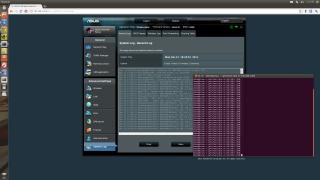
Random DHCP client disconnection issue, only certain wireless adapter is affected. |
|
|
Dec 21 2011, 10:19 PM
|
|
Senior Member
2,816 posts Joined: Jan 2003 From: kat situ kat sana
|
Can the firmware posted on Asus website be use with UniFi?
|
| Change to: |  0.0290sec 0.0290sec
 0.62 0.62
 6 queries 6 queries
 GZIP Disabled GZIP Disabled
Time is now: 1st December 2025 - 08:09 PM |
 Quote
Quote