Welcome Guest ( Log In | Register )

Bump Topic Topic Closed RSS Feed
125 Pages < 1 2 3 4 5 > » Bottom

Outline · [ Standard ] · Linear+

Photography The Sony Alpha Thread V37!, The Orange Legion

views
     
mastering89
post Feb 15 2010, 02:45 PM

miao miao
*******
Senior Member
2,546 posts

Joined: Jan 2009
From: Cyberjaya
2 days ago Went to Port Klang trying to find Muara Ikan Bakar... just to find place
this evening going ther again for dinner...

shot this sunset
user posted image
» Click to show Spoiler - click again to hide... «


user posted image
» Click to show Spoiler - click again to hide... «


also my bro juz came back from japan and he bought 75300. wanna ask if can buy his 55200 icon_idea.gif
Seng_Kiat
post Feb 15 2010, 03:09 PM

Look at all my stars!!
*******
Senior Member
5,580 posts

Joined: Jan 2005
QUOTE(ieR @ Feb 15 2010, 11:33 AM)
there are very technical explaination if u would like to listen.

standard by flash, the min shutter u will get is 1/60. let say the background is 2 stop under at 1/60 F5.6 iso400. (kitlens + A300 (iso400limit))

your subject will always lit up to 0ev metering (properly expose) by the flash. now, knowing all of above setting, the question is, how to you make the background expose the same?(as the subject?)

answer is simple, increase 2stop of exposure, but how?

1. Shutter Speed, by slowing down the shutter, u will have more light gain, 2 stop is by decreasing ur speed to1/15 from 1/60, which u might not wan to use it, as it causes blur from handshake if u are zooming at 100mm.

2. Sensitivity of ISO, by pumping to iso1600 from iso400 (that's 2 stop) u'll gain exactly what u need, but problem is, some of us are using older model where, iso400 is as far as they willing to go.

3. Aperture (Ksano you're right), increase the aperture by 2 stop, F5.6 to F2.8, u get more light travel into the lens/sensor, hence u will get brighter background, but as well as bokeh, if bokeh is what u wanted, then its okay, if it is not.... another story.

4. and u can mix 1 and 2 and 3 together, say shutterspeed at 1/40, iso800, at F5, u still gain 2 stop. smile.gif that is why, Pro use manual, using each of the setting above to compensate of each weaknesses.
tamron? dont think will sell, unless sigma's 17-70 becomes F2.8 and it's as sharp as tamron. tongue.gif

slow sync flash = slow shutter. its just a auto-mode used to overwrite the pre program of shutter in P/A mode.
*
Wah, very details explaination .. wink.gif .. i got it bro .. wink.gif .. thanks thanks alot .. appreciate it .. wink.gif ..
ieR
post Feb 15 2010, 06:04 PM

~Cursed Member~
Group Icon
Elite
3,928 posts

Joined: Jan 2003
From: Incheon, Korea.. currently in Miri, Soviet Sarawak
QUOTE(hkhk @ Feb 15 2010, 02:19 PM)
consistent on the exposure u mean ?
I am still figuring why my exposure is not consistent when i shoot a few frame with the manual setting (no change in the setting), no change is the lighting. The time between 2 shoot is more than 5s which is longer than my F58 refresh time (4s).
*
yes, consistent of background color.

i think u have to do a control test... my best bet is that ur flash contact might not be good or the hotshoe is too lose that ur flash might lost contact when shaked.. this happens all the time.
lugiamcg
post Feb 15 2010, 06:15 PM

On my way
****
Senior Member
640 posts

Joined: May 2009
From: Whirlpool Island, Johto


Kul | Mo0 and Freddy's advice taken into account...
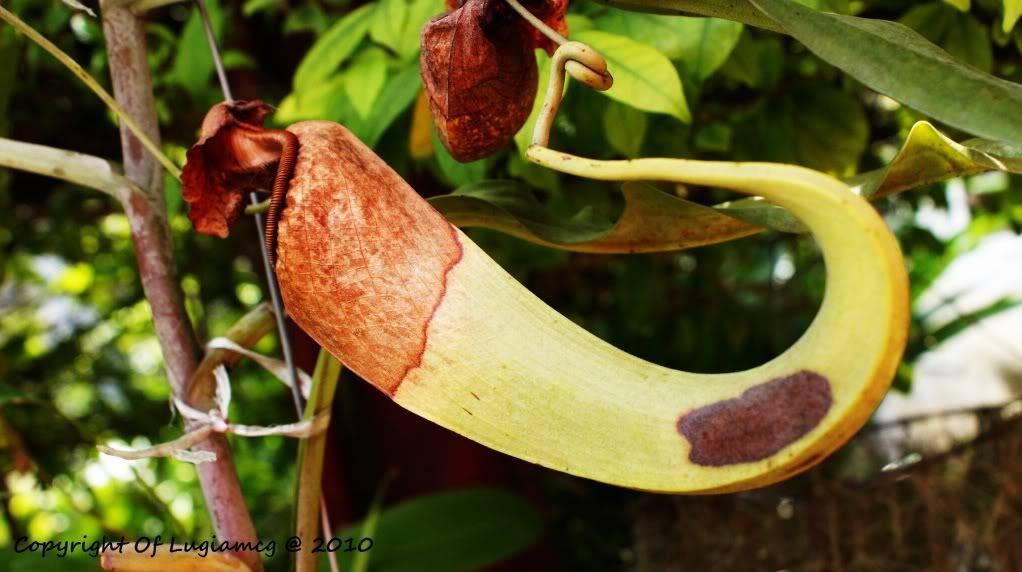
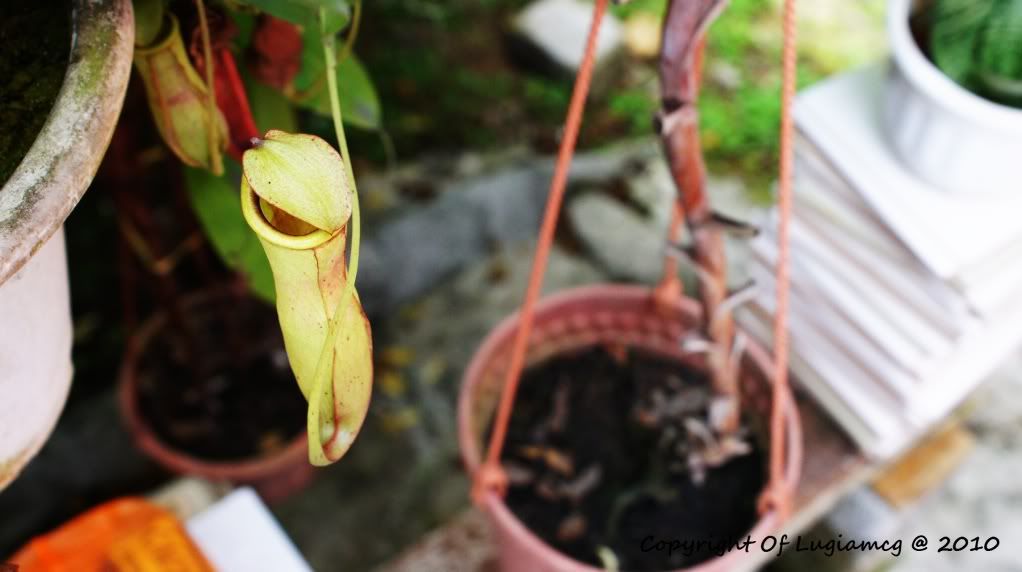
Pitcher Plant take 2...vivid mode n a lil' pp
C n C agn, thx =D

user posted image

user posted image


kevinwcw
post Feb 15 2010, 06:33 PM

Enthusiast
*****
Senior Member
943 posts

Joined: Feb 2005
From: KL Sri Petaling


congraz...v37 pg 3...biggrin.gif
ieR
post Feb 15 2010, 06:46 PM

~Cursed Member~
Group Icon
Elite
3,928 posts

Joined: Jan 2003
From: Incheon, Korea.. currently in Miri, Soviet Sarawak
lugiamcg: the 2nd pic compose is nice... but the pot plant underneath there seem distracting...

1st pic, the right side, is blur... maybe increase aperture to make the pitcher sharp... just the pitcher... but the rest, u can leave it blur.
hazril
post Feb 15 2010, 07:43 PM

.: This Is Brazil! :.
*******
Senior Member
3,070 posts

Joined: Dec 2006
From: Damansara


some awesome light painting...

http://acidcow.com/pics/7239-incredible-li...ng-58-pics.html
lugiamcg
post Feb 15 2010, 07:44 PM

On my way
****
Senior Member
640 posts

Joined: May 2009
From: Whirlpool Island, Johto


QUOTE(ieR @ Feb 15 2010, 06:46 PM)
lugiamcg: the 2nd pic compose is nice... but the pot plant underneath there seem distracting...

1st pic, the right side, is blur... maybe increase aperture to make the pitcher sharp... just the pitcher... but the rest, u can leave it blur.
*
alrighto...problem noted =D

btw, for some reason, the AF doesn't focus on the place i wanted it to. I tried focus lock but the only thing it does is focus on one spot only. So, it's pretty hard for me to focus on the entire subject sometimes. Do, u have any solutions on that? =D

PS: my aperture is already at it's widest point cry.gif
Mikeshashimi
post Feb 15 2010, 08:48 PM

10 Years on LYN
*******
Senior Member
4,053 posts

Joined: Jun 2009
From: Kuching


try manual focusing then. AF sometimes can be confused my tricky lighting.
freddy manson
post Feb 15 2010, 08:48 PM

ðñê hêll ð£ å gµ¥
*******
Senior Member
4,858 posts

Joined: Jun 2006
From: Tawau, Sabah


QUOTE(lugiamcg @ Feb 15 2010, 07:44 PM)
alrighto...problem noted =D

btw, for some reason, the AF doesn't focus on the place i wanted it to. I tried focus lock but the only thing it does is focus on one spot only. So, it's pretty hard for me to focus on the entire subject sometimes. Do, u have any solutions on that? =D

PS: my aperture is already at it's widest point  cry.gif
*
what ieR means is pumpin the f number.. so if u're on 3.5 u can try pumping to f4 or f4.5 to make the pitcher whole 'body' in focus..
trial and error..

about the AF... i can teach u one method.. this is quite easy when u get the hang of it..
first u point the focus point (the lines in ur OVF) to the edge/lines of the plant.. doesnt matter for ur compo..
press the shutter halfway (called S1) to lock the focus point and hold it..
then recompose the pic.. but slowly making sure that the subject is still in focus (hold the S1)
then when u're satisfy with the framing then just press the shutter all the way (calles S2)

kindda hard to understand, kecuali face 2 face ajar he he he..
this is my S1-S2 method..

i.e taking portrait:
use AF-S (autofocus single, not AF-A or AF-C <-- wont work on AF-C)
i set the focus point to the center.. i lock the focus while focusing on the model's eye.. by pressing the shutter release button halfway (s1) until u hear the lock confirmation (BEEP sound and the red line on ur OVF)
hold the shutter and i compose the pic slowly by moving my camera to view his/her whole face (or any area i want) and keeping the eye still sharp looking in the OVF..
then when i confirm terus tekan the shutter lagi (this is the S2) and i can make sure the eyes is in focus even when i frame the pic when the model's face is in the bottom right or bottom left or any corner of the whole pic..

rclxub.gif faham ka? he he he
neo_lam
post Feb 15 2010, 09:47 PM

Player
******
Senior Member
1,921 posts

Joined: May 2006


congratz on v37 thread and happy Chinese New Year!!

user posted image
hazril
post Feb 15 2010, 10:32 PM

.: This Is Brazil! :.
*******
Senior Member
3,070 posts

Joined: Dec 2006
From: Damansara


QUOTE(freddy manson @ Feb 15 2010, 08:48 PM)
what ieR means is pumpin the f number.. so if u're on 3.5 u can try pumping to f4 or f4.5 to make the pitcher whole 'body' in focus..
trial and error..

about the AF... i can teach u one method.. this is quite easy when u get the hang of it..
first u point the focus point (the lines in ur OVF) to the edge/lines of the plant.. doesnt matter for ur compo..
press the shutter halfway (called S1) to lock the focus point and hold it..
then recompose the pic.. but slowly making sure that the subject is still in focus (hold the S1)
then when u're satisfy with the framing then just press the shutter all the way (calles S2)

kindda hard to understand, kecuali face 2 face ajar he he he..
this is my S1-S2 method..

i.e taking portrait:
use AF-S (autofocus single, not AF-A or AF-C <-- wont work on AF-C)
i set the focus point to the center.. i lock the focus while focusing on the model's eye.. by pressing the shutter release button halfway (s1) until u hear the lock confirmation (BEEP sound and the red line on ur OVF)
hold the shutter and i compose the pic slowly by moving my camera to view his/her whole face (or any area i want) and keeping the eye still sharp looking in the OVF..
then when i confirm terus tekan the shutter lagi (this is the S2) and i can make sure the eyes is in focus even when i frame the pic when the model's face is in the bottom right or bottom left or any corner of the whole pic..

rclxub.gif faham ka? he he he
*
so the short form is AF>recompose>snap

biggrin.gif
ieR
post Feb 15 2010, 10:45 PM

~Cursed Member~
Group Icon
Elite
3,928 posts

Joined: Jan 2003
From: Incheon, Korea.. currently in Miri, Soviet Sarawak
QUOTE(hazril @ Feb 15 2010, 10:32 PM)
so the short form is AF>recompose>snap

biggrin.gif
*
hahahahaha,,... when i was reading his long explanation,... i got even more confuse... ur explanation... rox! lol...


the crop, the 9 point, the 4 corner at top left right, bottom left right (imagine handphone keypad, 1 3 7 and 9.) the point are there for a reason, they are actually the intersection of the rule of third lines. they actually helps a lot when doing composition...

lugiamcg: if ur camera cant find a focus lock, if u have a portable torch, light up the area, it will help assisting the focus lock.
freddy manson
post Feb 15 2010, 11:03 PM

ðñê hêll ð£ å gµ¥
*******
Senior Member
4,858 posts

Joined: Jun 2006
From: Tawau, Sabah


QUOTE(hazril @ Feb 15 2010, 10:32 PM)
so the short form is AF>recompose>snap

biggrin.gif
*
QUOTE(ieR @ Feb 15 2010, 10:45 PM)
hahahahaha,,... when i was reading his long explanation,... i got even more confuse... ur explanation... rox! lol...
the crop, the 9 point, the 4 corner at top left right, bottom left right (imagine handphone keypad, 1 3 7 and 9.) the point are there for a reason, they are actually the intersection of the rule of third lines. they actually helps a lot when doing composition...

lugiamcg: if ur camera cant find a focus lock, if u have a portable torch, light up the area, it will help assisting the focus lock.
*
i myself get confused LOL
yah that's right but i think lugiamcg need more explaination so i write in advance lol
lugiamcg
post Feb 15 2010, 11:15 PM

On my way
****
Senior Member
640 posts

Joined: May 2009
From: Whirlpool Island, Johto


Mikeshashimi - I'm not good on MF lol. Everytime i tried MF, i got OOF alot more cry.gif

freddy manson - i understand what u mean. I tried that b4. But the prob i'm having is...err, i think i'll give a a situation.
Like this, u imaging that there's a Range Rover climbing up a steep hill. Also, u picture urself standing about 10m beside it n u
want to take a shot of it stalling at the hill. U powered up ur cam n start focusing on the rover and ur cam actually did. Just
that it only focuses(green box on LV) on the front of the car and that means the back is blurred. U dislike that focus, so u
did it again. This time, the camera focuses on the car's back! U will then be so frustrated n re-focus over n over again, but it
just won't focus on the front n back at the same time ie: u won't get the most detail out of that rover. So, at the ended, u tried a
new way, focuses juz right at the center. U captured it but then u realize that u get a blurred head n tail. My point here is, my
cam juz won't focus on what i want(angled sub) perfectly n causing my 'pitcherplant' to have a blurred back(right side). cry.gif

PS: assume that the rover look just like how my pitcher is and there's no MF on ur cam and it's afternoon =D
Now, even myself got a lil' blurred of wad i wrote
Long story short, I want it to focus on 1 n 9 juz like ieR's keypad method =D

ieR - good point. Ur 1,3,7 n 9 make things clear. I want it to focus on something like 1 n 9. Is it possible by juz using AF?
I'll try ur torch method soon =D

PS: do enjoy my rover story =D

This post has been edited by lugiamcg: Feb 15 2010, 11:17 PM
Mikeshashimi
post Feb 15 2010, 11:23 PM

10 Years on LYN
*******
Senior Member
4,053 posts

Joined: Jun 2009
From: Kuching


well.. theres always a time to start right.. sometimes the camera wont focus on what YOU want to focus on (eg. macros). just try and try again with MF ... its tiring at times but well... thats one way to learn. trial and error... smile.gif
freddy manson
post Feb 15 2010, 11:24 PM

ðñê hêll ð£ å gµ¥
*******
Senior Member
4,858 posts

Joined: Jun 2006
From: Tawau, Sabah


QUOTE(lugiamcg @ Feb 15 2010, 11:15 PM)
Mikeshashimi - I'm not good on MF lol. Everytime i tried MF, i got OOF alot more  cry.gif

freddy manson - i understand what u mean. I tried that b4. But the prob i'm having is...err, i think i'll give a a situation.
                                   Like this, u imaging that there's a Range Rover climbing up a steep hill. Also, u picture urself standing about 10m beside it n u
                                   want to take a shot of it stalling at the hill. U powered up ur cam n start focusing on the rover and ur cam actually did. Just
                                   that it only focuses(green box on LV) on the front of the car and that means the back is blurred. U dislike that focus, so u
                                   did it again. This time, the camera focuses on the car's back! U will then be so frustrated n re-focus over n over again, but it
                                   just won't focus on the front n back at the same time ie: u won't get the most detail out of that rover. So, at the ended, u tried a
                                   new way, focuses juz right at the center. U captured it but then u realize that u get a blurred head n tail. My point here is, my
                                   cam juz won't focus on what i want(angled sub) perfectly n causing my 'pitcherplant' to have a blurred back(right side).  cry.gif

                                   PS: assume that the rover look just like how my pitcher is and there's no MF on ur cam and it's afternoon =D
                                   Now, even myself got a lil' blurred of wad i wrote
                                   Long story short, I want it to focus on 1 n 9 juz like ieR's keypad method =D

ieR - good point. Ur 1,3,7 n 9 make things clear. I want it to focus on something like 1 n 9. Is it possible by juz using AF?
                  I'll try ur torch method soon =D

PS: do enjoy my rover story =D
*
maybe u can try..
QUOTE(freddy manson @ Feb 15 2010, 08:48 PM)
what ieR means is pumpin the f number.. so if u're on 3.5 u can try pumping to f4 or f4.5 to make the pitcher whole 'body' in focus..
trial and error..
*
when the DOF is too shallow (f3.5) u'll get that effect... then pump it a stop.. and shot and pump again and shot.. look at which one that can fill ur need..

This post has been edited by freddy manson: Feb 15 2010, 11:28 PM
Banzai_san
post Feb 15 2010, 11:53 PM

Samurai Spirit
******
Senior Member
1,185 posts

Joined: Mar 2006
From: KKinabalu


"... produce images that are expressive and subjective, rather than objective and representational. ... " - Digital Photography Masterclass (Tom Ang)

Im still in the beginner's level. Im still trying to learn how to use my A550. Im still trying to get use of essential functions and more.
My photos are still ... as they say it... P&S style / level. Hope to learn from you guys and others.
david890701
post Feb 16 2010, 02:00 AM

-
*******
Senior Member
3,152 posts

Joined: Mar 2006


hello guys, anyone know where can i get my lens fixed in malacca? do PM me. Thanks!
neo_lam
post Feb 16 2010, 02:22 AM

Player
******
Senior Member
1,921 posts

Joined: May 2006


QUOTE(Banzai_san @ Feb 15 2010, 11:53 PM)
"... produce images that are expressive and subjective, rather than objective and representational. ... " - Digital Photography Masterclass (Tom Ang)

Im still in the beginner's level. Im still trying to learn how to use my A550. Im still trying to get use of essential functions and more.
My photos are still ... as they say it... P&S style / level. Hope to learn from you guys and others.
*
u got a very fine set of camera so now all u have to do is try to look more and shoot more....thts the only way to achieve nice photos...

125 Pages < 1 2 3 4 5 > » Top
Topic ClosedOptions
 

Change to:
| Lo-Fi Version
0.0242sec    0.31    6 queries    GZIP Disabled
Time is now: 5th December 2025 - 10:33 PM