Outline ·
[ Standard ] ·
Linear+
HDTV FAQ, For all Console users
|
hairuLeZ
|
 Aug 16 2007, 10:15 PM Aug 16 2007, 10:15 PM
|
Getting Started


|
QUOTE(rx330 @ Aug 16 2007, 09:26 AM) the new v series support 1080p ar? why are these manufacturers like to support 1080p but not able to output @ 1080p? QUOTE(htkaki @ Aug 16 2007, 10:40 AM) bro rx330, i found it rather confusing for the end consumers who is not aware or has little knowledge on HD. This could be a marketing gimmick (IMHO) and buyers need to clearly know what they are buying or looking for. As for 1080p display, not all 1920x1080 rez panel is truly full HD capable. In this case, Tosh 47WL66E. It could only display either 720p or 1080i. Full HD display is still at premium price here in Malaysia. But, I do hope that it would becomes 'affordable' in time to come. i wonder also. But looking at the spec, it does stated able to receive the signal 1080p. Its proven with my 360 n ps3 running on 1080p. Yes the graphic much superb in the 1080p than 1080i. Hmm maybe it not fully 1080p.........but weird my console running on that reso. Here r the pics : 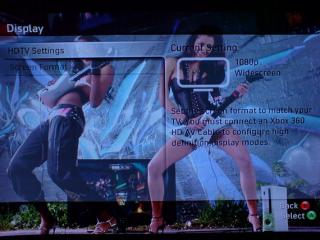
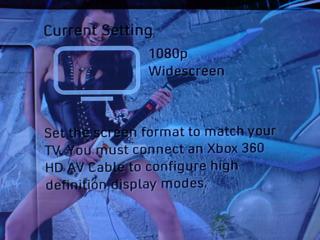
Well expert/gurus...please explain  This post has been edited by hairuLeZ: Aug 16 2007, 10:40 PM This post has been edited by hairuLeZ: Aug 16 2007, 10:40 PM |
|
|
|
|
|
redbull_y2k
|
Aug 16 2007, 11:23 PM
|
|
|
It means the scaler in your lcdtv can accept 1080p input and then rescale to your panel's resolution.  |
|
|
|
|
|
hairuLeZ
|
Aug 17 2007, 12:36 AM
|
Getting Started
|
QUOTE(redbull_y2k @ Aug 16 2007, 11:23 PM) It means the scaler in your lcdtv can accept 1080p input and then rescale to your panel's resolution. ^ Yeah i thought so. But when comparing 1080i and p got different which better display on p. I think its more than rescale  This post has been edited by hairuLeZ: Aug 17 2007, 12:40 AM This post has been edited by hairuLeZ: Aug 17 2007, 12:40 AM |
|
|
|
|
|
silencer
|
Aug 17 2007, 06:37 AM
|
|
|
hairulez..nice wall-paper.....
|
|
|
|
|
|
rx330
|
Aug 17 2007, 10:31 AM
|
|
|
if 1080p the wallpaper girlgot becum naked or not?
|
|
|
|
|
|
welwitchia
|
Aug 17 2007, 10:39 AM
|
|
|
^ OMG u're beyond hopeless. |
|
|
|
|
|
tot31
|
Aug 17 2007, 11:35 AM
|
|
|
QUOTE(rx330 @ Aug 17 2007, 10:31 AM) if 1080p the wallpaper girlgot becum naked or not? hahahahaha..once a pervert, always a pervert.....
Added on August 17, 2007, 11:36 amQUOTE(rx330 @ Aug 17 2007, 10:31 AM) if 1080p the wallpaper girlgot becum naked or not? hahahahaha..once a pervert, always a pervert..... This post has been edited by tot31: Aug 17 2007, 11:36 AM |
|
|
|
|
|
rx330
|
Aug 17 2007, 11:42 AM
|
|
|
wei..... u afraid nobody knows im a pervert is it? must post TWICE ar!!!!!!!!!!!!!!!!!!!!!!
|
|
|
|
|
|
lester
|
Aug 17 2007, 03:52 PM
|
Getting Started
|
I try on my Dell 2405WFP LCD via vga cabale but in xbox360 i can't select 1080i or 1080p the only setting i can choose is the screen resolution. So i choose the highest resolution available but compare with component input the vga color is a bit wash out and also the text is not as sharp as the component input. Am i miss something or what I thought connect via vga cable will be better?
|
|
|
|
|
|
tot31
|
Aug 17 2007, 03:57 PM
|
|
|
QUOTE(lester @ Aug 17 2007, 03:52 PM) I try on my Dell 2405WFP LCD via vga cabale but in xbox360 i can't select 1080i or 1080p the only setting i can choose is the screen resolution. So i choose the highest resolution available but compare with component input the vga color is a bit wash out and also the text is not as sharp as the component input. Am i miss something or what I thought connect via vga cable will be better? Have you updated to the Fall Update? Because the fall update has Reference Level setting for VGA, the best for me is Expanded. Make sure you use M$ FTF vga cable, if you use chicken brand the quality will be like chicken.
Added on August 17, 2007, 3:58 pmQUOTE(lester @ Aug 17 2007, 03:52 PM) I try on my Dell 2405WFP LCD via vga cabale but in xbox360 i can't select 1080i or 1080p the only setting i can choose is the screen resolution. So i choose the highest resolution available but compare with component input the vga color is a bit wash out and also the text is not as sharp as the component input. Am i miss something or what I thought connect via vga cable will be better? Have you updated to the Fall Update? Because the fall update has Reference Level setting for VGA, the best for me is Expanded. Make sure you use M$ FTF vga cable, if you use chicken brand the quality will be like chicken. This post has been edited by tot31: Aug 17 2007, 03:58 PM |
|
|
|
|
|
lester
|
Aug 17 2007, 04:11 PM
|
Getting Started
|
Hi tot31,
U mention about Reference Level setting for VGA, r u talking a bout a list of resolution to choose from? I choose the highest resolution, if i'm not mistaken i choose 1920 x 1080, does it mean is running on 1080P?
About the cable im not sure it is chicken brand or what bcoz i just ask for vga cable and they charge me rm60 for the cable.
This post has been edited by lester: Aug 17 2007, 04:17 PM
|
|
|
|
|
|
tot31
|
Aug 17 2007, 04:19 PM
|
|
|
QUOTE(lester @ Aug 17 2007, 04:11 PM) Hi tot31,
U mention about Reference Level setting for VGA, r u talking a bout a list of resolution to choose from? I choose the highest resolution, if i'm not mistaken i choose 1900 x 1080, does it mean is running on 1080P? If you can't see the Reference Level Settings option, then you're still on the old firmware. Try to update the firmware by going to LIVE (it'll autoupdate). 1900 x 1080 is 1080p. QUOTE About the cable im not sure it is chicken brand or what bcoz i just ask for vga cable and they charge me rm60 for the cable. It's a chicken brand for sure coz M$ FTF original vga cable will cost you RM160 and above. rx330: I'm not intended to double post but I think this board got some bug, even you also have posted double. Go and check. |
|
|
|
|
|
rx330
|
Aug 17 2007, 04:23 PM
|
|
|
kekkeke, i know lar...
something wrong...
|
|
|
|
|
|
02mini
|
Aug 18 2007, 08:48 PM
|
Getting Started
|
can we play ps3 on samsung 226BW 22" 2MS lcd monitor?
|
|
|
|
|
|
ruztynail
|
Aug 19 2007, 03:14 AM
|
|
|
QUOTE(02mini @ Aug 18 2007, 08:48 PM) can we play ps3 on samsung 226BW 22" 2MS lcd monitor? yes u can.. get a dvi-hdmi converter. |
|
|
|
|
|
02mini
|
Aug 19 2007, 01:15 PM
|
Getting Started
|
QUOTE(ruztynail @ Aug 19 2007, 03:14 AM) yes u can.. get a dvi-hdmi converter. ok thanks. but how about the speaker? the lcd doesnt have speaker. IS this connection correct? PS3 to LCD --->> use HDMI to DVI converter PS3 to Speaker -->> use the blue,red,yellow cable?? Use these two cables simultenously? Can it really works? |
|
|
|
|
|
Glau
|
Aug 19 2007, 02:10 PM
|
|
|
yes, it can. QUOTE(02mini @ Aug 19 2007, 01:15 PM) ok thanks. but how about the speaker? the lcd doesnt have speaker. IS this connection correct? PS3 to LCD --->> use HDMI to DVI converter PS3 to Speaker -->> use the blue,red,yellow cable?? Use these two cables simultenously? Can it really works?
Added on August 19, 2007, 2:14 pmjust got a LG lc7r for my PS3, simply superb. The good thing is that it accepts 1080p. tested with my ridge racer ps3 on 1080p..works like a charm. This post has been edited by Glau: Aug 19 2007, 02:14 PM |
|
|
|
|
|
acougan
|
Aug 19 2007, 07:12 PM
|
|
|
this benQ 16:10 monitor is pretty good  http://www.lowyat.net/v2/computer-hardware/benq-fp94vw.html http://www.lowyat.net/v2/computer-hardware/benq-fp94vw.htmlfor 360 VGA, cannot do 1920*1080, but 1280*720 looks OK (not stretched thin/fat) if you adjust the settings. on ps3 HDMI, it also accepts and display 720p and 1080p, but naturally 1080p is downscaled to fit its native 1440*900 resolution. since the monitor is 16:10 and 720p/1080p is 16:9, the monitor lets you choose 2 options. 1)full screen : the 16:9 is stretched (tall and thin) to fit 16:10 2)aspect : the 16:9 image has the correct aspect, but the leftest and rightest parts of the screen is cut off |
|
|
|
|
|
rx330
|
Aug 20 2007, 09:06 AM
|
|
|
glau, it accepts 1080p signal, but using a 1366 X 768 panel?
another gimmick?
|
|
|
|
|
|
redbull_y2k
|
Aug 20 2007, 03:19 PM
|
|
|
QUOTE(rx330 @ Aug 20 2007, 09:06 AM) glau, it accepts 1080p signal, but using a 1366 X 768 panel? another gimmick? Not exactly a gimmick. A 1080p downscaled to 1366x768 would still look better than a 720p signal upscaled to the panel's resolution.  |
|
|
|
|



 Quote
Quote





 0.0300sec
 0.29
0.29
 6 queries
 GZIP Disabled