

hey,everyone.gonna get a phone soon.should i get screen protector when i buy?
Samsung I8000 Omnia II v2, All-in-one. Redefined
Samsung I8000 Omnia II v2, All-in-one. Redefined
|
|
 Oct 8 2009, 09:02 PM Oct 8 2009, 09:02 PM
|
 
Junior Member
43 posts Joined: Apr 2009 
|
hey,everyone.gonna get a phone soon.should i get screen protector when i buy?
|
|
|
|
|
|
Oct 8 2009, 09:06 PM
|

Junior Member
136 posts Joined: Nov 2006
|
QUOTE(DarkAce @ Oct 8 2009, 09:02 PM) hey,everyone.gonna get a phone soon.should i get screen protector when i buy? update your price surveys yeah dude   This post has been edited by thinakaran: Oct 8 2009, 09:06 PM |
|
|
Oct 8 2009, 09:37 PM
|

Junior Member
290 posts Joined: Feb 2008
|
guys got any recommendations where to get nice pouch/case for tis phone in KL?
|
|
|
Oct 9 2009, 03:39 AM
|

All Stars
29,767 posts Joined: Jan 2009 From: Johor, Malaysia. 
|
My OMNIA II WM 6.5 + SPB Mobile Shell 3.5 + Resco Contact Manager 2
   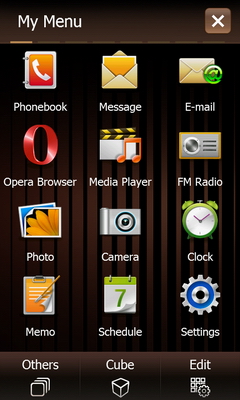 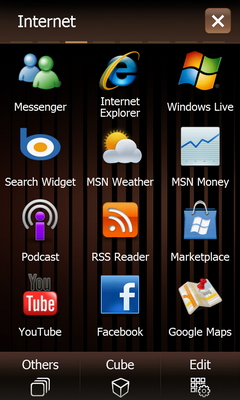     This post has been edited by Andrewtst: Oct 9 2009, 04:02 AM |
|
|
Oct 9 2009, 03:42 AM
|
|
All Stars
29,767 posts Joined: Jan 2009 From: Johor, Malaysia.
|
Continue...
 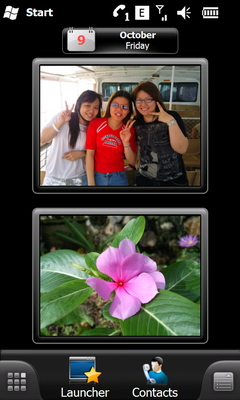 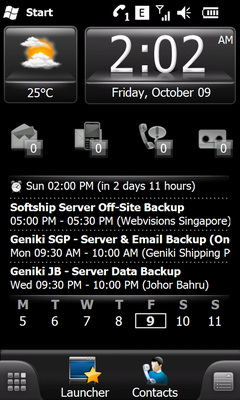 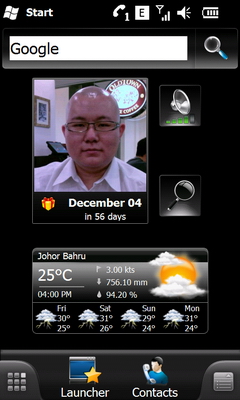 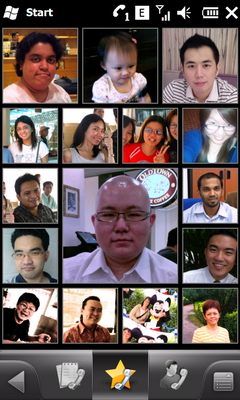  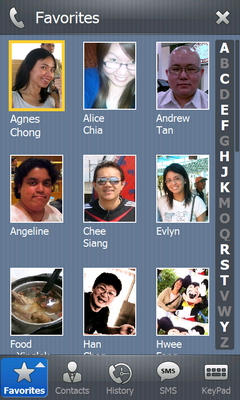 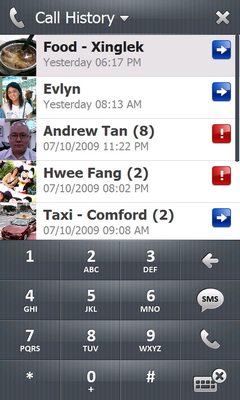 This post has been edited by Andrewtst: Oct 9 2009, 03:48 AM |
|
|
Oct 9 2009, 10:32 AM
|

Junior Member
36 posts Joined: Oct 2005 From: PJ
|
Andrewtst & the rest,
Do you all know how to bring out the old "Windows Setting" in WinMo 6.5 ? I can't find it, can only use Samsung Setting. and idea ? |
|
|
|
|
|
Oct 9 2009, 10:54 AM
|

Senior Member
506 posts Joined: Aug 2008 From: Sometime Singapore, mostly Jakarta.
|
QUOTE(jyhk_junk @ Oct 9 2009, 09:32 AM) Andrewtst & the rest, Disable TouchWiz UI.Do you all know how to bring out the old "Windows Setting" in WinMo 6.5 ? I can't find it, can only use Samsung Setting. and idea ? |
|
|
Oct 9 2009, 11:11 AM
|
|
Junior Member
36 posts Joined: Oct 2005 From: PJ
|
already disable TouchWiz UI still didn't display the old Windows Menu, can you show some screen shot ?
When using WinMO 6.1, when disable the TouchWiz UI, we can display and show the old Microsoft Setting. |
|
|
 Oct 9 2009, 11:20 AM Oct 9 2009, 11:20 AM
|
|
Senior Member
506 posts Joined: Aug 2008 From: Sometime Singapore, mostly Jakarta.
|
QUOTE(jyhk_junk @ Oct 9 2009, 10:11 AM) already disable TouchWiz UI still didn't display the old Windows Menu, can you show some screen shot ? After disabling TouchWiz UI, click on "Start" on the top left corner and you got the old WinMo menu, right?When using WinMO 6.1, when disable the TouchWiz UI, we can display and show the old Microsoft Setting. |
|
|
Oct 9 2009, 11:24 AM
|
|
Junior Member
36 posts Joined: Oct 2005 From: PJ
|
When you disabled the TouchWiz UI & click on "Start" you will still get the new windows Menu shown in Post #394 (1st two screenshot) by Andrewtst post.
|
|
|
Oct 9 2009, 12:04 PM
|
|
All Stars
29,767 posts Joined: Jan 2009 From: Johor, Malaysia.
|
QUOTE(Omnian @ Oct 9 2009, 11:20 AM) After disabling TouchWiz UI, click on "Start" on the top left corner and you got the old WinMo menu, right? In new Windows Mobile 6.5, The Samsung touchWiz UI by default is disable, but you can't get the actual Settings from Microsoft also. I didn't find got setting Menu inside the new Microsoft Menu UI also. I doubt it has been disable by Samsung. (Maybe la, or it don't have one, I never play others WM 6.5 before. Actually OMNIA II is my 1st device base on Windows Mobile. I still new on it)I get back all the default Windows Mobile setting (not Samsung one) from SPB Mobile Shell. This post has been edited by Andrewtst: Oct 9 2009, 12:09 PM |
|
|
Oct 9 2009, 12:13 PM
|

Junior Member
192 posts Joined: Dec 2004 From: Somewhere in the Northern Hemisphere...
|
QUOTE(Andrewtst @ Oct 9 2009, 12:04 PM) In new Windows Mobile 6.5, The Samsung touchWiz UI by default is disable, but you can't get the actual Settings from Microsoft also. I didn't find got setting Menu inside the new Microsoft Menu UI also. I doubt it has been disable by Samsung. (Maybe la, or it don't have one, I never play others WM 6.5 before. Actually OMNIA II is my 1st device base on Windows Mobile. I still new on it) To re-enable traditional Settings menuI get back all the default Windows Mobile setting (not Samsung one) from SPB Mobile Shell. Open any registry editor, go to path: HKEY_LOCAL_MACHINE\Security\Shell\StartInfo\ Value 'HideSettings' Set to '0'.. and soft-reset Credit goes to rodrigofd. Taken from http://www.modaco.com/content/i8000-omnia-...e-samsungizing/ |
|
|
Oct 9 2009, 12:14 PM
|

Senior Member
1,991 posts Joined: May 2008 From: OuTeR sPaCe!!
|
QUOTE(jyhk_junk @ Oct 9 2009, 11:24 AM) When you disabled the TouchWiz UI & click on "Start" you will still get the new windows Menu shown in Post #394 (1st two screenshot) by Andrewtst post. that one is for Winmo 6.5 la..if u r on 6.1,u'll get the classic start menu..then klik setting...u'll get ur classic settings then~ |
|
|
|
|
|
 Oct 9 2009, 12:28 PM Oct 9 2009, 12:28 PM
|
|
Senior Member
506 posts Joined: Aug 2008 From: Sometime Singapore, mostly Jakarta.
|
QUOTE(jyhk_junk @ Oct 9 2009, 10:24 AM) When you disabled the TouchWiz UI & click on "Start" you will still get the new windows Menu shown in Post #394 (1st two screenshot) by Andrewtst post. Oooh...the older old menu  In this WM6.5 menu, can you try go to [Start]>[Settings]>[System]>[Large Display] and checked the radio box beside Use large Start Menu. |
|
|
Oct 9 2009, 12:36 PM
|
|
Senior Member
506 posts Joined: Aug 2008 From: Sometime Singapore, mostly Jakarta.
|
QUOTE(Andrewtst @ Oct 9 2009, 11:04 AM) In new Windows Mobile 6.5, The Samsung touchWiz UI by default is disable, but you can't get the actual Settings from Microsoft also. I didn't find got setting Menu inside the new Microsoft Menu UI also. I doubt it has been disable by Samsung. (Maybe la, or it don't have one, I never play others WM 6.5 before. Actually OMNIA II is my 1st device base on Windows Mobile. I still new on it) There...your "Settings" I get back all the default Windows Mobile setting (not Samsung one) from SPB Mobile Shell.  
This post has been edited by Omnian: Oct 9 2009, 12:40 PM |
|
|
Oct 9 2009, 12:36 PM
|
|
Senior Member
506 posts Joined: Aug 2008 From: Sometime Singapore, mostly Jakarta.
|
QUOTE(lhongwuh @ Oct 9 2009, 11:14 AM) that one is for Winmo 6.5 la.. Errr...WinMo 6.5 oso can leh. if u r on 6.1,u'll get the classic start menu..then klik setting...u'll get ur classic settings then~ This post has been edited by Omnian: Oct 9 2009, 12:43 PM |
|
|
Oct 9 2009, 12:56 PM
|
|
Junior Member
192 posts Joined: Dec 2004 From: Somewhere in the Northern Hemisphere...
|
QUOTE(Omnian @ Oct 9 2009, 12:36 PM) There...your "Settings" That is Samsung's customised settings. What he meant is Microsoft stock settings menu, which has been disabled from registry. Like below:-


This post has been edited by bluhound: Oct 9 2009, 01:06 PM |
|
|
Oct 9 2009, 01:02 PM
|
|
Senior Member
1,991 posts Joined: May 2008 From: OuTeR sPaCe!!
|
QUOTE(Omnian @ Oct 9 2009, 12:36 PM) Errr...WinMo 6.5 oso can leh. paiseh...i still havent try 6.5 yet..my info limited to 6.1 only~  but his question is referring to 6.1 initially~~ |
|
|
Oct 9 2009, 01:05 PM
|
|
Senior Member
506 posts Joined: Aug 2008 From: Sometime Singapore, mostly Jakarta.
|
QUOTE(lhongwuh @ Oct 9 2009, 12:02 PM) paiseh...i still havent try 6.5 yet.. No, it's about 6.5 from the beginning.my info limited to 6.1 only~ but his question is referring to 6.1 initially~~ At first I mis-SEE oso |
|
|
Oct 9 2009, 01:21 PM
|
|
Junior Member
36 posts Joined: Oct 2005 From: PJ
|
QUOTE(bluhound @ Oct 9 2009, 12:13 PM) To re-enable traditional Settings menu Hi bluhound,Open any registry editor, go to path: HKEY_LOCAL_MACHINE\Security\Shell\StartInfo\ Value 'HideSettings' Set to '0'.. and soft-reset Credit goes to rodrigofd. Taken from http://www.modaco.com/content/i8000-omnia-...e-samsungizing/ Thanks for the info, that exactly solved the problem and now managed to bring out the "old" Microsoft setting m  enu. enu.  Added on October 9, 2009, 1:23 pmOmnian, No worried .. most importantly you have to passion to share what you know, and experience... This post has been edited by jyhk_junk: Oct 9 2009, 01:23 PM |
| Change to: |  0.0323sec 0.0323sec
 0.26 0.26
 6 queries 6 queries
 GZIP Disabled GZIP Disabled
Time is now: 6th December 2025 - 11:54 PM |
 Quote
Quote