Welcome Guest ( Log In | Register )

Bump Topic Topic Closed RSS Feed
124 Pages « < 102 103 104 105 106 > » Bottom

Outline · [ Standard ] · Linear+

 iPhone Club v9 - iPhone related news & Questions , For questions, kindly use the template

views
     
SUSprototype_x0
post Aug 31 2009, 01:34 PM

Getting Started
**
Junior Member
169 posts

Joined: Jan 2005


QUOTE(nokia2003 @ Aug 31 2009, 12:48 AM)
have you tried doing this?
» Click to show Spoiler - click again to hide... «


Added on August 31, 2009, 12:52 amhowever, that part shown above, will only answers your "sms preview" bit and not the "unknown".
*
tried it but failed. it still happen.. any necessary workout that u might suggest?

but for now, i will just wait till the next firmware release, dev team release the jailbreak, then i will do update+jailbreak.. pretty sure it will cure this nuisance..
rover82
post Aug 31 2009, 02:34 PM

New Member
*
Newbie
1 posts

Joined: Aug 2009
iPhone Generation : 2G
Unlocked? (or Part Number): Lock (brought from US)
Current Firmware : 2.1.1
iTunes Version : 8.2.1
PC/MAC : MAC OS X
Jailbreaking software : Pwnagetool
Problem Encountered : Careless dropped the phone onto the floor, and now the touchscreen is not functioning (unable to slide to unlock the phone)
Steps Taken So Far : Search trough the web, found out that have to replace the screen and digitizer
Screenshot of Problem(if applicable) :
Other Information/Remarks : Wonder if there is another solution to solve it without replacing the screen (it cost heaps).


TSnokia2003
post Aug 31 2009, 03:22 PM

Look at all my stars!!
*******
Senior Member
5,786 posts

Joined: Nov 2007
From: VIC - The Place To Be


QUOTE(Digitral @ Aug 31 2009, 10:37 AM)
Restore to Original Firmware or JB Firmware?
*
original, unaltered firmware of course.

QUOTE(prototype_x0 @ Aug 31 2009, 01:34 PM)
tried it but failed. it still happen.. any necessary workout that u might suggest?

but for now, i will just wait till the next firmware release, dev team release the jailbreak, then i will do update+jailbreak.. pretty sure it will cure this nuisance..
*
not much that be done. i'm sure you know that JB causes an iPhone to work slightly differently that it is supposed to be.
vectorian
post Aug 31 2009, 04:18 PM

Casual
***
Junior Member
377 posts

Joined: Feb 2006


QUOTE(nokia2003 @ Aug 31 2009, 05:46 AM)
from your SE phone, copy your contacts to the SIM card first.

and from there, use the function on the iPhone to copy over.

or, if you are move tech savvy, use the preloaded SE software on your PC and transfer the contacts to outlook and synchronise via iTunes
*
Thanks bro... that seems like a heck loads of work but what to do.

Actually the other issue is that the number of contacts on my old phone REALLY outnumbers the capacity of the Maxis SIM card... sigh.
frozzbyte
post Aug 31 2009, 04:54 PM

Feeling butthurt lately? Like I care
*******
Senior Member
3,657 posts

Joined: May 2005
QUOTE(prototype_x0 @ Aug 31 2009, 01:34 PM)
tried it but failed. it still happen.. any necessary workout that u might suggest?

but for now, i will just wait till the next firmware release, dev team release the jailbreak, then i will do update+jailbreak.. pretty sure it will cure this nuisance..
*
Do you have any other sms application i.e. biteSMS or iRealSMS that you installed thru Cydia? What about Mcleaner or iBlacklist?
Digitral
post Aug 31 2009, 07:32 PM

Full Capdase Product
*******
Senior Member
7,578 posts

Joined: Jan 2003
From: Taman Segar Perdana, Cheras


QUOTE(nokia2003 @ Aug 31 2009, 03:22 PM)
original, unaltered firmware of course.
*
Already try restore the phone to firmware 3.0.1

Also cant even find any Edge or 3G icon appear. Only signal bar even the 3G is enable.

anymore setting did I miss out?


naem86
post Aug 31 2009, 08:21 PM

New Member
*
Newbie
3 posts

Joined: Aug 2009
Hi, naem here.

1stly, i'm new here. I try find solution for this problem and still not get the answer.

My Problem :

1) My WIFI ( laptop ) is succefully connected with my iphone. Problem is no received data there. It still zero. Only send data is active.

2) I call maxis to get info about how to subscribe their plan for my internet acces through iphone. Still not answered. Like blur-blur..Ohhhh. So, i decided to take action by subscribing their prepaid broadband. Its only RM8 a day. Waahh....happy so much. But i got problem when i didnt know how to set up this one :

QUOTE
APN: unet
Number to dial: *99#
User ID: maxis
Password: wap
Refer here for maxis prepaid broadband : http://www.maxis.com.my/personal/broadband...ess_prepaid.asp

I already try cellular solution by putting iccp* ( not sure with the name but it works and maxis logo appeared ). I'm sure there is no "Number To Dial: *993#" under cellular network .

So, anyone can help me please?


ps: I bought iphone not from maxis. Seller claimed that is unlocked by telco. Its serial number MB489MY.

QUOTE
iPhone Generation : 3G
Unlocked? (or Part Number): Not sure.Unlocked by telco ( MB489MY
Current Firmware : 3.0.1 ( baru je update..success )
iTunes Version : not sure ( 8 ** )
PC/MAC : Window Vista
Jailbreaking software : not sure
Steps Taken So Far : ???
pps: thanks moderator for moving this post into this thread...

This post has been edited by naem86: Aug 31 2009, 08:31 PM
achew
post Aug 31 2009, 09:47 PM

Photolithography Engineer
*******
Senior Member
3,807 posts

Joined: Jan 2003
From: Masking


guys...lets say i connect my iphone to more than 1 macs....most of my app was downloaded in my main mac..but occasionally i had to use other macs for work..i realise very often..when i downloaded something into my other macs..and when i sync..some of my games/app in my iphone would be removed(even tho i click the option to transfer my stuff)...its getting a lil bit frustrated as i just formatted my leopard into snowleopard...so my apps/games in the comp were gone..and now i sync it again...1/2 of them disappear from my iphone... =.=
tinkerbel
post Aug 31 2009, 10:11 PM

Fanaddict!
Group Icon
VIP
13,495 posts

Joined: Dec 2006
From: KL, Malaysia


@naem86,
I'm not sure U can use iPhone as an ad-hoc network; meaning U get the Wifi from ur laptop PC instead of directly from the router. Try connecting it directly to the SSID on the router and it should work.

Since your i3G is a local Maxis set, it should oredi have the APN settings which means U shouldn't need to tweak it in order to use EDGE/3G unless U have previously done something. Check Settings; if U have a 'Profile' in it, delete that profile. Alternatively, if U have JB ur phone, U just need to put those settings in the APN area [sorry I'm not familiar with JB phones; not yet at least]

@achew,
All U need to do is to authorise the computer so U can share and swap apps/songs U have purchased from 1 computer to another. U can authorise up to 5 computers. Don't forget to deauthorise if and when ur swapping the computer for good.

This post has been edited by tinkerbel: Aug 31 2009, 10:13 PM
naem86
post Aug 31 2009, 10:46 PM

New Member
*
Newbie
3 posts

Joined: Aug 2009
QUOTE(tinkerbel @ Aug 31 2009, 10:11 PM)
@naem86,
I'm not sure U can use iPhone as an ad-hoc network; meaning U get the Wifi from ur laptop PC instead of directly from the router.  Try connecting it directly to the SSID on the router and it should work.

Since your i3G is a local Maxis set, it should oredi have the APN settings which means U shouldn't need to tweak it in order to use EDGE/3G unless U have previously done something.  Check Settings; if U have a 'Profile' in it, delete that profile.  Alternatively, if U have JB ur phone, U just need to put those settings in the APN area [sorry I'm not familiar with JB phones; not yet at least]
Thanks bro..

Actually i try set up adhoc network at 1st..everything is ok untill i try to surf intenrnt with my iphone. Loading only and at the end a msg " server stop working" appeared.

So, i check it with my network ( pc), looking its properties and there are 2 TCP IP ( tcp ip v4 and tcp ip v6 ). i set it to obtain ip automatically..Still get nothing. Data sent is active, received data zero.

QUOTE
Connection-specific DNS Suffix:
Description: Broadcom 802.11b/g WLAN
Physical Address: 00-21-00-B6-9E-D7
DHCP Enabled: Yes
Autoconfiguration IPv4 Address: 169.254.24.60
IPv4 Subnet Mask: 255.255.0.0
IPv4 Default Gateway:
IPv4 DNS Server:
IPv4 WINS Server:
NetBIOS over Tcpip Enabled: Yes
Link-local IPv6 Address: fe80::8c76:2ba4:8be9:183c%11
IPv6 Default Gateway:
IPv6 DNS Servers: fec0:0:0:ffff::1%1, fec0:0:0:ffff::2%1, fec0:0:0:ffff::3%1


DNS server for IPv6 is really weird and i think IPv4 shuld have uniqe IP instead of blank..Ayoyo..

This post has been edited by naem86: Aug 31 2009, 11:01 PM
achew
post Aug 31 2009, 11:14 PM

Photolithography Engineer
*******
Senior Member
3,807 posts

Joined: Jan 2003
From: Masking


QUOTE(tinkerbel @ Aug 31 2009, 10:11 PM)
@naem86,
I'm not sure U can use iPhone as an ad-hoc network; meaning U get the Wifi from ur laptop PC instead of directly from the router.  Try connecting it directly to the SSID on the router and it should work.

Since your i3G is a local Maxis set, it should oredi have the APN settings which means U shouldn't need to tweak it in order to use EDGE/3G unless U have previously done something.  Check Settings; if U have a 'Profile' in it, delete that profile.  Alternatively, if U have JB ur phone, U just need to put those settings in the APN area [sorry I'm not familiar with JB phones; not yet at least]

@achew,
All U need to do is to authorise the computer so U can share and swap apps/songs U have purchased from 1 computer to another.  U can authorise up to 5 computers.  Don't forget to deauthorise if and when ur swapping the computer for good.
*
yup..i did authorize all my 4 macs...but somehow..none of my app from the iphone would transfer to those "new" macs...even i write click my iphone's name click transfer purchases...nothing happened.. T_T

anyway..i redl back everything for free..but well..troublesome..and some games had to start all over again..zz
naem86
post Sep 1 2009, 06:10 AM

New Member
*
Newbie
3 posts

Joined: Aug 2009
Thanks God....My problem has been sttle. Hohoho...

Ok..for those who are still cannto use ur adhoc wifi from your PC/Laptop ( vista only ), try this :

1) follow the instruction from one of our member thread here 1st

http://forum.lowyat.net/topic/831923/+60


2) Refer back to your networck connection on your pc. Just pick together ( Local area connection + wireless network ) and create a network bridge.
QUOTE
# Open “Network and Sharing Center” (Windows Vista)
# Select “Manage network connections”
# Select both wireless connection and Local area connection (that you have Internet on it!!!)
# Right Click on one of them then select “Bridge Connections”
# Wait for windows to complete the Bridging possess

credit back to http://cazisoft.com/2008/how-to-connect-th...to-the-internet
3) after that, just waiting till its complete.

4) go back to your iphone. Renew lease and automatically your DHCP will get the ip.

5) connet to the internet through your iphone...hehehehe

thanks2....


QUOTE(naem86 @ Aug 31 2009, 08:21 PM)
Hi, naem here.

1stly, i'm new here. I try find solution for this problem and still not get the answer.

My Problem :

1) My WIFI ( laptop ) is succefully connected with my iphone. Problem is no received data there. It still zero. Only send data is active.

2) I call maxis to get info about how to subscribe their plan for my internet acces through iphone. Still not answered. Like blur-blur..Ohhhh. So, i decided to take action by subscribing their prepaid broadband. Its only RM8 a day. Waahh....happy so much. But i got problem when i didnt know how to set up this one :
Refer  here for maxis prepaid broadband : http://www.maxis.com.my/personal/broadband...ess_prepaid.asp

I already try cellular solution by putting iccp* ( not sure with the name but it works and maxis logo appeared ). I'm sure there is no "Number To Dial: *993#" under cellular network .

So, anyone can help me please?
ps: I bought iphone not from maxis. Seller claimed that is unlocked by telco. Its serial number MB489MY.
pps: thanks moderator for moving this post into this thread...

*
owikh84
post Sep 1 2009, 06:21 AM

i7 Clan
Group Icon
Elite
8,711 posts

Joined: Nov 2007
From: Butterworth, PG / Machang, Kelantan


iPhone Generation : 3G
Unlocked? (or Part Number): Officially unlocked
Current Firmware : 3.0
iTunes Version : 8.2.1
PC/MAC : PC
Jailbreaking software : Pwnagetool Redsnow (windows)
Problem Encountered : MMS failed on Maxis 4.0, enable MMS in Settings, what else should I enable?
Steps Taken So Far :
http://forum.lowyat.net/index.php?showtopic=1141938
http://forum.lowyat.net/topic/752226
Screenshot of Problem(if applicable) :
Other Information/Remarks : Yes I can see Cellular Data Network
Mozilla-Firefox
post Sep 1 2009, 08:01 PM

Getting Started
**
Junior Member
59 posts

Joined: Sep 2007
From: Kuala Lumpur


QUOTE
7. Find My iPhone with MobileMe [Need to subscribe]
A: MobileMe helps you find your lost iPhone.
Sometimes it’s your keys. Other times it’s your glasses. Misplacing things happens all the time. Now, if you misplace your iPhone, Find My iPhone can help you find it.


what if the iPhone is off will I be able to still track it?

This post has been edited by Mozilla-Firefox: Sep 1 2009, 08:02 PM
ah_fui
post Sep 1 2009, 08:07 PM

technical potatoz
*****
Senior Member
858 posts

Joined: Jan 2003


iphone 2g
fw 3.0.1
lock
redsnow (jb + unlock)
sbsettings 3.0.4
cydelete

why my iphone doesnt show sbsettings & cydelete icons after i have install it.
i have redo few times still d same result.

This post has been edited by ah_fui: Sep 1 2009, 08:32 PM
lemonie
post Sep 1 2009, 08:40 PM

Getting Started
**
Junior Member
110 posts

Joined: Jan 2009
QUOTE(ah_fui @ Sep 1 2009, 08:07 PM)
iphone 2g
fw 3.0.1
lock
redsnow (jb + unlock)
sbsettings 3.0.4
cydelete

why my iphone doesnt show sbsettings & cydelete icons after i have install it.
i have redo few times still d same result.
*
cydelete doesn't have an icon fyi. u can just tap and hold on your cydia icon and u can delete them without going into cydia.
SUSprototype_x0
post Sep 1 2009, 10:08 PM

Getting Started
**
Junior Member
169 posts

Joined: Jan 2005


QUOTE(frozzbyte @ Aug 31 2009, 04:54 PM)
Do you have any other sms application i.e. biteSMS or iRealSMS that you installed thru Cydia? What about Mcleaner or iBlacklist?
*
yes i have iBlacklist only. i dont use third party sms apps.

but this thing happened recently, i mean, quite a long time after i installed iblacklist.
chinamobile
post Sep 1 2009, 10:43 PM

Getting Started
**
Junior Member
146 posts

Joined: Jun 2008
From: KL lowyat plaza


QUOTE(prototype_x0 @ Aug 30 2009, 11:57 AM)
iPhone Generation : Iphone 3G
Unlocked? (or Part Number): Officially Unlocked, Singtel Set, MB496ZA
Current Firmware : 3.0.1
iTunes Version : Itunes 8.2
PC/MAC : PC
Jailbreaking software : Redsnow
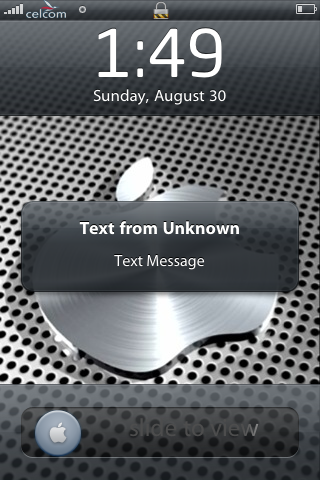
Problem Encountered : preview SMS receive shown "text from unknown" instead of contact name and sms preview
Steps Taken So Far : tried respring, reboot.. even turn off the iphone and turn it on again. it's still the same.
Screenshot of Problem(if applicable) : user posted image
Other Information/Remarks :

to all iphone gurus, please help. your help are very much appreciated. thanks.
*
First i think you will need to restore firmware again....sad.gif

DO NOT RESTORE BACKUP!.

sync contacts and others thru itune

after try it

your sms should work fine.

sometimes restoring from backup is APITA

smile.gif


Added on September 1, 2009, 10:46 pm
QUOTE(owikh84 @ Sep 1 2009, 06:21 AM)
iPhone Generation : 3G
Unlocked? (or Part Number): Officially unlocked
Current Firmware : 3.0
iTunes Version : 8.2.1
PC/MAC : PC
Jailbreaking software : Pwnagetool Redsnow (windows)
Problem Encountered : MMS failed on Maxis 4.0, enable MMS in Settings, what else should I enable?
Steps Taken So Far :
http://forum.lowyat.net/index.php?showtopic=1141938
http://forum.lowyat.net/topic/752226
Screenshot of Problem(if applicable) :
Other Information/Remarks : Yes I can see Cellular Data Network
*
did your upload thru itune Shift+Update maxis.ipcc ? .....restart iphone

This post has been edited by chinamobile: Sep 1 2009, 10:50 PM
ah_fui
post Sep 2 2009, 10:14 AM

technical potatoz
*****
Senior Member
858 posts

Joined: Jan 2003


QUOTE(lemonie @ Sep 1 2009, 08:40 PM)
cydelete doesn't have an icon fyi. u can just tap and hold on your cydia icon and u can delete them  without going into cydia.
*
thx for yr info. but then how come my sbsettings doesnt display at springboard ?
am i missing some steps ?
PeeEl
post Sep 2 2009, 10:38 AM

Look at all my stars!!
*******
Senior Member
3,612 posts

Joined: Jan 2009


QUOTE(ah_fui @ Sep 2 2009, 10:14 AM)
thx for yr info. but then how come my sbsettings doesnt display at springboard ?
am i missing some steps ?
*
There is also no icon for SBSettings. Just short slash at the top left corner and a window will drop down.

124 Pages « < 102 103 104 105 106 > » Top
Topic ClosedOptions
 

Change to:
| Lo-Fi Version
0.1506sec    0.68    6 queries    GZIP Disabled
Time is now: 3rd December 2025 - 02:46 PM