

yup, my fren also envy the laptop finishing and the design. sort of like carbon fiber kind of design.
ASUS k40AB/k50AB: HD 4570 for just RM2K!, Light gaming on the cheap
ASUS k40AB/k50AB: HD 4570 for just RM2K!, Light gaming on the cheap
|
|
 Sep 23 2009, 02:22 PM Sep 23 2009, 02:22 PM
|
 
Senior Member
822 posts Joined: Jan 2007 From: Sepang, KLIA - Malaysia / York - UK  
|
yup, my fren also envy the laptop finishing and the design. sort of like carbon fiber kind of design.
|
|
|
|
|
|
Sep 23 2009, 02:32 PM
|

Senior Member
783 posts Joined: Apr 2005
|
QUOTE(xKAIZERUx @ Sep 23 2009, 02:22 PM) yup, my fren also envy the laptop finishing and the design. sort of like carbon fiber kind of design. Haha.. especially when under light, it gives you the impression of a fine glossy expensive design. Its like some kind of snake skin for me (Asian King Cobra perhaps). My personal view la. |
|
|
Sep 23 2009, 02:43 PM
|
|
Senior Member
822 posts Joined: Jan 2007 From: Sepang, KLIA - Malaysia / York - UK
|
But one thing i dislike this kind of finishing, it it a fingerprint magnet. I spend a lot of time try to polish the laptop so it wont have any marks on it. *sigh*
|
|
|
Sep 23 2009, 03:06 PM
|

Junior Member
108 posts Joined: May 2009
|
where is the download link for the k40ab bios?too many page la...sum1 gv me..thx!!1
and how to flash ya..haha This post has been edited by jackng: Sep 23 2009, 03:09 PM |
|
|
Sep 23 2009, 03:20 PM
|

Senior Member
1,304 posts Joined: Jan 2009 From: Kuala Lumpur
|
QUOTE(jackng @ Sep 23 2009, 03:06 PM) where is the download link for the k40ab bios?too many page la...sum1 gv me..thx!!1 http://support.asus.com/download/download.aspxand how to flash ya..haha choose product>>series>>models. then choose OS then click bios. u can flash bios using the windows bios flash utility. under bios utilities. |
|
|
Sep 23 2009, 03:30 PM
|
|
Senior Member
1,304 posts Joined: Jan 2009 From: Kuala Lumpur
|
okay so this is my f81se with the useless evercool magic....no change in temperature in any way. infact i think that it increase the temperature in full load because it blocks the vent when the internal fan is at highest speed.

since f81se does not have cool palm rest feature so its kinda hot there...so i took out the express card slot. 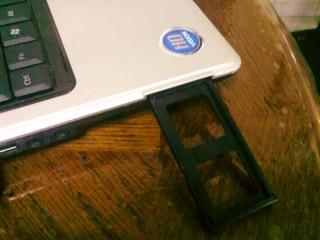
and use the evercool magic like this. 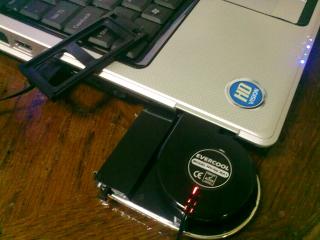
guess what. my hard disk temperature drop from 47~48C to 40C! and now my palm is cool ^^. its good that i found a way how to make it useful. if not i would hv pack it and keep it in the store... |
|
|
|
|
|
Sep 23 2009, 03:33 PM
|

Senior Member
4,709 posts Joined: Jan 2003
|
QUOTE(GothFebrio @ Sep 23 2009, 03:30 PM) okay so this is my f81se with the useless evercool magic....no change in temperature in any way. infact i think that it increase the temperature in full load because it blocks the vent when the internal fan is at highest speed.
since f81se does not have cool palm rest feature so its kinda hot there...so i took out the express card slot.
and use the evercool magic like this.
guess what. my hard disk temperature drop from 47~48C to 40C! and now my palm is cool ^^. its good that i found a way how to make it useful. if not i would hv pack it and keep it in the store...  glad! glad! |
|
|
Sep 23 2009, 03:55 PM
|
|
Junior Member
108 posts Joined: May 2009
|
y after i update my bios,my vista cant detect d dgpu mode??not show 4570 in window d?need mod???and how?
Added on September 23, 2009, 4:13 pmhelp!!!! This post has been edited by jackng: Sep 23 2009, 04:13 PM |
|
|
Sep 23 2009, 04:16 PM
|
|
Senior Member
1,304 posts Joined: Jan 2009 From: Kuala Lumpur
|
QUOTE(jackng @ Sep 23 2009, 03:55 PM) y after i update my bios,my vista cant detect d dgpu mode??not show 4570 in window d?need mod???and how? in bios u using powerxpress or dgpu?Added on September 23, 2009, 4:13 pmhelp!!!! |
|
|
Sep 23 2009, 04:23 PM
|
|
Junior Member
108 posts Joined: May 2009
|
QUOTE(GothFebrio @ Sep 23 2009, 04:16 PM) in bios u using powerxpress or dgpu? i use dgpu..and i can control the contrast while in the bios..but when enter window i cant control ady and it show standart vga graphic apdater |
|
|
Sep 23 2009, 04:29 PM
|
|
Senior Member
1,304 posts Joined: Jan 2009 From: Kuala Lumpur
|
QUOTE(jackng @ Sep 23 2009, 04:23 PM) i use dgpu..and i can control the contrast while in the bios.. wat windows u using?but when enter window i cant control ady and it show standart vga graphic apdater |
|
|
Sep 23 2009, 04:37 PM
|
|
Senior Member
822 posts Joined: Jan 2007 From: Sepang, KLIA - Malaysia / York - UK
|
it happen to me too. what i do is re-install without uninstalling any driver. then it work.
|
|
|
Sep 23 2009, 04:37 PM
|
|
Junior Member
108 posts Joined: May 2009
|
QUOTE(GothFebrio @ Sep 23 2009, 04:29 PM) wat windows u using? using vista service pack2...nvm i settle the problem ady..thx!! haha |
|
|
|
|
|
Sep 23 2009, 04:38 PM
|
|
Senior Member
1,304 posts Joined: Jan 2009 From: Kuala Lumpur
|
QUOTE(jackng @ Sep 23 2009, 04:37 PM) using vista service pack2... haha. cool. mind sharing the problem and the solution? incase someone happens to have the same problem as urs. ^^nvm i settle the problem ady..thx!! haha |
|
|
Sep 23 2009, 08:07 PM
|

Junior Member
175 posts Joined: Apr 2007
|
mass effect, cod5, gears of war...no big deal...hahahha
|
|
|
Sep 23 2009, 08:55 PM
|

Junior Member
33 posts Joined: Sep 2009
|
yuhuu... anyone tried NFS:Shift with this lappy??
If good then I wanna get this lappy tomorrow...  |
|
|
Sep 23 2009, 09:52 PM
|

Senior Member
1,192 posts Joined: Jan 2009 From: Malaysia 
|
just bought my laptop at 1999. just open i and i check my graphic card. WHY IS IZZIT WRITTEN HD3200??? i tought it should be HD4570???
|
|
|
Sep 23 2009, 09:58 PM
|
|
Senior Member
1,304 posts Joined: Jan 2009 From: Kuala Lumpur
|
QUOTE(saw2001 @ Sep 23 2009, 09:52 PM) just bought my laptop at 1999. just open i and i check my graphic card. WHY IS IZZIT WRITTEN HD3200??? i tought it should be HD4570??? default bios setting is powerxpress mode. which will use the 3200 when not gaming and will use 4570 when gaming. if u want to use only hd4570. change in the bios setting to dgpu. k40ab comes with hd4570 and integrated ati 3200.Added on September 23, 2009, 9:59 pmi suggest use dgpu and install catalyst control centre and enable ati power play. it will downclock the hd4570 depends on how u set it. instead of changing cards...hd4570 produce better picture quality. This post has been edited by GothFebrio: Sep 23 2009, 09:59 PM |
|
|
Sep 23 2009, 10:02 PM
|

Senior Member
2,066 posts Joined: Oct 2007
|
QUOTE(saw2001 @ Sep 23 2009, 09:52 PM) just bought my laptop at 1999. just open i and i check my graphic card. WHY IS IZZIT WRITTEN HD3200??? i tought it should be HD4570??? dude.. this question has been answered for like ages ago.. in the first few pages of the thread already.. its most adviced to set it to dGPU.. cos power xpress switching thingy still a problem... and for the bios flash... for all.. download the bios and extract it.. den boot into bios and start easy flash.. that should be the easiest.. |
|
|
Sep 23 2009, 10:15 PM
|
|
Senior Member
1,192 posts Joined: Jan 2009 From: Malaysia
|
i am a noob lar.. where to set the dGPU???
Added on September 23, 2009, 10:23 pmhelp.... This post has been edited by saw2001: Sep 23 2009, 10:23 PM |
|
Topic ClosedOptions
|
| Change to: |  0.2912sec 0.2912sec
 0.38 0.38
 6 queries 6 queries
 GZIP Disabled GZIP Disabled
Time is now: 4th December 2025 - 08:01 AM |
 Quote
Quote