Welcome Guest ( Log In | Register )

28 Pages « < 5 6 7 8 9 > » Bottom

Outline · [ Standard ] · Linear+

 Official Microsoft Sidewinder Thread, Every Sidewinder - Framed and Reviewed

views
     
TomatomanzSeedlezz
post May 7 2009, 03:58 PM

Killer Tomatoz!..
******
Senior Member
1,898 posts

Joined: Jan 2003
From: N.S.A
@wingster : your post kinda confused me there... sweat.gif

Not sure what are u trying to say (especially the mouse feet part) when u didn't put a big alphabetical letter on each of your first few sentences, makes me wondering is it connected/continued to yer previous sentences above it..nor theres any full-stop there.. blink.gif

Easier if u just say the "pros" and "cons" way :-

In comparison to Razer DeathAdder (especially its practically same as Razer Mamba's shape, just that Mamba its wireless/wired hybrid).

Pros :-
-------

1. Easy to setup.
2. Extra 2 sets of spare mouse feets.
3. Great battery life (on one AA rechargeable battery!).
4. Nice weighted mouse.
5. Pretty good grip with its grooves at the sides.
6. Non-rubberized, which makes easier to clean.
7. Simple and ingenious design on the charge-cable magnet.
8. Nimh AA Battery, easy to obtain and not to mentioned cheaper too.
9. Fast battery charge.
10. Very afforable wireless gaming mouse.
11. Macro on-the-fly.
12. Very easy to replace mouse feets.
13. Solid metal scroll button.
14. Good placement of side-buttons compared to the conventional front and back side-buttons.
15. Side-scroll button.
16. LCD built-in for additional info like dpi selection, charging, macro and etc.
17. Solid construction/build.
18. 'Quick-turn' feature simple yet useful for FPS gamers.
19. Alot buttons to customize.
20. Good dpi buttons placement on top of the mouse.
21. Works on all types mousepads/mats even on my table.
22. 3-years warranty (basically the longest warranty on a gaming mice).

Cons :-
--------

1. Less grip due its not rubberized (but it can be pros too as u no need to worry the rubber worn out or melted sticky feeling).
2. Could be more ergonomic on its design.
3. No 3rd-party mouse feet in case all mouse feets worn out (afaik).
4. No on-the-fly sensitivity.
5. No firmware upgradeable (well, it could be just no bugs especially serious ones on the X8).
6. No onboard memory (imo, not much ppl use it though.. can't say i really miss it, most probably saved cost too).

That's pretty much my opinion so far in my 3days of X8 usage.

Cheers flex.gif

This post has been edited by TomatomanzSeedlezz: May 7 2009, 04:34 PM
silencer
post May 7 2009, 08:55 PM

AnyThiN GoEs
******
Senior Member
1,846 posts

Joined: Jan 2003
From: City^of^Anggerik


another proud owner of sidewinder x8, bought rom kingcom ..thinking on getting sidewinder keyboard x6 later..to replace the existing BT set of my logitech MX-5000, wonder why there isnt any gaming wireless keyboard, similar like the mice x6 , produced by ms yet????
TSEnigmare
post May 7 2009, 10:20 PM

Microsoft SideWinder™ Maverick
****
Senior Member
550 posts

Joined: Jan 2009
From: The North Pole Status: Watching Blu-Ray


Wow! Welcome to the club! Finally another X8 user... There should be about 4 of us here now.. tongue.gif
wingster
post May 8 2009, 05:29 PM

mr.Uiinshiida.
******
Senior Member
1,418 posts

Joined: May 2008
From: somewhere somewhere
Sorry for my confusion, the explaination I'm given might not clear and very confusing to you all so I make another quite detail summary here and I will delete my previous review sooner...

Ok so I make the summary for extra details and given the new owner a clearly infomation on using all the mouse features.....

Sidewinder X8

As for general feature TomatomanzSeedlezz has point out most of the pro's and con's... so I straight foward for details on each features ...

1) Bluetrack Technology - To make it clear, Bluetrack technology actually is using the back the optical light but comes in blue color, with the blue optical light engine features, these Bluetrack engine mouse has more powerful tracking ability which can track more surface accurately than Laser mouse and given more precise tracking. Likewise, these Bluetrack Mouses which is Microsoft Explorer, Explorer Mini and Microsoft Sidewinder X8 Gaming Mouse has very smooth and great tracking performance on mosts of the gaming mousepad.

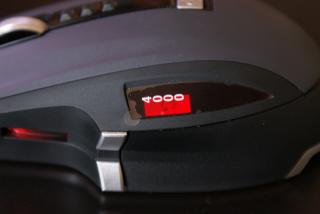
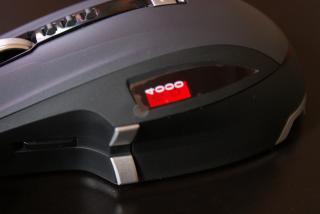
2) LCD Screen Display - LCD Screen Display only available for Microsoft Sidewinder and Sidewinder X8, the features of the LCD is displaying the DPI Settings and the Intellpoint "Quickturn" features. For Sidewinder X8, it added the Macro Record Button display which able for user to seen the settings of recording.

Attached Image Attached Image

3)Custom buttons and Macro Record Buttons - Yes, Sidewinder X8 has 5 customable buttons(excluding the main left and right click buttons) and added a macro record buttons which allow the users to setup a macro while in gaming.

Customable Buttons are:
-Top and Bottom Thumb Buttons
-Left and Right Click Buttons
-Wheel, Left and Right Wheel Tilt buttons

Uncustomable Buttons are:
-Gaming Shortcut File buttons (Silver Sidewinder Icons Button)
-Macro Record Buttons
-Dpi Sensitivity Buttons

Yet, here's the step of record the macro buttons:
Attached Image Attached Image

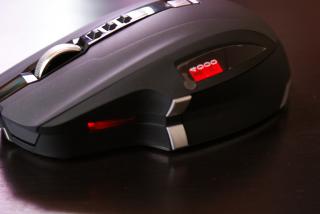
a) Press the Macro Record buttons, the Macro Record buttons will lights up in red and the LCD Display will show the icons of Macro Record Settings.
b) To known the Macro Record is recording or not recording, see the LCD Display, when you see the Mouse with an arrow, it means that the Macro record is not yet been setting up and you may press one of the button for macro record.
c) You can only select Right Click, Top and Bottom Thumb button, Wheel Button, Wheel Left and Right Tilt Buttons only for macro record.
d) Once you select the buttons, the LCD Display will become a rolling arrow display and the macro buttons will start blinking, right now you can assign the keys from your mouse or your keyboard for macro record.
e) While you finish your macro assignment, press the macro record button and your macro is recorded on your selected buttons on your mouse.

4) Gaming Shortcut Buttons - A simply buttons that opens the 'Games' file once you hit off the silver Sidewinder icon buttons.


Attached Image

5)DPI On-the-fly buttons - Generally, there are three buttons for the on-the-fly settings, allows you to sets of your DPI settings on these buttons. I'm not sure for the others Sidewidner series mouse but for X8, the DPI sensitivity is recordable which means, once you set your current DPI on your Computer A, the DPI settings will remain the settings you set on the Computer A even you plug in your mouse into Computer B or Computer C without Intellpoint software and the Sidewinder mouse sensitivity settings*

*The Intellpoint Microsoft Mouse do only shows DPI sensitivity if your installation settings sets to Sidewinder series mouses

6) DPI Numbers Settings - Yes, here's the infomation of the DPI Numbers settings, unlike Logitech G9 mouse. Sidewinder DPI Sensivity comes in less choices of your DPI Settings and here's the numbers of the DPI Settings you may allow
for setup:

(Min) 250 < > 500 < > 750 < > 1000 < > 1500 < > 2000 < > 3000 < > 4000 (Max)

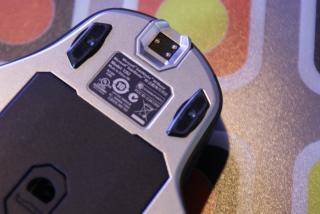
7) Mousefeet - Sidewinder Mousefeet comes with non-rubberized grip, much more of plastic made coat up with a smooth surface. You will have total up 3 sets of mouse feet (2 spare mouse feet). Because these mouse feet are not rubberized so it may cause your mouse suffering an unbalancing problem in some certain of very solid surface which I'm encounter it. Futhurmore, the mousefeet can be easily damaged and grinded if you let your mouse in a very solid surface especially those very hard surfaces. Here's the result that your mouse feet will be damage if you keep using on the hard and solid table:
Attached Image


So if you extreamly care your mouse like me, kindly use your mouse with a cloth pad or straight forwardly play your mouse together with your cloth-type gaming mousepad or the soft and smooth surface like thick papers, cards and etc.
with soft + smooth surface.

8) Intellpoint Software - Mouse and Gaming Support Software

A Microsoft Software for all the Microsoft Mouses which given your mouse to assign different function, shortcut and macro's. No doubt, all the Microsoft Mouses has no on-board memory as Razer Lachesis and Mamba, also the Logitech G9 and G9x but Intellpoint gives a powerful gaming accelerations which is ; Quick Turn, Precision Booster and Gaming Toggle.

Now I do a short explaination about these features,

Quick Turn - Allows you to turns 360 degree in lighting speed, yet this is the powerful ability that others brand mouses besides Microsoft did not have it.

Precision Booster - An option for you to slowing down your mouse pointer in a short while, this features does not affect with any DPI decreases, like if you put your mouse DPI as 1000 sensitivity, while you use Precision Booster, your mouse do slows down by slowing down your Mouse Pointer speed. This is an option while you want do a short aiming and correct your mouse position especially in FPS while you using Machine Gun in full auto mode, it do helps a lots.
Precision Booster comes with two options which is Press and Hold and Toggle mode.

Gaming Toggle - A secondary quick macro record buttons, which allows you to instant record anything you press on the keyboard with up to 64 words. In sidewinder, while you use the gaming toggle, it will appear the small icons of Gaming Toggle.

For the instructions and how to using these features, just go to your buttons option and select these three feature, it will appear the guide for you that teach you how to works on these features. For Precision Booster it straight forward appear the settings and it did write the description on how the features do works for the Precision Booster window.

9) 3 in 1 Puck and battery info - yes the Puck is the Sidewinder X8, Charger + Wired plug-in + Mousefeet Storage + Wireless Receiver and yet howmuch does the battery can last long?

From the tester of Razer Mamba and Sidewinder users, they said both had same wireless battery life .....

For serious non-stop gaming, the battery life can lasts around 30 hours but after the testing, hardcore gaming can do last around 5~7 hours for Razer Mamba and around 10++ Hours for Sidewinder X8

(Need hard core gamer help to proving this)

For casual gaming which you play a few hours for 2 to 3 times and with a few hours break in a day (erm about 1~4 hours for game play and 30min ~ 2 hours rests ), the battery life can lasts around 70 hours

For not serious gaming which you only play up to 1 to 4 hours in a day, the battery life can lasts about more than 70 hours

And for full battery charge, you need one to two hours but still depends the condition of your mouse battery, temperature and the current battery life ......

This post has been edited by wingster: May 8 2009, 05:58 PM

TSEnigmare
post May 8 2009, 09:35 PM

Microsoft SideWinder™ Maverick
****
Senior Member
550 posts

Joined: Jan 2009
From: The North Pole Status: Watching Blu-Ray


Hey wingster, the test drivers for the mamba are not in Malaysia right?? Where'd you get the "battery life with hardcore gaming" info? I've yet to see any sign of a Mamba here...
wingster
post May 8 2009, 09:51 PM

mr.Uiinshiida.
******
Senior Member
1,418 posts

Joined: May 2008
From: somewhere somewhere
From the reviews and feedback of outer seas not here ....

This post has been edited by wingster: May 8 2009, 09:53 PM
TSEnigmare
post May 8 2009, 10:09 PM

Microsoft SideWinder™ Maverick
****
Senior Member
550 posts

Joined: Jan 2009
From: The North Pole Status: Watching Blu-Ray


QUOTE(wingster @ May 8 2009, 09:51 PM)
From the reviews and feedback of outer seas not here ....
*
Are the reviews official? I doubt the mouse lasts "only 5-7 hours" of intense gaming..


Added on May 8, 2009, 10:35 pmOh yea, wingster, what camera are u using to take the photos? Compared to mine, yours look far superior... cry.gif

This post has been edited by Enigmare: May 8 2009, 10:35 PM
wingster
post May 8 2009, 11:18 PM

mr.Uiinshiida.
******
Senior Member
1,418 posts

Joined: May 2008
From: somewhere somewhere
err .... I'm using DSLR Camera + Some Photoshop

on topic ... dunno why those reviewer's has test out that the lifetime on the Razer Mamba (as the official said lasts around 14 hours) minimize to 4-5 hours and it might cause from the firmware

but to Sidewinder are very difference because both using different battery so Sidewinder X8 lasts more longer on hardcore gaming =X compare to Mamba and same life time as Logitech G7 I think

This post has been edited by wingster: May 8 2009, 11:23 PM
asellus
post May 9 2009, 05:00 AM

#gompusas
Group Icon
Elite
4,541 posts

Joined: Jan 2003
From: BSRPPG51 Access Concentrator


After a little bit more than a week of testing, the X8 is a decent mouse although not exactly flawless. The mouse design is comfortable although at first, I have to get used with its narrower design compared to my old Lexma laser mouse (sometimes I have problem left/right-clicking the mouse). Takes a few days to do it.

The Bluetrack technology (which is the main reason why I bought it) works well on laminated printed glossy photo paper that I used as a mouse pad. Well, works as well as the older mouse at least. Haven't tried it too much on other surfaces, although I find out that the surface has to be flat for the tracking to work.

The battery life is very good. I do not use the supplied rechargeable battery but I use those disposable generic alkaline battery I bought from Giants hypermarket (Giant-branded - RM13 for 12 pieces pack) and it lasted for I think 7 or 8 days. During that period, I finished playing HL2: Episode 1 and some 15 hours of Left 4 Dead, plus general usage like posting to my blog here and other things like surfing etc.

My only complaint about the mouse is the weight. This mouse weight is double compared to my old mouse, and this really affect my aiming in Left 4 Dead. Not a factor in HL2: Episode 2 but my FF rate in Left 4 Dead increased when using this mouse. Even after a week, I still can't get used to the weight of this mouse, which means I now only play 'Normal' or 'Advanced' or even 'Easy' games online instead of the 'Expert' mode.
wingster
post May 9 2009, 07:56 AM

mr.Uiinshiida.
******
Senior Member
1,418 posts

Joined: May 2008
From: somewhere somewhere
QUOTE(asellus @ May 9 2009, 05:00 AM)
After a little bit more than a week of testing, the X8 is a decent mouse although not exactly flawless. The mouse design is comfortable although at first, I have to get used with its narrower design compared to my old Lexma laser mouse (sometimes I have problem left/right-clicking the mouse). Takes a few days to do it.

The Bluetrack technology (which is the main reason why I bought it) works well on laminated printed glossy photo paper that I used as a mouse pad. Well, works as well as the older mouse at least. Haven't tried it too much on other surfaces, although I find out that the surface has to be flat for the tracking to work.

The battery life is very good. I do not use the supplied rechargeable battery but I use those disposable generic alkaline battery I bought from Giants hypermarket (Giant-branded -  RM13 for 12 pieces pack) and it lasted for I think 7 or 8 days. During that period, I finished playing HL2: Episode 1 and some 15 hours of Left 4 Dead, plus general usage like posting to my blog here and other things like surfing etc.

My only complaint about the mouse is the weight. This mouse weight is double compared to my old mouse, and this really affect my aiming in Left 4 Dead. Not a factor in HL2: Episode 2 but my FF rate in Left 4 Dead increased when using this mouse. Even after a week, I still can't get used to the weight of this mouse, which means I now only play 'Normal' or 'Advanced' or even 'Easy' games online instead of the 'Expert' mode.
*
hmm..... if hardcore gaming how long does it lasts? do you try before? I need someone here to proof that o.o

and yet I'm quite comfort on using these kind of big and quite heavy mouse since my previous gaming mouse are that heavy ......

This post has been edited by wingster: May 9 2009, 07:59 AM
silencer
post May 9 2009, 01:49 PM

AnyThiN GoEs
******
Senior Member
1,846 posts

Joined: Jan 2003
From: City^of^Anggerik


Any news wether MS will release the wireless version for X6 keyboard....thinking on getting the current X6, but already used with my current l Logitech Cordless Desktop MX 5000.
wingster
post May 9 2009, 01:57 PM

mr.Uiinshiida.
******
Senior Member
1,418 posts

Joined: May 2008
From: somewhere somewhere
Right now there still no any others of wireless gaming keyboard ....

Maybe they encounter some problem....
TomatomanzSeedlezz
post May 9 2009, 04:35 PM

Killer Tomatoz!..
******
Senior Member
1,898 posts

Joined: Jan 2003
From: N.S.A
QUOTE(silencer @ May 9 2009, 01:49 PM)
Any news wether MS will release the wireless version for X6 keyboard....thinking on getting the current X6, but already used with my current l Logitech Cordless Desktop MX 5000.
*
Well, imo the closest u can get a wireless backlighted-keyboard its 'Wireless Entertainment Desktop 8000'.
http://www.microsoft.com/hardware/mouseand...ve_tab=overview

Cheers smile.gif
wen9x88
post May 9 2009, 04:38 PM

Look at all my stars!!
*******
Senior Member
2,933 posts

Joined: Nov 2007
From: Kuala lumpur


any cheap x6 keyboard?
promotion ?
wingster
post May 9 2009, 04:58 PM

mr.Uiinshiida.
******
Senior Member
1,418 posts

Joined: May 2008
From: somewhere somewhere
QUOTE(TomatomanzSeedlezz @ May 9 2009, 04:35 PM)
Well, imo the closest u can get a wireless backlighted-keyboard its 'Wireless Entertainment Desktop 8000'.
http://www.microsoft.com/hardware/mouseand...ve_tab=overview

Cheers smile.gif
*
the price is pretty insane to .... can buy many of G15 or even G19 XD likewise it also dun have numpad .... just like the normal laptop keypad but it's slim and rechargeable
TomatomanzSeedlezz
post May 9 2009, 05:12 PM

Killer Tomatoz!..
******
Senior Member
1,898 posts

Joined: Jan 2003
From: N.S.A
QUOTE(wingster @ May 9 2009, 04:58 PM)
the price is pretty insane to .... can buy many of G15 or even G19 XD likewise it also dun have numpad .... just like the normal laptop keypad but it's slim and rechargeable
*
lol.. us$299 ... so abt rm1k...

Well... can't really compared with those wired keyboards u mention, as it comes with wireless laser mouse and docking station with 4-usb ports hub built-in tongue.gif

I read a few reviews on it.. but they didn't say abt the battery life.. and as expected.. it uses freaking 4-AA batteries!.. sweat.gif

Imo, its expensive due this cool feature as below :-

Intelligent Backlighting
-----------------------------
Backlighting comes on automatically when you approach the keyboard and turns off when you’re away, saving valuable battery life. And, backlight intensity automatically adjusts itself to the room lighting conditions.

Cheers sweat.gif

This post has been edited by TomatomanzSeedlezz: May 9 2009, 05:28 PM
wingster
post May 9 2009, 05:13 PM

mr.Uiinshiida.
******
Senior Member
1,418 posts

Joined: May 2008
From: somewhere somewhere
QUOTE(TomatomanzSeedlezz @ May 9 2009, 04:35 PM)
Well, imo the closest u can get a wireless backlighted-keyboard its 'Wireless Entertainment Desktop 8000'.
http://www.microsoft.com/hardware/mouseand...ve_tab=overview

Cheers smile.gif
*
-double post- deleted

This post has been edited by wingster: May 9 2009, 09:32 PM
ayil
post May 9 2009, 08:34 PM

Price Police Sux My Dix
*******
Senior Member
2,377 posts

Joined: Jul 2007
From: Biggest IT Warehouse in Malaysia


nice pics! is it better than razer lachesis? interested to get 1..
silencer
post May 9 2009, 08:35 PM

AnyThiN GoEs
******
Senior Member
1,846 posts

Joined: Jan 2003
From: City^of^Anggerik


The price is too darn expensive...and I believe that the function is similar with my current logitech BT desktop mx5000, built mainly for entertainment, and I have no intention to throw away my X8.
chanws8
post May 9 2009, 08:41 PM

ИΞШB!Ξ
*******
Senior Member
2,165 posts

Joined: Aug 2006
From: P4ИD0R4


I wonder how many people willing to buy an entertainment keyboard which is more expensive than G19... sweat.gif

28 Pages « < 5 6 7 8 9 > » Top
 

Change to:
| Lo-Fi Version
0.0183sec    0.51    6 queries    GZIP Disabled
Time is now: 15th December 2025 - 06:36 AM