Welcome Guest ( Log In | Register )

5 Pages  1 2 3 > » Bottom

Outline · [ Standard ] · Linear+

 Official Microsoft Sidewinder Thread, Every Sidewinder - Framed and Reviewed

views
     
wingster
post Apr 26 2009, 06:14 PM

mr.Uiinshiida.
******
Senior Member
1,418 posts

Joined: May 2008
From: somewhere somewhere
I'm not the X8 user but did try and did research before

Sidewinder X8 is a 4000dpi Wired and Wireless dual usage gaming mouse.

Sidewinder X8 can be as wireless mouse or wired mouse, likewise you can charge your mouse battery while you are wired mode and while you want go for wireless just unplug the wire, simple!

The feel of X8 is quite same as Sidewinder mouse but without the weight cartridge like X5.

Bluetrack is a new technology that upper level than laser mouse A BIT .... seriously I'm also the Bluetrack Mouse user so I know, Bluetrack add some extra options which can track certain smooth surface and rough surface like human skin(anywhere you like)... fur, marble, cloth, wooden, soil .... etc. different surface difference performance of course =)

HOWEVER .... it had a very weird negative options .... which cannot track white paper surface which is opposite than optical mouse and also still it cannot track under glass surface (In 40%~100% transparency) =.= .. half transparency may be works well .... sometimes XD

the advantages is just you can play your mouse any where in many types of surface which laser mouse cannot do it

This post has been edited by wingster: Apr 26 2009, 06:17 PM
wingster
post Apr 26 2009, 07:34 PM

mr.Uiinshiida.
******
Senior Member
1,418 posts

Joined: May 2008
From: somewhere somewhere
QUOTE(DjK @ Apr 26 2009, 06:38 PM)
» Click to show Spoiler - click again to hide... «

Very good input from wingster there. Mind sharing with us what kind of mouse you use?

Just something to add, eventhough blue track tech provides you the ability to track better than a laser track mouse, please don't use it on soil, etc and don't use a sand paper as your mousepad please shocking.gif as it is better to preserve the mouse that you bought for that amount of money...just a thought. tongue.gif
*
Im using Explorer Mouse .... a wireless 800dpi mouse =.= and also out of the Sidewinder series XD

I did try on soil quite ... fun.

right now because my mouse has a certain part is made by metal so right now getting a little rusty ..

I also test running on the grass ... maybe that cause my mouse get rust =.=

also X8 has same distance as Explorer Mouse you can play your mouse in about 10m-20m range in wireless ......................
which you can control your mouse at outside your house, your dongle inside the house ....


wingster
post Apr 26 2009, 09:13 PM

mr.Uiinshiida.
******
Senior Member
1,418 posts

Joined: May 2008
From: somewhere somewhere
for fun lor .... also my Explorer Mouse almost alike of remote control because whenever I watch any movie by connect the projectile or LCD TV I always use my mouse to control thats why I move my mouse anywhere include my house garden


wingster
post Apr 28 2009, 05:59 PM

mr.Uiinshiida.
******
Senior Member
1,418 posts

Joined: May 2008
From: somewhere somewhere
sweat really get poison after a seeing the X8 too much looks like I wanna sell of G9 and Explorer Mouse =.= .... for this mouse however I hate this mouse lack of one thingy which is ONBOARD Macro .... sad to me through =_=
wingster
post Apr 28 2009, 06:21 PM

mr.Uiinshiida.
******
Senior Member
1,418 posts

Joined: May 2008
From: somewhere somewhere
Yeah and the price is same price as my explorer mouse =.= Im a little regret after I seen this godlike mouse X_X
wingster
post Apr 28 2009, 10:42 PM

mr.Uiinshiida.
******
Senior Member
1,418 posts

Joined: May 2008
From: somewhere somewhere
by the way bro ... is this mouse wireless receiver is the wire?

Oh well did know that the dongle is so huge =.= .... so big than I expected which is not so good for complete portable ....

well after the research yea Razer Mamba and Microsoft Sidewinder X8 has awesome performance but lose against 1 big think with Logitech G7 Wireless Gaming mouse is the dongle ....

both new mouse gives a sick problem to laptop user because the punk core X8 and wire plug has wipe out with the G7 easy and small little dongle =_=

This post has been edited by wingster: Apr 28 2009, 11:45 PM
wingster
post Apr 29 2009, 07:11 AM

mr.Uiinshiida.
******
Senior Member
1,418 posts

Joined: May 2008
From: somewhere somewhere
but bring less portable .... well is good for desktop but quite bad for laptop user as I know ,.... the dongle or I say the punk is not the problem but too much wire @_@ ... well the truth is the charge and go is pawn off the bloody expensive razer mamba but the wire issue still make me not afford on this cons ....

but anyway decide to brought it after I sell off my Explorer Mouse ..
eventhrough I like my explorer mouse but is quite uncomfort due for long usage because its the metallic coated like steel series mouse but it can be very oil once I hold up my mouse for a minute .... maybe that's my problem ... I use my G9 mouse did not had so much problem thanks for the dry grip but still I love wireless more than wired =3


wingster
post Apr 29 2009, 05:41 PM

mr.Uiinshiida.
******
Senior Member
1,418 posts

Joined: May 2008
From: somewhere somewhere
I'm a laptop gamer =P .... also portable user thats why ... I always go here go there for my laptop for gaming or college ....

Laptop is main core and those speaker,headphone gaming mouse and gaming keyboard and heat fan are my docking stations X_X

Finally sell off my beloved Explorer Mouse ready for deposit my new lovely X8 and take it at May =w=


wingster
post Apr 29 2009, 07:01 PM

mr.Uiinshiida.
******
Senior Member
1,418 posts

Joined: May 2008
From: somewhere somewhere
actually 30 hours usage by using 1 AA battery, the battery life might able to hit 3 days if you plays 12 hours per days, if not serious gaming I guess it should be last more longer
wingster
post Apr 30 2009, 02:45 PM

mr.Uiinshiida.
******
Senior Member
1,418 posts

Joined: May 2008
From: somewhere somewhere
hehe going to get my beloved X8 .... good bye my Explorer Mousie .... >.<
wingster
post Apr 30 2009, 09:36 PM

mr.Uiinshiida.
******
Senior Member
1,418 posts

Joined: May 2008
From: somewhere somewhere
-deleted-

This post has been edited by wingster: May 9 2009, 01:15 AM
wingster
post May 1 2009, 10:58 AM

mr.Uiinshiida.
******
Senior Member
1,418 posts

Joined: May 2008
From: somewhere somewhere
However after the study of this mouse, ya it has much pros than cons
expect the mouse feet problem (because thats my problem) ...

This mouse has very good thumb button design, instead of using the front and back thumb button, Sidewinder series breaking the design by using top and bottom thumb button, in X8 the design is much more better because the button are dent inside and feet in with the thumb make it comfort and easy to press off without tweaking off your thumbnail.

The main clicking button, in my feel this mouse clicking has a fast clicking feel (meaning the click down and up feel is faster)

Lastly the Intellpoint software, yet I say the Precision Booster and the 360 Angle Turning is an ownage ability in FPS, first precision booster can slow down your mouse movement even the mouse pointer dpi sensor is quite high, you can use it while you facing difficulty of switching dpi in speed. Yeap, meaning you using your sniper rifle and aim the enemy in slow and precision while holding on the button (Precision Booster) after you kill off, release off the button and switch to normal settings fps aim.
And thats the only function I do like very much ...... in FPS is awesome !

About the mouse feet, yup those spare mouse feet has thier small tiny difference on each surface ..

Black mouse feet
-Smooth in half transparent glass, smooth metallic surface and marble surface but quite little rough in wood(smooth) surface, very rough in wall or solid surface

White mouse feet
-Smooth in half transparent glass, smooth metallic suface and marble also very smooth wooden surface but little tiny rough on smooth wooden surface followed by wall and solid surface also

Grey mouse feet
-Smooth in smooth to very smooth wooden surface, pvc table surface and paper surface but rough in most solid, metallic surface

... and actually not much difference also =_= just the grey mouse feet show a little difference

yet still not disappoint me yet ... I contact with kingom and he can help me to change the mouse ... =.=


wingster
post May 1 2009, 06:15 PM

mr.Uiinshiida.
******
Senior Member
1,418 posts

Joined: May 2008
From: somewhere somewhere
-deleted-

This post has been edited by wingster: May 9 2009, 01:16 AM


Attached thumbnail(s)
Attached Image Attached Image Attached Image Attached Image Attached Image Attached Image
wingster
post May 3 2009, 09:55 AM

mr.Uiinshiida.
******
Senior Member
1,418 posts

Joined: May 2008
From: somewhere somewhere
yea ... by the way Im seal back the mouse for exchange ....

hope to get a really 100% non-problematical problem to me again ..


wingster
post May 4 2009, 08:38 AM

mr.Uiinshiida.
******
Senior Member
1,418 posts

Joined: May 2008
From: somewhere somewhere
QUOTE(TomatomanzSeedlezz @ May 4 2009, 05:12 AM)
BlueTrack its Optical (BlueLight) not Laser.

Blue Specular Optics
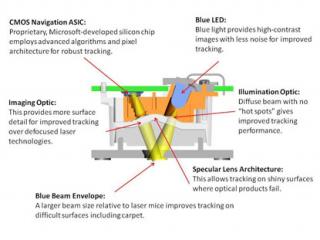
Microsoft’s proprietary high-angle imaging optics generate more exact surface images — even of shiny surfaces such as granite and marble — instead of blurry, out-of-focus images, as can be produced by many of the leading laser mice. And blue light helps create high-resolution, high-contrast images for better navigation.

Four Times as Wide, More Diffuse Beam for Better Imaging and Tracking
The wider beam enables illumination of a larger surface area and allows more light to return to the sensor. This helps for tracking on irregular surfaces such as carpet, where smaller laser beams often get lost between the individual fibers. The BlueTrack Technology light source is optimized to provide illumination at the tracking surface that is more uniform than current laser or optical mice. This illumination is accomplished by using a new optical element, never before used in a mouse. The light source is encapsulated in a diffusing optic that smoothes out hot spots within the illumination profile. While the concept of diffused lighting is well known, the application of diffused light sources to mice is a Microsoft proprietary technology.

Incoherent Blue Light
Laser mice use coherent light that’s easily disrupted by dust and dirt, leading to poor tracking. The Explorer Mouse and Explorer Mini Mouse’s incoherent blue light doesn’t have the extreme sensitivity to dust, so the signal quality is maintained. This means your mouse will provide excellent performance even in a less than clean environment — you’ll get great precision performance in a dusty workshop or outdoors just as you do on an ideal clean surface.

Q:    Why is a Blue LED light better than a red one or a laser? How does its DPI compare to other mice technologies?
A:    Blue light allows the sensor to capture a high-contrast image of the surface. For example, the blue light beneficially interacts with fluorescent dyes in some surfaces to increase the amount of reflected light relative to an infrared laser beam. The physics is similar to that of the “blue light” used in crime-scene TV shows to examine surfaces for police investigations.

Its normal that a high performance gaming mice to plug-in direct to yer pc due power-consumption as even my old DiamondBack Plasma LE has issue power it up if i don't direct plug into my pc.

Not to sure what u said abt "the mouse puck cannot be used under 2.0 USB port means you cannot plug in any G15, Reclusa, Sidewinder keyboard".

Is it you meant that can't be use on USB 1.1 ports?..

Btw, its "puck" (as it looks like a ice hockey puck) not "punk"...  sweat.gif

Cheers smile.gif
*
maybe I angry of the puck called it as punk .... thanks for the correction

hmm doesn't Bluetrack is the next generation after laser?
but yes you rite that it is optic ...
Attached Image

And yes ... This mouse does not support 1.1 USB port due to the huge combination ...

hmm ...


Added on May 4, 2009, 8:53 am
QUOTE(astria @ May 4 2009, 01:03 AM)
ya, i understand y the size, but i am going to use it with my laptop + moving around pretty often...  thus i find the dongle may be cumbersome...
*
bro ... the dongle is all in package .... so is still good for portable since it expel the charger and the huge socket ....

well I suggest to find sumthing to hang on or put your dongle into your beg might be better ... but still need a small table or some space for your mouse is a must ... if you can't then better yo use your laptop pad .... for controlling the mouse

oh well for the battery no need to afraid ... once you did charge 2 hours, you can use up to 70 hours if you not seriously gaming or to clearly tell you that ,... you don't always continues for spamming the mouse click or macros continuously ...

even is 8 cm .. but portable charging still another pro's of the portable usage .... instead of find the plug for charging go usb plug and charge thats simple =2=


Added on May 4, 2009, 8:56 am
@Aura

err.... sorry for weak mention I mean the T-Shirt cloths we wearing everyday

never try for the mousepad

This post has been edited by wingster: May 4 2009, 12:02 PM

wingster
post May 4 2009, 11:50 AM

mr.Uiinshiida.
******
Senior Member
1,418 posts

Joined: May 2008
From: somewhere somewhere
hehe feel it and try ...

but for certain people ... the first try of the Sidewinder X8 might be feel the main button ... too easily be hit .. especially hit two left click and right at the same time .. but after a few days of using might feel better and use this advantage on AWP Sniper rifle in CS =.=

This post has been edited by wingster: May 4 2009, 11:51 AM
wingster
post May 4 2009, 07:36 PM

mr.Uiinshiida.
******
Senior Member
1,418 posts

Joined: May 2008
From: somewhere somewhere
Wee .. finally I exchange my mouse and yet the unbalance problem still there but only on the wooden surface like Ikea GALENT Table (Black Wood) ... on gaming mouse pad is fine .... so I find an option to solve out the problem ... which is the adding 1 slice of paper on to the mouse feet ...
now test on all surface finally the bloody problem is over XD
wingster
post May 5 2009, 08:07 AM

mr.Uiinshiida.
******
Senior Member
1,418 posts

Joined: May 2008
From: somewhere somewhere
QUOTE(TomatomanzSeedlezz @ May 5 2009, 01:16 AM)
w00t!.. Finally gotten a wireless/wired hybrid mouse!.. (Sidewinder X8 loh.. what else?!.. tongue.gif).

At first i thought the X8 will be too big for me, but actually pretty common size for a gamer mice.

Not to mentioned i have pretty small hand, and the size not too big for me, just it takes sometime to get use to it.

The magnetic power cable works great (very simple concept, yet very easy and convenient to use), much better than Razer Mamba.

Just tested it on UT3 and TF2, works great so far and hopefully no problem for many years to come too wink.gif

I gotta say, it looks much better than the first version of Sidewinder (the one comes with weights), as it is much bigger and less comfortable, luckily didn't get it even tho Thundermatch having promo at rm119.

For added info, i tested on practically all mouse surfaces (mousemat/mousepad):-
=========================================

1. Cloth mousemat (Razer Goliathus) = works great!  thumbup.gif
2. Hard mousepad (Razer Exactmat) = works great!  thumbup.gif
3. Glass mousepad (Corepad Magna Blue) = works wonderful!  thumbup.gif

Cheers biggrin.gif
*
If RM119 can purchase it should be OMG so cheap and so lucky XD

anyway ... cheers =)

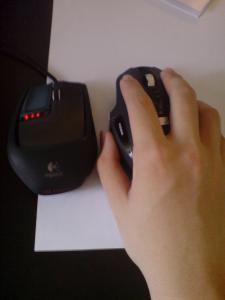
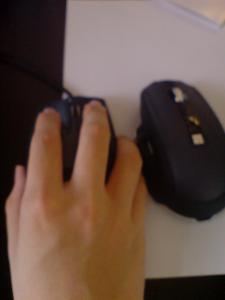
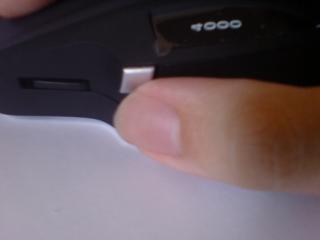
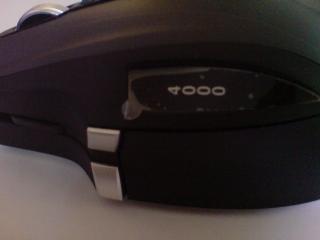
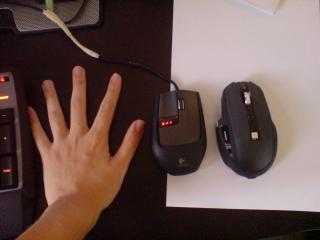
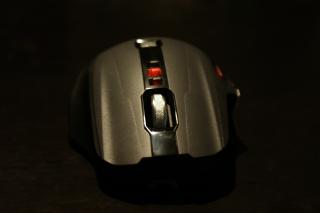
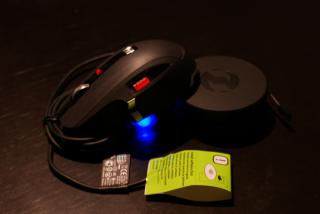
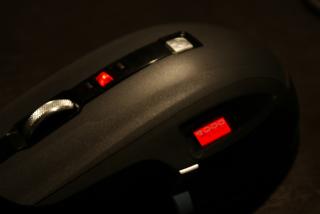
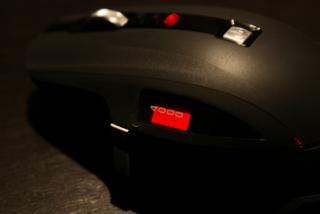
hehe ... here's my photo of my new exchanged X8 Sidewinder...
Attached Image
Sidewinder On the storm ...!!

Attached Image
Up in red down in blue =w=

Attached Image
Unleash the Red!!

Attached Image
Live Plug or Unplugged

Attached Image
Side 1500dpi

Attached Image
Side 750dpi

This post has been edited by wingster: May 5 2009, 09:08 AM
wingster
post May 6 2009, 11:57 AM

mr.Uiinshiida.
******
Senior Member
1,418 posts

Joined: May 2008
From: somewhere somewhere
Sidewinder X8 from Kingcom sell's RM350 .... or you can try survey at lowyat to check the stock is coming or not?

1st Sidewinder (non-X) sell for RM 250 ... in all IT not sure about the price now you may offer more lower price than that

If you cannot afford for X8 (now the price from kingcom is RM350) get a non-X version or X5 is ok if you are not a wireless fan =)

This post has been edited by wingster: May 6 2009, 11:58 AM
wingster
post May 6 2009, 02:33 PM

mr.Uiinshiida.
******
Senior Member
1,418 posts

Joined: May 2008
From: somewhere somewhere
yeah he exchange another better than previous unbalance mouse to me and adding 1 slice of paper solve the problem =3

5 Pages  1 2 3 > » Top
 

Change to:
| Lo-Fi Version
0.0218sec    0.85    7 queries    GZIP Disabled
Time is now: 11th December 2025 - 10:26 AM