[b]Finally after googling i managed to get it right

» Click to show Spoiler - click again to hide... «
ONLY FOR 8GB Ipod Touch 3rd gen
So the steps are
Step 1:Make sure you have firmware 3.1.2 downloaded. You can download firmware 3.1.2 for iPod touch 3G or if you already had then you don’t need to download.
3.1.2 hereStep 2:Once you have located the firmware 3.1.2 IPSW file, you need to put your iPod in Restore mode by following these steps carefully:
1. Make sure that your iPod touch is NOT CONNECTED to the PC/Mac
2. Now turn off your iPod touch.
3. Now hold the home button. Keep holding it for 10 seconds and then connect your iPod touch to PC/Mac while holding the Home button.
If you see the “Connect to iTunes" message on your iPod touch then it means you are now in recovery mode:
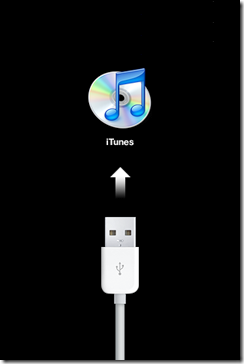
how to video
http://www.youtube.com/watch?v=kguaW0doMWMFinal Step:Once in recovery mode. All you need to do is:
1. Click on your iPod touch device on the iTunes side bar
2. Press Shift + Click on Restore button (PC) or Option + Restore (MAC) and you will be prompted to enter the firmware location. Give it the locations where your firmware 3.1.2 is located and click OK
Done Down grading

Download any jailbreak sw ... like blackRa1n etc
This post has been edited by cruzzmz: Apr 10 2010, 03:27 AM 

 Mar 23 2010, 06:41 AM


 Quote
Quote


 ... But here's the thing...


 0.0280sec
 0.48
0.48
 6 queries
 GZIP Disabled