How to re-enable disabled/suspended iTunes account via iTunes Live Chat:Note: iTunes Live Chat is only available from 8AM-8PM US time (which is around 12AM-12PM Malaysia time)(Can't remember all the details in full but will post up as much as i can)
1. Go to
iTunes Store Support.
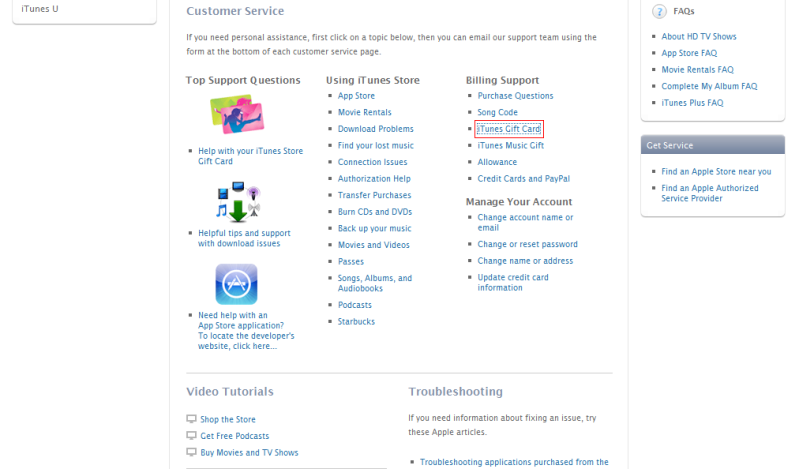
2. Click on any support link (did mine via
Gift Card FAQ).

3. Scroll down to the bottom of the page, you will find a link of iTunes Live Chat (the link is only available between 8AM-8PM US time, other than the mentioned period, you will only see a Email help link).
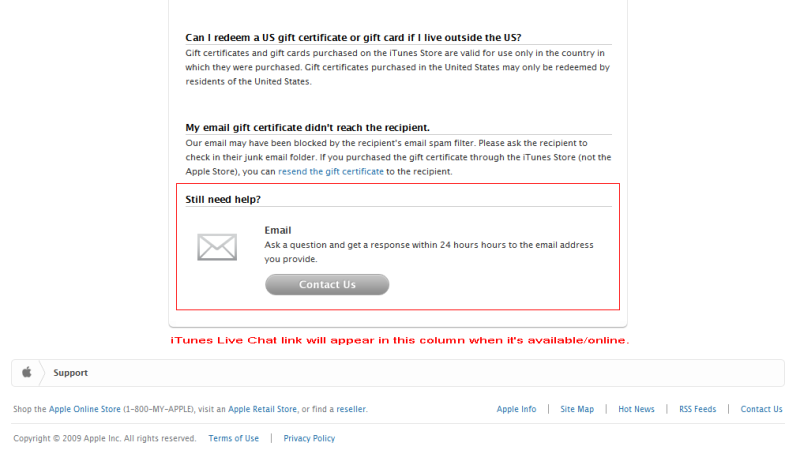
4. Click on the link. A window will pop up and you will be required to type in some details in 3 columns (required: iTunes account info, problem that you're facing).
5. Once you've sent it, it will take around 5 minutes or less to connect to a iTunes Support personnel (Loading/Please wait screen will show).
6. Once a iTunes Support personnel is connected to you, a chat window will load (similar to those we see in IMs).
7. Just chat with him/her (in proper English) and he/she will attend to any of your questions/problems. (For re-enabling of iTunes account, the request will be done in 5-10 minutes).
8. You will need to log out (if you're logged in) and log in to your iTunes account to confirm that it's working.
*iTunes Live Chat serves as a medium to solve any problems or questions you have regarding iTunes Store, not just for re-enabling of disabled/suspended iTunes account. But the fastest way to solve it is via iTunes Live Chat. Request via email can sometimes take up to 24 hours to be processed.This post has been edited by teikwing: Apr 17 2009, 04:53 PM 

 Apr 16 2009, 12:05 AM


 Quote
Quote




 0.0261sec
 3.64
3.64
 6 queries
 GZIP Disabled