Welcome Guest ( Log In | Register )

Bump Topic Topic Closed RSS Feed

Outline · [ Standard ] · Linear+

 [Tutorial] How to View + Create Offline Maps, 3G GPS Usage..Msian maps for d/load

views
     
TSMaverick Wil
post Nov 27 2008, 12:15 AM, updated 17y ago

Casual
***
Junior Member
303 posts

Joined: Nov 2008


Offline Maps 3

[Available Soon] more info: http://code.google.com/p/iphoneofflinemap/wiki/30HowTo

---

Offline Maps 2.x.x

Official Site: http://code.google.com/p/iphoneofflinemap/

View maps offline on your iPhone

This 1st part of the tutorial is on how to view maps offline on your iPhone. That means without the use of Wi-Fi, 3G or EDGE. A subsequent tutorial on how to create your own cached maps is located after this post.

Some notes before getting started:

* You will need to jailbreak your phone in order to apply these methods as it involves a jb function.

* The map files provided in this tutorial will only work for FW2.2 but the method of application is the same for previous firmware.
* Offline routes is supported for FW2.2.

*The Klang Valley map will be used to illustrate this tutorial but you can also download other cached maps I have created at the bottom of this post.

---------
OfflineMaps for FW2.2 & 2.2.1 Guide

Step 1:
Download+Install the "OfflineMaps" app which is now updated for FW2.2 & 2.2.1 from Cydia.

Step 2:
Download the cached map files for Klang Valley. Unzip that and you should get the folder (KV---KlangValley) with two files (com.apple.Maps & MapTiles.sqlitedb) inside. Now take note that you shouldn't try to rename any of the files or folders as this may cause errors later when loading the caches on your iPhone if you happen to pick a wrong name.

Step 3:
You will now have to copy the whole folder (KV---KlangValley) into your iPhone at /private/var/mobile/Media/Maps (Create the Maps folder if it's not available) directory via SSH or iPhone File Manager. Make sure it is the whole folder (KV---KlangValley) and not just the two files.

Step 4:
Once that's done, disconnect and load the OfflineMaps app on your iPhone. You should now be able to see "KV---KlangValley" under the maps list. You can also see WEM--West Malaysia here in my screen shot which is a separate cache maps loaded. That's just to show you can add more than one cached map at a single time to your iPhone.

» Click to show Spoiler - click again to hide... «


Step 5:
Ok, go ahead and tap on "KV---KlangValley" and tap on Link:

» Click to show Spoiler - click again to hide... «


Tap OK. This will bring you back to the list of maps.

» Click to show Spoiler - click again to hide... «


Step 6:
After that, simply tap on iPhone Maps Application to access your newly loaded cached map.

» Click to show Spoiler - click again to hide... «


That's that! thumbup.gif Enjoy!
>>>>>>>>>>>>>>>>>>>>>>>>>>>>>>>>>>>>>>>>>>>>>>>>>>>>>>>>>>

Cached Maps for Download: (Only for FW2.2) rclxm9.gif

01. Klang Valley - ( Mirror 1 )( Mirror 2 )( Mirror 3 )( Mirror 4 )
02. West Malaysia - ( Mirror 1 )( Mirror 2 )
03. East Malaysia - ( Mirror 1 )( Mirror 2 )
04. Johor (Coming Soon)
05. Kedah (Coming Soon)
06. Kelantan (Coming Soon)
07. Melaka (Coming Soon)
08. Negeri Sembilan - (Mirror 1)(Mirror 2)
09. Pahang (Coming Soon)
10. Perak (Coming Soon)
11. Perlis (Coming Soon)
12. Penang - ( Mirror 1 )( Mirror 2 )
13. Selangor ( Mirror 1 )
14. Terengganu (Coming Soon)
15. Sabah (Coming Soon)
16. Sarawak (Coming Soon)
17. Labuan (Coming Soon)
18. Putrajaya, Cyberjaya - (Mirror 1)
19. Singapore ( Mirror 1 )
20. Ipoh - (Mirror 1)
21. Kuching- (Mirror 1)
22. Australia Melbourne - (Mirror 1)


*WestMalaysia & EastMalaysia maps have limited zoom levels but are detailed enough to see all main roads/highways. It'll be useful for an overview map when on road trips or when you just simply need the bigger picture. All other maps have zoom levels all the way down to 2x. I have chosen to omit the max zoom at 1x for size reasons but also because I have found the information displayed on both 2x and 1x zoom layers to be almost indistinguishable.

*When you start seeing empty boxes while scrolling or zooming (in/out) without Wi-fi/3G/EDGE connection, it means that those areas were not included in the map cache.

----

For those who are still facing problems loading maps, please refer to forumer malboro13 post for solutions: http://forum.lowyat.net/topic/857684/+200


Updated and reedited with new screenshot (davidgary73)


-------

This post has been edited by davidgary73: Jul 12 2009, 11:36 AM
TSMaverick Wil
post Nov 27 2008, 12:18 AM

Casual
***
Junior Member
303 posts

Joined: Nov 2008


Create your own cached maps


This is the 2nd part of the tutorial which will touch on how to create your own cached maps for offline use on your iPhone.

Some notes before getting started:

*Offline maps are currently only workable on jailbroken phones.

*Offline routes is supported for FW2.2.

*This tutorial will concentrate on making cached maps for use with FW2.2 but those with FW2.1 and below may also follow the instructions here as the steps are pretty much the same except for the conversion part at the end.

* We will be utilising GMDL (Global Map Downloader Tool 0.5.08b by in7ane.com) so this will be a solution for Windows users only.

---------

Using GMDL to Create a Custom Offline Map Cache for Your iPhone


Step 1:
Download the "GMDL" program by in7ane.com from this link.

In order to be able to run this program, you will also need to make sure you have Microsoft .NET Framework (Version 2.0) installed for your pc. If you don't have it, you can go download it here.


Step 2:
Be prepared to keep your firewalls at bay because the program will need to access Google Maps. Proceed to open the GDML program (GMDL>bin>Debug>Global Map Download Tool). Now before we go any further, keep in mind that GMDL is not exactly the most user friendly program ever made. shakehead.gif It is still a work in progress so expect a beta like experience. Other than some annoying usability and display issues, it has been in my experience a stable application. Most importantly, it works. thumbup.gif

» Click to show Spoiler - click again to hide... «


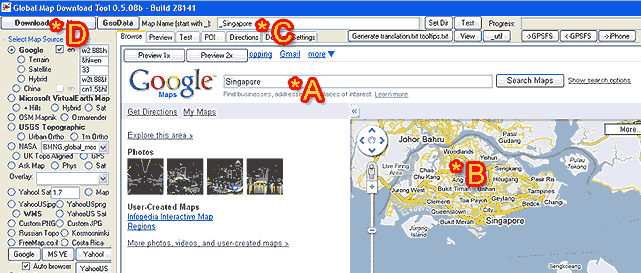
Ok, we are looking at the main GMDL interface here. As you can see, I have labeled the key areas we will be focusing on. For our purpose, you can pretty much forget about the other complicating looking array of settings. Mess around with it in your own time if you want to. Refer to the following steps with the help of the labels.

A : Type in the place you want and click on 'Search Maps'. For this tutorial, I will be using Singapore as an example.

B : The map of the area you want will show up here. Now this is the tricky part of the program and perhaps the most annoying. You have to adjust, zoom in/out and position the image to your liking because presumably, that will be the image area that your final map will look like. Only presumably so don't try to get it perfect the first time around. You can click on "Preview 1x" (on top of the Google Maps logo) to see what the final output area will be. There is a another preview screen which I'll get to in a bit. You will not be able to position exactly as you want as there are set grids that GMDL will download which you can again see by clicking on the Preview 1x button.

C : Now once you're done positioning, you will need to enter an output name in this field. Your output name must start with an underscore. I've decided to name my output map simply as Singapore so I would have to type in "_Singapore".

D : Next, click on the "Download This Map" button and the next image will come up:

» Click to show Spoiler - click again to hide... «


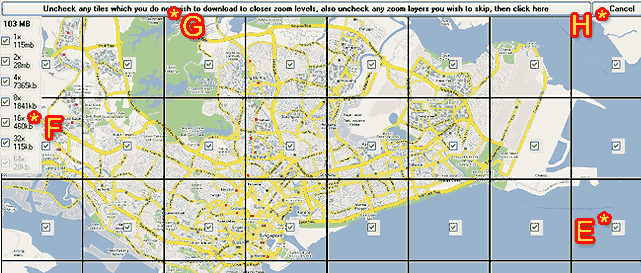
This is the preview screen. Let's look at what is on the above screen shot.

E : You get to choose which tiles you want in the final output. Check to include and un-check to discard. As you can see here this particular tile is just water so I might not want this in order to cut down on the final output size. This somehow does not work though as the final map output will still include all the area in the preview. Well, nothing you can do about it but I still recommend you un-check the tiles that you don't want.

F : These are the zoom levels you can select. 1x being the maximum zoom in and in this case 32x being the maximum zoom out. Fortunately, this feature actually does work. You can select multiple zoom levels to be included in a single map. File size of each zoom levels (as well as total size of all zoom levels selected) are shown so you can judge what is reasonable to include. As a note, in most cases, 2x provides more than enough close up detail as the information it provides is almost identical to a 1x zoom view.

G : If you are happy with what you have on this preview screen, go ahead and click this long button and downloading of the map will commence as in step I below.

H : If you want to re-position the map to a more suitable area, you can do so by clicking on cancel. A pop-up saying "Zoom level probably unavailable...." will appear. Just click 'OK' and proceed to click on the 'Browse' tab at the top-left to return to the previous screen.

» Click to show Spoiler - click again to hide... «


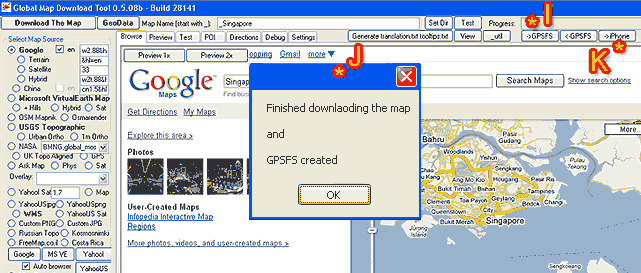
I : It will be as if nothing is happening but don't fret because the progress bar is silently running on the top right hand corner of the screen.

J : This message will pop-up once the download is finished. If a different window appears saying that you have incomplete tiles instead, simply try again to download the missing tiles as instructed on screen. It may not work instantly though as Google will sometimes misinterpret your mass download of map tiles and temporarily block your connection. You can also choose to not download those missing tiles if you want to.

K : The next step after the download is to get GMDL to process the downloaded image files into something your iPhone can understand. Click on the 'iPhone' button to do this.

» Click to show Spoiler - click again to hide... «


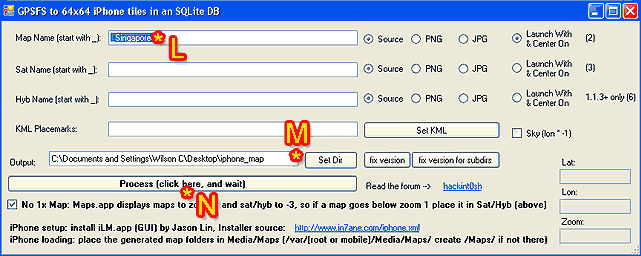
L : This will be the name of your map again. Leave this as it is.

M : This is the output directory. I suggest just leaving this as it is. If you are making more than one map after the other though, you will have to specify a different target folder or else an error message will come up saying that the directory already exists.

N : This is the final step on GMDL. Click this button and once the process has been completed, you can close the GDML program.

You will now have two finished files which are "com.apple.Maps" and "MapTiles.sqlitedb". If you remember from the first part of the tutorial on top, these are the two files you have to SSH to your iPhone (or 1 file for non-jb users using DiskAid). Users with FW2.1 and below should be able to use these files without any problem.

If however you are on the FW2.2, you're not quite finished yet because you still have one more step that is to convert "MapTiles.sqlitedb" into a FW2.2 compatible format. FW2.2 uses a 128x128 map tile which is different from the 64x64 map tile you now have. (GMDL has not yet been updated for this change).

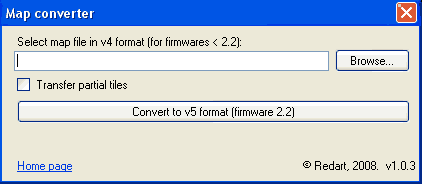
You need to download the MapConverter (Mapv4v5Converter.zip) from our Russian brothers here or here.. Unzip the file and install by executing the "Mapv4v5ConverterSetup.msi" file.

After installation has complete, run the program:

» Click to show Spoiler - click again to hide... «


Locate the "MapTiles.sqlitedb" file you wish to convert and click on "Convert to v5 Format". Specify an output location. Finally make sure you discard of the old MapTiles.sqlitedb file and replace it with this one. Make sure you rename this new file accurately as "MapTiles.sqlitedb" and put it into a single folder together with the existing "com.apple.Maps".

This is where the tutorial ends and connects with the first post on "how to view maps offline on your iPhone".

As a parting note, do mess around with GMDL when you have time. You will find that you can do stuff like place Points of Interests, manually name streets, etc so all these information will be available to you when you view your map offline without a data connection present.

Cheers! cool2.gif

This post has been edited by davidgary73: Apr 14 2009, 12:01 AM
TeK_KeN
post Nov 27 2008, 12:20 AM

rcctl
******
Senior Member
1,540 posts

Joined: Aug 2008
From: Your Dream
this is a good tutorial bro rclxms.gif

keep em coming.
will try once get back smile.gif
Siilver
post Nov 27 2008, 12:45 AM

Getting Started
**
Junior Member
154 posts

Joined: Nov 2008
From: Quelque part seulement nous savons
Good job mate.

Suits noobs like me that has no sense of direction. tongue.gif
=Hanxz=
post Nov 27 2008, 12:57 AM

l33t!
******
Senior Member
1,903 posts

Joined: Feb 2005
From: ipohmali


this post is nice and maverick who are u ah previously? tongue.gif
TSMaverick Wil
post Nov 27 2008, 01:08 AM

Casual
***
Junior Member
303 posts

Joined: Nov 2008


Thnx again guys. I was wilsoncvt previously hehe...
potion
post Nov 27 2008, 03:51 AM

Casual
***
Junior Member
319 posts

Joined: Jun 2005
From: Shah Alam, Selangor


great tips! will try this leter when i got some free time smile.gif
baretta
post Nov 27 2008, 07:49 AM

Regular
******
Senior Member
1,853 posts

Joined: Nov 2007
another reason, why you should jailbreak...... Good work....
bjkhan
post Nov 27 2008, 11:41 AM

Getting Started
**
Junior Member
178 posts

Joined: Feb 2006
From: Kuala Lumpur


this post really making me to consider to break the virginity of my iphone by jailbreaking....hmmmm
gengstapo
post Nov 27 2008, 02:19 PM

Retired enthusiast
********
All Stars
10,688 posts

Joined: Jan 2005
kewL
gonna try soon

TQ
TakanoKyohei
post Nov 27 2008, 02:36 PM

101101010110100101011
*****
Senior Member
959 posts

Joined: Jun 2006
From: Uaaaaaaa Status: Machine Coding


OMG, Nice Bro, you were really helping.... rclxms.gif

thumbs up for your..smile.gif thumbup.gif icon_idea.gif
Shock
post Nov 27 2008, 03:16 PM

On my way
****
Senior Member
518 posts

Joined: Jan 2003
i think you should use another host as well..mediafire is very bad for tmnut line..
TSMaverick Wil
post Nov 27 2008, 03:24 PM

Casual
***
Junior Member
303 posts

Joined: Nov 2008


@Shock. I've personally found MediaFire to be the quickest actually. hmm.gif You can recommend a different file hosting location to me and I can provide an alternative download link.
Shock
post Nov 27 2008, 03:29 PM

On my way
****
Senior Member
518 posts

Joined: Jan 2003
rapidshare / megaupload. both are quite ok for tmnut..

mediafire....my ip ping the, time out -.-
TSMaverick Wil
post Nov 27 2008, 03:47 PM

Casual
***
Junior Member
303 posts

Joined: Nov 2008


Ok, I'll post up alternative download links in a bit. Will be using rapidshare.
blizzzy
post Nov 27 2008, 04:16 PM

Getting Started
**
Junior Member
133 posts

Joined: Nov 2006
How do I delete the downloaded maps that I previously used on stock app MAPS if I am already using this one.
TSMaverick Wil
post Nov 27 2008, 04:20 PM

Casual
***
Junior Member
303 posts

Joined: Nov 2008


@blizzzy ...Let me just clear a few things first before I can help u:

1. You've loaded custom maps before on to your iPhone....yes/no?
2. You're jbroken and familiar with SSH?

This post has been edited by Maverick Wil: Nov 27 2008, 04:29 PM
blizzzy
post Nov 27 2008, 04:28 PM

Getting Started
**
Junior Member
133 posts

Joined: Nov 2006
1) No. Previously I just use MAPS the official App in Iphone
2) Yes its JB 2.1 and I use WinSCP on WinXP/openSSH on Iphone to transfer stuff between my comp and phone.

I just want to remove the cache of the downloaded maps cause I won't need it anymore if I want to install this thingy. Thanks =)
TSMaverick Wil
post Nov 27 2008, 04:32 PM

Casual
***
Junior Member
303 posts

Joined: Nov 2008


@blizzzy...oh ar..ok ..

Well you don't really need to remove the cache because the cache is not exactly permanent. It's temporary. It's would be a nonsensical thing to do and an absolute waste of your time. sweat.gif laugh.gif But if you insist... once you load new custom maps, the old cache is automatically wiped. There is also an option to clear cache on the OfflineMaps app (More>Remove All Caches)

This post has been edited by Maverick Wil: Nov 27 2008, 04:34 PM
Shock
post Nov 27 2008, 04:33 PM

On my way
****
Senior Member
518 posts

Joined: Jan 2003
oh, the offlinemaps have a function to remove all cache.
blizzzy
post Nov 27 2008, 04:37 PM

Getting Started
**
Junior Member
133 posts

Joined: Nov 2006
Ahh thanks. Great. I'll look around for Klang Valley maps for 2.1 if there are any =/
TSMaverick Wil
post Nov 27 2008, 04:41 PM

Casual
***
Junior Member
303 posts

Joined: Nov 2008


@blizzy

You can find a KL Map for 2.1 at http://forum.lowyat.net/topic/809207/+20
blizzzy
post Nov 27 2008, 04:45 PM

Getting Started
**
Junior Member
133 posts

Joined: Nov 2006
Yay awesome! Thanks a lot man. smile.gif
stringfellow
post Nov 27 2008, 06:35 PM

Ultrawide | 4K | VR
********
Senior Member
11,305 posts

Joined: Jan 2003
Question.

These maps are of a single level zoom accuracy only , right? If I decide to zoom in, and that zoom level is not available, you'll basically get a blank slate ,right?

SO, in other words, you will need customised versions of varying levels of zoom accuracies, which would come to GBs of map tiles if I want those many level of zoom accuracies, right? The need for varying levels of accuracies comes when you are travelling in tighly packed high density road areas, in which you would need to zoom in to get a sense of the roads around you, and when you are traveling cross country, the road gets less dense to only major highways and therefore needing the maps to be zoomed out. How do you accommodate for this?

Don't get me wrong, I am appreciative of your efforts, Maverick Wil/Wilsoncvt, but if I am reading this correctly, and if this app allows single level zoom accuracy only, it is only worthwhile when you are in a specific area only, meaning either in high density road areas like cities, or zoomed-out maps with only display of major roads , in the case of offroading or travelling balik kampung.

IMO(and I will have to stress much on this IMO), this is not enough a reason to jailbreak, contrary to the opinions of certain quarters here. Reason being, this app is trying to emulate the way Garmin GPSes work, but only with single level zoom accuracies, a.k.a static map tiles at preset accuracy. The Garmins allow zooming out and being able to see the "bigger picture" but because of how Google Maps work, you are moving between different zoom accuracy map tiles. It is because of this reason that i feel, IMO, that not being able to set it with varying accuracy (because otherwise, you'll bloat the map tile sizes to crazy sizes) that it does not suit the purpose well.

Using Google Maps properly with 3G/EDGE may not be for everyone, since it involves subscriptions to these WWAN services and not everyone can afford them. I totally understand that, and I can understand why, because of these constraints, that solutions like this(Offline Maps) comes up. But still, using Google Maps THIS way, would only work somewhat satisfactorily only when you have map zoom accuracy a certain way, and different areas you travel will need different solutions to the level of map zoom accuracy. It is because of these varying complexities, that is why I feel, it is best coupled with a WWAN service (3G, or EGDE). Even on 3G/EDGE and using Google Maps, there are disadvantages, and sometimes maps are slow to load, or not noad at all, but you have to understand, Google Maps was never intended to be used as a full-fledged GPS solution ala Garmin, it is mean as a location-based service.

It is therefore, from these conclusions I have mentioned, that I feel that while this app has its benefits, it does not serve its purpose well. And therefore, still not a good enough reason to jailbreak.

Disclaimer: All these are my own posts and all in my own opinion (IMO). I am running this risk of being at the disadvantage of not being agreed upon by many here, because of my no-jailbreaking stance here, but this is after all, a forum, and in a forum, we voice our opinions and we don't necessarily agree with the next person. It is how we disagree with the next person agreeably, that exemplifies the maturity of the populace of a said forum. Enough said.
Snuffykl
post Nov 27 2008, 06:38 PM

**emolified**
*****
Senior Member
835 posts

Joined: Oct 2006
From: Malacca


nice tutorial there smile.gif. thx alot dude smile.gif helps alot hehe....
Shock
post Nov 27 2008, 06:43 PM

On my way
****
Senior Member
518 posts

Joined: Jan 2003
string, maybe you got it wrong. gmdl software is used to download all the "pictures" of the map in google included the various zooms. if set correctly , you can have all the maps (picture) up to the road (jalan xx) . after download the pictures, it will combine back as maps using grid system ( not sure on this)

in another words, this software are downloading the pictures from various zoom not static to 1 zoom only. there is 1x,2x,4x,8x,16x,32x and 64x downloading zoom for the pictures. so , when i view off line maps, i can view like normal maps as if from wifi/ 3g or edge, with various of zooms.

I am sorry if i got you meaning post wrongly.
stringfellow
post Nov 27 2008, 06:50 PM

Ultrawide | 4K | VR
********
Senior Member
11,305 posts

Joined: Jan 2003
If that is the case, then I take it back, it is a great solution! rclxms.gif

My understanding after reading the tutorial was it was preset to a static zoom level only, not varying zoom.

Mind if I ask how big would the size of the map would be if I want all these varying degrees of zoom intact? Is the size as reported by the size of that download there, as in
46MB?

Looking at the process of making custom maps for yourself, it is rather tedious. I'm thinking of using this as a solution to looking at my maps while I'm at my nightspot places, but if I had to go jump though lots of hoops to get there, I'll let others do it. tongue.gif

Still, I have my own Garmin. I'd rather have the same function in my Aifontriji and not having the need to carry two devices while I'm walking in strange, new places, but I don't feel inclined to jailbreak just for this.
Shock
post Nov 27 2008, 06:53 PM

On my way
****
Senior Member
518 posts

Joined: Jan 2003
the 46mb is just klang valley only... the size is depends on your zooms. as in u zoom in more = more pictures to download. judging from the size klang valley it about 3k+ pictures in there.

sometimes you jailbreak your phone got troll, it goes slower...i jb i only get those usefull apps from cydia and i really don't like my phone goes troll (turtle) lol.

This post has been edited by Shock: Nov 27 2008, 06:53 PM
stringfellow
post Nov 27 2008, 06:56 PM

Ultrawide | 4K | VR
********
Senior Member
11,305 posts

Joined: Jan 2003
So in rough figure, if I want a full Klang Valley map, with all the possible zoom levels, what kind of map size are we talking about here? GBs?

Have you put this on your iPhone? Does it go "troll" on you?
Shock
post Nov 27 2008, 07:00 PM

On my way
****
Senior Member
518 posts

Joined: Jan 2003
offlinemaps not troll, only winterboard + themes + icon changes will troll prolly 10 to 15 secs.

let say if included klang as well, prolly max only 100mb. the one i did, which included klang but only limited to second of last zoom u can get is 63mb. problem which caching map is u need time and good line. singapore whole country is 300mb.
Snuffykl
post Nov 27 2008, 07:03 PM

**emolified**
*****
Senior Member
835 posts

Joined: Oct 2006
From: Malacca


QUOTE(Shock @ Nov 27 2008, 06:43 PM)
string, maybe you got it wrong. gmdl software is used to download all the "pictures" of the map in google included the various zooms. if set correctly , you can have all the maps (picture) up to the road (jalan xx) . after download the pictures, it will combine back as maps using grid system ( not sure on this)

in another words, this software are downloading the pictures from various zoom not static to 1 zoom only. there is 1x,2x,4x,8x,16x,32x and 64x downloading zoom for the pictures. so , when i view off line maps, i can view like normal maps as if from wifi/ 3g or edge, with various of zooms.

I am sorry if i got you meaning post wrongly.
*
yeah wanna know how to zoom more details of a location without using any connection smile.gif
Shock
post Nov 27 2008, 07:05 PM

On my way
****
Senior Member
518 posts

Joined: Jan 2003
QUOTE(Snuffykl @ Nov 27 2008, 07:03 PM)
yeah wanna know how to zoom more details of a location without using any connection smile.gif
*
bro, we already dl the maps with various of zoom. take is as "pre-dled" map. just zoom like dbl tap then the maps will load from the "saved cache map" which we put though SSH.

when you already put in the file dled with the maps of that area, you wont need any connections.

This post has been edited by Shock: Nov 27 2008, 07:06 PM
Snuffykl
post Nov 27 2008, 07:07 PM

**emolified**
*****
Senior Member
835 posts

Joined: Oct 2006
From: Malacca


QUOTE(Shock @ Nov 27 2008, 07:05 PM)
bro, we already dl the maps with various of zoom. take is as "pre-dled" map. just zoom like dbl tap then the maps will load from the "saved cache map" which we put though SSH.

when you already put in the file dled with the maps of that area, you wont need any connections.
*
i know double tab to zoom but when i tried to zoom it's not very details. zoom 3 times that's it can't zoom anymore .

This post has been edited by Snuffykl: Nov 27 2008, 07:09 PM
Shock
post Nov 27 2008, 07:11 PM

On my way
****
Senior Member
518 posts

Joined: Jan 2003
that because the maps not make fully zoom. the software gmdl is very stingy. it can only take certain area if want full zoom. let say u want klang valley, which maverick upload. it should be contain full zoom. if you want included klang, then only max 2x zoom not 1x zoom. therefore maverick is offering is time and dedication to make full zoom maps for whole malaysia.
TSMaverick Wil
post Nov 27 2008, 07:12 PM

Casual
***
Junior Member
303 posts

Joined: Nov 2008


@stringfellow

Yea, as a non jb, you are at a big disadvantage on the forums haha...

..just kidding wit u... laugh.gif

Right as Shock said, GMDL allows you to download (in a single map file) varying levels of zoom that are available on Google Maps. You can choose which levels of zoom you want in your custom map.

Let's take for example the WestMalaysia map that I have provided for download. That map only has if I'm not mistaken 3 to 4 levels of basic zoom starting from the maximum zoom out layer that was available. Zoom in any more than that and you will get blank tiles. However, this was what I chose out of size concern. I actually did attempt to download the whole WestMalaysia map with every layers of zoom possible (approx 8 layers) but this amounted to a 5GB file size which is huge. It ended up not converting and I'm pretty sure it wouldn't load properly on the iPhone.

To solve this problem, I decided to provide a sort of an overview map of WestMalaysia where you can still zoom down to details that show you main roads and highways. It is still pretty detailed and is only a mere 11.5MB which is a fraction of the 5GB size. I then created separate maps for varying states like the Klang Valley area with pretty much all the zoom levels for when more information is needed. I can easily switch between the different maps using the OfflineMaps app on the iPhone itself relatively easily when I want to. I have so far managed to load 4 different cached map files on the iPhone at any one time but there has been no issues on limit that I know of thus far.

The KlangValley map at all zoom levels is approx 42MB and it includes a bit of the outskirts area as well. I may have left out the maximum zoom level though which doesn't really affect any loss of info as x1 zoom and x2 zoom has pretty much the same info set. The maximum zoom layer I left out would have added an extra 30mb to the file size for a total of 72MB which overall is not too bad. I've found that it's best though to keep each cached map file size to under 250MB for maximum performance (no lags, nothing).

I'm getting a bit sidetracked typing this up now because I just noticed some small discussion going on already so I hope the above answers your concerns and shows that it is still very useful for OfflineMaps existence. I personally am not a 3G subscriber and I'm managing pretty well with using maps on a casual basis.

This post has been edited by Maverick Wil: Nov 27 2008, 07:16 PM
stringfellow
post Nov 27 2008, 07:14 PM

Ultrawide | 4K | VR
********
Senior Member
11,305 posts

Joined: Jan 2003
QUOTE(Shock @ Nov 27 2008, 07:11 PM)
that because the maps not make fully zoom. the software gmdl is very stingy. it can only take certain area if want full zoom. let say u want klang valley, which maverick upload. it should be contain full zoom. if you want included klang, then only max 2x zoom not 1x zoom. therefore maverick is offering is time and dedication to make full zoom maps for whole malaysia.
*
I'll be interested back again, once this has been achieved.
Shock
post Nov 27 2008, 07:14 PM

On my way
****
Senior Member
518 posts

Joined: Jan 2003
bro maverick, your klang valley map still not in rapidshare yet >.>
TSMaverick Wil
post Nov 27 2008, 07:17 PM

Casual
***
Junior Member
303 posts

Joined: Nov 2008


Funny you should say so because it just finished and I'm updating the links right after this.
stringfellow
post Nov 27 2008, 07:21 PM

Ultrawide | 4K | VR
********
Senior Member
11,305 posts

Joined: Jan 2003
Mav,

You can see where I come from in terms of a user level. I am a 3G subscriber, therefore the Klang Valley maps are not of substantial importance since I can do it the intended way, via Google Maps + 3G connection. It is on the areas where there are not 3G coverage, that your solution here becomes important.

Do these Offline maps have routing capabilities, or at least searchable street contents. Let' say I preload these offline maps of Paris, and I want to use these offline maps to look for Rue de Rivoli, can this be done? If the answer is yes, then you may have move me closer towards jailbreaking.
Shock
post Nov 27 2008, 07:25 PM

On my way
****
Senior Member
518 posts

Joined: Jan 2003
there is a way to make the address list, but i have not known how to yet. singapore people have done so. they have 700++ street list for them to use with offlinemaps. my knowledge to this is still very limited but i am learning.

i just state what i have known, for your question, maverick answer might be better than mine.
TSMaverick Wil
post Nov 27 2008, 07:30 PM

Casual
***
Junior Member
303 posts

Joined: Nov 2008


QUOTE(stringfellow @ Nov 27 2008, 07:21 PM)
Mav,

You can see where I come from in terms of a user level. I am a 3G subscriber, therefore the Klang Valley maps are not of substantial importance since I can do it the intended way, via Google Maps + 3G connection. It is on the areas where there are not 3G coverage, that your solution here becomes important.

Do these Offline maps have routing capabilities, or at least searchable street contents. Let' say I preload these offline maps of Paris, and I want to use these offline maps to look for Rue de Rivoli, can this be done? If the answer is yes, then you may have move me closer towards jailbreaking.
*
Yea I get exactly how this would be important to you in that way. I'm ecstatic that you will finally take the leap of faith into jb-ing your aifontriji haha laugh.gif but at this moment no...you cannot use the route function at all because of FW2.2 compatibility issues. I'm not sure if you can use it in tandem with 3G when the fix does arrive but I will find out. Unfortunately for now though as what I've read, the GMDL developer will not be free to work on his program until the end of December 08 so a solution whatever the case may be is still a few months away.

I'm sorry guys! cry.gif stringfellow is still not going to jb! cry.gif cry.gif cry.gif laugh.gif


ps...I totally missed your search question. The answer is No...not as I know of. The only alternative that I think Shock was refering to is that you can add POI's and custom info on a map in GDML before processing it but that would mean a hell of a lot of work. But if you do manage to manually label everything, I guess you could do a search without a connection but I can't confirm this as of now.


*tutorial has been updated slightly based on your feedback regarding zoom levels.

This post has been edited by Maverick Wil: Nov 27 2008, 07:40 PM
cscheat
post Nov 28 2008, 09:25 AM

V.V.I.P member
******
Senior Member
1,262 posts

Joined: Aug 2005
From: Mars


Taikor Maverick, i have one question

after installing the offline map cache, will everything loads faster when i use the google map when in ONLINE mode ?
kazasho
post Nov 28 2008, 10:18 AM

カザショ!
******
Senior Member
1,964 posts

Joined: Jun 2006
From: San Andreas


hohohoho. this is GOOOOOOOOOODDDDDDDDDDDDDDDD. need to jb >.< but as alternative to me.
I try to help u on this.
TSMaverick Wil
post Nov 28 2008, 10:50 AM

Casual
***
Junior Member
303 posts

Joined: Nov 2008


@cscheat

That depends on how fast your connection is. The areas that are covered by the offline map you have loaded into the cache will load as fast as an excellent wi-fi connection (which is pretty much instantly). Everything else not covered by the offline map will obviously load according to your connection speed.
kazasho
post Nov 28 2008, 10:55 AM

カザショ!
******
Senior Member
1,964 posts

Joined: Jun 2006
From: San Andreas


QUOTE(Maverick Wil @ Nov 28 2008, 10:50 AM)
@cscheat

That depends on how fast your connection is. The areas that are covered by the offline map you have loaded into the cache will load as fast as an excellent wi-fi connection (which is pretty much instantly). Everything else not covered by the offline map will obviously load according to your connection speed.
*
y there is no .exe when I download the file? cry.gif
TSMaverick Wil
post Nov 28 2008, 11:03 AM

Casual
***
Junior Member
303 posts

Joined: Nov 2008


@kazasho

What file are you referring to?
kazasho
post Nov 28 2008, 11:04 AM

カザショ!
******
Senior Member
1,964 posts

Joined: Jun 2006
From: San Andreas


this
Using GMDL to Create a Custom Offline Map Cache for Your iPhone


Step 1:
Download+Install the "GMDL" program by in7ane.com from this link.


Added on November 28, 2008, 11:05 am
QUOTE(kazasho @ Nov 28 2008, 11:04 AM)
this
Using GMDL to Create a Custom Offline Map Cache for Your iPhone
Step 1:
Download+Install the "GMDL" program by in7ane.com from this link.
*
or is it only use in iphone? not computer? lol

This post has been edited by kazasho: Nov 28 2008, 11:05 AM
TSMaverick Wil
post Nov 28 2008, 11:07 AM

Casual
***
Junior Member
303 posts

Joined: Nov 2008


Oh...sorry bout that...there is no .exe file. I shouldn't have put "install". Go on to step 2 from there.
feizaiII
post Nov 28 2008, 01:50 PM

***** Genuine? *****
*******
Senior Member
3,310 posts

Joined: Apr 2005
Tested!! Work Fine!!
Thanks Maverick Wil!!

But mine is 1st gen, so no GPS, dnt have the circle blinking blinking follow me

cscheat
post Nov 28 2008, 02:24 PM

V.V.I.P member
******
Senior Member
1,262 posts

Joined: Aug 2005
From: Mars


QUOTE(feizaiII @ Nov 28 2008, 02:50 PM)
Tested!! Work Fine!!
Thanks Maverick Wil!!

But mine is 1st gen, so no GPS, dnt have the circle blinking blinking follow me
*
feizaiII, after u patch the offline map, did u notice a significant increase in speed when using google map ? (online mode)
jimnuz
post Nov 28 2008, 02:35 PM

Getting Started
**
Junior Member
109 posts

Joined: Nov 2007


bro mav, both mediafire and rapidshare link not working for the klang valley maps...><

This post has been edited by jimnuz: Nov 28 2008, 05:40 PM
milky
post Nov 28 2008, 02:47 PM

- King -
*******
Senior Member
4,743 posts

Joined: Jan 2003
From: u noe EARTH ? wher all human being is there


bro maverick.. by any chance u making any singapore maps?
ahsin
post Nov 28 2008, 03:08 PM

Freak9u
******
Senior Member
1,144 posts

Joined: Aug 2005
From: Kota Kemuning
noob question.... after install the offline map, can use it with gps??
SUSMike3300
post Nov 28 2008, 03:12 PM

Look at all my stars!!
*******
Senior Member
6,866 posts

Joined: Feb 2005


QUOTE(ahsin @ Nov 28 2008, 03:08 PM)
noob question.... after install the offline map, can use it with gps??
*
The reason for offline map is no data will be charge while using maps so 3G , WiFi, and GPS data won't be in use.
mamet
post Nov 28 2008, 04:49 PM

1/3 Sone
****
Senior Member
592 posts

Joined: Oct 2006
From: Anson

cool...
makes my hand more itchier to upgrade 2.2... tongue.gif
siawgu
post Nov 28 2008, 05:30 PM

Enthusiast
*****
Senior Member
996 posts

Joined: Jan 2003
From: Kuching, Sarawak


nice tutorial.. if wanna whole malaysia. kinda big the filesize. hoho i tried whole sarawak about 400MB @@
TSMaverick Wil
post Nov 28 2008, 06:09 PM

Casual
***
Junior Member
303 posts

Joined: Nov 2008


@ feizaiII : Coolness! smile.gif

@ jimnuz : Mediafire is working now. Maybe there was a que. Rapidshare has reached download limit so I'll update that in a bit tonight to a better server. Thnx for the heads up.

@ milky : Sure I'll add it to the list.

@ ahsin, Mike3300 : Actually, the GPS does work because the aifontriji itself has a built-in GPS chip that communicates with the satellites. With offline map caches however, you can only use the GPS to view where you are on the map a.k.a the blue dot. You won't be able to use search or find directions.


Added on November 28, 2008, 6:18 pm@ mamet : No reason you shouldn't!

@ twinkles : thnx.

@ siawgu : Don't make your file size too big but from what I've been reading around, there has been no problems so far loading a 1GB file. My personal max that I tested without problems is up to 500MB. I tried a 5GB file too but that didn't quite work out.


Added on November 28, 2008, 7:12 pmI have just updated the tutorial (1st Part) on how to view offline maps. I found a way for those who do not want to jailbreak so bro stringfellow, that fix was created for you in mind. You might want to make your own maps though because you can only load one file at a time. Anything below 1GB should be fine.

This post has been edited by Maverick Wil: Nov 28 2008, 07:12 PM
kazasho
post Nov 28 2008, 07:26 PM

カザショ!
******
Senior Member
1,964 posts

Joined: Jun 2006
From: San Andreas


ok I got it running. man this is cool. can put a map like gps. like put a point where u want to go and from where. cool.

ok some noob question

1. if I copy all (maybe I have two cache maps i.e KL and Klang valley) , does it will overlap when I using it? or when I want to use the app, only 1 map can be cache?

2. if I dont want to JB, I need to always replace the cache using a computer?
TSMaverick Wil
post Nov 28 2008, 07:44 PM

Casual
***
Junior Member
303 posts

Joined: Nov 2008


@kazasho

1. You can only use one map cache at a time.

2. Yup...or you could just create a big map. Of course file size will be much bigger but as from what I know, 1GB files do not lag up the phone in any way. 2GB files could actually also be possible but I think not more than that.
kazasho
post Nov 28 2008, 08:25 PM

カザショ!
******
Senior Member
1,964 posts

Joined: Jun 2006
From: San Andreas


QUOTE(Maverick Wil @ Nov 28 2008, 07:44 PM)
@kazasho

1. You can only use one map cache at a time.

2. Yup...or you could just create a big map. Of course file size will be much bigger but as from what I know, 1GB files do not lag up the phone in any way. 2GB files could actually also be possible but I think not more than that.
*
hohoho. either way, its 1 map at a time. but no jb must transfer using computer. nice. another question, how can ipod touch or iphone lag? because of many apps install? or themes? or many songs?
frequency
post Nov 29 2008, 12:13 AM

我要挑战十个!
*******
Senior Member
2,567 posts

Joined: Jan 2003


I have loaded the map but whenver i click it ..it ll prompt me no internet connection..
TSMaverick Wil
post Nov 29 2008, 01:39 AM

Casual
***
Junior Member
303 posts

Joined: Nov 2008


@kazasho : Not to say lag but if I were to load a 5GB map in, I would guess loading speeds will be rather slow. Same for any apps. The iPhone's processing capabilities can only do so much.

@frequency : erm.. I'll need more details than that... what do you mean by when you click the map? Which window is this at?
milky
post Nov 29 2008, 08:39 AM

- King -
*******
Senior Member
4,743 posts

Joined: Jan 2003
From: u noe EARTH ? wher all human being is there


QUOTE(Maverick Wil @ Nov 28 2008, 06:09 PM)
@ feizaiII : Coolness! smile.gif

@ jimnuz : Mediafire is working now. Maybe there was a que. Rapidshare has reached download limit so I'll update that in a bit tonight to a better server. Thnx for the heads up.

@ milky : Sure I'll add it to the list.

@ ahsin, Mike3300 : Actually, the GPS does work because the aifontriji itself has a built-in GPS chip that communicates with the satellites. With offline map caches however, you can only use the GPS to view where you are on the map a.k.a the blue dot. You won't be able to use search or find directions.


Added on November 28, 2008, 6:18 pm@ mamet : No reason you shouldn't!

@ twinkles : thnx.

@ siawgu : Don't make your file size too big but from what I've been reading around, there has been no problems so far loading a 1GB file. My personal max that I tested without problems is up to 500MB. I tried a 5GB file too but that didn't quite work out.


Added on November 28, 2008, 7:12 pmI have just updated the tutorial (1st Part) on how to view offline maps. I found a way for those who do not want to jailbreak so bro stringfellow, that fix was created for you in mind. You might want to make your own maps though because you can only load one file at a time. Anything below 1GB should be fine.
*
thx for the singapore maps.. u da man la..
harmeet15
post Nov 29 2008, 10:15 AM

Winners don't make excuses
*******
Senior Member
2,729 posts

Joined: Oct 2005
From: Gotham City


bro, i navigate 2 /private/var/mobile/Media/Maps
but thr is no maps folder...do i have 2 create it?
Shock
post Nov 29 2008, 03:15 PM

On my way
****
Senior Member
518 posts

Joined: Jan 2003
QUOTE(harmeet15 @ Nov 29 2008, 10:15 AM)
bro, i navigate 2 /private/var/mobile/Media/Maps
but thr is no maps folder...do i have 2 create it?
*
yeah , you have to create your self
harmeet15
post Nov 29 2008, 03:48 PM

Winners don't make excuses
*******
Senior Member
2,729 posts

Joined: Oct 2005
From: Gotham City


QUOTE(Shock @ Nov 29 2008, 03:15 PM)
yeah , you have to create your self
*
yeah, figured tat...
thx
but it seems like oni map is active at a given time ya...
it supposed 2 be like tat?
harmeet15
post Nov 29 2008, 04:07 PM

Winners don't make excuses
*******
Senior Member
2,729 posts

Joined: Oct 2005
From: Gotham City


my phone is JB unit...

copied WM, SG and klang v...

then follow the steps
works fine
on da SB, da offline map icon has klan on top
in da mean i try SG area wud use 3g...
supposed 2 be tat way?

TSMaverick Wil
post Nov 29 2008, 05:25 PM

Casual
***
Junior Member
303 posts

Joined: Nov 2008


@ harmeet15 : Oh no. I must have forgotten to rename the Klang Valley file. Will fix it in a bit but you can do it yourself as well. Rename the folder as whatever you want but my format is "KV---KlangValley" because I've found that the front 2 initials will show up on SB and the rest of the name is for view in OfflineMaps. I chose to go with this refercne method.

but it seems like oni map is active at a given time ya... << I don't quite get this.


@pehkay

For real? How come? Which part doesn't work?
pehkay
post Nov 29 2008, 08:39 PM

Getting Started
**
Junior Member
145 posts

Joined: Jan 2008


I can't browse to /private/var/mobile/Library/Caches/MapTiles directory .... only the media directory ... biggrin.gif
TSMaverick Wil
post Nov 29 2008, 09:15 PM

Casual
***
Junior Member
303 posts

Joined: Nov 2008


@pehkay

Damn thats a bummer. Give me a while to look back at that solution then. See what I can come up with.
davidgary73
post Nov 29 2008, 09:16 PM

Music Producer
Group Icon
VIP
4,903 posts

Joined: Jul 2008
@pehkay

I reckon that you will not be able to access the folders required to upload those maps as your phone needs to be JB to acess the root folders. For non Jailbreak iPhones, you will only see your media folders.

I'm not sure if ifunbox can help but do give it a try.

Cheers

TSMaverick Wil
post Nov 29 2008, 10:44 PM

Casual
***
Junior Member
303 posts

Joined: Nov 2008


@pehkay

Are you using Windows or a Mac?

I'm on Windows. I went and examined DiskAid and found that I can access the folders I specified. You can toggle to explore the 'root' directory instead of 'media' at the drop down menu on the bottom-left of the window. If files don't show up while you're browsing, hit F5 now and then to refresh. The MapTiles.sqlitedb file is most definitely there. Try again.

The non-jailbreak method works.

I'm not sure if the mac version of DiskAid has the same layout but it should. If anyone can confirm the same description as above, that'd be great. Cheers.

This post has been edited by Maverick Wil: Nov 29 2008, 10:54 PM
frequency
post Nov 29 2008, 11:36 PM

我要挑战十个!
*******
Senior Member
2,567 posts

Joined: Jan 2003


QUOTE(Maverick Wil @ Nov 29 2008, 01:39 AM)
@kazasho : Not to say lag but if I were to load a 5GB map in, I would guess loading speeds will be rather slow. Same for any apps. The iPhone's processing capabilities can only do so much.

@frequency : erm.. I'll need more details than that... what do you mean by when you click the map? Which window is this at?
*
Hi Maverick, thanks for ur cool post.
Actually I am doing the route,whenever I click search, It prompts me no internet connection.
Izzit actually not support routing for malaysia?
TSMaverick Wil
post Nov 30 2008, 12:24 AM

Casual
***
Junior Member
303 posts

Joined: Nov 2008


@ frequency

As stated in the tutorial, routing for OfflineMaps is not supported for FW2.2. Not for Malaysia and not for anywhere else. Not yet anyways. Besides, even if you were to do routing offline (I'm assuming you did not turn on any data connection 3G/Wifi/EDGE), you have to do it in GMDL first by setting points of interests. I am still learning about this so once I get around to figuring it out (very busy at the moment), I'll update the tutorial to share with you guys how to set points of interests yourself and access them through your bookmarks on the iPhone. Essentially it is like having a street directory offline.
pehkay
post Nov 30 2008, 03:19 PM

Getting Started
**
Junior Member
145 posts

Joined: Jan 2008


@Maverick

It says "Sorry, you need to have jailbroken device to view the root partition".

Oh well.. using diskaid 2 for windows


ifunbox doesn't work too smile.gif

This post has been edited by pehkay: Nov 30 2008, 03:30 PM
TSMaverick Wil
post Nov 30 2008, 04:32 PM

Casual
***
Junior Member
303 posts

Joined: Nov 2008


@pehkay

Oooh i c...I don't get that error message because I'm jailbroken. Argh... That's so not cool. From what I've been reading up on DiskAid is the only possible one which managed to do it before. I guess Apple clamped down on the loophole in the 2.1 and above fw... Sorry mate. I'll have to take down that bit of the tutorial then.
Samanoske Akechi
post Nov 30 2008, 06:47 PM

Itanium Solutions Inc.
****
Senior Member
625 posts

Joined: Aug 2006
From: Subang Jaya


QUOTE(Shock @ Nov 27 2008, 03:16 PM)
i think you should use another host as well..mediafire is very bad for tmnut line..
*
QUOTE(Shock @ Nov 27 2008, 03:29 PM)
rapidshare / megaupload. both are quite ok for tmnut..

mediafire....my ip ping the, time out -.-
*
I second this, mate. Maverick, might I suggest using Sendspace? Beats my pings to Rapidshare/Megaupload/Mediafire anytime. smile.gif Would appreciate it very much. Thanks.

Oh, and awesome work with the tutorial. Very in-depth, suits users of all levels. Copying in the first batch of maps now. thumbup.gif

This post has been edited by Samanoske Akechi: Nov 30 2008, 07:28 PM
TSMaverick Wil
post Dec 4 2008, 01:02 PM

Casual
***
Junior Member
303 posts

Joined: Nov 2008


I'll be back with updates after a while. I'm pretty caught up in a project for the next week plus so I won't have the time to really sit down and work on the offline maps for now. I'll be around though.

This post has been edited by Maverick Wil: Dec 4 2008, 01:03 PM
lordsharingan
post Dec 5 2008, 06:41 PM

やった!!
****
Senior Member
656 posts

Joined: Oct 2006
From: ジャパン

man, the download speed for cydia is super slow for me. it takes ages to download maps offline itself. lol
TSMaverick Wil
post Dec 5 2008, 06:57 PM

Casual
***
Junior Member
303 posts

Joined: Nov 2008


@lordsharingan

Internet connection has been really bad these few weeks and getting worse by the day. I keep resetting my modem to get a better ip range but seems like all the bloody ip ranges are messed up.
lordsharingan
post Dec 5 2008, 07:07 PM

やった!!
****
Senior Member
656 posts

Joined: Oct 2006
From: ジャパン

yeh, i have to install some of the configuration seperately. D: . sigh. this sucks.
Norup58
post Dec 11 2008, 11:52 PM

New Member
*
Newbie
2 posts

Joined: Dec 2008


Hi, found this thread very interesting and wanted to try it out, however, have encountered following problems:
Have a jb iPhone on 2.2 and OS Vista 64 and when I tried to install Mapv4v5converter it said it required NetFrameWork ver 3.5. No problem, it actually had a link to get the upgrade. Just wanted to mention it as the tut says NetFrameWork 2.0.

But my main problem is everytime GMDL has finished downloading my selected map (7,2 Mb) and I press iPhone- Process I get following error (same everytime- have tried various maps sizes):
File or assembly "System.Data.SQLite, Version=1.0.48.0, Culture=neutral, PublicKeyToken=db937bc2d44ff139" or one of its dependencies could not be loaded. Tried to load a program with wrong format. (the wording is translated from Danish)

If I choose "continue" nothing happens and when I choose "abort" the whole program (GMDL) shuts down.

Hope somebody has a solution for this.
TSMaverick Wil
post Dec 12 2008, 04:20 AM

Casual
***
Junior Member
303 posts

Joined: Nov 2008


QUOTE(Norup58 @ Dec 11 2008, 11:52 PM)
Hi, found this thread very interesting and wanted to try it out, however, have encountered following problems:
Have a jb iPhone on 2.2 and OS Vista 64 and when I tried to install Mapv4v5converter it said it required NetFrameWork ver 3.5. No problem, it actually had a link to get the upgrade. Just wanted to mention it as the tut says NetFrameWork 2.0.

But my main problem is everytime GMDL has finished downloading my selected map (7,2 Mb) and I press iPhone- Process I get following error (same everytime- have tried various maps sizes):
File or assembly "System.Data.SQLite, Version=1.0.48.0, Culture=neutral, PublicKeyToken=db937bc2d44ff139" or one of its dependencies could not be loaded. Tried to load a program with wrong format. (the wording is translated from Danish)

If I choose "continue" nothing happens and when I choose "abort" the whole program (GMDL) shuts down.

Hope somebody has a solution for this.
*
It should be a compatibility issue with GMDL and Windows Vista. I remember reading somewhere that GMDL is buggy on Vista so this should be one of the bugs. No solution until the developer updates the GMDL which is not anytime soon. Apparently he is going to attempt working on the next update sometime Jan 2009.
Norup58
post Dec 12 2008, 04:31 AM

New Member
*
Newbie
2 posts

Joined: Dec 2008


Hi, OK thanks for the explanation/ reason.
Guess I'll just have to be patient and wait for the update/ bug-fix.
TSMaverick Wil
post Dec 12 2008, 04:37 AM

Casual
***
Junior Member
303 posts

Joined: Nov 2008


Or you could do it on an XP. I'm sure there are plenty of those lying around laugh.gif
Ryuuga
post Dec 14 2008, 06:50 PM

Guitarist Unlimited
****
Senior Member
677 posts

Joined: Apr 2007


this doesn't work on 2.1??
ive tried with 2.1 and done all the above but only got squares as maps -__- tried several times with no avail =/
TSMaverick Wil
post Dec 14 2008, 08:19 PM

Casual
***
Junior Member
303 posts

Joined: Nov 2008


QUOTE(Ryuuga @ Dec 14 2008, 06:50 PM)
this doesn't work on 2.1??
ive tried with 2.1 and done all the above but only got squares as maps -__- tried several times with no avail =/
*
As mentioned MANY times over in the tutorial, there are some parts which only work for FW2.2. I suggest you read through again properly.
Ryuuga
post Dec 15 2008, 12:23 AM

Guitarist Unlimited
****
Senior Member
677 posts

Joined: Apr 2007


QUOTE(Maverick Wil @ Dec 14 2008, 08:19 PM)
As mentioned MANY times over in the tutorial, there are some parts which only work for FW2.2. I suggest you read through again properly.
*
i'm sorry, perhaps i missed this part of it:
» Click to show Spoiler - click again to hide... «


maybe you should bold those. might make things clearer. Anyhow, i'll try again with 2.1 ONLY maps and see how it goes.
thanks nevertheless
tarpaucase
post Dec 16 2008, 02:56 PM

Look at all my stars!!
*******
Senior Member
3,469 posts

Joined: Jan 2003
From: ...Frying Pan...
My contribution - Ipoh Map for 2.2 tongue.gif
Let me know if it works for you guys...

http://rapidshare.com/files/173805981/Ipoh.zip

Edit :

Cyberjaya+Putrajaya for 2.1
http://rapidshare.com/files/173806284/ipho...berjaya-2.1.zip

Cyberjaya+Putrajaya for 2.2
http://rapidshare.com/files/173807366/ipho...berjaya-2.2.zip

Ipoh Map for 2.1
http://rapidshare.com/files/173811643/Ipoh-2.1.zip

This post has been edited by tarpaucase: Dec 16 2008, 04:56 PM
joenjill
post Dec 24 2008, 11:57 AM

Regular
******
Senior Member
1,015 posts

Joined: Jan 2003
From: ~kUala lUmpur~
Maverick Wil, i had downloaded the GMDL program, but i unable to open the exe file. It say application failed to open.
tarpaucase
post Dec 24 2008, 03:47 PM

Look at all my stars!!
*******
Senior Member
3,469 posts

Joined: Jan 2003
From: ...Frying Pan...
can you provide like.. a much more detailed description ?
like .. the complete error message.. or a screenshot?

maybe you're missing some pre-requisite to run it.. are you on vista? xp ? .. details! tongue.gif
joenjill
post Dec 24 2008, 04:06 PM

Regular
******
Senior Member
1,015 posts

Joined: Jan 2003
From: ~kUala lUmpur~
tried already few times to download again. but still appear same msg.....
spyware? virus?? shakehead.gif

user posted image
SHOfrE3zE
post Dec 24 2008, 05:17 PM

Drop It Like It's Hot
******
Senior Member
1,895 posts

Joined: Jan 2003
From: Shah Alam


is there any other way i can download offlinemaps other than from cydia? i always failed downloading it due to the terrible connection.
terencetoo
post Dec 24 2008, 07:09 PM

Look at all my stars!!
*******
Senior Member
3,246 posts

Joined: Apr 2005


brother, referring back to post 1 with the link SSH to dummies...i cant see any thing at regarding SSH there....

any tutorial for SSH application?

First time using SSH when im a windows based user.

Thanks n nice work there mate!
eclau
post Dec 25 2008, 10:36 PM

New Member
*
Junior Member
6 posts

Joined: Oct 2007
Routing for FW 2.2 is now supported!

Check out the solution here:
http://code.google.com/p/iphoneofflinemap/

milky
post Dec 26 2008, 11:58 PM

- King -
*******
Senior Member
4,743 posts

Joined: Jan 2003
From: u noe EARTH ? wher all human being is there


maverick bro.... y my GPS cant detect my location where i am ?
before this i was using fw2.1 i can use the GPS for offline map...when i upgraded to fw2.2 & use ur maps also the GPS cant detect my location... i'm not saying ur map got problem... jus asking whether anyone else facing this problem with the new fw2.2 offlinemaps apps?
pehkay
post Dec 27 2008, 10:58 AM

Getting Started
**
Junior Member
145 posts

Joined: Jan 2008


QUOTE(eclau @ Dec 25 2008, 10:36 PM)
Routing for FW 2.2 is now supported!

Check out the solution here:
http://code.google.com/p/iphoneofflinemap/
*
Does it work for you? at least for MY map?
tapirus
post Dec 27 2008, 11:50 AM

(︶ε︶メ)╭∩╮ a�tE(R)isk
******
Senior Member
1,237 posts

Joined: Jul 2006
From: espie-prai


QUOTE(joenjill @ Dec 24 2008, 04:06 PM)
tried already few times to download again. but still appear same msg.....
spyware? virus?? shakehead.gif

user posted image
*
be4 this i didn't faced any problem like this..after i 4mat my pc now i faced the same problem with u..any1 here can help us...
pehkay
post Dec 30 2008, 10:25 AM

Getting Started
**
Junior Member
145 posts

Joined: Jan 2008


There is a new version of offline maps. Might need to update the front page smile.gif
TSMaverick Wil
post Dec 30 2008, 03:01 PM

Casual
***
Junior Member
303 posts

Joined: Nov 2008


Hey thnx pehkay. I noticed the new version as well but I have yet to update. I've been MIA since Xmas so I'll be back in here doing the updates after the New Year. Cheers.

setoyo
post Dec 30 2008, 10:26 PM

Luv MySeLF!
*****
Senior Member
849 posts

Joined: Sep 2007
The best tutorial ever... will try it soon...

One of the reason, why i luv my jb iphone3g...

thanks maverick...
milky
post Dec 30 2008, 10:28 PM

- King -
*******
Senior Member
4,743 posts

Joined: Jan 2003
From: u noe EARTH ? wher all human being is there


QUOTE(milky @ Dec 26 2008, 11:58 PM)
maverick bro.... y my GPS cant detect my location where i am ?
before this i was using fw2.1 i can use the GPS for offline map...when i upgraded to fw2.2 & use ur maps also the GPS cant detect my location... i'm not saying ur map got problem... jus asking whether anyone else facing this problem with the new fw2.2 offlinemaps apps?
*
anybody facing the same problem with me?
ch1ck3n
post Jan 2 2009, 12:33 AM

Regular
******
Senior Member
1,437 posts

Joined: Oct 2004
milky, i got the same problem here with you.
e 3 h y 0 r
post Jan 2 2009, 11:36 AM

L e 3 h y 0 r 1
*******
Senior Member
3,918 posts

Joined: Jan 2003
From: Paris


user posted image

how come i dont see copy? i only saw LINK
pehkay
post Jan 2 2009, 11:42 AM

Getting Started
**
Junior Member
145 posts

Joined: Jan 2008


QUOTE(| e 3 h y 0 r | @ Jan 2 2009, 11:36 AM)
user posted image

how come i dont see copy? i only saw LINK
*
The new version came out only a few days ago. The front page just needs to be updated smile.gif

Use link for now tongue.gif
e 3 h y 0 r
post Jan 2 2009, 03:49 PM

L e 3 h y 0 r 1
*******
Senior Member
3,918 posts

Joined: Jan 2003
From: Paris


link doesnt work
hao9986
post Jan 2 2009, 07:14 PM

Getting Started
**
Junior Member
102 posts

Joined: Jan 2003
From: KL


have u downloaded/generated the map?...dl links in 1st post.

if you r using FW2.2 and after generated the map using GMDL, u have to use Mapv4v5Converter to convert the map for FW2.2.

Please read all the things in 1st and 2nd post.

New version of offline map dun need Copy. Just link.

This post has been edited by hao9986: Jan 2 2009, 07:14 PM
lotilor
post Jan 2 2009, 08:01 PM

New Member
*
Junior Member
29 posts

Joined: Jul 2008
Please post mirror download link rapidshare for klang valley.
very very very slow mediafire. speed 1kb/sec.
afcmh
post Jan 2 2009, 11:27 PM

Getting Started
**
Junior Member
127 posts

Joined: Mar 2006
From: KL


yala the download so slow eventhou im using the idm...
another thing is it cannot be paused...huhu
hao9986
post Jan 3 2009, 11:44 AM

Getting Started
**
Junior Member
102 posts

Joined: Jan 2003
From: KL


u can use download manager kind of software to download mediafire file...the speed was ok to me...20+kb/s

else, u may want to build a map urself by using GMDL and convert, pretty easy, just follow the steps. probably faster than download.

smile.gif smile.gif

I have built my own kl map, but it is 107MB.
z3al
post Jan 3 2009, 12:37 PM

Getting Started
**
Junior Member
94 posts

Joined: Feb 2006
From: .::PC::.


Its better to use REGET to download from mediafire-
basically can get 50 kbps fer sure...
lotilor
post Jan 3 2009, 08:49 PM

New Member
*
Junior Member
29 posts

Joined: Jul 2008
here mirror rapidshare for klang valley
http://rapidshare.com/files/179329056/KlangValley.rar

hope this help for those hate mediafire speed.

milky
post Jan 3 2009, 11:55 PM

- King -
*******
Senior Member
4,743 posts

Joined: Jan 2003
From: u noe EARTH ? wher all human being is there


is anybody using fw2.2 & the lastest offline maps.. still working? becoz i cant seem to get it working..
theishrob
post Jan 4 2009, 09:22 AM

New Member
*
Newbie
1 posts

Joined: Jan 2009
hey guys....
i've done each step here perfectly but there's only link when i try to open the map
i've even downloaded the original klang valley one, still nothing, just says OK after i finish clicking link sad.gif

great tut though, if only could get it to work on 2.2 sad.gif


NOTE: it works anyway, i think it already does the copy part, but I cannot search because it tells me I am not connected to the internet... does anybody know a fix to THAT?

another note:now it's just plain not linking it to maps, just those annoying gray squares sad.gif

This post has been edited by theishrob: Jan 4 2009, 10:57 AM
Shock
post Jan 4 2009, 06:51 PM

On my way
****
Senior Member
518 posts

Joined: Jan 2003
1) it offline maps, cannot search any address.

2) if any gray square, just relink the map. it the after effect when u use wifi to load the map (something like that)

3) the guide is for firmware 2.2.
curtlai
post Jan 5 2009, 01:19 AM

Getting Started
**
Junior Member
171 posts

Joined: Nov 2005


hi after use link on new version... then how?? i clicked link and nothing...
Shock
post Jan 5 2009, 02:10 AM

On my way
****
Senior Member
518 posts

Joined: Jan 2003
do you SSH the map? read first post already?
pehkay
post Jan 5 2009, 09:25 AM

Getting Started
**
Junior Member
145 posts

Joined: Jan 2008


After you link it .. go your your map apps .... biggrin.gif

The offline map just links it only ...
milky
post Jan 6 2009, 10:44 PM

- King -
*******
Senior Member
4,743 posts

Joined: Jan 2003
From: u noe EARTH ? wher all human being is there


QUOTE(pehkay @ Jan 5 2009, 09:25 AM)
After you link it .. go your your map apps .... biggrin.gif

The offline map just links it only ...
*
do u get to work on the offline gps?
pehkay
post Jan 7 2009, 10:10 AM

Getting Started
**
Junior Member
145 posts

Joined: Jan 2008


That the point of offline maps ...

Yeah, GPS works on offline maps (turn off WIFI, 3g except Location services)
milky
post Jan 7 2009, 10:32 AM

- King -
*******
Senior Member
4,743 posts

Joined: Jan 2003
From: u noe EARTH ? wher all human being is there


QUOTE(pehkay @ Jan 7 2009, 10:10 AM)
That the point of offline maps ...

Yeah, GPS works on offline maps (turn off WIFI, 3g except Location services)
*
i noe.... wat i meant is that.. my GPS not working @ all... fw2.1 still working after upgrading it to fw2.2 & installing the lastest offline maps.. i cant seem to detect the location where i am standing already..
Shock
post Jan 7 2009, 12:50 PM

On my way
****
Senior Member
518 posts

Joined: Jan 2003
try like this, on wifi/egde/3g. go outside sky stand and locate yourself

if you can see circle already, wait awhile to pinpoint for more precise location
hao9986
post Jan 8 2009, 12:49 AM

Getting Started
**
Junior Member
102 posts

Joined: Jan 2003
From: KL


if u generate the map from GMDL, make sure u convert it to FW2.2 version by using Map Converter, can be found in 2nd post.
if u download the map from somewhere else, make sure the map is for FW2.2.

map for FW2.1 is different from map for FW2.2, you have to convert it.

after tat, use offline map to link the map, then turn off ur 3g and wifi to try whether the map is working offline or not, using Google Map app.

GPS and map offline are working like charm in my iphone 3G FW2.2 smile.gif

This post has been edited by hao9986: Jan 8 2009, 12:52 AM
weng55
post Jan 9 2009, 09:01 PM

New Member
*
Junior Member
27 posts

Joined: Dec 2008


hmm i followed the instructions converted the maps using the programme and still i just link and it goes ok then when i click it again it gives the link and cancel and go ok again sad.gif pls help
milky
post Jan 9 2009, 11:04 PM

- King -
*******
Senior Member
4,743 posts

Joined: Jan 2003
From: u noe EARTH ? wher all human being is there


i've converted the maps.. 1 question whould like to ask is that i got 1 circle is where i am located.. but normally is a blue dot keep blinking rite?
y i jus got 1 circle only? not quite precise the location..
hao9986
post Jan 10 2009, 12:05 AM

Getting Started
**
Junior Member
102 posts

Joined: Jan 2003
From: KL


QUOTE(weng55 @ Jan 9 2009, 09:01 PM)
hmm i followed the instructions converted the maps using the programme and still i just link and it goes ok then when i click it again it gives the link and cancel and go ok again sad.gif pls help
*
after u clicked link, juz quit the offline maps, then run google maps to see the map...u can turn off ur wifi and 3G in order to test whether ur offline map working or not.


Added on January 10, 2009, 12:09 am
QUOTE(milky @ Jan 9 2009, 11:04 PM)
i've converted the maps.. 1 question whould like to ask is that i got 1 circle is where i am located.. but normally is a blue dot keep blinking rite?
y i jus got 1 circle only? not quite precise the location..
*
if ur place (indoor) dun have strong gps signal, then it will show the circle.....u go outside and try...shud be able to get gps signal and the blinking blue dot

This post has been edited by hao9986: Jan 10 2009, 12:09 AM
teikwing
post Jan 10 2009, 02:32 AM

Dah Macan?
*******
Senior Member
3,239 posts

Joined: Oct 2006
From: Sydney, NSW


just got mine installed. works like a charm. thanks TS. smile.gif
henmaker
post Jan 10 2009, 10:12 AM

New Member
*
Newbie
2 posts

Joined: Jan 2009


Thanks for sharing this tips, this is kuching Map, if you guys need it, or Maverick if you want to update your map download list (For FW2.2)

http://www.mediafire.com/?sharekey=f4ce145...2db6fb9a8902bda
adri4n
post Jan 11 2009, 11:55 AM

Running in Circles... Going No Where
******
Senior Member
1,850 posts

Joined: Jan 2003


wierd~~ i've completed all the process on the 1st page until the "Process finish"

and then i only have the "OK" option only...dun have the "Maps" link for me to click....

Is it i miss out some application?
hao9986
post Jan 11 2009, 03:58 PM

Getting Started
**
Junior Member
102 posts

Joined: Jan 2003
From: KL


new version dun have the "Maps" link at process finish
Clarencerx
post Jan 11 2009, 04:10 PM

Apple. The only perfection.
*****
Senior Member
971 posts

Joined: Nov 2005
From: Perth, Australia


this is a really good thread.

TS keep up to good work!!

cheers
HagenLand
post Jan 15 2009, 06:51 PM

New Member
*
Newbie
2 posts

Joined: Jan 2009
Hi all,

first thanks Maveric for his Guide, it is brilliant. rclxms.gif

I was easily able to create a map just simply following it. "new version of GDML" can save for iPhone fw 2.2 directly.


Then I uploaded the map to the phone. Open the offlinemaps app (u can download from Cydia the new version 2.1.0-4) then I select to link the map and after that Importing current Maps.

And tadaaaa thats all

then I can wait for hours for this process to finish but it never happen.

The map I am trying to use is only 35 megs big, I also tried one of the Maverics but the result is the same.

Anyone have same problem or can help? icon_question.gif icon_question.gif icon_question.gif icon_question.gif icon_question.gif

cheers

Jose
Masamune
post Jan 22 2009, 12:31 PM

Just A Kid
******
Senior Member
1,228 posts

Joined: Nov 2006
From: Moscow,Russia and Klang,Selangor


Hey the links for the klang valley maps seem to be broken and not work..
Anyone can upload a new one?


Added on January 22, 2009, 6:19 pmHey wat about routes?
How do u save them and use in offline maps?


This post has been edited by Masamune: Jan 22 2009, 06:19 PM
wyyam
post Jan 22 2009, 08:36 PM

Getting Started
**
Junior Member
226 posts

Joined: Sep 2007
From: Malacca


I dled the maps in my PC.. n how to transfer it to my iphone?
N oso wat is SSH?

Some1 help me...=)
milky
post Jan 22 2009, 09:15 PM

- King -
*******
Senior Member
4,743 posts

Joined: Jan 2003
From: u noe EARTH ? wher all human being is there


QUOTE(wyyam @ Jan 22 2009, 08:36 PM)
I dled the maps in my PC.. n how to transfer it to my iphone?
N oso wat is SSH?

Some1 help me...=)
*
u need to get SSH from Cydia 1st..
& read the 1st post & read pinned thread..

check this out..

http://forum.lowyat.net/index.php?showtopic=763287&hl=

This post has been edited by milky: Jan 22 2009, 09:18 PM
wyyam
post Jan 22 2009, 09:38 PM

Getting Started
**
Junior Member
226 posts

Joined: Sep 2007
From: Malacca


QUOTE(milky @ Jan 22 2009, 09:15 PM)
u need to get SSH from Cydia 1st..
& read the 1st post & read pinned thread..

check this out..

http://forum.lowyat.net/index.php?showtopic=763287&hl=
*
Ok thx biggrin.gif

Really appreciated ur help rclxms.gif
zeeshanbasit
post Jan 23 2009, 04:23 AM

New Member
*
Newbie
3 posts

Joined: Jan 2009


i have jailbreak my iphone 3g running with fw 2.2. i have installed offline maps from cydia but when i open offline maps it does not gives me the options like edit and more. i have followed all the steps mentioned in one of the thread here. after uploading the maps when i open offline maps from iphone it shows me the name of the map i have uploaded but when i tap on it, it give me only two options link and cancel. when i tap link it do some processing and after a while it says linked to maps with OK button. if i close offline maps and open the iphone maps application i do not get the maps there. can anyone help me out. any help will be hightly appriciated.
hao9986
post Jan 23 2009, 08:06 AM

Getting Started
**
Junior Member
102 posts

Joined: Jan 2003
From: KL


did u convert ur map?
zeeshanbasit
post Jan 24 2009, 11:52 PM

New Member
*
Newbie
3 posts

Joined: Jan 2009


QUOTE(hao9986 @ Jan 23 2009, 04:06 AM)
did u convert ur map?
*
yes i convert my map and it is working now, i am not sure what the problem was, but tried to import maps again and linked them again and they worked. but i am not getting how to download a good map, i mean i am living in dubai now a days and whenever i try to download the map i do not get the good one, some times i miss one part and sometimes the other. any suggestion how download the whole city map from gmdl.
jonsey
post Jan 25 2009, 03:09 AM

New Member
*
Newbie
2 posts

Joined: Jan 2009
i've only a problem...any time i load MAPS without WIFI and 3G it always says that there is no connection fot data transfert sad.gif
PLEASE HELP!!!!

sad.gif((((((((((((((

PS...when i restart the WIFI immediatly i can see the map installed... sad.gif maybe there is some conflict with something...please help!

This post has been edited by jonsey: Jan 25 2009, 03:22 AM
hao9986
post Jan 25 2009, 03:51 AM

Getting Started
**
Junior Member
102 posts

Joined: Jan 2003
From: KL


it doesn't matter. As long as u have linked the map, u should be able to see the map there, without WIFI or 3G
dsiew
post Jan 25 2009, 02:39 PM

Enthusiast
*****
Senior Member
715 posts

Joined: Jan 2003


what about us with macs ?
how do we do the above ?
jonsey
post Jan 25 2009, 09:27 PM

New Member
*
Newbie
2 posts

Joined: Jan 2009
hao9986 please come in msn... smile.gif
Thanks!
I Still can't load offline maps...after linkin the map in offlinemap application,i open the Maps but no map is loaded sad.gif
zeeshanbasit
post Jan 25 2009, 10:55 PM

New Member
*
Newbie
3 posts

Joined: Jan 2009


why do we always have to link the maps before we can go to the Iphone Maps application. everytime i have to see the map i have to link it first, how can we copy the maps so we don't have to link it again and again. when i used this on fw 2.1 i had the option of copy the map in offline maps but now as i have upgraded to fw 2.2 i do not get this option. can anyone help in this regard.
hao9986
post Jan 25 2009, 11:54 PM

Getting Started
**
Junior Member
102 posts

Joined: Jan 2003
From: KL


"link" is same as "copy"

just need to do 1 time...dun have to do everytime u open Map, unless u want to change map


This post has been edited by hao9986: Jan 27 2009, 01:47 AM
txt007
post Feb 1 2009, 07:18 AM

New Member
*
Newbie
1 posts

Joined: Feb 2009
Hi,

i just install offlinemap from cydia.
iphone 3G 2.2 jailbroken and unlocked

can make the offlinemap work.

Any help?

What i can get is only image 1 to 4 (as attached). No other option available

thanks


Attached thumbnail(s)
Attached Image
pehkay
post Feb 2 2009, 10:01 AM

Getting Started
**
Junior Member
145 posts

Joined: Jan 2008


Can you all please read the last few pages .... the answer is there usually ...

After pressing link ... use your Maps app!!!!!!!!!

Offline maps just links the your custom map to the Map apps
sudhirian
post Feb 10 2009, 12:55 AM

Getting Started
**
Junior Member
213 posts

Joined: Aug 2008
From: Malaysia
hey guys a noob with JB in the house...

i tried to look for the Maps folder everywhere, but i can't find it...
i've updated my firmware to the 2.2.1 OS
help much appreciated.
davidgary73
post Feb 10 2009, 12:59 AM

Music Producer
Group Icon
VIP
4,903 posts

Joined: Jul 2008
QUOTE(sudhirian @ Feb 10 2009, 12:55 AM)
hey guys a noob with JB in the house...

i tried to look for the Maps folder everywhere, but i can't find it...
i've updated my firmware to the 2.2.1 OS
help much appreciated.
*
U downloaded Offline Maps?

Did you follow the steps on first post?
sudhirian
post Feb 10 2009, 01:18 AM

Getting Started
**
Junior Member
213 posts

Joined: Aug 2008
From: Malaysia
@davidgary73

yes to all that.
reign226
post Feb 10 2009, 12:27 PM

Enthusiast
*****
Senior Member
804 posts

Joined: Apr 2006
this is an excellent tutorial! can you update to include how to add points of interest? I think this is the next thing on people's mind especially those who are planning a holiday. Download the map, add points of interest and then you're good to go without any internet connection
baretta
post Feb 11 2009, 07:24 PM

Regular
******
Senior Member
1,853 posts

Joined: Nov 2007
Download xgps la. Already available in cydia.
sudhirian
post Feb 11 2009, 09:35 PM

Getting Started
**
Junior Member
213 posts

Joined: Aug 2008
From: Malaysia
@baretta bro

whats the difference btwn both?
baretta
post Feb 12 2009, 02:07 AM

Regular
******
Senior Member
1,853 posts

Joined: Nov 2007
@ sudhiran

Turn by turn voice navi. And will be release on this 20/02. You can refer iclarified.com. But now you can d/load 1.1 and it is much far better than any offline maps that exists todate. Easy to use. Takde sakit kepala. Hehehehh.
isMEheNG
post Feb 12 2009, 04:30 PM

Getting Started
**
Junior Member
98 posts

Joined: Jul 2007
QUOTE(sudhirian @ Feb 10 2009, 12:55 AM)
hey guys a noob with JB in the house...

i tried to look for the Maps folder everywhere, but i can't find it...
i've updated my firmware to the 2.2.1 OS
help much appreciated.
*
Create that folder in that directory mentioned at 1st post urself
cactusdd
post Feb 16 2009, 09:11 PM

New Member
*
Junior Member
21 posts

Joined: Mar 2008
Is there any Mac's Application for creating offline map ? because i don't have PC

or

Did anyone has "Johor Bahru" map? or any Link to search offline map?

Thank in advance.
baretta
post Feb 16 2009, 10:00 PM

Regular
******
Senior Member
1,853 posts

Joined: Nov 2007
QUOTE(cactusdd @ Feb 16 2009, 09:11 PM)
Is there any Mac's Application for creating offline map ? because i don't have PC

or

Did anyone has "Johor Bahru" map? or any Link to search offline map?

Thank in advance.
*
Using xgps, no need PC...just need wifi for creating offline map and no need to ssh bla....bla....blaaaaa
reign226
post Feb 22 2009, 09:53 PM

Enthusiast
*****
Senior Member
804 posts

Joined: Apr 2006
how to use GDML to get the hybrid maps? I keep getting a failed error.

XGPS can download maps but after that i dunno what happens.
specat
post Feb 27 2009, 11:18 PM

New Member
*
Junior Member
35 posts

Joined: Jan 2006
Hi, I am using a iphone 2G with FW2.2. I followed all the steps in the tutorial part 1 and couldnt view the map in MAPS. Is it because I need to convert the KV map again? I thought it was already stated for use with FW2.2?
beavis68
post Mar 5 2009, 03:50 PM

I want my chicken Picata!! r u threatening me?
******
Senior Member
1,020 posts

Joined: Oct 2006
From: Lake Titicaca


here u go -- Maps for Negeri Sembilan....


http://www.mediafire.com/?n2zqnzwitqt

http://www.mediafire.com/?yyyoaffnzuf

This post has been edited by beavis68: Mar 5 2009, 03:54 PM
jetzkr8
post Mar 8 2009, 02:02 AM

New Member
*
Junior Member
26 posts

Joined: Oct 2007
Mine is 2G on FW2.2.1
Installed OfflineMaps 2.1.0-4 using CYDIA

Downloaded KV map, somehow this unzips to directory "KlangValley" which I subsequently renamed as "KV---KlangValley" in keeping with the standards naming conventions for rest.

When I SSH sftp into iPhone, saw Maps directory not there, so I created new one /private/var/mobile/Media/Maps and proceeded to copythe unzipped folders /WM---WestMalaysia /PN---Penang /KV---KlangValley and also made chgmod these to 777 just in case.

I am seeing a totally different screen interface with feweroption inside the OfflineMaps application. It shows the above folder names exactly, with two other options - "Remove all caches" and "Importing current Maps" (this last option in red font.

Selecting any of the maps, pop-up "Processing Map" which says "Select the method you want to use for XX-XXXXXX (xx.x MB)" which I presume it correctly picks up from Maps directory. Two buttons "cancel" and "link" the former which resultsin another pop-up "Process Finish" + "Map XX---XXXXXXX is linking to Maps" and an "ok" button which returns to original screen.

"Remove all Caches" works and prompts a confirmation pop-up and completes the task if selected.

"Importing current Maps" reports in a pop-up "No Maps Data found in Maps (try download with wifi connection" and an "ok" button.

I am not too sure and would appreciate if someone can clarify :

1. Does this application simply feed a cache of maps to the original Maps application in iPhone?
2. When I open Maps with WIFI connected, data from online sources will be displayed, but if no WIFI, it will access the OfflineMaps data cache?

Otherwise, I am not seeing any offline maps within the offlineMaps application. Nor do I see "edit" "about" 'copy" and other buttons screens shown earlier in this thread. I presume the newer version 2.1.0-4 has totally different screens.


specat
post Mar 11 2009, 11:24 PM

New Member
*
Junior Member
35 posts

Joined: Jan 2006
I have the exact same problem.
Blunt
post Mar 14 2009, 11:34 AM

Getting Started
**
Junior Member
90 posts

Joined: Feb 2007
From: Between amanda's knickers...


These are great tips for guys whose phone are not online... but why would use an iphone if you cant go online (and get maps)? It's like buying a car but refuse to drive it on highways.
The cheapest data plan is only RM66, i bet most of you spent more than rm70 on prepaid cards per month.
themanwithnoname
post Apr 5 2009, 01:06 PM

╭∩╮(︶ε︶メ)╭∩╮
******
Senior Member
1,099 posts

Joined: Dec 2006
From: ☭ Soviet Sarawak ☭


QUOTE(specat @ Mar 11 2009, 11:24 PM)
I have the exact same problem.
*
Found the solution. Thanks all. smile.gif

QUOTE(Blunt @ Mar 14 2009, 11:34 AM)
These are great tips for guys whose phone are not online... but why would use an iphone if you cant go online (and get maps)? It's like buying a car but refuse to drive it on highways.
The cheapest data plan is only RM66, i bet most of you spent more than rm70 on prepaid cards per month.
*
This is tottally different case and situation laugh.gif doh.gif

This post has been edited by themanwithnoname: Apr 5 2009, 06:46 PM
Ndrew
post Apr 5 2009, 06:38 PM

Getting Started
**
Junior Member
192 posts

Joined: Jul 2008


QUOTE(jetzkr8 @ Mar 8 2009, 02:02 AM)
Mine is 2G on FW2.2.1
Installed OfflineMaps 2.1.0-4 using CYDIA

Downloaded KV map, somehow this unzips to directory "KlangValley" which I subsequently renamed as "KV---KlangValley" in keeping with the standards naming conventions for rest.

When I SSH sftp into iPhone, saw Maps directory not there, so I created new one /private/var/mobile/Media/Maps and proceeded to copythe unzipped folders /WM---WestMalaysia   /PN---Penang   /KV---KlangValley and also made chgmod these to 777 just in case.

I am seeing a totally different screen interface with feweroption inside the OfflineMaps application. It shows the above folder names exactly, with two other options - "Remove all caches" and "Importing current Maps" (this last option in red font.

Selecting any of the maps, pop-up "Processing Map" which says "Select the method you want to use for XX-XXXXXX (xx.x MB)" which I presume it correctly picks up from Maps directory. Two buttons "cancel" and "link" the former which resultsin another pop-up "Process Finish" + "Map XX---XXXXXXX is linking to Maps" and an "ok" button which returns to original screen.

"Remove all Caches" works and prompts a confirmation pop-up and completes the task if selected.

"Importing current Maps" reports in a pop-up "No Maps Data found in Maps (try download with wifi connection" and an "ok" button.

I am not too sure and would appreciate if someone can clarify :

1. Does this application simply feed a cache of maps to the original Maps application in iPhone?
2. When I open Maps with WIFI connected, data from online sources will be displayed, but if no WIFI, it will access the OfflineMaps data cache?

Otherwise, I am not seeing any offline maps within the offlineMaps application. Nor do I see "edit" "about" 'copy" and other buttons screens shown earlier in this thread. I presume the newer version 2.1.0-4 has totally different screens.
*
Regarding ur questioms:
1. yes, after the processing maps process, click ok and go to your maps application.. if wifi is off it will display the map you loaded.
2. Yup

hope you got it. I got mine working fine rclxms.gif

by the way, is the link to the GMDL program in the 1st page still working? clicked on it and it said page not found....

This post has been edited by Ndrew: Apr 5 2009, 06:41 PM
siqplus
post Apr 8 2009, 10:54 AM

Getting Started
**
Junior Member
81 posts

Joined: Nov 2008


i got some promlems...
first thing first..


when option

Processing Map
select the method you want
to use for KlangValley (46.7 MB)

popup, the "copy" isnt available, there are "Cancel" and "Link" instead...
any solution?

or

izit working with firmware 2.2.1? last time i use when im on 2.2, it worked perfectly..


Added on April 8, 2009, 8:56 pmok got it.. link same as copy

This post has been edited by siqplus: Apr 8 2009, 08:56 PM
arthurlim89
post Apr 9 2009, 01:25 AM

Getting Started
**
Junior Member
156 posts

Joined: Jan 2008


hey, guy i already dl this map , can it route in offline mode?

i can route, but need connect to wifi or edge

can used route at offline?
cpyew
post Apr 10 2009, 04:43 PM

Getting Started
**
Junior Member
58 posts

Joined: Jun 2008


QUOTE(arthurlim89 @ Apr 9 2009, 01:25 AM)
hey, guy i already dl this map , can it route in offline mode?

i can route, but need connect to wifi or edge

can used route at offline?
*
Good question .... i also want to know how to use the GPS with out required to online. Any software required ???

thanks

davidgary73
post Apr 14 2009, 12:05 AM

Music Producer
Group Icon
VIP
4,903 posts

Joined: Jul 2008
Thread being updated and also included maps provided by forumers. Do keep the maps coming and thank you for those who have help to upload various maps.

Thank you

Cheers
tALEz
post Apr 30 2009, 08:41 PM

Casual
***
Junior Member
469 posts

Joined: Jan 2003
Guys I can't seem to get the offline map to show.
I read every page in this thread and followed all the steps.

My problem is exactly the same as jetzkr8 posted.
Linking the map is ok.
But whenever I start the maps application, nothing shows up (wifi turned off).

Any ideas?

davidgary73
post Apr 30 2009, 08:59 PM

Music Producer
Group Icon
VIP
4,903 posts

Joined: Jul 2008
QUOTE(tALEz @ Apr 30 2009, 08:41 PM)
Guys I can't seem to get the offline map to show.
I read every page in this thread and followed all the steps.

My problem is exactly the same as jetzkr8 posted.
Linking the map is ok.
But whenever I start the maps application, nothing shows up (wifi turned off).

Any ideas?
*
Try this:

1) Place your current maps (KV---KlangValley) in /private/var/mobile/Media/Maps (Create the Maps folder if it's not available).
2) Launch OfflineMaps n select KlngValley Maps and select Link.
3) Click ok and make sure you see 'Klan' word on your offlinemaps icon.
4) Launch Maps and you should be able to view the map.


tALEz
post Apr 30 2009, 09:16 PM

Casual
***
Junior Member
469 posts

Joined: Jan 2003
I see the word "KV--" on my offlinemaps icon, instead of "Klan" as you mentioned..
So I'm guessing something wrong with my files/folder?
Hmmm...
davidgary73
post Apr 30 2009, 09:21 PM

Music Producer
Group Icon
VIP
4,903 posts

Joined: Jul 2008
QUOTE(tALEz @ Apr 30 2009, 09:16 PM)
I see the word "KV--" on my offlinemaps icon, instead of "Klan" as you mentioned..
So I'm guessing something wrong with my files/folder?
Hmmm...
*
KV-- is fine. I deleted the KV-- and kept it as KlangValley instead of KV---KlangValley. Sorry for the confusion.

If you do see the KV--, you should be able to see the KV map in Maps.
tALEz
post Apr 30 2009, 09:27 PM

Casual
***
Junior Member
469 posts

Joined: Jan 2003
Hmmm, retried copy create folder everything.
Whenever I launch the maps application, it keeps telling me I'm not subscribed to any data service.

The .rar file can't be corrupt, extracted without problems.
I SSH via usb, copied files fine.
Linked fine. My iPhone is JBed.
Funny leh...
malboro13
post May 2 2009, 01:09 PM

New Member
*
Newbie
3 posts

Joined: May 2009
first post.. to be grateful to all forums i have beeing using for making my iphone a nice accesory for me..

the solution about the maps that doesnt see in the maps app with the offlinemaps... is that you must to erase the file placed in

private/var/mobile/library/caches/maptiles..

there is a file named maptiles.sqlitedb..
you must to erase it
that files is the link that supposed to do the offlinemaps application
but for some reason it doesnt link it

only you have to erase it
and link your map again with the offlinemaps
and you'll see your map is loading just like magic

=)

my fiiiiiiiiirst post explaining something about the iphone =)
i'm just realized smile.gif
i hope you guys keep on posting ...
for people like me .. it helps a lot !
see you =)
tALEz
post May 3 2009, 12:54 PM

Casual
***
Junior Member
469 posts

Joined: Jan 2003
QUOTE(malboro13 @ May 2 2009, 01:09 PM)
first post.. to be grateful to all forums i have beeing using for making my iphone a nice accesory for me..

the solution about the maps that doesnt see in the maps app with the offlinemaps... is that you must to erase the file placed in

private/var/mobile/library/caches/maptiles..

there is a file named maptiles.sqlitedb..
you must to erase it
that files is the link that supposed to do the offlinemaps application
but for some reason it doesnt link it

only you have to erase it
and link your map again with the offlinemaps
and you'll see your map is loading just like magic

=)

my fiiiiiiiiirst post explaining something about the iphone =)
i'm just realized smile.gif
i hope you guys keep on posting ...
for people like me .. it helps a lot !
see you =)
*
Ok this freaking works.
Thx for your contribution malboro13, most appreciated.

BlaBlaBoy
post May 5 2009, 01:37 AM

Make Malaysia a peaceful land
******
Senior Member
1,028 posts

Joined: Oct 2006
From: Urban area, Rural area now back to Urban area


My offline map working fine.. it does help me alot
kayzie
post May 5 2009, 01:47 PM

Getting Started
**
Junior Member
136 posts

Joined: Apr 2008


Good day guys.

After using offlinemaps, personally i felt it's really good to browse around a specific known location when you know where it was.

offlinemaps doesn't work for ppl who doesn't know unknown places, search function won't work if you key in a specific location.

normal maps function will give u a pin indicating a specified place if found, offlinemaps does not. sad.gif
malboro13
post May 6 2009, 08:42 AM

New Member
*
Newbie
3 posts

Joined: May 2009
QUOTE(kayzie @ May 5 2009, 01:47 PM)
Good day guys.

After using offlinemaps, personally i felt it's really good to browse around a specific known location when you know where it was.

offlinemaps doesn't work for ppl who doesn't know unknown places, search function won't work if you key in a specific location.

normal maps function will give u a pin indicating a specified place if found, offlinemaps does not. sad.gif
*
but yu can always have a look at maps.live.com
there u can get the routes, places and everything.. of maybe with " aroundme " app in the appstore ( free )
when those elements you can easily search for unknown places and with maps.live...... you also can trace routes
saksoba
post May 16 2009, 04:43 PM

Casual
***
Junior Member
478 posts

Joined: Nov 2006


how come u guys maps only <100mb? i try for whole selangor n i got around 400mb.. then i cancel download.. what is the min zoom for us to see the main road/highways? 3x?


Added on May 23, 2009, 9:39 amcan we save route? i wanna see the route when i use the offline map..

This post has been edited by saksoba: May 23 2009, 09:39 AM
slingswish
post May 25 2009, 09:50 PM

On my way
****
Senior Member
560 posts

Joined: Jan 2003
From: sunway


Hi Guys hope u guys can clear the smoke on my head

i'm about to buy a iphoen but i wanted to know whether

1. If i heard iphone can save offline google maps right ? then when i use the google map to check where i am
basically it will tk frm the offline map right? so do i still nit to use my GPRS or wifi to online to get my position ?
or i can use it like garmin ? position me tru offline maps smile.gif

2. Can i turn off my GPRS when i not in use and will it ask before it connect?

3. Does it worth to buy if i sometimes wan to view the map c where i am most of the time listen to song
view picture , write notes , and can i use and stylus to tap on da screen ?

4. How long it takes to lock into the satelite ?

PLEASE HELP TQ

and ...why do i nit to unlock it ? will the warranty be void ?

This post has been edited by slingswish: May 25 2009, 09:51 PM
omnimech
post May 25 2009, 09:54 PM

DaFuQ
******
Senior Member
1,441 posts

Joined: Nov 2006
From: I Do Not Know


U can install offline maps, but u still will not be able to get a lock on without internet.

so basically u have road maps but no gps.

for the gps to guide u around, u strill need the internet.

drives me insane. bought a garmin to put in the car instead. lol

slingswish
post May 25 2009, 10:26 PM

On my way
****
Senior Member
560 posts

Joined: Jan 2003
From: sunway


OMG then its useless lol ...isit better that i get a nokia 5800 ? -.-"

but i know iphone is more smooth than nokia 5800 interm of touch screen biggrin.gif

This post has been edited by slingswish: May 25 2009, 10:26 PM
malboro13
post May 26 2009, 01:45 PM

New Member
*
Newbie
3 posts

Joined: May 2009
QUOTE(slingswish @ May 25 2009, 10:26 PM)
OMG then its useless lol ...isit better that i get a nokia 5800 ? -.-"

but i know iphone is more smooth than nokia 5800 interm of touch screen biggrin.gif
*
iphone does almost exactly the same nokia would do..

using xgps on jailbr... iphone u can have the direction you are going, no needed for internet, just your GPS..
nokia 5800 doesnt make any routes without internet, or does it?

iphone also doesnt do that function, but having internet on iphone you can make the route on it, with the maps app...
with the help of offlinemaps for not using too much kb's .. if you only open maps with the appropiate offline map loaded on it, the only information u're iphone will get is the route.. few kb's..

okok i got out of the topic..

but this also answers some questions of other users
amirsubhi
post May 26 2009, 01:47 PM

The Power Is IN Your Hand!
******
Senior Member
1,472 posts

Joined: Apr 2005
From: SumwHeRe In MaLaYsIa


QUOTE(malboro13 @ May 26 2009, 01:45 PM)
iphone does almost exactly the same nokia would do..

using xgps on jailbr... iphone u can have the direction you are going, no needed for internet, just your GPS..
nokia 5800 doesnt make any routes without internet, or does it?

iphone also doesnt do that function, but having internet on iphone you can make the route on it, with the maps app...
with the help of offlinemaps for not using too much kb's .. if you only open maps with the appropiate offline map loaded on it, the only information u're iphone will get is the route.. few kb's..

okok i got out of the topic..

but this also answers some questions of other users
*
act nokia 5800 do make routes without internet..as long as u have the maps inside it
saksoba
post May 26 2009, 05:08 PM

Casual
***
Junior Member
478 posts

Joined: Nov 2006


QUOTE(slingswish @ May 25 2009, 09:50 PM)
Hi Guys hope u guys can clear the smoke on my head

i'm about to buy a iphoen but i wanted to know whether

1. If i heard iphone can save offline google maps right ? then when i use the google map to check where i am
basically it will tk frm the offline map right? so do i still nit to use my GPRS or wifi to online to get my position ?
or i can use it like garmin ? position me tru offline maps smile.gif

2. Can i turn off my GPRS when i not in use and will it ask before it connect?

3. Does it worth to buy if i sometimes wan to view the map c where i am most of the time listen to song
view picture , write notes , and can i use and stylus to tap on da screen ?

4. How long it takes to lock into the satelite ?

PLEASE HELP TQ

and ...why do i nit to unlock it ? will the warranty be void ?
*
1. Yeah. Jailbroken, download from Cydia, Offline Map. U still need the GPRS/EDGE/3G/Wifi to route or locate ur location. Garmin? Nope. My myself also wondering if I can route offline. brows.gif

2. Yes. Use Boss Preference from Cydia.

3. I'm not sure but for whatever it is, for me, when iPhone OS 3.0 release, it worth. I think sum1 on lyn selling da stylus for iphone. Check garage sale.

4. Er, what satelite?

Unlock iPhones: Doesn’t have an Service Provider lock (aka factory unlocked) and you are able to put any SIM card into the phone and get service. Meaning, you can use the services of various GSM based carriers around the world. Quote from Maverick.

Correct me if I'm wrong smile.gif

This post has been edited by saksoba: May 26 2009, 05:08 PM
icechiller555
post Jun 10 2009, 06:44 PM

iLife
*****
Senior Member
715 posts

Joined: Jan 2005


Hey has anybody here used the iphone gps in malaysia? Can you get the malaysian maps or do you use google maps and require using gprs? Thnx
Mickeyhon
post Jun 13 2009, 07:01 PM

Getting Started
**
Junior Member
122 posts

Joined: Oct 2008
From: Penang


offlineMap dowload from wer use my iphone ?

i hav no idea.. any1 can guide me ?


This post has been edited by Mickeyhon: Jun 13 2009, 07:38 PM
kw87
post Jun 15 2009, 06:27 PM

New Member
*
Junior Member
36 posts

Joined: Nov 2008
Does the offline map only support "map", i can't seem to use hybird or satellite, or search function?


Added on June 16, 2009, 8:17 pmwhere did you found so large file?

QUOTE(saksoba @ May 16 2009, 04:43 PM)
how come u guys maps only <100mb? i try for whole selangor n i got around 400mb.. then i cancel download.. what is the min zoom for us to see the main road/highways? 3x?


Added on May 23, 2009, 9:39 amcan we save route? i wanna see the route when i use the offline map..
*
This post has been edited by kw87: Jun 16 2009, 08:17 PM
hamsapfella
post Jun 25 2009, 03:06 PM

Getting Started
**
Junior Member
103 posts

Joined: Jul 2007


any updates for OS3.0?
keeting89
post Jun 27 2009, 07:54 PM

=>S@f3 Tr@d3r W1th0ut S@f3 Tr@d3r T@g<=
******
Senior Member
1,390 posts

Joined: Sep 2008
From: <Kedah.KL.Johor Bahru>


Wowwo.. tq.. really appreciate it..
ricardoizecson
post Jun 27 2009, 08:22 PM

Getting Started
**
Junior Member
83 posts

Joined: Jun 2009


is it working for OS 3.0?
divinemist
post Jul 6 2009, 12:24 PM

New Member
*
Junior Member
17 posts

Joined: Sep 2008


I followed the steps explained in Post#1 & 2 and at last opened the Google Maps application with WiFi turned off but it doesn't show any maps at all. I even tried installing and viewing maps uploaded in Post#90 by tarpaucase on my iPhone 2G fw2.1 but of no help. What shall I do now? I don't know what's the problem. I have GMDL 0.5.10b which has the option to convert the downloaded map to fw2.1 & below or fw2.2 & above.

Thanks for any suggestions. smile.gif
wahkiz
post Jul 22 2009, 02:55 PM

Casual
***
Junior Member
307 posts

Joined: Apr 2005
From: Malaysia, PJ.


Hi guys,

For those using 3.0, here's a temporary solution.

(Need SSH, if you dont know what that means, stay away from this tutorial)

1. First of all, open Maps and let some tiles load.
2. SSH to your phone, open /private/var/mobile/Libary/Caches/MapTiles/
3. If you do not see the MapTiles folder or MapTiles.db inside it, try doing the first step again.
4. Download any of the rar packages found in the first page of this thread, unrar, and find for the MapTiles.db inside.
5. Replace the MapTiles.db file inside the folder you just SSH'ed to.
6. Finally, change permissions of /private/var/mobile/Libary/Caches/MapTiles/ to 555 to ensure the iPhone doesn't modifies the MapTiles.db file or deletes it. (Make sure to do it recursively, which includes the MapTiles.db file itself).

Personally tested and working. No offlinemaps application required.
LivingLife
post Jul 23 2009, 12:24 AM

Casual
***
Junior Member
406 posts

Joined: May 2006
From: :)


Thanks wahkiz its working!
e 3 h y 0 r
post Jul 23 2009, 08:25 AM

L e 3 h y 0 r 1
*******
Senior Member
3,918 posts

Joined: Jan 2003
From: Paris


QUOTE(wahkiz @ Jul 22 2009, 02:55 PM)
Hi guys,

For those using 3.0, here's a temporary solution.

(Need SSH, if you dont know what that means, stay away from this tutorial)

1. First of all, open Maps and let some tiles load.
2. SSH to your phone, open  /private/var/mobile/Libary/Caches/MapTiles/
3. If you do not see the MapTiles folder or MapTiles.db inside it, try doing the first step again.
4. Download any of the rar packages found in the first page of this thread, unrar, and find for the MapTiles.db inside.
5. Replace the MapTiles.db file inside the folder you just SSH'ed to.
6. Finally, change permissions of  /private/var/mobile/Libary/Caches/MapTiles/ to 555 to ensure the iPhone doesn't modifies the MapTiles.db file or deletes it. (Make sure to do it recursively, which includes the MapTiles.db file itself).

Personally tested and working. No offlinemaps application required.
*
did exactly told, but it still uses GPRS to load my maps...
wahkiz
post Jul 24 2009, 12:02 PM

Casual
***
Junior Member
307 posts

Joined: Apr 2005
From: Malaysia, PJ.


Use sbsettings to disable your GPRS.. the maps application will still try to use an active connection to load tiles, but if it doesnt sees a connection, it will load from the file.
sapromat
post Jul 25 2009, 06:12 PM

New Member
*
Newbie
1 posts

Joined: Jul 2009
You can create any map for iphone with help of free program SAS.Planet (sasgis.ru/sasplaneta)
ferox
post Jul 27 2009, 11:17 AM

Casual
***
Junior Member
331 posts

Joined: Feb 2005
From: Kuala Lumpur


There is an app called OffMaps available in the iTunes store.

windwong
post Jul 28 2009, 05:06 PM

Getting Started
**
Junior Member
196 posts

Joined: Nov 2008


used what wahkiz told but still cannot
Im on os3 but it spring of everytime i select "link"........
lchee
post Aug 5 2009, 06:14 PM

On my way
****
Junior Member
511 posts

Joined: Jan 2003
It works. The method Wahkiz mentioned works for me. I have to restart my Iphone for it to work. The map I downloaded is the one posted at the first page, it's the Klang Valley map which is bout 40+ MB. However, I notice it cannot be zoomed to the most detail part. Is there any map that can zoom in more for Klang Valley? Thanks.
pavkish
post Aug 7 2009, 04:38 AM

New Member
*
Newbie
1 posts

Joined: Aug 2009
Thank You very much for posting such a great tutorial...Nice work.I downloaded and installed GMDL Tool (0.5.10b-Build18875) and able to run the .exe and browse the maps.But when I clicked on the "Download the Map" button a window pop's up and shows
a blank images/tiles and after clicking on the "Uncheck Any tiles.." button no tiles are downloaded..I don't know what's the problem,Can any body please help me resolve this issue if they had gone thru same issue..Thanks in advance.


This post has been edited by pavkish: Aug 7 2009, 04:39 AM
tyj82
post Aug 24 2009, 01:49 AM

LYN Freak
******
Senior Member
1,047 posts

Joined: Jan 2003
From: Penang, Setapak,KL


Use Map Enchance it will keep your map there even if you offline

This post has been edited by tyj82: Aug 24 2009, 01:51 AM
evildan
post Sep 1 2009, 01:05 AM

New Member
*
Newbie
1 posts

Joined: Sep 2009
Hi TS,

Good job for the instructions for using GMDL. I have created maps using GMDL to use in offlinemap 3.0 (fixed the file permision bug in iphone 3.xx).

For those who want to install offlinemap 3.0,
1) download http://iphoneofflinemap.googlecode.com/fil...phoneos-arm.deb
2) ftp into any directories of your iphone eg: /var/mobile/
3) ssh into your iphone:
cd /var/mobile
dpkg -i OfflineMaps_3.0_PREVIEW_iphoneos-arm.deb
4) Respring (for those who don't know how, just off and on your iphone)


Anyway TS, i noticed that using Maps without cached maps from GMDL, i can see the block numbers after zooming in. This is something i noticed from iphone 3.xx onwards. But when i use GMDL maps, i couldn't see the block numbers. Do you know how to use GMDL to get the block number details? The max zoom that i can find is "1", but it doesn't show block number.

When i use GMDL in Browse tab, zooming in i can see block number though.

Hope you can shed some light! smile.gif


DikkieD
post Sep 15 2009, 12:33 PM

Getting Started
**
Junior Member
296 posts

Joined: Apr 2006
From: BB


Would be nice to have a map of bali smile.gif
dARKaNGEl
post Nov 5 2009, 01:31 AM

Just another helping hand
******
Senior Member
1,368 posts

Joined: Jan 2003
From: Petaling Jaya
for FW 3.1.2, follow evildan's instruction first.

then ssh to your iphone or use mobile terminal and do the following:

$ cd /private/var/mobile/Library/Caches
$ ln -s Maps/MapTiles/ MapTiles

Offline Maps will work again. All you need to do is select Copy (not Link) the map you have. This will copy the map into the cache. Larger map will take longer time to copy.
Then in Maps application, if you don't see the map yet, simply move your screen around with finger or zoom in/out and the offline map will appear.
rattan
post Apr 21 2010, 03:20 AM

Droid
Group Icon
Trade Dispute
3,379 posts

Joined: Apr 2006
From: KL


can anyone help me. My iphone 2g not updating location when im on wifi or EDGE (DiGi) , it says location cannot be updated.

Use to work fine last time.

Also, how to know if i have loaded the offline maps successfully into Maps ?

This post has been edited by rattan: Apr 21 2010, 04:37 AM
Jackygwh
post Apr 21 2010, 11:35 PM

Regular
******
Senior Member
1,131 posts

Joined: Jan 2003
From: Kuching


so is this mean iphone 3GS version 3.01 cant use this software rite ?
rattan
post Apr 23 2010, 05:03 PM

Droid
Group Icon
Trade Dispute
3,379 posts

Joined: Apr 2006
From: KL


QUOTE(dARKaNGEl @ Nov 5 2009, 01:31 AM)
for FW 3.1.2, follow evildan's instruction first.

then ssh to your iphone or use mobile terminal and do the following:

$ cd /private/var/mobile/Library/Caches
$ ln -s Maps/MapTiles/ MapTiles

Offline Maps will work again. All you need to do is select Copy (not Link) the map you have. This will copy the map into the cache. Larger map will take longer time to copy.
Then in Maps application, if you don't see the map yet, simply move your screen around with finger or zoom in/out and the offline map will appear.
*
Im on 3.1.2 i got mine working fine on ifon 2G. Quite slow tough for iphone2g. Processor i think. hmm.gif
cscheat
post Sep 15 2010, 05:39 PM

V.V.I.P member
******
Senior Member
1,262 posts

Joined: Aug 2005
From: Mars


Guys, offline map for iOS 4 is out !!!

anyone can post some tutorial here ?

Topic ClosedOptions
 

Change to:
| Lo-Fi Version
0.2753sec    0.37    6 queries    GZIP Disabled
Time is now: 4th December 2025 - 02:17 AM