Outline ·
[ Standard ] ·
Linear+
Asus Eee PC Thread V3
|
michaeltan1943
|
 Jul 5 2009, 08:15 AM Jul 5 2009, 08:15 AM
|

|
QUOTE(Perfect-Stranger @ Jul 5 2009, 12:14 AM) For Asus service centre, please refer to Asus Royal Club Thread ^^ Here Frankly speaking, they can't do anything for you on the spot now. They will service it according to the service number. First come first serve basis. So, prepare to leave it there for couple of days. 
Added on July 5, 2009, 12:16 amHi bro, according to Asus supplier, Eee PC 1005 will be pricing at RM 1499 - 1699. NOT RM 1999 !  Thanks. If that is the case, then that is great. But most people are quoting RM1999. But even at RM1699, its too high still for a mere netbook |
|
|
|
|
|
Perfect-Stranger
|
Jul 5 2009, 11:02 AM
|
|
|
QUOTE(michaeltan1943 @ Jul 5 2009, 09:15 AM) If that is the case, then that is great. But most people are quoting RM1999. But even at RM1699, its too high still for a mere netbook Bro, the thing is, 1005 not even launch in Malaysia yet. How are they gonna quote you with that price ? No stock but able to come out with a quotation ? Maybe you get the wrong model ? RM 1999 is for Eee PC 1008. For me, RM 1699 is ok as long as the spec of the laptop is competitive enough. Acer aspire one, Fujitsu M1010, Ideapad, all selling at RM 1499. with RM 200 extra, i can get a better battery life and better spec, for me, i'm willing to pay for the difference. |
|
|
|
|
|
michaeltan1943
|
Jul 5 2009, 04:08 PM
|
|
|
I just got the Asus 1008. It is a discgrace. The screen is so reflective that it looks like a mirror. Cannot even use properly in cafes.
Amazing, Asus's top model is a shame. No point being light and sexy when cannot even see the screen in a lighted area.
|
|
|
|
|
|
havocx
|
Jul 6 2009, 11:16 AM
|
|
|
QUOTE(highlander8 @ Jul 4 2009, 08:57 AM) I've seen white, black and pink color and until recently seen the gold color which has struck me the most. In view of no visibility of the newer model 1005 locally, finally committed to a brand new 1000HE with Gold color. My first impression was great especially with the long lasting battery, keyboard size is nice, surprise me this is a matte surface LCD screen, responsive wireless connection, pretty clear webcam picture as well as fine built quality. The drawback is a bit heavy but still fell very light as compare to notebook. Overall very happy with my first netbook investment.
QUOTE(SKY 1809 @ Jul 4 2009, 10:01 AM) Thanks. tried also but unable. I have to use the most primitive method i.e copy and paste, and it works.
QUOTE(michaeltan1943 @ Jul 5 2009, 04:08 PM) I just got the Asus 1008. It is a discgrace. The screen is so reflective that it looks like a mirror. Cannot even use properly in cafes. Amazing, Asus's top model is a shame. No point being light and sexy when cannot even see the screen in a lighted area.  |
|
|
|
|
|
wakakaka
|
Jul 6 2009, 12:39 PM
|
Getting Started

|
Hi, anyone know where to get the t91 touch screen eee pc online? It's released right? I tried amazon and ebay but none shows up
|
|
|
|
|
|
SKY 1809
|
Jul 6 2009, 01:18 PM
|
|
|
QUOTE(havocx @ Jul 6 2009, 11:16 AM)
Important factor matte screen. Always loved that versus the new glossy screens you see most people touting around. My mate got himself a Champagne one on the weekend too, I'd say for now the 1000HE is about the best choice out there. I dont like Glossy screens. They look great but they attract fingerprints and repel sunlight back at you. I changed most of my machines and LCD screens at home to ensure they are matte instead of glossy.
How come you're copying over a whole DVD ? You can just copy over portions of the DVD which would play the main files.
Erm...you didnt go for a test drive on the machine first ? If its already yours though perhaps a way out is to get the matte screen protector or just go for screen skinning, thatll bring the matte back to your screens. You have to understand yes its the top model, and it has features often being asked upon in top models, sleek, thin and most importantly glossy screen. Have a look at all the top models out there be it laptops, netbooks, LCD screens and the like, glossy screen is the norm cuz it looks more stylish. Personally i'd agree that it does look stylish as a buyer but not for a user  Hi Sifu, I am keen to connect one of my netbooks ( mini 9 or Asus 1000H ) to my HIFI dac on route to my HIFI system. So i choose an usb device that can give digital/optical output to Dac ( sourcing for one ). However devices from Creative or WDTV mostly produce AV sounds. Any device that more suited for HIFI, preferably less than rm 300 ? Thank you for sharing so much with us. This post has been edited by SKY 1809: Jul 6 2009, 01:21 PM |
|
|
|
|
|
mikelanding
|
Jul 6 2009, 01:21 PM
|
|
|
QUOTE(SKY 1809 @ Jul 6 2009, 01:18 PM) Hi Sifu, I am keen to connect one of my netbooks ( mini 9 or Asus 1000H ) to my HIFI dac on route to my HIFI system. So i choose an usb device that can give digital/optical output to Dac ( sourcing for one ). However devices from Creative or WDTV mostly produce AV sounds. Any device that more suited for HIFI, preferably less than rm 300 ? Thank you. There is some rather budget USB to digital output (Optical or coax) But it just a mere output..no processing. This device as low as RM40+. It is best to use couple with Hifi system or DAC |
|
|
|
|
|
SKY 1809
|
Jul 6 2009, 01:25 PM
|
|
|
QUOTE(mikelanding @ Jul 6 2009, 01:21 PM) There is some rather budget USB to digital output (Optical or coax) But it just a mere output..no processing. This device as low as RM40+. It is best to use couple with Hifi system or DAC Thanks. Where to get it HIFI or computer shop ? Mind to share a little more . It is for my Zero Dac, keeping in the cold storage. |
|
|
|
|
|
havocx
|
Jul 6 2009, 02:21 PM
|
|
|
QUOTE(wakakaka @ Jul 6 2009, 12:39 PM) Hi, anyone know where to get the t91 touch screen eee pc online? It's released right? I tried amazon and ebay but none shows up 
QUOTE(mikelanding @ Jul 6 2009, 01:21 PM) There is some rather budget USB to digital output (Optical or coax) But it just a mere output..no processing. This device as low as RM40+. It is best to use couple with Hifi system or DAC
Because the difference in sound quality is nothing short of amazing. You'll find these USB 7.1 channel soundcards being included in the Higher End Steelseries earphones too. Even though they are budget items their outputs much better than the default output on the machines itself.
I got mine from Sunway Acme Computers for about RM40. Paired it then with Father In Laws Bose Earphones and the difference between normal output and the USB output was so very clear. Im no audiophile though like mikelanding and i might probably be talking about some other end of the spectrum here, but thats my short review on the stuff, hopefully you'll be able to use it 
Ooh and this is how it looks like, and yes i know, it aint much of a head turner but hopefully its something youre looking for.
 This post has been edited by havocx: Jul 6 2009, 02:23 PM This post has been edited by havocx: Jul 6 2009, 02:23 PM |
|
|
|
|
|
SKY 1809
|
Jul 6 2009, 02:34 PM
|
|
|
QUOTE(havocx @ Jul 6 2009, 02:21 PM)
You're absolutely right! Except the release was at Compudex Taiwan, so officially its not really out there just yet
Hey hey mikelanding you beat me to it mate. Yep mikleandings right, you can actually get it at most computer shop and they look amazing or anything like that. They will be sold as a USB 7.1 channel soundcard if im not mistaken. So why use them when you already have an audio out for your machine ?
Because the difference in sound quality is nothing short of amazing. You'll find these USB 7.1 channel soundcards being included in the Higher End Steelseries earphones too. Even though they are budget items their outputs much better than the default output on the machines itself.
I got mine from Sunway Acme Computers for about RM40. Paired it then with Father In Laws Bose Earphones and the difference between normal output and the USB output was so very clear. Im no audiophile though like mikelanding and i might probably be talking about some other end of the spectrum here, but thats my short review on the stuff, hopefully you'll be able to use it
Ooh and this is how it looks like, and yes i know, it aint much of a head turner but hopefully its something youre looking for.
Thanks a lot. But the unit looks like the output is analog to earphones. The pink is for digital output ? I am actually looking for digital signal/optical output to my DAC. My Dac would convert it back to analog signal to my amp. Anyway, it is kind of you to share. Have a nice day, brother. This post has been edited by SKY 1809: Jul 6 2009, 02:40 PM |
|
|
|
|
|
mikelanding
|
Jul 6 2009, 02:49 PM
|
|
|
QUOTE(SKY 1809 @ Jul 6 2009, 02:34 PM) Thanks a lot. But the unit looks like the output is analog to earphones. The pink is for digital output ? I am actually looking for digital signal/optical output to my DAC. My Dac would convert it back to analog signal to my amp. Anyway, it is kind of you to share. Have a nice day, brother. I think forumer: GodLuvSxS got sell this kind of converter. 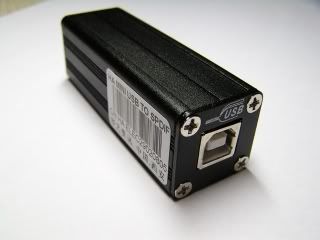 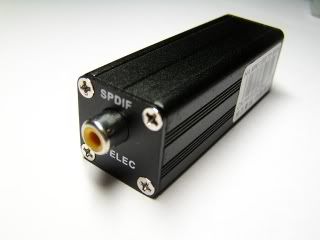 refer to : http://forum.lowyat.net/index.php?showtopic=617400&hl=spdifI got the spdif (optical) to usb. Didnt had chance to test out because my DAC only accept coax.. This post has been edited by mikelanding: Jul 6 2009, 02:50 PM |
|
|
|
|
|
SKY 1809
|
Jul 6 2009, 02:58 PM
|
|
|
QUOTE(mikelanding @ Jul 6 2009, 02:49 PM) I think forumer: GodLuvSxS got sell this kind of converter. refer to : http://forum.lowyat.net/index.php?showtopic=617400&hl=spdifI got the spdif (optical) to usb. Didnt had chance to test out because my DAC only accept coax.. Thanks. Want to sell yours by post to Selangor ? This post has been edited by SKY 1809: Jul 6 2009, 03:26 PM |
|
|
|
|
|
havocx
|
Jul 6 2009, 09:31 PM
|
|
|
QUOTE(SKY 1809 @ Jul 6 2009, 02:34 PM) Thanks a lot. But the unit looks like the output is analog to earphones. The pink is for digital output ? I am actually looking for digital signal/optical output to my DAC. My Dac would convert it back to analog signal to my amp. Anyway, it is kind of you to share. Have a nice day, brother. |
|
|
|
|
|
SKY 1809
|
Jul 6 2009, 09:53 PM
|
|
|
QUOTE(havocx @ Jul 6 2009, 09:31 PM)
The pink is actually for Mic. Haha looks like im not quite so right in the audiophile portion of stuff haha ;pIt is ok , brother. I remember sometime back you talk about using 701 to remotely control the hse lights or something like that. I am just dreaming of using NAS to store music, using netbook to control the music in the future.  Hope to learn more from you. |
|
|
|
|
|
mikelanding
|
Jul 6 2009, 10:37 PM
|
|
|
QUOTE(SKY 1809 @ Jul 6 2009, 02:58 PM) Thanks. Want to sell yours by post to Selangor ? Should be ok. But mine output is optical NOT Coax. I also need to dig out from storage, dunno put where ..  |
|
|
|
|
|
michaeltan1943
|
Jul 6 2009, 10:39 PM
|
|
|
QUOTE(havocx @ Jul 6 2009, 11:16 AM)
Erm...you didnt go for a test drive on the machine first ? If its already yours though perhaps a way out is to get the matte screen protector or just go for screen skinning, thatll bring the matte back to your screens. You have to understand yes its the top model, and it has features often being asked upon in top models, sleek, thin and most importantly glossy screen. Have a look at all the top models out there be it laptops, netbooks, LCD screens and the like, glossy screen is the norm cuz it looks more stylish. Personally i'd agree that it does look stylish as a buyer but not for a user bro havox, where to get this matte screen protector? How much is it and do they have 10 inches? Also, what is actually screen skinning? Is it safe to do and where to do it? How much also? |
|
|
|
|
|
havocx
|
Jul 7 2009, 10:17 AM
|
|
|
QUOTE(SKY 1809 @ Jul 6 2009, 09:53 PM) It is ok , brother. I remember sometime back you talk about using 701 to remotely control the hse lights or something like that. I am just dreaming of using NAS to store music, using netbook to control the music in the future. Hope to learn more from you.
On the NAS side of things thats pretty easy already. Most if not all of the NAS enclosures comes built in with an Itunes or Media Player server as well as some having BitTorrent features.
The netbook will serve you well in that sense, to have the tunes playing out from your speakers, especially if you have one of those wireless ones.
QUOTE(michaeltan1943 @ Jul 6 2009, 10:39 PM) bro havox, where to get this matte screen protector? How much is it and do they have 10 inches? Also, what is actually screen skinning? Is it safe to do and where to do it? How much also?
Screen skinning is actually just a term i use. But skinning still. You know skinning for your phone? Where you wrap a material on your phone to make it more individual, ie cartoon characters and all that ? Its also a special adhesive where no residue will be left.
Something like the one below

In any case, the same material also comes in matte clear, ie you can actually apply it on your computer monitor to fit exactly. You'd then perhaps be able to lower down the bling of your screen to be used outside |
|
|
|
|
|
komando67
|
Jul 7 2009, 11:03 AM
|
Getting Started
|
i got a problem..my 1000he battery life reduced....only used for 2 month..1st time use batt show up to 7hr an 6hr pluss..now..just 3-4hr only on full charge..this is battery defect or what?
|
|
|
|
|
|
havocx
|
Jul 7 2009, 11:49 AM
|
|
|
QUOTE(komando67 @ Jul 7 2009, 11:03 AM) i got a problem..my 1000he battery life reduced....only used for 2 month..1st time use batt show up to 7hr an 6hr pluss..now..just 3-4hr only on full charge..this is battery defect or what?
Firstly : Youre Asus Power Management may not be set to Auto and perhaps its on Performance where battery life will take an effect and a hit because of higher performance demanded from the machine.
Secondly: You might not be treating the battery with enough care. Using the machine while both the battery and direct power from the cord is connected will impact the battery life. Batteries should not be used while the machine is being charged, if you are on full battery and youre near a power supply choose either to disconnect the battery and run only via power or ensure the battery is fully charge to its maximum capacity before disconnecting. Sometimes what happens is you see your battery low, you then rush to a power supply to charge the machine, 30 minutes later you have to rush off somewhere. Your pull out your machine, you glance on the power, it shows fully charged, even though normal full charge (while not being used) is about 2.5 hours. You then use the machine where the battery is not on full capacity and charges it again at your next stop. This lack of care for the battery would greatly affect on its life. I have laptops in the office, its always on battery and always charged. Taking them out to be used for meetings gets them only 30 minutes of life. Preety bad. My personal company laptop, however using the same care for batteries, i still have 2.5 hours life on the machine. They have the same lifespan being issued out. So among the folks in my team, their machines are pretty much relegated to being Desktop Laptops.
Thirdly : Defect on the battery. Batteries are usually covered via 3 months warranty. Should you fall in category 2 and you try to claim on 3, it may not always work as the batteries have an internal system to show that they should be maintained properly. Batteries has a maximum and minimum charge. Misuse of the battery in option 2 will not enable a battery to reach its maximum charge at all and in those cases defective batteries warranty wont cover it. |
|
|
|
|
|
SKY 1809
|
Jul 7 2009, 12:17 PM
|
|
|
QUOTE(havocx @ Jul 7 2009, 11:49 AM)
3 reasons that might happen
Firstly : Youre Asus Power Management may not be set to Auto and perhaps its on Performance where battery life will take an effect and a hit because of higher performance demanded from the machine.
Secondly: You might not be treating the battery with enough care. Using the machine while both the battery and direct power from the cord is connected will impact the battery life. Batteries should not be used while the machine is being charged, if you are on full battery and youre near a power supply choose either to disconnect the battery and run only via power or ensure the battery is fully charge to its maximum capacity before disconnecting. Sometimes what happens is you see your battery low, you then rush to a power supply to charge the machine, 30 minutes later you have to rush off somewhere. Your pull out your machine, you glance on the power, it shows fully charged, even though normal full charge (while not being used) is about 2.5 hours. You then use the machine where the battery is not on full capacity and charges it again at your next stop. This lack of care for the battery would greatly affect on its life. I have laptops in the office, its always on battery and always charged. Taking them out to be used for meetings gets them only 30 minutes of life. Preety bad. My personal company laptop, however using the same care for batteries, i still have 2.5 hours life on the machine. They have the same lifespan being issued out. So among the folks in my team, their machines are pretty much relegated to being Desktop Laptops.
Thirdly : Defect on the battery. Batteries are usually covered via 3 months warranty. Should you fall in category 2 and you try to claim on 3, it may not always work as the batteries have an internal system to show that they should be maintained properly. Batteries has a maximum and minimum charge. Misuse of the battery in option 2 will not enable a battery to reach its maximum charge at all and in those cases defective batteries warranty wont cover it.Very good piece of advice. However, for me that have to be out in the field , practically quite hard to find the "right timing " to recharge the battery. While waiting for battery to be almost drained out ( ready for recharge ) , we could be out in the field and could be long days too. So charging the battery back to 100% ( from 50% ) while back to office/home , and get ready for the next day could be the solution, though not the ideal way. Now my 1000H suffers a 4.5% wear after about 10 months of use. I wonder how you can find the perfect timing to charge, unless you have several netbooks to use alternately. Or buying a spare battery might help ? Mind to share more with your expertise ? This post has been edited by SKY 1809: Jul 7 2009, 12:21 PM |
|
|
|
|



 Quote
Quote


 0.0243sec
 0.81
0.81
 6 queries
 GZIP Disabled