Outline ·
[ Standard ] ·
Linear+
Asus Eee PC Thread V3
|
havocx
|
 Nov 28 2008, 10:39 AM Nov 28 2008, 10:39 AM
|

|
Current Netbooks.
2 x EEEPc 701 - SSD 4GB - 2GB Ram, 16gb AData SDHC
2 x EEEPc 900 - SSD 8 GB - 2GB Ram, 16gb AData SDHC
Interchangeable Bluetooth Receiver, GPS Transmitter, 77whr Battery with the EEEPC 701
1 x EEEPc 901 - HDD 30Gb
1 x EEEPc 1000H - HDD 80 Gb
I went with the EEEPC's for their lightweight and design and more importantly the SSD's. Now most Ultra Mobiles will pit SSD's ( which are small ) vs their larger capacity HDD's within. Even the 901 which I have uses the 1.8" Sata HDD which gives a space of 30gb vs the others which are all SSD's the largest being 12gb and the smallest being 4gb. Believe me, SSD's are the only way to go. Nothing beats that.
For size comparisons, from what I see the EEEPC takes about the smallest footprint as compared to its similar competitor of the same capacity and size. That being said, yes Im a fan of the EEEPC but not to say Ive nothing good to say about the rest. But if you are going for size, you will see that most the time the EEEPC will be much sleeker than the others. Have you seen how huge in comparison HP 2133 Mini Notebook is ? Or how fat MSI Wind is in comparison to the EEEPC ?
Design wise though I like the look of the Aspire One from Acer. That's just new but those lights at the side and the gloss they go really well together  EEEPC has gloss too on the 901 and 1001 but I still prefer the Aspire One look. Perhaps I may trade in one of the Laptops that I have for the Aspire One EEEPC has gloss too on the 901 and 1001 but I still prefer the Aspire One look. Perhaps I may trade in one of the Laptops that I have for the Aspire One
Earlier when purchasing my requirements were :
Running on / Can install Windows XP SP2 - Most if not all support that. In fact all my EEEPC's are running a small Modified version of XP SP3 which is taking only about 400mb in install footprint!
Net Surfing, (thus need Wifi and Ethernet support ) - The very essence of an Ultra Mobile PC, we can safely say for both requirements above any UMPC will fit that need.
Watch Movies, ( RMVB, Avi , moderate bitrate, maybe sometimes 720HD or 1080HD, rarely but possible) -
For this part yes most UMPC will be able to fulfill your needs but having the latest Atom Processor EEEPC in the 1001 I can play all movies except sadly for the movies running on 1080HD and 720HD, well they play but not often smooth. So yes they play but you wont get proper playback. Best stick to normal divx at the normal high resolution and not the super high ones.
Play Games, (old school game, Counter-strike 1.6 ) - Playing Warcraft 3 on my old skool EEEPC 701 with 512mb Ram ( All the other ones have been upgraded to 2gb Ram ), Warcraft 3 runs fine on it so safe to say you'd be fine, though playing CS on it may need you to squint a little 
Running Diablo 2 on mine now too.
Office works ( MS office) - This goes without saying In Fact MS Office 2007.
Running Garmin GPS on 2 of the UMPC's now. I have Ultra Big Screen GPS for cheap!
All my EEEPC's are running WinXP SP3 fine without problems. Speed is essential and other than my 901 which runs on 30gb SATA HDD all I can say about all of the UMPC that I have is that they run blazing fast.QUOTE(hangy2k @ Nov 28 2008, 09:02 AM) i got it in singapore, at S$898. the sim card slot is under the battery, the 3G connection so far so good..  
I prefer if the 3.5G was in the 904 or 900 series though. Did you see any like that ?
You see reason i like the 700, 900 and 904 ( and yes reason is a bit lame ).
All of them fit into my Khaki Pants. Into the pocket.
Now the 901 and 1000H is a little different make, battery is different and all that and they Dont fit in my pants.
For me Netbook, can fit in my pants pocket Which is why I stuck with EEEPC.
Also I have a lot of spares for the 700 and 900 but i also now feel that I need 3G in them.
No more of those Pods of Maxis and Celcoms that im using.
Any particular shop did you get them from mate ?This post has been edited by havocx: Nov 28 2008, 11:18 AM
|
|
|
|
|
|
havocx
|
Nov 28 2008, 11:04 AM
|
|
|
QUOTE(new in IT @ Nov 28 2008, 10:49 AM) Hey guys and gals, is this model available in Malaysia's market? Estimated price? ASUS Eee PC 900HA Specifications: # Intel Atom 1.6 GHz processor # 160GB 5400 RPM Hard Drive (Seagate Momentus 5400.4) # 1GB of DDR2 RAM (667MHz) # Windows XP Home Edition Operating System # 9" WSVGA LED-Backlit 1024 x 600 LCD # Ports: Three USB 2.0, 1 VGA monitor out, headphone jack, microphone input, SD card reader (SDHC compatible), Kensington lock slot, Ethernet 10/100 # Webcam (.3 MP) # Battery: 7.4v 5200mAh 4-cell battery (39Wh) # Wireless: 802.11b/g (Atheros AR5007EG) # One-year warranty # Size: 8.86 (W) x 6.69 (D) x .79 ~ 1.33 (H) # Weight: 2 lbs 7 oz
Its called the EEEPC 904. Retails at RM1399 in Midvalley IT Center, saw it last Thursday.
Exact complete same specs.
Having my eyes on it because this too fits into my side pocket This post has been edited by havocx: Nov 28 2008, 11:20 AM |
|
|
|
|
|
havocx
|
Nov 28 2008, 02:25 PM
|
|
|
QUOTE(hangy2k @ Nov 28 2008, 01:51 PM) yea, 901 is slightly bigger, maybe you should consider buying bigger pant?  for the 901 3.5G version, you can get it in all singtel shop in singapore. it is exclusive to singtel only. 
Im planning to buy it and use in Msia. Is it locked only to Singtel ?
From what I read the EEEPC's 3.5G modem is not supposed to be locked to a Service Provider.
At the price I would be purchasing ( ie your price at S898 ) would I also be signing up to a broadband deal like how Maxis is doing with its Inspiron Mini 9's ?
Bigger pants ? Waa kenot loo...my pants already so huge. |
|
|
|
|
|
havocx
|
Nov 28 2008, 03:47 PM
|
|
|
QUOTE(hangy2k @ Nov 28 2008, 02:43 PM) singtel doesn't lock the set, you can use it with other provider. i plan to use it with celcom when i am at malaysia. price S$898 is the retail price without signing any plan, but if you want to sign a 24 month plan for 2mbps, it is S$598
Hmm interesting option this. Better yet that I am planning to go to Singapore soon for some shopping.
Ishk like this confirm cannot buy bigger pants liaw, the money im gonna spend for the EEEPC means ill be patching my current worn out ones leh
Thanks for your info hangy2k |
|
|
|
|
|
havocx
|
Nov 28 2008, 06:08 PM
|
|
|
QUOTE(alvinddm @ Nov 28 2008, 04:18 PM) Just my luck.. anyone knows who has stock? If not any big difference between the two battery capacity?
Also from reports, the smaller capacity battery also apparently juts out a little more than the bigger capacity ones.
QUOTE(hangy2k @ Nov 28 2008, 04:31 PM) anyone can buy, as long as you have money
local shores first, that is, if it does hit This post has been edited by havocx: Nov 28 2008, 06:08 PM |
|
|
|
|
|
havocx
|
Nov 28 2008, 07:47 PM
|
|
|
|
|
|
|
|
|
havocx
|
Nov 28 2008, 07:54 PM
|
|
|
|
|
|
|
|
|
havocx
|
Nov 30 2008, 10:06 AM
|
|
|
QUOTE(jananan @ Nov 29 2008, 04:42 PM) where did you that 10,400 mah battery ? freakin huge man... i was thinking of getting one. but now after looking at yours... but it really elevates the keyboard huh.... good for typing.... anyway, where u bought and how much ? thanks
QUOTE(tanseehua @ Nov 29 2008, 10:13 PM) Hello, Im finally become EeePC user at last. Last week in Bangkok MBK plaza, saw a EeePC 701 (1st model with webcam) is selling at 6900 bht. thinking to buy but at last tak jadi. coz thinking to come back Malaysia by the Aspire 1 at RM1499 and do installment by credit card. Im not sure is worth is to buy at this price or not, but as long as i can do the installment for 12 months, im happy to buy it. but i found that this model with 6600mAh battery is quit heavy in term of compare with prevois EeePC model or other compatitor product. But im happy with it. now will join here more to know more about EeePC liao lo............... Nice to be here, Thanks for all information from other forumers here.
Your 904 is a good buy. Saw last week in Midvalley the price was RM1399 so you have a good bargain there, I might wanna get one for me self as well
Dont ya worry about the 6600mAh, the one in Midvalley was selling the lower capacity model battery of 5600mah, difference in weight is really negligible.
For those using the Celeron processor, the ones with the higher capacity battery is actually better
QUOTE(alexandriafx @ Nov 30 2008, 09:44 AM) waa...finally i bought 1000h...yesterday at lowyat tru toshiba88(lowyat member)....nice selller there...1000h 1799 +30 for 2G ram upgraded...the battery still cant see how many hours it can last...got the 5600mah still the six cell...coz the 6600 dont have stock even i searching around before decide to buy...sound very good...weightless compare to my acer 3680...so welcome to the club to me...hehe 
Look behind for my size comparison photos
For the Atom processors, the smaller battery is actually better. Its smaller in footprint and actually strangely, lasts longer This post has been edited by havocx: Nov 30 2008, 10:08 AM |
|
|
|
|
|
havocx
|
Nov 30 2008, 05:37 PM
|
|
|
QUOTE(alexandriafx @ Nov 30 2008, 11:34 AM) how can i resize the icon on desktop to smaller 1 ya?...coz the default size icon on desktop to big for me...i the tried change the resolution but x600 is the best...cant go higher...so any idea resize the desktop icon?...

Steps for changing desktop icon size.
1. Right Click Desktop + Choose “Properties”
2. In the Properties Window click on the “Appearance Tab” at the top.
3. In the Appearance Window click on the button called “Advanced”
4. In the Advanced Appearance Window choose “Item:” from the drop down list and choose “Icon” and you can choose desired Icon size. By default many users will see 32 x 32 pixels but this can be changed to whatever you want.
QUOTE(mynewuser @ Nov 30 2008, 05:00 PM) Thinking of getting this netbook for browsing and office work. Any comment on the performance.
I guess you can compare hows the performance just from there
The one youre looking at has higher HDD capacity, Ram and screen size.
Running on normal HDD though and not SSD This post has been edited by havocx: Nov 30 2008, 05:39 PM |
|
|
|
|
|
havocx
|
Dec 1 2008, 12:46 AM
|
|
|
QUOTE(alexandriafx @ Nov 30 2008, 06:22 PM) thanks havoc...done it...anything u willing to share...oh perhaps in maximize the speed of this lappy?...by the way how can i enter bios setup when it boot?...but seem it boot too fast...huhu...
Youre using the 1000H with XP yes ? In 1000H the bios has an option for a quick boot, that helps in the bootup. Look into the DVD that came with your laptop in the software section for the Asus U1 Tuner. That'll help 'overclock' your laptop.
You can then search on the net on how to minimize the load of your laptop thus making it boot faster. Tho it can never boot as fast as SSD models ( my 701 model boots up fully in 11 secs flat ) but you can fine tune it to boot faster. Depending on how you want to configure it though.
My 1000H 80Gb boots up fully in 26 seconds. Im planning to make a smaller partition just for windows only perhaps 5GB so that i can make the load up even faster. More RAM might help in making your windows experience better what more since the price is very low nowadays |
|
|
|
|
|
havocx
|
 Dec 2 2008, 10:44 AM Dec 2 2008, 10:44 AM
|
|
|
QUOTE(miloy2k @ Dec 1 2008, 09:55 PM) can this eepc watch movie smoothly? since teh size is small thinking can watch movie/anime/etc while one the go 
Running on / Can install Windows XP SP2 - Most if not all support that. In fact all my EEEPC's are running a small Modified version of XP SP3 which is taking only about 400mb in install footprint!
Net Surfing, (thus need Wifi and Ethernet support ) - The very essence of an Ultra Mobile PC, we can safely say for both requirements above any UMPC will fit that need.
Watch Movies, ( RMVB, Avi , moderate bitrate, maybe sometimes 720HD or 1080HD, rarely but possible) -
For this part yes most UMPC will be able to fulfill your needs but having the latest Atom Processor EEEPC in the 1001 I can play all movies except sadly for the movies running on 1080HD and 720HD, well they play but not often smooth. So yes they play but you wont get proper playback. Best stick to normal divx at the normal high resolution and not the super high ones.
Play Games, (old school game, Counter-strike 1.6 ) - Playing Warcraft 3 on my old skool EEEPC 701 with 512mb Ram ( All the other ones have been upgraded to 2gb Ram ), Warcraft 3 runs fine on it so safe to say you'd be fine, though playing CS on it may need you to squint a little
Running Diablo 2 on mine now too.
Office works ( MS office) - This goes without saying In Fact MS Office 2007.
In fact Ive DUMPED the office laptop at home ( Core 2 Duo Processor ) and brings it to the office only for another screen ( dual screen ), prefer to carry the EEEPC to my meetings, not only do i get the stares, i also get the oohs and aahs showing the prowress of the tiny machine on the BIG Screen. Also I dont have to break my back daily lugging the Office Laptop around.
Running Garmin GPS on 2 of the UMPC's now. I have Ultra Big Screen GPS for cheap!
QUOTE(zerigemok @ Dec 1 2008, 10:58 PM) Guys, need a quick input here. I'm thinking of buying a used eee901. Is the warranty covered by asus all over the world, (i'll have the receipt of purchase too). And another question, can it connect to an external monitor? I'm gonna use it to surf lots of internet with lots of tabs open and maybe a movie or music playing at the background. Will it be too much for the netbook? Thanks in advance QUOTE(emino @ Dec 1 2008, 11:17 PM) FF3 is heavy for eee, and it lags on some website (such as youtube). FF2 is not a that heavy, and still tolerable. in fact, i uses that one on my eee. But believe me, 1.5 is better. Or Google Chrome.
Some of my desktops at home also experiences crashes when i have more than 35 tabs open..err maybe i shouldnt open too many of those huh ? 
In any case, Chrome still moves fine with those number of tabs open so im just thinking its FF3 This post has been edited by havocx: Dec 2 2008, 10:49 AM |
|
|
|
|
|
havocx
|
Dec 2 2008, 04:04 PM
|
|
|
QUOTE(Choongster @ Dec 2 2008, 12:14 PM) does the GARMIN GPS program have to run with GARMIN GPS Receiver? or it can be any third party GPS receiver?
Program though will then only work with your machine. You wont be able to install it on another machine with the same serial number. If you get Garmins receiver and software together as a bundle then you can use it together in any machine.
I didnt get the Garmins GPS receiver cuz at the time the only option they had was a wired option and i detest wires |
|
|
|
|
|
havocx
|
Dec 3 2008, 08:03 PM
|
|
|
QUOTE(shadiee @ Dec 3 2008, 07:45 PM) Any info when 1002HA selling in Malaysia? It available for preorder now in US.
Battery life is wanting though.. 4200mah ? Personally I wouldnt go for it, its sleek and light yes.
But then again I could go for Inspiron Mini 12 if i wanted slim.
EEEPC 701 and 900 slimness is just right for me This post has been edited by havocx: Dec 3 2008, 08:05 PM |
|
|
|
|
|
havocx
|
Dec 4 2008, 09:10 AM
|
|
|
QUOTE(emino @ Dec 4 2008, 08:38 AM) Usually if people wanna sell second handed stuffs yourself, the formula is to cut the selling price by half, and then add/deduct the item price based on its condition and how fast you wanna let it go.
Based on
Current latest Ikano promotion EEEPC 701's going for only RM599
Last promotion of EEEPC 900 in IOI Puchong going for only RM699 - thats EEEPC 701 specs with 8.9" screen.
The laptop is no longer with Warranty
Falling prices of RAM and SDHC cards.
Id say for a whole package like yours perhaps you may be able to push at RM500. Thats an estimate only of course, hopefully you get to sell it higher, but more likely youll only be able to push it off lower |
|
|
|
|
|
havocx
|
Dec 4 2008, 01:41 PM
|
|
|
QUOTE(huh? @ Dec 4 2008, 09:47 AM) hmmm... sounds bad for me as i was looking to sell it somewhere around 700.. (IN MY DREAMS!! ..hahaha ) i was thinking of getting a portable game console.. i guess ill just keep it rather than selling it.. and get a higher capacity batt pack myb..
Have it next to your LCD and connect a thumbdrive or perhaps a 1TB hdd to it and youre set to have a home theater collection of shows and DVD's
Attach a wireless keyboard and mouse on it and connect it to your LCD TV and voila, huge DISPLAY for the very same visitors
Possibilities are endless, ive explored them all hehe....besides the Matt cover helps from keeping oily fingers off. Now I can even surf while doing potty business kwakwa
QUOTE(shadiee @ Dec 4 2008, 11:07 AM) I really like a brushed-aluminum chassis. If the battery can last around 3hs with wifi on is ok for me.
QUOTE(Hico @ Dec 4 2008, 12:29 PM) s101 available in msia market oledi? how much it cost?
Also still waiting for it |
|
|
|
|
|
havocx
|
Dec 4 2008, 11:02 PM
|
|
|
QUOTE(sevendogz @ Dec 4 2008, 10:45 PM) any ideas of bluetooth in 904hd? i saw a bluetooth driver V5.5.0.3200 for 904hd, downloading now, don't know can use or not? anyone?
Im pretty sure it doesnt
Unless of course you bought one of those bluetooth adapter in which case you should use the one that came with the disk. This post has been edited by havocx: Dec 4 2008, 11:04 PM |
|
|
|
|
|
havocx
|
Dec 5 2008, 06:17 PM
|
|
|
QUOTE(shadiee @ Dec 5 2008, 11:12 AM) Yup the battery can last 3hrs with wifi turn ON as reviewed by laptopmag. But far from Samsung NC10 lasted 6:34hrs
Now IF ONLY Asus went ahead and stuck 3G in there, itll be PERFECT!
QUOTE(kevtan @ Dec 5 2008, 06:16 PM) The 901 with 16gb SSD last the same time. 
901 vs Asus 1002HA
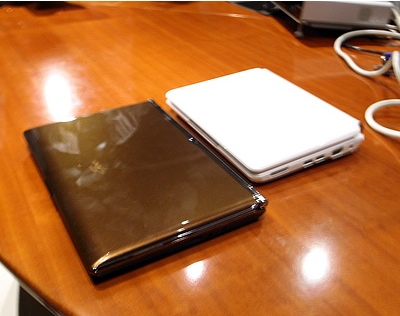
This post has been edited by havocx: Dec 5 2008, 06:25 PM |
|
|
|
|
|
havocx
|
Dec 6 2008, 12:27 AM
|
|
|
QUOTE(emino @ Dec 5 2008, 09:35 PM) Unless you import or buy secondhand, I dont think its possible to buy 901 in Malaysia anymore. They stopped bringing it in.
QUOTE(iAce @ Dec 5 2008, 09:44 PM) Is there another net-book with a wireless capabilities such as Asus Eee PC [ Wireless N Connection ]
QUOTE(emino @ Dec 5 2008, 09:48 PM) If theres someone I've missed, please tell me what eee do you own so that I can put it on the list at the front page. If you have any interesting eee-related links, tutorials or articles, feel free to notify me as well. Same goes to any of you with eee pictures you wanna share.  Thanks.
Current Netbooks.
2 x EEEPc 701 - SSD 4GB - 2GB Ram, 16gb AData SDHC
2 x EEEPc 900 - SSD 8 GB - 2GB Ram, 16gb AData SDHC
Interchangeable Bluetooth Receiver, GPS Transmitter, 77whr Battery with the EEEPC 701
1 x EEEPc 901 - HDD 30Gb
1 x EEEPc 1000H - HDD 80 Gb
Total EEEPC in the house = Grand Total of 6!
QUOTE(emino @ Dec 5 2008, 11:03 PM) i thought all asus netbook came with b/g/n wifi? |
|
|
|
|
|
havocx
|
Dec 6 2008, 06:00 PM
|
|
|
QUOTE(emino @ Dec 5 2008, 11:03 PM) i thought all asus netbook came with b/g/n wifi?
QUOTE(winlose2582 @ Dec 6 2008, 05:36 PM) Today just went to Digital mall to check out the netbook.... Found one of the Spec for EEEPC 1000H.... Wireless N, 160Gb, 6 Cell battery and etc... The memory is 1GB... but i heard the sale guy said the ram is DDR2, 800Mhz... is it ?? With 2gb ram, price around Rm1860++
Emino you can pick this up as the main resource page, itll help consolidate the info
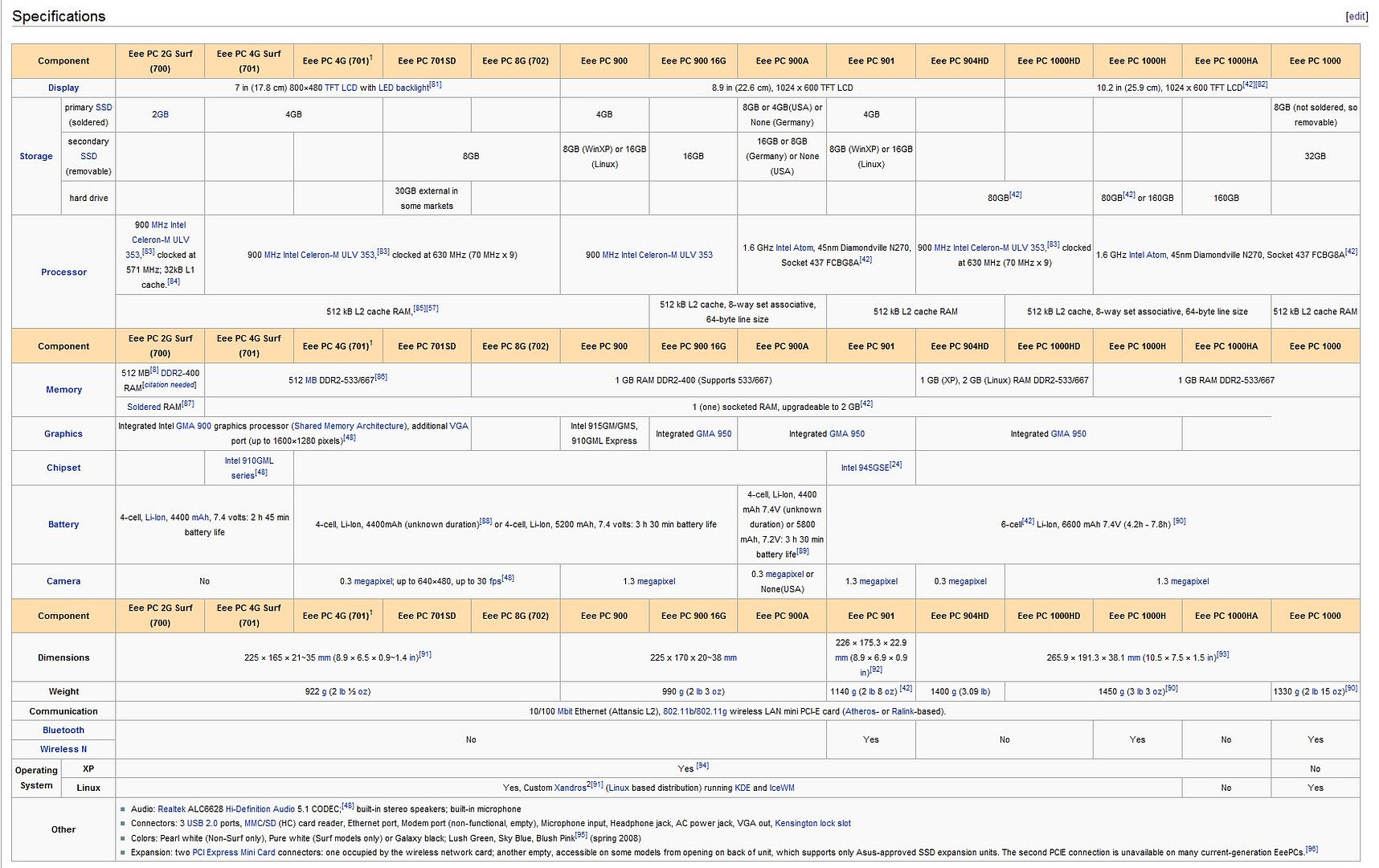 This post has been edited by havocx: Dec 6 2008, 06:01 PM This post has been edited by havocx: Dec 6 2008, 06:01 PM |
|
|
|
|
|
havocx
|
Dec 15 2008, 06:42 PM
|
|
|
QUOTE(Hico @ Dec 12 2008, 02:14 PM) but it is a lot better i think..at least more look like a notebook...almost same like n10 ..
I had also a chance to review and play a bit with the HP's latest release, thats one slim netbook and nice to play around with, too bad on its Proprietory Graphics Output, that really put me off. I mean I use the EEEPC for many a reason one of which is for work and displaying presentation and the off chance of a movie or two, and the very mention of proprietory, well thats a put off.
I mean its just simply only to HP and its not even normal HDMI or any other type of output. Ishks.
On another note, FTEC came out with its EEBook. Haha just like EEEPC without the extra E Immitation is the sincerest form of flattery. Im actually quite interested in it, except for the embossed EEBook on the main screen of the laptop.
For RM1399, you get a 10.2 inch, 160gb, 1Gb DDR2 Ram, Wifi, 5 Cell Battery, Atom 1.6Mhz Processor. Definitely an option to think about. For RM1899 you get the same like above with the addition of N wireless, 2GB Ram, Bluetooth and 3G MODULE!!!! Waaa best.
I nearly got one then got kicked by the wife asking me to wait for the Asus 1002HA, she said at that price might as well get the Dell Inspiron Mini 9 and pair it via Bluetooth to her phone for Modem. Aiseh so im waiting again |
|
|
|
|



 Quote
Quote


 0.0614sec
 0.29
0.29
 7 queries
 GZIP Disabled