


Intel Q9xxx and Xeon 33x0 Family, Show the rest what Intel Quadies can do!
Intel Q9xxx and Xeon 33x0 Family, Show the rest what Intel Quadies can do!
|
|
 Nov 13 2008, 11:13 PM Nov 13 2008, 11:13 PM
|
 
Junior Member
244 posts Joined: Feb 2005  
|
Haha..the air cooler from you wor.. if cannot make it ..then have to find you already ..
|
|
|
|
|
|
Nov 25 2008, 11:08 PM
|

Junior Member
24 posts Joined: May 2008
|
Hi all,newbie here..
 Here is my X3320 config @2.9Ghz and tis is the 1st time to OC.. my x3320 stucked @ 2.95Ghz,when i trying to oc to 3.0,it can boot,but reboot after detecting raid array?How come like tis 1? This post has been edited by 3PointSix: Nov 26 2008, 05:53 PM |
|
|
Nov 26 2008, 11:08 AM
|
 
Elite
8,545 posts Joined: Aug 2006 From: 224.0.0.6
|
Details of your hardware?
List down here. Play w vNB, vTT, vCore, vDimm & GTL. -pWs- |
|
|
 Nov 26 2008, 11:51 AM Nov 26 2008, 11:51 AM
|
|
Junior Member
24 posts Joined: May 2008
|
QUOTE(-pWs- @ Nov 26 2008, 11:08 AM) Details of your hardware? MB:Striker II formulaList down here. Play w vNB, vTT, vCore, vDimm & GTL. -pWs-  RAM:Crucial Balistix Tracer PC8500 4x1GB CPU:X3320 My CPU can reached 3.0G after disabled the C1E in bios. 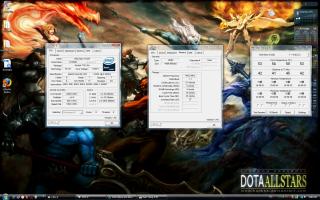
But disable the C1E seems cannot solve the problem,cos after i screenshot the pic,my pc hang there,den i reboot and the same problem appear again.. it can boot,but kip reboot after detecting raid array.. This post has been edited by 3PointSix: Nov 26 2008, 05:48 PM |
|
|
Nov 26 2008, 09:21 PM
|
|
Elite
8,545 posts Joined: Aug 2006 From: 224.0.0.6
|
Your overclock setting?
vCore: vNB: vTT: vPLL: vDimm: GTL: -pWs- |
|
|
Nov 26 2008, 11:12 PM
|
|
Junior Member
24 posts Joined: May 2008
|
vCore:1.15
vNB:1.26 vTT:1.32 vPLL:not found vDimm:1.90 GTL:not found All never tweak b4 so it is set to auto. |
|
|
|
|
|
Nov 26 2008, 11:19 PM
|
|
Elite
8,545 posts Joined: Aug 2006 From: 224.0.0.6
|
I think StrikerII Formula should hav the GTL setting.
It might be in different naming. Your vTT is high. Do not exceed 1.4v. Try playing w upping the vNB and vCore. How about ram timing? You leave it "Auto" also?? Mind to provide Memset screenie? -pWs- |
|
|
Nov 26 2008, 11:34 PM
|
|
Junior Member
24 posts Joined: May 2008
|
QUOTE(-pWs- @ Nov 26 2008, 11:19 PM) I think StrikerII Formula should hav the GTL setting. i found CPU GTL REF Ratio n NB GTL REF Ratio in bios.Both set to autoIt might be in different naming. Your vTT is high. Do not exceed 1.4v. Try playing w upping the vNB and vCore. How about ram timing? You leave it "Auto" also?? Mind to provide Memset screenie? -pWs- The CPU vTT i oso set as auto,so now i hv to tweak it lower?How much shld i tweak to? Yes,Ram timing i leave it auto also.. Now i running 350x7.5 which RAM ratio r 1:1 
|
|
|
Nov 26 2008, 11:54 PM
|
|
Elite
8,545 posts Joined: Aug 2006 From: 224.0.0.6
|
1. Set Command Rate to "2T"
2. Ram timing better use Manual. 3. Ram ratio make it 1:1 first 4. vTT should be 1.1x for 45nm iianm. Use latest Memset and reattach again. -pWs- |
|
|
Nov 27 2008, 06:39 AM
|
|
Junior Member
24 posts Joined: May 2008
|
cpu vTT in bios start from 1.20 only..
Memset 3.5 not latest 1?? Btw,i found that tis mobo Vnb quite high 1.. When i set it to auto,even no oc,it will raised to 1.34. This post has been edited by 3PointSix: Nov 27 2008, 06:53 AM |
|
|
Nov 27 2008, 08:03 AM
|
|
Elite
8,545 posts Joined: Aug 2006 From: 224.0.0.6
|
QUOTE(3PointSix @ Nov 27 2008, 06:39 AM) cpu vTT in bios start from 1.20 only.. Yup...Memset 3.5 is not the latest one.Memset 3.5 not latest 1?? Btw,i found that tis mobo Vnb quite high 1.. When i set it to auto,even no oc,it will raised to 1.34. -pWs- |
|
|
Nov 27 2008, 12:17 PM
|
|
Junior Member
24 posts Joined: May 2008
|
can provide me the dl link?i google it but all are 3.5 1..
|
|
|
Nov 27 2008, 02:51 PM
|
|
Elite
8,545 posts Joined: Aug 2006 From: 224.0.0.6
|
|
|
|
|
|
|
Dec 1 2008, 09:20 PM
|

Senior Member
1,991 posts Joined: Jan 2007 From: Seri Kembangan 
|
just burn in this processor, 1st time play with quad
 vtt more than 1.4 really will kill the processor?  This post has been edited by hengmy: Dec 1 2008, 09:22 PM Attached thumbnail(s) 
|
|
|
Dec 1 2008, 10:38 PM
|

Senior Member
4,947 posts Joined: Nov 2007
|
O... Nice stuff with stock vcore
 Wow, your PWM 49'C at idle? WOW, vNB 1.5v? vNB 1.3v or below should be enough. Wow, your PWM 49'C at idle? WOW, vNB 1.5v? vNB 1.3v or below should be enough.This post has been edited by Silverfire: Dec 1 2008, 10:51 PM |
|
|
Dec 1 2008, 10:59 PM
|

Senior Member
2,547 posts Joined: Oct 2007 
|
QUOTE(hengmy @ Dec 1 2008, 09:20 PM) just burn in this processor, 1st time play with quad try to make it lower than 1.4v lo... read at anandtech got the VTT article....vtt more than 1.4 really will kill the processor? btw, u got this chip from zerohour?  |
|
|
Dec 2 2008, 12:06 AM
|
|
Senior Member
1,991 posts Joined: Jan 2007 From: Seri Kembangan
|
QUOTE(Silverfire @ Dec 1 2008, 10:38 PM) O... Nice stuff with stock vcore lol, not sure the vnb for quad, so simply pump to 1.5v lor.. pwm too hot?? Wow, your PWM 49'C at idle? WOW, vNB 1.5v? vNB 1.3v or below should be enough.Added on December 2, 2008, 12:07 am QUOTE(tkh_1001 @ Dec 1 2008, 10:59 PM) try to make it lower than 1.4v lo... read at anandtech got the VTT article.... i pump to 1.35v only, dont dare go higher coz read the article before..btw, u got this chip from zerohour? this is not from zerohour, not money to grab that time  This post has been edited by hengmy: Dec 2 2008, 12:07 AM |
|
|
Dec 2 2008, 12:40 AM
|
|
Senior Member
4,947 posts Joined: Nov 2007
|
QUOTE(hengmy @ Dec 2 2008, 12:06 AM) lol, not sure the vnb for quad, so simply pump to 1.5v lor.. pwm too hot?? Usually around 480FSB or below 1.3vNB enough. As for PWM, mine full load 46'C only(my PWM no heatsink 1).Added on December 2, 2008, 12:07 am i pump to 1.35v only, dont dare go higher coz read the article before.. this is not from zerohour, not money to grab that time |
|
|
Dec 2 2008, 01:31 AM
|
|
Senior Member
1,991 posts Joined: Jan 2007 From: Seri Kembangan
|
QUOTE(Silverfire @ Dec 2 2008, 12:40 AM) Usually around 480FSB or below 1.3vNB enough. As for PWM, mine full load 46'C only(my PWM no heatsink 1). 1.4v cant boot into window, must use 1.5v.. dont know y it 49c, sometime noon will be 51c..  |
|
|
Dec 2 2008, 09:09 AM
|

Senior Member
8,642 posts Joined: Feb 2006 From: Jelutong Penang  
|
okay guys..
my 2nd day got my hand of this Quadie 9550.. no time to test and playing with bios.. just 1)change pci/pcie freq to 37.6 (burn my ex graphic card coz forgot about this setting) 2) set mem divider to 1:1 3) just try fsb 400..than 433 and lastly stop at this 443.9FSB other setting just leave to auto.. and guess what.. the bios just crank up the voltage to 1.520 volt o load.. and temp as show by OCCT go as high as 85C.. core temp show 76C. so which one show the actual value for the temp.. pls enlighten me ps: yeap.. i know i need another cooler for sure.. Attached thumbnail(s) 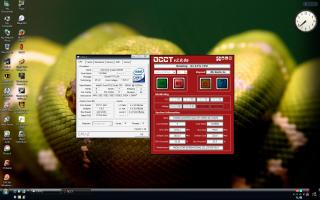
|
| Change to: |  0.0288sec 0.0288sec
 0.40 0.40
 6 queries 6 queries
 GZIP Disabled GZIP Disabled
Time is now: 8th December 2025 - 06:41 PM |
 Quote
Quote