

try to put router on DHCP mode, and than try
The Tomato/Victek's Tomato Firmware Club, Victek himself is here to help you !
The Tomato/Victek's Tomato Firmware Club, Victek himself is here to help you !
|
|
 Mar 25 2010, 05:12 AM Mar 25 2010, 05:12 AM
|
 
Newbie
0 posts Joined: Dec 2009  
|
try to put router on DHCP mode, and than try
|
|
|
|
|
|
 Mar 31 2010, 08:11 AM Mar 31 2010, 08:11 AM
|
|
Newbie
0 posts Joined: Mar 2010
|
Hi Guys,
I currently have version 1.27 installed on a wrt54gl router. I updated from 1.23 earlier in the week. For some reason, the dhcp lease from my isp is being dropped. Here's a response from the ISP Tech: Looking at our logs today, I think the problem may be with the custom firmware on your router. Our logs show you getting IP addresses from us, confirming the IP, and then ceasing communication with our DHCP server, which then causes the lease to expire, until you tell it to check again manually. I would recommend either rolling back to your old firmware, or updating tomato to the newest version. Thank you, and have a nice day! On the status, the connection uptime creeps up but at the same time, the remaining lease is set for 5 minutes and decrements every second. Please help in resolving the matter. Here's a snippet from my logs: (Replaced IP address) Mar 30 23:52:59 AMB_GL daemon.info udhcpc[313]: Lease of x.x.x.x obtained, lease time 300 Mar 30 23:55:29 AMB_GL daemon.info udhcpc[313]: Sending renew... Mar 30 23:55:29 AMB_GL daemon.info udhcpc[313]: Lease of x.x.x.x obtained, lease time 300 Mar 30 23:57:59 AMB_GL daemon.info udhcpc[313]: Sending renew... Mar 30 23:57:59 AMB_GL daemon.info udhcpc[313]: Lease of x.x.x.x obtained, lease time 300 Mar 31 00:00:01 AMB_GL cron.err crond[1003]: USER root pid 1037 cmd logger -p syslog.info -- -- MARK -- Mar 31 00:00:01 AMB_GL syslog.info root: -- MARK -- Mar 31 00:00:29 AMB_GL daemon.info udhcpc[313]: Sending renew... Mar 31 00:00:29 AMB_GL daemon.info udhcpc[313]: Lease of x.x.x.x obtained, lease time 300 Thanks, Ren This post has been edited by runssh: Mar 31 2010, 03:05 PM |
|
|
Apr 12 2010, 01:59 PM
|

Senior Member
1,412 posts Joined: Jun 2005
|
hi guys, i'm sorry if this question had been asked
recently i just bought WRT54GL, and i bought this router because i want to do QoS and traffic shaping things i want to do are 1. put priority to certain apps 2. divide bandwidth equally to 2 users(currently using 1mbps streamyx, upgrading to 4mbps soon, by then will apply this division) so its tomato more suitable or DD-WRT? i notice DD-WRT has a very straight forward setting for the bandwidth divide |
|
|
Apr 12 2010, 03:01 PM
|

Senior Member
868 posts Joined: Dec 2005
|
Hi, Im new to tomato firmware, may i know DLINK DIR655 can flash to tomato firmware?
|
|
|
Apr 12 2010, 11:50 PM
|
|
Newbie
0 posts Joined: Aug 2009 From: CO
|
QUOTE(ywkwy @ Apr 12 2010, 12:01 AM) Hi, Im new to tomato firmware, may i know DLINK DIR655 can flash to tomato firmware? Unfortunately, not possible. Added on April 13, 2010, 12:45 am QUOTE(darude87 @ Apr 11 2010, 10:59 PM) hi guys, i'm sorry if this question had been asked I personally prefer Victek's RAF Tomato v1.25.8515.2ND (Victek RAF Frimware) for QOS. It has a nice clean UI, is very easy to manipulate, and the firmware is as stable as they come.recently i just bought WRT54GL, and i bought this router because i want to do QoS and traffic shaping things i want to do are 1. put priority to certain apps 2. divide bandwidth equally to 2 users(currently using 1mbps streamyx, upgrading to 4mbps soon, by then will apply this division) so its tomato more suitable or DD-WRT? i notice DD-WRT has a very straight forward setting for the bandwidth divide Here is a link (Using QOS - LinksysInfo) to a great Tomato QOS guide that may help you decide. It really comes down to personal preference, as either one will do what you ask. Why not try them both out? This post has been edited by Trademark: Apr 13 2010, 12:45 AM |
|
|
Apr 18 2010, 10:23 AM
|
|
Senior Member
683 posts Joined: Jun 2008
|
I just flashed in tomato ,then I tried to set out QOS rules , but it doesnt work.
There are 2 persons who are using the internet at home , but my stupid bro are always buffering youtube while playing online games at the same time. This result I cant even watch a video on facebook. so I want to limit his speed to 50% , while I'll be getting 100% full speed. I am using wireless while he's using Ethernet port 2. (using linksys WRT54GL) here is the snapshot ,880kbs (download speed)and 430 kbs (upload speed) are what I got from speedtest.net  I got his desktop MAC address by using cmd--> getmac .   After I've done with the setting , I rebooted the WRT54GL . But the QOS is not working , my brother is still getting 7xx kbit. have I done anything wrong with the setting ? please guide me , thanks and much appreciated of your reply. |
|
|
|
|
|
Apr 18 2010, 02:17 PM
|

Senior Member
4,189 posts Joined: Jan 2003 From: Age Quod Agis 
|
You need Victek version . (IP/MAC BW Limiter)
Attached thumbnail(s) 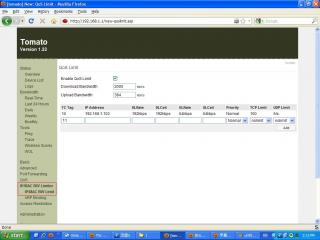
|
|
|
Apr 18 2010, 04:40 PM
|
|
Senior Member
683 posts Joined: Jun 2008
|
QUOTE(yangxi @ Apr 18 2010, 02:17 PM) You need Victek version . (IP/MAC BW Limiter) Now I am using tomato , how do I upgrade to Victek ? here is the download page right ? http://victek.is-a-geek.com/tomato.html but ... how to find it if it is compatible with WRT54GL ? and which one I should download # Tomato RAF 1.25.8025.2 # Tomato RAF 1.25.8515.2 ND ? the non-English language is confusing me |
|
|
Apr 18 2010, 09:16 PM
|
 
VIP
12,925 posts Joined: Mar 2005 From: Kuala Lumpur
|
QUOTE(linkinawe @ Apr 18 2010, 04:40 PM) Now I am using tomato , how do I upgrade to Victek ? here is the download page right ? http://victek.is-a-geek.com/tomato.html but ... how to find it if it is compatible with WRT54GL ? and which one I should download Check your version of WRT54GL , if its a newer version then you can use ND , which has the new Wireless drivers# Tomato RAF 1.25.8025.2 # Tomato RAF 1.25.8515.2 ND ? the non-English language is confusing me |
|
|
Apr 19 2010, 02:12 PM
|
|
Senior Member
683 posts Joined: Jun 2008
|
what is ARP Binding ? is it limit wireless device by MAC address to connect ur Access point ?
only those MAC address written in ARP list are allow to connect your access point right? |
|
|
Apr 24 2010, 03:41 PM
|
|
Senior Member
1,412 posts Joined: Jun 2005
|
QUOTE(prasys @ Apr 18 2010, 09:16 PM) Check your version of WRT54GL , if its a newer version then you can use ND , which has the new Wireless drivers pardon me but how do i check my version of WRT54GL? i just bought recently, original firmware is 4.30.7 |
|
|
Apr 30 2010, 07:48 AM
|
|
Newbie
0 posts Joined: Aug 2009 From: CO
|
QUOTE(darude87 @ Apr 24 2010, 12:41 AM) pardon me but how do i check my version of WRT54GL? i just bought recently, original firmware is 4.30.7 They usually print the version # on the bottom of the router.You don't need to worry though, as all GL's can run the ND versions of the firmware. Added on April 30, 2010, 8:18 am QUOTE(linkinawe @ Apr 18 2010, 11:12 PM) what is ARP Binding ? is it limit wireless device by MAC address to connect ur Access point ? ARP Binding is similar to wireless MAC address filtering, but it applies to both wired and wireless clients, and uses the IP address as well.only those MAC address written in ARP list are allow to connect your access point right? So to answer you question, yes, it will make it so that only the clients listed in ARP Binding will be allowed to connect, just remember it applies to both wired and wireless clients. Just add all your devices to the list, check the boxes 'Enable ARP Binding' & 'Limit unlisted machines', and Save to enable it. You will need to use static IP's to get this working properly, which you can do under 'Static DHCP' or on the device itself, ideally outside of the auto served DHCP IP's. Otherwise, if you use the DHCP Server, it could very well pull an IP that doesn't match the MAC Adress/IP entered in the ARP Binding set up, and that means no connection. This post has been edited by Trademark: Apr 30 2010, 08:18 AM |
|
|
May 9 2010, 10:39 PM
|

Senior Member
744 posts Joined: Oct 2004 From: ~Somewhere on Earth~ 
|
I guess this thread is "dead"
|
|
|
|
|
|
May 20 2010, 03:14 PM
|

Senior Member
838 posts Joined: Aug 2005 From: Selangor
|
just bought a new WRT54GL for my wifi router
gonna read through all these 42 pages before i get better understanding on this tomato firmware wanna utilize my router to the best for torrent and heavy downloading but at the same time, i don't want to sacrifice my normal http browsing  |
|
|
May 20 2010, 03:22 PM
|

Junior Member
431 posts Joined: Dec 2008
|
Can my netgear DG834G support tomato?
|
|
|
May 22 2010, 08:14 AM
|
|
Newbie
0 posts Joined: Aug 2009 From: CO
|
QUOTE(vista enthusiasist @ May 20 2010, 12:22 AM) Can my netgear DG834G support tomato? Sorry, but no dice with that router. |
|
|
May 22 2010, 12:31 PM
|

Senior Member
2,471 posts Joined: Jan 2003
|
QUOTE(vista enthusiasist @ May 20 2010, 03:22 PM) Can my netgear DG834G support tomato? maybe you can try dgteam customized firmware.  |
|
|
May 24 2010, 04:11 PM
|

Senior Member
1,310 posts Joined: Jan 2003 
|
QUOTE(linkinawe @ Apr 18 2010, 10:23 AM) I just flashed in tomato ,then I tried to set out QOS rules , but it doesnt work. you ter-balik your download and upload speed.There are 2 persons who are using the internet at home , but my stupid bro are always buffering youtube while playing online games at the same time. This result I cant even watch a video on facebook. so I want to limit his speed to 50% , while I'll be getting 100% full speed. I am using wireless while he's using Ethernet port 2. (using linksys WRT54GL) here is the snapshot ,880kbs (download speed)and 430 kbs (upload speed) are what I got from speedtest.net I got his desktop MAC address by using cmd--> getmac . After I've done with the setting , I rebooted the WRT54GL . But the QOS is not working , my brother is still getting 7xx kbit. have I done anything wrong with the setting ? please guide me , thanks and much appreciated of your reply. outbound is where you set your upload, inbound is where you set your donwload. |
|
|
May 30 2010, 07:15 PM
|

Senior Member
4,743 posts Joined: Jan 2003 From: u noe EARTH ? wher all human being is there 
|
if my modem is WRT54G v5(which i found @ the bottom of the modem) possible to use this tomato firmware?
This post has been edited by milky: May 30 2010, 07:17 PM |
|
|
Jun 11 2010, 10:52 PM
|
|
Senior Member
744 posts Joined: Oct 2004 From: ~Somewhere on Earth~
|
QUOTE(milky @ May 30 2010, 07:15 PM) if my modem is WRT54G v5(which i found @ the bottom of the modem) possible to use this tomato firmware? No...it's not possible. Only for WRT54G v1-v4, WRT54GS v1-v4, WRT54GL v1.x, WRTSL54GS Source |
| Change to: |  0.0270sec 0.0270sec
 0.32 0.32
 6 queries 6 queries
 GZIP Disabled GZIP Disabled
Time is now: 2nd December 2025 - 06:52 AM |
 Quote
Quote